sport mode TOYOTA AURIS 2015 Owners Manual (in English)
[x] Cancel search | Manufacturer: TOYOTA, Model Year: 2015, Model line: AURIS, Model: TOYOTA AURIS 2015Pages: 632, PDF Size: 17.65 MB
Page 378 of 632
3785-5. Other interior features
Auris Touring Sports_EE (OM12G98E)
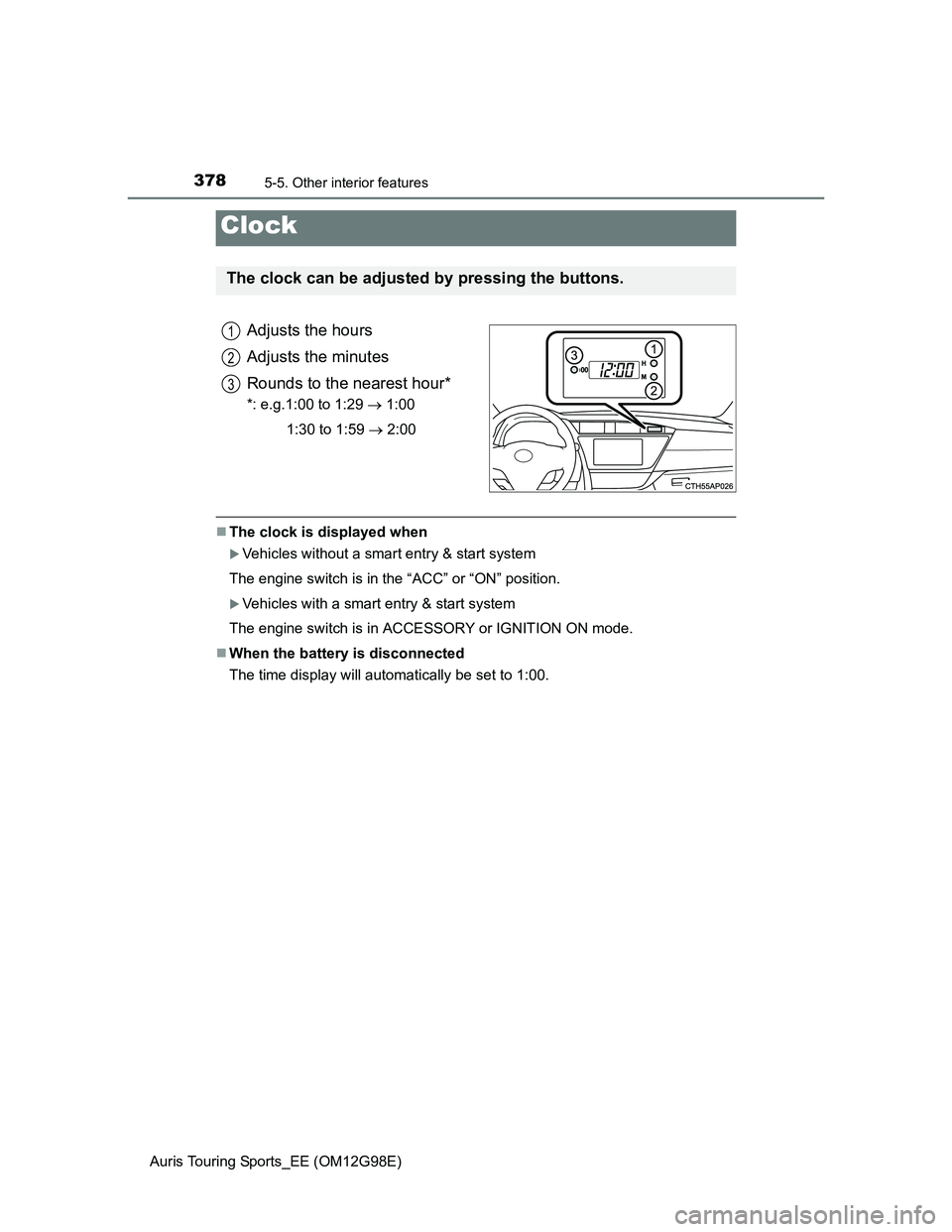
Adjusts the hours
Adjusts the minutes
Rounds to the nearest hour*
*: e.g.1:00 to 1:29 1:00
1:30 to 1:59 2:00
The clock is displayed when
Vehicles without a smart entry & start system
The engine switch is in the “ACC” or “ON” position.
Vehicles with a smart entry & start system
The engine switch is in ACCESSORY or IGNITION ON mode.
When the battery is disconnected
The time display will automatically be set to 1:00.
Clock
The clock can be adjusted by pressing the buttons.
1
2
3
Page 380 of 632
3805-5. Other interior features
Auris Touring Sports_EE (OM12G98E)
The outside temperature is displayed when
Vehicles without a smart entry & start system
The engine switch is in the “ON” position.
Vehicles with a smart entry & start system
The engine switch is in IGNITION ON mode.
Display
In the following situations, the correct outside temperature may not be dis-
played, or the display may take longer than normal to change.
When the vehicle is stopped, or moving at low speeds (less than 15 km/h [9
mph]).
When the outside temperature has changed suddenly (at the entrance/exit
of a garage, tunnel, etc.)
When the outside temperature display flashes
Vehicles without a multi-information display: If the outside temperature is
3°C (37°F) or less, the temperature display flashes 10 times, and then illu-
minates.
Vehicles with a multi-information display: If the outside temperature is 3°C
(37F) or less, the ice warning indicator flashes 10 times, and then
illuminates.
When “--C” is displayed
The system may be malfunctioning. Take your vehicle to any authorized
Toyota dealer or repairer, or another duly qualified and equipped professional.
Page 383 of 632
3835-5. Other interior features
Auris Touring Sports_EE (OM12G98E)
5
Interior features
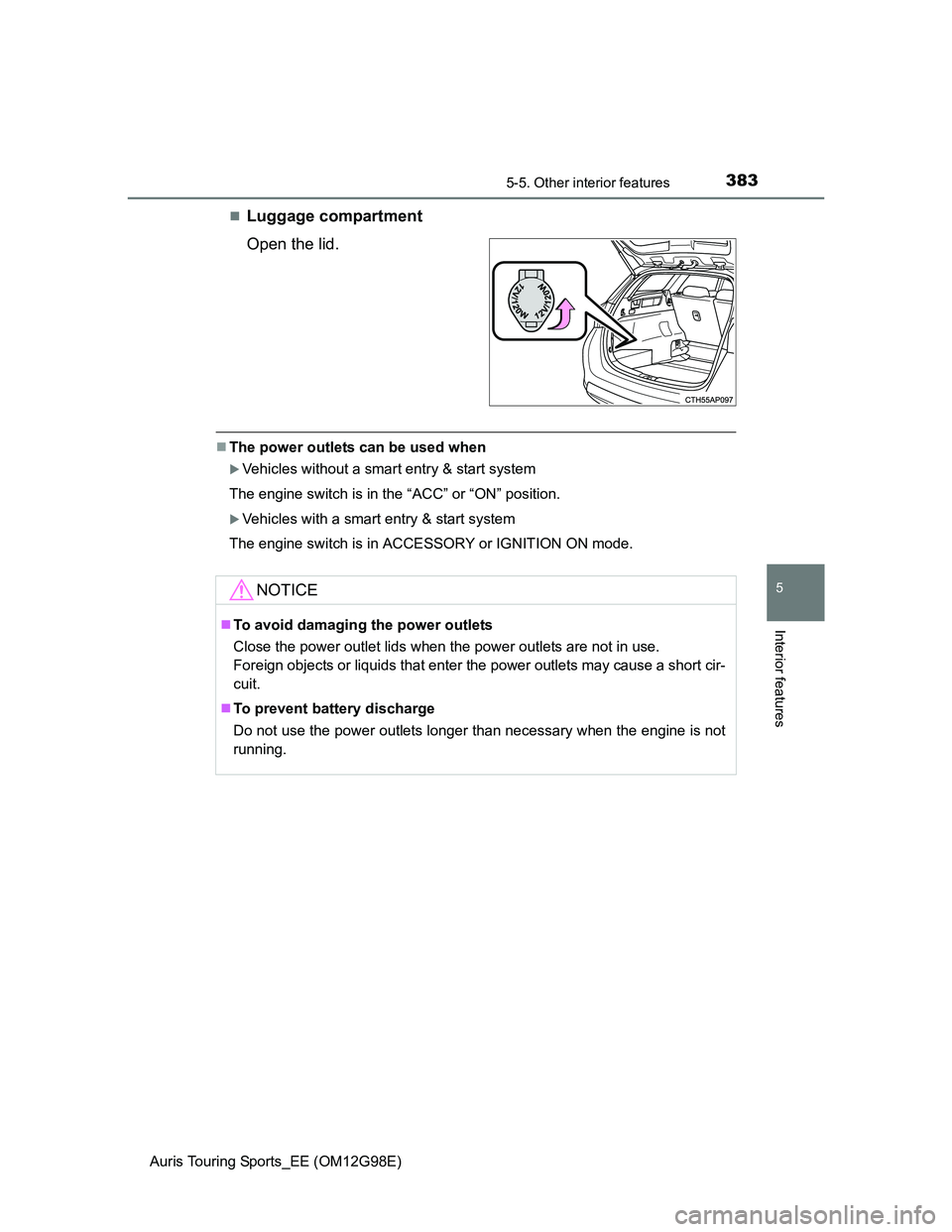
Luggage compartment
Open the lid.
The power outlets can be used when
Vehicles without a smart entry & start system
The engine switch is in the “ACC” or “ON” position.
Vehicles with a smart entry & start system
The engine switch is in ACCESSORY or IGNITION ON mode.
NOTICE
To avoid damaging the power outlets
Close the power outlet lids when the power outlets are not in use.
Foreign objects or liquids that enter the power outlets may cause a short cir-
cuit.
To prevent battery discharge
Do not use the power outlets longer than necessary when the engine is not
running.
Page 385 of 632
3855-5. Other interior features
Auris Touring Sports_EE (OM12G98E)
5
Interior features
The seat heaters can be used when
Vehicles without a smart entry & start system
The engine switch is in the “ON” position.
Vehicles with a smart entry & start system
The engine switch is in IGNITION ON mode.
When not in use
Turn the seat heater off.
CAUTION
Burns
Use caution when seating the following persons in a seat with the seat
heater on to avoid the possibility of burns:
• Babies, small children, the elderly, the sick and the physically chal-
lenged
• Persons with sensitive skin
• Persons who are fatigued
• Persons who have taken alcohol or drugs that induce sleep (sleeping
drugs, cold remedies, etc.)
Do not cover the seat with anything when using the seat heater.
Using the seat heater with a blanket or cushion increases the temperature
of the seat and may lead to overheating.
Do not use seat heater more than necessary. Doing so may cause minor
burns or overheating.
NOTICE
To prevent seat heater damage
Do not put heavy objects that have an uneven surface on the seat and do
not stick sharp objects (needles, nails, etc.) into the seat.
To prevent battery discharge
Turn the seat heaters off when the engine is not running.
Page 389 of 632
3895-5. Other interior features
Auris Touring Sports_EE (OM12G98E)
5
Interior features
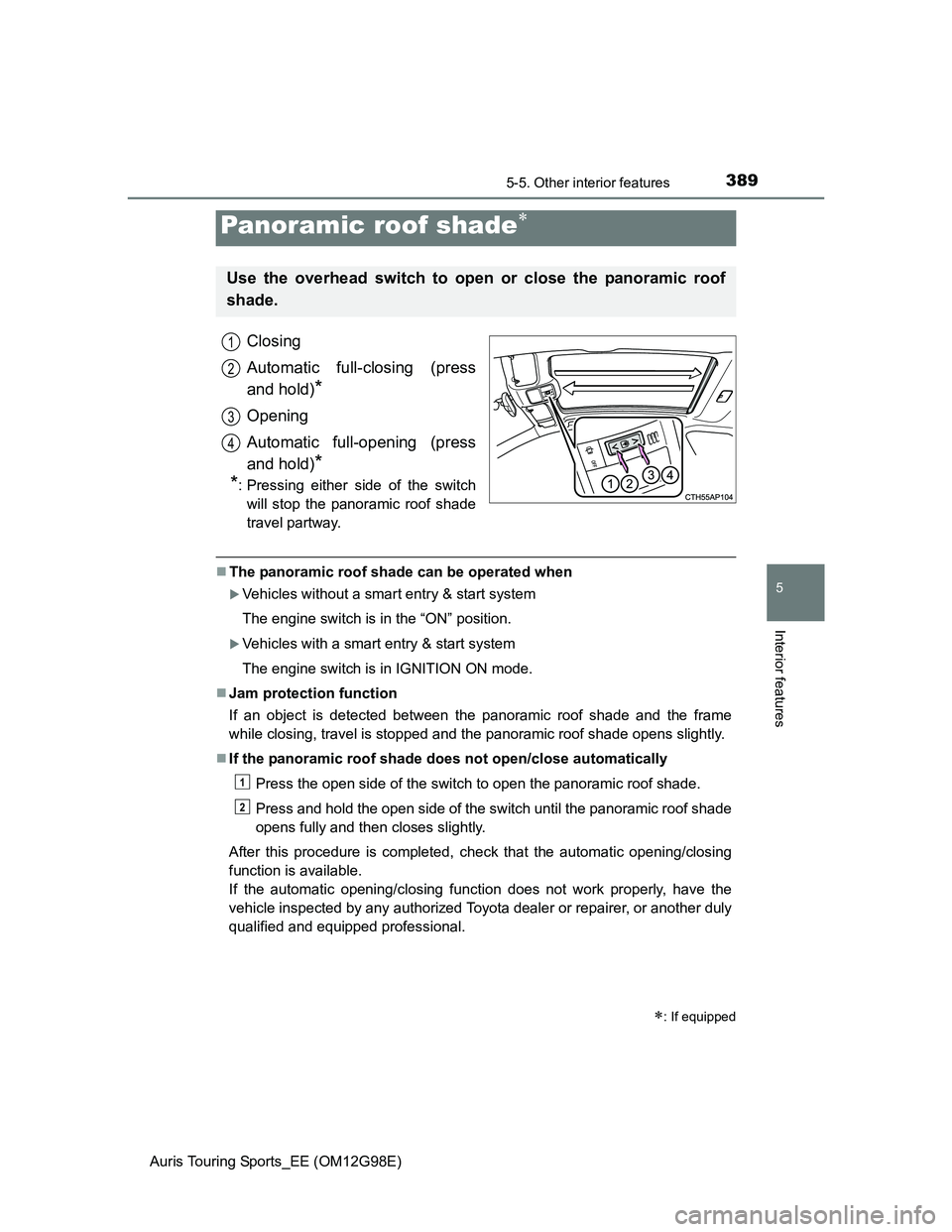
Closing
Automatic full-closing (press
and hold)
*
Opening
Automatic full-opening (press
and hold)
*
*
: Pressing either side of the switch
will stop the panoramic roof shade
travel partway.
The panoramic roof shade can be operated when
Vehicles without a smart entry & start system
The engine switch is in the “ON” position.
Vehicles with a smart entry & start system
The engine switch is in IGNITION ON mode.
Jam protection function
If an object is detected between the panoramic roof shade and the frame
while closing, travel is stopped and the panoramic roof shade opens slightly.
If the panoramic roof shade does not open/close automatically
Press the open side of the switch to open the panoramic roof shade.
Press and hold the open side of the switch until the panoramic roof shade
opens fully and then closes slightly.
After this procedure is completed, check that the automatic opening/closing
function is available.
If the automatic opening/closing function does not work properly, have the
vehicle inspected by any authorized Toyota dealer or repairer, or another duly
qualified and equipped professional.
Panoramic roof shade
: If equipped
Use the overhead switch to open or close the panoramic roof
shade.
1
2
3
4
1
2
Page 393 of 632
3936-1. Maintenance and care
Auris Touring Sports_EE (OM12G98E)
6
Maintenance and care
When using a car wash (vehicles with a smart entry & start system)
If the door handle becomes wet while the electronic key is within the effective
range, the door may lock and unlock repeatedly. In that case, follow the fol-
lowing correction procedures to wash the vehicle:
Place the key in a position 2 m (6 ft.) or more separate from the vehicle
while the vehicle is being washed. (Take care to ensure that the key is not
stolen.)
Set the electronic key to battery-saving mode to disable the smart entry &
start system. (P. 122)
Aluminum wheels (if equipped)
Remove any dirt immediately by using a neutral detergent. Do not use hard
brushes or abrasive cleaners. Do not use strong or harsh chemical clean-
ers.
Use the same mild detergent and wax as used on the paint.
Do not use detergent on the wheels when they are hot, for example after
driving for long distance in the hot weather.
Wash detergent from the wheels immediately after use.
Bumpers
Do not scrub with abrasive cleaners.
CAUTION
When washing the vehicle
Do not apply water to the inside of the engine compartment. Doing so may
cause the electrical components etc. to catch fire.
Page 403 of 632
4036-3. Do-it-yourself maintenance
Auris Touring Sports_EE (OM12G98E)
6
Maintenance and care
Washer fluid (P. 423)
• Water or washer fluid containing
antifreeze (for winter use)
• Funnel (used only for adding
water or washer fluid)
CAUTION
The engine compartment contains many mechanisms and fluids that may
move suddenly, become hot, or become electrically energized. To avoid death
or serious injury, observe the following precautions.
When working on the engine compartment
Keep hands, clothing and tools away from the moving fan and engine
drive belt.
Be careful not to touch the engine, radiator, exhaust manifold, etc. right
after driving as they may be hot. Oil and other fluids may also be hot.
Do not leave anything that may burn easily, such as paper and rags, in the
engine compartment.
Do not smoke, cause sparks or expose an open flame to fuel or the bat-
tery. Fuel and battery fumes are flammable.
Be extremely cautious when working on the battery. It contains poisonous
and corrosive sulfuric acid.
Take care because brake fluid can harm your hands or eyes and damage
painted surfaces. If fluid gets on your hands or in your eyes, flush the
affected area with clean water immediately.
If you still experience discomfort, consult a doctor.
When working near the electric cooling fans or radiator grille
Vehicles without a smart entry & start system:
Be sure the engine switch is off.
With the engine switch in the “ON” position, the electric cooling fan may
automatically start to run if the air conditioning is on and/or the coolant tem-
perature is high. (P. 419)
Vehicles with a smart entry & start system:
Be sure the engine switch is off.
With the engine switch in IGNITION ON mode, the electric cooling fan may
automatically start to run if the air conditioning is on and/or the coolant tem-
perature is high. (P. 419)
ItemsParts and tools
Page 416 of 632
4166-3. Do-it-yourself maintenance
Auris Touring Sports_EE (OM12G98E)
When adding engine oil (1ND-TV engine only)
Do not overfill the engine. Use the dipstick to ensure that the oil level does not
exceed the full mark. If exceeded, the oil level will have to be adjusted to
below the full mark.
Engine oil consumption
A certain amount of engine oil will be consumed while driving. In the following
situations, oil consumption may increase, and engine oil may need to be
refilled in between oil maintenance intervals.
When the engine is new, for example directly after purchasing the vehicle or
after replacing the engine
If low quality oil or oil of an inappropriate viscosity is used
When driving at high engine speeds or with a heavy load, when towing, or
when driving while accelerating or decelerating frequently
When leaving the engine idling for a long time, or when driving frequently
through heavy traffic
After changing the engine oil (diesel engine only)
The engine oil maintenance data should be reset. Perform the following pro-
cedures:
Switch the display to the trip meter “A” when the engine is running.
(P. 90, 95)
Turn the engine switch off.
Vehicles without a smart entry & start system:
While pressing the display change button (P. 90, 95), turn the engine
switch to the “ON” position (do not start the engine because reset mode will
be canceled). Continue to press and hold the button until the trip meter dis-
plays “000000”.
Vehicles with a smart entry & start system:
While pressing the display change button (P. 90, 95), turn the engine
switch to the IGNITION ON mode (do not start the engine because other-
wise the reset mode will be canceled). Continue to press and hold the but-
ton until the trip meter displays “000000”.
1
2
3
Page 421 of 632
4216-3. Do-it-yourself maintenance
Auris Touring Sports_EE (OM12G98E)
6
Maintenance and care
After recharging/reconnecting the battery (vehicles with a smart entry &
start system)
Unlocking the doors using the smart entry & start system may not be possi-
ble immediately after reconnecting the battery. If this happens, use the wire-
less remote control or the mechanical key to lock/unlock the doors.
Start the engine with the engine switch in ACCESSORY mode. The engine
may not start with the engine switch turned off. However, the engine will
operate normally from the second attempt.
The engine switch mode is recorded by the vehicle. If the battery is recon-
nected, the vehicle will return the engine switch mode to the status it was in
before the battery was disconnected. Make sure to turn off the engine
before disconnect the battery. Take extra care when connecting the battery
if the engine switch mode prior to discharge is unknown.
If the system will not start even after multiple attempts, contact any authorized
Toyota dealer or repairer, or another duly qualified and equipped professional.
CAUTION
Chemicals in the battery
Batteries contain poisonous and corrosive sulfuric acid and may produce
hydrogen gas which is flammable and explosive. To reduce the risk of death
or serious injury, take the following precautions while working on or near the
battery:
Do not cause sparks by touching the battery terminals with tools.
Do not smoke or light a match near the battery.
Avoid contact with eyes, skin and clothes.
Never inhale or swallow electrolyte.
Wear protective safety glasses when working near the battery.
Keep children away from the battery.
Page 428 of 632
4286-3. Do-it-yourself maintenance
Auris Touring Sports_EE (OM12G98E)
How to initialize the tire pressure warning system
Park the vehicle in a safe place and turn the engine switch off.
Initialization cannot be performed while the vehicle is moving.
Adjust the tire inflation pressure to the specified cold tire inflation
pressure level. (P. 599)
Make sure to adjust the tire pressure to the specified cold tire inflation
pressure level. The tire pressure warning system will operate based on
this pressure level.
Turn the engine switch to IGNITION ON mode (vehicles with a
smart entry & start system) or engine switch to the “ON” position
(vehicles without a smart entry & start system).
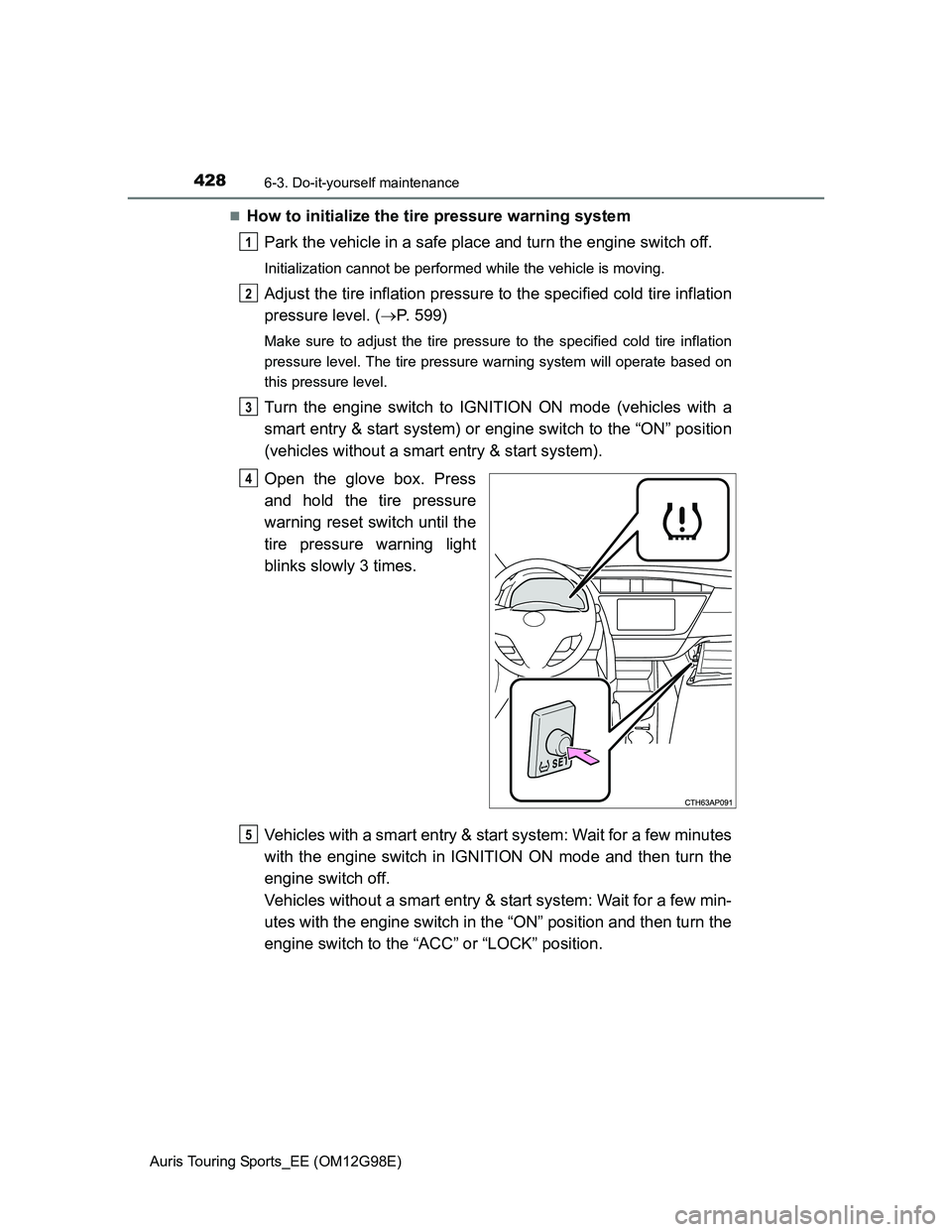
Open the glove box. Press
and hold the tire pressure
warning reset switch until the
tire pressure warning light
blinks slowly 3 times.
Vehicles with a smart entry & start system: Wait for a few minutes
with the engine switch in IGNITION ON mode and then turn the
engine switch off.
Vehicles without a smart entry & start system: Wait for a few min-
utes with the engine switch in the “ON” position and then turn the
engine switch to the “ACC” or “LOCK” position.
1
2
3
4
5