ECO mode TOYOTA AURIS 2015 (in English) User Guide
[x] Cancel search | Manufacturer: TOYOTA, Model Year: 2015, Model line: AURIS, Model: TOYOTA AURIS 2015Pages: 632, PDF Size: 17.65 MB
Page 124 of 632
1243-2. Opening, closing and locking the doors
Auris Touring Sports_EE (OM12G98E)Note for the entry function
Even when the electronic key is within the effective range (detection areas),
the system may not operate properly in the following cases:
• The electronic key is too close to the window or outside door handle, near
the ground, or in a high place when the doors are locked or unlocked.
• The electronic key is near the ground or in a high place, or too close to
the rear bumper center when the back door is opened.
• The electronic key is on the instrument panel, luggage cover or floor, or in
the door pockets or glove box when the engine is started or engine switch
modes are changed.
Do not leave the electronic key on top of the instrument panel or near the
door pockets when exiting the vehicle. Depending on the radio wave recep-
tion conditions, it may be detected by the antenna outside the cabin and the
door will become lockable from the outside, possibly trapping the electronic
key inside the vehicle.
As long as the electronic key is within the effective range, the doors may be
locked or unlocked by anyone. However, only the doors detecting the elec-
tronic key can be used to unlock the vehicle.
Even if the electronic key is not inside the vehicle, it may be possible to start
the engine if the electronic key is near the window.
The doors may unlock or lock if a large amount of water splashes on the
door handle, such as in the rain or in a car wash when the electronic key is
within the effective range. (The doors will automatically be locked after
approximately 30 seconds if the doors are not opened and closed.)
If the wireless remote control is used to lock the doors when the electronic
key is near the vehicle, there is a possibility that the door may not be
unlocked by the entry function. (Use the wireless remote control to unlock
the doors.)
Page 125 of 632
1253-2. Opening, closing and locking the doors
Auris Touring Sports_EE (OM12G98E)
3
Operation of each component
Note for locking the doors
Touching the door lock sensor while wearing gloves may delay or prevent
lock operation. Remove the gloves and touch the lock sensor again.
When the lock operation is performed using the lock sensor, recognition sig-
nals will be shown up to two consecutive times. After this, no recognition
signals will be given.
If the door handle becomes wet while the electronic key is within the effec-
tive range, the door may lock and unlock repeatedly. In that case, follow the
following correction procedures to wash the vehicle:
• Place the electronic key in a location 2 m (6 ft.) or more away from the
vehicle. (Take care to ensure that the key is not stolen.)
• Set the electronic key to battery-saving mode to disable the smart entry &
start system. (P. 122)
Vehicles without a multi-information display: If the electronic key is inside
the vehicle and a door handle becomes wet during a car wash, a buzzer will
sound outside the vehicle. To turn off the alarm, lock all the doors.
Vehicles with a multi-information display: If the electronic key is inside the
vehicle and a door handle becomes wet during a car wash, a message may
be shown on the multi-information display and a buzzer will sound outside
the vehicle. To turn off the alarm, lock all the doors.
The lock sensor may not work properly if it comes into contact with ice,
snow, mud, etc. Clean the lock sensor and attempt to operate it again.
Fingernails may scrape against the door during operation of the door han-
dle. Be careful not to injure fingernails or damage the surface of the door.
Page 126 of 632
1263-2. Opening, closing and locking the doors
Auris Touring Sports_EE (OM12G98E)Note for the unlocking function
A sudden approach to the effective range or door handle may prevent the
doors from being unlocked. In this case, return the door handle to the origi-
nal position and check that the doors unlock before pulling the door handle
again.
Gripping the door handle when wearing a glove may not unlock the door.
If the door handle becomes wet while the electronic key is within the effec-
tive range, the door may lock and unlock repeatedly. In that case, follow the
following correction procedures to wash the vehicle:
• Place the electronic key in a location 2 m (6 ft.) or more away from the
vehicle. (Take care to ensure that the key is not stolen.)
• Set the electronic key to battery-saving mode to disable the smart entry &
start system. (P. 122)
If there is another electronic key in the detection area, it may take slightly
longer to unlock the doors after the door handle is gripped.
Fingernails may scrape against the door during operation of the door han-
dle. Be careful not to injure fingernails or damage the surface of the door.
When the vehicle is not driven for extended periods
To prevent theft of the vehicle, do not leave the electronic key within 2 m
(6 ft.) of the vehicle.
The smart entry & start system can be deactivated in advance. (P. 604)
Alarm (if equipped)
Using the smart entry & start system to lock the doors will set the alarm sys-
tem. (P. 79)
To operate the system properly
Make sure to carry the electronic key when operating the system. Do not get
the electronic key too close to the vehicle when operating the system from the
outside of the vehicle.
Depending on the position and holding condition of the electronic key, the key
may not be detected correctly and the system may not operate properly. (The
alarm may go off accidentally, or the door lock prevention function may not
operate.)
If the smart entry & start system does not operate properly
Locking and unlocking the doors: Use the mechanical key. (P. 567)
Starting the engine: P. 568
Page 127 of 632
1273-2. Opening, closing and locking the doors
Auris Touring Sports_EE (OM12G98E)
3
Operation of each component
Electronic key battery depletion
The standard battery life is 1 to 2 years.
If the battery becomes low, an alarm will sound in the cabin when the engine
stops. (P. 500, 517)
As the electronic key always receives radio waves, the battery will become
depleted even if the electronic key is not used. The following symptoms indi-
cate that the electronic key battery may be depleted. Replace the battery
when necessary. (P. 443)
• The smart entry & start system or the wireless remote control does not
operate.
• The detection area becomes smaller.
• The LED indicator on the key surface does not turn on.
To avoid serious deterioration, do not leave the electronic key within 1 m (3
ft.) of the following electrical appliances that produce a magnetic field:
•TVs
• Personal computers
• Cellular phones, cordless phones and battery chargers
• Recharging cellular phones or cordless phones
• Table lamps
• Induction cookers
When the electronic key battery is fully depleted
P. 443
Customization
Settings (e. g. smart entry & start system) can be changed.
(Customizable features: P. 604)
If the smart entry & start system has been deactivated in a customized
setting
Locking and unlocking the doors:
Use the wireless remote control or mechanical key. (P. 137, 567)
Starting the engine and changing engine switch modes: P. 568
Stopping the engine: P. 2 0 1
Page 164 of 632
1643-4. Adjusting the steering wheel and mirrors
Auris Touring Sports_EE (OM12G98E)
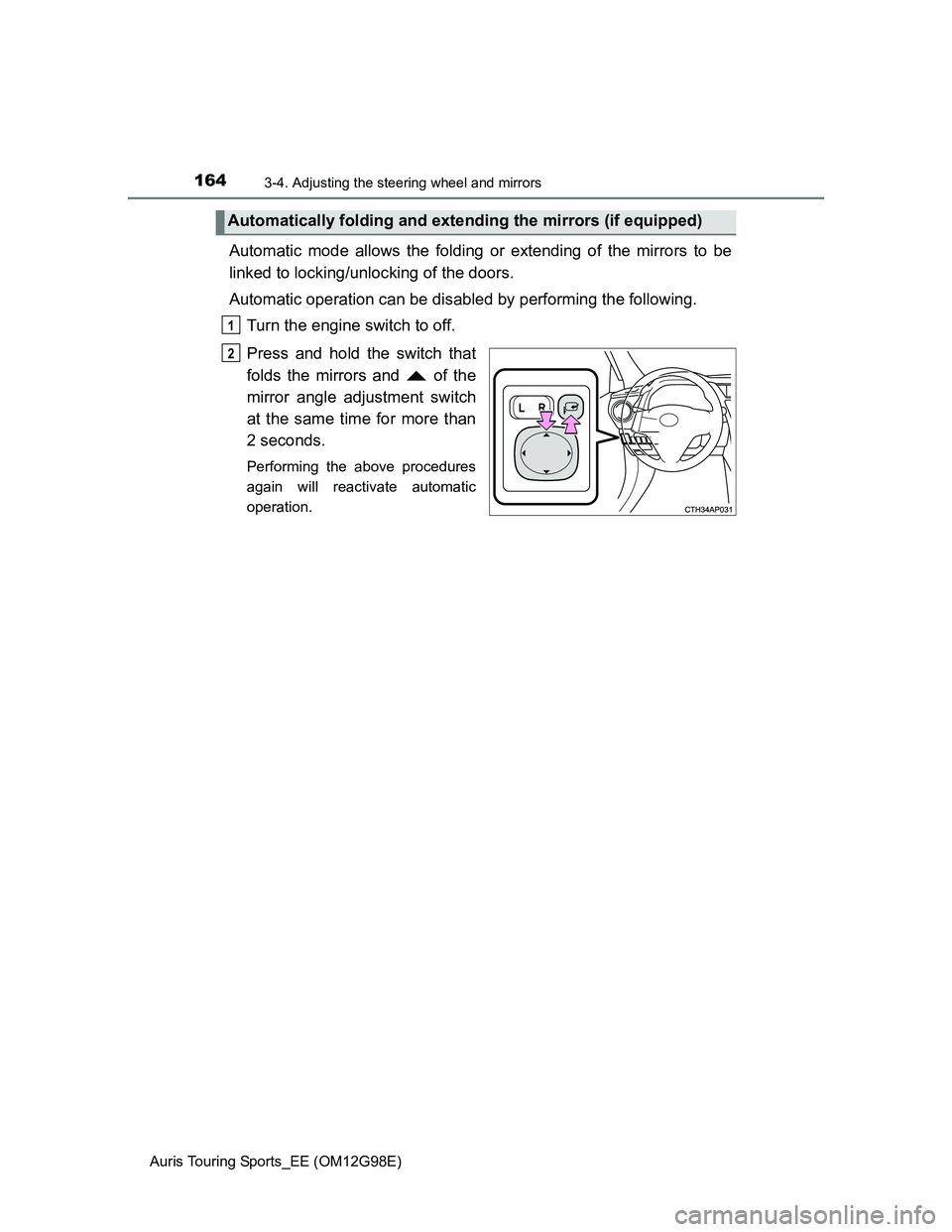
Automatic mode allows the folding or extending of the mirrors to be
linked to locking/unlocking of the doors.
Automatic operation can be disabled by performing the following.
Turn the engine switch to off.
Press and hold the switch that
folds the mirrors and of the
mirror angle adjustment switch
at the same time for more than
2 seconds.
Performing the above procedures
again will reactivate automatic
operation.
Automatically folding and extending the mirrors (if equipped)
1
2
Page 165 of 632
1653-4. Adjusting the steering wheel and mirrors
Auris Touring Sports_EE (OM12G98E)
3
Operation of each component
Mirror angle can be adjusted when
Vehicles without a smart entry & start system
The engine switch is in the “ACC” or “ON” position.
Vehicles with a smart entry & start system
The engine switch is in ACCESSORY or IGNITION ON mode.
When the mirrors are fogged up
The outside rear view mirrors can be cleared using the mirror defoggers. Turn
on the rear window defogger to turn on the outside rear view mirror defog-
gers. (P. 314)
Using automatic mode in cold weather (if equipped)
When automatic mode is used in cold weather, the door mirror could freeze
up and automatic stowing and return may not be possible. In this event,
remove any ice and snow from the door mirror, then either operate the mirror
using manual mode or move the mirror by hand.
CAUTION
Important points while driving
Observe the following precautions while driving.
Failure to do so may result in loss of control of the vehicle and cause an
accident, resulting in death or serious injury.
Do not adjust the mirrors while driving.
Do not drive with the mirrors folded.
Both the driver and passenger side mirrors must be extended and properly
adjusted before driving.
When a mirror is moving
To avoid personal injury and mirror malfunction, be careful not to get your
hand caught by the moving mirror.
When the mirror defoggers are operating
Do not touch the rear view mirror surfaces, as they can become very hot
and burn you.
Page 167 of 632
1673-5. Opening and closing the windows
Auris Touring Sports_EE (OM12G98E)
3
Operation of each component
The power windows can be operated when
Vehicles without a smart entry & start system
The engine switch is in the “ON” position.
Vehicles with a smart entry & start system
The engine switch is in IGNITION ON mode.
Operating the power windows after turning the engine off
Vehicles without a smart entry & start system
The power windows can be operated for approximately 45 seconds even
after the engine switch is turned to the “ACC” or “LOCK” position. They can-
not, however, be operated once either front door is opened.
Vehicles with a smart entry & start system
The power windows can be operated for approximately 45 seconds even
after the engine switch is turned to ACCESSORY mode or turned off. They
cannot, however, be operated once either front door is opened.
Jam protection function (windows with one-touch closing function only)
If an object becomes caught between the window and the window frame, win-
dow travel is stopped and the window is opened slightly.
Page 168 of 632
1683-5. Opening and closing the windows
Auris Touring Sports_EE (OM12G98E)When the power window does not close normally (windows with one-
touch closing function only)
If the jam protection function is operating abnormally and a window cannot be
closed, perform the following operations using the power window switch on
the relevant door.
Vehicles without a smart entry & start system: After stopping the vehicle, the
window can be closed by holding the power window switch in the one-touch
closing position while the engine switch is turned to the “ON” position.
Vehicles with a smart entry & start system: After stopping the vehicle, the
window can be closed by holding the power window switch in the one-touch
closing position while the engine switch is turned to IGNITION ON mode.
If the window still cannot be closed even by carrying out the operation as
explained above, initialize the function by performing the following proce-
dure.
Hold the power window switch in the one-touch closing position. Continue
holding the switch for a further 6 seconds after the window has closed.
Hold the power window switch in the one-touch opening position. Con-
tinue holding the switch for a further 2 seconds after the window has
opened completely.
Hold the power window switch in the one-touch closing position once
again. Continue holding the switch for a further 2 seconds after the win-
dow has closed.
If you release the switch while the window is moving, start again from the
beginning.
If the window continues to close but then re-open slightly even after perform-
ing the above procedure correctly, have the vehicle inspected by any autho-
rized Toyota dealer or repairer, or another duly qualified and equipped
professional.
1
2
3
Page 174 of 632
1744-1. Before driving
Auris Touring Sports_EE (OM12G98E)
Multidrive
Make sure that the parking brake is set and shift the shift lever to D.
Gently depress the accelerator pedal.
Release the parking brake.
Manual transmission
With the parking brake firmly set and the clutch pedal fully
depressed, shift the shift lever to 1.
Lightly depress the accelerator pedal at the same time as gradually
releasing the clutch pedal.
Release the parking brake.
When starting off on an uphill
The hill-start assist control is available. (P. 281)
Driving in the rain
Drive carefully when it is raining, because visibility will be reduced, the win-
dows may become fogged-up, and the road will be slippery.
Drive carefully when it starts to rain, because the road surface will be espe-
cially slippery.
Refrain from high speeds when driving on an expressway in the rain,
because there may be a layer of water between the tires and the road sur-
face, preventing the steering and brakes from operating properly.
Engine speed while driving (vehicles with a Multidrive)
In the following conditions, the engine speed may become high while driving.
This is due to automatic up-shifting control or down-shifting implementation to
meet driving conditions. It does not indicate sudden acceleration.
The vehicle is judged to be driving uphill or downhill
When the accelerator pedal is released
When the brake pedal is depressed while sport mode is selected
Starting off on a steep uphill
1
2
3
1
2
3
Page 199 of 632
1994-2. Driving procedures
Auris Touring Sports_EE (OM12G98E)
4
Driving
Check that the parking brake is set.
Check that the shift lever is set in P (Multidrive) or N (manual trans-
mission).
Vehicles without a multi-information display
Multidrive: Firmly depress the brake pedal.
Manual transmission: Firmly depress the clutch pedal.
The smart entry & start system indicator light (green) will turn on. If the
indicator light does not turn on, the engine cannot be started.
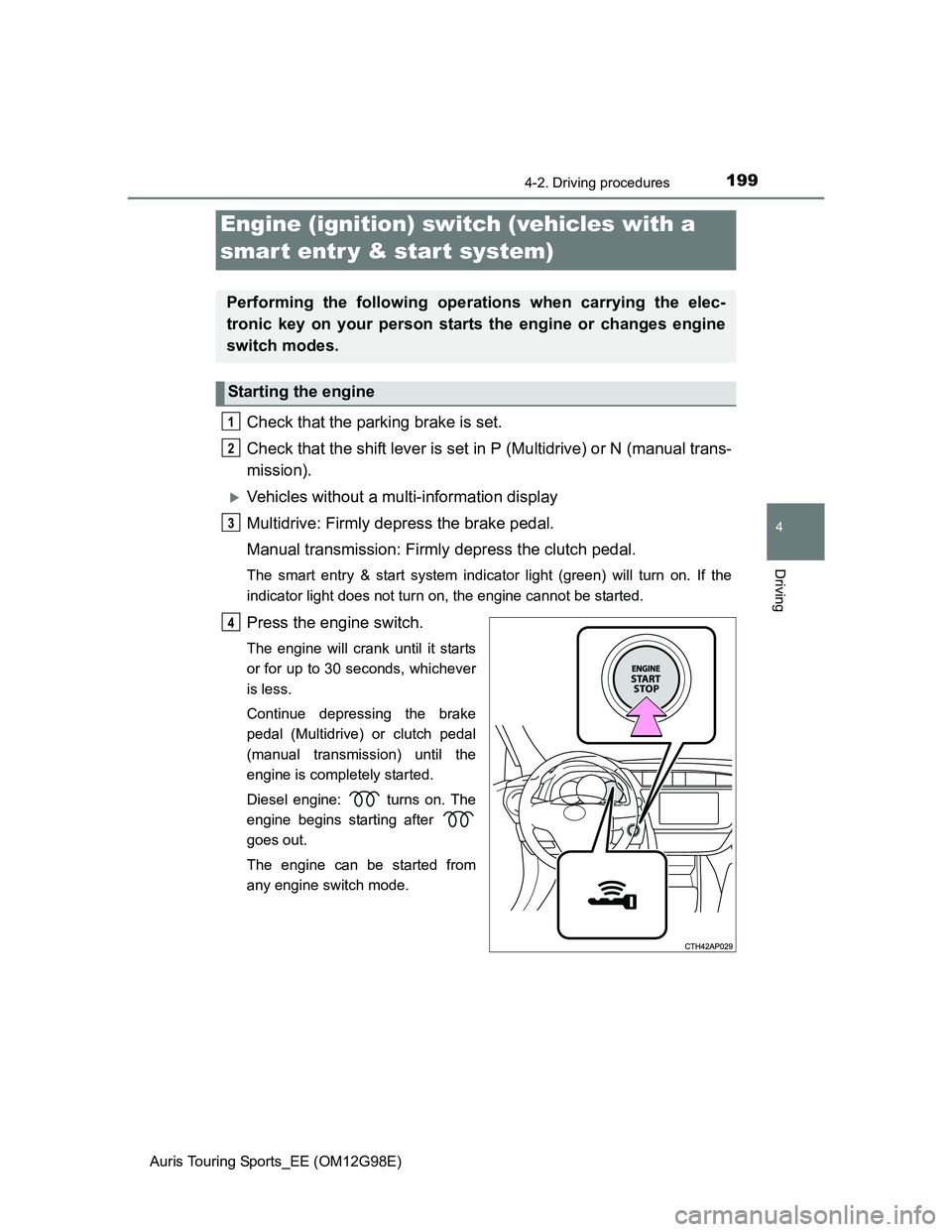
Press the engine switch.
The engine will crank until it starts
or for up to 30 seconds, whichever
is less.
Continue depressing the brake
pedal (Multidrive) or clutch pedal
(manual transmission) until the
engine is completely started.
Diesel engine: turns on. The
engine begins starting after
goes out.
The engine can be started from
any engine switch mode.
Engine (ignition) switch (vehicles with a
smart entr y & start system)
Performing the following operations when carrying the elec-
tronic key on your person starts the engine or changes engine
switch modes.
Starting the engine
1
2
3
4