lights TOYOTA AVALON 2008 XX30 / 3.G Owner's Manual
[x] Cancel search | Manufacturer: TOYOTA, Model Year: 2008, Model line: AVALON, Model: TOYOTA AVALON 2008 XX30 / 3.GPages: 452, PDF Size: 7.59 MB
Page 148 of 452
![TOYOTA AVALON 2008 XX30 / 3.G Owners Manual 148 2-3. Operating the lights and windshield wipers
AVALON_U_(L/O_0802)
■In extremely hot or cold weather
The system will turn off if the windshield gets extremely hot (at more than
176°F [80°C])](/img/14/6155/w960_6155-147.png "TOYOTA AVALON 2008 XX30 / 3.G Owners Manual 148 2-3. Operating the lights and windshield wipers
AVALON_U_(L/O_0802)
■In extremely hot or cold weather
The system will turn off if the windshield gets extremely hot (at more than
176°F [80°C])")
148 2-3. Operating the lights and windshield wipers
AVALON_U_(L/O_0802)
■In extremely hot or cold weather
The system will turn off if the windshield gets extremely hot (at more than
176°F [80°C]) or cold (at less than 14°F [-10°C]).
■ Customization that can be co nfigured at Toyota dealer
Settings (e.g. drip prevention function) can be changed.
(Customizable features P. 432)
CAUTION
■Caution regarding the use of windshield wipers in “AUTO” mode
The windshield wipers may operate unexpect edly if the sensor is touched or
the windshield is subject to vibration in “AUTO” mode. Take care that your
fingers or anything else do not become caught in the windshield wipers.
NOTICE
■ When the windshield is dry
Do not use the wipers, as they may damage the windshield.
■ When there is no washer fluid spray from the nozzle
Damage to the washer fluid pump may be caused if the lever is pulled
toward you and held continually.
Page 157 of 452
157
2-4. Using other
driving systems
2
When driving
AVALON_U_(L/O_0802)
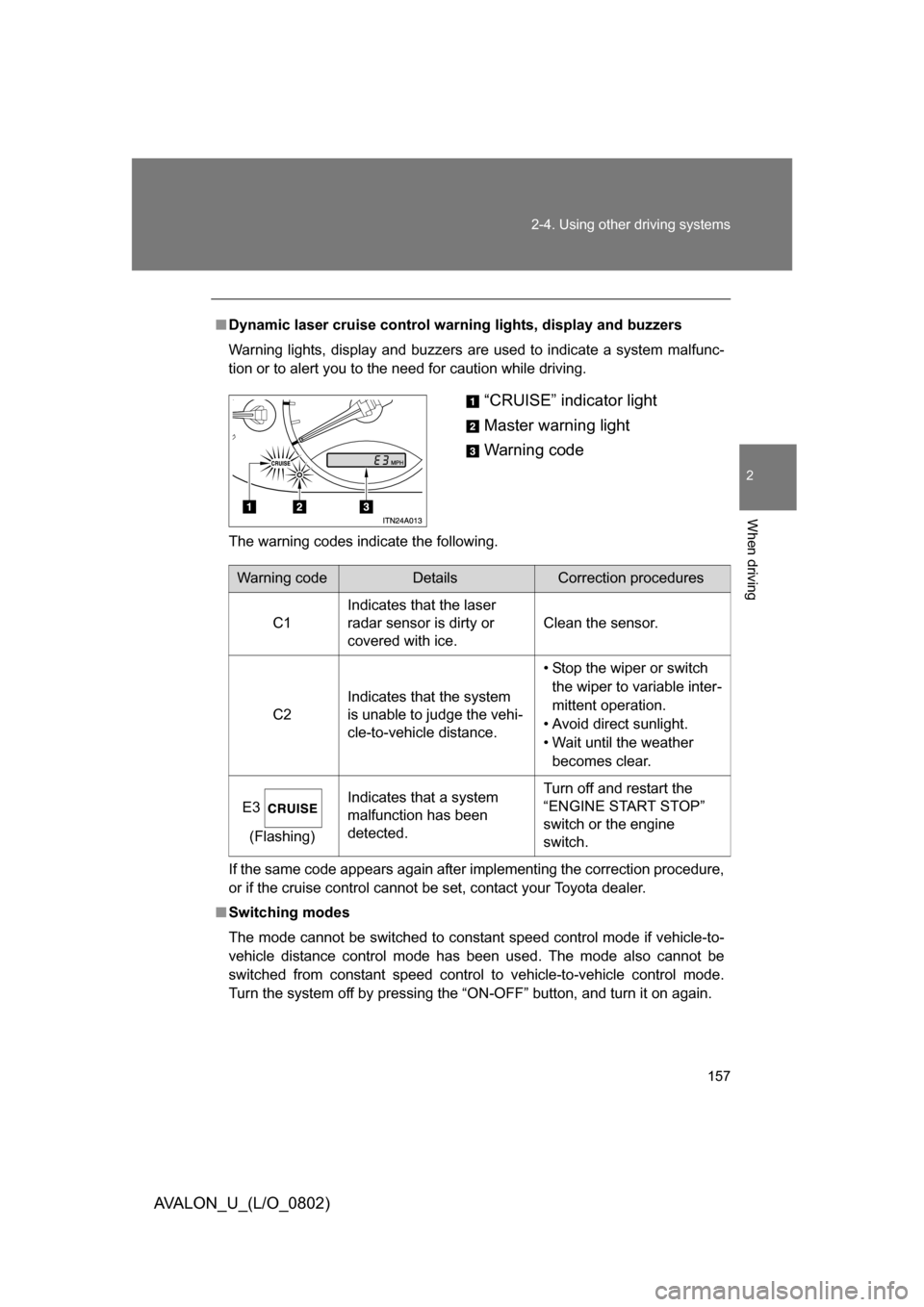
■Dynamic laser cruise control warning lights, display and buzzers
Warning lights, display and buzzers are used to indicate a system malfunc-
tion or to alert you to the need for caution while driving.
The warning codes indicate the following.
If the same code appears again after implementing the correction procedure,
or if the cruise control cannot be set, contact your Toyota dealer.
■ Switching modes
The mode cannot be switched to constant speed control mode if vehicle-to-
vehicle distance control mode has been used. The mode also cannot be
switched from constant speed control to vehicle-to-vehicle control mode.
Turn the system off by pressing the “ON-OFF” button, and turn it on again.
“CRUISE” indicator light
Master warning light
Warning code
Warning codeDetailsCorrection procedures
C1 Indicates that the laser
radar sensor is dirty or
covered with ice. Clean the sensor.
C2 Indicates that the system
is unable to judge the vehi-
cle-to-vehicle distance. • Stop the wiper or switch
the wiper to variable inter-
mittent operation.
• Avoid direct sunlight.
• Wait until the weather becomes clear.
E3 (Flashing) Indicates that a system
malfunction has been
detected. Turn off and restart the
“ENGINE START STOP”
switch or the engine
switch.
Page 177 of 452
Interior features3
177
AVALON_U_(L/O_0802)
3-1. Using the air conditioning
system and defogger... 178
Automatic air conditioning
system ........................... 178
Using the steering wheel climate control
switches ......................... 185
Rear window and outside
rear view mirror
defoggers ....................... 187
3-2. Using the audio
system .......................... 188
Audio system type............ 188
Audio cover ...................... 190
Using the radio ................. 191
Using the CD player ......... 198
Playing MP3 and WMA
discs............................... 206
Optimal use of the audio
system ........................... 214
Using the AUX adapter .... 216
Using the steering wheel audio switches ............... 217
3-3. Using the hands-free
system .......................... 220
Hands-free system
(for cellular phone) ........ 220
Using the hands-free
system ........................... 223 Making a phone call ......... 231
Setting a cellular phone ... 236
Security and system
setup .............................. 241
Using the phone book ...... 244
3-4. Using the interior
lights ............................. 252
Interior lights list ............... 252
3-5. Using the storage
features ......................... 255
List of storage features .... 255
3-6. Other interior features ... 263 Sun visors ........................ 263
Vanity mirrors ................... 264
Clock ................................ 265
Outside temperature
display............................ 266
Ashtrays .......................... 267
Power outlets ................... 268
Climate control seats/seat
heaters .......................... 270
Armrest ............................ 272
Rear sunshade ................ 273
Floor mats ........................ 275
Trunk features .................. 276
Garage door opener ........ 278
Compass .......................... 283
Page 252 of 452
252
AVALON_U_(L/O_0802)
3-4. Using the interior lights
Interior lights list
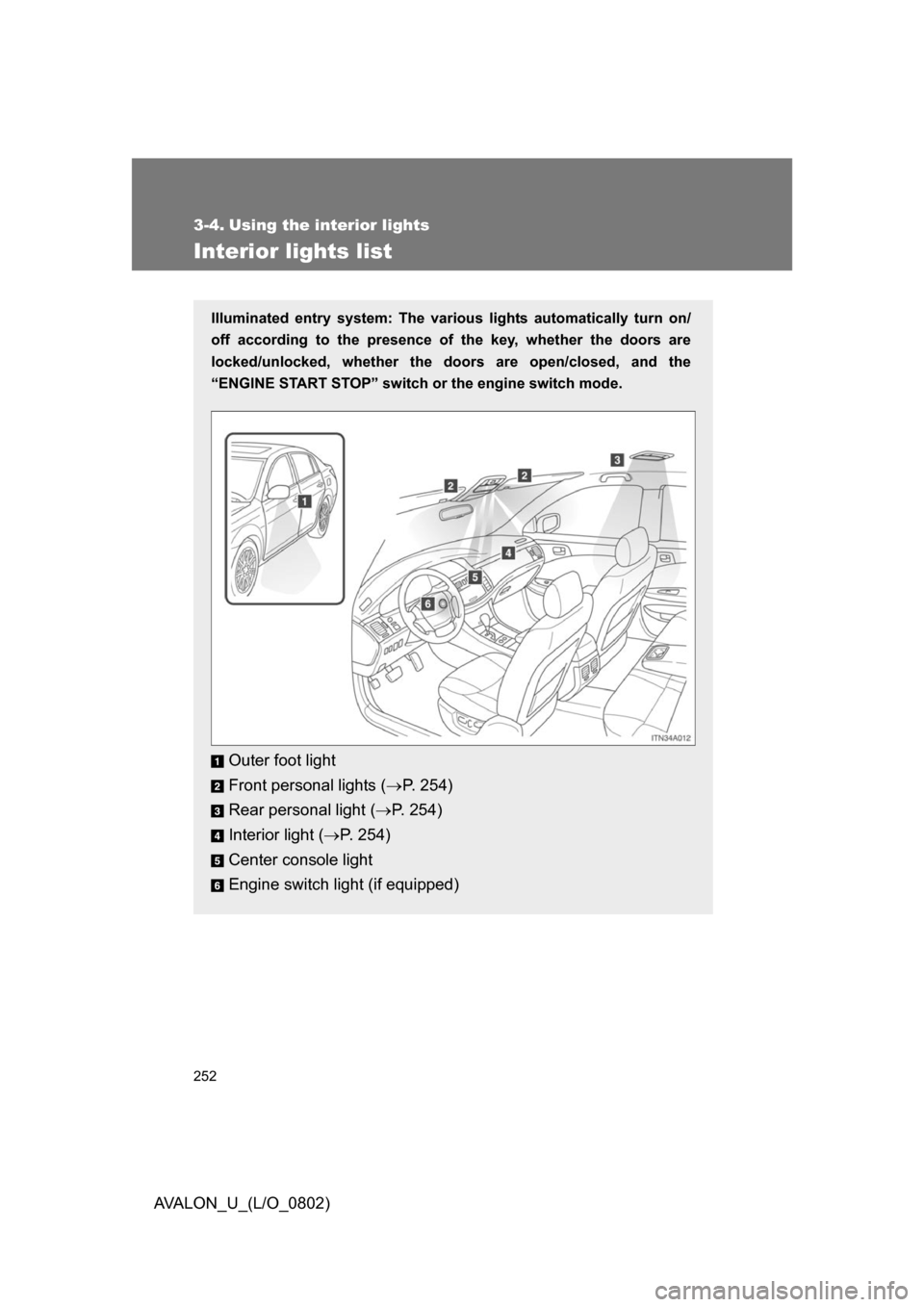
Illuminated entry system: The various lights automatically turn on/
off according to the presence of the key, whether the doors are
locked/unlocked, whether the doors are open/closed, and the
“ENGINE START STOP” switch or the engine switch mode.
Outer foot light
Front personal lights ( P. 254)
Rear personal light ( P. 254)
Interior light ( P. 254)
Center console light
Engine switch light (if equipped)
Page 253 of 452
253
3-4. Using the interior lights
3
Interior features
AVALON_U_(L/O_0802)
■
To prevent battery discharge
If the interior lights, personal lights and engine switch light (if equipped)
remain on when the door is not fully closed or the interior light switch in
“DOOR” position, the lights will go off automatically after 20 minutes.
■ Customization that can be co nfigured at Toyota dealer
Setting (e.g. The time elapsed before lights turn off) can be changed.
(Customizable features
P. 432)
Page 254 of 452
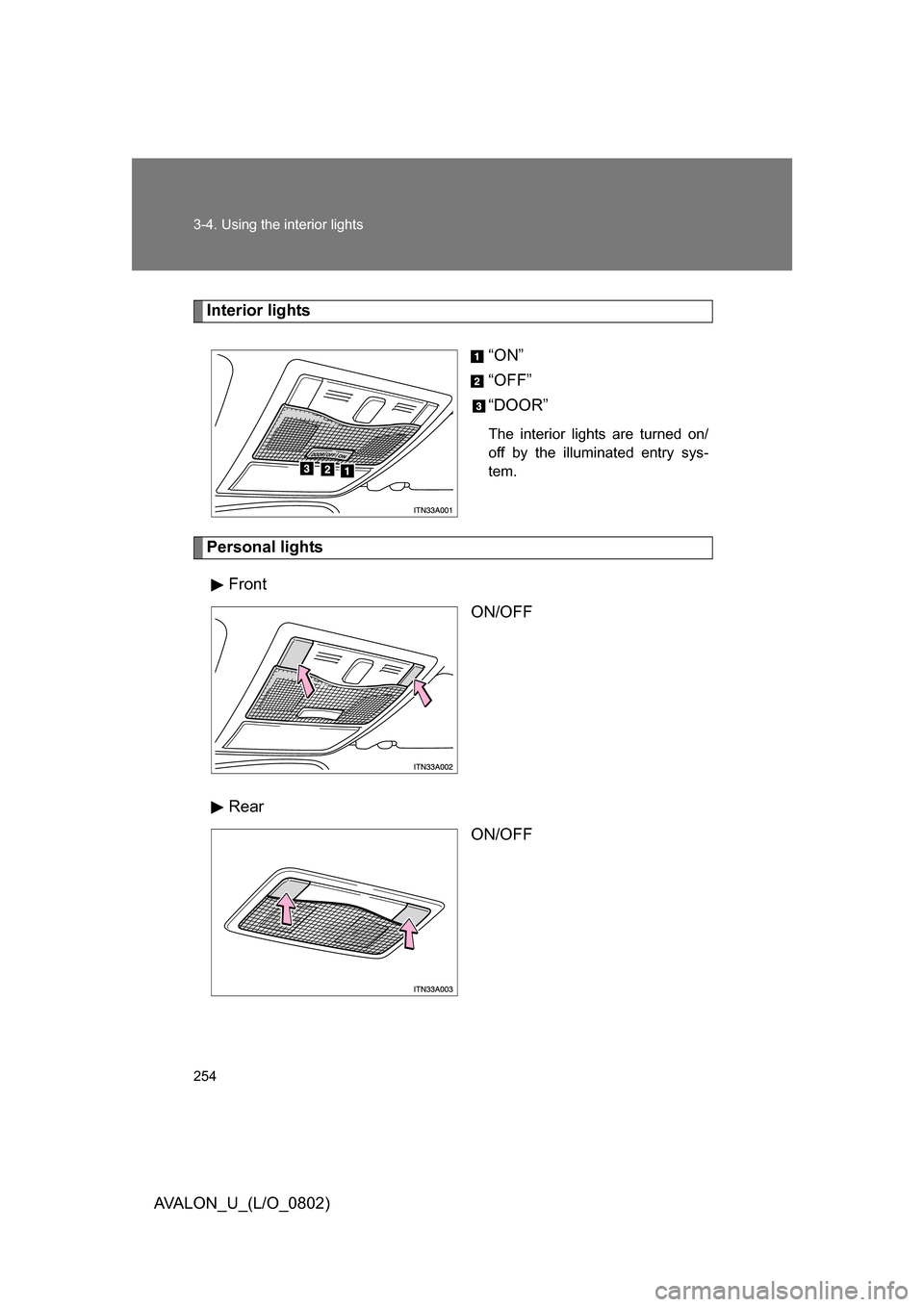
254 3-4. Using the interior lights
AVALON_U_(L/O_0802)
Interior lights“ON”
“OFF”
“DOOR”
The interior lights are turned on/
off by the illuminated entry sys-
tem.
Personal lightsFront ON/OFF
Rear ON/OFF
Page 264 of 452
264
3-6. Other interior features
AVALON_U_(L/O_0802)
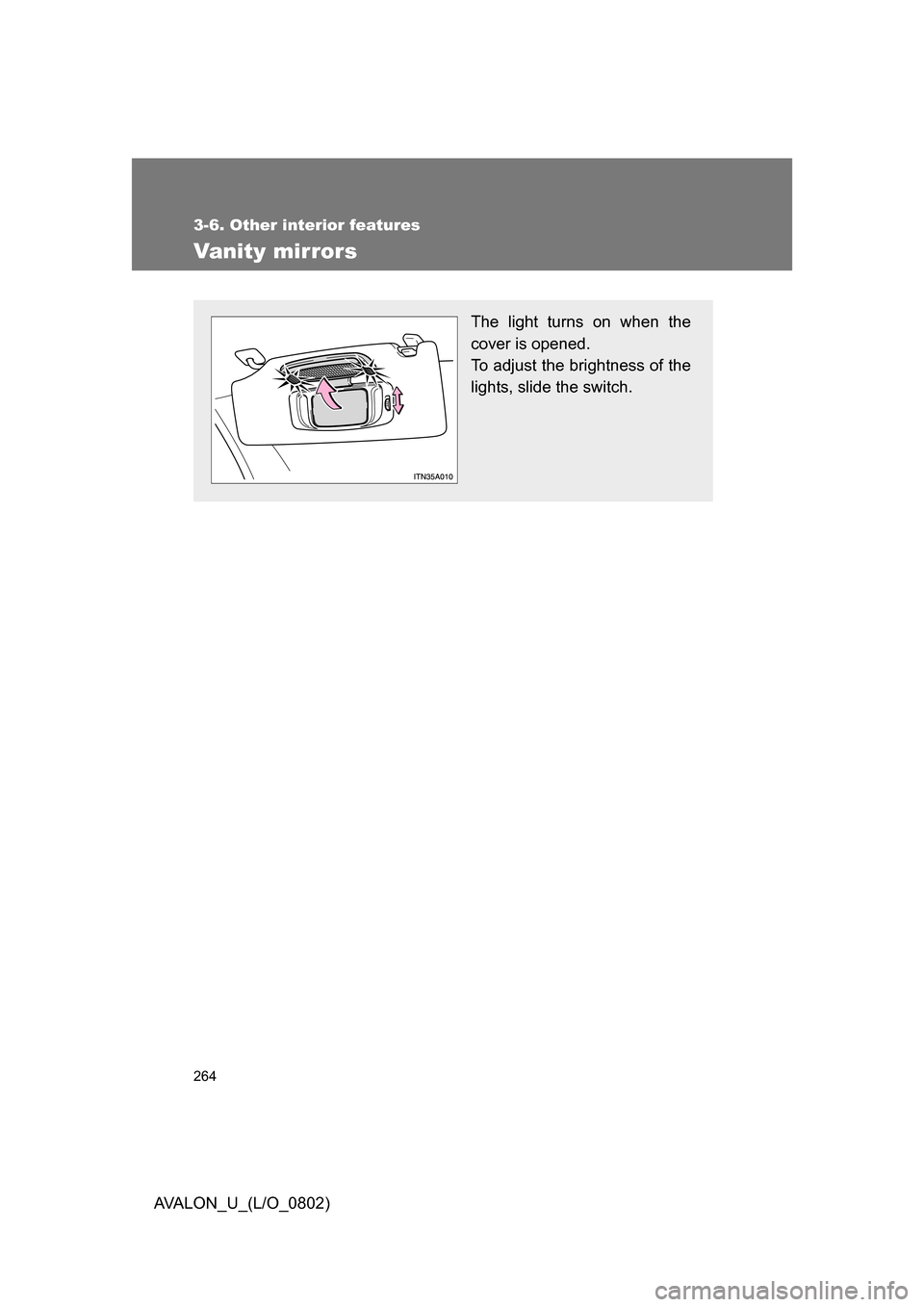
Vanity mirrors
The light turns on when the
cover is opened.
To adjust the brightness of the
lights, slide the switch.
Page 287 of 452
Maintenance and care4
287
AVALON_U_(L/O_0802)
4-1. Maintenance and care ... 288Cleaning and protecting the
vehicle exterior............... 288
Cleaning and protecting the
vehicle interior................ 291 4-2. Maintenance ................... 294
Maintenance
requirements .................. 294
General maintenance....... 296
Emission inspection and
maintenance (I/M)
programs ........................ 299
4-3. Do-it-yourself
maintenance ................. 300
Do-it-yourself service
precautions .................... 300
Hood ................................ 303
Positioning a floor jack ..... 304
Engine compartment ........ 306
Tires ................................. 322
Tire inflation pressure ...... 331
Wheels ............................. 335
Air conditioning filter......... 337
Key battery ....................... 340
Checking and replacing
fuses .............................. 344
Headlight aim (with
discharge headlights) ..... 353
Light bulbs........................ 355
Page 290 of 452
290 4-1. Maintenance and care
AVALON_U_(L/O_0802)
CAUTION
■Caution about the exhaust pipe
Exhaust gasses cause the exhaust pipe to become quite hot.
When washing the vehicle, be careful not to touch the pipe until it has cooled
sufficiently, as touching a hot exhaust pipe can cause burns.
NOTICE
■ To protect your vehicle’s painted surfaces
Do not use organic cleaners such as benzine or gasoline.
■ Cleaning the exterior lights
● Wash carefully. Do not use organic substances or scrub with a hard brush.
This may damage the surfaces of the lights.
● Do not apply wax on the surface of the lights. Wax may cause damage to
the lenses.
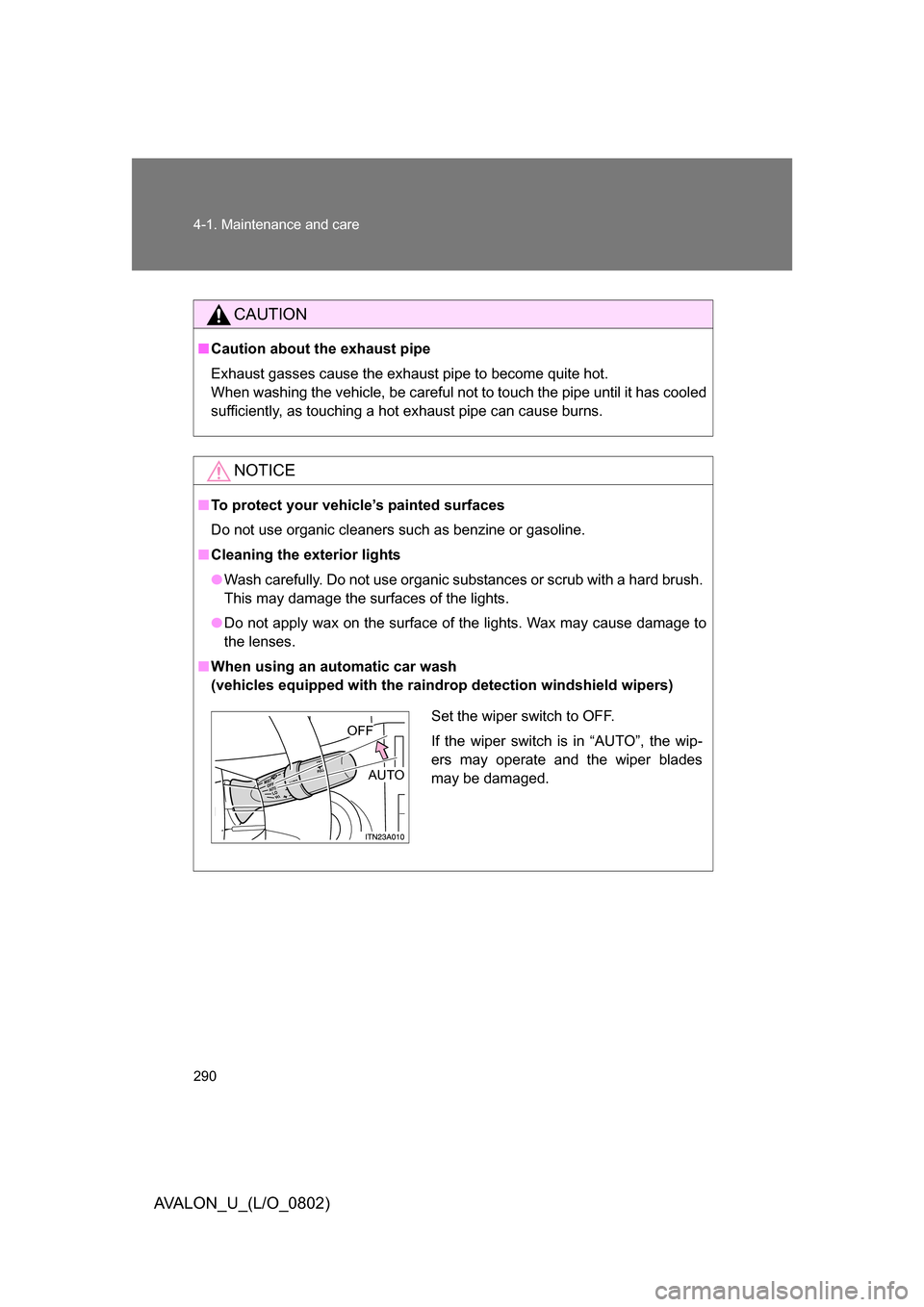
■ When using an automatic car wash
(vehicles equipped with the raindrop detection windshield wipers)
Set the wiper switch to OFF.
If the wiper switch is in “AUTO”, the wip-
ers may operate and the wiper blades
may be damaged. OFF
AUTO
Page 297 of 452
297
4-2. Maintenance
4
Maintenance and care
AVALON_U_(L/O_0802)
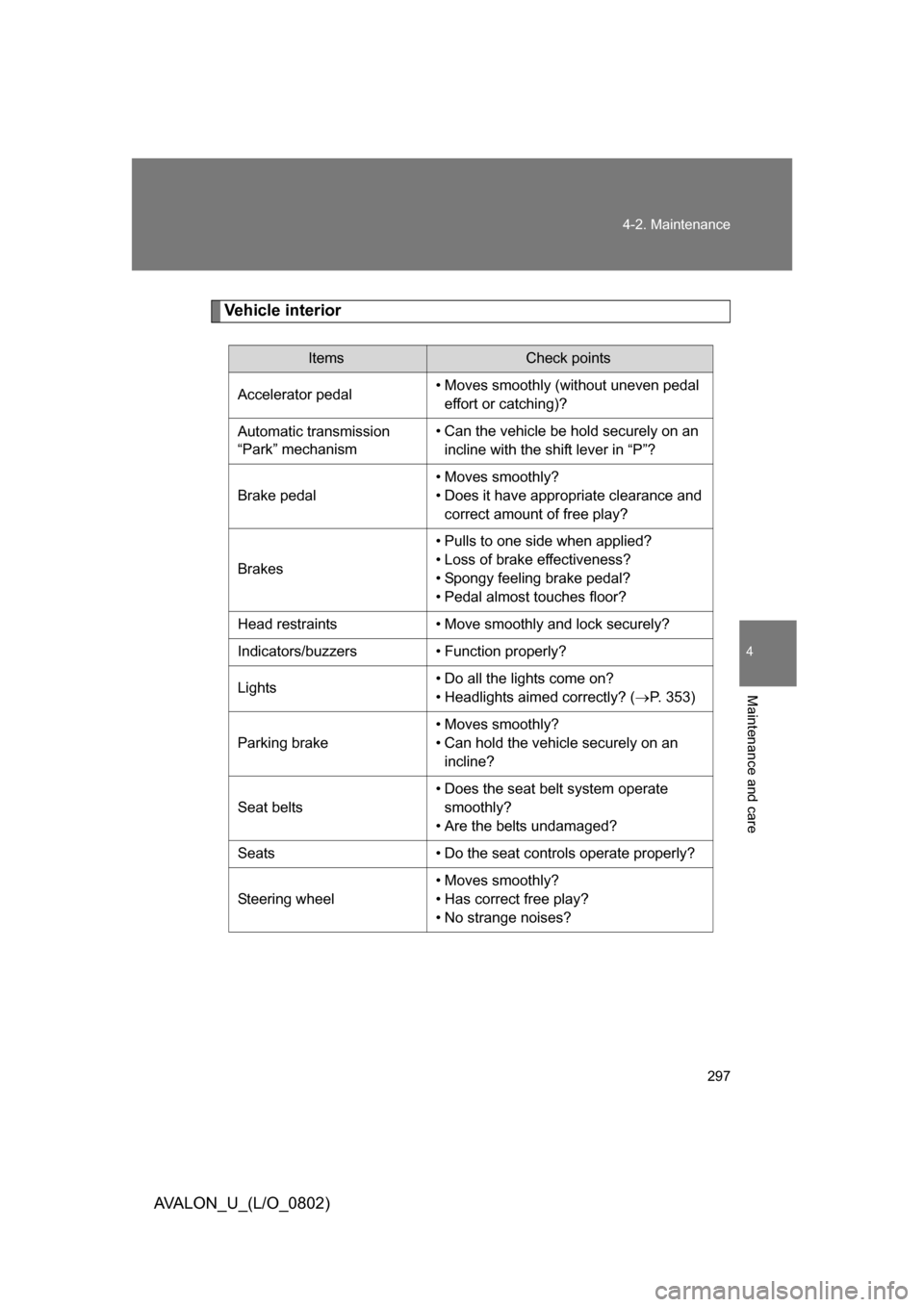
Vehicle interior
ItemsCheck points
Accelerator pedal • Moves smoothly (without uneven pedal
effort or catching)?
Automatic transmission
“Park” mechanism • Can the vehicle be hold securely on an
incline with the shift lever in “P”?
Brake pedal • Moves smoothly?
• Does it have appropriate clearance and
correct amount of free play?
Brakes • Pulls to one side when applied?
• Loss of brake effectiveness?
• Spongy feeling brake pedal?
• Pedal almost touches floor?
Head restraints • Move smoothly and lock securely?
Indicators/buzzers • Function properly?
Lights • Do all the lights come on?
• Headlights aimed correctly? (
P. 353)
Parking brake • Moves smoothly?
• Can hold the vehicle securely on an
incline?
Seat belts • Does the seat belt system operate
smoothly?
• Are the belts undamaged?
Seats • Do the seat controls operate properly?
Steering wheel • Moves smoothly?
• Has correct free play?
• No strange noises?