cruise TOYOTA AVENSIS 2017 Owners Manual (in English)
[x] Cancel search | Manufacturer: TOYOTA, Model Year: 2017, Model line: AVENSIS, Model: TOYOTA AVENSIS 2017Pages: 661, PDF Size: 39.92 MB
Page 3 of 661
3
1
8 6 5
4
3
2
AVENSIS_OM_OM20C66E_(EE)
9
7
3-4. Adjusting the steering wheel and mirrors
Steering wheel ...................174
Inside rear view mirror .......176
Outside rear view mirrors .............................179
3-5. Opening and closing the windows
Power windows ..................182
4-1. Before driving Driving the vehicle .............186
Cargo and luggage ............198
Trailer towing .....................200
4-2. Driving procedures Engine (ignition) switch (vehicles without smart
entry & start system)........209
Engine (ignition) switch (vehicles with smart
entry & start system)........212
Multidrive ...........................219
Manual transmission ..........226
Turn signal lever ................229
Parking brake.....................230
4-3. Operating the lights and wipers
Headlight switch.................233
Fog light switch ..................241
Windshield wipers and washer .............................243
Rear window wiper and washer .............................247 4-4. Refueling
Opening the fuel tank cap .......................... 248
4-5. Toyota Safety Sense Toyota Safety Sense ......... 252
PCS (Pre-Crash Safety system) ........................... 259
LDA (Lane Departure Alert) ............................... 272
Automatic High Beam ....... 278
RSA (Road Sign Assist) .... 284
4-6. Using the driving support systems
Cruise control .................... 289
Speed limiter ..................... 292
Stop & Start system .......... 295
Driving assist systems....... 306
4-7. Driving tips Winter driving tips.............. 312
4Driving
AVENSIS_OM_OM20C66E_(EE).book Page 3 Wednesday, June 15, 2016 4:07 PM
Page 8 of 661
8
AVENSIS_OM_OM20C66E_(EE)
For your infor mation
Please note that this manual applies to all models and all equipment, includ-
ing options. Therefore, you may find some explanations for equipment not
installed on your vehicle.
All specifications provided in this manual are current at the time of printing.
However, because of the Toyota policy of continual product improvement, we
reserve the right to make changes at any time without notice.
Depending on specifications, the vehicle shown in the illustrations may differ
from your vehicle in terms of equipment.
Both genuine Toyota and a wide variety of other spare parts and accessories
for Toyota vehicles are currently available on the market. Should it be deter-
mined that any of the genuine Toyota parts or accessories supplied with the
vehicle need to be replaced, Toyota recommends that genuine Toyota parts
or accessories, be used to replace them. Other parts or accessories of
matching quality can also be used. Toyota cannot accept any liability or guar-
antee spare parts and accessories which are not genuine Toyota products,
nor for replacement or installation involving such parts. In addition, damage
or performance problems resulting from the use of non-genuine Toyota spare
parts or accessories may not be covered under warranty.
The installation of an RF-transmitter system in your vehicle could affect elec-
tronic systems such as:
● Multiport fuel injection system/sequential multiport fuel injection system
● Cruise control system (if equipped)
● Anti-lock brake system
● SRS airbag system
● Seat belt pretensioner system
● Toyota Safety Sense (if equipped)
Be sure to check with any authorized Toyota dealer or repairer, or another
duly qualified and equipped professional fo r precautionary measures or spe-
cial instructions regarding installa tion of an RF-transmitter system.
Further information regarding frequency bands, power levels, antenna posi-
tions and installation provisions for the installation of RF-transmitters, is avail-
able on request at any authorized Toyota dealer or repairer, or another duly
qualified and equipped professional.
Main Owner’s Manual
Accessories, spare parts and modification of your Toyota
Installation of an RF-transmitter system
AVENSIS_OM_OM20C66E_(EE).book Page 8 Wednesday, June 15, 2016 4:07 PM
Page 19 of 661
19Pictorial index
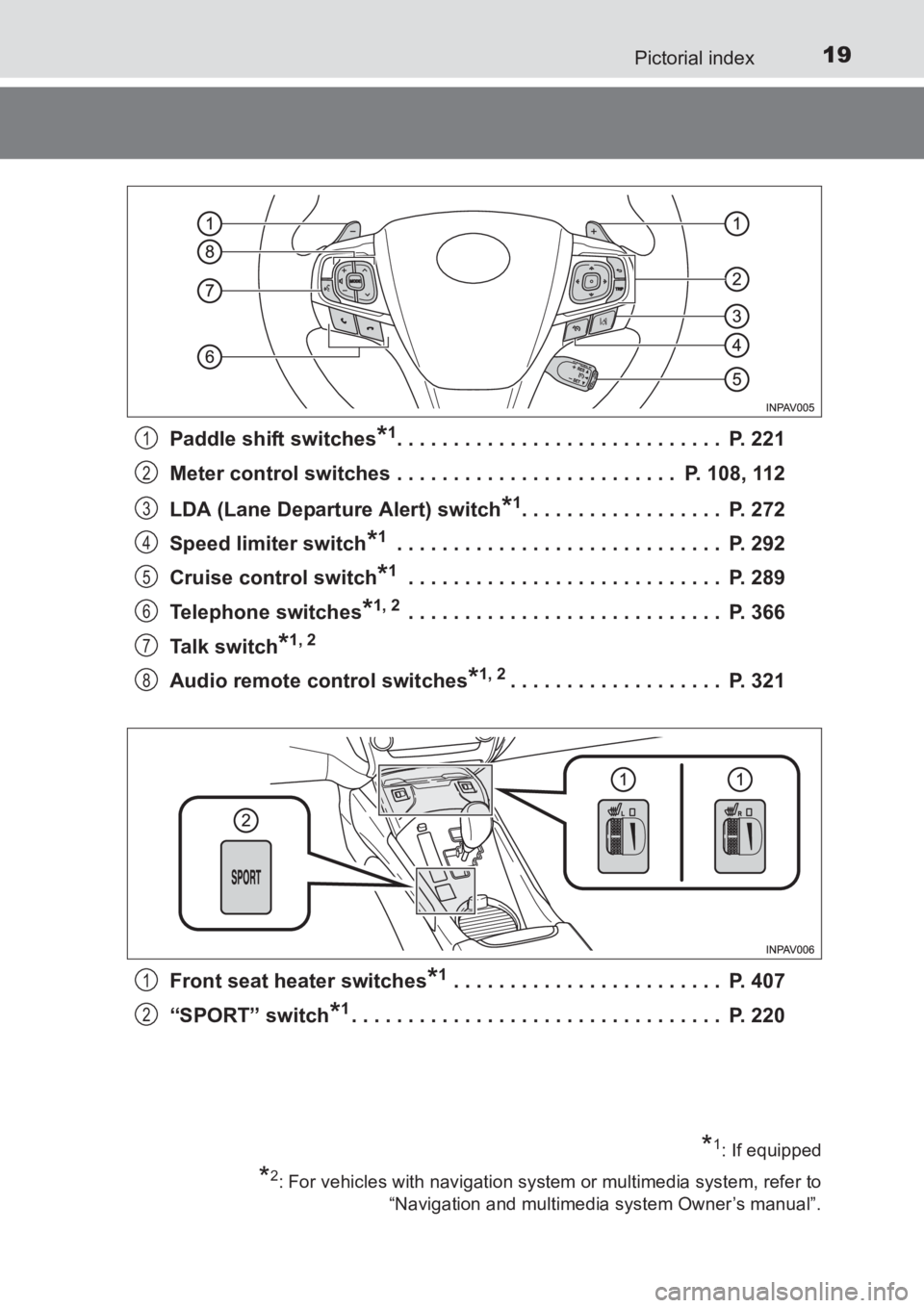
AVENSIS_OM_OM20C66E_(EE)Paddle shift switches
*1. . . . . . . . . . . . . . . . . . . . . . . . . . . . . P. 221
Meter control switches . . . . . . . . . . . . . . . . . . . . . . . . . P. 108, 112
LDA (Lane Departure Alert) switch
*1. . . . . . . . . . . . . . . . . . P. 272
Speed limiter switch
*1 . . . . . . . . . . . . . . . . . . . . . . . . . . . . . P. 292
Cruise control switch
*1 . . . . . . . . . . . . . . . . . . . . . . . . . . . . P. 289
Telephone switches
*1, 2 . . . . . . . . . . . . . . . . . . . . . . . . . . . . P. 366
Talk switch
*1, 2
Audio remote control switches*1, 2. . . . . . . . . . . . . . . . . . . P. 321
Front seat heater switches
*1 . . . . . . . . . . . . . . . . . . . . . . . . P. 407
“SPORT” switch
*1. . . . . . . . . . . . . . . . . . . . . . . . . . . . . . . . . P. 220
1
2
3
4
5
6
7
8
*1: If equipped
*2: For vehicles with navigation system or multimedia system, refer to “Navigation and multimedia system Owner’s manual”.
1
2
AVENSIS_OM_OM20C66E_(EE).book Page 19 Wednesday, June 15, 201 6 4:07 PM
Page 25 of 661
25Pictorial index
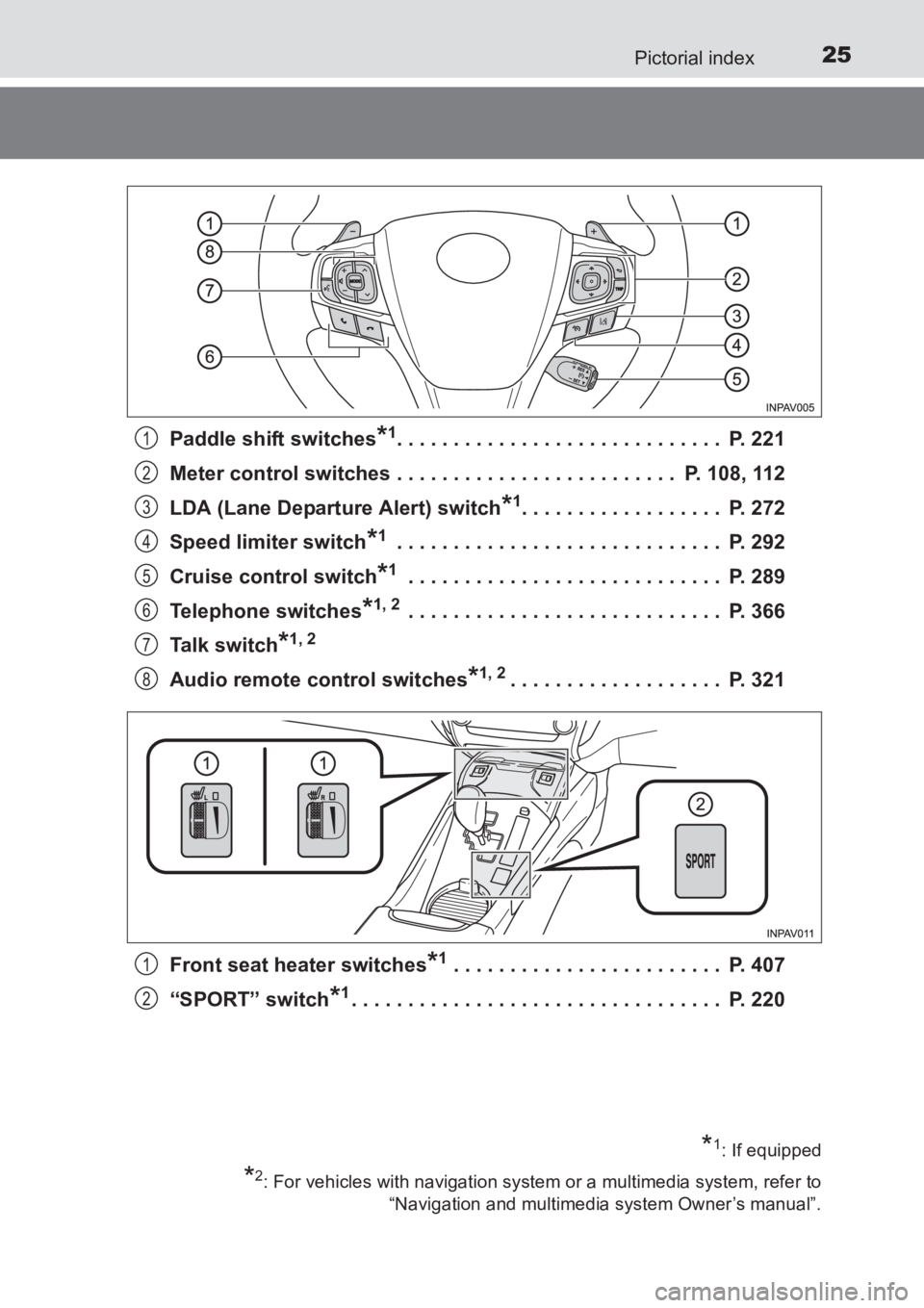
AVENSIS_OM_OM20C66E_(EE)Paddle shift switches
*1. . . . . . . . . . . . . . . . . . . . . . . . . . . . . P. 221
Meter control switches . . . . . . . . . . . . . . . . . . . . . . . . . P. 108, 112
LDA (Lane Departure Alert) switch
*1. . . . . . . . . . . . . . . . . . P. 272
Speed limiter switch
*1 . . . . . . . . . . . . . . . . . . . . . . . . . . . . . P. 292
Cruise control switch
*1 . . . . . . . . . . . . . . . . . . . . . . . . . . . . P. 289
Telephone switches
*1, 2 . . . . . . . . . . . . . . . . . . . . . . . . . . . . P. 366
Talk switch
*1, 2
Audio remote control switches*1, 2. . . . . . . . . . . . . . . . . . . P. 321
Front seat heater switches
*1 . . . . . . . . . . . . . . . . . . . . . . . . P. 407
“SPORT” switch
*1. . . . . . . . . . . . . . . . . . . . . . . . . . . . . . . . . P. 220
1
2
3
4
5
6
7
8
*1: If equipped
*2: For vehicles with navigation system or a multimedia system, refer to “Navigation and multimedia system Owner’s manual”.
1
2
AVENSIS_OM_OM20C66E_(EE).book Page 25 Wednesday, June 15, 201 6 4:07 PM
Page 101 of 661
1012. Instrument cluster
2
Instrument cluster
AVENSIS_OM_OM20C66E_(EE)
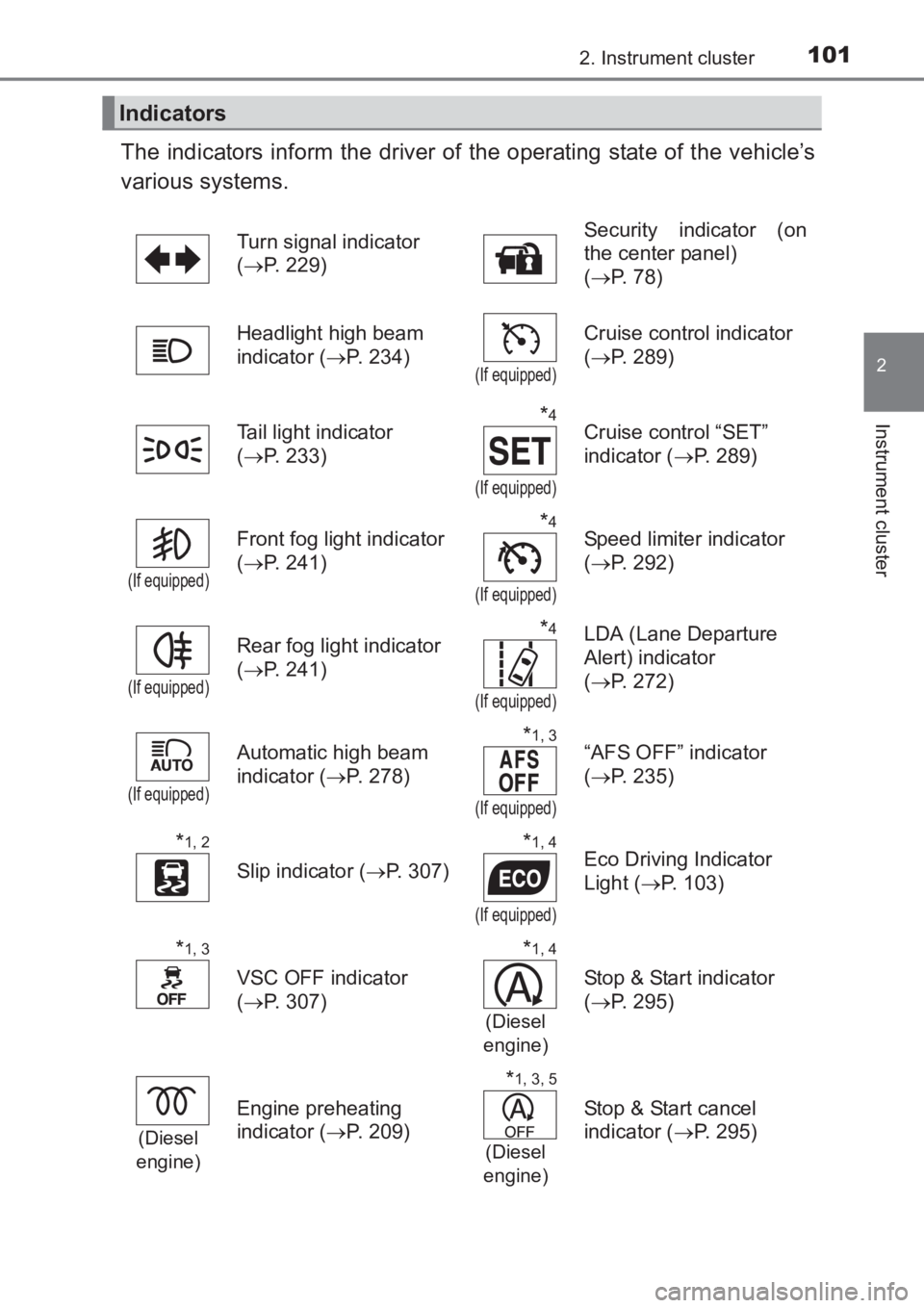
The indicators inform the driver of the operating state of the vehicle’s
various systems.
Indicators
Turn signal indicator
(→ P. 229) Security indicator (on
the center panel)
(
→ P. 78)
Headlight high beam
indicator ( →P. 234)
(If equipped)
Cruise control indicator
(→ P. 289)
Tail light indicator
( → P. 233)
*4
(If equipped)
Cruise control “SET”
indicator ( →P. 289)
(If equipped)
Front fog light indicator
(→ P. 241)*4
(If equipped)
Speed limiter indicator
(→ P. 292)
(If equipped)
Rear fog light indicator
(→ P. 241)*4
(If equipped)
LDA (Lane Departure
Alert) indicator
(→ P. 272)
(If equipped)
Automatic high beam
indicator ( →P. 278)*1, 3
(If equipped)
“AFS OFF” indicator
(→ P. 235)
*1, 2
Slip indicator ( →P. 307)
*1, 4
(If equipped)
Eco Driving Indicator
Light ( →P. 103)
*1, 3
VSC OFF indicator
(→ P. 307)
*1, 4
(Diesel
engine)
Stop & Start indicator
( → P. 295)
(Diesel
engine)
Engine preheating
indicator ( →P. 209)
*1, 3, 5
(Diesel
engine)
Stop & Start cancel
indicator ( →P. 295)
AVENSIS_OM_OM20C66E_(EE).book Page 101 Wednesday, June 15, 20 16 4:07 PM
Page 185 of 661
185
4Driving
AVENSIS_OM_OM20C66E_(EE)4-1. Before driving
Driving the vehicle ............. 186
Cargo and luggage ............ 198
Trailer towing ..................... 200
4-2. Driving procedures Engine (ignition) switch (vehicles without smart
entry & start system)........ 209
Engine (ignition) switch (vehicles with smart
entry & start system)........ 212
Multidrive ........................... 219
Manual transmission.......... 226
Turn signal lever ................ 229
Parking brake .................... 230
4-3. Operating the lights and wipers
Headlight switch ................ 233
Fog light switch .................. 241
Windshield wipers and washer ............................. 243
Rear window wiper and washer ............................. 247 4-4. Refueling
Opening the fuel tank cap ........................... 248
4-5. Toyota Safety Sense Toyota Safety Sense ......... 252
PCS (Pre-Crash Safety system) ............................ 259
LDA (Lane Departure Alert) ................................ 272
Automatic High Beam ........ 278
RSA (Road Sign Assist)..... 284
4-6. Using the driving support systems
Cruise control..................... 289
Speed limiter ......................292
Stop & Start system ........... 295
Driving assist systems ....... 306
4-7. Driving tips Winter driving tips .............. 312
AVENSIS_OM_OM20C66E_(EE).book Page 185 Wednesday, June 15, 20 16 4:07 PM
Page 208 of 661
2084-1. Before driving
AVENSIS_OM_OM20C66E_(EE)
WARNING
Follow all the instructions described in this section. Failure to do so could
cause an accident resulting in death or serious injury.
■ Trailer towing precautions
When towing, make sure that none of the weight limits are exceeded.
(→ P. 201)
■ To avoid accident or injury
●Do not tow a trailer when the temporary spare tire is installed on your vehi-
cle.
● Do not tow a trailer when the tire installed is repaired with the emergency
tire puncture repair kit.
● Do not use cruise control (if equipped) when trailer towing.
■ Vehicle speed in towing
Observe the legal maximum speeds for trailer towing.
■ Before descending hills or long declines
Reduce speed and downshift. However, never downshift suddenly while
descending steep or long downhill grades.
■ Operation of the brake pedal
Do not hold the brake pedal depressed often or for long periods of time.
Doing so may result in the brake overheating or reduce braking effects.
AVENSIS_OM_OM20C66E_(EE).book Page 208 Wednesday, June 15, 20 16 4:07 PM
Page 223 of 661
2234-2. Driving procedures
4
Driving
AVENSIS_OM_OM20C66E_(EE)
■When the vehicle comes to a stop with the shift lever in the M position
● The transmission will automatically downshift to M1 once the vehicle is
stopped.
● After a stop, the vehicle will start off in M1.
● When the vehicle is stopped, the transmission is set at M1.
■ Paddle shift switch (if equipped)
●When the paddle shift switch is operated with the shift lever in the D posi-
tion, a gear step will be automatically selected according to the vehicle
speed and driving conditions.
● Automatic deactivation of gear step selection with the shift lever in the D
position
Gear step selection in the D position wi ll be deactivated in the following situ-
ations:
• When the vehicle comes to a stop
• If the accelerator pedal is depressed for longer than a certain period of time in one gear step
• When the shift lever is shifted to a position other than D
■ Downshifting restrictions warning buzzer
To help ensure safety and driving performance, downshifting operation may
sometimes be restricted. In some circumstances, downshifting may not be
possible even when the shift lever or paddle shift switch (if equipped) is oper-
ated. (The warning buzzer will sound twice.)
■ When driving with cruise cont rol activated (if equipped)
Even when performing the following actions with the intent of enabling engine
braking, engine braking will not activate because cruise control will not be
canceled.
● While driving in D or 7-speed sport sequential shiftmatic mode, downshifting
to 6, 5 or 4. ( →P. 289)
● When switching the driving mode to sport mode while driving in D position.
(→ P. 221)
■ Automatic deactivation of sport mode
If the engine switch is turned to the “LOCK” position (vehicles without smart
entry & start system) or off (vehicles with smart entry & start system) after
driving in sport mode, the mode is automatically deactivated.
■ Shift lock system
The shift lock system is a system to prevent accidental operation of the shift
lever in starting.
The shift lever can be shifted from P only when the engine switch is in the
“ON” position (vehicles without smart entry & start system) or ON mode (vehi-
cles with smart entry & start system) and the brake pedal is being depressed.
AVENSIS_OM_OM20C66E_(EE).book Page 223 Wednesday, June 15, 20 16 4:07 PM
Page 289 of 661
289
4
4-6. Using the driving support systems
Driving
AVENSIS_OM_OM20C66E_(EE)
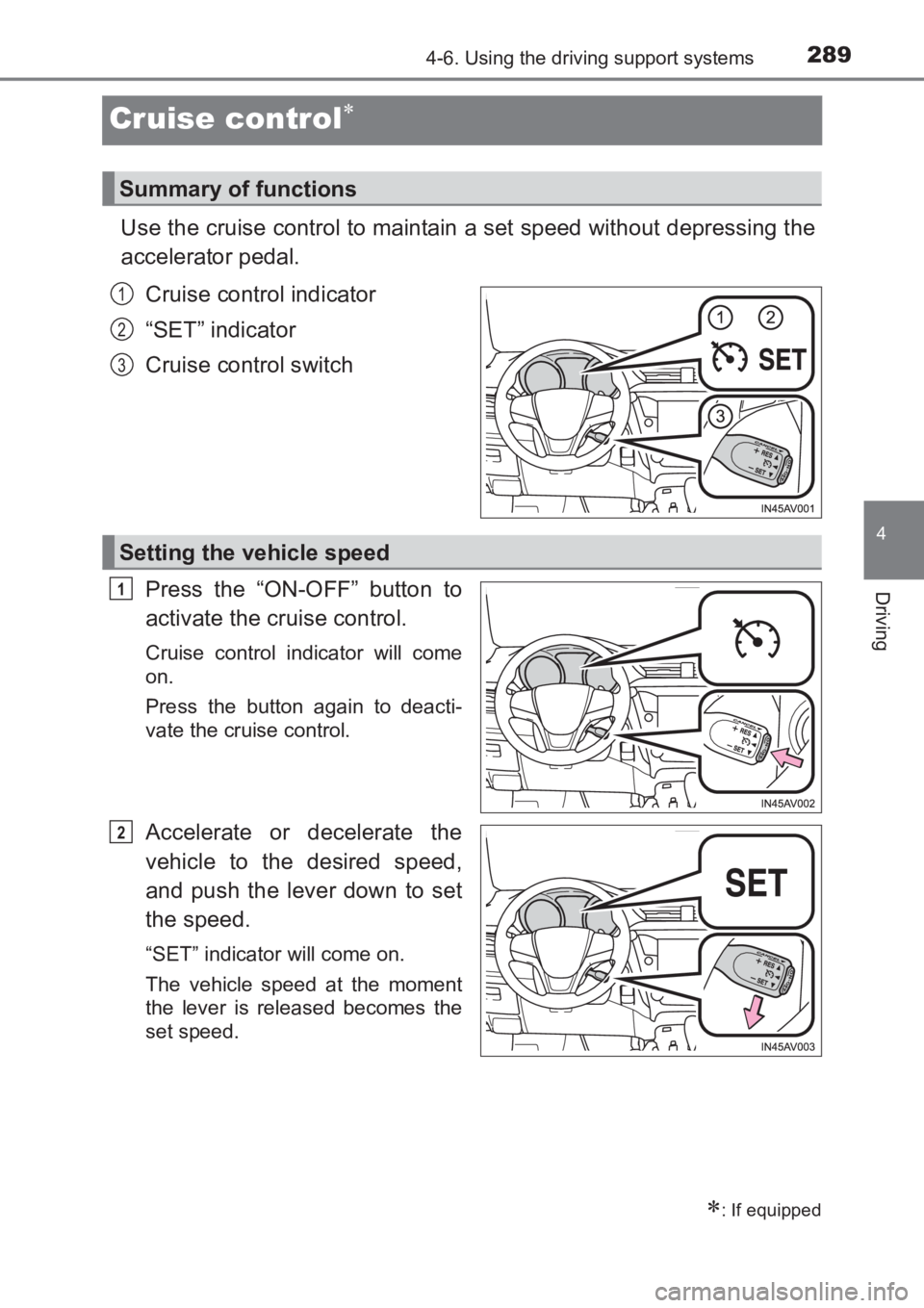
Cruise control∗
Use the cruise control to maintain a set speed without depressing the
accelerator pedal.Cruise control indicator
“SET” indicator
Cruise control switch
Press the “ON-OFF” button to
activate the cruise control.
Cruise control indicator will come
on.
Press the button again to deacti-
vate the cruise control.
Accelerate or decelerate the
vehicle to the desired speed,
and push the lever down to set
the speed.
“SET” indicator will come on.
The vehicle speed at the moment
the lever is released becomes the
set speed.
∗: If equipped
Summary of functions
1
2
3
Setting the vehicle speed
1
2
AVENSIS_OM_OM20C66E_(EE).book Page 289 Wednesday, June 15, 20 16 4:07 PM
Page 290 of 661
2904-6. Using the driving support systems
AVENSIS_OM_OM20C66E_(EE)
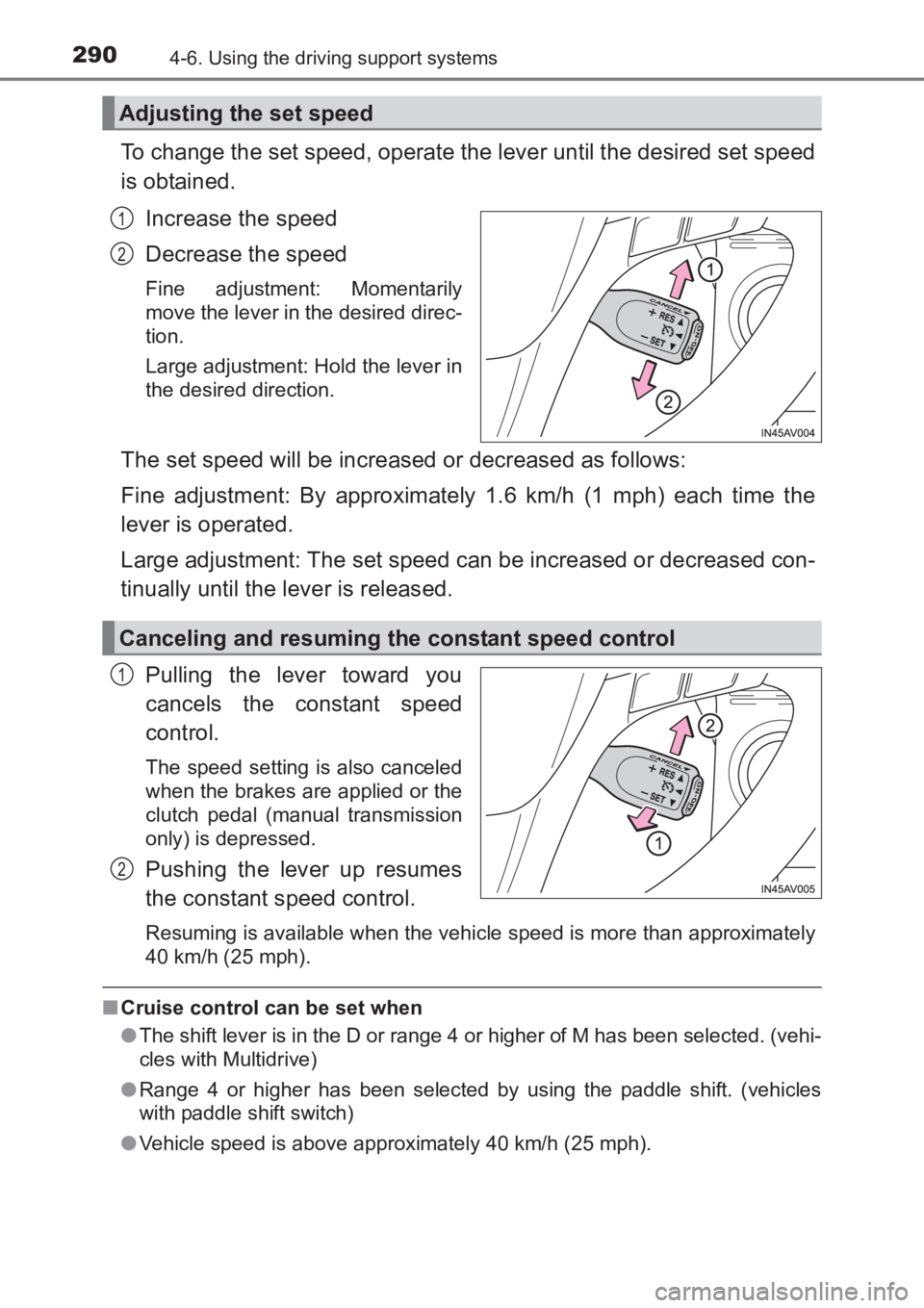
To change the set speed, operate the lever until the desired set speed
is obtained.Increase the speed
Decrease the speed
Fine adjustment: Momentarily
move the lever in the desired direc-
tion.
Large adjustment: Hold the lever in
the desired direction.
The set speed will be increased or decreased as follows:
Fine adjustment: By approximately 1.6 km/h (1 mph) each time the
lever is operated.
Large adjustment: The set speed can be increased or decreased con-
tinually until the lever is released.
Pulling the lever toward you
cancels the constant speed
control.
The speed setting is also canceled
when the brakes are applied or the
clutch pedal (manual transmission
only) is depressed.
Pushing the lever up resumes
the constant speed control.
Resuming is available when the vehicle speed is more than approximately
40 km/h (25 mph).
■Cruise control can be set when
●The shift lever is in the D or range 4 or higher of M has been selected. (vehi-
cles with Multidrive)
● Range 4 or higher has been selected by using the paddle shift. (vehicles
with paddle shift switch)
● Vehicle speed is above approximately 40 km/h (25 mph).
Adjusting the set speed
1
2
Canceling and resuming the constant speed control
1
2
AVENSIS_OM_OM20C66E_(EE).book Page 290 Wednesday, June 15, 20 16 4:07 PM