USB TOYOTA AYGO 2013 Owners Manual (in English)
[x] Cancel search | Manufacturer: TOYOTA, Model Year: 2013, Model line: AYGO, Model: TOYOTA AYGO 2013Pages: 372, PDF Size: 14.28 MB
Page 3 of 372
1
2
3
4
5
6
AYGO_WE_99G80E
3
2-3. Operating the lights and
wipers
Headlight switch.................. 144
Fog light switch ................... 148
Windshield wiper and
washer .............................. 150
Rear window wiper and
washer .............................. 152
2-4. Using other driving systems
Driving assist systems ........ 154
2-5. Driving information
Cargo and luggage ............. 157
Winter driving tips ............... 159
Trailer towing ...................... 163
3-1. Using the air conditioning
system and defogger
Air conditioning system ....... 166
Rear window defogger ........ 174
3-2. Using the audio system
(Type A)
Audio system types............. 175
Using the radio.................... 177
Using the CD player............ 181
Optimal use of the audio
system .............................. 187
Using the AUX port ............. 1893-3. Using the audio system
(Type B)
Audio system types ............ 190
Using the radio ................... 192
Using the CD player ........... 196
Operating a USB memory/
iPod .................................. 202
Using the AUX port ............ 208
Using the Bluetooth
® audio
streaming ......................... 209
Using the telephone ........... 212
Audio settings..................... 220
Configuration ...................... 222
Frequently asked
questions.......................... 224
3-4. Using the interior lights
Interior lights list ................. 228
• Interior light ...................... 228
3-5. Using the storage features
List of storage features....... 229
• Cup holders...................... 230
3-6. Other interior features
Sun visors .......................... 231
Vanity mirrors ..................... 232
Clock .................................. 233
Power outlet ....................... 236
Floor mat ............................ 237
Luggage compartment
features ............................ 239
3Interior features
Page 15 of 372
AYGO_WE_99G80E
15
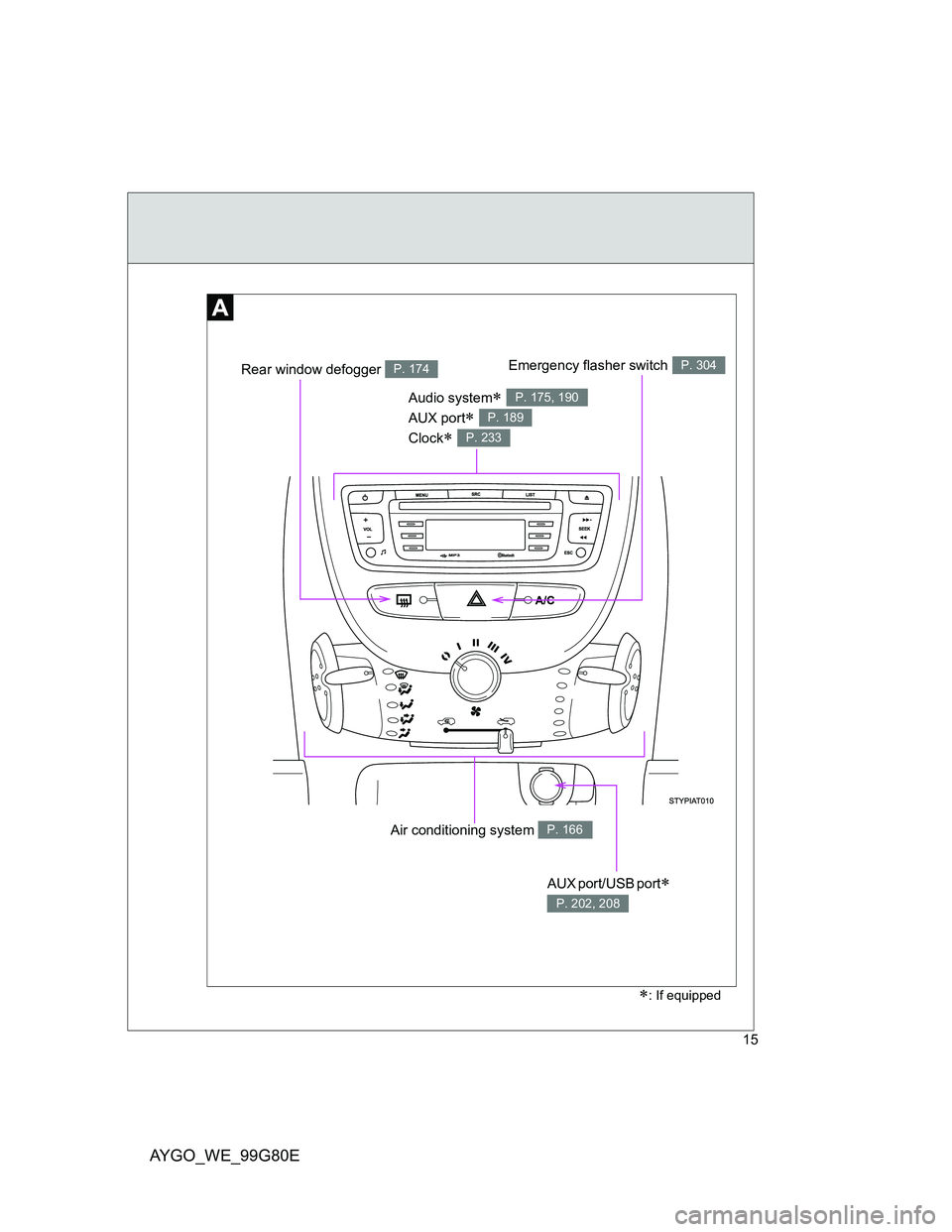
Air conditioning system P. 166
Audio system
AUX port
Clock
P. 175, 190
P. 189
P. 233
AUX port/USB port
P. 202, 208
: If equipped
Emergency flasher switchP. 304Rear window defogger P. 174
Page 24 of 372
AYGO_WE_99G80E
24
Pictorial indexInstrument panel
(Right-hand drive vehicles)
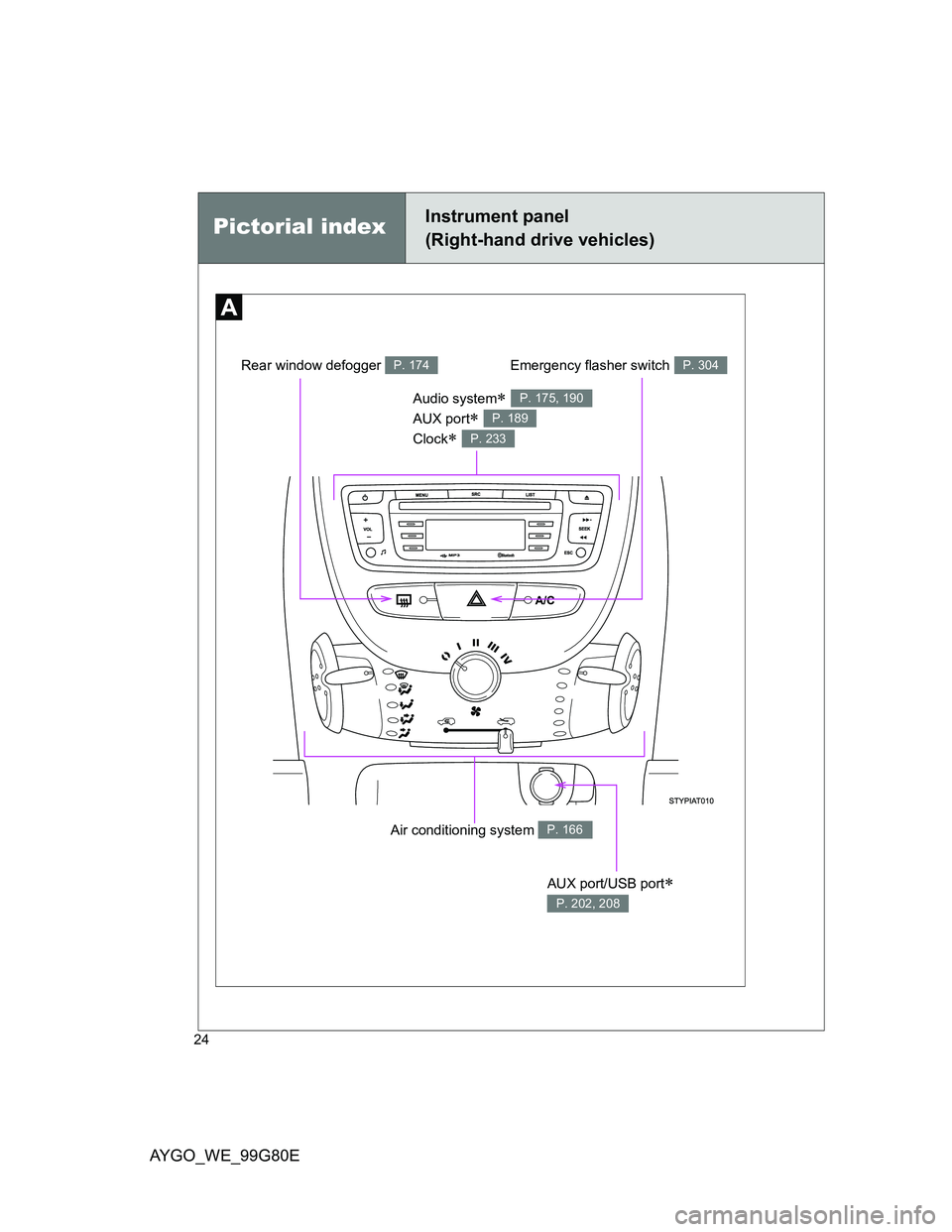
Air conditioning system P. 166
Audio system
AUX port
Clock
P. 175, 190
P. 189
P. 233
AUX port/USB port
P. 202, 208
Emergency flasher switchP. 304Rear window defogger P. 174
Page 165 of 372
3Interior features
165
AYGO_WE_99G80E
3-1. Using the air conditioning
system and defogger
Air conditioning system..... 166
Rear window defogger...... 174
3-2. Using the audio system
(Type A)
Audio system types .......... 175
Using the radio ................. 177
Using the CD player ......... 181
Optimal use of the audio
system ............................ 187
Using the AUX port ........... 189
3-3. Using the audio system
(Type B)
Audio system types .......... 190
Using the radio ................. 192
Using the CD player ......... 196
Operating a USB memory/
iPod ................................ 202
Using the AUX port ........... 208
Using the Bluetooth
® audio
streaming ........................ 209
Using the telephone.......... 212
Audio settings ................... 220
Configuration .................... 222
Frequently asked
questions ........................ 2243-4. Using the interior lights
Interior lights list ................ 228
• Interior light ..................... 228
3-5. Using the storage features
List of storage features ..... 229
• Cup holders .................... 230
3-6. Other interior features
Sun visors ......................... 231
Vanity mirrors.................... 232
Clock ................................. 233
Power outlet ...................... 236
Floor mat........................... 237
Luggage compartment
features........................... 239
Page 190 of 372
190
AYGO_WE_99G80E
3-3. Using the audio system (Type B)
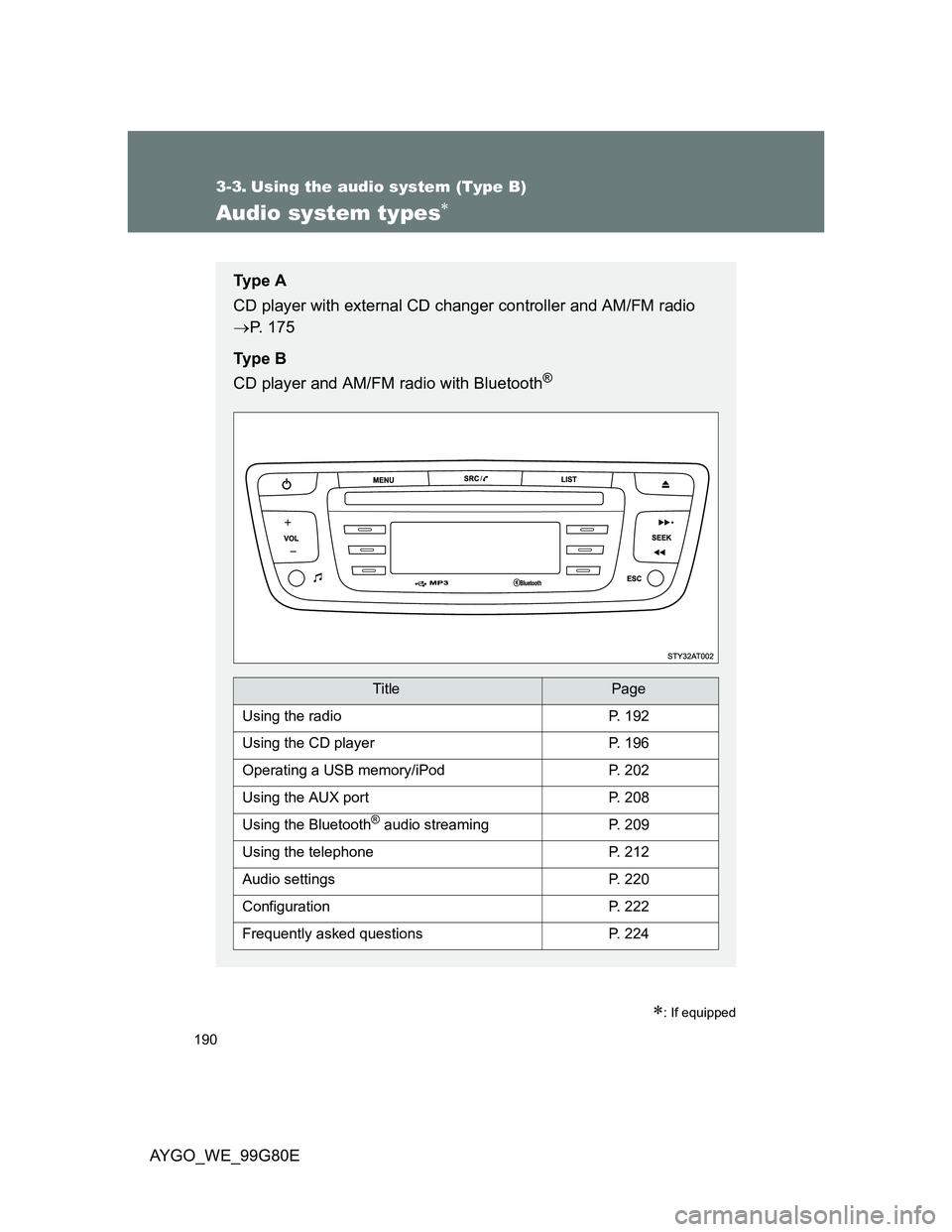
Audio system types
: If equipped
Ty p e A
CD player with external CD changer controller and AM/FM radio
P. 175
Ty p e B
CD player and AM/FM radio with Bluetooth
®
TitlePage
Using the radioP. 192
Using the CD playerP. 196
Operating a USB memory/iPodP. 202
Using the AUX portP. 208
Using the Bluetooth® audio streamingP. 209
Using the telephoneP. 212
Audio settingsP. 220
ConfigurationP. 222
Frequently asked questionsP. 224
Page 194 of 372
194 3-3. Using the audio system (Type B)
AYGO_WE_99G80E
Selecting a play mode
Press the “MENU” button.
Press (Radio).
Press one of to select.
“TA”: The TA (Traffic Announcement) function gives
priority to TA alert messages. To operate, this
function needs good reception of a radio station
transmitting this type of message. When a traffic
report is transmitted, the current audio source
(Radio, CD, USB, etc.) is interrupted automati-
cally to play the TA message. Normal playback
of the audio source resumes at the end of the
transmission of the message.
“RDS”: RDS, if displayed, enables you to continue lis-
tening to the same station by automatically
retuning to alternative frequencies. However, in
certain conditions, coverage of an RDS station
may not be assured throughout the country as
radio stations do not cover 100% of the territory.
This explains the loss of reception of the station
during a journey.
“TXT”: Radio text is information transmitted by the radio
station related to the current program or song.
“Write freq.”: Enter a frequency manually.
Press (+ or -) to select the desired fre-
quency.
Press (OK) to save the setting.
Page 202 of 372
202
3-3. Using the audio system (Type B)
AYGO_WE_99G80E
Operating a USB memor y/iPod
: If equipped
Connecting a USB memory/iPod enables you to enjoy music
from the vehicle speakers.
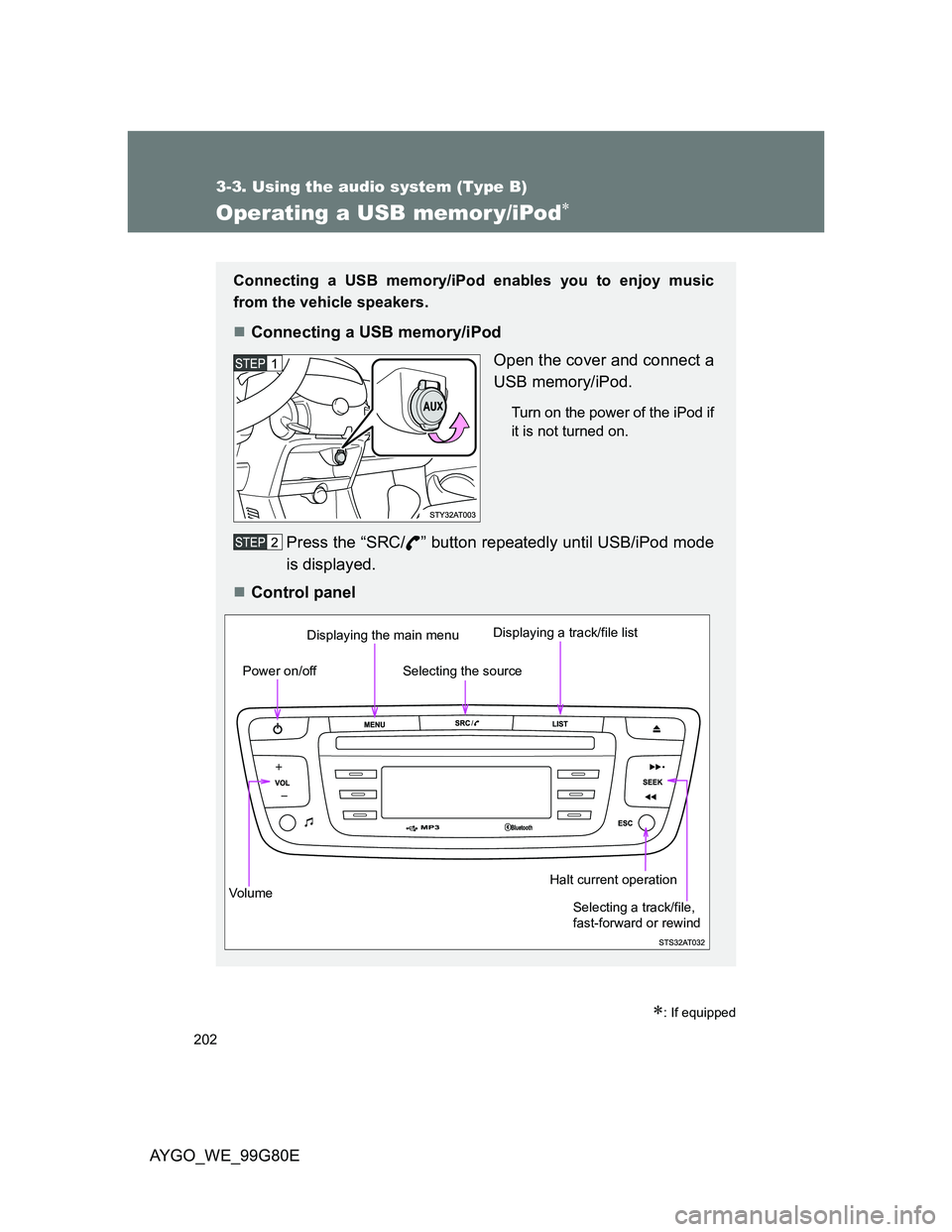
Connecting a USB memory/iPod
Open the cover and connect a
USB memory/iPod.
Turn on the power of the iPod if
it is not turned on.
Press the “SRC/ ” button repeatedly until USB/iPod mode
is displayed.
Control panel
Vo lu m eDisplaying the main menu
Power on/offDisplaying a track/file listHalt current operation
Selecting the source
Selecting a track/file,
fast-forward or rewind
Page 205 of 372
205 3-3. Using the audio system (Type B)
3
Interior features
AYGO_WE_99G80E
USB memory functions
Depending on the USB memory that is connected to the system, the
device itself may not be operable and certain functions may not be avail-
able. If the device is inoperable or a function is unavailable due to a mal-
function (as opposed to a system specification), disconnecting the device
and reconnecting it once again may resolve the problem.
If the USB memory still does not begin operation after being discon-
nected and reconnected, format the memory.
The system creates playlists (temporary memory), the creation time for
which this can take, can be from a few seconds to several minutes. The
playlists are updated every time the ignition is switched off or a USB
memory stick is connected. Play starts automatically after a period, which
depends on the capacity of the USB memory stick.
At a first connection, the order suggested is by folder. When connecting
again, the order previously chosen is retained.
USB memory
Compatible devices
The audio system will only play files with “.mp3”, “.wma”, “.wav” and “.ogg”
extension.
A high compression rate can adversely affect sound quality.
Playlists
The types of playlists that are accepted: “.m3u” and “.wpl”.
The number of files recognized is limited to 5000 in 500 folders on a maxi-
mum of 8 levels.
About iPod
Apple is not responsible for the operation of this device or its compliance
with safety and regulatory standards.
iPod is a trademark of Apple Inc., registered in the U.S. and other coun-
tries.
Page 206 of 372
206 3-3. Using the audio system (Type B)
AYGO_WE_99G80E
iPod functions
When an iPod is connected and the audio source is changed to iPod
mode, the iPod will resume play from the same point in which it was last
used.
Depending on the iPod that is connected to the system, certain functions
may not be available. If a function is unavailable due to a malfunction (as
opposed to a system specification), disconnecting the device and recon-
necting it once again may resolve the problem.
While connected to the system, the iPod cannot be operated with its own
controls. It is necessary to use the controls of the vehicle’s audio system
instead.
The playlists are those defined in the iPod.
iPod problems
To resolve most problems encountered when using your iPod, discon-
nect your iPod from the vehicle iPod connection and reset it. For instruc-
tions on how to reset your iPod, refer to your iPod Owner’s Manual.
The iPod must be updated regularly for the best connection.
Compatible models
The iPod must be generation 3 or later.
CAUTION
Caution while driving
Do not connect USB memory/iPod or operate the controls.
Page 207 of 372
207 3-3. Using the audio system (Type B)
3
Interior features
AYGO_WE_99G80E
NOTICE
To prevent damage
Do not leave USB memory/iPod in the vehicle. The temperature inside the
vehicle may become high, resulting in damage to the player.
Do not push down on or apply unnecessary pressure to the USB memory/
iPod while it is connected as this may damage the USB memory/iPod or its
terminal.
Do not insert foreign objects into the port as this may damage the USB
memory/iPod or its terminal.
Do not connect a hard disk or USB device other than audio players to the
USB port. This may cause damage to your installation.