buttons TOYOTA AYGO 2017 Owners Manual (in English)
[x] Cancel search | Manufacturer: TOYOTA, Model Year: 2017, Model line: AYGO, Model: TOYOTA AYGO 2017Pages: 480, PDF Size: 40.72 MB
Page 16 of 480
16Pictorial index
AYGO_OM_Europe_OM99Q24E
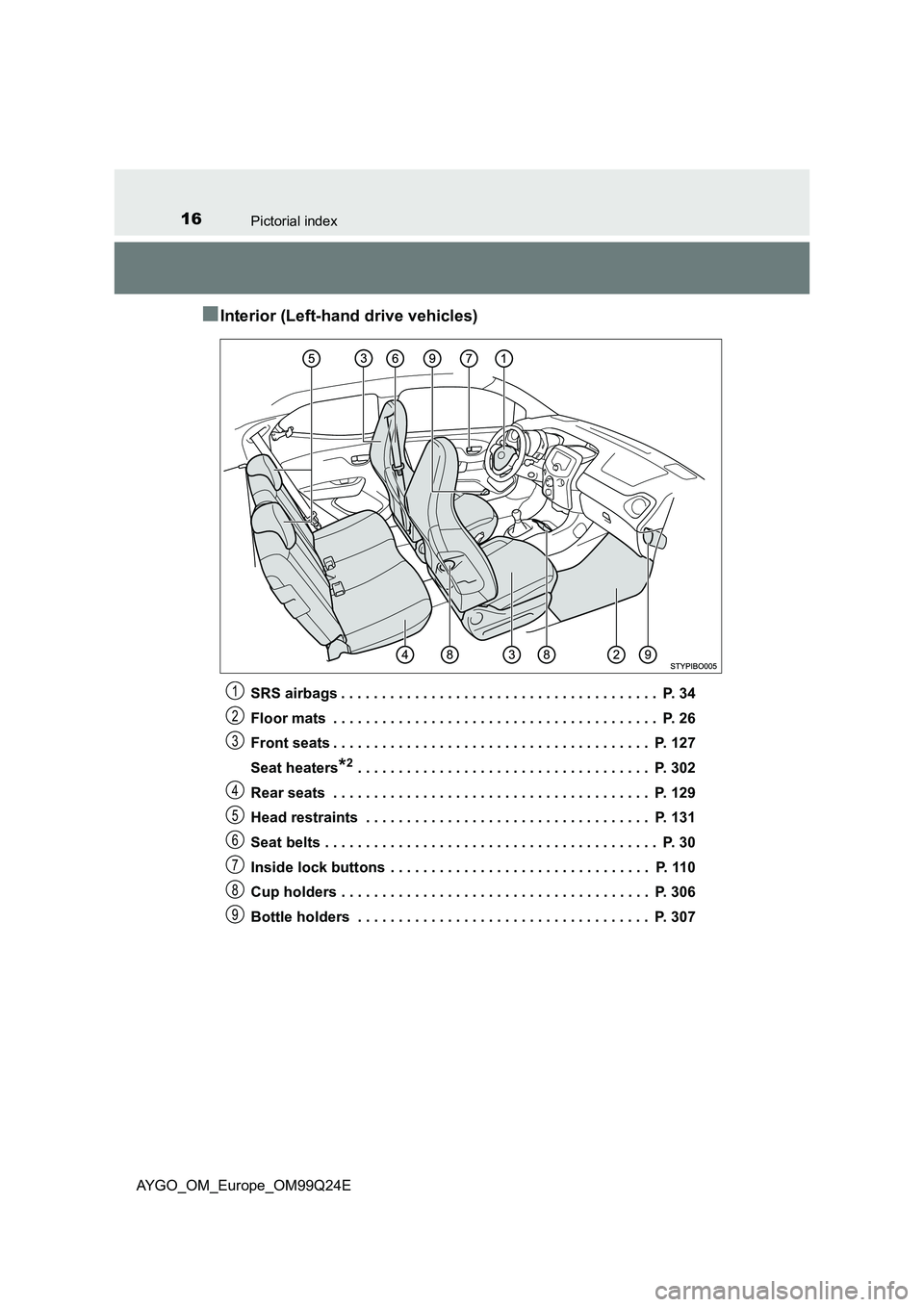
■Interior (Left-hand drive vehicles)
SRS airbags . . . . . . . . . . . . . . . . . . . . . . . . . . . . . . . . . . . . . . . P. 34
Floor mats . . . . . . . . . . . . . . . . . . . . . . . . . . . . . . . . . . . . . . . . P. 26
Front seats . . . . . . . . . . . . . . . . . . . . . . . . . . . . . . . . . . . . . . . P. 127
Seat heaters*2 . . . . . . . . . . . . . . . . . . . . . . . . . . . . . . . . . . . . P. 302
Rear seats . . . . . . . . . . . . . . . . . . . . . . . . . . . . . . . . . . . . . . . P. 129
Head restraints . . . . . . . . . . . . . . . . . . . . . . . . . . . . . . . . . . . P. 131
Seat belts . . . . . . . . . . . . . . . . . . . . . . . . . . . . . . . . . . . . . . . . . P. 30
Inside lock buttons . . . . . . . . . . . . . . . . . . . . . . . . . . . . . . . . P. 110
Cup holders . . . . . . . . . . . . . . . . . . . . . . . . . . . . . . . . . . . . . . P. 306
Bottle holders . . . . . . . . . . . . . . . . . . . . . . . . . . . . . . . . . . . . P. 307
1
2
3
4
5
6
7
8
9
Page 22 of 480
22Pictorial index
AYGO_OM_Europe_OM99Q24E
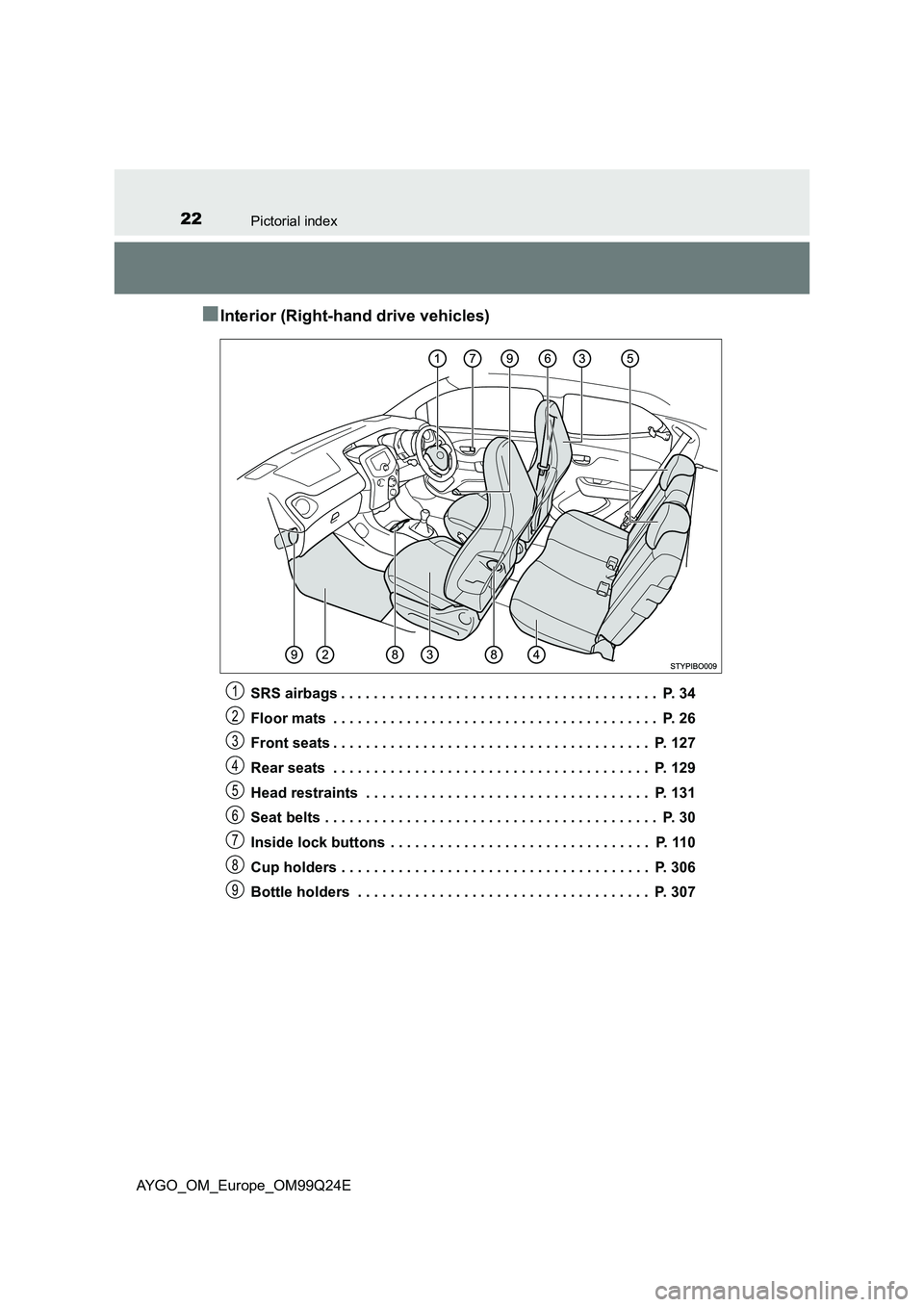
■Interior (Right-hand drive vehicles)
SRS airbags . . . . . . . . . . . . . . . . . . . . . . . . . . . . . . . . . . . . . . . P. 34
Floor mats . . . . . . . . . . . . . . . . . . . . . . . . . . . . . . . . . . . . . . . . P. 26
Front seats . . . . . . . . . . . . . . . . . . . . . . . . . . . . . . . . . . . . . . . P. 127
Rear seats . . . . . . . . . . . . . . . . . . . . . . . . . . . . . . . . . . . . . . . P. 129
Head restraints . . . . . . . . . . . . . . . . . . . . . . . . . . . . . . . . . . . P. 131
Seat belts . . . . . . . . . . . . . . . . . . . . . . . . . . . . . . . . . . . . . . . . . P. 30
Inside lock buttons . . . . . . . . . . . . . . . . . . . . . . . . . . . . . . . . P. 110
Cup holders . . . . . . . . . . . . . . . . . . . . . . . . . . . . . . . . . . . . . . P. 306
Bottle holders . . . . . . . . . . . . . . . . . . . . . . . . . . . . . . . . . . . . P. 307
1
2
3
4
5
6
7
8
9
Page 67 of 480
671-2. Child safety
1
For safety and security
AYGO_OM_Europe_OM99Q24E
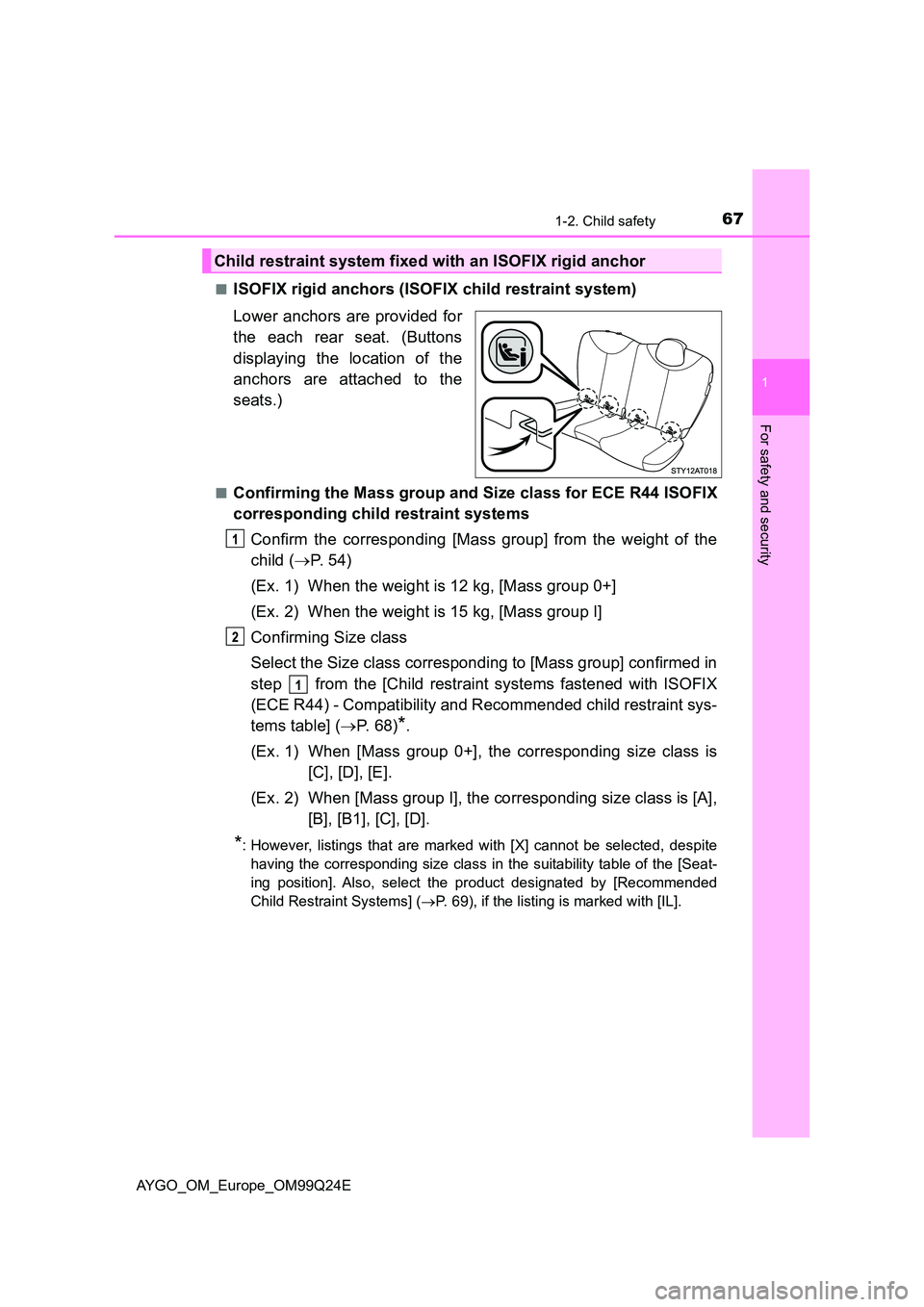
■ISOFIX rigid anchors (ISOFIX child restraint system)
Lower anchors are provided for
the each rear seat. (Buttons
displaying the location of the
anchors are attached to the
seats.)
■Confirming the Mass group and Size class for ECE R44 ISOFIX
corresponding child restraint systems
Confirm the corresponding [Mass group] from the weight of the
child ( P. 54)
(Ex. 1) When the weight is 12 kg, [Mass group 0+]
(Ex. 2) When the weight is 15 kg, [Mass group I]
Confirming Size class
Select the Size class corresponding to [Mass group] confirmed in
step from the [Child restraint systems fastened with ISOFIX
(ECE R44) - Compatibility and Recommended child restraint sys-
tems table] ( P. 68)*.
(Ex. 1) When [Mass group 0+], the corresponding size class is
[C], [D], [E].
(Ex. 2) When [Mass group I], the corresponding size class is [A],
[B], [B1], [C], [D].
*: However, listings that are marked with [X] cannot be selected, despite
having the corresponding size class in the suitability table of the [Seat-
ing position]. Also, select the product designated by [Recommended
Child Restraint Systems] ( P. 69), if the listing is marked with [IL].
Child restraint system fixed with an ISOFIX rigid anchor
Page 89 of 480
89
2
2. Instrument cluster
Instrument cluster
AYGO_OM_Europe_OM99Q24E
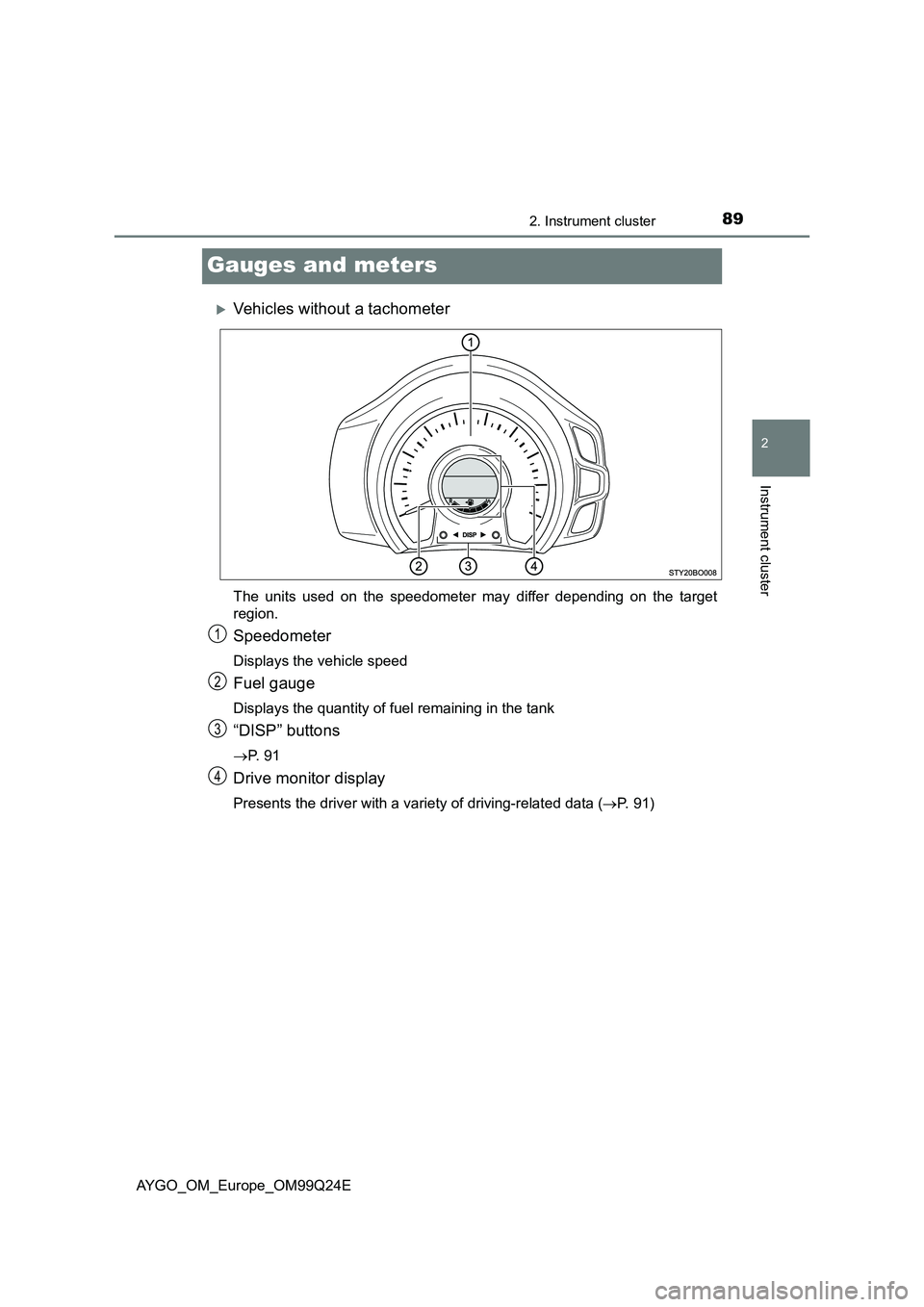
Gauges and meters
Vehicles without a tachometer
The units used on the speedometer may differ depending on the target
region.
Speedometer
Displays the vehicle speed
Fuel gauge
Displays the quantity of fuel remaining in the tank
“DISP” buttons
P. 9 1
Drive monitor display
Presents the driver with a variety of driving-related data (P. 91)
1
2
3
4
Page 90 of 480
902. Instrument cluster
AYGO_OM_Europe_OM99Q24E
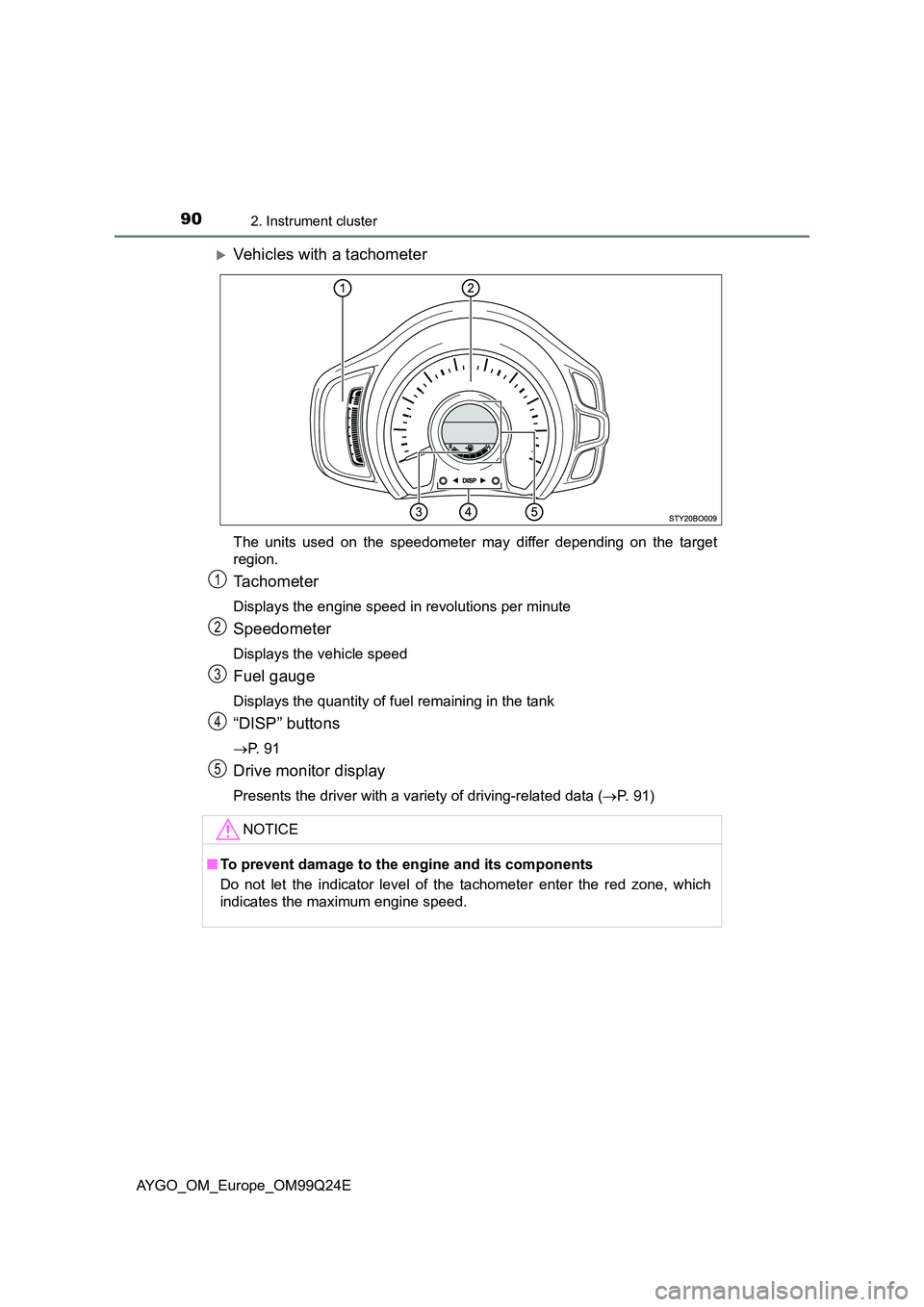
Vehicles with a tachometer
The units used on the speedometer may differ depending on the target
region.
Tachometer
Displays the engine speed in revolutions per minute
Speedometer
Displays the vehicle speed
Fuel gauge
Displays the quantity of fuel remaining in the tank
“DISP” buttons
P. 9 1
Drive monitor display
Presents the driver with a variety of driving-related data (P. 91)
NOTICE
■To prevent damage to the engine and its components
Do not let the indicator level of the tachometer enter the red zone, which
indicates the maximum engine speed.
1
2
3
4
5
Page 91 of 480
91
2
2. Instrument cluster
Instrument cluster
AYGO_OM_Europe_OM99Q24E
Drive monitor display
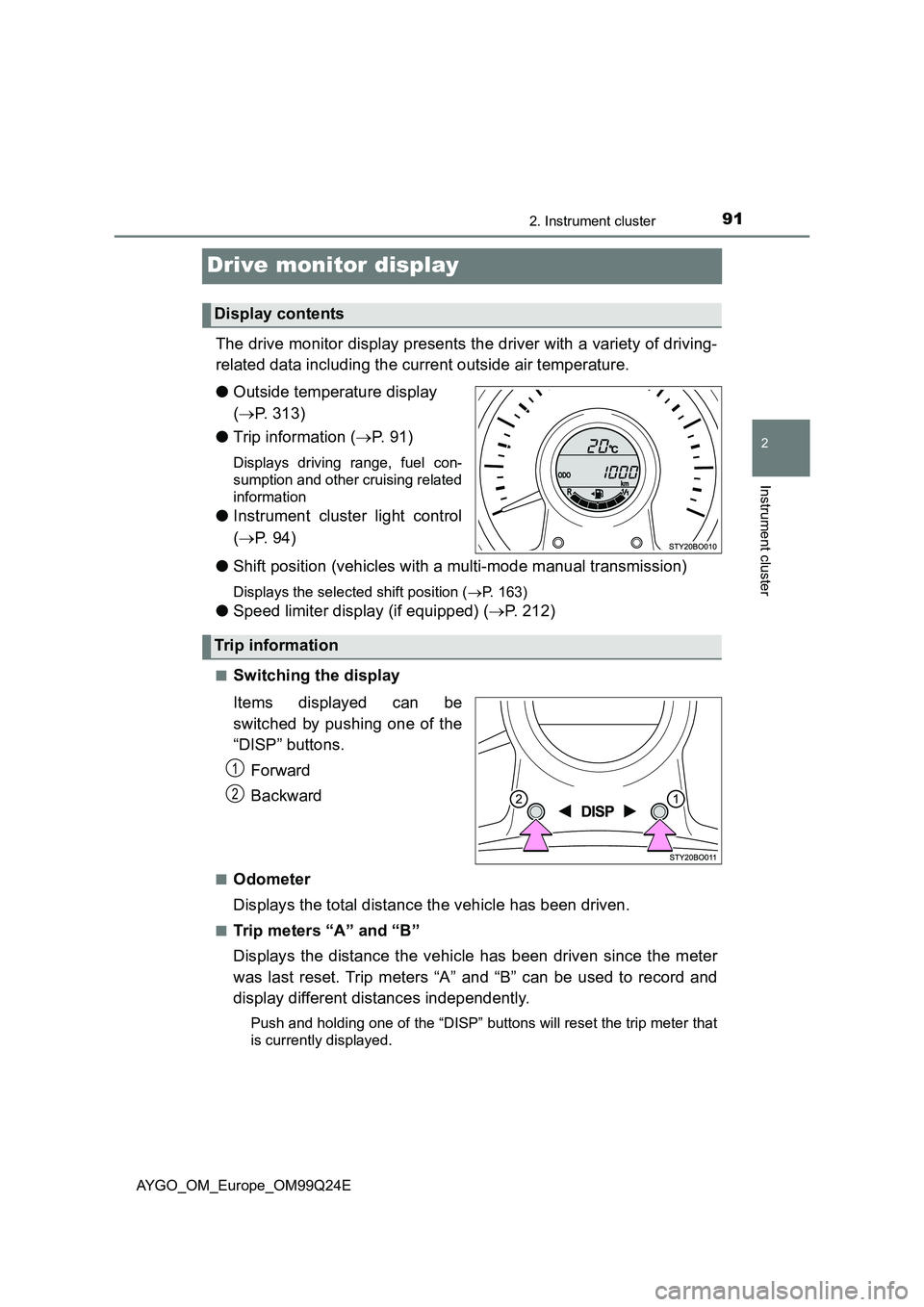
The drive monitor display presents the driver with a variety of driving-
related data including the current outside air temperature.
● Outside temperature display
( P. 313)
● Trip information (P. 91)
Displays driving range, fuel con-
sumption and other cruising related
information
● Instrument cluster light control
( P. 9 4 )
● Shift position (vehicles with a multi-mode manual transmission)
Displays the selected shift position (P. 163)
●Speed limiter display (if equipped) (P. 212)
■Switching the display
Items displayed can be
switched by pushing one of the
“DISP” buttons.
Forward
Backward
■Odometer
Displays the total distance the vehicle has been driven.
■Trip meters “A” and “B”
Displays the distance the vehicle has been driven since the meter
was last reset. Trip meters “A” and “B” can be used to record and
display different distances independently.
Push and holding one of the “DISP” buttons will reset the trip meter that
is currently displayed.
Display contents
Trip information
1
2
Page 92 of 480
922. Instrument cluster
AYGO_OM_Europe_OM99Q24E
■Stop & Start system operation time (if equipped)
● Displays the amount of time the engine was stopped due to oper-
ation of the Stop & Start system during the current trip.
Vehicles without a smart entry & start system: From the engine switch in
the “ON” position to the engine switch in the “LOCK” position.
Vehicles with a smart entry & start system: From the engine switch in
IGNITION ON mode to the engine switch off.
● When the Stop & Start system is operating, the presently dis-
played screen is interrupted and the Stop & Start system opera-
tion time automatically displayed.
• Push one of the “DISP” buttons to return to the previous screen.
• The automatically displayed function of the Stop & Start system oper-
ation time activated or deactivated switch over method. ( P. 93)
■Stop & Start system total operation time (if equipped)
Displays the total amount of time that the engine has been stopped
due to operation of the Stop & Start system since the system was
last reset.
Push and hold one of the “DISP” buttons to reset.
■Outside temperature (except manual transmission vehicles
with a 1KR engine)
Displays the outside temperature. (P. 313)
■Current fuel consumption
Displays the current rate of fuel consumption.
■Average fuel consumption
Displays the average fuel consumption since the function was
reset.
• The function can be reset by pushing one of the “DISP” buttons for lon-
ger than 1 second when the average fuel consumption is displayed.
• Use the displayed average fuel consumption as a reference.
Page 93 of 480
932. Instrument cluster
2
Instrument cluster
AYGO_OM_Europe_OM99Q24E
■Driving range
Displays the estimated approximate distance that can be driven
with the quantity of fuel remaining.
• This distance is computed based on your average fuel consumption. As
a result, the actual distance that can be driven may differ from that dis-
played.
• When only a small amount of fuel is added to the tank, the display may
not be updated.
When refueling, turn the engine switch to the “LOCK” position (vehicles
without a smart entry & start system) or off (vehicles with a smart entry
& start system). If the vehicle is refueled without turning the engine
switch to the “LOCK” position or off, the display may not be updated.
• The display shows “LoFUEL” when the remaining is very low.
■Average vehicle speed
Displays the average vehicle speed since the function was reset.
The function can be reset by pushing one of the “DISP” button for longer
than 1 second when the average vehicle speed is displayed.
■Instrument cluster light control
Displays the instrument cluster light control display.
• This screen is only displayed when the tail lights are on.
• The brightness of the instrument cluster light can be adjusted. ( P. 9 4 )
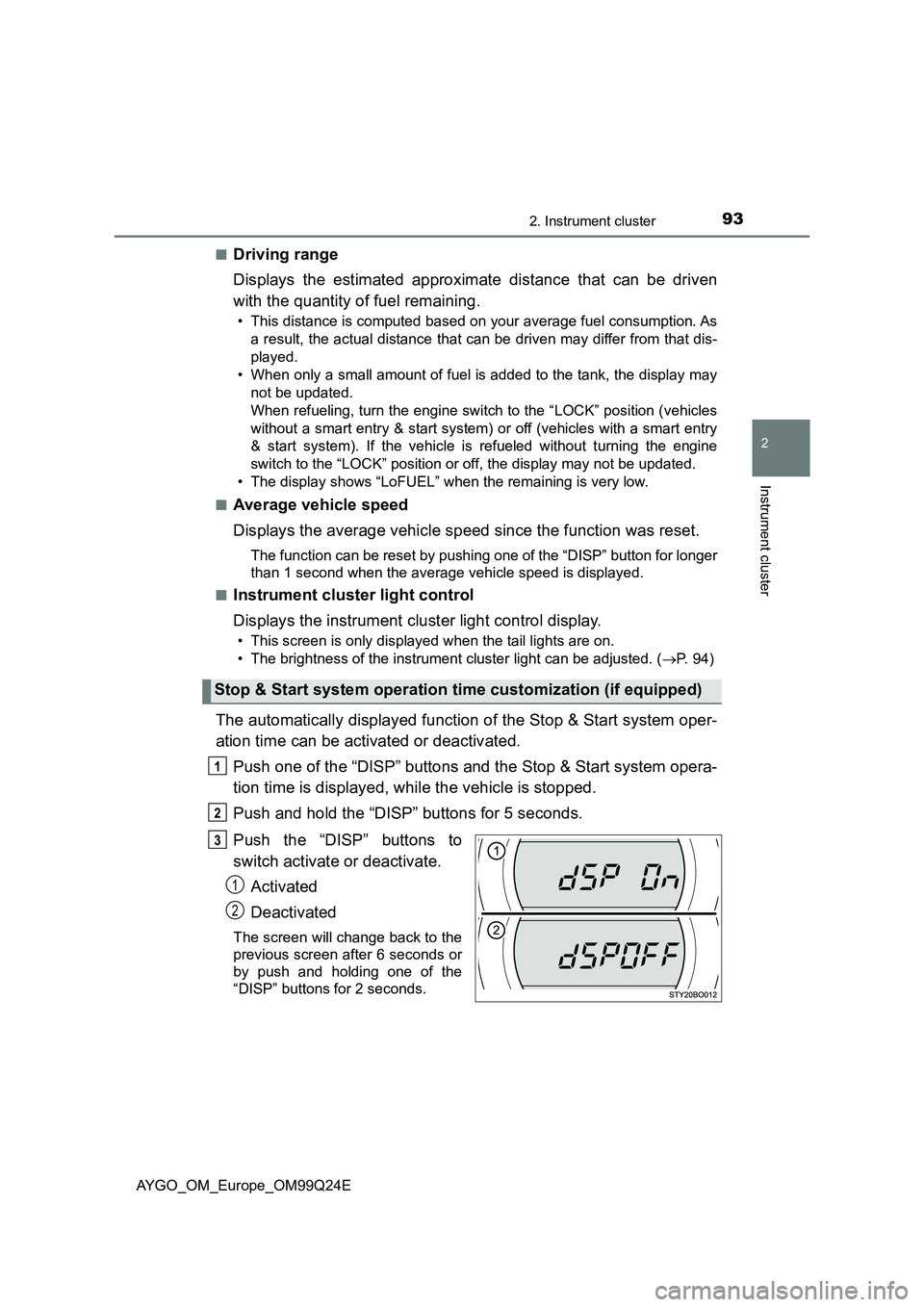
The automatically displayed function of the Stop & Start system oper-
ation time can be activated or deactivated.
Push one of the “DISP” buttons and the Stop & Start system opera-
tion time is displayed, while the vehicle is stopped.
Push and hold the “DISP” buttons for 5 seconds.
Push the “DISP” buttons to
switch activate or deactivate.
Activated
Deactivated
The screen will change back to the
previous screen after 6 seconds or
by push and holding one of the
“DISP” buttons for 2 seconds.
Stop & Start system operation time customization (if equipped)
1
2
Page 94 of 480
942. Instrument cluster
AYGO_OM_Europe_OM99Q24E
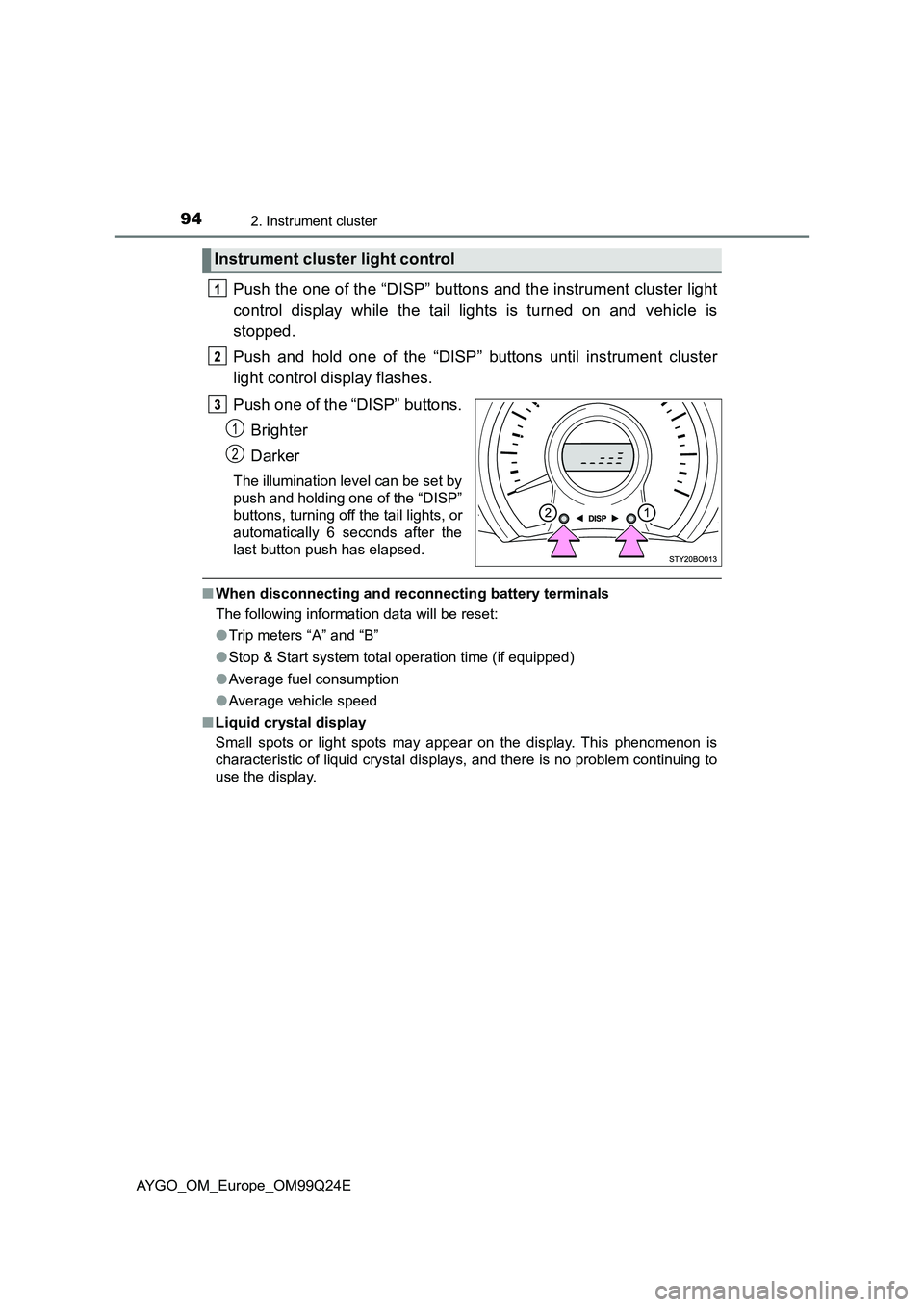
Push the one of the “DISP” buttons and the instrument cluster light
control display while the tail lights is turned on and vehicle is
stopped.
Push and hold one of the “DISP” buttons until instrument cluster
light control display flashes.
Push one of the “DISP” buttons.
Brighter
Darker
The illumination level can be set by
push and holding one of the “DISP”
buttons, turning off the tail lights, or
automatically 6 seconds after the
last button push has elapsed.
■ When disconnecting and reconnecting battery terminals
The following information data will be reset:
● Trip meters “A” and “B”
● Stop & Start system total operation time (if equipped)
● Average fuel consumption
● Average vehicle speed
■ Liquid crystal display
Small spots or light spots may appear on the display. This phenomenon is
characteristic of liquid crystal displays, and there is no problem continuing to
use the display.
Instrument cluster light control
1
2
Page 100 of 480
1003-1. Key information
AYGO_OM_Europe_OM99Q24E
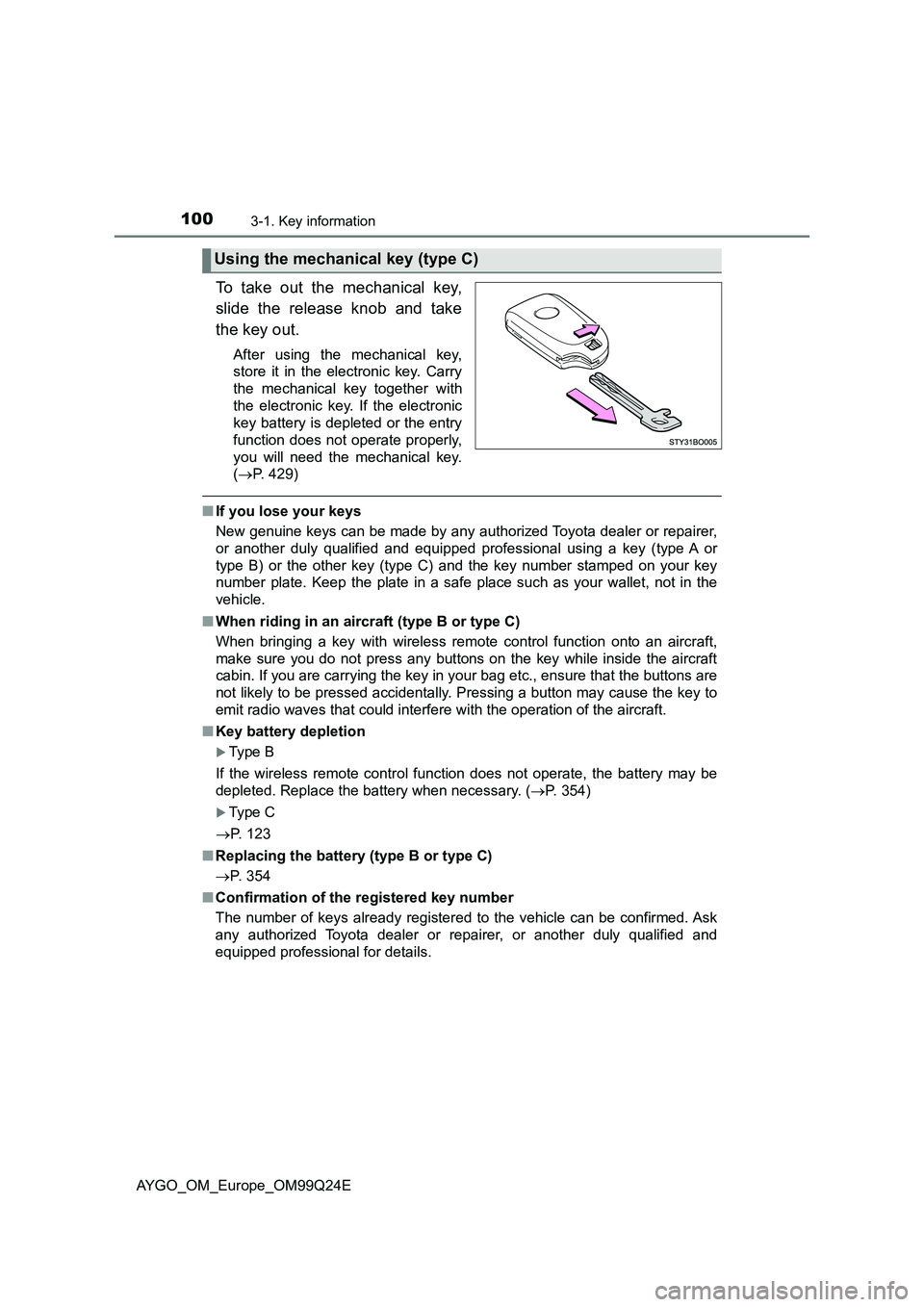
To take out the mechanical key,
slide the release knob and take
the key out.
After using the mechanical key,
store it in the electronic key. Carry
the mechanical key together with
the electronic key. If the electronic
key battery is depleted or the entry
function does not operate properly,
you will need the mechanical key.
( P. 429)
■If you lose your keys
New genuine keys can be made by any authorized Toyota dealer or repairer,
or another duly qualified and equipped professional using a key (type A or
type B) or the other key (type C) and the key number stamped on your key
number plate. Keep the plate in a safe place such as your wallet, not in the
vehicle.
■ When riding in an aircraft (type B or type C)
When bringing a key with wireless remote control function onto an aircraft,
make sure you do not press any buttons on the key while inside the aircraft
cabin. If you are carrying the key in your bag etc., ensure that the buttons are
not likely to be pressed accidentally. Pressing a button may cause the key to
emit radio waves that could interfere with the operation of the aircraft.
■ Key battery depletion
Type B
If the wireless remote control function does not operate, the battery may be
depleted. Replace the battery when necessary. ( P. 354)
Type C
P. 123
■ Replacing the battery (type B or type C)
P. 354
■ Confirmation of the registered key number
The number of keys already registered to the vehicle can be confirmed. Ask
any authorized Toyota dealer or r epairer, or another duly qualified and
equipped professional for details.
Using the mechanical key (type C)