key battery TOYOTA AYGO X 2022 (in English) User Guide
[x] Cancel search | Manufacturer: TOYOTA, Model Year: 2022, Model line: AYGO X, Model: TOYOTA AYGO X 2022Pages: 494, PDF Size: 92.53 MB
Page 132 of 494
130
Owner's Manual_Europe_M99V08_en
4-2. Driving procedures
Some electrical components such as
the audio system can be used.
3 ON (“ON” position)
All electrical components can be used.
4START (“START” position)
For starting the engine.
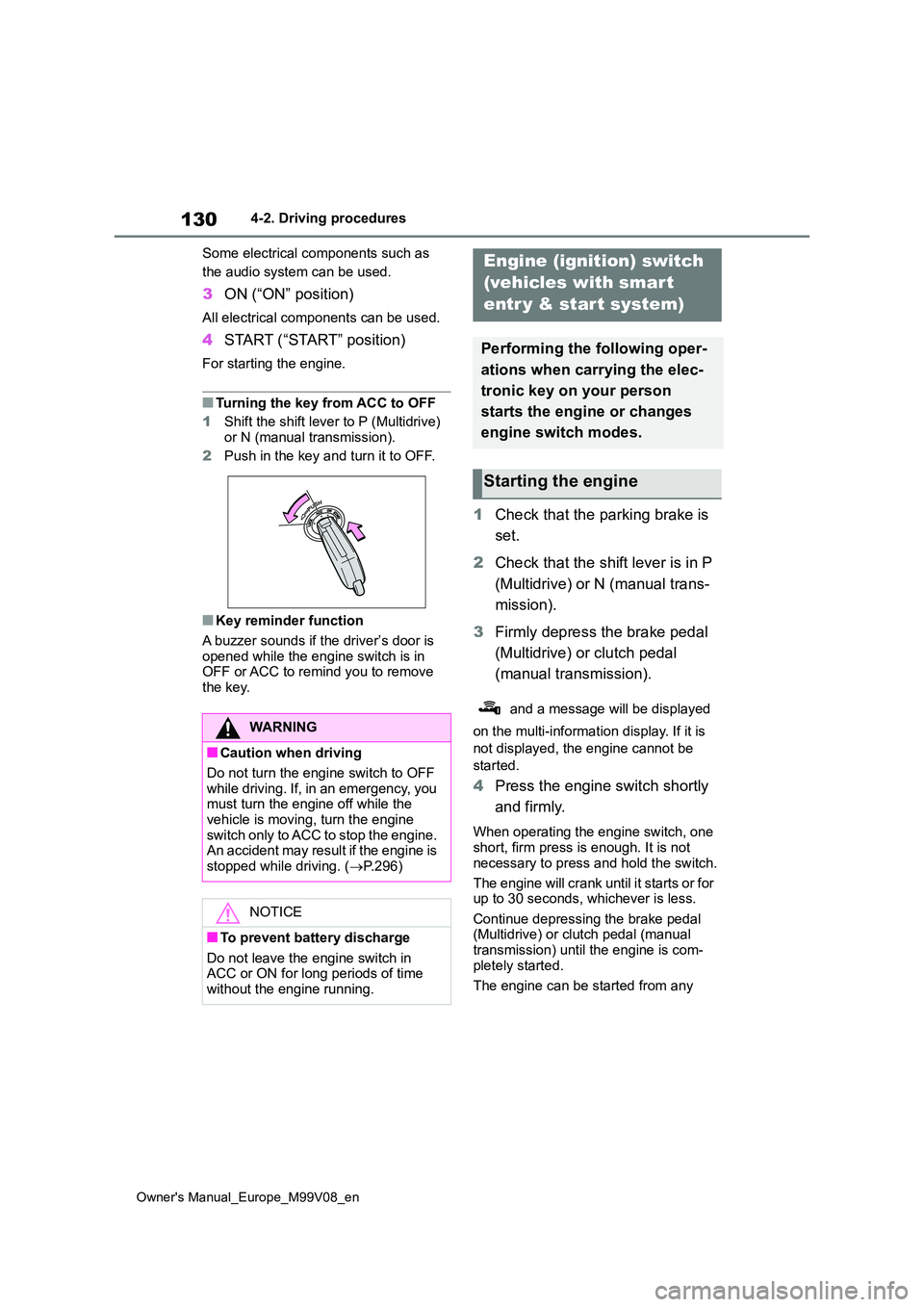
■Turning the key from ACC to OFF
1 Shift the shift lever to P (Multidrive)
or N (manual transmission).
2 Push in the key and turn it to OFF.
■Key reminder function
A buzzer sounds if the driver’s door is opened while the engine switch is in OFF or ACC to remind you to remove
the key.
1 Check that the parking brake is
set.
2 Check that the shift lever is in P
(Multidrive) or N (manual trans-
mission).
3 Firmly depress the brake pedal
(Multidrive) or clutch pedal
(manual transmission).
and a message will be displayed
on the multi-information display. If it is
not displayed, the engine cannot be
started.
4 Press the engine switch shortly
and firmly.
When operating the engine switch, one short, firm press is enough. It is not
necessary to press and hold the switch.
The engine will crank until it starts or for up to 30 seconds, whichever is less.
Continue depressing the brake pedal (Multidrive) or clutch pedal (manual transmission) until the engine is com-
pletely started.
The engine can be started from any
WARNING
■Caution when driving
Do not turn the engine switch to OFF while driving. If, in an emergency, you must turn the engine off while the
vehicle is moving, turn the engine switch only to ACC to stop the engine. An accident may result if the engine is
stopped while driving. ( P.296)
NOTICE
■To prevent battery discharge
Do not leave the engine switch in ACC or ON for long periods of time without the engine running.
Engine (ignition) switch
(vehicles with smart
entr y & start system)
Performing the following oper-
ations when carrying the elec-
tronic key on your person
starts the engine or changes
engine switch modes.
Starting the engine
Page 133 of 494
131
4
Owner's Manual_Europe_M99V08_en
4-2. Driving procedures
Driving
engine switch mode.
■Engine switch illumination
In the following situations, the engine switch is illuminated.
●When the driver’s or passenger’s door is opened.
●When the engine switch is in ACC or ON.
●When the engine switch mode is changed from ACC or ON to off.
Also, in the following situation, the engine switch flashes.
●When depressing the brake pedal while carrying the electronic key.
■If the engine does not start
●The engine immobilizer system may not have been deactivated. ( P.74) Contact any authorized Toyota retailer
or Toyota authorized repairer, or any reliable repairer.
●If a message related to start-up is shown on the multi-information dis-play, read the message and follow the
instructions.
■If the battery is discharged
The engine cannot be started using the
smart entry & start system. Refer to P.335 to restart the engine.
■Electronic key battery depletion
P. 9 2
■Conditions affecting operation
P. 1 0 3
■Notes for the entry function
P. 1 0 4
■Steering lock function
●After turning the engine switch off and
opening and closing the doors, the steering wheel will be locked due to the steering lock function. Operating
the engine switch again automatically cancels the steering lock.
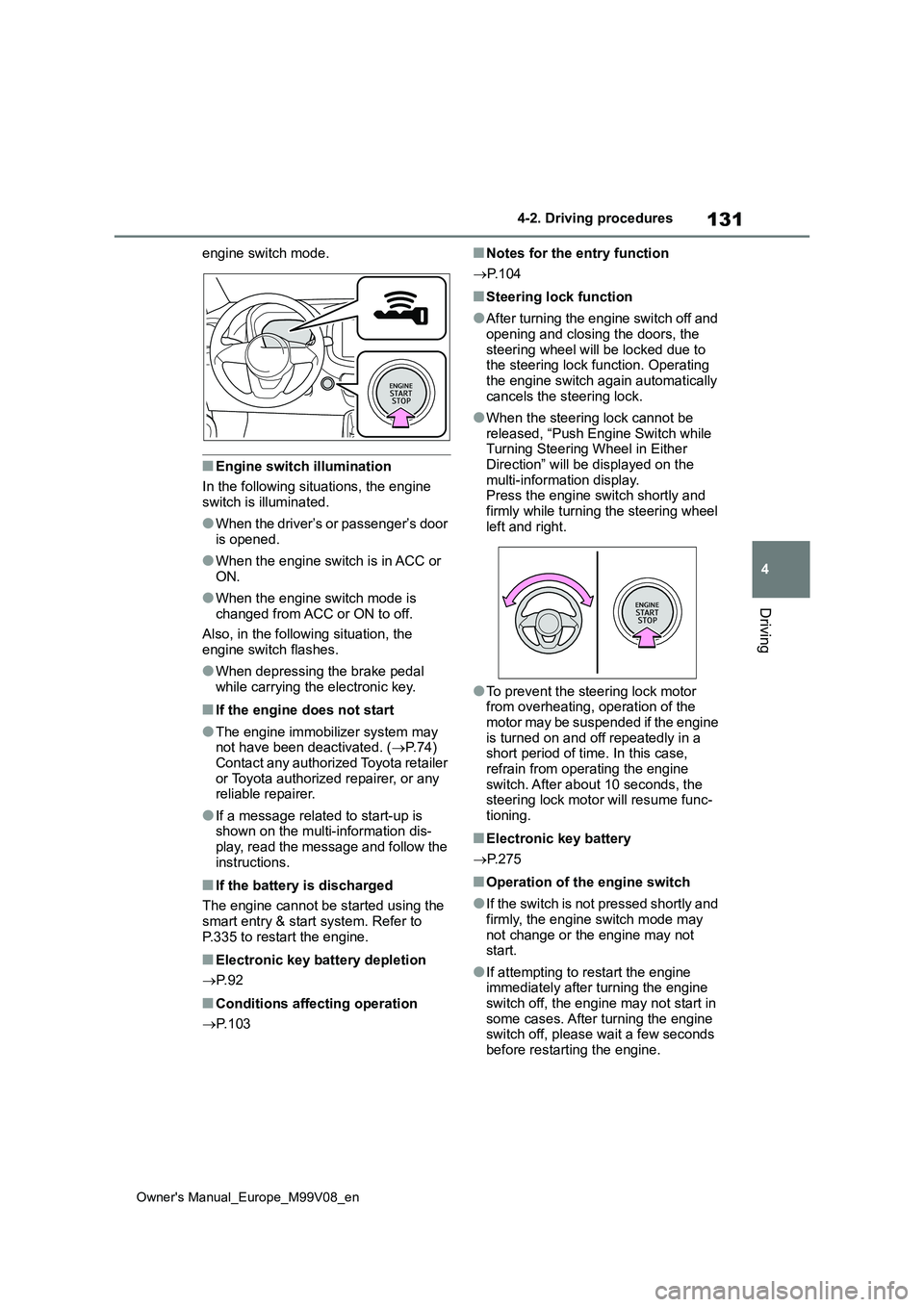
●When the steering lock cannot be released, “Push Engine Switch while Turning Steering Wheel in Either
Direction” will be displayed on the multi-information display.Press the engine switch shortly and
firmly while turning the steering wheel left and right.
●To prevent the steering lock motor from overheating, operation of the motor may be suspended if the engine
is turned on and off repeatedly in a short period of time. In this case, refrain from operating the engine
switch. After about 10 seconds, the steering lock motor will resume func-tioning.
■Electronic key battery
P. 2 7 5
■Operation of the engine switch
●If the switch is not pressed shortly and
firmly, the engine switch mode may not change or the engine may not start.
●If attempting to restart the engine immediately after turning the engine
switch off, the engine may not start in some cases. After turning the engine switch off, please wait a few seconds
before restarting the engine.
Page 232 of 494
230
Owner's Manual_Europe_M99V08_en
5-2. Using the interior lights
5-2.Using the interior lights
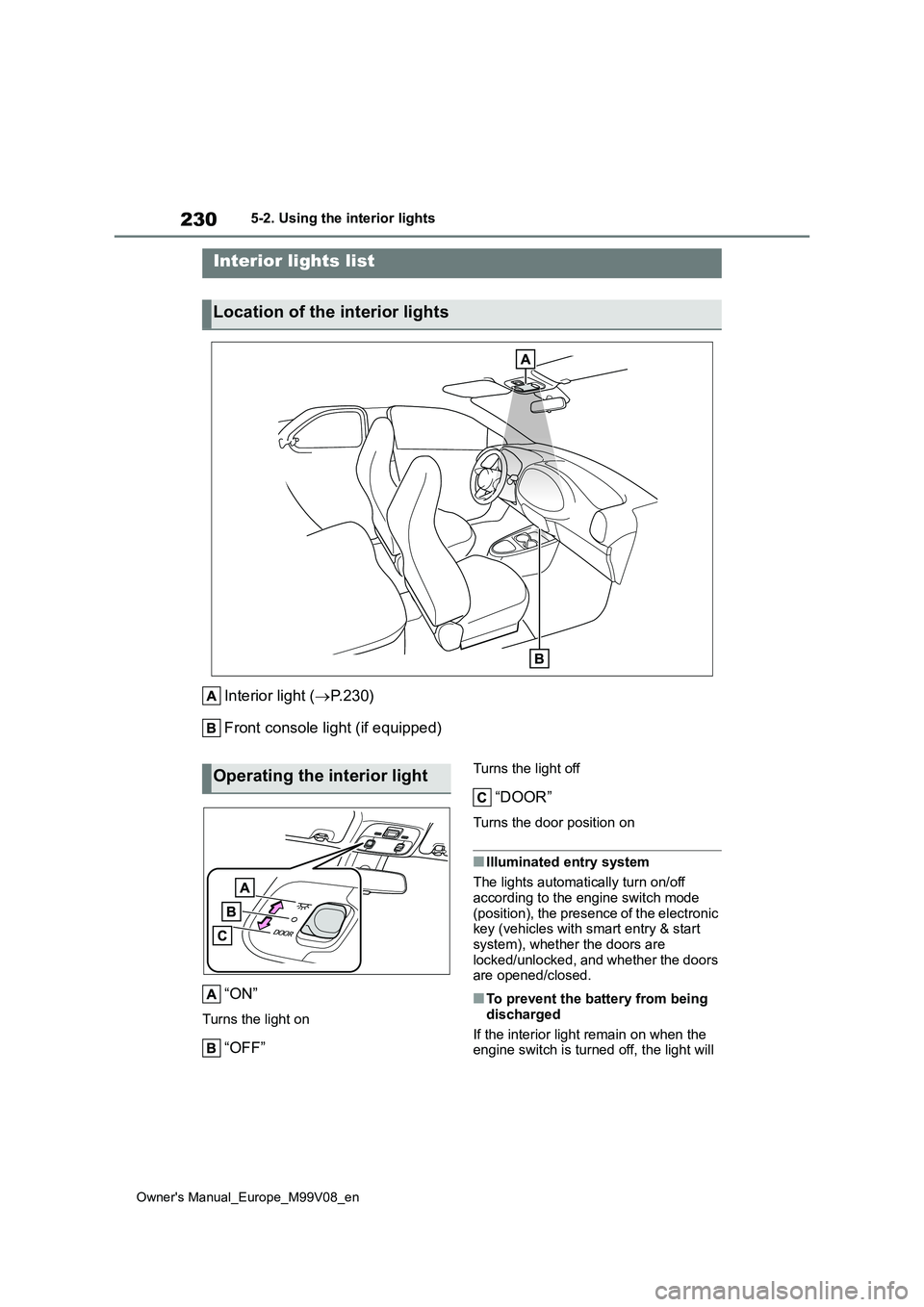
Interior light (P. 2 3 0 )
Front console light (if equipped)
“ON”
Turns the light on
“OFF”
Turns the light off
“DOOR”
Turns the door position on
■Illuminated entry system
The lights automatically turn on/off
according to the engine switch mode (position), the presence of the electronic key (vehicles with smart entry & start
system), whether the doors are locked/unlocked, and whether the doors are opened/closed.
■To prevent the battery from being
discharged
If the interior light remain on when the engine switch is turned off, the light will
Interior lights list
Location of the interior lights
Operating the interior light
Page 243 of 494
241
5
Owner's Manual_Europe_M99V08_en
5-4. Other interior features
Interior features
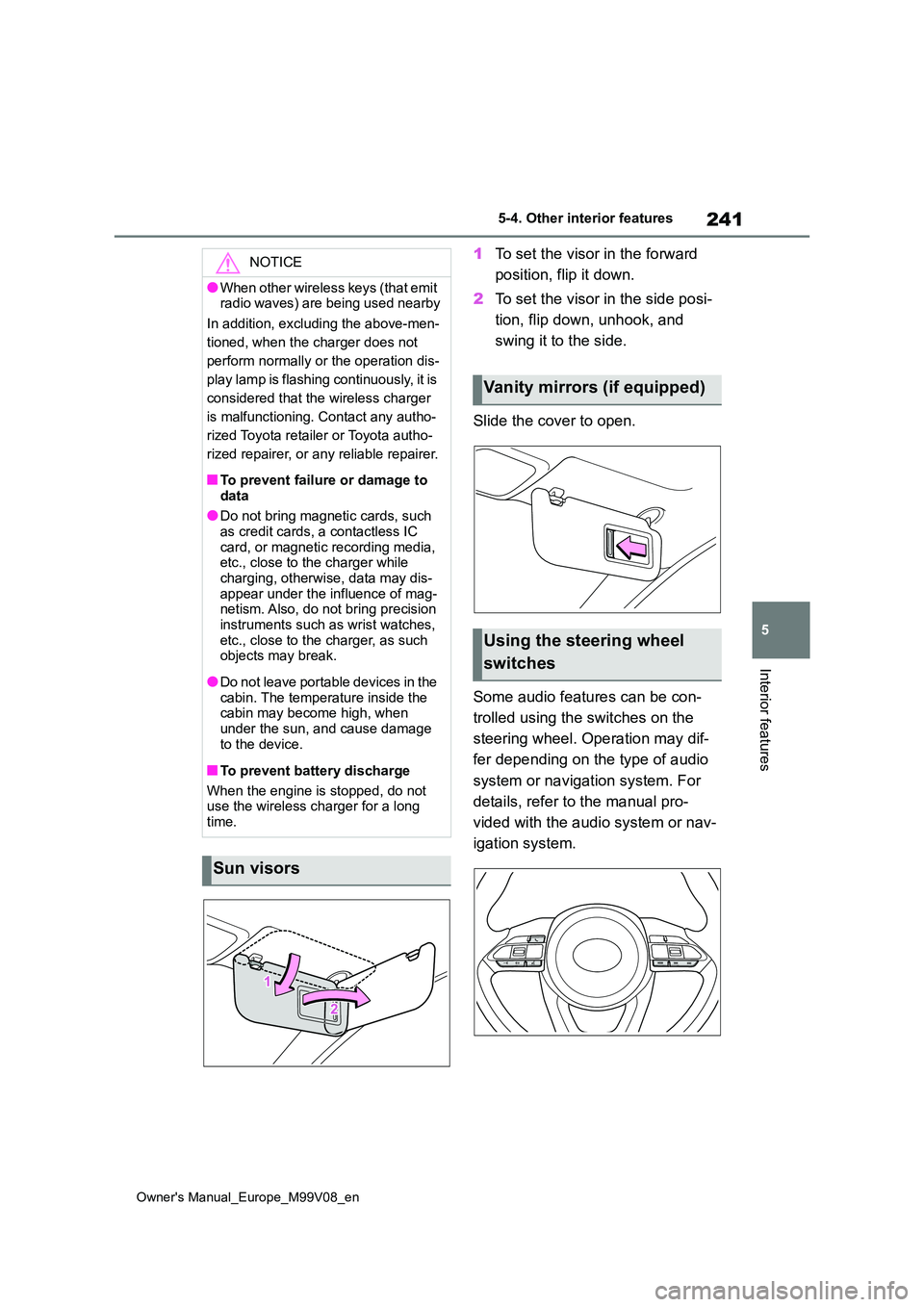
1To set the visor in the forward
position, flip it down.
2 To set the visor in the side posi-
tion, flip down, unhook, and
swing it to the side.
Slide the cover to open.
Some audio features can be con-
trolled using the switches on the
steering wheel. Operation may dif-
fer depending on the type of audio
system or navigation system. For
details, refer to the manual pro-
vided with the audio system or nav-
igation system.
NOTICE
●When other wireless keys (that emit radio waves) are being used nearby
In addition, excluding the above-men-
tioned, when the charger does not
perform normally or the operation dis-
play lamp is flashing continuously, it is
considered that the wireless charger
is malfunctioning. Contact any autho-
rized Toyota retailer or Toyota autho-
rized repairer, or any reliable repairer.
■To prevent failure or damage to
data
●Do not bring magnetic cards, such as credit cards, a contactless IC
card, or magnetic recording media, etc., close to the charger while charging, otherwise, data may dis-
appear under the influence of mag- netism. Also, do not bring precision instruments such as wrist watches,
etc., close to the charger, as such objects may break.
●Do n ot l ea ve po r t ab l e d ev ic es in t he cabin. The temperature inside the cabin may become high, when
under the sun, and cause damage to the device.
■To prevent battery discharge
When the engine is stopped, do not use the wireless charger for a long
time.
Sun visors
Vanity mirrors (if equipped)
Using the steering wheel
switches
Page 245 of 494
6
243
Owner's Manual_Europe_M99V08_en
6
Maintenance and care
Maintenance and care
6-1. Maintenance and care
Cleaning and protecting the
vehicle exterior ............... 244
Cleaning and protecting the
vehicle interior ................ 248
6-2. Maintenance
Maintenance requirements 251
6-3. Do-it-yourself maintenance
Do-it-yourself service precau-
tions ................................ 253
Hood ................................. 255
Positioning a floor jack...... 256
Engine compartment ........ 258
Tires .................................. 265
Tire inflation pressure ....... 270
Wheels.............................. 271
Air conditioning filter ......... 273
Wireless remote control/elec-
tronic key battery ............ 275
Checking and replacing fuses
....................................... 278
Light bulbs ........................ 285
Page 246 of 494
244
Owner's Manual_Europe_M99V08_en
6-1. Maintenance and care
6-1.Mainte nance a nd care
Working from top to bottom, lib-
erally apply water to the vehicle
body, wheel wells and underside
of the vehicle to remove any dirt
and dust.
Wash the vehicle body using a
sponge or soft cloth, such as a
chamois.
For hard-to-remove marks, use
car wash soap and rinse thor-
oughly with water.
Wipe away any water.
Wax the vehicle when the water-
proof coating deteriorates.
If water does not bead on a clean sur-
face, apply wax when the vehicle body
is cool.
Vehicles with a canvas top:
Vacuuming of outer canvas before
washing is helpful in removing dust and
other foreign particles.
Follow the procedure shown below:
• Brush off any loose dirt and rinse off
with a hose.
• Using a sponge, wash with a mild
solution of soap (hand soap) in luke-
warm water.
• Rinse thoroughly to remove soap.
■Automatic car washes
●Vehicles with a canvas top: Do not use the automatic car washes.
●Before washing the vehicle:• Fold the mirrors.• Remove the pole antenna
Start washing from the front of the vehi-
cle. Extend the mirrors and pole
antenna before driving.
●Brushes used in automatic car washes may scratch the vehicle sur-
face, parts (wheel, etc.) and harm your vehicle’s paint.
■High pressure car washes
●Vehicles with a canvas top: Do not use the high pressure car washes.
●As water may enter the cabin, do not bring the nozzle tip near the gaps around the doors or perimeter of the
windows, or spray these areas contin- uously.
■When using a car wash (vehicles with smart entry & start system)
If the door handle becomes wet while the electronic key is within the effective range, the door may lock and unlock
repeatedly. In that case, follow the fol- lowing correction procedures to wash the vehicle:
●Place the key in a position 2 m (6 ft.)
or more separate from the vehicle while the vehicle is being washed. (Take care to ensure that the key is
not stolen.)
●Set the electronic key to battery-sav-
ing mode to disable the smart entry & start system. ( P.103)
■Wheels and wheel ornaments (vehi- cles without matte black painted
wheels)
●Remove any dirt immediately by using
a neutral detergent.
●Wash detergent off with water immedi-
ately after use.
●To protect the paint from damage,
Cleaning and protecting
the vehicle exterior
Perform cleaning in a manner
appropriate to each compo-
nent and its material.
Cleaning instructions
Page 264 of 494
262
Owner's Manual_Europe_M99V08_en
6-3. Do-it-yourself maintenance
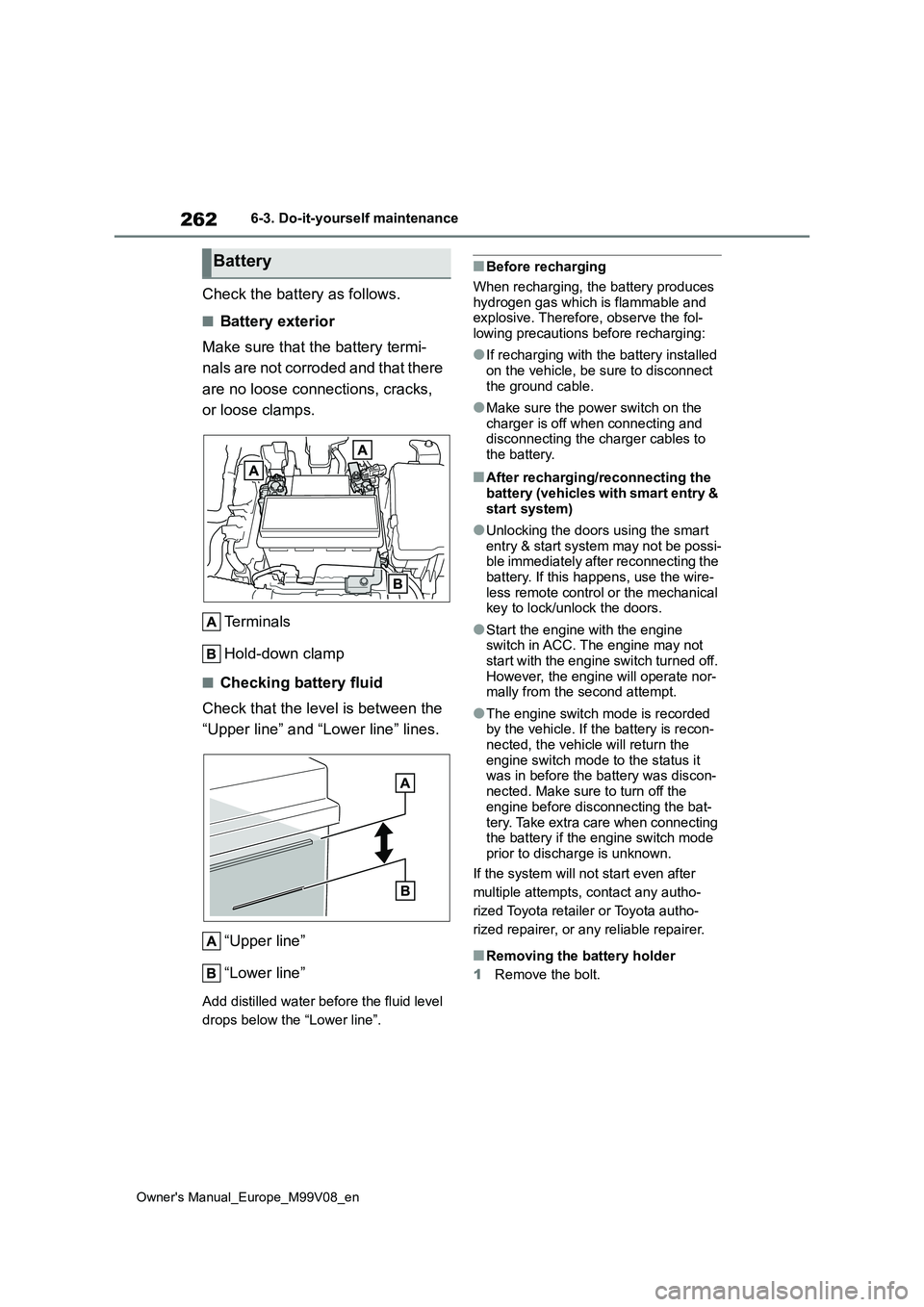
Check the battery as follows.
■Battery exterior
Make sure that the battery termi-
nals are not corroded and that there
are no loose connections, cracks,
or loose clamps.
Terminals
Hold-down clamp
■Checking battery fluid
Check that the level is between the
“Upper line” and “Lower line” lines.
“Upper line”
“Lower line”
Add distilled water before the fluid level
drops below the “Lower line”.
■Before recharging
When recharging, the battery produces
hydrogen gas which is flammable and explosive. Therefore, observe the fol-lowing precautions before recharging:
●If recharging with the battery installed on the vehicle, be sure to disconnect
the ground cable.
●Make sure the power switch on the
charger is off when connecting and disconnecting the charger cables to the battery.
■After recharging/reconnecting the
battery (vehicles with smart entry & start system)
●Unlocking the doors using the smart entry & start system may not be possi-ble immediately after reconnecting the
battery. If this happens, use the wire- less remote control or the mechanical key to lock/unlock the doors.
●Start the engine with the engine switch in ACC. The engine may not
start with the engine switch turned off. However, the engine will operate nor-mally from the second attempt.
●The engine switch mode is recorded by the vehicle. If the battery is recon-
nected, the vehicle will return the engine switch mode to the status it was in before the battery was discon-
nected. Make sure to turn off the engine before disconnecting the bat-
tery. Take extra care when connecting the battery if the engine switch mode prior to discharge is unknown.
If the system will not start even after
multiple attempts, contact any autho-
rized Toyota retailer or Toyota autho-
rized repairer, or any reliable repairer.
■Removing the battery holder
1 Remove the bolt.
Battery
Page 277 of 494
275
6
Owner's Manual_Europe_M99V08_en
6-3. Do-it-yourself maintenance
Maintenance and care
■If the key battery is depleted
The following symptoms may occur:
●The smart entry & start system (if equipped) and wireless remote control will not function properly.
●The operational range will be reduced.
Flathead screwdriver
Small flathead screwdriver
Lithium battery CR2032 (vehi-
cles without smart entry & start
system), or CR2450 (vehicles
with smart entry & start system)
■Use a CR2032 (vehicles without smart entry & start system) or CR2450 (vehicles with smart entry
& start system) lithium battery
●Batteries can be purchased at any
authorized Toyota retailer or Toyota authorized repairer, or any reliable repairer, local electrical appliance
shops or camera stores.
●Replace only with the same or equiva-
lent type recommended by the manu-
facturer.
●Dispose of used batteries according to
local laws.
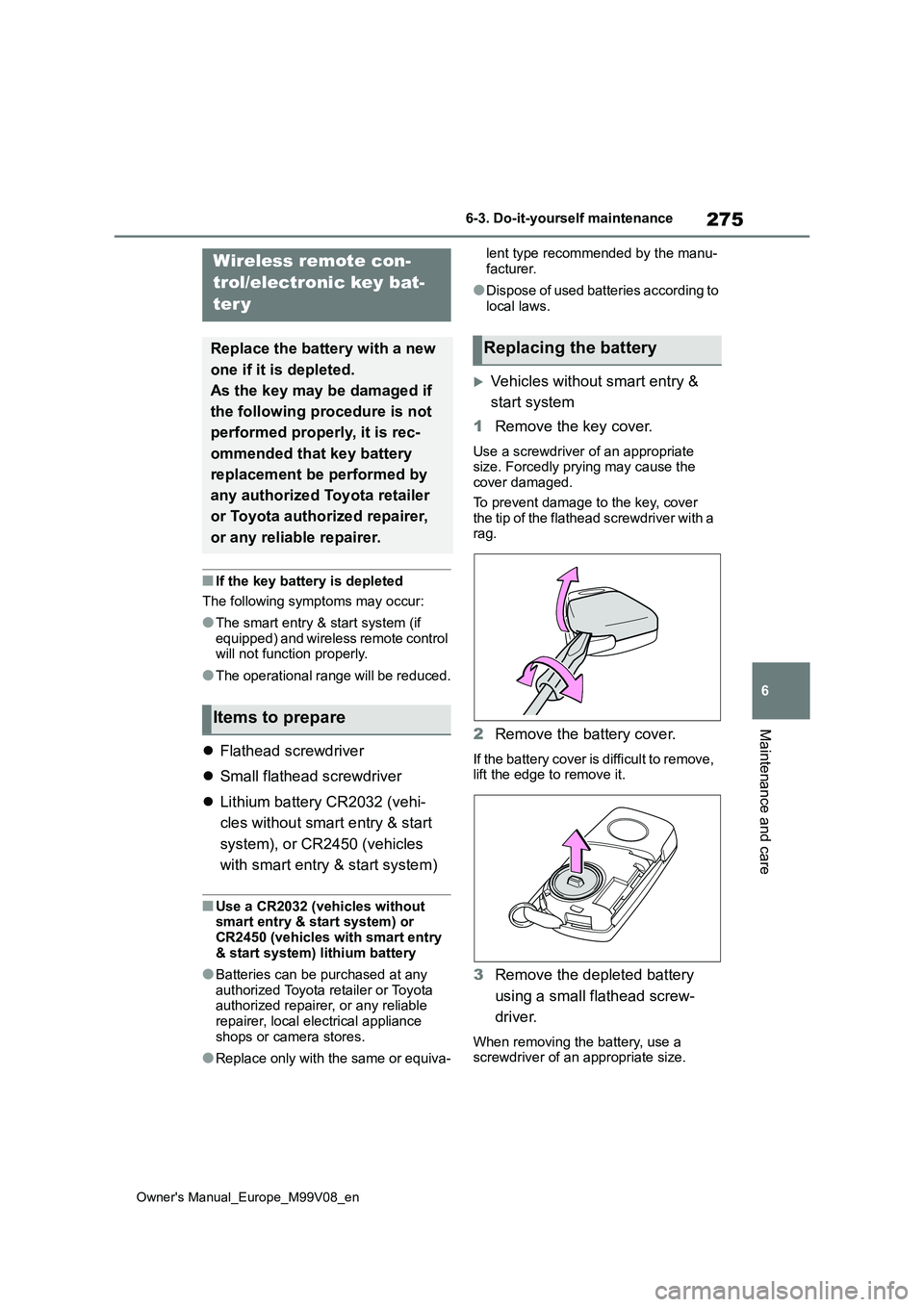
Vehicles without smart entry &
start system
1 Remove the key cover.
Use a screwdriver of an appropriate size. Forcedly prying may cause the cover damaged.
To prevent damage to the key, cover the tip of the flathead screwdriver with a rag.
2 Remove the battery cover.
If the battery cover is difficult to remove, lift the edge to remove it.
3 Remove the depleted battery
using a small flathead screw-
driver.
When removing the battery, use a screwdriver of an appropriate size.
Wireless remote con-
trol/electronic key bat-
ter y
Replace the battery with a new
one if it is depleted.
As the key may be damaged if
the following procedure is not
performed properly, it is rec-
ommended that key battery
replacement be performed by
any authorized Toyota retailer
or Toyota authorized repairer,
or any reliable repairer.
Items to prepare
Replacing the battery
Page 278 of 494
276
Owner's Manual_Europe_M99V08_en
6-3. Do-it-yourself maintenance
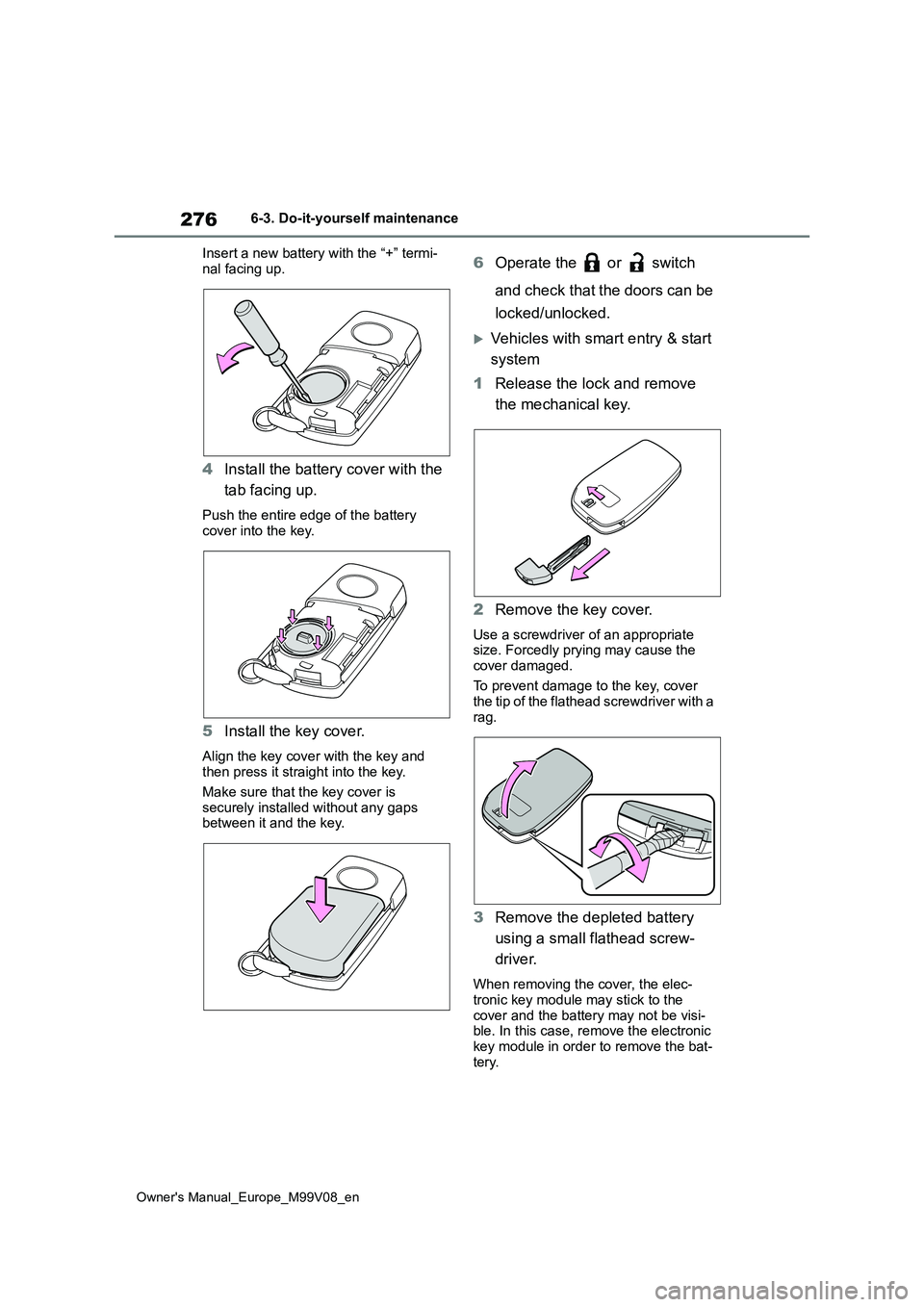
Insert a new battery with the “+” termi-
nal facing up.
4 Install the battery cover with the
tab facing up.
Push the entire edge of the battery
cover into the key.
5 Install the key cover.
Align the key cover with the key and then press it straight into the key.
Make sure that the key cover is
securely installed without any gaps between it and the key.
6 Operate the or switch
and check that the doors can be
locked/unlocked.
Vehicles with smart entry & start
system
1 Release the lock and remove
the mechanical key.
2 Remove the key cover.
Use a screwdriver of an appropriate size. Forcedly prying may cause the
cover damaged.
To prevent damage to the key, cover the tip of the flathead screwdriver with a
rag.
3 Remove the depleted battery
using a small flathead screw-
driver.
When removing the cover, the elec- tronic key module may stick to the
cover and the battery may not be visi- ble. In this case, remove the electronic key module in order to remove the bat-
tery.
Page 279 of 494
277
6
Owner's Manual_Europe_M99V08_en
6-3. Do-it-yourself maintenance
Maintenance and care
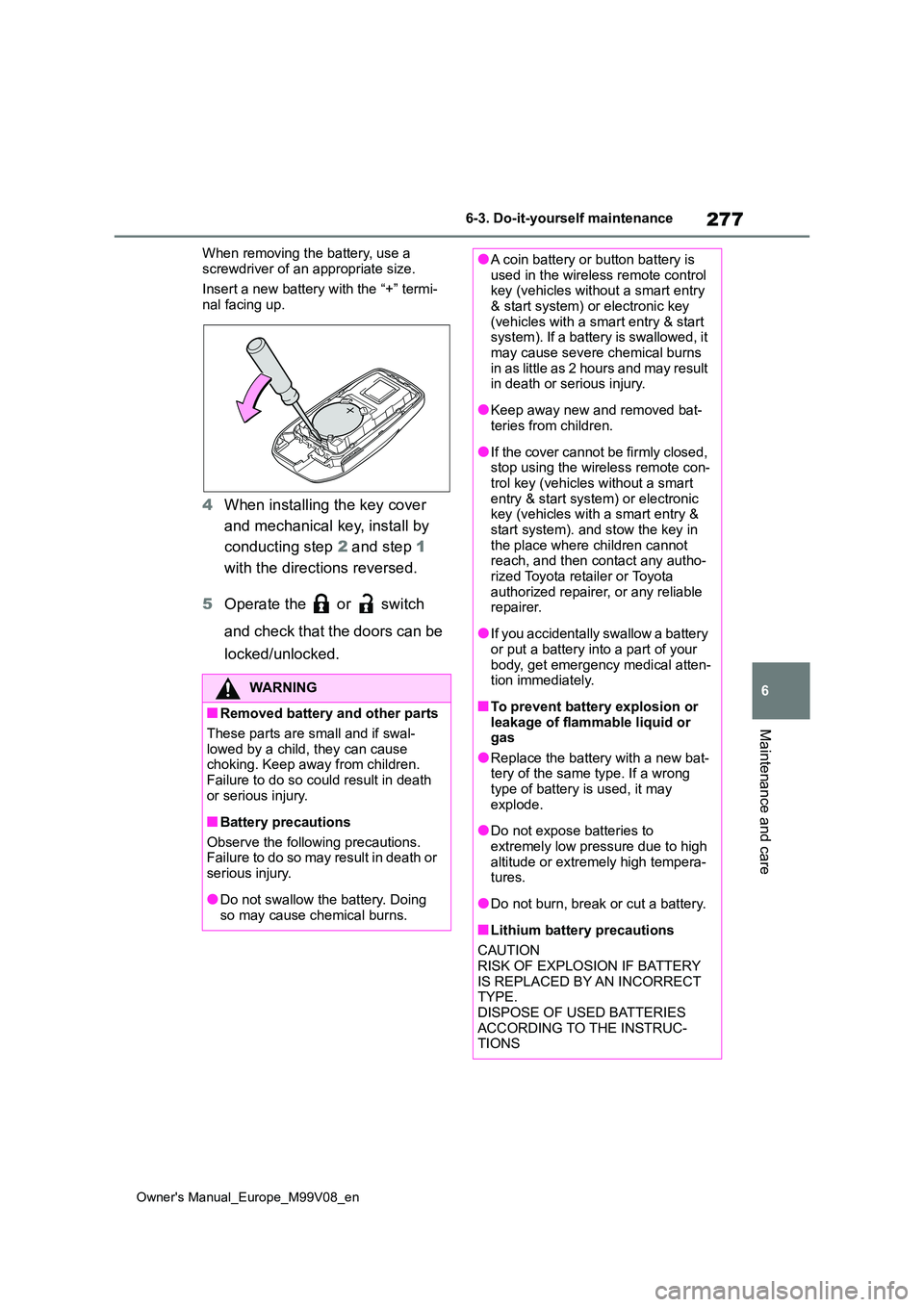
When removing the battery, use a
screwdriver of an appropriate size.
Insert a new battery with the “+” termi- nal facing up.
4 When installing the key cover
and mechanical key, install by
conducting step 2 and step 1
with the directions reversed.
5 Operate the or switch
and check that the doors can be
locked/unlocked.
WARNING
■Removed battery and other parts
These parts are small and if swal- lowed by a child, they can cause choking. Keep away from children.
Failure to do so could result in death or serious injury.
■Battery precautions
Observe the following precautions. Failure to do so may result in death or
serious injury.
●Do not swallow the battery. Doing
so may cause chemical burns.
●A coin battery or button battery is used in the wireless remote control key (vehicles without a smart entry
& start system) or electronic key (vehicles with a smart entry & start system). If a battery is swallowed, it
may cause severe chemical burns i n a s l it t l e as 2 ho u r s a n d m ay r e su lt in death or serious injury.
●Keep away new and removed bat-teries from children.
●If the cover cannot be firmly closed, stop using the wireless remote con-
trol key (vehicles without a smart entry & start system) or electronic key (vehicles with a smart entry &
start system). and stow the key in the place where children cannot reach, and then contact any autho-
rized Toyota retailer or Toyota authorized repairer, or any reliable repairer.
●If you accidentally swallow a battery or put a battery into a part of your
body, get emergency medical atten- tion immediately.
■To prevent battery explosion or leakage of flammable liquid or gas
●Replace the battery with a new bat-tery of the same type. If a wrong type of battery is used, it may
explode.
●Do not expose batteries to
extremely low pressure due to high altitude or extremely high tempera-tures.
●Do not burn, break or cut a battery.
■Lithium battery precautions
CAUTION RISK OF EXPLOSION IF BATTERY
IS REPLACED BY AN INCORRECT TYPE.DISPOSE OF USED BATTERIES
ACCORDING TO THE INSTRUC- TIONS