lane assist TOYOTA BZ4X 2022 (in English) User Guide
[x] Cancel search | Manufacturer: TOYOTA, Model Year: 2022, Model line: BZ4X, Model: TOYOTA BZ4X 2022Pages: 674, PDF Size: 120.02 MB
Page 297 of 674
295
5
Owners Manual_Europe_M42D76_en
5-4. Using the driving support systems
Driving
■Operating conditions of function
This function is operable when all of the following conditions are met:
●The LTA system detects lane lines or
the path of preceding or surrounding
vehicles (except when the preceding vehicle is small, such as a motorcy-cle).
●The dynamic radar cruise control is operating.
●The lane width is approximately 3 to 4 m (10 to 13 ft.).
●The turn signal lever is not being oper-ated.
●The vehicle is not being driven around a sharp curve.
●The vehicle is not accelerating or decelerating more than a certain
amount.
●The steering wheel is not being turned
with a large force.
●The hands off steering wheel warning
( P.296) is not operating.
●The vehicle is being driven in the
center of a lane.
■Temporary cancelation of functions
●When the operating conditions are no
longer met, a function may be tempo- rarily canceled. However, when the operation conditions are met again,
operation of the function will automati- cally be restored. ( P.295)
●If the operating conditions of a func- tion are no longer met while the func-tion is operating, a buzzer may sound
to indicate that the function has been temporarily canceled.
●The steering assist operation of the function can be overridden by the steering wheel operation of the driver.
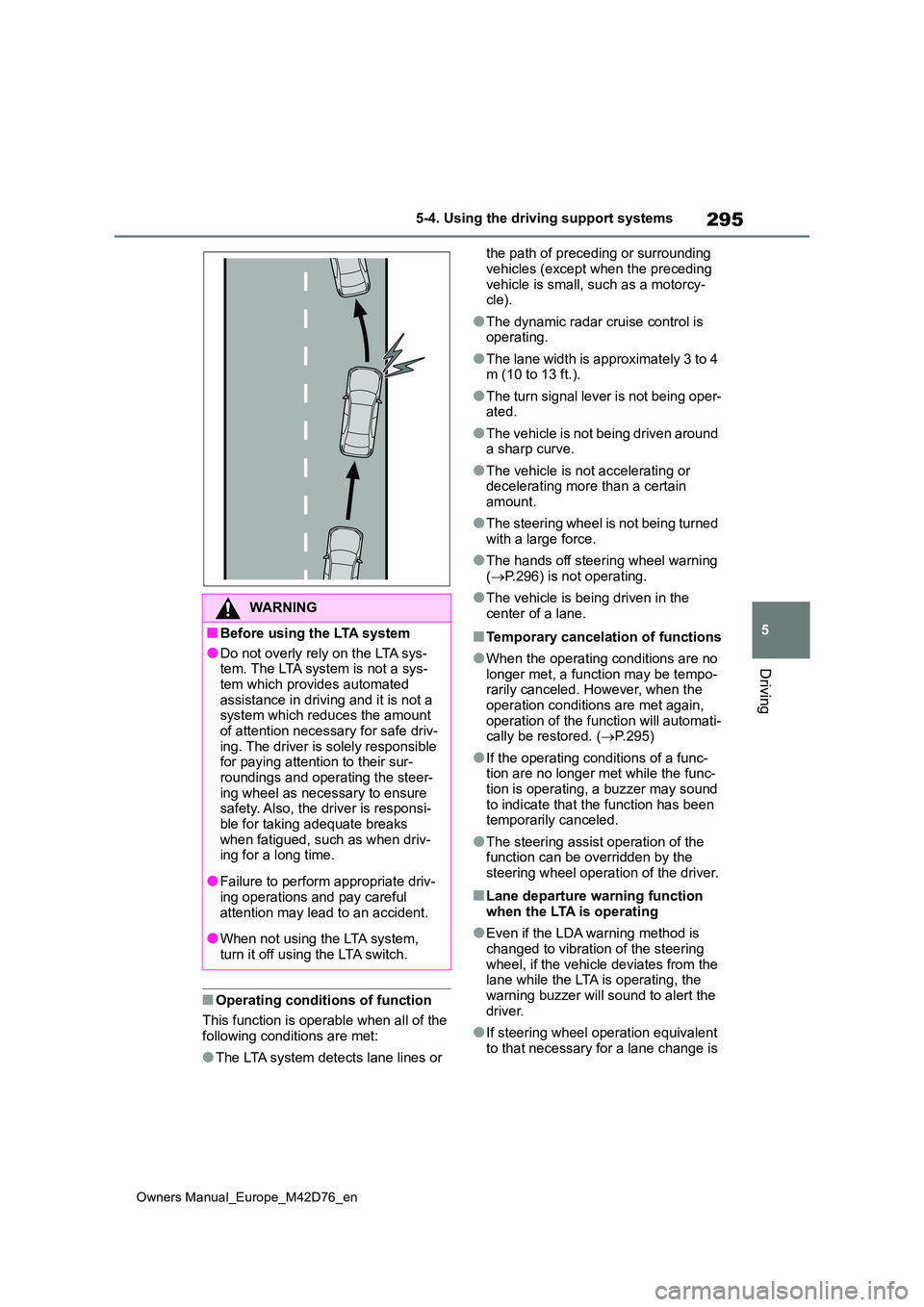
■Lane departure warning function
when the LTA is operating
●Even if the LDA warning method is
changed to vibration of the steering wheel, if the vehicle deviates from the lane while the LTA is operating, the
warning buzzer will sound to alert the driver.
●If steering wheel operation equivalent to that necessary for a lane change is
WARNING
■Before using the LTA system
●Do not overly rely on the LTA sys-tem. The LTA system is not a sys-
tem which provides automated assistance in driving and it is not a system which reduces the amount
of attention necessary for safe driv- ing. The driver is solely responsible for paying attention to their sur-
roundings and operating the steer- ing wheel as necessary to ensure safety. Also, the driver is responsi-
ble for taking adequate breaks when fatigued, such as when driv-ing for a long time.
●Failure to perform appropriate driv-ing operations and pay careful
attention may lead to an accident.
●When not using the LTA system,
turn it off using the LTA switch.
Page 303 of 674
301
5
Owners Manual_Europe_M42D76_en
5-4. Using the driving support systems
Driving
• The steering wheel is not being turned
sufficiently to perform a lane change.*: Boundary between the asphalt and
grass, soil, etc., or structures, such as
a curb, guardrail, etc.
●Break suggestion function
This function is operable when all of the
following conditions are met:
• The vehicle speed is approximately 50 km/h (32 mph) or more.• The lane width is approximately 3 m
(9.8 ft.) or more.
■Temporary cancelation of functions
When the operating conditions are no longer met, a function may be temporar-
ily canceled. However, when the opera- tion conditions are met again, operation of the function will automatically be
restored. ( P.300)
■Operation of the lane departure alert function/lane departure pre-vention function
●Depending on the vehicle speed, road conditions, lane departure angle, etc.,
operation of the lane departure pre- vention function may not be felt or the function may not operate.
●Depending on the conditions, the warning buzzer may operate even if
vibration is selected through a cus- tomize setting.
●If a course* is not clear or straight, the
lane departure alert function or lane
departure prevention function may not operate.
●The lane departure alert function or lane departure prevention function may not operate if the system judges
that the vehicle is intentionally being steered to avoid a pedestrian or parked vehicle.
●It may not be possible for the system to judge if there is danger of a collision
with a vehicle in an adjacent lane.
●The steering assist operation of the
lane departure prevention function can be overridden by the steering
wheel operation of the driver.*: Boundary between the asphalt and
grass, soil, etc., or structures, such as
a curb, guardrail, etc.
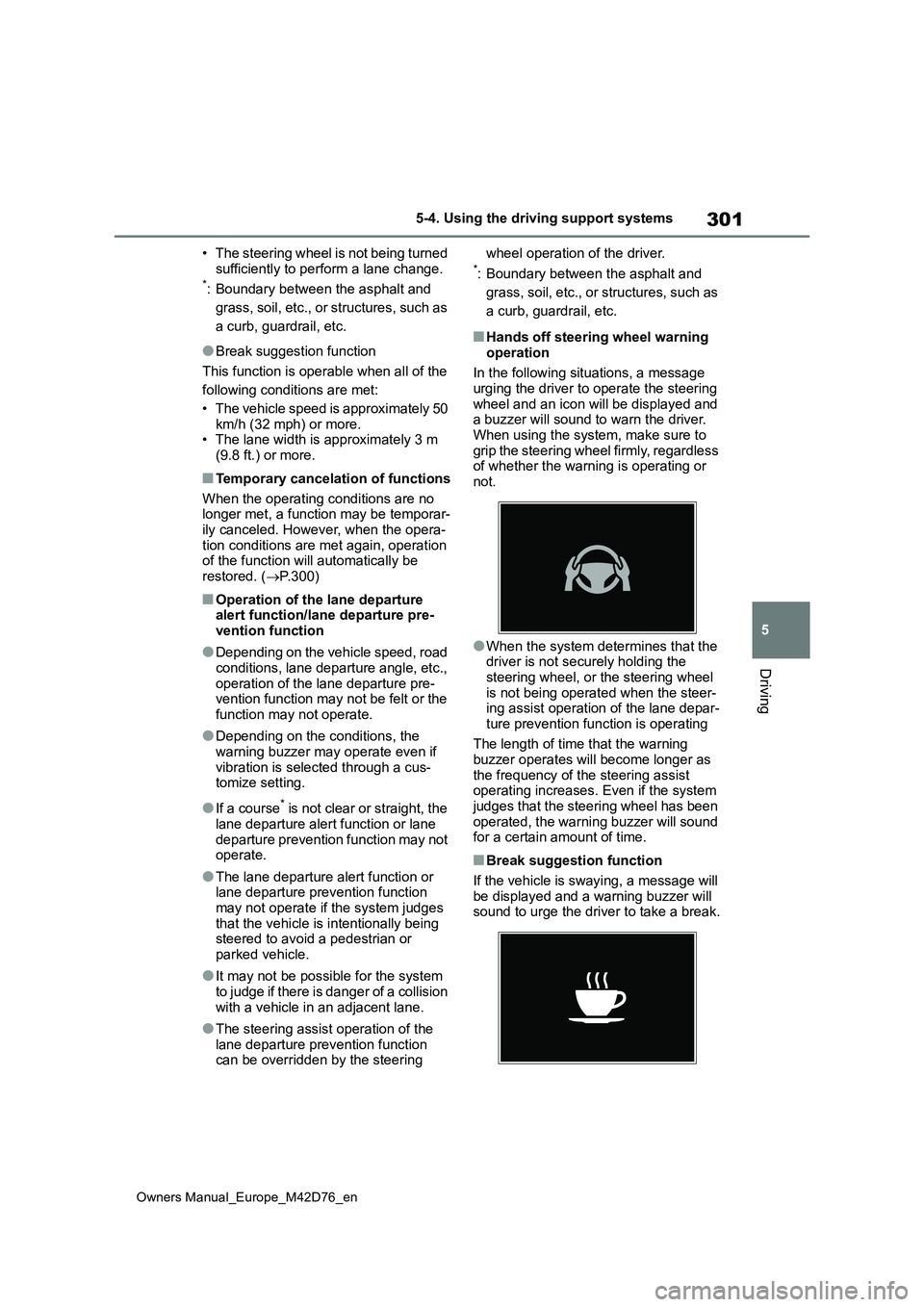
■Hands off steering wheel warning
operation
In the following situations, a message urging the driver to operate the steering
wheel and an icon will be displayed and a buzzer will sound to warn the driver. When using the system, make sure to
grip the steering wheel firmly, regardless of whether the warning is operating or not.
●When the system determines that the driver is not securely holding the
steering wheel, or the steering wheel is not being operated when the steer-ing assist operation of the lane depar-
ture prevention function is operating
The length of time that the warning buzzer operates will become longer as
the frequency of the steering assist operating increases. Even if the system judges that the steering wheel has been
operated, the warning buzzer will sound for a certain amount of time.
■Break suggestion function
If the vehicle is swaying, a message will
be displayed and a warning buzzer will sound to urge the driver to take a break.
Page 304 of 674
302
Owners Manual_Europe_M42D76_en
5-4. Using the driving support systems
Depending on the condition of the vehi-
cle and road surface, the break sugges- tion function may not operate.
The LDA system can be
enabled/disabled through a cus-
tomize setting. ( P.568)
The settings of the LDA can be
changed through on the custom-
ize settings. ( P.568)
The operating state of the lane departure alert function and st eering assist
operation of the lane departure prevention function are indicat ed.
Changing LDA settings
WARNING
■Situations in which the LDA should not be used
In the following situations, disable the LDA system. Failure to do so may lead to an accident.
●When it is necessary to disable the system: P.275
■Situations in which the system may not operate properly
In the following situations, the system
may not operate properly and the vehicle may depart from its lane. Do not overly rely on these functions. The
driver is solely responsible for paying attention to their surroundings and operating the steering wheel as nec-
essary to ensure safety.
●When the boundary between the
asphalt and grass, soil, etc., or structures, such as a curb, guard-rail, etc. is not clear or straight
●When the vehicle is struck by a crosswind or the turbulence of other
nearby vehicles
●Situations in which the lane may not
be detected: P. 2 8 1
●Situations in which the sensors may
not operate properly: P.279
●Situations in which some or all of
the functions of the system cannot operate: P. 2 8 1
Displays and system operation
Page 306 of 674
304
Owners Manual_Europe_M42D76_en
5-4. Using the driving support systems
When the front camera detects a
sign or information of a sign is
available from the navigation
system (if equipped), the sign will
be displayed on the display.
Multiple signs can be displayed.
Depending on the specifications of the
vehicle, the number of displayed signs
may be limited.
■Operating conditions of sign dis- play
Signs will be displayed when the follow-
ing conditions are met:
●The system has detected a sign
In the following situations, a displayed sign may stop being displayed:
●When a new sign has not been detected for a certain distance
●When the system determines that the road being driven on has changed, such as after a left or right turn
■Situations in which the display
function may not operate properly
In the following situations, the RSA sys- tem may not operate properly and may
not detect signs or may display the incorrect sign. However, this does not indicate a malfunction.
●When a sign is dirty, faded, tilted or bent
●When the contrast of an electronic sign is low
●When all or part of a sign is hidden by a tree, utility pole, etc.
●When a sign is detected by the front
camera for a short amount of time
●When the driving state (turning,
changing lanes, etc.) is judged incor- rectly
●When a sign is immediately after a freeway junction or in an adjacent lane just before merging
●When stickers are attached to the rear of a preceding vehicle
●When a sign similar to a system com-patible sign is detected as a system
compatible sign
●When a speed limit sign for a frontage
road is within detection range of the front camera
RSA (Road Sign Assist)
The RSA system detects spe-
cific road signs using the front
camera and/or navigation sys-
tem (if equipped) (when speed
limit information is available)
and warns the driver via dis-
plays and buzzers.
WARNING
■For safe use
●Driving safely is solely the responsi- bility of the driver. Pay careful atten-tion to the surrounding conditions in
order to ensure safe driving.
●Do not rely solely upon the RSA.
The RSA assists the driver by pro- viding road sign information, but it is not a replacement for the driver’s
own vision and awareness. Driving safely is solely the responsibility of the driver. Pay careful attention to
the surrounding conditions in order to ensure safe driving.
■Situations in which the RSA should not be used
When it is necessary to disable the
system: P. 2 7 5
■Situations in which the system
may not operate properly
Situations in which the sensors may not operate properly: P. 2 7 9
Display Function
Page 309 of 674
307
5
Owners Manual_Europe_M42D76_en
5-4. Using the driving support systems
Driving
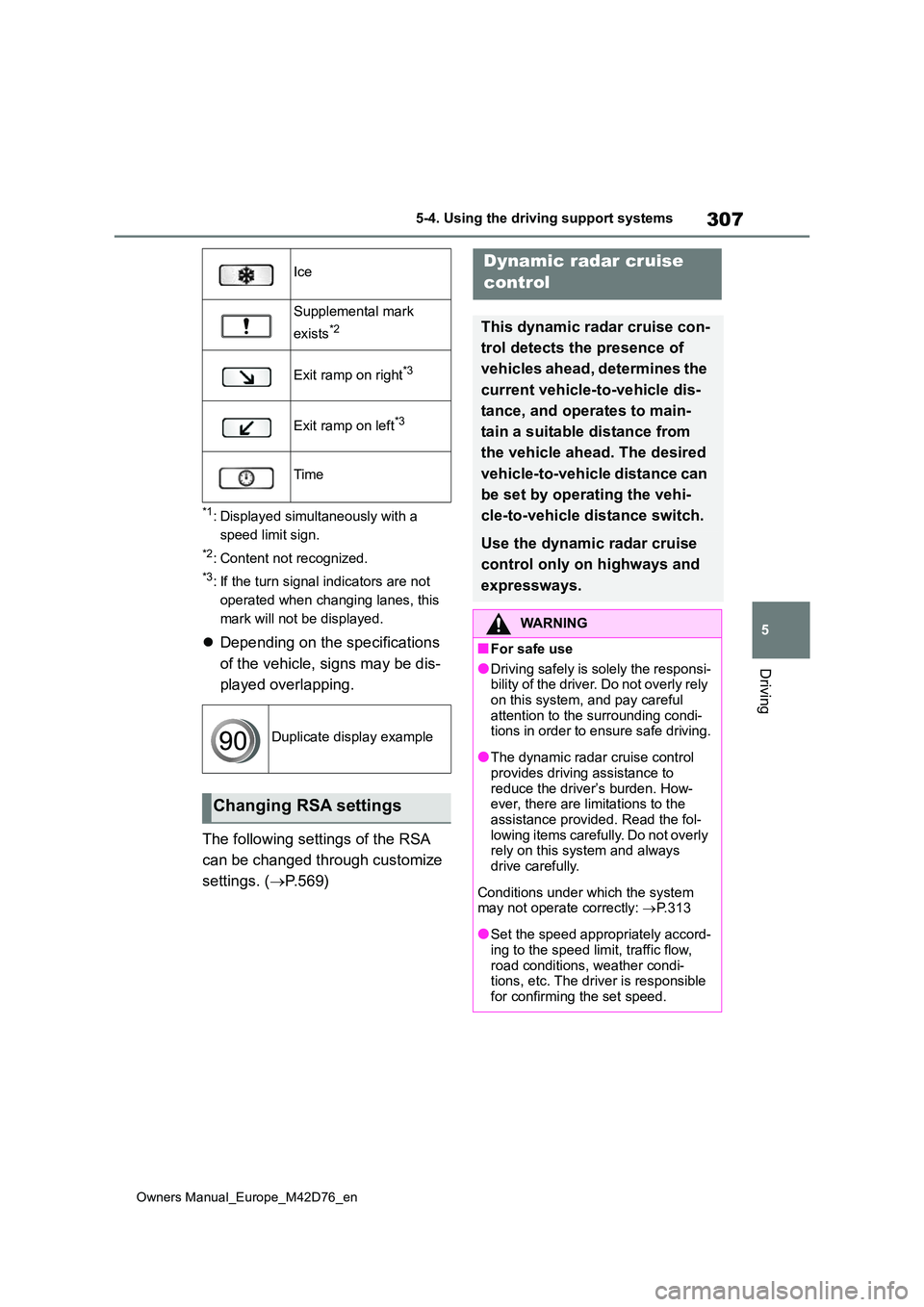
*1: Displayed simultaneously with a
speed limit sign.
*2: Content not recognized.
*3: If the turn signal indicators are not
operated when changing lanes, this
mark will not be displayed.
Depending on the specifications
of the vehicle, signs may be dis-
played overlapping.
The following settings of the RSA
can be changed through customize
settings. ( P. 5 6 9 )
Ice
Supplemental mark
exists*2
Exit ramp on right*3
Exit ramp on left*3
Time
Duplicate display example
Changing RSA settings
Dynamic radar cruise
control
This dynamic radar cruise con-
trol detects the presence of
vehicles ahead, determines the
current vehicle-to -vehicle dis-
tance, and operates to main-
tain a suitable distance from
the vehicle ahead. The desired
vehicle-to-vehicle distance can
be set by operating the vehi-
cle-to-vehicle distance switch.
Use the dynamic radar cruise
control only on highways and
expressways.
WARNING
■For safe use
●Driving safely is solely the responsi- bility of the driver. Do not overly rely
on this system, and pay careful attention to the surrounding condi-tions in order to ensure safe driving.
●The dynamic radar cruise control provides driving assistance to
reduce the driver’s burden. How- ever, there are limitations to the assistance provided. Read the fol-
lowing items carefully. Do not overly rely on this system and always drive carefully.
Conditions under which the system may not operate correctly: P.313
●Set the speed appropriately accord- ing to the speed limit, traffic flow,
road conditions, weather condi- tions, etc. The driver is responsible for confirming the set speed.
Page 310 of 674
308
Owners Manual_Europe_M42D76_en
5-4. Using the driving support systems
WARNING
●Even if the system is operating cor- rectly, the condition of a preceding
vehicle as recognized by the driver and detected by the system may differ. Therefore, it is necessary for
the driver to pay attention, assess risks, and ensure safety. Over-reli-ance on this system to drive the
vehicle safely may lead to an acci- dent resulting in death or serious injury.
■Precautions for the driving assist systems
Observe the following precautions, as there are limitations to the assistance provided by the system. Over-reliance
on this system may lead to an acci- dent resulting in death or serious injury.
●Details of support provided for the driver’s vision The dynamic radar
cruise control is only intended to help the driver in determining the distance between the driver’s own
vehicle and a designated preceding vehicle. It is not a system which allows for careless or inattentive
driving, and is not a system which assists in poor visibility conditions. The driver must pay attention to
their surroundings, even when the vehicle stops.
●Details of support provided for the driver’s judgement The dynamic radar cruise control determines
whether the distance between the driver’s own vehicle and a desig-nated preceding vehicle is within a
set range. It is not capable of mak- ing any other type of judgement. Therefore, it is absolutely neces-
sary for the driver to remain vigilant and to determine whether or not there is a possibility of danger.
●Details of support provided for the driver’s operation The dynamic radar cruise control does not
include functions which will prevent or avoid collisions with vehicles ahead of your vehicle. Therefore, if
there is ever any possibility of dan- ger, the driver must take immediate and direct control of the vehicle and
act appropriately in order to ensure safety.
■Situations in which the dynamic radar cruise control should not be used
Do not use the dynamic radar cruise control in the following situations. As the system will not be able to provide
appropriate control, using it may lead to an accident resulting in death or serious injury.
●Roads where there are pedestrians, cyclists, etc.
●When driving on a highway or expressway entrance or exit
●When the approach warning sounds frequently
●Situations in which the sensors may not operate properly: P.279
●Situations in which the lane may not be detected: P. 2 8 1
Page 316 of 674
314
Owners Manual_Europe_M42D76_en
5-4. Using the driving support systems
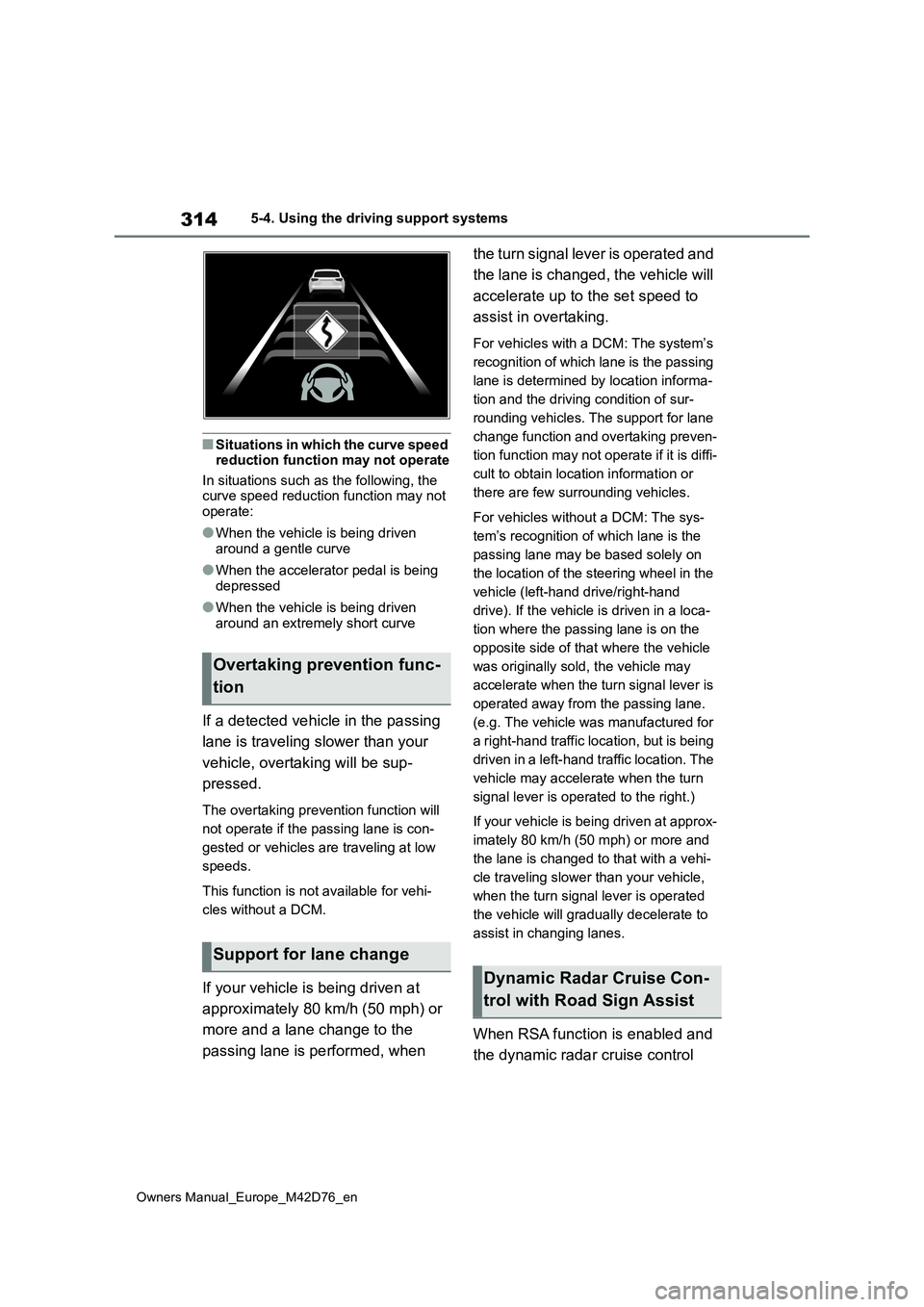
■Situations in which the curve speed reduction function may not operate
In situations such as the following, the curve speed reduction function may not operate:
●When the vehicle is being driven around a gentle curve
●When the accelerator pedal is being depressed
●When the vehicle is being driven around an extremely short curve
If a detected vehicle in the passing
lane is traveling slower than your
vehicle, overtaking will be sup-
pressed.
The overtaking prevention function will
not operate if the passing lane is con-
gested or vehicles are traveling at low
speeds.
This function is not available for vehi-
cles without a DCM.
If your vehicle is being driven at
approximately 80 km/h (50 mph) or
more and a lane change to the
passing lane is performed, when
the turn signal lever is operated and
the lane is changed, the vehicle will
accelerate up to the set speed to
assist in overtaking.
For vehicles with a DCM: The system’s
recognition of which lane is the passing
lane is determined by location informa-
tion and the driving condition of sur-
rounding vehicles. The support for lane
change function and overtaking preven-
tion function may not operate if it is diffi-
cult to obtain location information or
there are few surrounding vehicles.
For vehicles without a DCM: The sys-
tem’s recognition of which lane is the
passing lane may be based solely on
the location of the steering wheel in the
vehicle (left-hand drive/right-hand
drive). If the vehicle is driven in a loca-
tion where the passing lane is on the
opposite side of that where the vehicle
was originally sold, the vehicle may
accelerate when the turn signal lever is
operated away from the passing lane.
(e.g. The vehicle was manufactured for
a right-hand traffic location, but is being
driven in a left-hand traffic location. The
vehicle may accelerate when the turn
signal lever is operated to the right.)
If your vehicle is being driven at approx-
imately 80 km/h (50 mph) or more and
the lane is changed to that with a vehi-
cle traveling slower than your vehicle,
when the turn signal lever is operated
the vehicle will gradually decelerate to
assist in changing lanes.
When RSA function is enabled and
the dynamic radar cruise control
Overtaking prevention func-
tion
Support for lane change
Dynamic Radar Cruise Con-
trol with Road Sign Assist
Page 323 of 674
321
5
Owners Manual_Europe_M42D76_en
5-4. Using the driving support systems
Driving
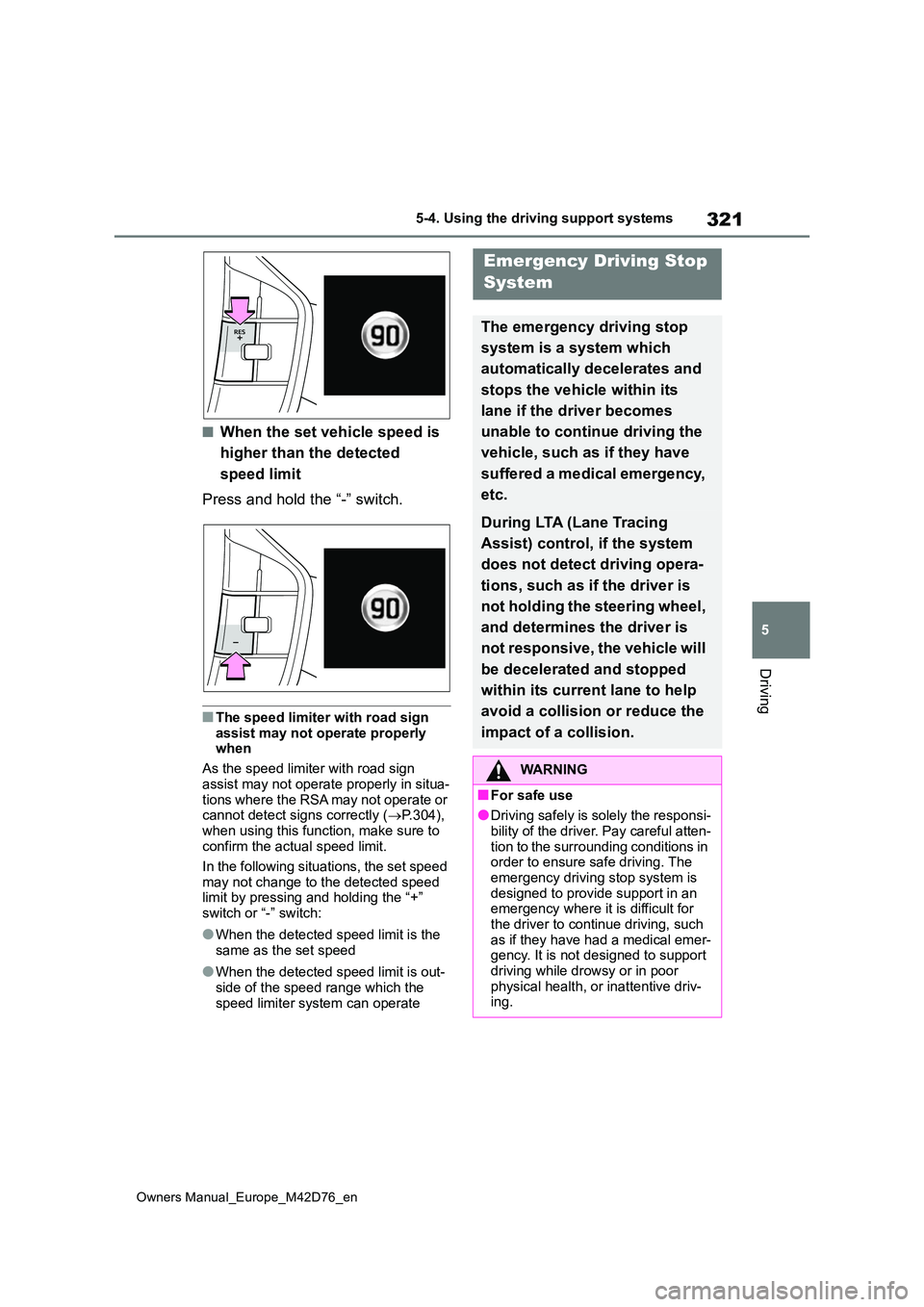
■When the set vehicle speed is
higher than the detected
speed limit
Press and hold the “-” switch.
■The speed limiter with road sign
assist may not operate properly when
As the speed limiter with road sign
assist may not operate properly in situa- tions where the RSA may not operate or cannot detect signs correctly ( P.304),
when using this function, make sure to confirm the actual speed limit.
In the following situations, the set speed
may not change to the detected speed limit by pressing and holding the “+” switch or “-” switch:
●When the detected speed limit is the same as the set speed
●When the detected speed limit is out-side of the speed range which the
speed limiter system can operate
Emergency Driving Stop
System
The emergency driving stop
system is a system which
automatically decelerates and
stops the vehicle within its
lane if the driver becomes
unable to continue driving the
vehicle, such as if they have
suffered a medical emergency,
etc.
During LTA (Lane Tracing
Assist) control, if the system
does not detect driving opera-
tions, such as if the driver is
not holding the steering wheel,
and determines the driver is
not responsive, the vehicle will
be decelerated and stopped
within its current lane to help
avoid a collision or reduce the
impact of a collision.
WARNING
■For safe use
●Driving safely is solely the responsi-
bility of the driver. Pay careful atten- tion to the surrounding conditions in order to ensure safe driving. The
emergency driving stop system is designed to provide support in an emergency where it is difficult for
the driver to continue driving, such as if they have had a medical emer-gency. It is not designed to support
driving while drowsy or in poor physical health, or inattentive driv-ing.
Page 324 of 674
322
Owners Manual_Europe_M42D76_en
5-4. Using the driving support systems
Operation of this system is sepa-
rated into 4 control states. Through
control state “warning phase 1” and
“warning phase 2”, the system
determines if the driver is aware
and responsive while outputting a
warning and controlling the vehicle
speed. If the system determines the
driver is not responsive, it will oper-
ate in control state “deceleration
stop phase” and “stop hold phase”
and decelerate and stop the vehi-
cle. It will then operate continuously
in “stop hold phase”.
■Operating conditions
This system operates when all of the fol- lowing conditions are met:
●When the LTA is on
●When the vehicle speed is approxi-
mately 50 km/h (30 mph) or more
■Operation cancelation conditions
In the following situations, system oper- ation will be canceled:
●When LTA control has been canceled
(the LTA switch has been pressed, etc.)
●When the dynamic radar cruise con-trol has been canceled
●When driver operations are detected (the steering wheel is held, the brake pedal, accelerator pedal, parking
brake, hazard light switch, or turn sig- nal lever is operated)
●When the driving assist switch is pressed while in the stop and hold phase
●When the power switch has been turned from ON to OFF
●Situations in which some or all of the
WARNING
●Although the emergency driving stop system is designed to deceler-
ate the vehicle within its lane to help avoid or help reduce the impact of a collision if the system
determines that it is difficult for the driver to continue driving, its effec-tiveness may change according to
various conditions. Therefore, it may not always be able to achieve the same level of performance.
Also, if the operating conditions are not met, this function will not oper-ate.
●After the emergency driving stop system operates, if driving
becomes possible again, immedi- ately begin driving again or, if nec-essary, park the vehicle on the
shoulder of the road and set a warning reflector and flare to warn other drivers of your stopped vehi-
cle.
●After this system operates, passen-
gers should attend to the driver as necessary and take appropriate hazard prevention measures, such
as moving to a place where safety can be ensured, such as the shoul-der of the road or behind a guard-
rail.
●T h i s s y s t e m d e t e c t s t h e c o n d i t i o n o f
the driver through the operation of the steering wheel. This system may operate if the driver is aware
but intentionally and continuously does not operate the vehicle. Also, the system may not operate if it
cannot determine that the driver is not responsive, such as if they are leaning on the steering wheel.
●Vehicles with a driver monitor cam-era: Situations in which the driver
monitor may not operate properly: P. 2 8 1
Summary of the system
Page 326 of 674
324
Owners Manual_Europe_M42D76_en
5-4. Using the driving support systems
*: If equipped
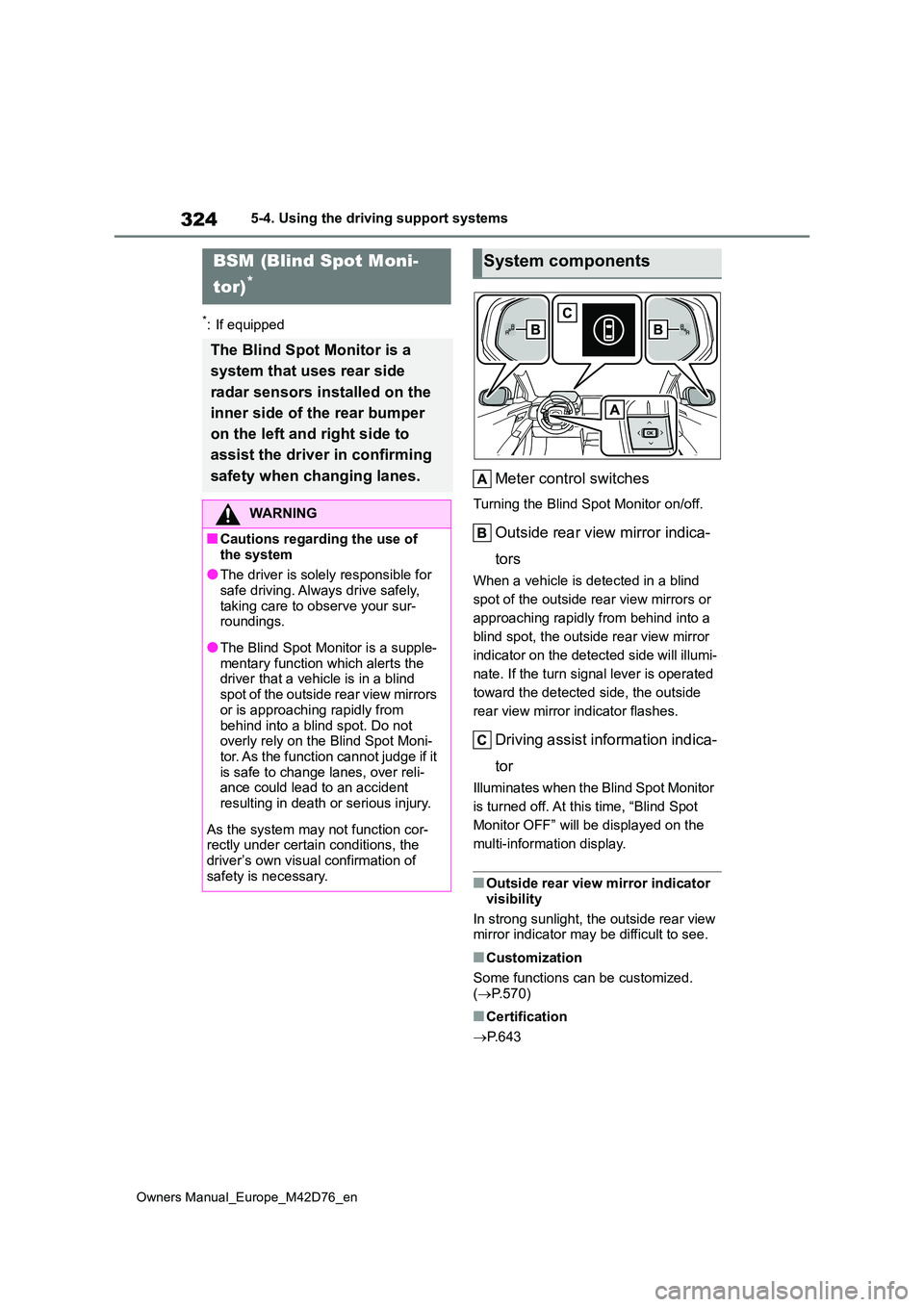
Meter control switches
Turning the Blind Spot Monitor on/off.
Outside rear view mirror indica-
tors
When a vehicle is detected in a blind
spot of the outside rear view mirrors or
approaching rapidly from behind into a
blind spot, the outside rear view mirror
indicator on the detected side will illumi-
nate. If the turn signal lever is operated
toward the detected side, the outside
rear view mirror indicator flashes.
Driving assist information indica-
tor
Illuminates when the Blind Spot Monitor
is turned off. At this time, “Blind Spot
Monitor OFF” will be displayed on the
multi-information display.
■Outside rear view mirror indicator
visibility
In strong sunlight, the outside rear view mirror indicator may be difficult to see.
■Customization
Some functions can be customized. ( P.570)
■Certification
P. 6 4 3
BSM (Blind Spot Moni-
tor)*
The Blind Spot Monitor is a
system that uses rear side
radar sensors installed on the
inner side of the rear bumper
on the left and right side to
assist the driver in confirming
safety when changing lanes.
WARNING
■Cautions regarding the use of
the system
●The driver is solely responsible for safe driving. Always drive safely,
taking care to observe your sur- roundings.
●The Blind Spot Monitor is a supple-mentary function which alerts the driver that a vehicle is in a blind
spot of the outside rear view mirrors or is approaching rapidly from
behind into a blind spot. Do not overly rely on the Blind Spot Moni-tor. As the function cannot judge if it
is safe to change lanes, over reli- ance could lead to an accident resulting in death or serious injury.
As the system may not function cor- rectly under certain conditions, the
driver’s own visual confirmation of safety is necessary.
System components