lock TOYOTA BZ4X 2022 (in English) Owner's Guide
[x] Cancel search | Manufacturer: TOYOTA, Model Year: 2022, Model line: BZ4X, Model: TOYOTA BZ4X 2022Pages: 674, PDF Size: 120.02 MB
Page 115 of 674
113
2
Owners Manual_Europe_M42D76_en
2-2. Charging
Electric Vehicle system
WARNING
■Power sources precautions
Observe the following precautions.
If you do not follow them, fire, electri- cal shock or damage may occur, pos-sibly resulting in death or serious
injury.
●Connect to an AC 220 V - 240 V
socket with a Residual Current Cir- cuit-Breaker (RCCB) and supplied by a circuit breaker in line with local
regulations. Use of an individual cir- cuit provided with at least 13 A is strongly recommended.
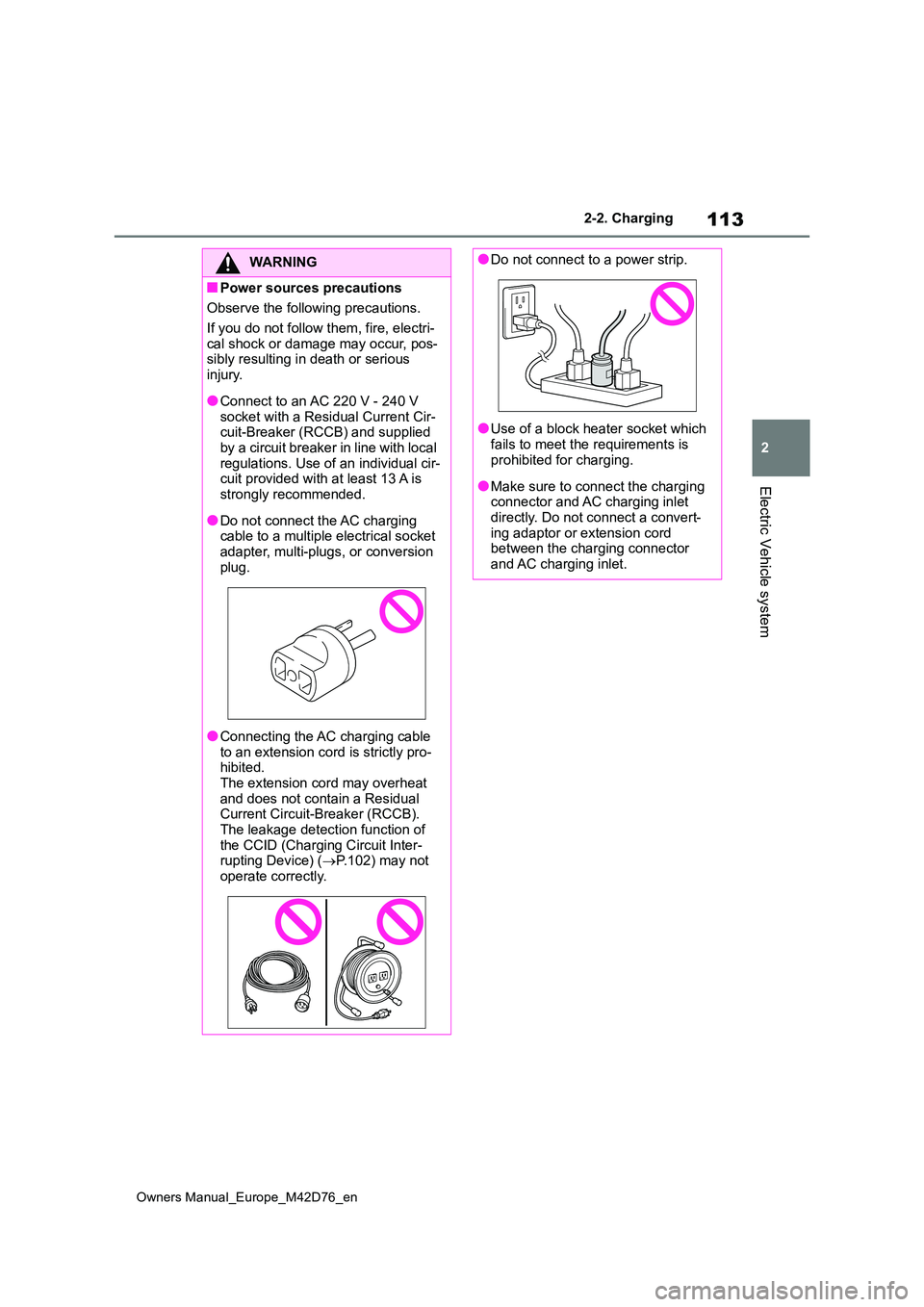
●Do not connect the AC charging cable to a multiple electrical socket
adapter, multi-plugs, or conversion plug.
●Connecting the AC charging cable to an extension cord is strictly pro-hibited.
The extension cord may overheat and does not contain a Residual Current Circuit-Breaker (RCCB).
The leakage detection function of the CCID (Charging Circuit Inter-rupting Device) ( P.102) may not
operate correctly.
●Do not connect to a power strip.
●Use of a block heater socket which
fails to meet the requirements is prohibited for charging.
●Make sure to connect the charging connector and AC charging inlet directly. Do not connect a convert-
ing adaptor or extension cord between the charging connector and AC charging inlet.
Page 123 of 674
121
2
Owners Manual_Europe_M42D76_en
2-2. Charging
Electric Vehicle system
P. 1 1 8
1 Prepare the AC charging cable.
( P. 9 8 )
2 Insert the AC charging cable
into the socket of the external
power source.
Make sure to hold the body of the plug
and insert it firmly into the socket.
If there is a switch that can switch the power supply to the socket, turn it on.
Use a string, etc., to hang the CCID (Charging Circuit Interrupting Device) on a hook or equivalent when a load is
applied to the socket and plug due to the installation height of the socket.
The CCID (Charging Circuit Interrupting
Device) can be hung by using the hole in the back. Do not attach the CCID (Charging Circuit Interrupting Device)
How to use AC charging
This section explains the pro-
cedure for charging the trac-
tion battery with an AC
charging cable.
When using an AC charger,
make sure to check the opera-
tion instructions of the AC
charger.
When the charging schedule is
registered, make sure “Charge
Now” is turned on before
charging. ( P.139, 144)
NOTICE
■When using the AC charging cable and related parts
To prevent damage to the AC charging cable and related parts, observe the following precautions.
●When interrupting or canceling charging, remove the charging con-nector before removing the plug.
●When removing the AC charging cable, check that the charging con-
nector is unlocked.
●Do not forcefully pull the charging
connector cap and AC charging inlet cap.
●Do not apply a vibration to the charging connector while charging. Charging may be stopped.
●Do not insert anything but the charging connector into the AC
charging inlet.
●When inserting the plug into or
removing the plug from the socket, make sure to hold the body of the plug.
●Do not damage the AC charging inlet cap with a sharp object.
●Do not forcefully pull the AC charging cable that is caught or entangled. If the cable is entangled,
disentangle it before using.
■AC charging inlet
Do not disassemble, repair or modify the AC charging inlet. When the AC charging inlet needs to be repaired,
consult any authorized Toyota retailer or Toyota authorized repairer, or any reliable repairer.
Charging precautions
When charging
Page 124 of 674
122
Owners Manual_Europe_M42D76_en
2-2. Charging
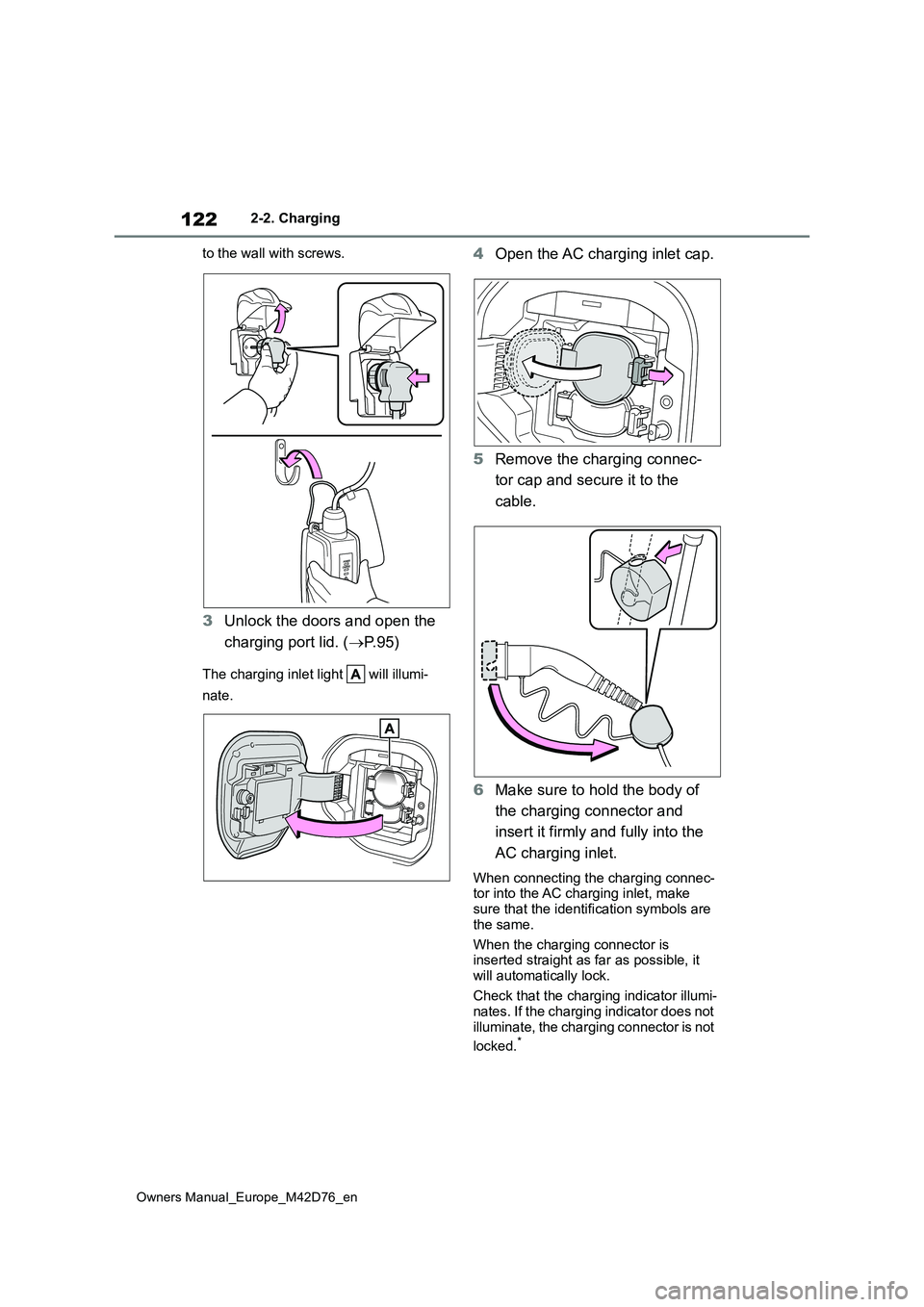
to the wall with screws.
3 Unlock the doors and open the
charging port lid. ( P. 9 5 )
The charging inlet light will illumi-
nate.
4 Open the AC charging inlet cap.
5 Remove the charging connec-
tor cap and secure it to the
cable.
6 Make sure to hold the body of
the charging connector and
insert it firmly and fully into the
AC charging inlet.
When connecting the charging connec- tor into the AC charging inlet, make sure that the identification symbols are
the same.
When the charging connector is inserted straight as far as possible, it
will automatically lock.
Check that the charging indicator illumi- nates. If the charging indicator does not
illuminate, the charging connector is not
locked.*
Page 125 of 674
123
2
Owners Manual_Europe_M42D76_en
2-2. Charging
Electric Vehicle system
*: If the charging connector is not firmly
inserted, locking operation will be
performed several times.
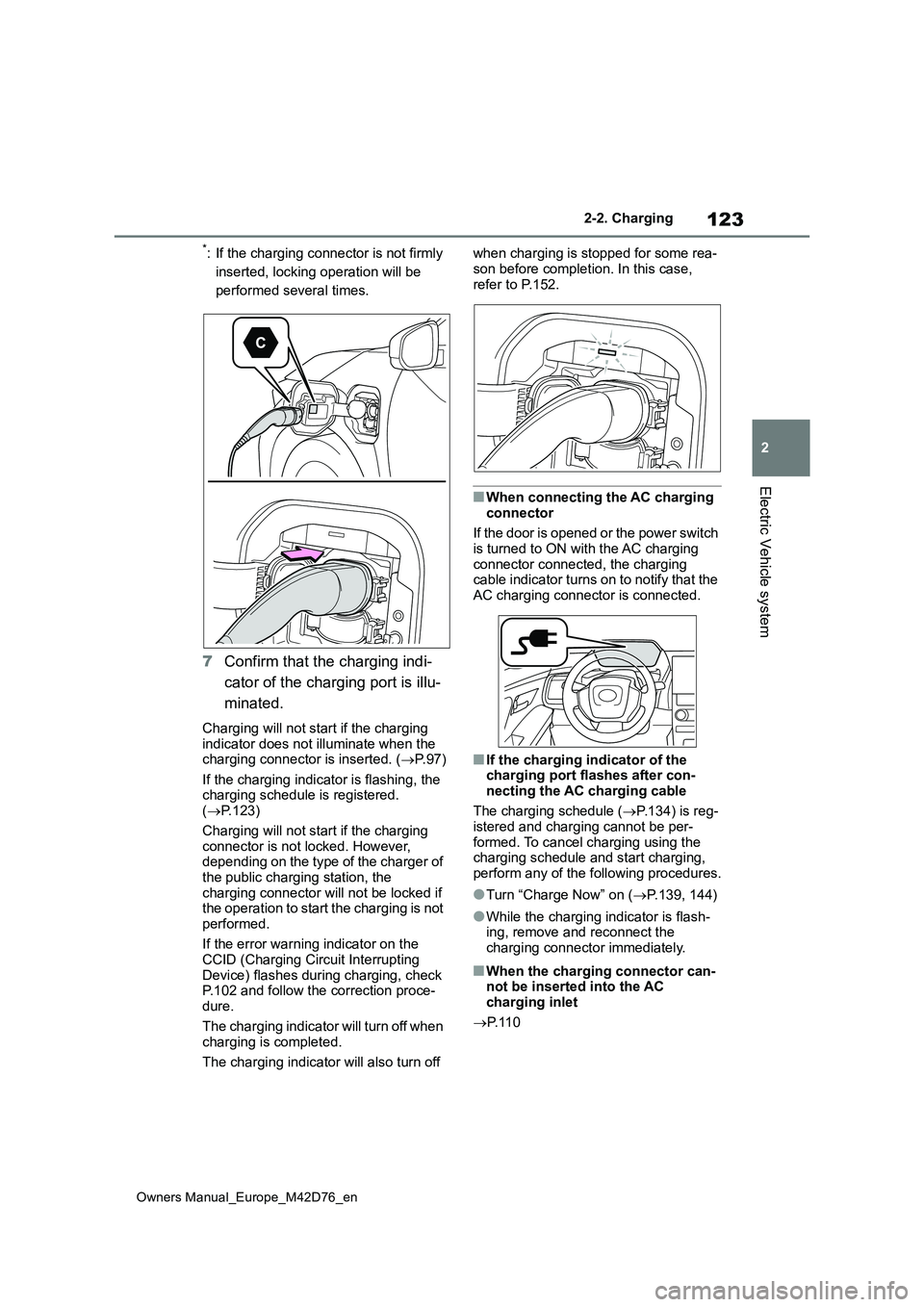
7 Confirm that the charging indi-
cator of the charging port is illu-
minated.
Charging will not start if the charging indicator does not illuminate when the charging connector is inserted. ( P. 9 7 )
If the charging indicator is flashing, the charging schedule is registered. ( P.123)
Charging will not start if the charging connector is not locked. However, depending on the type of the charger of
the public charging station, the charging connector will not be locked if the operation to start the charging is not
performed.
If the error warning indicator on the CCID (Charging Circuit Interrupting
Device) flashes during charging, check P.102 and follow the correction proce-dure.
The charging indicator will turn off when charging is completed.
The charging indicator will also turn off
when charging is stopped for some rea-
son before completion. In this case, refer to P.152.
■When connecting the AC charging
connector
If the door is opened or the power switch is turned to ON with the AC charging
connector connected, the charging cable indicator turns on to notify that the AC charging connector is connected.
■If the charging indicator of the charging port flashes after con-
necting the AC charging cable
The charging schedule ( P.134) is reg- istered and charging cannot be per-
formed. To cancel charging using the charging schedule and start charging, perform any of the following procedures.
●Turn “Charge Now” on ( P.139, 144)
●While the charging indicator is flash- ing, remove and reconnect the
charging connector immediately.
■When the charging connector can- not be inserted into the AC charging inlet
P. 1 1 0
Page 126 of 674
124
Owners Manual_Europe_M42D76_en
2-2. Charging
■Safety function
Charging will not start when the charging connector is not locked.
If the charging indicator does not illumi-
nate even when the charging connector is inserted, remove and reinsert the con-nector, and then check that the charging
indicator of the charging port illuminates.
■Charging time may increase
P. 1 2 0
■Charging at a public charging sta- tion with authentication function
When a door is unlocked during charging, the charging connector is unlocked and charging will be stopped.
In this case, the charging station authentication is canceled and charging may not be able to restart. Reconnect
the charging connector and perform authentication for the charging station.
■When your circuit breaker trips during charging
The upper limit of the charging current can be changed on the multi-information display or multimedia.
●Setting operations on multi-informa-tion display
1 Press or of the meter control
switches to select .
2 Press or of the meter control
switches to select “Vehicle Settings”,
and then press and hold .
3 Press or of the meter control
switches to select “Charging Set-
tings”, and then press .
The “Charging Settings” screen will be displayed.
4 Press or of the meter control
switches to select “Charging Cur-
rent”, and then press .
The “Charging Current” screen will be
displayed.
5 Press or of the meter control
switches to select “16A” or “8A” and
then press .
●Setting operations on multimedia
1 Select .
2 Select “Vehicle customize”.
3 Select “Charging”.
4 Select “Charging current”.
5 Select “16A” or “8A”.
The maximum charging current is lim-
ited to less than or equal to the selected
current.*
If the breaker still trips while charging,
even after changing the upper limit of the charging current, check if the con-nected power source meets the speci-
fied charging conditions. ( P.112)*: Restricting the charging current will
lengthen the charging time.
■Changing the “Charging Limit” set- tings
The upper limit of the charge capacity
can be changed on the multi-information display or multimedia.
The selected upper limit value is com-
mon to AC charging and DC charging.
●Setting operations on multi-informa-
tion display
1 Press or of the meter control
switches to select .
2 Press or of the meter control
switches to select “Vehicle Settings”,
and then press and hold .
3 Press or of the meter control
switches to select “Charging Set-
tings”, and then press .
Page 129 of 674
127
2
Owners Manual_Europe_M42D76_en
2-2. Charging
Electric Vehicle system
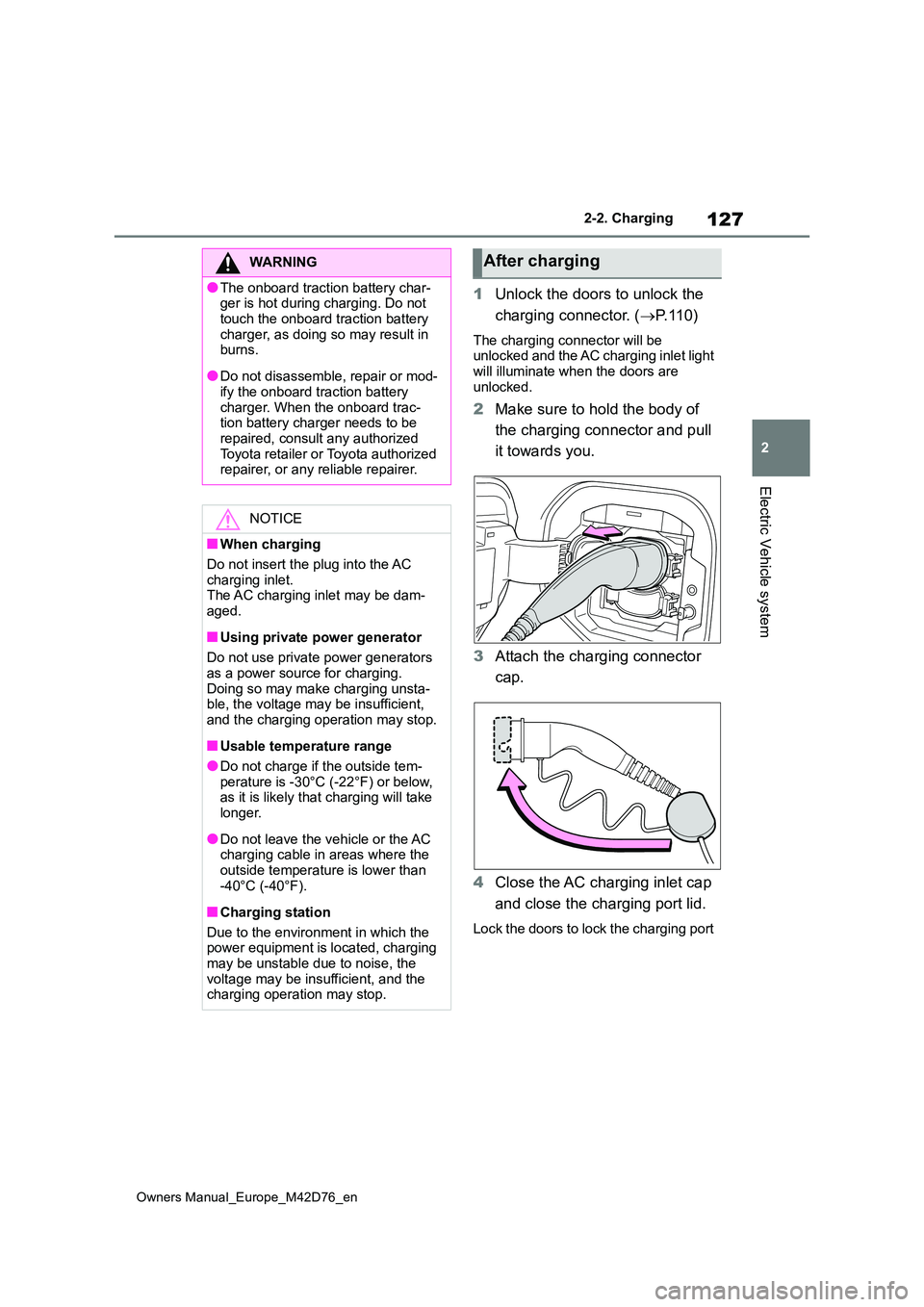
1Unlock the doors to unlock the
charging connector. ( P. 1 1 0 )
The charging connector will be unlocked and the AC charging inlet light
will illuminate when the doors are unlocked.
2 Make sure to hold the body of
the charging connector and pull
it towards you.
3 Attach the charging connector
cap.
4 Close the AC charging inlet cap
and close the charging port lid.
Lock the doors to lock the charging port
WARNING
●The onboard traction battery char- ger is hot during charging. Do not
touch the onboard traction battery charger, as doing so may result in burns.
●Do not disassemble, repair or mod-ify the onboard traction battery
charger. When the onboard trac- tion battery charger needs to be repaired, consult any authorized
Toyota retailer or Toyota authorized repairer, or any reliable repairer.
NOTICE
■When charging
Do not insert the plug into the AC charging inlet.The AC charging inlet may be dam-
aged.
■Using private power generator
Do not use private power generators as a power source for charging.
Doing so may make charging unsta- ble, the voltage may be insufficient, and the charging operation may stop.
■Usable temperature range
●Do not charge if the outside tem-
perature is -30°C (-22°F) or below, as it is likely that charging will take longer.
●Do not leave the vehicle or the AC charging cable in areas where the
outside temperature is lower than -40°C (-40°F).
■Charging station
Due to the environment in which the power equipment is located, charging
may be unstable due to noise, the voltage may be insufficient, and the charging operation may stop.
After charging
Page 130 of 674
128
Owners Manual_Europe_M42D76_en
2-2. Charging
lid. ( P. 9 6 )
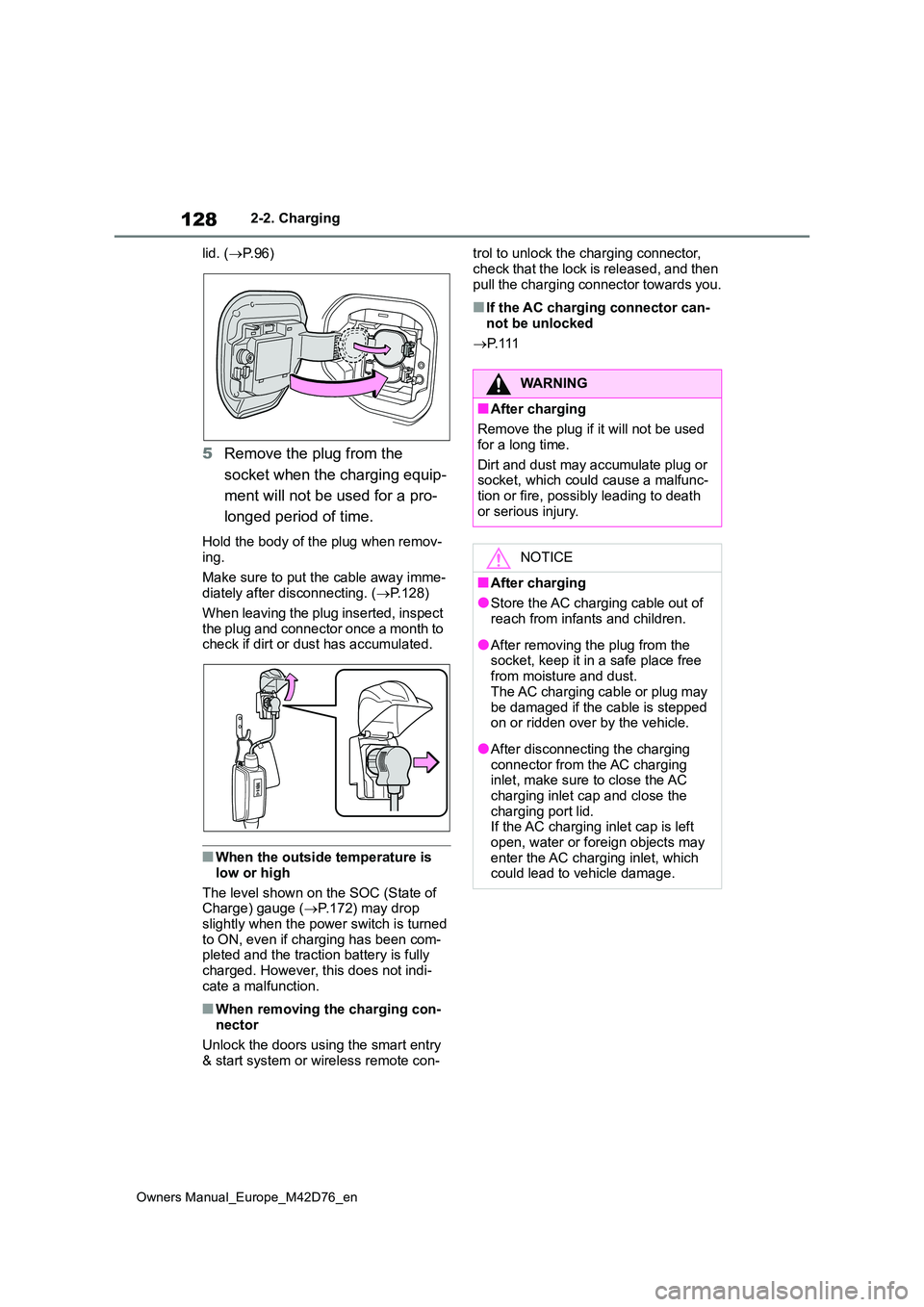
5Remove the plug from the
socket when the charging equip-
ment will not be used for a pro-
longed period of time.
Hold the body of the plug when remov- ing.
Make sure to put the cable away imme- diately after disconnecting. ( P.128)
When leaving the plug inserted, inspect
the plug and connector once a month to check if dirt or dust has accumulated.
■When the outside temperature is
low or high
The level shown on the SOC (State of Charge) gauge ( P.172) may drop
slightly when the power switch is turned to ON, even if charging has been com-pleted and the traction battery is fully
charged. However, this does not indi- cate a malfunction.
■When removing the charging con-nector
Unlock the doors using the smart entry & start system or wireless remote con-
trol to unlock the charging connector,
check that the lock is released, and then pull the charging connector towards you.
■If the AC charging connector can-not be unlocked
P. 1 1 1
WARNING
■After charging
Remove the plug if it will not be used
for a long time.
Dirt and dust may accumulate plug or socket, which could cause a malfunc-
tion or fire, possibly leading to death or serious injury.
NOTICE
■After charging
●Store the AC charging cable out of reach from infants and children.
●After removing the plug from the socket, keep it in a safe place free
from moisture and dust. The AC charging cable or plug may
be damaged if the cable is stepped on or ridden over by the vehicle.
●After disconnecting the charging connector from the AC charging inlet, make sure to close the AC
charging inlet cap and close the charging port lid.If the AC charging inlet cap is left
open, water or foreign objects may enter the AC charging inlet, which could lead to vehicle damage.
Page 131 of 674
129
2
Owners Manual_Europe_M42D76_en
2-2. Charging
Electric Vehicle system
P. 1 1 8
1 Unlock charging port lid by
unlocking the doors. ( P.185)
2 Open the charging port lid.
( P. 9 6 )
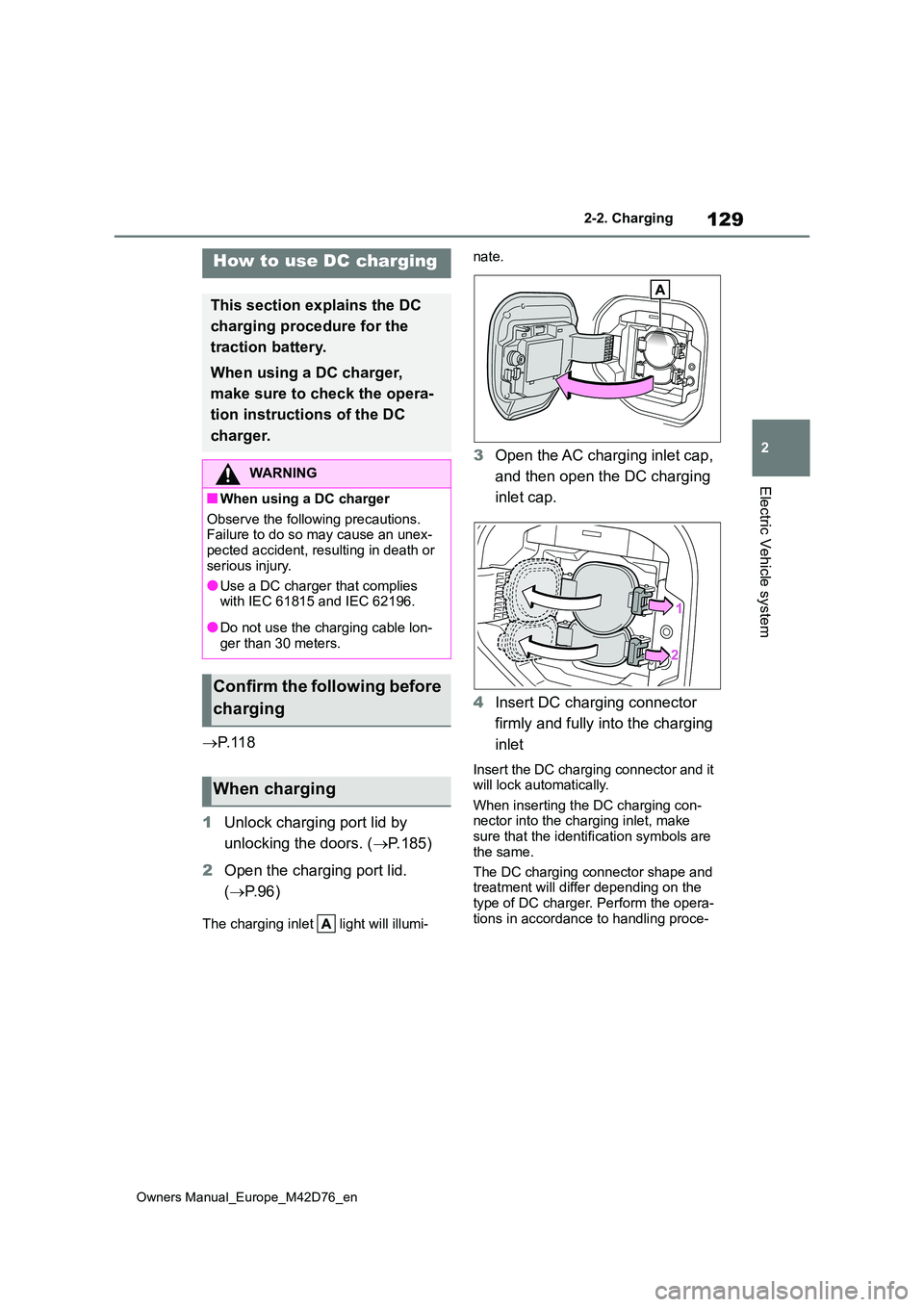
The charging inlet light will illumi-
nate.
3 Open the AC charging inlet cap,
and then open the DC charging
inlet cap.
4 Insert DC charging connector
firmly and fully into the charging
inlet
Insert the DC charging connector and it will lock automatically.
When inserting the DC charging con- nector into the charging inlet, make sure that the identification symbols are
the same.
The DC charging connector shape and treatment will differ depending on the
type of DC charger. Perform the opera- tions in accordance to handling proce-
How to use DC charging
This section explains the DC
charging procedure for the
traction battery.
When using a DC charger,
make sure to check the opera-
tion instructions of the DC
charger.
WARNING
■When using a DC charger
Observe the following precautions. Failure to do so may cause an unex-pected accident, resulting in death or
serious injury.
●Use a DC charger that complies with IEC 61815 and IEC 62196.
●Do not use the charging cable lon-ger than 30 meters.
Confirm the following before
charging
When charging
Page 135 of 674
133
2
Owners Manual_Europe_M42D76_en
2-2. Charging
Electric Vehicle system
1Operate the DC charger to stop
the charging.
DC charging connector will be unlocked automatically when charging is com-
pleted.
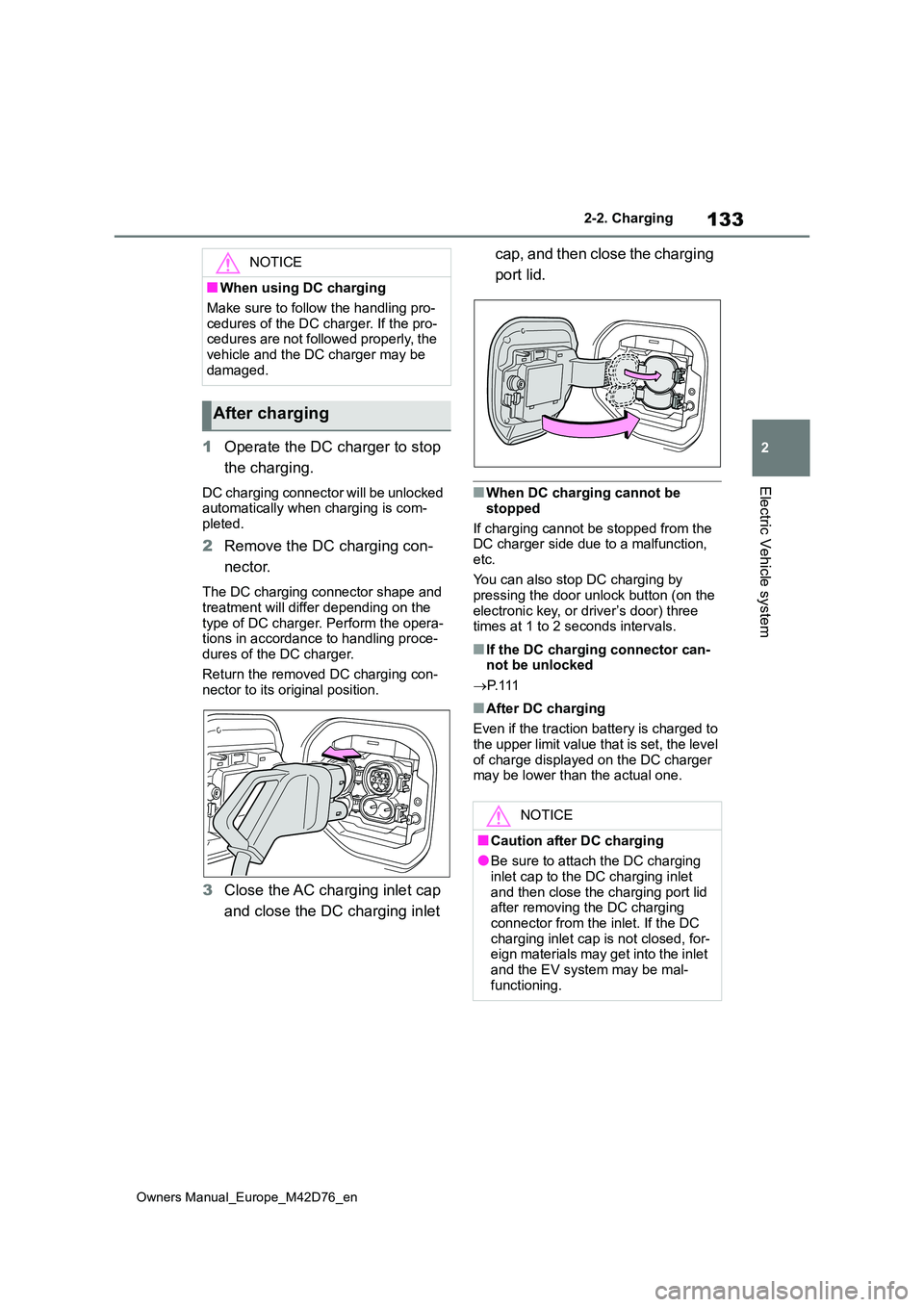
2 Remove the DC charging con-
nector.
The DC charging connector shape and
treatment will differ depending on the type of DC charger. Perform the opera-tions in accordance to handling proce-
dures of the DC charger.
Return the removed DC charging con- nector to its original position.
3 Close the AC charging inlet cap
and close the DC charging inlet
cap, and then close the charging
port lid.
■When DC charging cannot be
stopped
If charging cannot be stopped from the DC charger side due to a malfunction,
etc.
You can also stop DC charging by pressing the door unlock button (on the
electronic key, or driver’s door) three times at 1 to 2 seconds intervals.
■If the DC charging connector can-not be unlocked
P. 1 1 1
■After DC charging
Even if the traction battery is charged to the upper limit value that is set, the level
of charge displayed on the DC charger may be lower than the actual one.
NOTICE
■When using DC charging
Make sure to follow the handling pro-
cedures of the DC charger. If the pro- cedures are not followed properly, the vehicle and the DC charger may be
damaged.
After charging
NOTICE
■Caution after DC charging
●Be sure to attach the DC charging inlet cap to the DC charging inlet
and then close the charging port lid after removing the DC charging connector from the inlet. If the DC
charging inlet cap is not closed, for- eign materials may get into the inlet and the EV system may be mal-
functioning.
Page 137 of 674
135
2
Owners Manual_Europe_M42D76_en
2-2. Charging
Electric Vehicle system
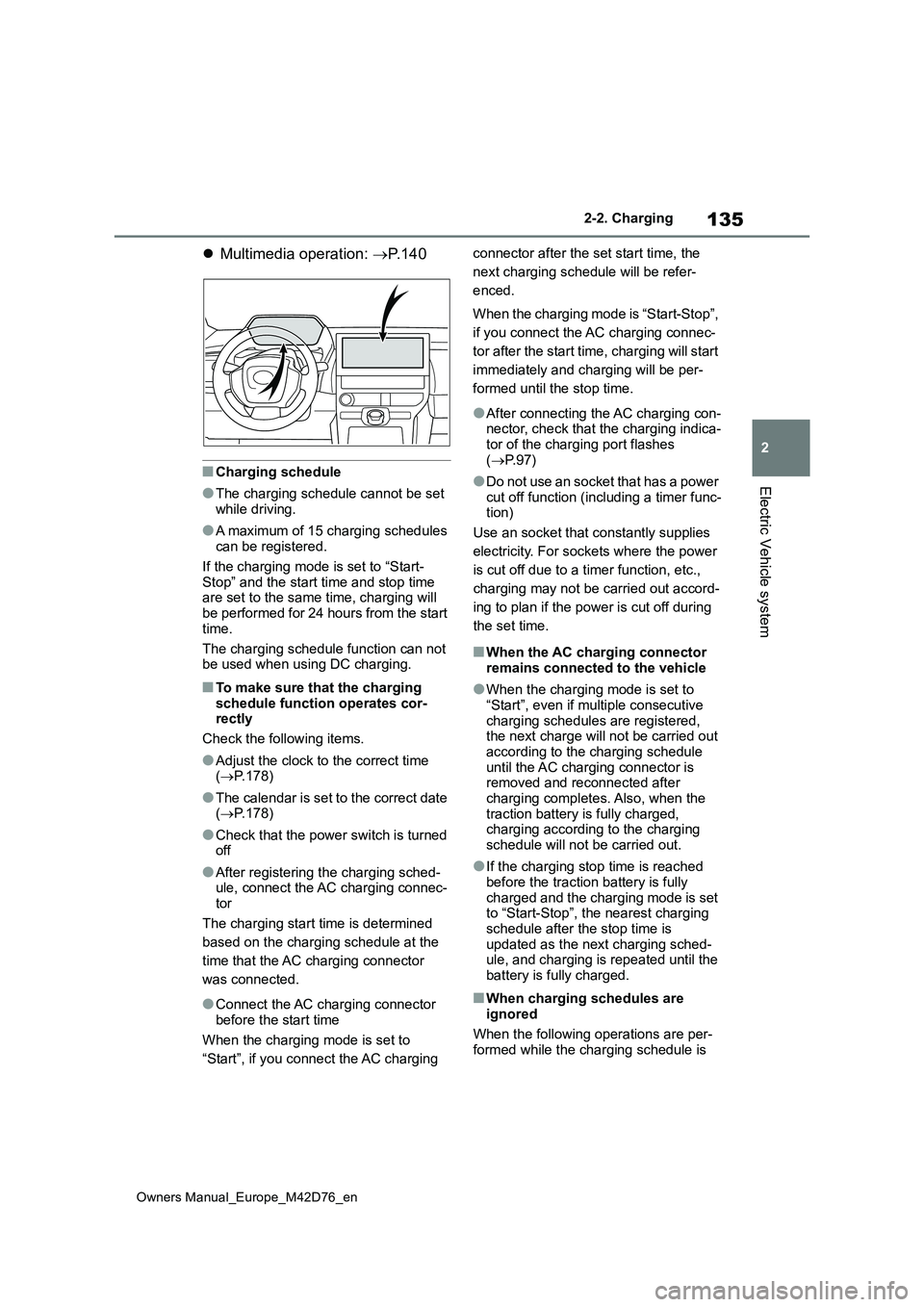
Multimedia operation: P. 1 4 0
■Charging schedule
●The charging schedule cannot be set while driving.
●A maximum of 15 charging schedules can be registered.
If the charging mode is set to “Start-
Stop” and the start time and stop time are set to the same time, charging will be performed for 24 hours from the start
time.
The charging schedule function can not be used when using DC charging.
■To make sure that the charging
schedule function operates cor- rectly
Check the following items.
●Adjust the clock to the correct time ( P.178)
●The calendar is set to the correct date ( P.178)
●Check that the power switch is turned off
●After registering the charging sched-ule, connect the AC charging connec-
tor
The charging start time is determined
based on the charging schedule at the
time that the AC charging connector
was connected.
●Connect the AC charging connector
before the start time
When the charging mode is set to
“Start”, if you connect the AC charging
connector after the set start time, the
next charging schedule will be refer-
enced.
When the charging mode is “Start-Stop”,
if you connect the AC charging connec-
tor after the start time, charging will start
immediately and charging will be per-
formed until the stop time.
●After connecting the AC charging con- nector, check that the charging indica-tor of the charging port flashes
( P. 9 7 )
●Do not use an socket that has a power
cut off function (including a timer func- tion)
Use an socket that constantly supplies
electricity. For sockets where the power
is cut off due to a timer function, etc.,
charging may not be carried out accord-
ing to plan if the power is cut off during
the set time.
■When the AC charging connector remains connected to the vehicle
●When the charging mode is set to “Start”, even if multiple consecutive
charging schedules are registered, the next charge will not be carried out according to the charging schedule
until the AC charging connector is removed and reconnected after charging completes. Also, when the
traction battery is fully charged, charging according to the charging schedule will not be carried out.
●If the charging stop time is reached before the traction battery is fully
charged and the charging mode is set to “Start-Stop”, the nearest charging schedule after the stop time is
updated as the next charging sched- ule, and charging is repeated until the battery is fully charged.
■When charging schedules are
ignored
When the following operations are per- formed while the charging schedule is