fuel TOYOTA CAMRY 2022 User Guide
[x] Cancel search | Manufacturer: TOYOTA, Model Year: 2022, Model line: CAMRY, Model: TOYOTA CAMRY 2022Pages: 664, PDF Size: 11.3 MB
Page 90 of 664
902. Instrument cluster
CAMRY_U
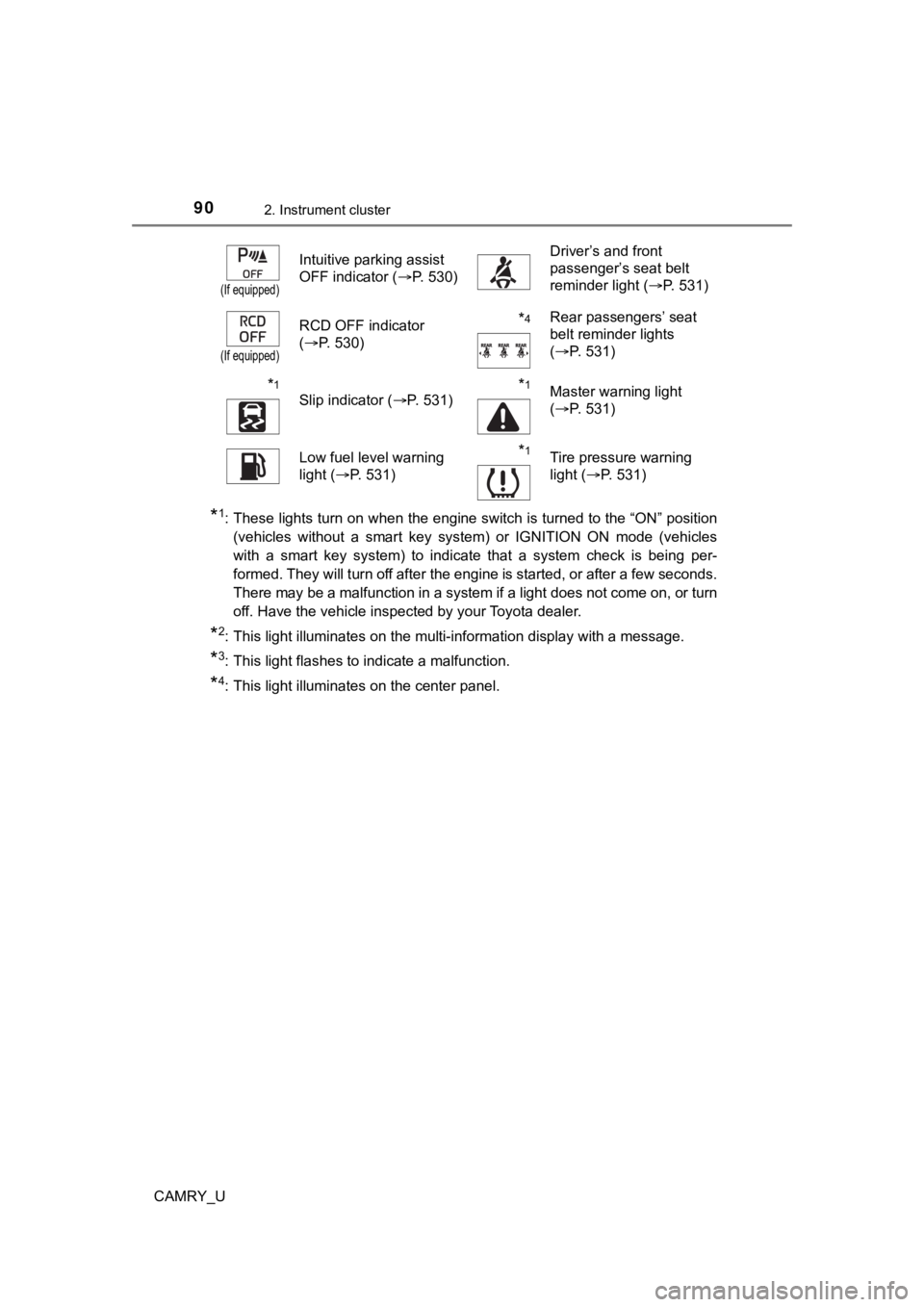
*1: These lights turn on when the engine switch is turned to the “ON” position
(vehicles without a smart key system) or IGNITION ON mode (vehicles
with a smart key system) to indicate that a system check is being per-
formed. They will turn off after the engine is started, or after a few seconds.
There may be a malfunction in a system if a light does not come on, or turn
off. Have the vehicle inspected by your Toyota dealer.
*2: This light illuminates on the multi-information display with a message.
*3: This light flashes to indicate a malfunction.
*4: This light illuminates on the center panel.
(If equipped)
Intuitive parking assist
OFF indicator (P. 530)Driver’s and front
passenger’s seat belt
reminder light (P. 531)
(If equipped)
RCD OFF indicator
(P. 530)*4Rear passengers’ seat
belt reminder lights
(P. 531)
*1
Slip indicator ( P. 531)*1Master warning light
(P. 531)
Low fuel level warning
light ( P. 531)*1Tire pressure warning
light (P. 531)
Page 95 of 664
952. Instrument cluster
2
Instrument cluster
CAMRY_U
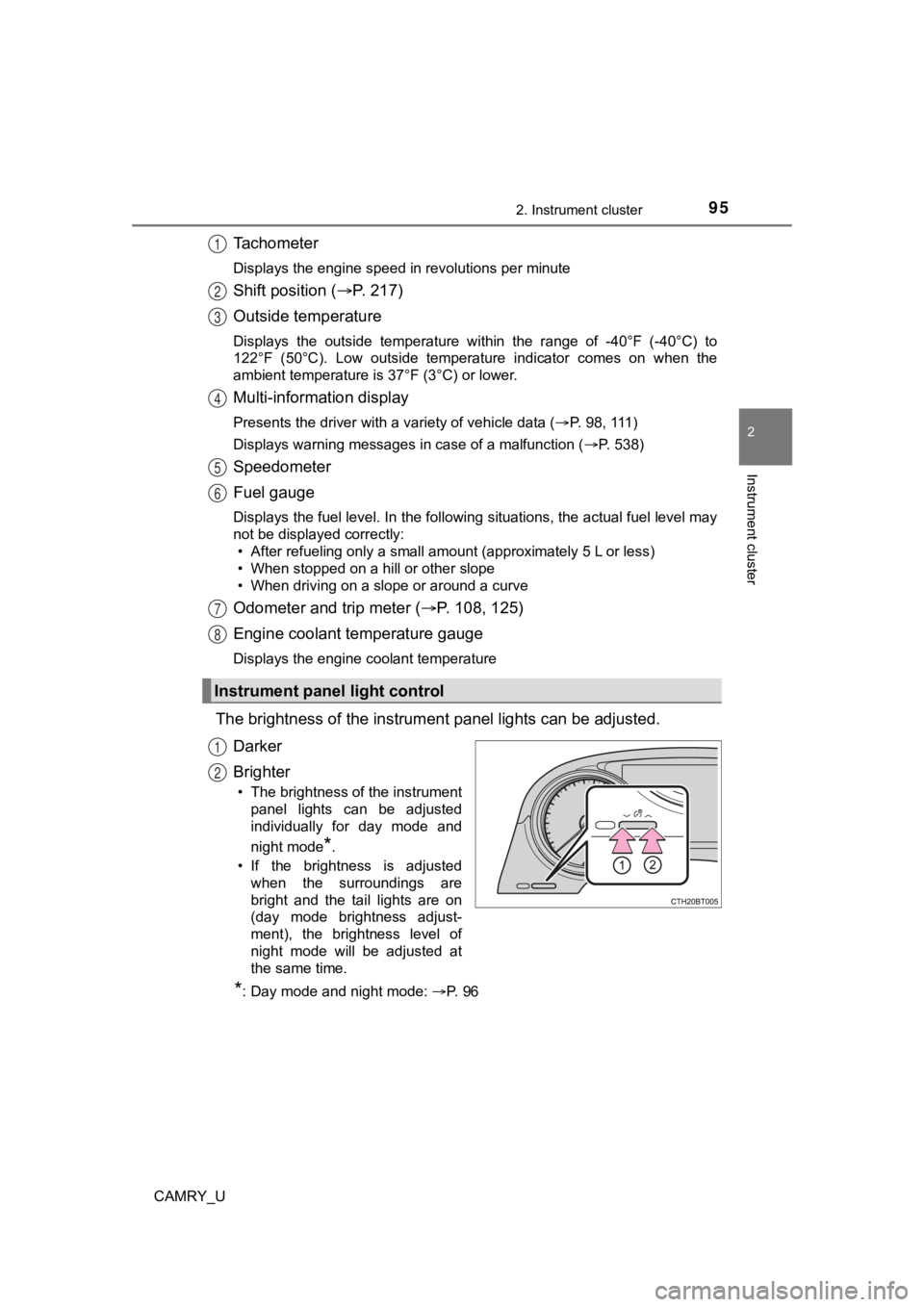
Tachometer
Displays the engine speed in revolutions per minute
Shift position (P. 2 1 7 )
Outside temperature
Displays the outside temperature within the range of -40°F (-40 °C) to
122°F (50°C). Low outside temperat ure indicator comes on when the
ambient temperature is 37°F (3°C) or lower.
Multi-information display
Presents the driver with a variety of vehicle data ( P. 98, 111)
Displays warning messages in case of a malfunction ( P. 538)
Speedometer
Fuel gauge
Displays the fuel level. In the following situations, the actua l fuel level may
not be displayed correctly: • After refueling only a small amount (approximately 5 L or less )
• When stopped on a hill or other slope
• When driving on a slope or around a curve
Odometer and trip meter ( P. 108, 125)
Engine coolant temperature gauge
Displays the engine coolant temperature
The brightness of the instrumen t panel lights can be adjusted.
Darker
Brighter
• The brightness of the instrument panel lights can be adjusted
individually for day mode and
night mode
*.
• If the brightness is adjusted when the surroundings are
bright and the tail lights are on
(day mode brightness adjust-
ment), the brightness level of
night mode will be adjusted at
the same time.
*: Day mode and night mode: P. 96
Instrument panel light control
1
2
3
4
5
6
7
8
1
2
Page 96 of 664

962. Instrument cluster
CAMRY_U
■The meters and display illuminate when
Vehicles without a smart key system
The engine switch is in the “ON” position.
Vehicles with a smart key system
The engine switch is in IGNITION ON mode.
■ Brightness of the meters ( day mode and night mode)
● The brightness of the meters is changed between day mode and ni ght
mode.
• Day mode: When the tail lights are off or when the tail lights are on but
the surrounding area is bright
• Night mode: When the tail lights are on and the surrounding ar ea is dark
● When in night mode, the brightness will be reduced slightly unless the
meters are set to the maximum brightness level.
■ Outside temperature display
In the following situations, the correct outside temperature ma y not be dis-
played, or the display may take longer than normal to change:
● When stopped, or driving at low speeds (less than 16 mph [25 km/h])
● When the outside temperature has changed suddenly (at the entra nce/exit
of a garage, tunnel, etc.)
● When “ ” or “E” is displayed, the system may be malfunctioning.
Take your vehicle to your Toyota dealer.
■ Fuel gauge and driving range display
The fuel gauge and driving range display are linked. If the fue l gauge and
driving range display do not update after refueling a small amount, they can
be updated by performing the following procedure:
Stop the vehicle on a level surface.
Wait until the fuel in the fuel tank stabilizes.
Press the ODO/TRIP switch to change the odometer and trip meter display
to the odometer.
Turn the engine switch off.
Vehicles without a smart key system:
While pressing and holding the ODO/TRIP switch, turn the engine switch to
the “ON” position.
Vehicles with a smart key system:
While pressing and holding the ODO/TRIP switch, turn the engine switch to
IGNITION ON mode.
Continue holding the ODO/TRIP switch for approximately 5 second s.
Release the switch when the odometer begins blinking.
Updating will be complete when the odometer blinks for approximately 5
seconds and then returns to the normal display.
1
2
3
4
5
Page 101 of 664
1012. Instrument cluster
2
Instrument cluster
CAMRY_U■
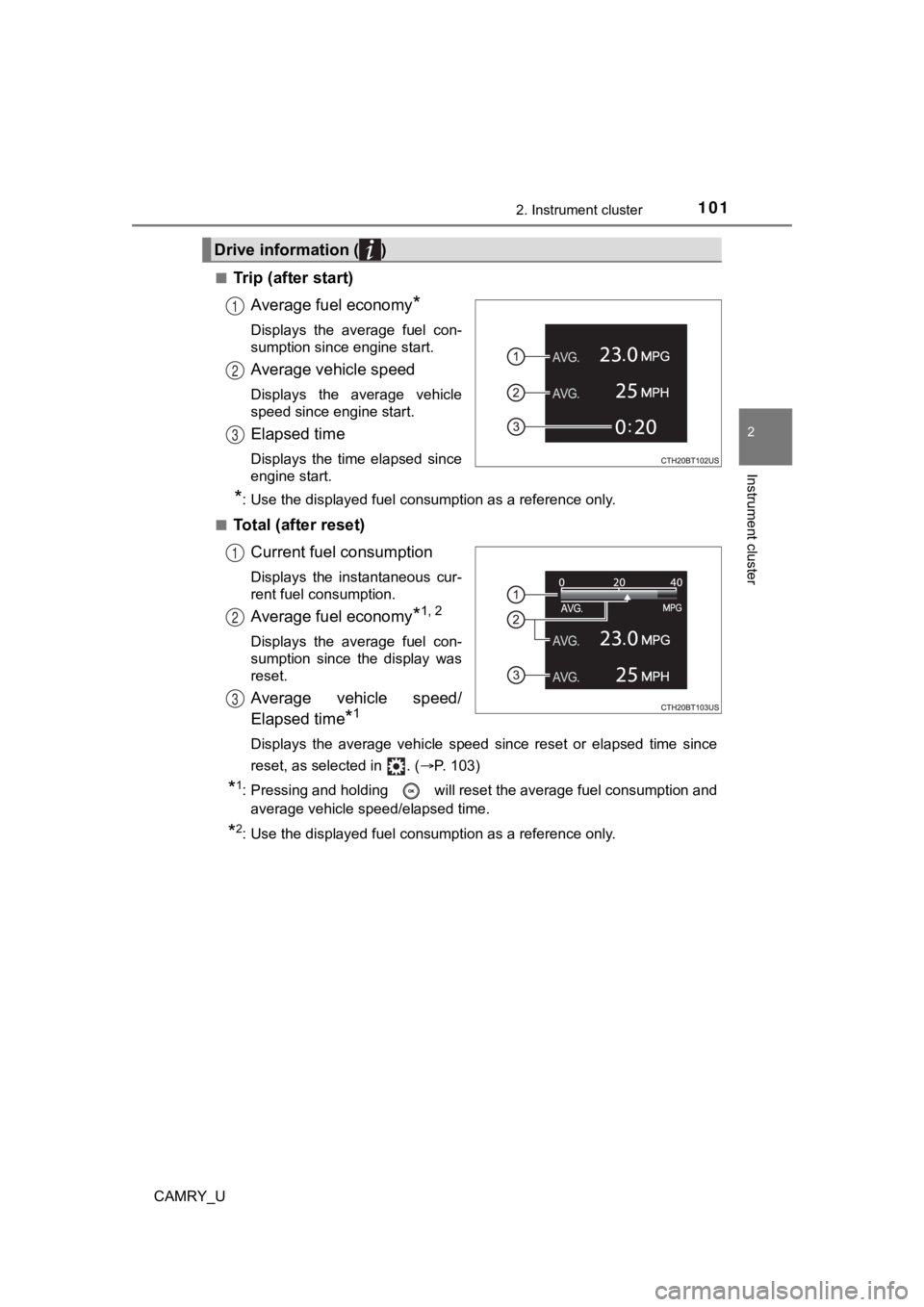
Trip (after start)
Average fuel economy
*
Displays the average fuel con-
sumption since engine start.
Average vehicle speed
Displays the average vehicle
speed since engine start.
Elapsed time
Displays the time elapsed since
engine start.
*: Use the displayed fuel consumption as a reference only.
■
Total (after reset) Current fuel consumption
Displays the instantaneous cur-
rent fuel consumption.
Average fuel economy*1, 2
Displays the average fuel con-
sumption since the display was
reset.
Average vehicle speed/
Elapsed time
*1
Displays the average vehicle speed since reset or elapsed time since
reset, as selected in . ( P. 103)
*1: Pressing and holding will reset the average fuel consumption and
average vehicle speed/elapsed time.
*2: Use the displayed fuel consumption as a reference only.
Drive information ( )
1
2
3
1
2
3
Page 102 of 664
1022. Instrument cluster
CAMRY_U■
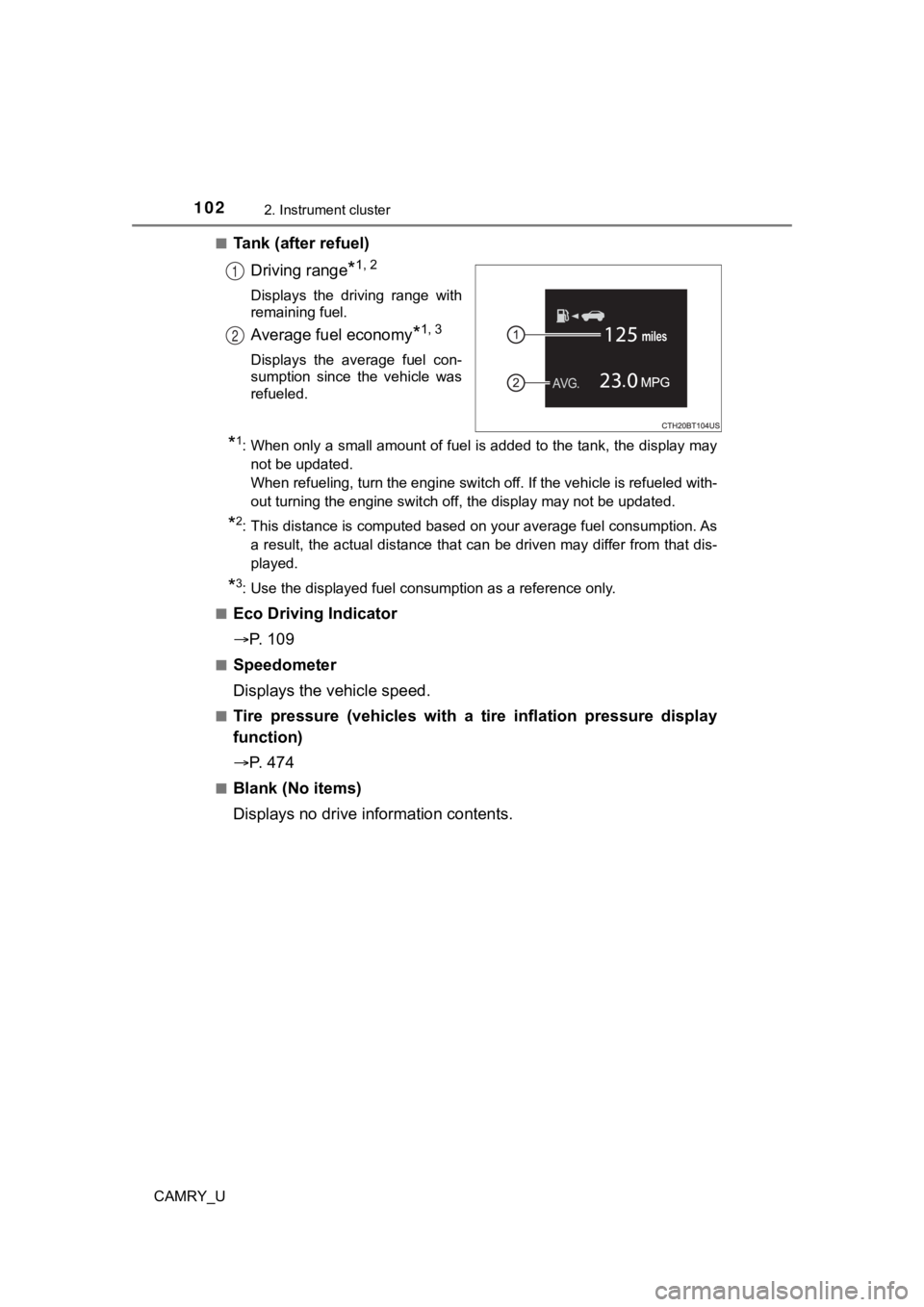
Tank (after refuel)
Driving range
*1, 2
Displays the driving range with
remaining fuel.
Average fuel economy*1, 3
Displays the average fuel con-
sumption since the vehicle was
refueled.
*1: When only a small amount of fuel is added to the tank, the dis play may
not be updated.
When refueling, turn the engine switch off. If the vehicle is r efueled with-
out turning the engine switch off, the display may not be updat ed.
*2: This distance is computed based on your average fuel consumpti on. As
a result, the actual distance that can be driven may differ fro m that dis-
played.
*3: Use the displayed fuel consumption as a reference only.
■
Eco Driving Indicator
P. 1 0 9
■Speedometer
Displays the vehicle speed.
■Tire pressure (vehicles with a tire inflation pressure display
function)
P. 4 7 4
■Blank (No items)
Displays no drive information contents.
1
2
Page 114 of 664
1142. Instrument cluster
CAMRY_U
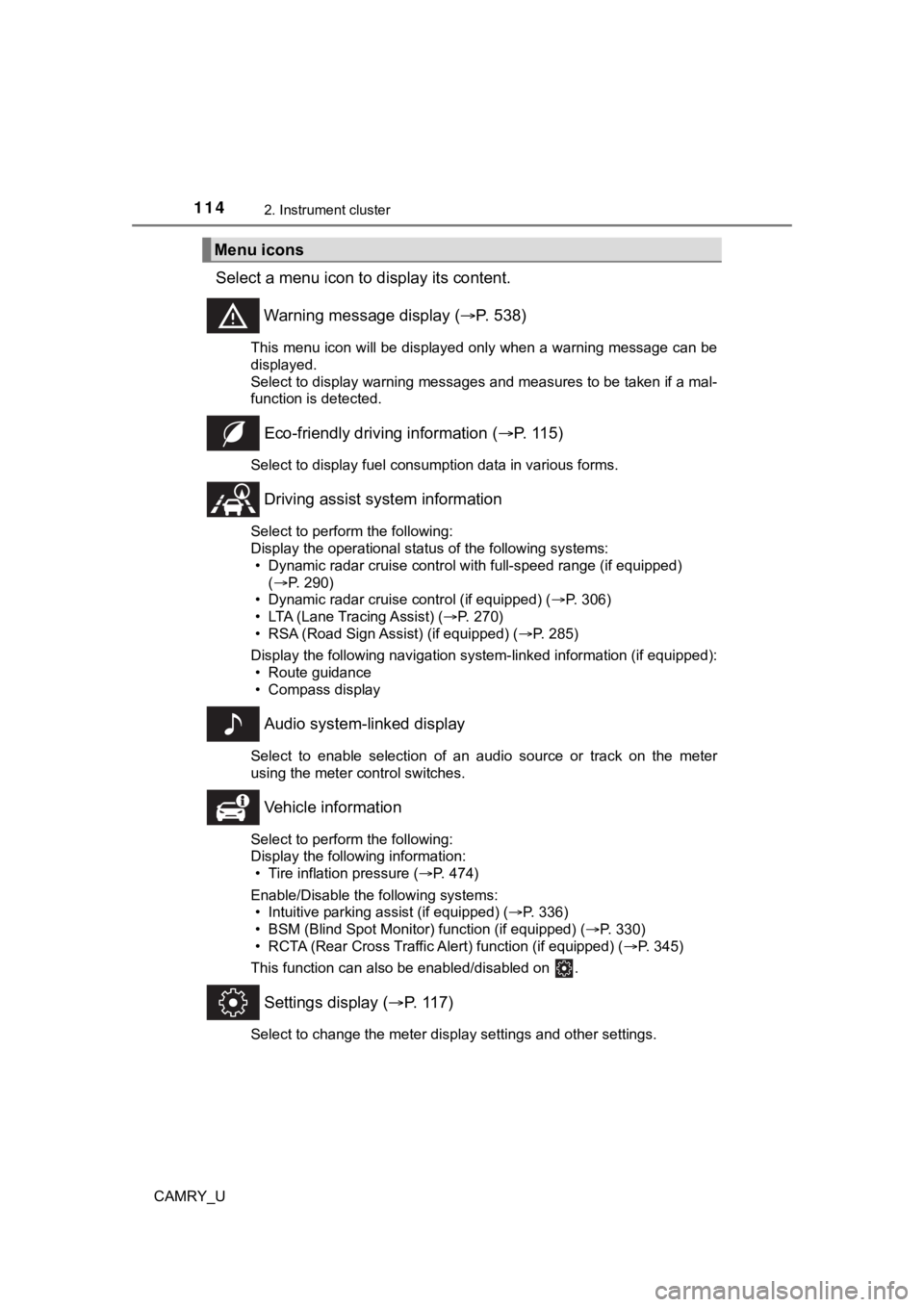
Select a menu icon to display its content.
Warning message display ( P. 538)
This menu icon will be displayed only when a warning message ca n be
displayed.
Select to display warning messages and measures to be taken if a mal-
function is detected.
Eco-friendly drivin g information (P. 115)
Select to display fuel consumption data in various forms.
Driving assist sys tem information
Select to perform the following:
Display the operational status of the following systems:
• Dynamic radar cruise control with full-speed range (if equippe d)
( P. 290)
• Dynamic radar cruise control (if equipped) ( P. 306)
• LTA (Lane Tracing Assist) ( P. 270)
• RSA (Road Sign Assist) (if equipped) ( P. 285)
Display the following navigation system-linked information (if equipped):
• Route guidance
• Compass display
Audio system-linked display
Select to enable selection of an audio source or track on the m eter
using the meter control switches.
Vehicle information
Select to perform the following:
Display the following information: • Tire inflation pressure ( P. 474)
Enable/Disable the following systems: • Intuitive parking assist (if equipped) ( P. 336)
• BSM (Blind Spot Monitor) function (if equipped) ( P. 330)
• RCTA (Rear Cross Traffic Al ert) function (if equipped) (P. 345)
This function can also be enabled/disabled on .
Settings display ( P. 117)
Select to change the meter display settings and other settings.
Menu icons
Page 115 of 664
1152. Instrument cluster
2
Instrument cluster
CAMRY_U■
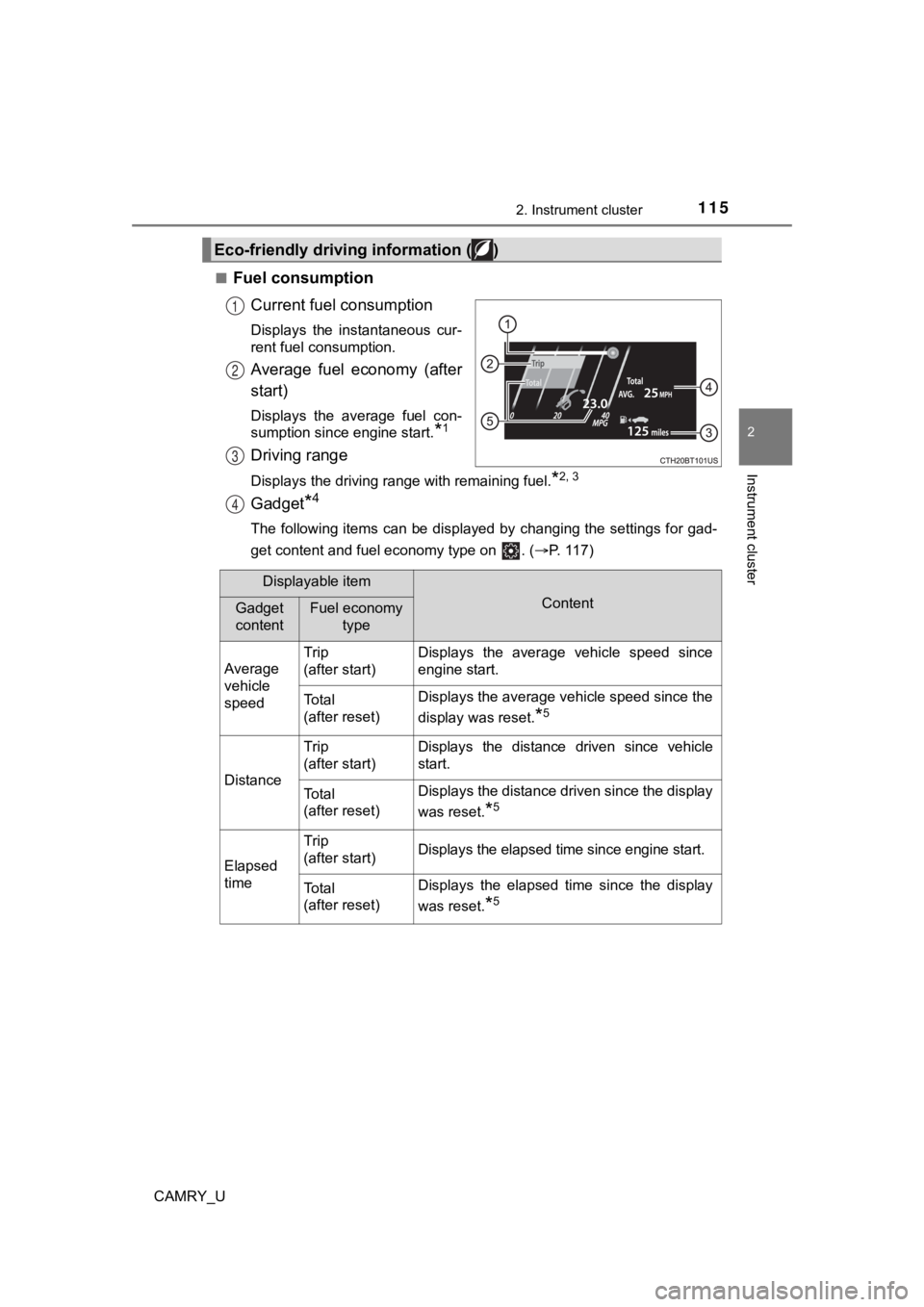
Fuel consumption
Current fuel consumption
Displays the instantaneous cur-
rent fuel consumption.
Average fuel economy (after
start)
Displays the average fuel con-
sumption since engine start.
*1
Driving range
Displays the driving range with remaining fuel.*2, 3
Gadget*4
The following items can be displayed by changing the settings f or gad-
get content and fuel economy type on . ( P. 117)
Eco-friendly driving information ( )
1
2
3
4
Displayable item
ContentGadget
contentFuel economy
type
Average
vehicle
speed Trip
(after start)
Displays the average vehicle speed since
engine start.
To t a l
(after reset)Displays the average vehicle speed since the
display was reset.
*5
Distance
Trip
(after start)Displays the distance driven since vehicle
start.
To t a l
(after reset)Displays the distance driven since the display
was reset.
*5
Elapsed
time
Trip
(after start)Displays the elapsed time since engine start.
To t a l
(after reset)Displays the elapsed time since the display
was reset.
*5
Page 116 of 664

1162. Instrument cluster
CAMRY_U
Average fuel economy
Displayed item (listed below) can be changed on the fuel economy type
screen of . ( P. 117)
●Total (after reset)
Displays the average fuel consumption since the display was res et.*1, 5
●Tank (after refuel)
Displays the average fuel consumption since the vehicle was ref u-
eled.
*1, 2
*1: Use the displayed fuel consumption as a reference only.
*2: When only a small amount of fuel is added to the tank, the dis play may
not be updated.
When refueling, turn the engine switch off. If the vehicle is r efueled with-
out turning the engine switch off, the display may not be updat ed.
*3: This distance is computed based on your average fuel consumpti on. As
a result, the actual distance that can be driven may differ fro m that dis-
played.
*4: The default setting is no display.
*5: This display can be reset by pressing and holding while it is dis-
played.
■
Eco indicator • Eco Driving Indicator P. 1 2 6
• Driving range Displays the driving rang e with remaining fuel.
When only a small amount of fuel is added to the tank, the display may
not be updated.
When refueling, turn the engine switch off. If the vehicle is r efueled with-
out turning the engine switch off, the display may not be updat ed.
This distance is computed based on your average fuel consumption. As
a result, the actual distance that can be driven may differ fro m that dis-
played.
5
Page 117 of 664
1172. Instrument cluster
2
Instrument cluster
CAMRY_U■
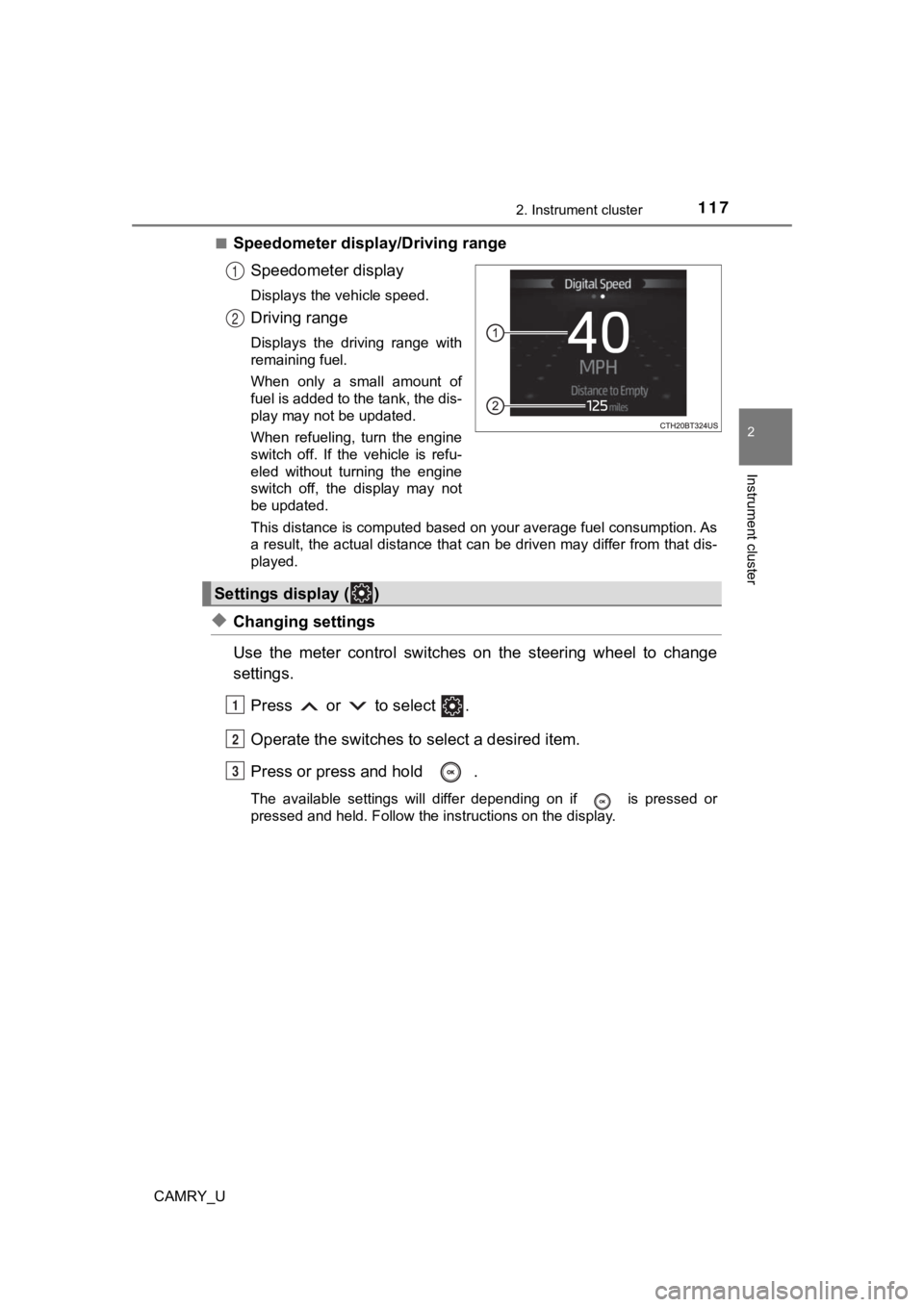
Speedometer display/Driving range
Speedometer display
Displays the vehicle speed.
Driving range
Displays the driving range with
remaining fuel.
When only a small amount of
fuel is added to the tank, the dis-
play may not be updated.
When refueling, turn the engine
switch off. If the vehicle is refu-
eled without turning the engine
switch off, the display may not
be updated.
This distance is computed based on your average fuel consumption. As
a result, the actual distance that can be driven may differ fro m that dis-
played.
◆Changing settings
Use the meter control switches on the steering wheel to change
settings.
Press or to select .
Operate the switches to select a desired item.
Press or press and hold .
The available settings will differ depending on if is pressed or
pressed and held. Follow the instructions on the display.
1
2
Settings display ( )
1
2
3
Page 124 of 664
1242. Instrument cluster
CAMRY_U■
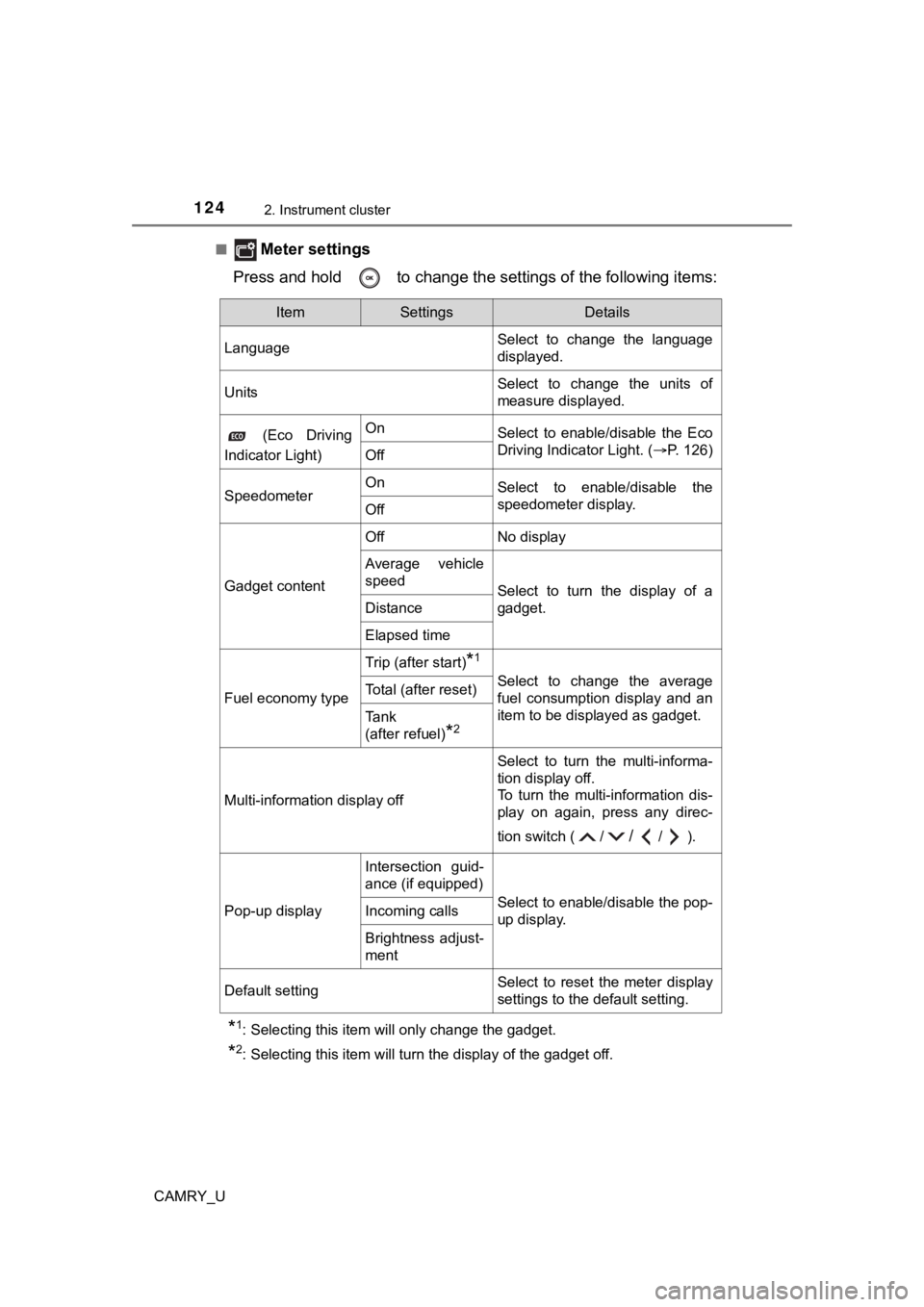
Meter settings
Press and hold to change the se ttings of the following items:
*1: Selecting this item will only change the gadget.
*2: Selecting this item will turn the display of the gadget off.
ItemSettingsDetails
Language Select to change the language
displayed.
UnitsSelect to change the units of
measure displayed.
(Eco Driving
Indicator Light)OnSelect to enable/disable the Eco
Driving Indicator Light. ( P. 126)
Off
SpeedometerOnSelect to enable/disable the
speedometer display.
Off
Gadget content
OffNo display
Average vehicle
speed
Select to turn the display of a
gadget.
Distance
Elapsed time
Fuel economy type
Trip (after start)*1
Select to change the average
fuel consumption display and an
item to be displayed as gadget.Total (after reset)
Tank
(after refuel)
*2
Multi-information display off
Select to turn the multi-informa-
tion display off.
To turn the multi-information dis-
play on again, press any direc-
tion switch ( /
//).
Pop-up display
Intersection guid-
ance (if equipped)
Select to enable/disable the pop-
up display.Incoming calls
Brightness adjust-
ment
Default settingSelect to reset the meter display
settings to the default setting.