window TOYOTA CAMRY 2022 User Guide
[x] Cancel search | Manufacturer: TOYOTA, Model Year: 2022, Model line: CAMRY, Model: TOYOTA CAMRY 2022Pages: 664, PDF Size: 11.3 MB
Page 83 of 664
831-4. Theft deterrent system
1
For safety and security
CAMRY_U
Do one of the following to deactivate or stop the alarm:
Vehicles without a smart key system
● Unlock the doors.
● Open the trunk using the wi reless remote control.
● Turn the engine switch to the “ACC” or “ON” position, or start the
engine. (The alarm will be deact ivated or stopped after a few sec-
onds.)
Vehicles with a smart key system
● Unlock the doors.
● Open the trunk using the entry function or w ireless remote control.
● Turn the engine switch to ACCESSORY or IGNITION ON mode, or
start the engine. (The alarm will be deactivated or stopped after a
few seconds.)
■ System maintenance
The vehicle has a maintenance-free type alarm system.
■ Items to check before locking the vehicle
To prevent unexpected triggering of the alarm and vehicle theft , make sure of
the following:
● Nobody is in the vehicle.
● The windows and moon roof or panoramic moon roof are closed before the
alarm is set.
● No valuables or other personal items are left in the vehicle.
Deactivating or stopping the alarm
Page 139 of 664
139
3
Operation of
each component
CAMRY_U 3-1. Key information
Keys .................................. 140
3-2. Opening, closing and locking the doors
Doors ................................ 147
Trunk ................................. 156
Smart key system ............. 161
3-3. Adjusting the seats Front seats ........................ 167
Rear seats (folding type) ................... 169
Head restraints.................. 171
3-4. Adjusting the steering wheel and mirrors
Steering wheel .................. 173
Inside rear view mirror ...... 175
Outside rear view mirrors ............................. 177
3-5. Opening and closing the windows
Power windows ................. 179
Moon roof .......................... 183
Panoramic moon roof........ 187
Page 141 of 664
1413-1. Key information
3
Operation of each component
CAMRY_U
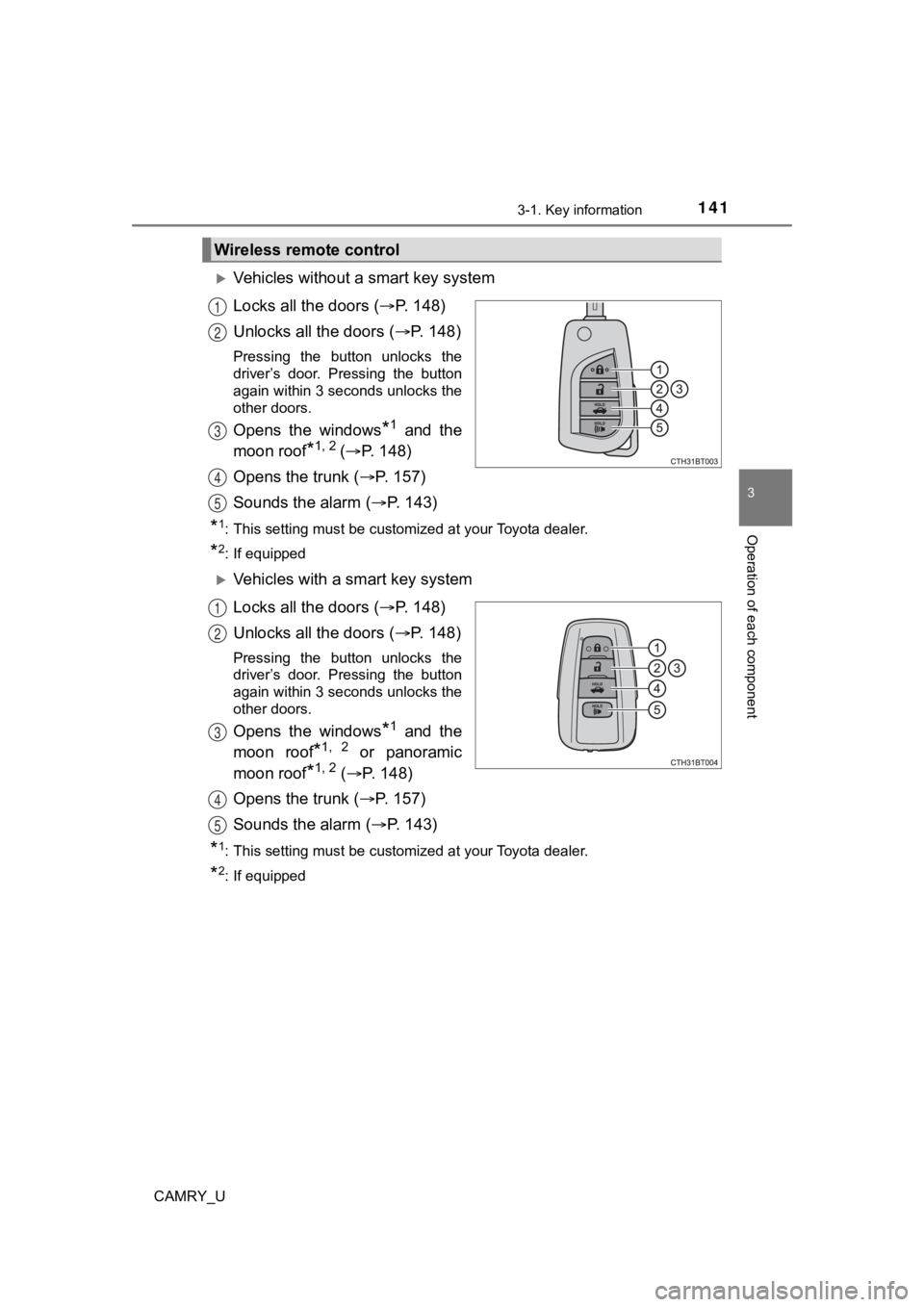
Vehicles without a smart key system
Locks all the doors (P. 1 4 8 )
Unlocks all the doors ( P. 1 4 8 )
Pressing the button unlocks the
driver’s door. Pressing the button
again within 3 seconds unlocks the
other doors.
Opens the windows*1 and the
moon roof
*1, 2 ( P. 148)
Opens the trunk ( P. 1 5 7 )
Sounds the alarm ( P. 143)
*1: This setting must be customized at your Toyota dealer.
*2: If equipped
Vehicles with a smart key system
Locks all the doors ( P. 1 4 8 )
Unlocks all the doors ( P. 1 4 8 )
Pressing the button unlocks the
driver’s door. Pressing the button
again within 3 seconds unlocks the
other doors.
Opens the windows*1 and the
moon roof
*1, 2 or panoramic
moon roof
*1, 2 ( P. 148)
Opens the trunk ( P. 1 5 7 )
Sounds the alarm ( P. 143)
*1: This setting must be customized at your Toyota dealer.
*2: If equipped
Wireless remote control
1
2
3
4
5
1
2
3
4
5
Page 144 of 664

1443-1. Key information
CAMRY_U■
If you lose your keys
New genuine keys can be made by your Toyota dealer using the ot her key
(vehicles without a smart key system) or the other mechanical k ey (vehicles
with a smart key system) and the key number stamped on your key number
plate. Keep the plate in a safe place such as your wallet, not in the vehicle.
■ When riding in an aircraft
When bringing a key with wireless remote control function onto an aircraft,
make sure you do not press any button on the key while inside t he aircraft
cabin. If you are carrying the key in your bag etc., ensure tha t the buttons are
not likely to be pressed accidentally. Pressing a button may cause the key to
emit radio waves that could interfere with the operation of the aircraft.
■ Conditions affecting operation
Vehicles without a smart key system
The wireless remote control function may not operate normally i n the follow-
ing situations:
● When the wireless key battery is depleted
● Near a TV tower, electric power plant, gas station, radio stati on, large dis-
play, airport or other facility that generates strong radio wav es or electrical
noise
● When carrying a portable radio, cellular phone or other wireles s communi-
cation devices
● When the wireless key is in contact with, or is covered by a me tallic object
● When other wireless key (that emit radio waves) is being used n earby
● If window tint with a metallic content or metallic objects are attached to the
rear window
Vehicles with a smart key system
P. 163
Page 148 of 664
1483-2. Opening, closing and locking the doors
CAMRY_U
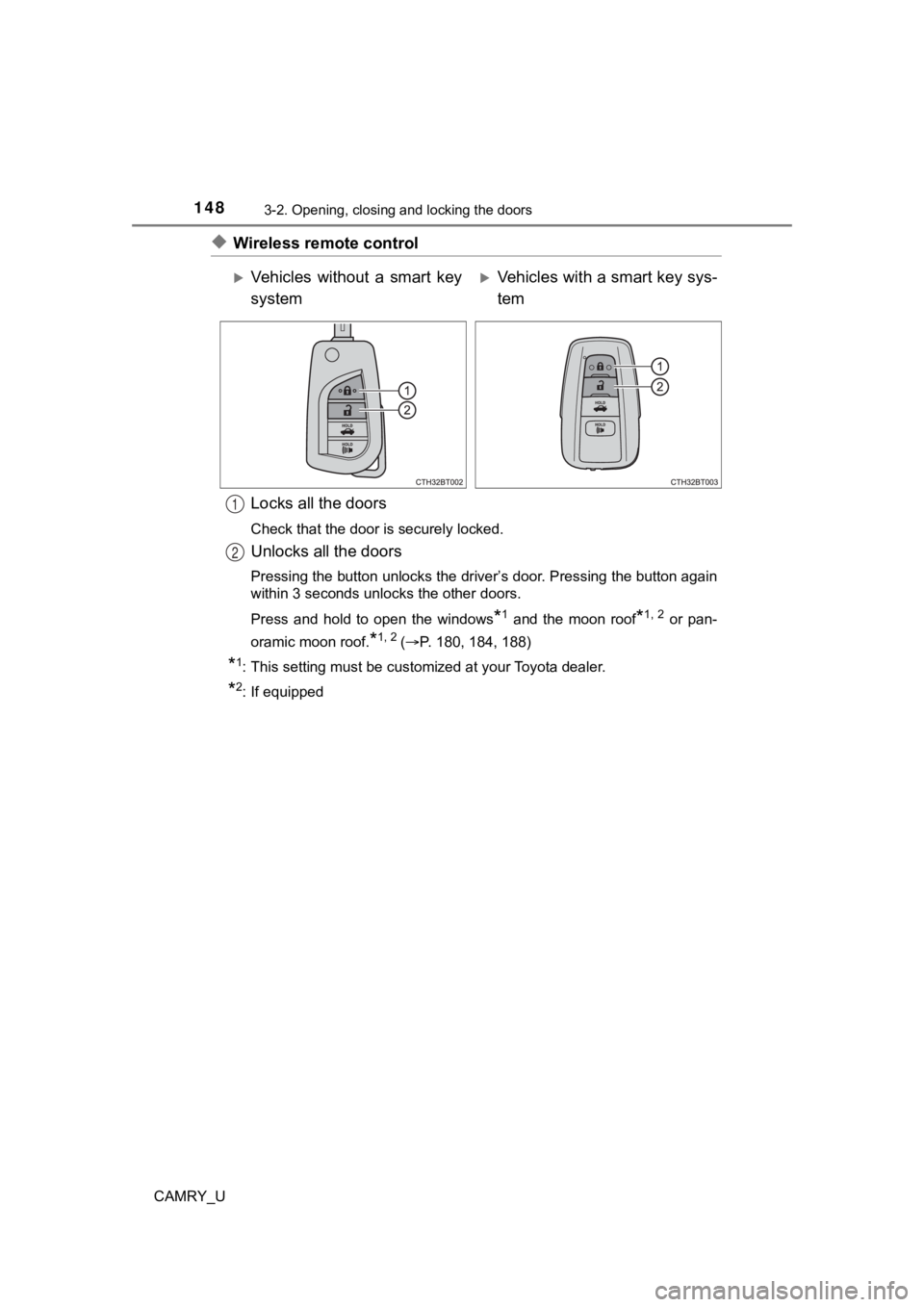
◆Wireless remote controlLocks all the doors
Check that the door is securely locked.
Unlocks all the doors
Pressing the button unlocks the driver’s door. Pressing the button again
within 3 seconds unlocks the other doors.
Press and hold to open the windows
*1 and the moon roof*1, 2 or pan-
oramic moon roof.
*1, 2 ( P. 180, 184, 188)
*1: This setting must be customized at your Toyota dealer.
*2: If equipped
Vehicles without a smart key
systemVehicles with a smart key sys-
tem
1
2
Page 149 of 664
1493-2. Opening, closing and locking the doors
3
Operation of each component
CAMRY_U
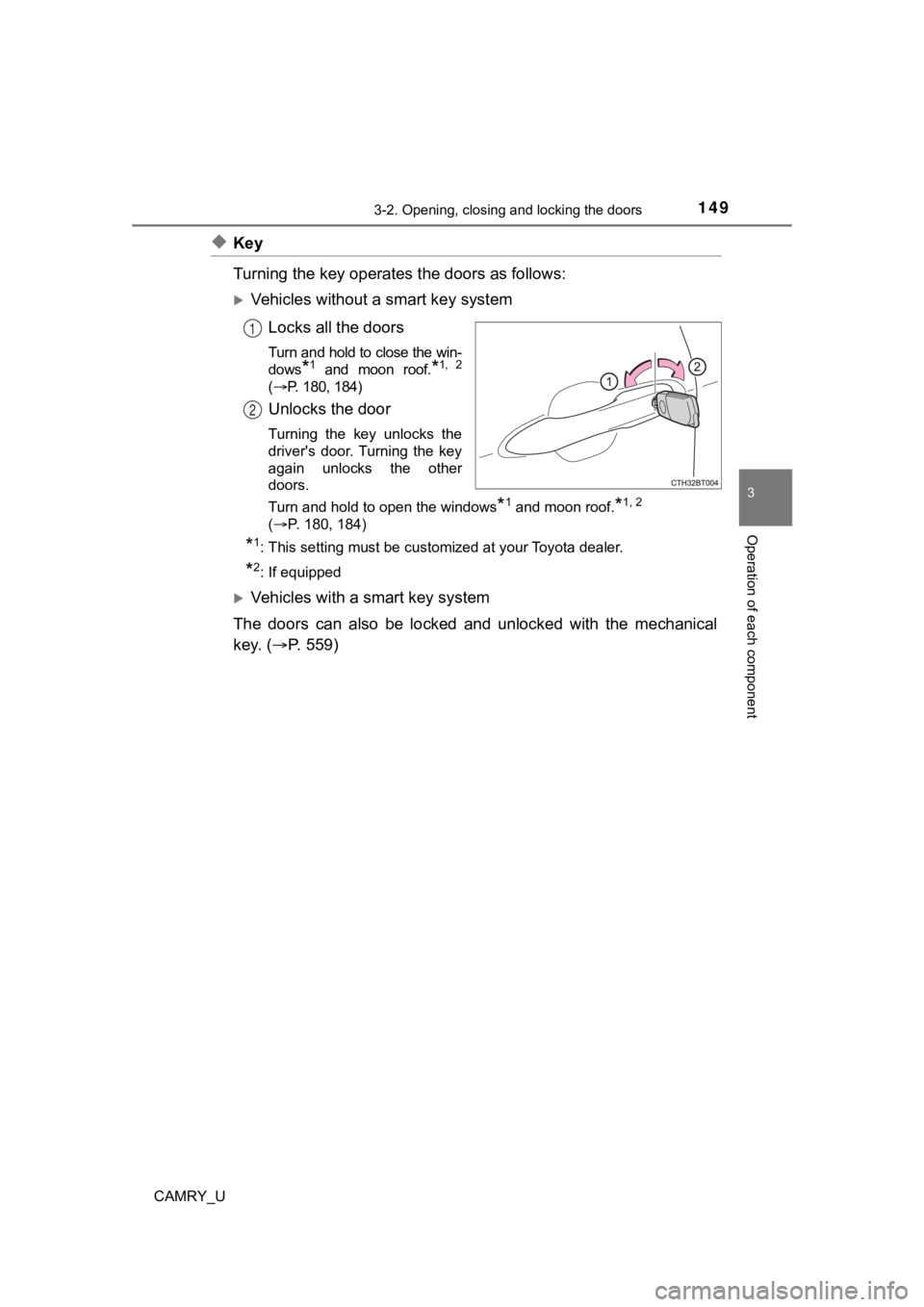
◆Key
Turning the key operates the doors as follows:
Vehicles without a smart key systemLocks all the doors
Turn and hold to close the win-
dows
*1 and moon roof.*1, 2
( P. 180, 184)
Unlocks the door
Turning the key unlocks the
driver's door. Turning the key
again unlocks the other
doors.
Turn and hold to open the windows
*1 and moon roof.*1, 2
(P. 180, 184)
*1: This setting must be customized at your Toyota dealer.
*2: If equipped
Vehicles with a smart key system
The doors can also be locked and unlocked with the mechanical
key. ( P. 5 5 9 )
1
2
Page 150 of 664
1503-2. Opening, closing and locking the doors
CAMRY_U
■Operation signals
Doors:
A buzzer sounds and the emergency flashers flash to indicate th at the doors
have been locked/unlocked. (Locked: Once; Unlocked: Twice)
Windows and moon roof or panoramic moon roof:
A buzzer sounds to indicate that the windows and moon roof or p anoramic
moon roof are operating.
■ Security feature
If a door is not opened within approximately 60 seconds after t he vehicle is
unlocked, the security feature automatically locks the vehicle again.
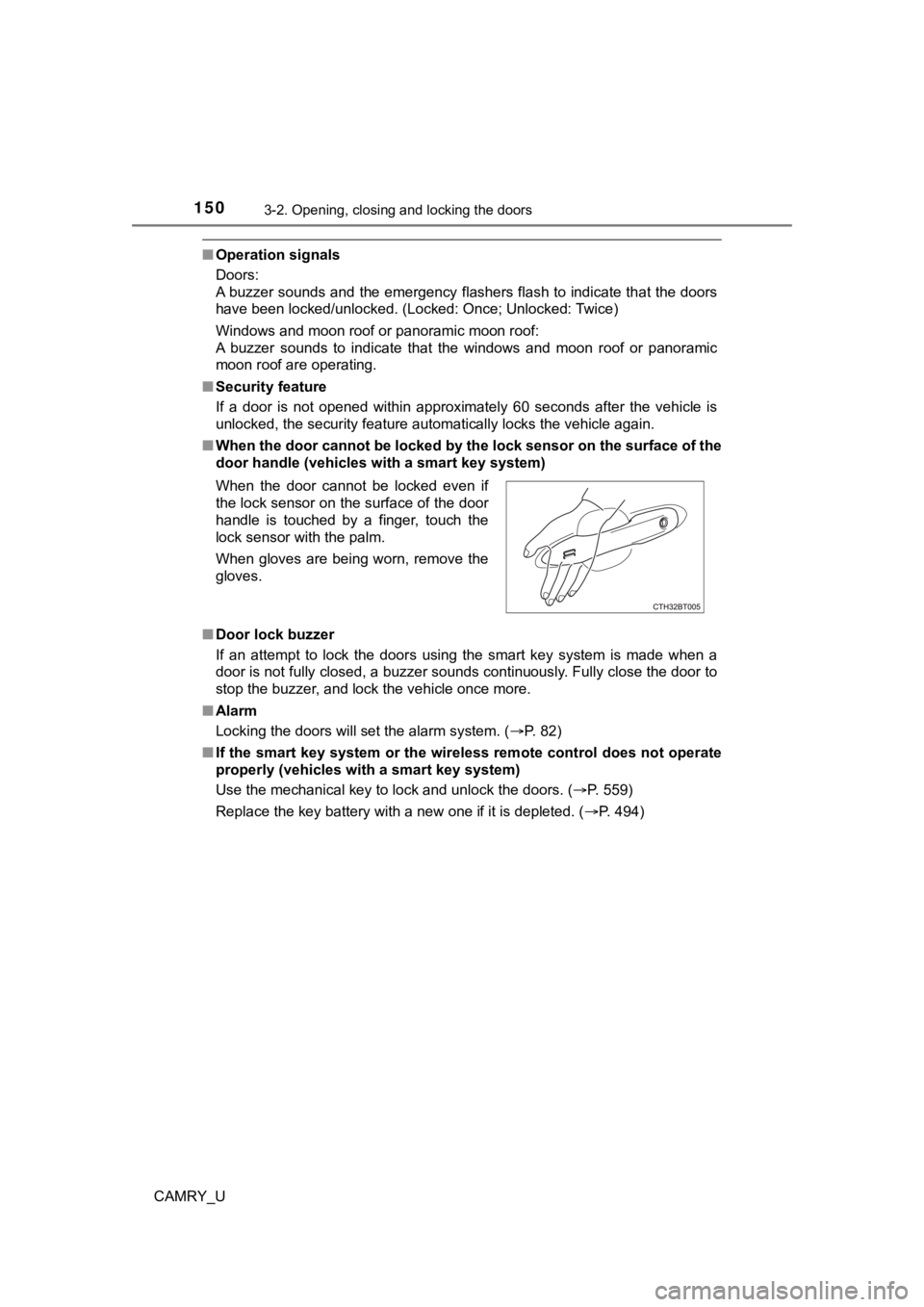
■ When the door cannot be locked by the lock sensor on the surface of the
door handle (vehicles with a smart key system)
■ Door lock buzzer
If an attempt to lock the doors using the smart key system is made when a
door is not fully closed, a buzzer sounds continuously. Fully c lose the door to
stop the buzzer, and lock the vehicle once more.
■ Alarm
Locking the doors will set the alarm system. ( P. 82)
■ If the smart key system or the wireless remote control does not operate
properly (vehicles with a smart key system)
Use the mechanical key to lock and unlock the doors. ( P. 559)
Replace the key battery with a new one if it is depleted. ( P. 494)
When the door cannot be locked even if
the lock sensor on the surface of the door
handle is touched by a finger, touch the
lock sensor with the palm.
When gloves are being worn, remove the
gloves.
Page 164 of 664

1643-2. Opening, closing and locking the doors
CAMRY_U●
When other wireless keys (that emit radio waves) are being used nearby
● When carrying the electronic key together with the following devices that
emit radio waves
• Portable radio, cellular phone, cordless phone or other wirele ss commu-
nication devices
• Another vehicle’s electronic key, another electronic key of yo ur vehicle, or
a wireless key that emits radio waves
• Personal computers or personal digital assistants (PDAs)
• Digital audio players
• Portable game systems
● If window tint with a metallic content or metallic objects are attached to the
rear window
● When the electronic key is placed near a battery charger or ele ctronic
devices
● When the vehicle is parked in a pay parking spot where radio wa ves are
emitted.
■ Note for the entry function
●Even when the electronic key is within the effective range (det ection areas),
the system may not operate properly in the following cases:
• The electronic key is too close to the window or outside door handle, near
the ground, or in a high place when the doors are locked or unl ocked.
• The electronic key is near the ground or in a high place, or t oo close to
the rear bumper center when the trunk is opened.
• The electronic key is on the instrument panel, rear package tr ay or floor,
or in the door pockets or glove box when the engine is started or engine
switch modes are changed.
● Do not leave the electronic key on top of the instrument panel or near the
door pockets when exiting the vehicle. Depending on the radio w ave recep-
tion conditions, it may be detected by the antenna outside the cabin and the
door will become lockable from the outside, possibly trapping the electronic
key inside the vehicle.
● As long as the electronic key is within the effective range, th e doors may be
locked or unlocked by anyone. However, only the doors detecting the elec-
tronic key can be used to unlock the vehicle.
● Even if the electronic key is not inside the vehicle, it may be possible to start
the engine if the electronic key is near the window.
● The doors may unlock or lock if a large amount of water splashe s on the
door handle, such as in the rain or in a car wash, when the electronic key is
within the effective range. (The doors will automatically be lo cked after
approximately 60 seconds if the doors are not opened and closed.)
Page 178 of 664

1783-4. Adjusting the steering wheel and mirrors
CAMRY_U
■Mirror angle can be adjusted when
Vehicles without a smart key system
The engine switch is in the “ACC” or “ON” position.
Vehicles with a smart key system
The engine switch is in ACCESSORY or IGNITION ON mode.
■ When the mirrors are fogged up (vehicles with outside rear view mirror
defoggers)
The outside rear view mirrors can be cleared using the mirror d efoggers. Turn
on the rear window defogger to turn on the outside rear view mirror defog-
gers. ( P. 383, 389, 397)
WARNING
■ Important points while driving
Observe the following precautions while driving.
Failure to do so may result in loss of control of the vehicle and cause an
accident, resulting in death or serious injury.
● Do not adjust the mirrors while driving.
● Do not drive with the mirrors folded.
● Both the driver and passenger side mirrors must be extended and properly
adjusted before driving.
■ When a mirror is moving
To avoid personal injury and mirror malfunction, be careful not to get your
hand caught by the moving mirror.
■ When the mirror defoggers are operating (vehicles with outside rear
view mirror defoggers)
Do not touch the rear view mirror surfaces, as they can become very hot
and burn you.
Page 179 of 664
179
3
Operation of each component
CAMRY_U
3-5. Opening and closing the windows
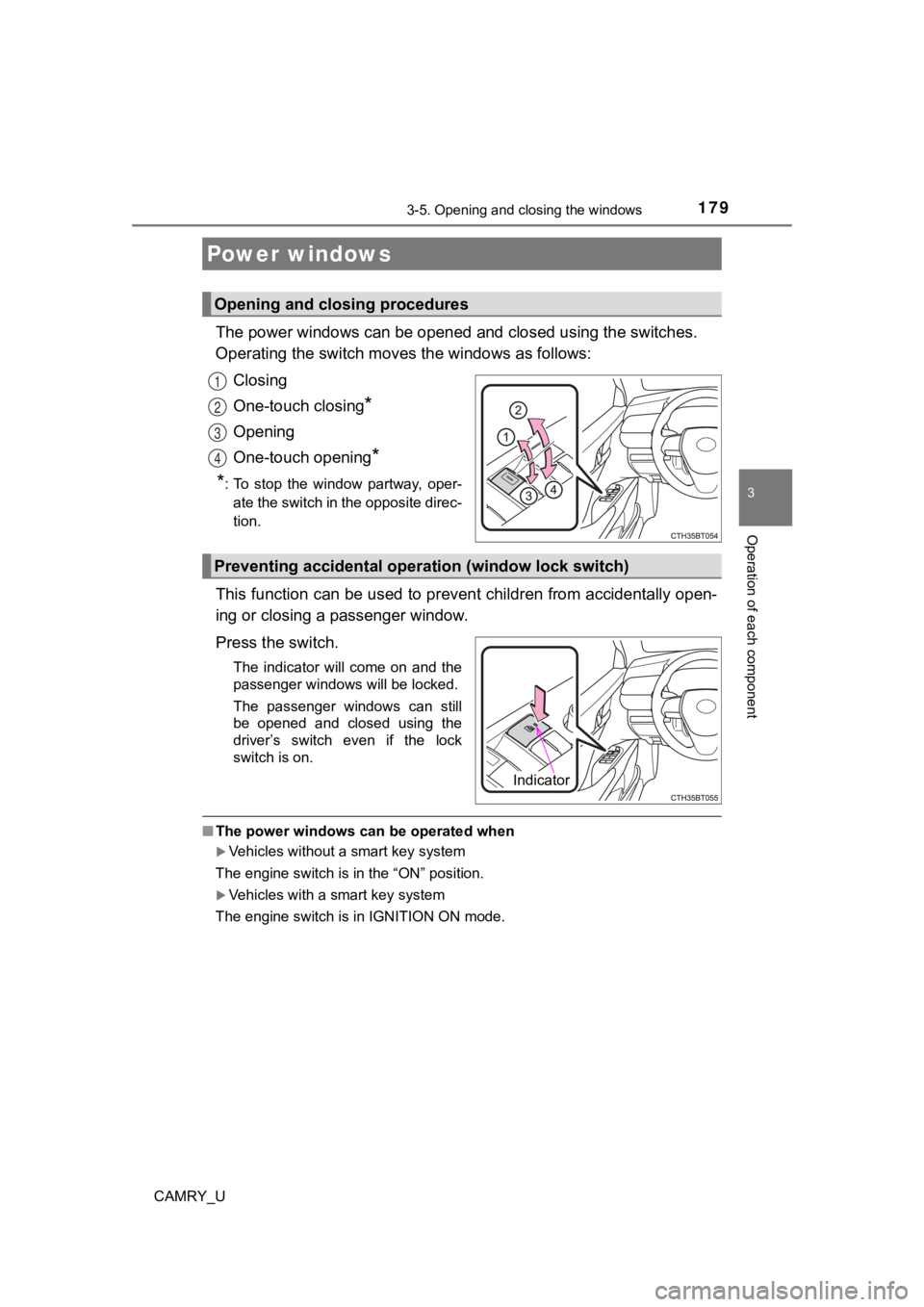
The power windows can be opened and closed using the switches.
Operating the switch moves the windows as follows:
Closing
One-touch closing
*
Opening
One-touch opening
*
*
: To stop the window partway, oper- ate the switch in the opposite direc-
tion.
This function can be used to prev ent children from accidentally open-
ing or closing a passenger window.
Press the switch.
The indicator will come on and the
passenger windows will be locked.
The passenger windows can still
be opened and closed using the
driver’s switch even if the lock
switch is on.
■ The power windows can be operated when
Vehicles without a smart key system
The engine switch is in the “ON” position.
Vehicles with a smart key system
The engine switch is in IGNITION ON mode.
Power windows
Opening and closing procedures
1
2
3
4
Preventing accidental operation (window lock switch)
Indicator