fuel TOYOTA CAMRY 2022 Owner's Manual
[x] Cancel search | Manufacturer: TOYOTA, Model Year: 2022, Model line: CAMRY, Model: TOYOTA CAMRY 2022Pages: 664, PDF Size: 11.3 MB
Page 134 of 664
1342. Instrument cluster
CAMRY_U
Audio (vehicles without Data Communication Module) or Audio
Plus (vehicles without Data Communication Module)
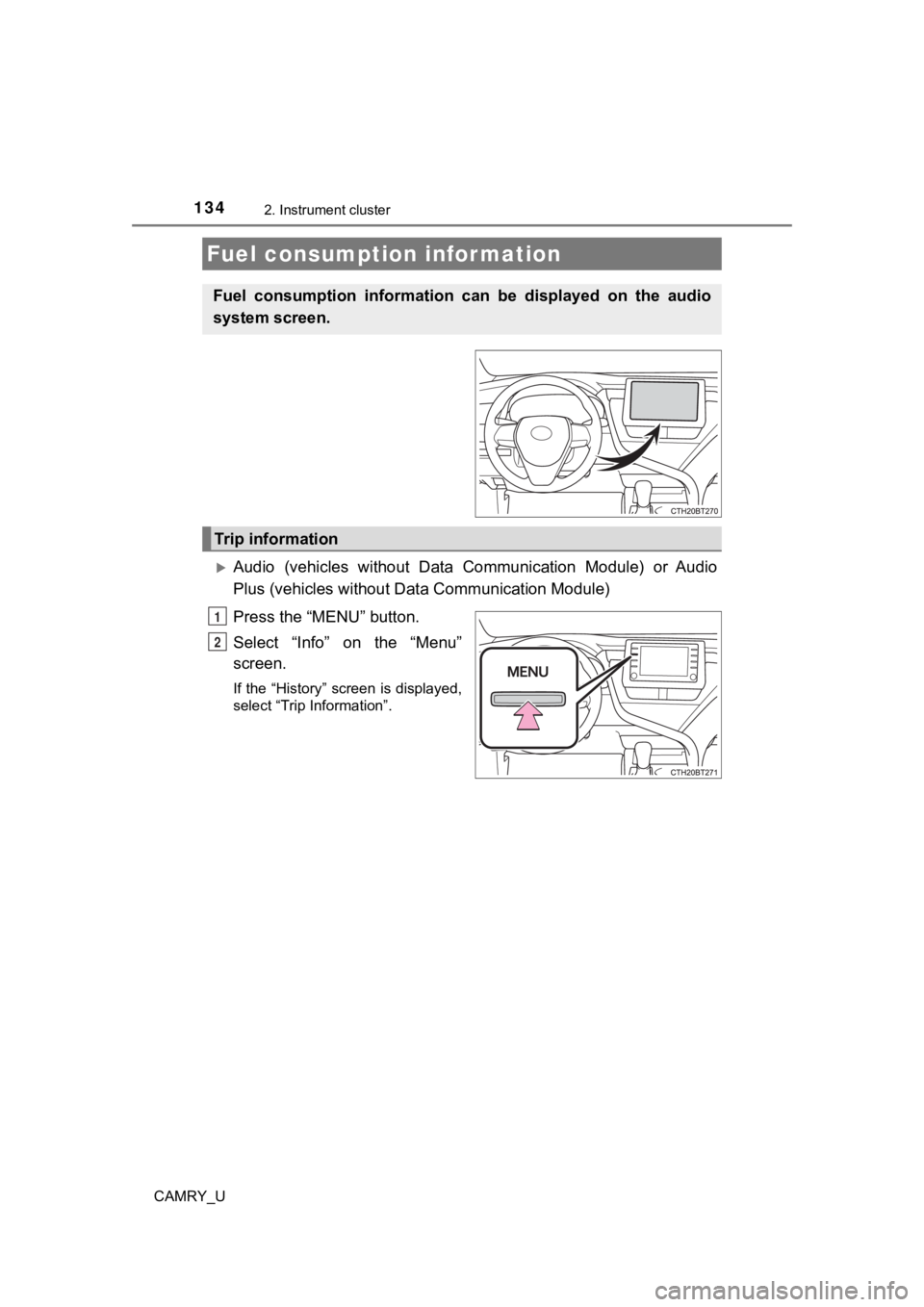
Press the “MENU” button.
Select “Info” on the “Menu”
screen.
If the “History” screen is displayed,
select “Trip Information”.
Fuel consumption information
Fuel consumption information can be displayed on the audio
system screen.
Trip information
1
2
Page 135 of 664
1352. Instrument cluster
2
Instrument cluster
CAMRY_U
Audio (vehicles with Data Communication Module), Audio Plus
(vehicles with Data Communicat ion Module) and Premium Audio
Press the “MENU” button.
Select “Info” on the “Menu”
screen.
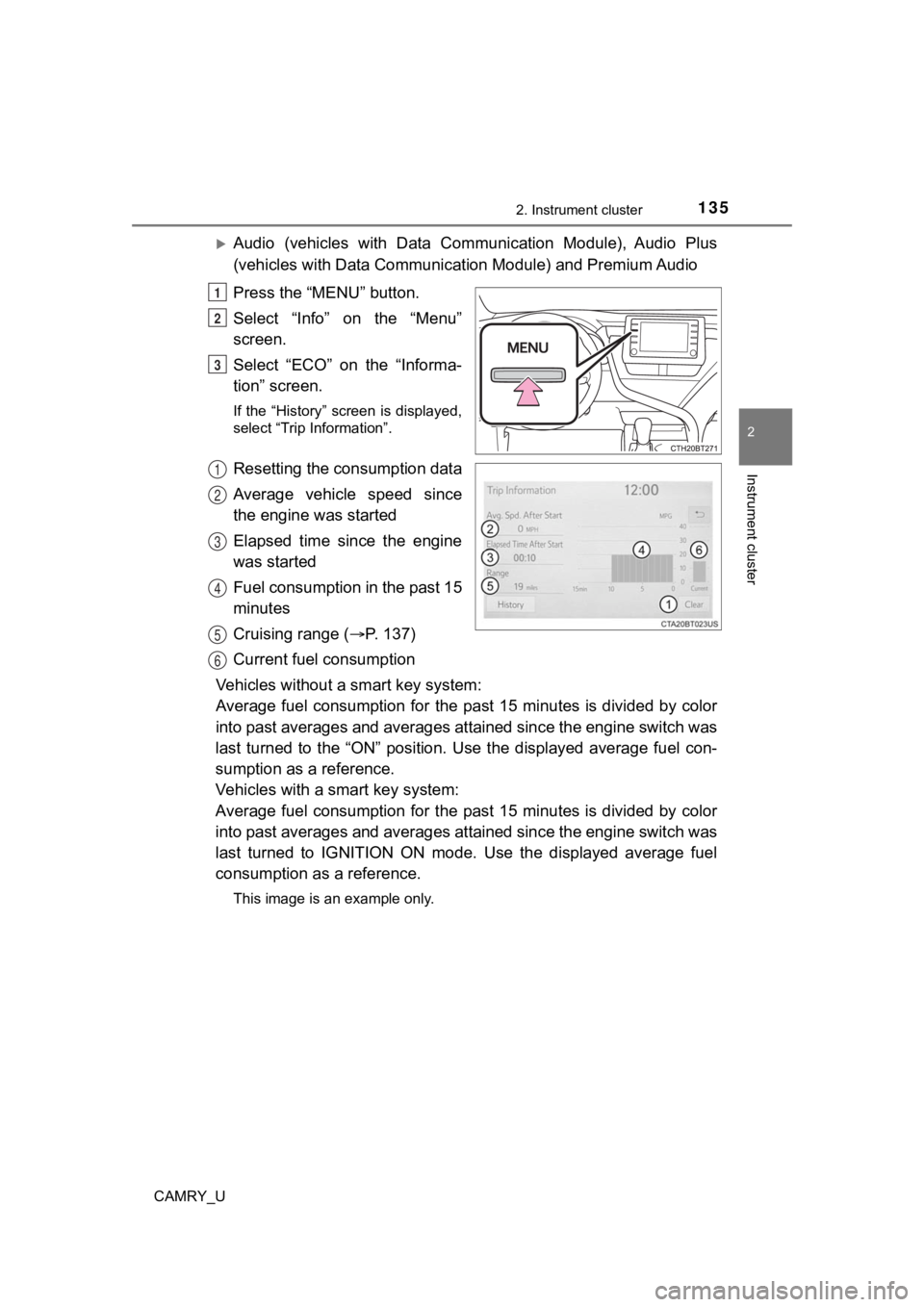
Select “ECO” on the “Informa-
tion” screen.
If the “History” screen is displayed,
select “Trip Information”.
Resetting the consumption data
Average vehicle speed since
the engine was started
Elapsed time since the engine
was started
Fuel consumption in the past 15
minutes
Cruising range ( P. 137)
Current fuel consumption
Vehicles without a smart key system:
Average fuel consumption for the past 15 minutes is divided by color
into past averages and averages attained since the engine switch was
last turned to the “ON” position. Use the displayed average fue l con-
sumption as a reference.
Vehicles with a smart key system:
Average fuel consumption for the past 15 minutes is divided by color
into past averages and averages attained since the engine switch was
last turned to IGNITION ON mode. Use the displayed average fuel
consumption as a reference.
This image is an example only.
1
2
3
1
2
3
4
5
6
Page 136 of 664
1362. Instrument cluster
CAMRY_U
Audio (vehicles without Data Communication Module) or Audio
Plus (vehicles without Data Communication Module)
Press the “MENU” button.
Select “Info” on t he “Menu” screen.
If the “Trip Information” screen is displayed, select “History” .
Audio (vehicles with Data Communication Module), Audio Plus
(vehicles with Data Communicat ion Module) and Premium Audio
Press the “MENU” button.
Select “Info” on t he “Menu” screen.
Select “ECO” on the “Information” screen.
If the “Trip Information” screen is displayed, select “History” .
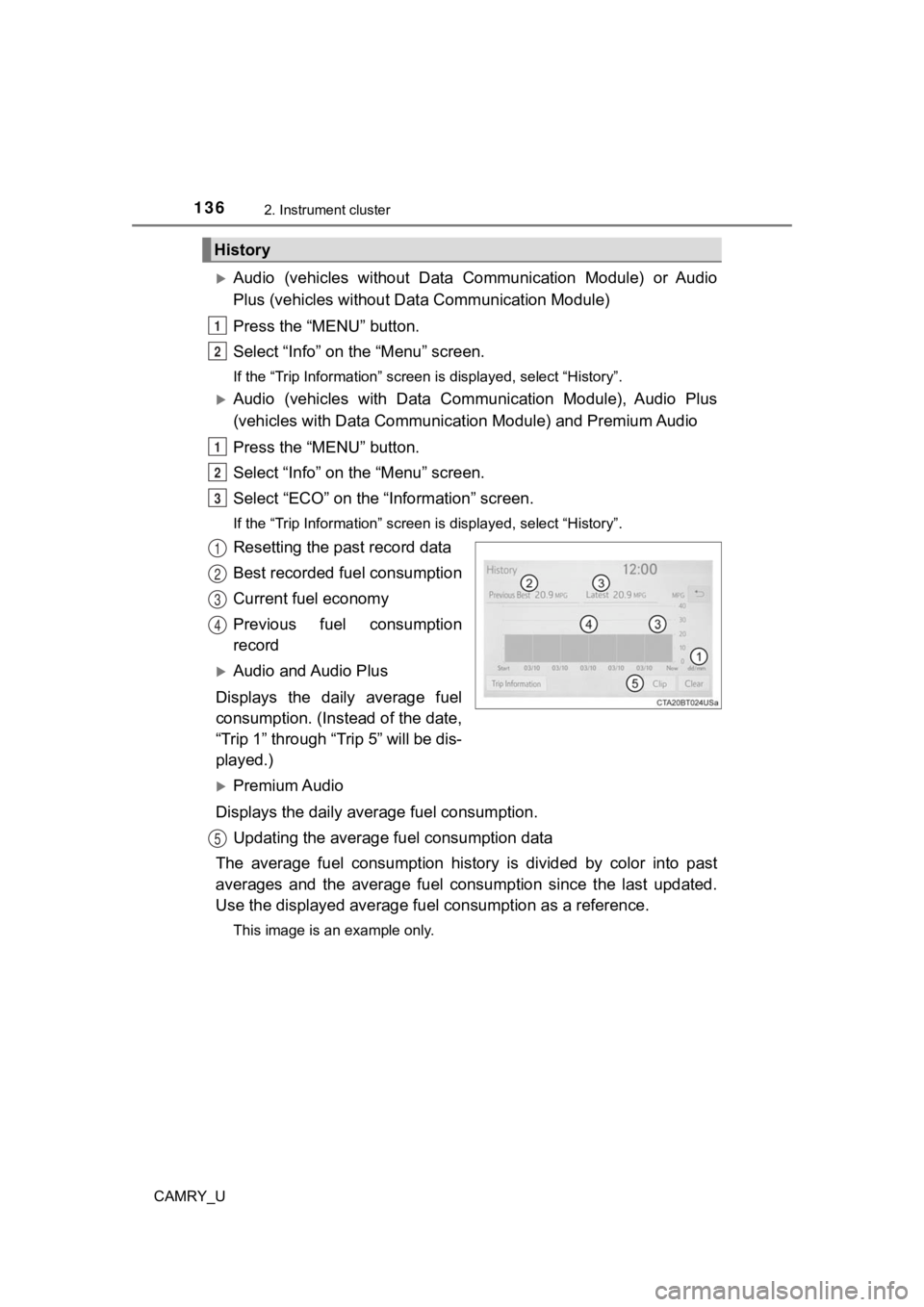
Resetting the past record data
Best recorded fuel consumption
Current fuel economy
Previous fuel consumption
record
Audio and Audio Plus
Displays the daily average fuel
consumption. (In stead of the date,
“Trip 1” through “Trip 5” will be dis-
played.)
Premium Audio
Displays the daily average fuel consumption. Updating the average fuel consumption data
The average fuel consumption histo ry is divided by color into past
averages and the average fuel co nsumption since the last updated.
Use the displayed average fuel consumption as a reference.
This image is an example only.
History
1
2
1
2
3
1
2
3
4
5
Page 137 of 664

1372. Instrument cluster
2
Instrument cluster
CAMRY_U
■Updating the past record data
Update the average fuel consumption by selecting “Clip” to meas ure the cur-
rent fuel consumption again.
■ Resetting the data
The fuel consumption data can be deleted by selecting “Clear”.
■ Cruising range
Displays the estimated maximum distance that can be driven with the quan-
tity of fuel remaining.
This distance is computed based on your average fuel consumptio n.
As a result, the actual distance that can be driven may differ from that dis-
played.
Page 193 of 664

193
4Driving
CAMRY_U4-1. Before driving
Driving the vehicle ............. 194
Cargo and luggage ........... 203
Vehicle load limits ............. 206
Trailer towing..................... 207
Dinghy towing ................... 208
4-2. Driving procedures Engine (ignition) switch (vehicles without a
smart key system) ........... 209
Engine (ignition) switch (vehicles with a
smart key system) ........... 211
Automatic transmission ..... 217
Turn signal lever................ 223
Parking brake .................... 224
Electric parking brake........ 225
Brake Hold ........................ 229
4-3. Operating the lights and wipers
Headlight switch ................ 231
AHB (Automatic High Beam) ............................. 236
Windshield wipers and washer ............................ 240
4-4. Refueling Opening the fuel tank cap .................................. 244
4-5. Using the driving support systems
Toyota Safety Sense 2.5+...................... 248 PCS (Pre-Collision
System)........................... 254
LTA (Lane Tracing Assist) ............................. 270
RSA (Road Sign Assist) .... 285
Dynamic radar cruise control with full-speed
range............................... 290
Dynamic radar cruise control ............................. 306
Driving assist systems ...... 322
BSM (Blind Spot Monitor)........................... 330
• BSM function ................ 333
Intuitive parking assist....... 336
RCTA (Rear Cross Traffic Alert) ............................... 345
• RCTA function .............. 347
RCD (Rear Camera Detection) ....................... 354
PKSB (Parking Support Brake) ............................. 360
Parking Support Brake function (static
objects) ........................... 368
Parking Support Brake function (rear-crossing
vehicles).......................... 372
Driving mode select switches .......................... 375
4-6. Driving tips Winter driving tips ............. 377
Page 196 of 664

1964-1. Before driving
CAMRY_U■
Breaking in your new Toyota
To extend the life of the vehicle, observing the following prec autions is recom-
mended:
● For the first 186 miles (300 km):
Avoid sudden stops.
● For the first 621 miles (1000 km):
• Do not drive at extremely high speeds.
• Avoid sudden acceleration.
• Do not drive continuously in low gears.
• Do not drive at a constant speed for extended periods.
■ Drum-in-disc type parking brake system
Your vehicle has a drum-in-disc type parking brake system. This type of brake
system needs bedding-down of the brake shoes periodically or wh enever the
parking brake shoes and/or drum are replaced. Have your Toyota dealer per-
form the bedding down operation.
■ Operating your vehicle in a foreign country
Comply with the relevant vehicle registration laws and confirm the availability
of the correct fuel. ( P. 590)
■ Eco-friendly driving
P. 109, 126, 131
Page 210 of 664
2104-2. Driving procedures
CAMRY_U■
When “Check Fuel Cap” is displayed on the multi-information dis play
P. 247
■ If the engine does not start
The engine immobilizer system may not have been deactivated. ( P. 80)
Contact your Toyota dealer.
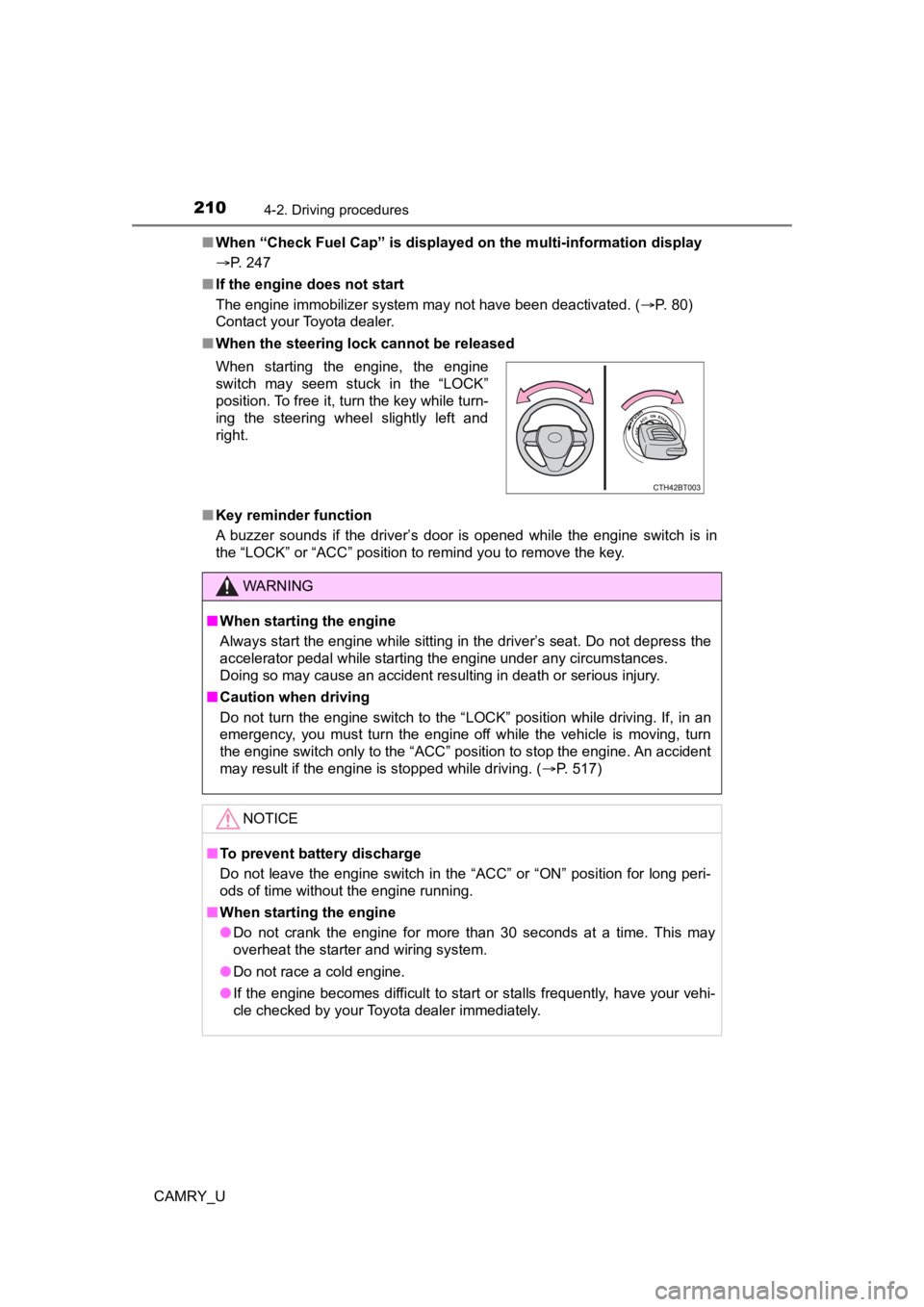
■ When the steering lock cannot be released
■ Key reminder function
A buzzer sounds if the driver’s door is opened while the engine switch is in
the “LOCK” or “ACC” position to remind you to remove the key. When starting the engine, the engine
switch may seem stuck in the “LOCK”
position. To free it, turn the key while turn-
ing the steering wheel slightly left and
right.
WARNING
■ When starting the engine
Always start the engine while sitting in the driver’s seat. Do not depress the
accelerator pedal while starting the engine under any circumsta nces.
Doing so may cause an accident resulting in death or serious in jury.
■ Caution when driving
Do not turn the engine switch to the “LOCK” position while driving. If, in an
emergency, you must turn the engine off while the vehicle is moving, turn
the engine switch only to the “ACC” position to stop the engine . An accident
may result if the engine is stopped while driving. ( P. 517)
NOTICE
■To prevent battery discharge
Do not leave the engine switch in the “ACC” or “ON” position fo r long peri-
ods of time without the engine running.
■ When starting the engine
● Do not crank the engine for more than 30 seconds at a time. This may
overheat the starter and wiring system.
● Do not race a cold engine.
● If the engine becomes difficult to start or stalls frequently, have your vehi-
cle checked by your Toyota dealer immediately.
Page 214 of 664
2144-2. Driving procedures
CAMRY_U
■Auto power off function
If the vehicle is left in ACCESSORY mode for more than 20 minut es or IGNI-
TION ON mode (with the engine is not running) for more than an hour with
the shift lever in P, the engine switch will automatically turn off. However, this
function cannot entirely prevent battery discharge. Do not leav e the vehicle
with the engine switch in ACCESSORY or IGNITION ON mode for lon g peri-
ods of time when the engine is not running.
■ Electronic key battery depletion
P. 145
■ Conditions affecting operation
P. 163
■ Notes for the entry function
P. 164
■ If the engine does not start
●The engine immobilizer system may not have been deactivated. ( P. 80)
Contact your Toyota dealer.
● Check that the shift lever is securely set in P. The engine may not start if the
shift lever is displaced out of P.
■ Steering lock
After turning the engine switch off and opening and closing the doors, the
steering wheel will be locked due to the steering lock function. Operating the
engine switch again automatically cancels the steering lock.
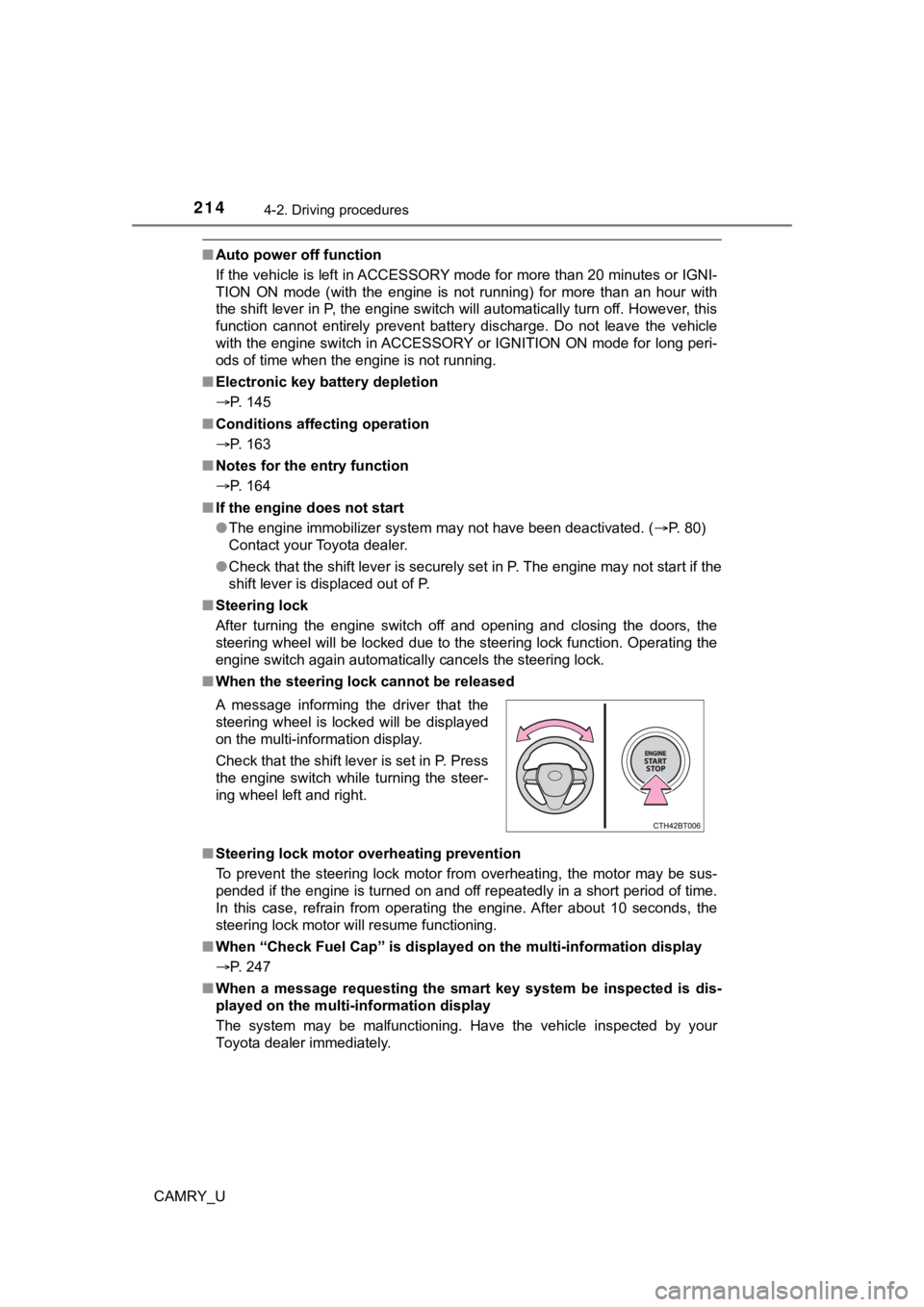
■ When the steering lock cannot be released
■ Steering lock motor overheating prevention
To prevent the steering lock motor from overheating, the motor may be sus-
pended if the engine is turned on and off repeatedly in a short period of time.
In this case, refrain from operating the engine. After about 10 seconds, the
steering lock motor will resume functioning.
■ When “Check Fuel Cap” is displayed on the multi-information display
P. 247
■ When a message requesting the smart key system be inspected is dis-
played on the multi-information display
The system may be malfunctioning. Have the vehicle inspected by your
Toyota dealer immediately. A message informing the driver that the
steering wheel is locked will be displayed
on the multi-information display.
Check that the shift lever is set in P. Press
the engine switch while turning the steer-
ing wheel left and right.
Page 233 of 664
2334-3. Operating the lights and wipers
4
Driving
CAMRY_U
■Daytime running light system
●Type A:
The daytime running lights illuminate using the same lights as the headlights
and illuminate darker than the headlights.
Type B:
The daytime running lights illuminate using the same lights as the parking
lights and illuminate brighter than the parking lights.
● To make your vehicle more visible to other drivers during dayti me driving,
the daytime running lights turn on automatically when all of the following
conditions are met. (The daytime running lights are not designe d for use at
night.)
• The engine is running
• The parking brake is released
• The headlight switch is in the or
* position
*: When the surroundings are bright
The daytime running lights remain on after they illuminate, even if the parking
brake is set again.
● For U.S.A.: Daytime running lights can be turned off by operati ng the switch.
● Compared to turning on the headlights, the daytime running ligh t system
offers greater durability and consumes less electricity, so it can help improve
fuel economy.
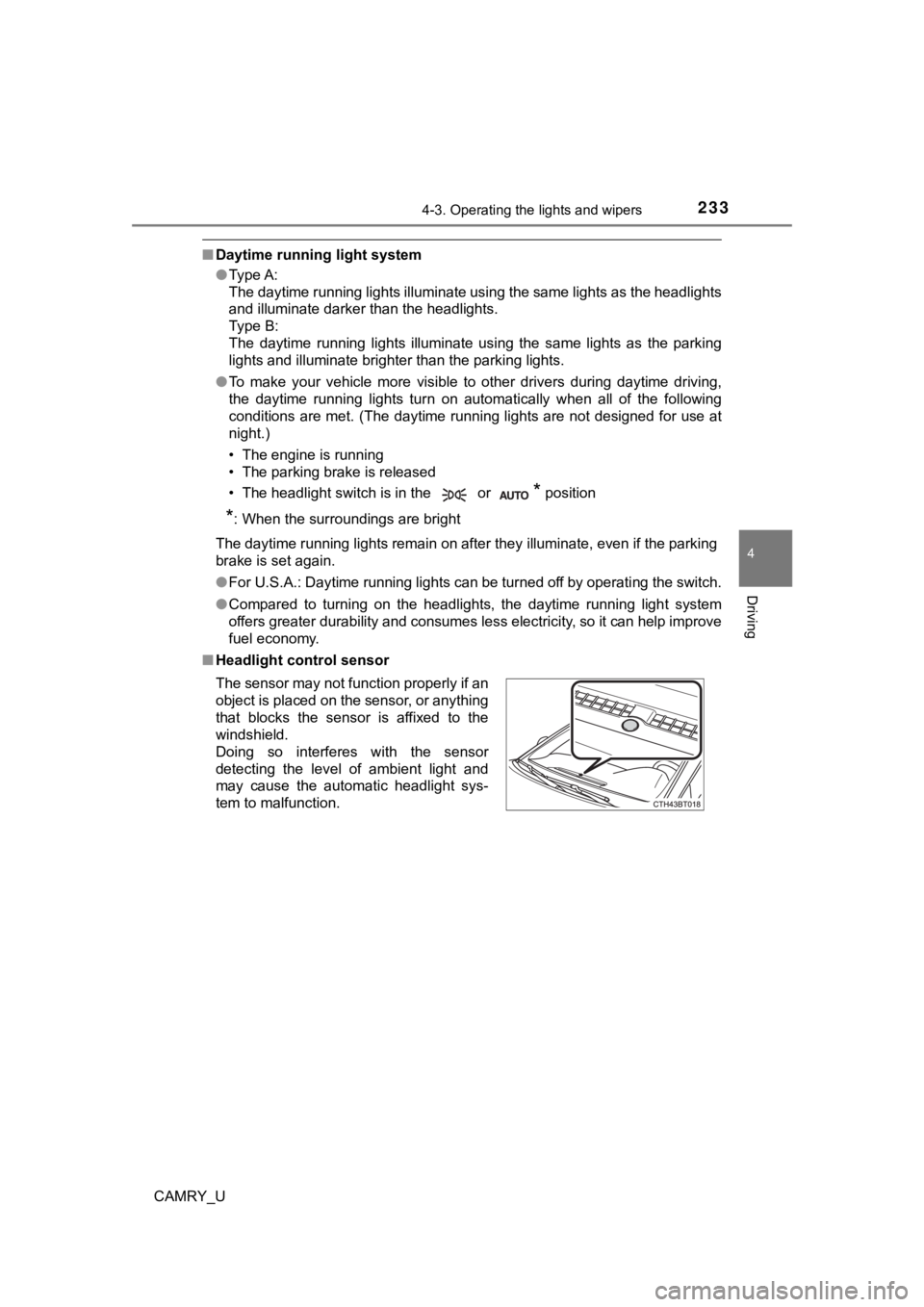
■ Headlight control sensor
The sensor may not function properly if an
object is placed on the sensor, or anything
that blocks the sensor is affixed to the
windshield.
Doing so interferes with the sensor
detecting the level of ambient light and
may cause the automatic headlight sys-
tem to malfunction.
Page 244 of 664
244
CAMRY_U
4-4. Refueling
●Close all the doors and windows, and turn the engine switch off.
● Confirm the type of fuel.
■Fuel types
P. 590
■ Fuel tank opening for unleaded gasoline
To help prevent incorrect fueling, your vehicle has a fuel tank opening that
only accommodates the special nozzle on unleaded fuel pumps.
■ If the malfunction indicator lamp illuminates
The malfunction indicator lamp may illuminate erroneously if re fueling is per-
formed repeatedly when the fuel tank is nearly full.
Opening the fuel tank cap
Perform the following steps to open the fuel tank cap:
Before refueling the vehicle