fuel TOYOTA CAMRY 2022 Owner's Guide
[x] Cancel search | Manufacturer: TOYOTA, Model Year: 2022, Model line: CAMRY, Model: TOYOTA CAMRY 2022Pages: 664, PDF Size: 11.3 MB
Page 245 of 664

2454-4. Refueling
4
Driving
CAMRY_U
WARNING
■When refueling the vehicle
Observe the following precautions while refueling the vehicle. Failure to do
so may result in death or serious injury.
● After exiting the vehicle and before opening the fuel door, touch an
unpainted metal surface to discharge any static electricity. It is important to
discharge static electricity before refueling because sparks resulting from
static electricity can cause fuel vapors to ignite while refueling.
● Always hold the grips on the fuel tank cap and turn it slowly t o remove it.
A whooshing sound may be heard when the fuel tank cap is loosened.
Wait until the sound cannot be heard before fully removing the cap. In hot
weather, pressurized fuel may spray out the filler neck and cau se injury.
● Do not allow anyone that has not discharged static electricity from their
body to come close to an open fuel tank.
● Do not inhale vaporized fuel.
Fuel contains substances that are harmful if inhaled.
● Do not smoke while refueling the vehicle.
Doing so may cause the fuel to ignite and cause a fire.
● Do not return to the vehicle or touch any person or object that is statically
charged.
This may cause static electricity to build up, resulting in a p ossible ignition
hazard.
■ When refueling
Observe the following precautions to prevent fuel overflowing from the fuel
tank:
● Securely insert the fuel nozzle into the fuel filler neck.
● Stop filling the tank after the fuel nozzle automatically click s off.
● Do not top off the fuel tank.
NOTICE
■Refueling
Do not spill fuel during refueling.
Doing so may damage the vehicle, such as causing the emission c ontrol
system to operate abnormally or damaging fuel system components or the
vehicle’s painted surface.
Page 246 of 664
2464-4. Refueling
CAMRY_U
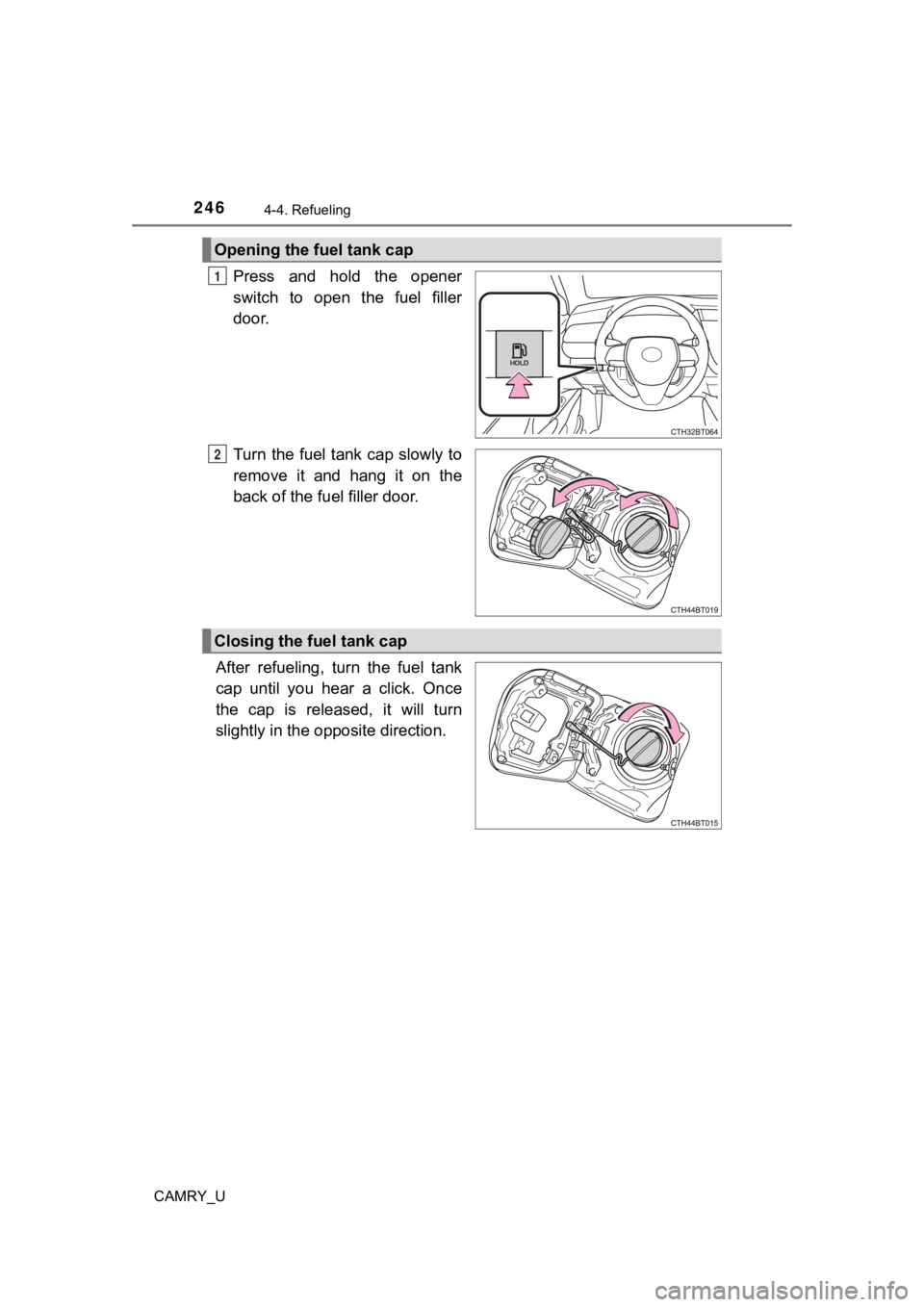
Press and hold the opener
switch to open the fuel filler
door.
Turn the fuel tank cap slowly to
remove it and hang it on the
back of the fuel filler door.
After refueling, turn the fuel tank
cap until you hear a click. Once
the cap is released, it will turn
slightly in the opposite direction.
Opening the fuel tank cap
1
2
Closing the fuel tank cap
Page 247 of 664
2474-4. Refueling
4
Driving
CAMRY_U
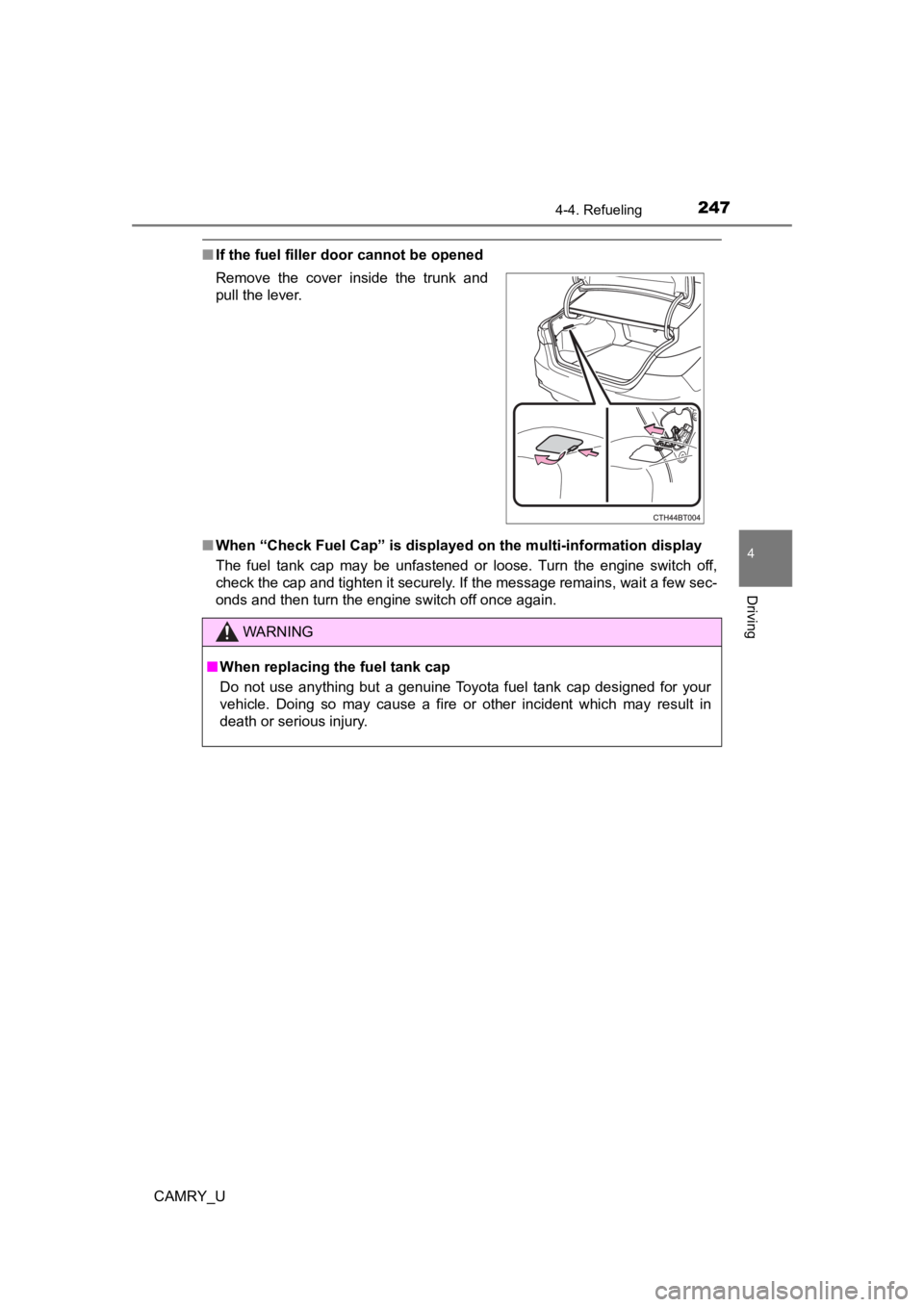
■If the fuel filler door cannot be opened
■ When “Check Fuel Cap” is displayed on the multi-information dis play
The fuel tank cap may be unfastened or loose. Turn the engine switch off,
check the cap and tighten it securely. If the message remains, wait a few sec-
onds and then turn the engine switch off once again. Remove the cover inside the trunk and
pull the lever.
WARNING
■ When replacing the fuel tank cap
Do not use anything but a genuine Toyota fuel tank cap designed for your
vehicle. Doing so may cause a fire or other incident which may result in
death or serious injury.
Page 375 of 664
3754-5. Using the driving support systems
4
Driving
CAMRY_U
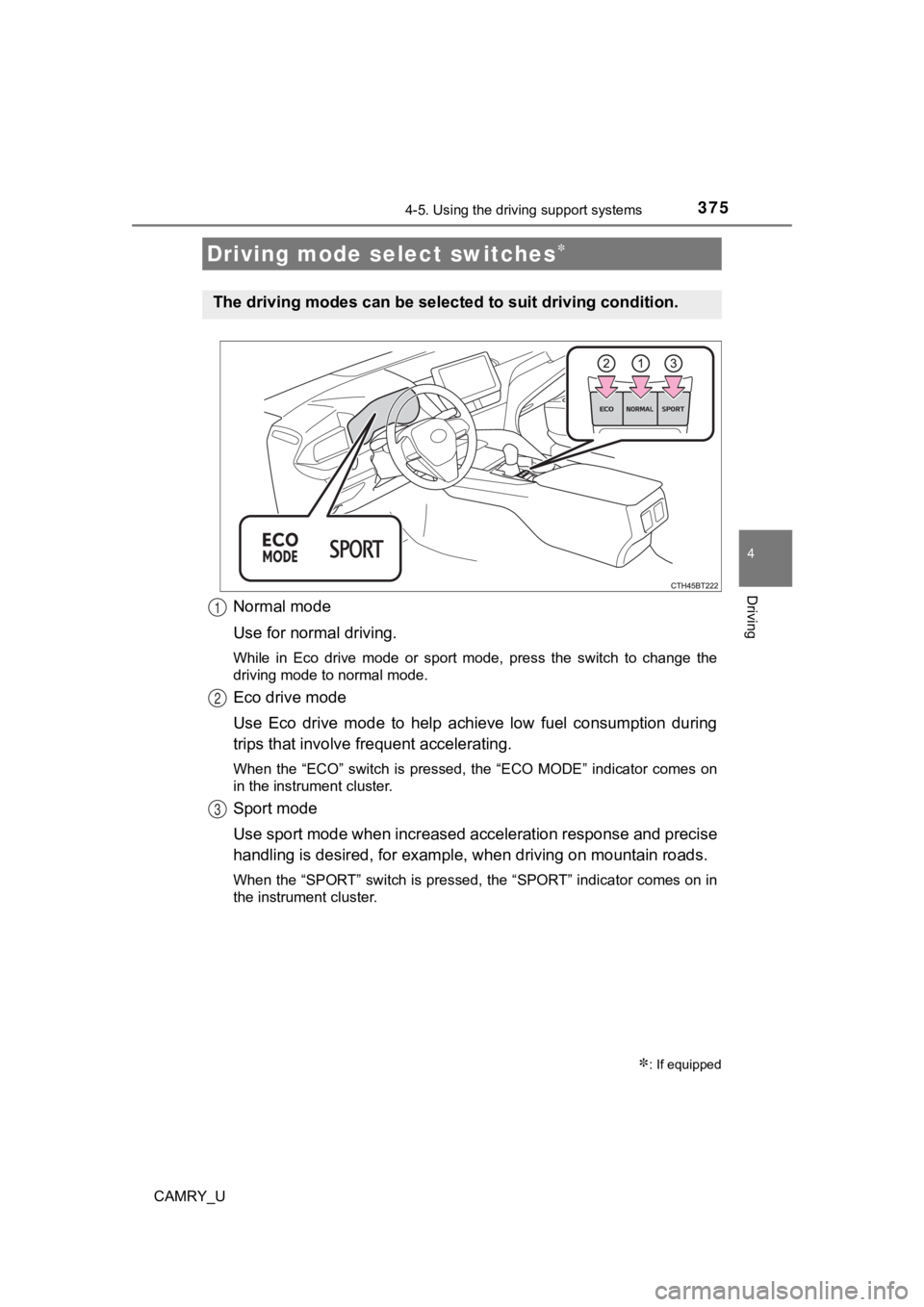
Normal mode
Use for normal driving.
While in Eco drive mode or sport mode, press the switch to change the
driving mode to normal mode.
Eco drive mode
Use Eco drive mode to help achieve low fuel consumption during
trips that involve frequent accelerating.
When the “ECO” switch is pressed, the “ECO MODE” indicator comes on
in the instrument cluster.
Sport mode
Use sport mode when increased acceleration response and precise
handling is desired, for exampl e, when driving on mountain road s.
When the “SPORT” switch is pressed, the “SPORT” indicator comes on in
the instrument cluster.
Driving mode select switches
: If equipped
The driving modes can be select ed to suit driving condition.
1
2
3
Page 376 of 664

3764-5. Using the driving support systems
CAMRY_U
■Operation of the air conditioning system in Eco drive mode
Eco drive mode controls the heating/cooling operations and fan speed of the
air conditioning system to enhance fuel efficiency ( P. 387, 394). To improve
air conditioning performance, adjust the fan speed or turn off Eco drive mode.
■ Sport mode automatic deactivation
Sport mode is automatically deactivated if the engine switch is turned off after
driving in sport mode.
Page 385 of 664
3855-1. Using the air conditioning system and defogger
5
Interior features
CAMRY_U■
Outside/recirculated air mode
●Setting to the recirculated air mode temporarily is recommended in prevent-
ing dirty air from entering the vehicle interior and helping to cool the vehicle
when the outside air temperature is high.
● Outside/recirculated air mode may automatically switch dependin g on the
temperature setting or the inside temperature.
■ When the outside temperature exceeds 75°F (24°C) and the air co ndition-
ing system is on
● In order to reduce the air conditioning power consumption, the air condition-
ing system may switch to recirculated air mode automatically. This may also
reduce fuel consumption.
● Vehicles without a smart key system:
Recirculated air mode is selected as a default mode when the en gine switch
is turned to the “ON” position.
Vehicles with a smart key system:
Recirculated air mode is selected as a default mode when the en gine
switch is turned to IGNITION ON mode.
● It is possible to switch to outside air mode at any time by pre ssing .
■ When the outside t emperature is low
The dehumidification function may not operate even when
is pressed.
■ Ventilation and air conditioning odors
●To let fresh air in, set the air conditioning system to the out side air mode.
● During use, various odors from inside and outside the vehicle m ay enter into
and accumulate in the air conditioning system. This may then ca use odor to
be emitted from the vents.
● To reduce potential odors from occurring:
It is recommended that the air conditioning system be set to ou tside air
mode prior to turning the vehicle off.
■ Air conditioning filter
P. 492
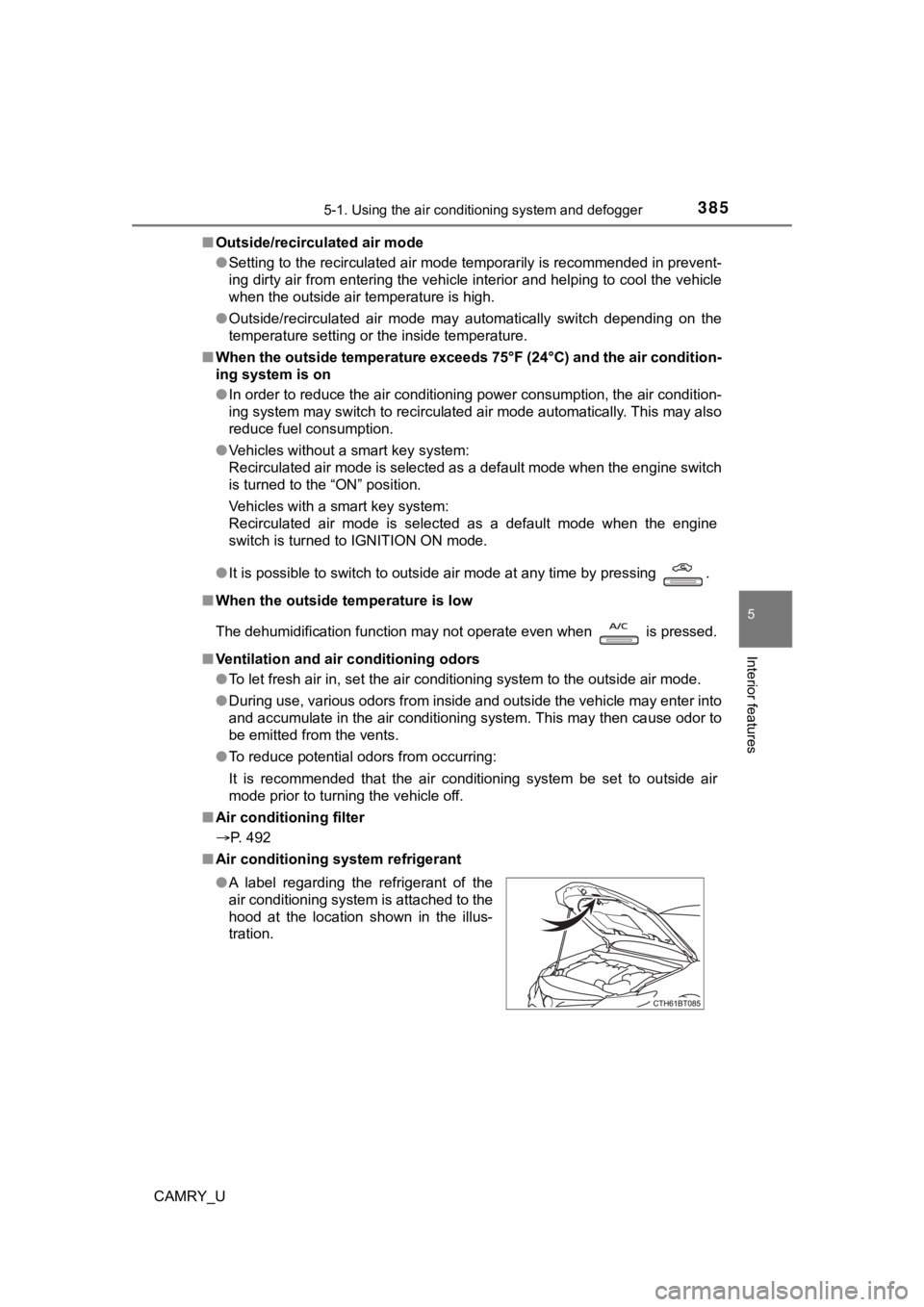
■ Air conditioning system refrigerant
●A label regarding the refrigerant of the
air conditioning system is attached to the
hood at the location shown in the illus-
tration.
Page 391 of 664

3915-1. Using the air conditioning system and defogger
5
Interior features
CAMRY_U■
When driving on dusty roads
Close all windows. If dust thrown up by the vehicle is still drawn into the vehi-
cle after closing the windows, it is recommended that the air intake mode be
set to outside air mode and the fan speed to any setting except off.
■ Outside/recirculated air mode
●Setting to the recirculated air mode temporarily is recommended in prevent-
ing dirty air from entering the vehicle interior and helping to cool the vehicle
when the outside air temperature is high.
● Outside/recirculated air mode may automatically switch dependin g on the
temperature setting or the inside temperature.
■ When the outside temperature exceeds 75°F (24°C) and the air co ndition-
ing system is on
● In order to reduce the air conditioning power consumption, the air condition-
ing system may switch to recirculated air mode automatically. This may also
reduce fuel consumption.
● Vehicles without a smart key system:
Recirculated air mode is selected as a default mode when the en gine switch
is turned to the “ON” position.
Vehicles with a smart key system:
Recirculated air mode is selected as a default mode when the en gine
switch is turned to IGNITION ON mode.
● It is possible to switch to outside air mode at any time by pre ssing .
■ When the outside t emperature is low
The dehumidification function may not operate even when is pre ssed.
■ Operation of the air conditioni ng system in Eco drive mode (if equipped)
● In the Eco drive mode, the air conditioning system is controlle d as shown
below to prioritize fuel efficiency.
Fan speed restricted when automatic mode is selected
● To improve air conditioning performance, perform the following operations:
• Adjust the fan speed
• Turn off Eco drive mode
Page 399 of 664
3995-1. Using the air conditioning system and defogger
5
Interior features
CAMRY_U
■Using automatic mode
Fan speed is adjusted automatically according to the temperatur e setting and
the ambient conditions.
Therefore, the fan may stop for a while until warm or cool air is ready to flow
immediately after is pressed.
■ Fogging up of the windows
●The windows will easily fog up when the humidity in the vehicle is high.
Turning on will dehumidify the air from the outlets and defog the
windshield effectively.
● If you turn off, the windows may fog up more easily.
● The windows may fog up if the recirculated air mode is used.
■ When driving on dusty roads
Close all windows. If dust thrown up by the vehicle is still drawn into the vehi-
cle after closing the windows, it is recommended that the air intake mode be
set to outside air mode and the fan speed to any setting except off.
■ Outside/recirculated air mode
●Setting to the recirculated air mode temporarily is recommended in prevent-
ing dirty air from entering the vehicle interior and helping to cool the vehicle
when the outside air temperature is high.
● Outside/recirculated air mode may automatically switch dependin g on the
temperature setting or the inside temperature.
■ When the outside temperature exceeds 75°F (24°C) and the air co ndition-
ing system is on
● In order to reduce the air conditioning power consumption, the air condition-
ing system may switch to recirculated air mode automatically. This may also
reduce fuel consumption.
● Recirculated air mode is selected as a default mode when the en gine switch
is turned to IGNITION ON mode.
● It is possible to switch to outside air mode at any time by pre ssing .
■ When the outside t emperature is low
The dehumidification function may not operate even when is pressed.
Page 400 of 664
4005-1. Using the air conditioning system and defogger
CAMRY_U■
Operation of the air conditioning system in Eco drive mode
●In the Eco drive mode, “ECO” is displayed on the air conditioni ng screen
and the air conditioning system is controlled as shown below to prioritize
fuel efficiency.
Fan speed restricted when automatic mode is selected
● To improve air conditioning performance, perform the following operations:
• Adjust the fan speed
• Turn off Eco drive mode
■ Ventilation and air conditioning odors
●To let fresh air in, set the air conditioning system to the out side air mode.
● During use, various odors from inside and outside the vehicle m ay enter into
and accumulate in the air conditioning system. This may then ca use odor to
be emitted from the vents.
● To reduce potential odors from occurring:
• It is recommended that the air conditioning system be set to o utside air
mode prior to turning the vehicle off.
• The start timing of the blower may be delayed for a short peri od of time
immediately after the air conditioning system is started in aut omatic
mode.
■ Air conditioning filter
P. 492
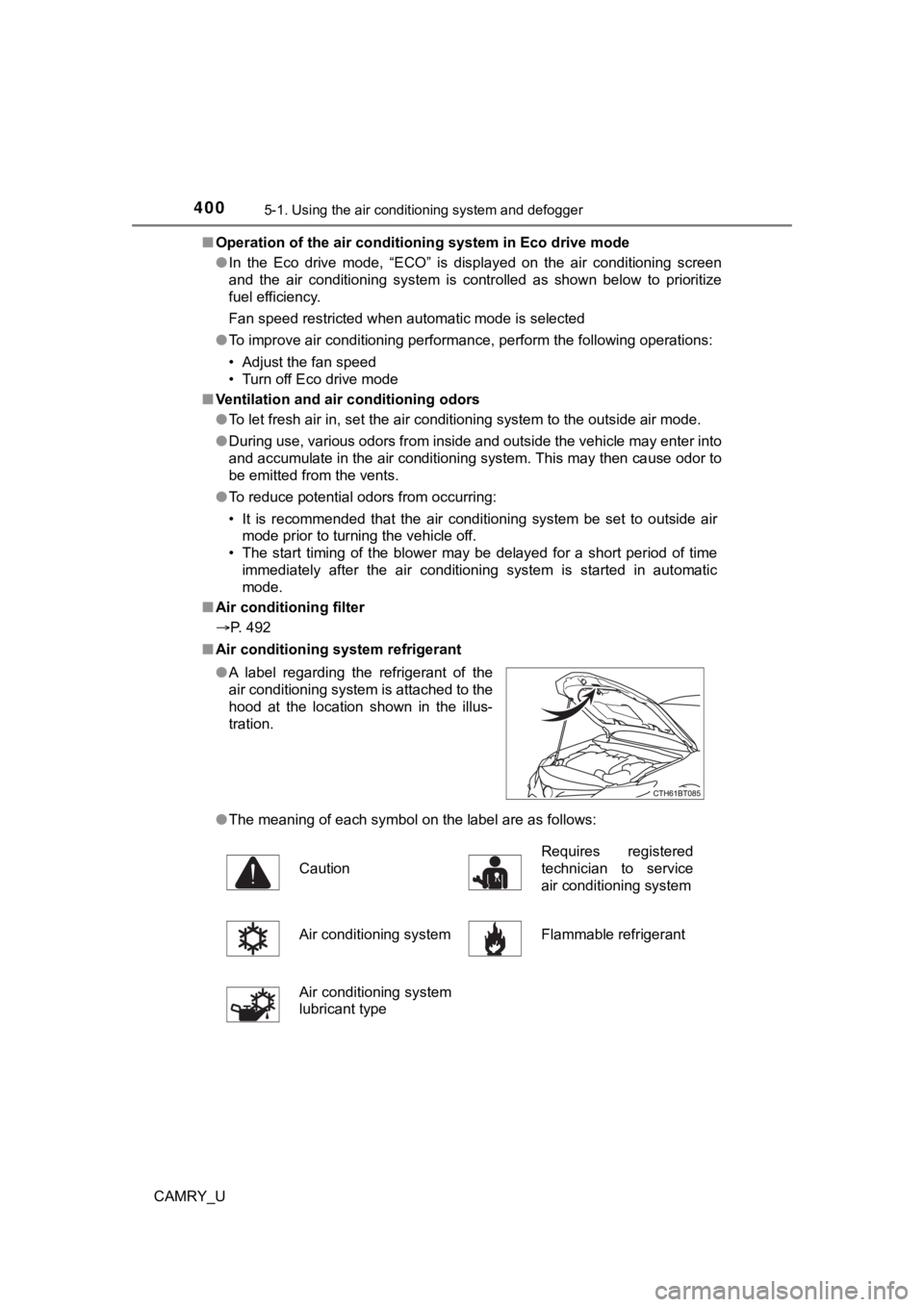
■ Air conditioning system refrigerant
●The meaning of each symbol on the label are as follows:
●
A label regarding the refrigerant of the
air conditioning system is attached to the
hood at the location shown in the illus-
tration.
Caution Requires registered
technician to service
air conditioning system
Air conditioning system Flammable refrigerant
Air conditioning system
lubricant type
Page 426 of 664

4265-4. Other interior features
CAMRY_U■
Sound generated during operation
Operation sounds may be heard when the power supply switch is p ressed to
turn the wireless charger on, when the engine switch is pressed to change to
ACCESSORY mode or IGNITION ON m ode while the wireless charger is on,
or when a portable device is being detected. This does not indicate a mal-
function.
■ Situations in which the wireless charger may not operate correctly
In the following situations, the wireless charger may not opera te correctly:
● When a portable device is fully charged
● When a portable device is being charged by a wired connection.
● When there is foreign matter between the charging area and portable device
● When the temperature of a portable device becomes high while ch arging
● When the temperature near the charging tray is 95°F (35°C) or m ore due to
being in direct sunlight, etc.
● When a portable device is placed with its charging surface faci ng up
● When a portable device is not centered on the charging area
● When a portable device is larger than the charging tray
● When a foldable portable device is placed outside of the chargi ng area
● When the vehicle is near a TV tower, electric power plant, fuel station, radio
station, large display, airport, or other facility that generat es strong radio
waves or electrical noise
● When the any of the following objects, with a thickness of 0.08 in. (2 mm) or
more, are between the charging surface of a portable device and the
charging area:
• Thick cases or covers
• Thick decorations
• Accessories, such as finger rings, straps, etc.
● When the portable device is in contact with, or is covered by a ny of the fol-
lowing metallic objects:
• Cards covered with metal, such as aluminum foil
• Cigarette boxes that have aluminum foil inside
• Metallic wallets or bags
• Coins
• Heat packs
• Recorded media such as CDs and DVDs
• Metallic decorations
• Metallic cases or covers
● When wireless keys (that emit radio waves) other than those of your vehicle
are being used nearby