cruise control TOYOTA CAMRY HYBRID 2018 (in English) User Guide
[x] Cancel search | Manufacturer: TOYOTA, Model Year: 2018, Model line: CAMRY HYBRID, Model: TOYOTA CAMRY HYBRID 2018Pages: 596, PDF Size: 10.01 MB
Page 191 of 596

1914-1. Before driving
4
Driving
■When starting off on an uphill
The hill-start assist control will activate. ( →P. 284)
■ For fuel-efficient driving
Keep in mind that hybrid vehicles are similar to conventional vehicles, and it
is necessary to refrain from activities such as sudden acceleration. ( →P. 335)
■ Coasting (Auto Glide Control)
When Eco drive mode is selected, under certain conditions, Auto Glide Con-
trol will operate automatically and allow the vehicle coast, enhancing fuel
economy. ( →P. 334)
■ Driving in the rain
●Drive carefully when it is raining, because visibility will be reduced, the win-
dows may become fogged-up, and the road will be slippery.
● Drive carefully when it starts to rain, because the road surface will be espe-
cially slippery.
● Refrain from high speeds when driving on an expressway in the rain,
because there may be a layer of water between the tires and the road sur-
face, preventing the steering and brakes from operating properly.
■ Restraining hybrid system outp ut (Brake Override System)
● When the accelerator and brake pedals are depressed at the same time, the
hybrid system output may be restrained.
● A warning message is displayed on the multi-information display while the
system is operating.
■ ECO Accelerator Guidance ( →P. 117)
Eco-friendly driving may be achieved more easily by staying within the zone
of Eco acceleration. Also, by staying within the zone of Eco acceleration, it
will be easier to obtain a good Eco score.
● When starting off:
Gradually depress the accelerator pedal to stay within the zone of Eco accel-
eration and accelerate to the desired speed. By refraining from excessive
acceleration, a good eco start score will be obtained.
● When driving:
After accelerating to the desired speed, release the accelerator pedal and
drive at a stable speed while staying within the zone of Eco acceleration. By
staying within the zone of Eco acceleration, a good eco cruise score will be
obtained.
● When stopping:
By starting to release the accelerator pedal early before decelerating, a good
eco stop score will be obtained.
Page 217 of 596
2174-2. Driving procedures
4
Driving
■When driving with dynamic radar cr uise control with full-speed range
activated
Even when performing the following actions with the intent of enabling engine
braking, engine braking will not activate because radar cruise control with full
speed range will not be canceled.
● While driving in D or S mode, downshifting to 5 or 4.
(
→P. 270)
● When switching the driving mode to sport mode while driving in the D posi-
tion. (
→P. 333)
■ Restraining sudden star t (Drive-start Control)
→P. 192
■ Shift lock system
The shift lock system is a system to prevent accidental operation of the shift
lever in starting.
The shift lever can be shifted from P only when the power switch is in the ON
mode, the brake pedal is depressed and the shift release button is pushe\
d.
■ If the shift lever canno t be shifted from P
First, check whether the brake pedal is being depressed.
If the shift lever cannot be shifted even though the brake pedal is depressed
and the shift release button is pushed, there may be a problem with the shift
lock system. Have the vehicle inspected by your Toyota dealer immediately.
The following steps may be used as an emergency measure to ensure that
the shift lever can be shifted.
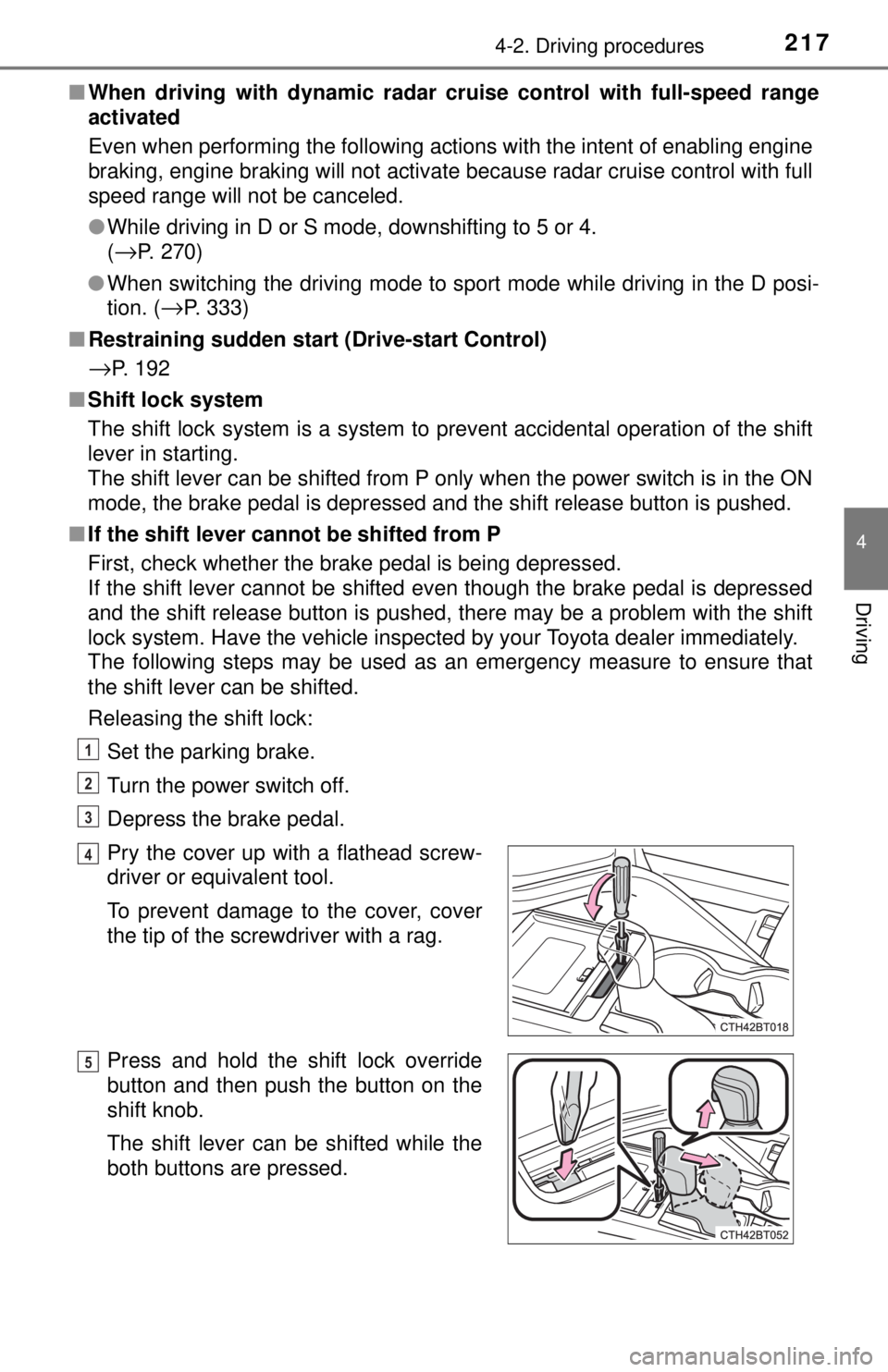
Releasing the shift lock:
Set the parking brake.
Turn the power switch off.
Depress the brake pedal.
Pry the cover up with a flathead screw-
driver or equivalent tool.
To prevent damage to the cover, cover
the tip of the screwdriver with a rag.
Press and hold the shift lock override
button and then push the button on the
shift knob.
The shift lever can be shifted while the
both buttons are pressed.
1
2
3
4
5
Page 242 of 596
2424-5. Using the driving support systems
◆PCS (Pre-Collision System)
→P. 2 4 9
◆LDA (Lane Departure Alert with steering control)
→P. 2 6 0
◆Automatic High Beam
→P. 2 3 0
◆Dynamic radar cruise cont rol with full-speed range
→ P. 2 7 0
Toyota Safety Sense P
The Toyota Safety Sense P consists of the following drive assist
systems and contributes to a safe and comfortable driving expe-
rience:
WARNING
■Toyota Safety Sense P
The Toyota Safety Sense P is designed to operate under the assumption
that the driver will drive safely, and is designed to help reduce the impact to
the occupants and the vehicle in the case of a collision or assist the driver in
normal driving conditions.
As there is a limit to the degree of recognition accuracy and control perfor-
mance that this system can provide, do not overly rely on this system. The
driver is always responsible for paying attention to the vehicle's surround-
ings and driving safely.
Page 270 of 596
2704-5. Using the driving support systems
In vehicle-to-vehicle distance co ntrol mode, the vehicle automatically
accelerates, decelerates and stops to match the speed changes of the
preceding vehicle even if the acce lerator pedal is not depressed. In
constant speed control mode, t he vehicle runs at a fixed speed.
Use the dynamic radar cruise control with full-speed range on free-
ways and highways.
● Vehicle-to-vehicle distance control mode ( →P. 273)
● Constant speed control mode ( →P. 279)
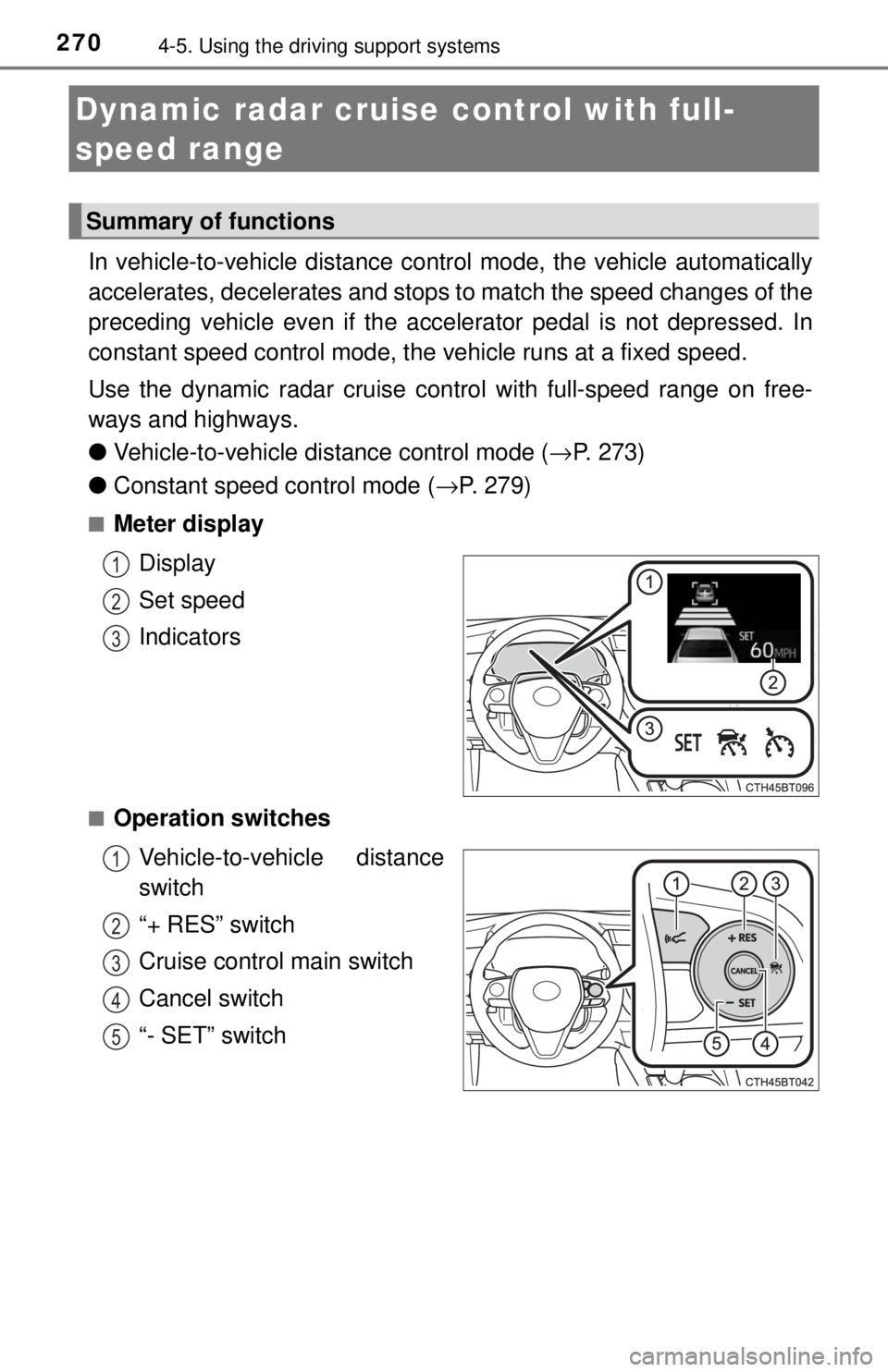
■Meter display
Display
Set speed
Indicators
■Operation switchesVehicle-to-vehicle distance
switch
“+ RES” switch
Cruise control main switch
Cancel switch
“- SET” switch
Dynamic radar cruise control with full-
speed range
Summary of functions
1
2
3
1
2
3
4
5
Page 271 of 596
2714-5. Using the driving support systems
4
Driving
WARNING
■Before using dynamic radar cruise control with full-speed range
Driving safely is the sole responsibility of the driver. Do not rely solely on the
system, and drive safely by always paying careful attention to your sur-
roundings.
The dynamic radar cruise control wi th full-speed range provides driving
assistance to reduce the driver's burden. However, there are limitations to
the assistance provided.
Set the speed appropriately depending on the speed limit, traffic flow, road
conditions, weather conditions, etc. The driver is responsible for checking
the set speed.
Even when the system is functioning normally, the condition of the preced-
ing vehicle as detected by the system may differ from the condition
observed by the driver. Therefore, th e driver must always remain alert,
assess the danger of each situation and drive safely. Relying on this system
or assuming the system ensures safety while driving can lead to an acci-
dent, resulting in death or serious injury.
■ Cautions regarding the driving assist systems
Observe the following precautions, as there are limitations to the assistance
provided by the system.
Failure to do so may cause an accident resulting in death or serious injury.
● Assisting the driver to measure following distance
The dynamic radar cruise control with full-speed range is only intended to
help the driver in determining the following distance between the driver’s
own vehicle and a designated vehicle traveling ahead. It is not a mecha-
nism that allows careless or inattentive driving, and it is not a system that
can assist the driver in low-visibility conditions. It is still necessary for
driver to pay close attention to the vehicle’s surroundings.
● Assisting the driver to judge proper following distance
The dynamic radar cruise control with full-speed range determines
whether the following distance between the driver’s own vehicle and a
designated vehicle traveling ahead is with in a set range. It is not capable
of making any other type of judgement. Therefore, it is absolutely neces-
sary for the driver to remain vigilant and to determine whether or not there
is a possibility of danger in any given situation.
● Assisting the driver to operate the vehicle
The dynamic radar cruise control with full-speed range has limited capabil-
ity to prevent or avoid a collision with a vehicle traveling ahead. Therefore,
if there is ever any danger, the driver must take immediate and direct con-
trol of the vehicle and act appropriately in order to ensure the safety of all
involved.
Page 272 of 596
2724-5. Using the driving support systems
WARNING
■To avoid inadvertent dynamic rada r cruise control with full-speed
range activation
Switch the dynamic radar cruise control with full-speed range off using the
cruise control main switch when not in use.
■ Situations unsuitable for dynamic radar cruise control with full-speed
range
Do not use dynamic radar cruise control with full-speed range in any of the
following situations.
Doing so may result in inappropriate speed control and could cause an acci-
dent resulting in death or serious injury.
● Roads where there are pedestrians, cyclists, etc.
● In heavy traffic
● On roads with sharp bends
● On winding roads
● On slippery roads, such as those covered with rain, ice or snow
● On steep downhills, or where there are sudden changes between sharp up
and down gradients
Vehicle speed may exceed the set speed when driving down a steep hill.
● At entrances to freeways and highways
● When weather conditions are bad enough that they may prevent the sen-
sors from detecting correctly (fog, snow, sandstorm, heavy rain, etc.)
● When there is rain, snow, etc. on the front surface of the radar sensor or
camera sensor
● In traffic conditions that require frequent repeated acceleration and decel-
eration
● During emergency towing
● When an approach warning buzzer is heard often
Page 274 of 596
2744-5. Using the driving support systems
Example of acceleration
When there are no longer any preceding vehicles driving slower
than the set speed
The system accelerates until the set speed is reached. The system then
returns to constant speed cruising.
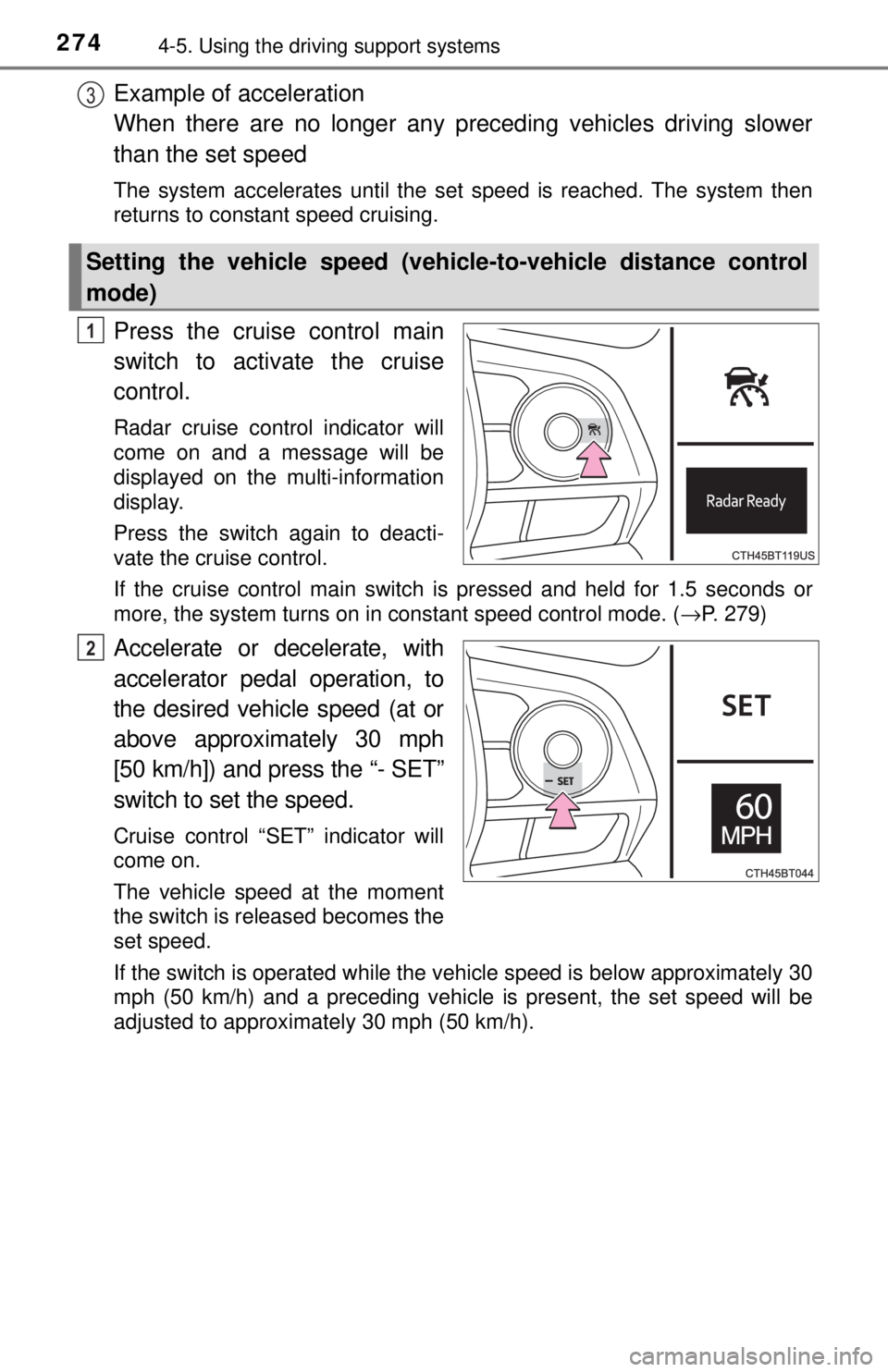
Press the cruise control main
switch to activate the cruise
control.
Radar cruise control indicator will
come on and a message will be
displayed on the multi-information
display.
Press the switch again to deacti-
vate the cruise control.
If the cruise control main switch is pressed and held for 1.5 seconds or
more, the system turns on in constant speed control mode. ( →P. 279)
Accelerate or decelerate, with
accelerator pedal operation, to
the desired vehicle speed (at or
above approximately 30 mph
[50 km/h]) and press the “- SET”
switch to set the speed.
Cruise control “SET” indicator will
come on.
The vehicle speed at the moment
the switch is released becomes the
set speed.
If the switch is operated while the vehicle speed is below approximately 30
mph (50 km/h) and a preceding vehicle is present, the set speed will be
adjusted to approximately 30 mph (50 km/h).
Setting the vehicle speed (vehicle-to-vehicle distance control
mode)
3
1
2
Page 277 of 596
2774-5. Using the driving support systems
4
Driving
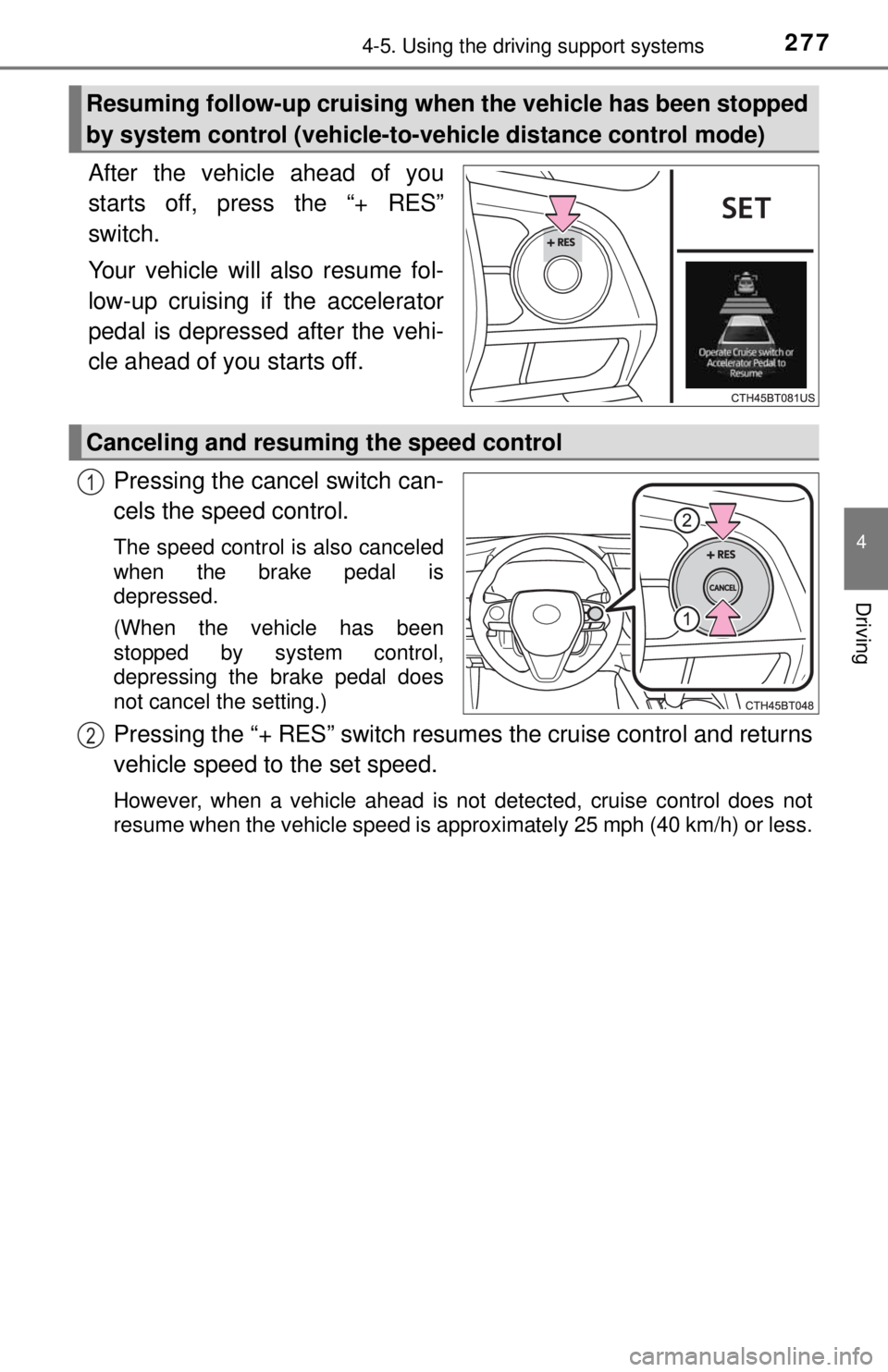
After the vehicle ahead of you
starts off, press the “+ RES”
switch.
Your vehicle will also resume fol-
low-up cruising if the accelerator
pedal is depressed after the vehi-
cle ahead of you starts off.Pressing the cancel switch can-
cels the speed control.
The speed control is also canceled
when the brake pedal is
depressed.
(When the vehicle has been
stopped by system control,
depressing the brake pedal does
not cancel the setting.)
Pressing the “+ RES” switch resumes the crui se control and returns
vehicle speed to the set speed.
However, when a vehicle ahead is not detected, cruise control does not
resume when the vehicle speed is approximately 25 mph (40 km/h) or less.
Resuming follow-up cruising when the vehicle has been stopped
by system control (vehicle-to-vehicle distance control mode)
Canceling and resuming the speed control
1
2
Page 278 of 596
2784-5. Using the driving support systems
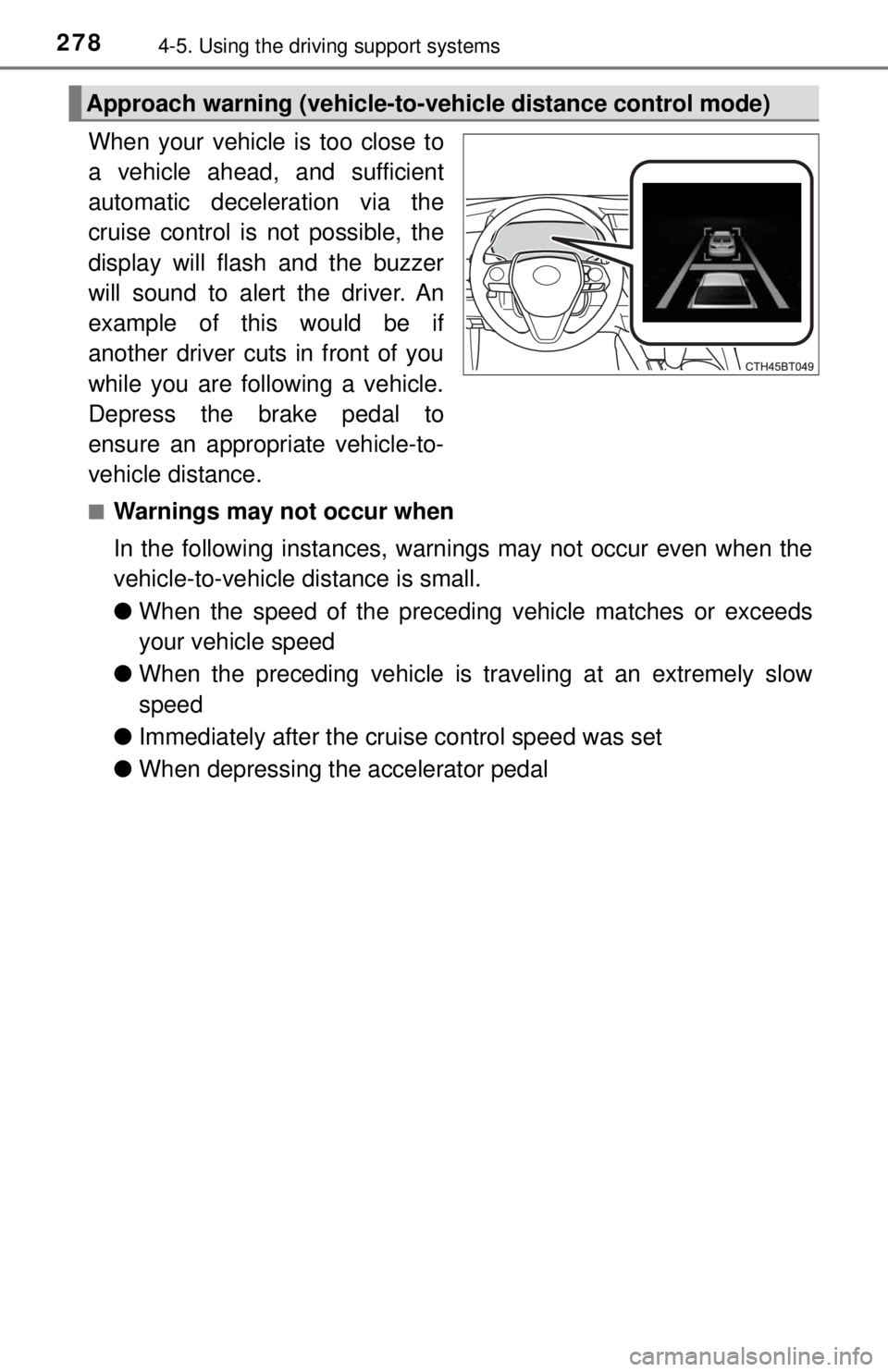
When your vehicle is too close to
a vehicle ahead, and sufficient
automatic deceleration via the
cruise control is not possible, the
display will flash and the buzzer
will sound to alert the driver. An
example of this would be if
another driver cuts in front of you
while you are following a vehicle.
Depress the brake pedal to
ensure an appropriate vehicle-to-
vehicle distance.
■Warnings may not occur when
In the following instances, warnings may not occur even when the
vehicle-to-vehicle distance is small.
●When the speed of the preceding vehicle matches or exceeds
your vehicle speed
● When the preceding vehicle is traveling at an extremely slow
speed
● Immediately after the cruise control speed was set
● When depressing the accelerator pedal
Approach warning (vehicle-to-vehicle distance control mode)
Page 279 of 596
2794-5. Using the driving support systems
4
Driving
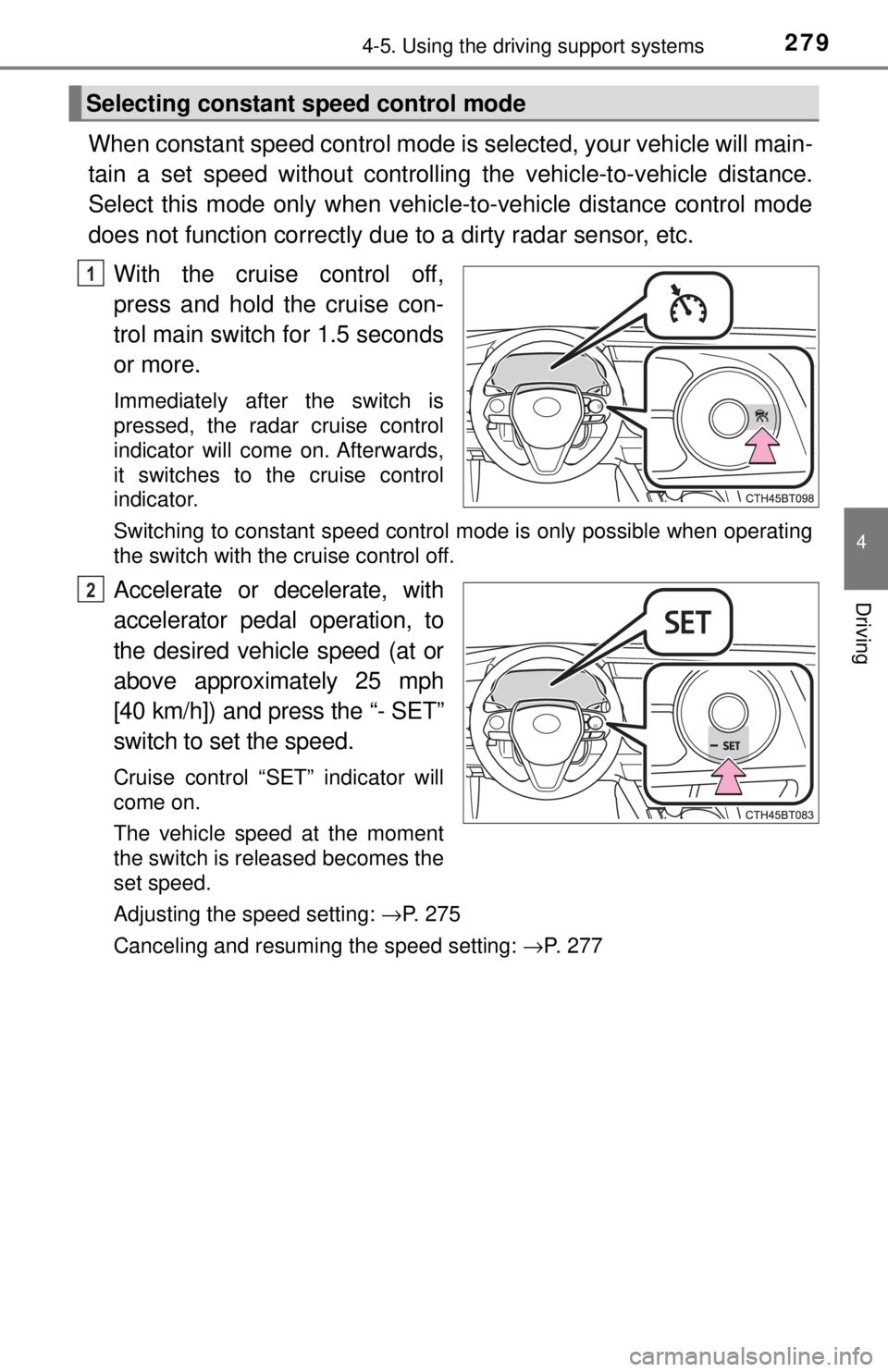
When constant speed control mode is selected, your vehicle will main-
tain a set speed without controllin g the vehicle-to-vehicle distance.
Select this mode only when vehicle-to-vehicle distance control mode
does not function co rrectly due to a dirty radar sensor, etc.
With the cruise control off,
press and hold the cruise con-
trol main switch for 1.5 seconds
or more.
Immediately after the switch is
pressed, the radar cruise control
indicator will come on. Afterwards,
it switches to the cruise control
indicator.
Switching to constant speed control mode is only possible when operating
the switch with the cruise control off.
Accelerate or decelerate, with
accelerator pedal operation, to
the desired vehicle speed (at or
above approximately 25 mph
[40 km/h]) and press the “- SET”
switch to se t the speed.
Cruise control “SET” indicator will
come on.
The vehicle speed at the moment
the switch is released becomes the
set speed.
Adjusting the speed setting: →P. 275
Canceling and resuming the speed setting: →P. 277
Selecting constant speed control mode
1
2