fuel TOYOTA CAMRY HYBRID 2020 (in English) User Guide
[x] Cancel search | Manufacturer: TOYOTA, Model Year: 2020, Model line: CAMRY HYBRID, Model: TOYOTA CAMRY HYBRID 2020Pages: 592, PDF Size: 12.13 MB
Page 85 of 592

851-4. Hybrid system
1
For safety and security
■If a warning light comes on, a warning message is displayed, or the 12-
volt battery is disconnected
The hybrid system may not start. In this case, try to start the system again. If
the “READY” indicator does not come on, contact your Toyota dea ler.
■ Running out of fuel
When the vehicle has run out of fuel and the hybrid system cann ot be started,
refuel the vehicle with at least enough gasoline to make the lo w fuel level
warning light ( P. 478) go off. If there is only a small amount of fuel, the
hybrid system may not be able to start. (The standard amount of fuel is about
2.3 gal. [8.8 L, 1.9 Imp. gal.] when the vehicle is on a level surface. This value
may vary when the vehicle is on a slope. Add extra fuel when th e vehicle is
inclined.)
■ Electromagnetic waves
●High voltage parts and cables on hybrid vehicles incorporate el ectromag-
netic shielding, and therefore emit approximately the same amou nt of elec-
tromagnetic waves as conventional gasoline powered vehicles or home
electronic appliances.
● Your vehicle may cause sound interference in some third party-p roduced
radio parts.
■ Hybrid battery ( traction battery)
The hybrid battery (traction battery) has a limited service life. The lifespan of
the hybrid battery (traction battery) can change in accordance with driving
style and driving conditions.
■ Starting the hybrid system in an e xtremely cold environment (AXVH70
model
*)
When the hybrid battery (traction battery) is extremely cold (b elow approxi-
mately -22°F [-30°C]) under the influence of the outside temper ature, it may
not be possible to start the hybrid system. In this case, try to start the hybrid
system again after the temperature of the hybrid battery (traction battery)
increases due to the outside temperature increase etc.
*: The model code is indicated on the Certification Label. ( P. 523)
Page 87 of 592

871-4. Hybrid system
1
For safety and security
WARNING
■Road accident cautions
Observe the following precautions to reduce the risk of death o r serious
injury:
● Pull your vehicle off the road, apply the parking brake, shift the shift lever
to P, and turn the hybrid system off.
● Do not touch the high voltage parts, cables and connectors.
● If electric wires are exposed inside or outside your vehicle, a n electric
shock may occur. Never touch exposed electric wires.
● If a fire occurs in the hybrid vehicle, leave the vehicle as soon as possible.
Never use a fire extinguisher that is not meant for electric fires. Using even
a small amount of water may be dangerous.
● If your vehicle needs to be towed, do so with front wheels raised. If the
wheels connected to the electric motor (traction motor) are on the ground
when towing, the motor may continue to generate electricity. Th is may
cause a fire. ( P. 471)
● Carefully inspect the ground under the vehicle. If you find that liquid has
leaked onto the ground, the fuel system may have been damaged. Leave
the vehicle as soon as possible.
● If electrolyte is leaking from the hybrid battery (traction bat tery), do not
approach the vehicle.
Even in the unlikely event that the hybrid battery (traction ba ttery) is dam-
aged, the internal construction of the battery will prevent a l arge amount
of electrolyte from leaking out. However, any electrolyte that does leak out
will give off a vapor. This vapor is an irritant to skin and ey es and could
cause acute poisoning if inhaled.
AXVH70 model*
● Do not touch the hybrid battery (traction battery) if liquid is leaking from or
adhering to it. If electrolyte (carbonic-based organic electrol yte) from the
hybrid battery (traction battery) comes into contact with the e yes or skin, it
could cause blindness or skin wounds. In the unlikely event tha t it comes
into contact with the eyes or skin, wash it off immediately with a large
amount of water, and seek immediate medical attention.
● Do not bring burning or high-tem perature items close to the electrolyte.
The electrolyte may ignite and cause a fire.
*: The model code is indicated on the Certification Label. ( P. 523)
AXVH71 models*
●If a fluid leak occurs, do not touch the fluid as it may be str ong alkaline
electrolyte from the hybrid battery (traction battery). If it c omes into contact
with your skin or eyes, wash it off immediately with a large am ount of water
or, if possible, boric acid solution. Seek immediate medical attention.
*: The model code is indicated on the Certification Label. ( P. 523)
Page 97 of 592
972. Instrument cluster
2
Instrument cluster
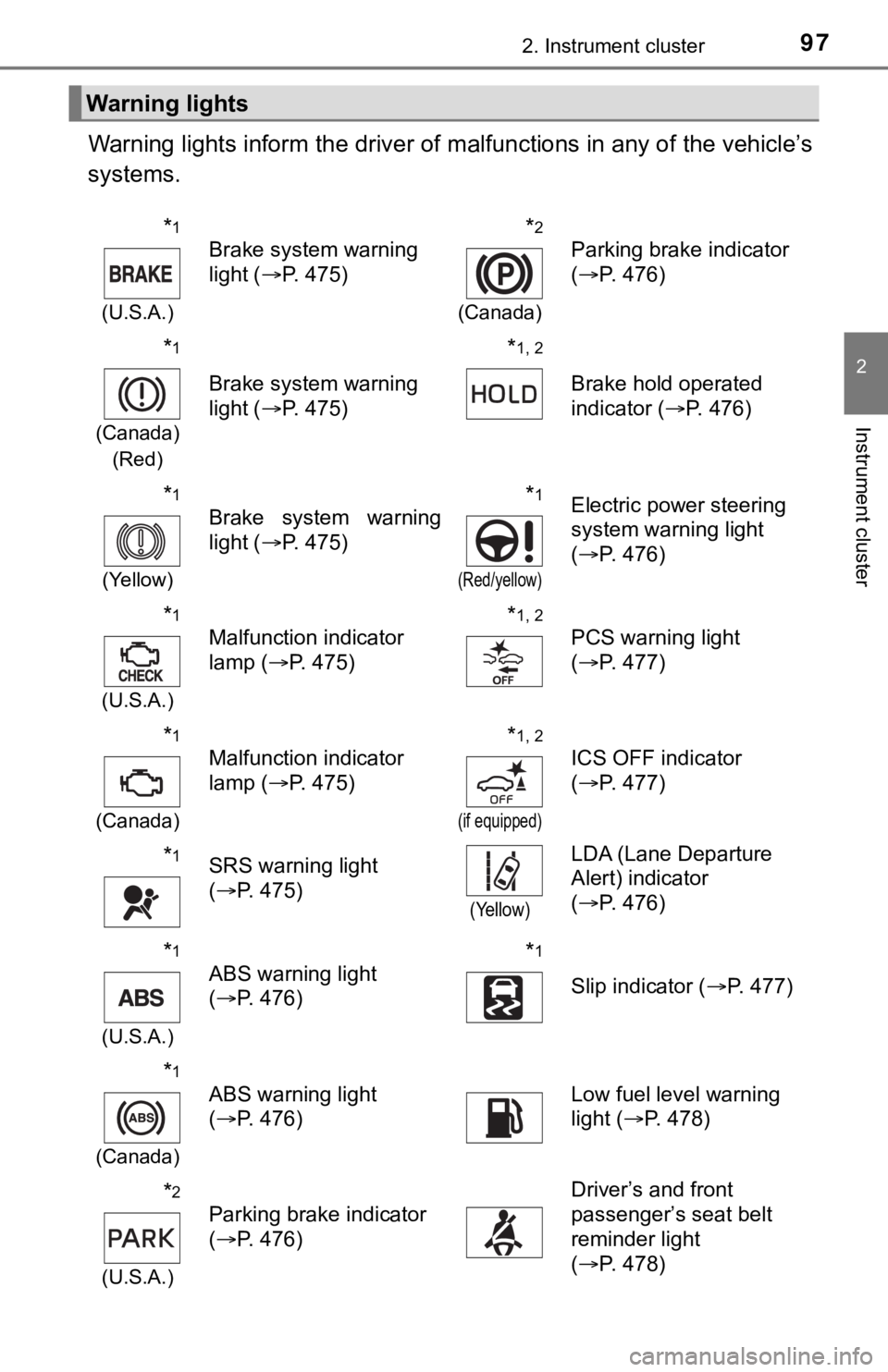
Warning lights inform the driver of malfunctions in any of the vehicle’s
systems.
Warning lights
*1
(U.S.A.)
Brake system warning
light ( P. 475)*2
(Canada)
Parking brake indicator
(P. 476)
*1
(Canada)
(Red)
Brake system warning
light ( P. 475)
*1, 2
Brake hold operated
indicator ( P. 476)
*1
(Yellow)
Brake system warning
light ( P. 475)*1
(Red/yellow)
Electric power steering
system warning light
(P. 476)
*1
(U.S.A.)
Malfunction indicator
lamp ( P. 475)*1, 2
PCS warning light
(P. 477)
*1
(Canada)
Malfunction indicator
lamp ( P. 475)*1, 2
(if equipped)
ICS OFF indicator
(P. 477)
*1SRS warning light
(P. 475)
(Yellow)
LDA (Lane Departure
Alert) indicator
(P. 476)
*1
(U.S.A.)
ABS warning light
(P. 476)*1
Slip indicator ( P. 477)
*1
(Canada)
ABS warning light
(P. 476)Low fuel level warning
light ( P. 478)
*2
(U.S.A.)
Parking brake indicator
(P. 476)
Driver’s and front
passenger’s seat belt
reminder light
(P. 478)
Page 103 of 592
1032. Instrument cluster
2
Instrument cluster
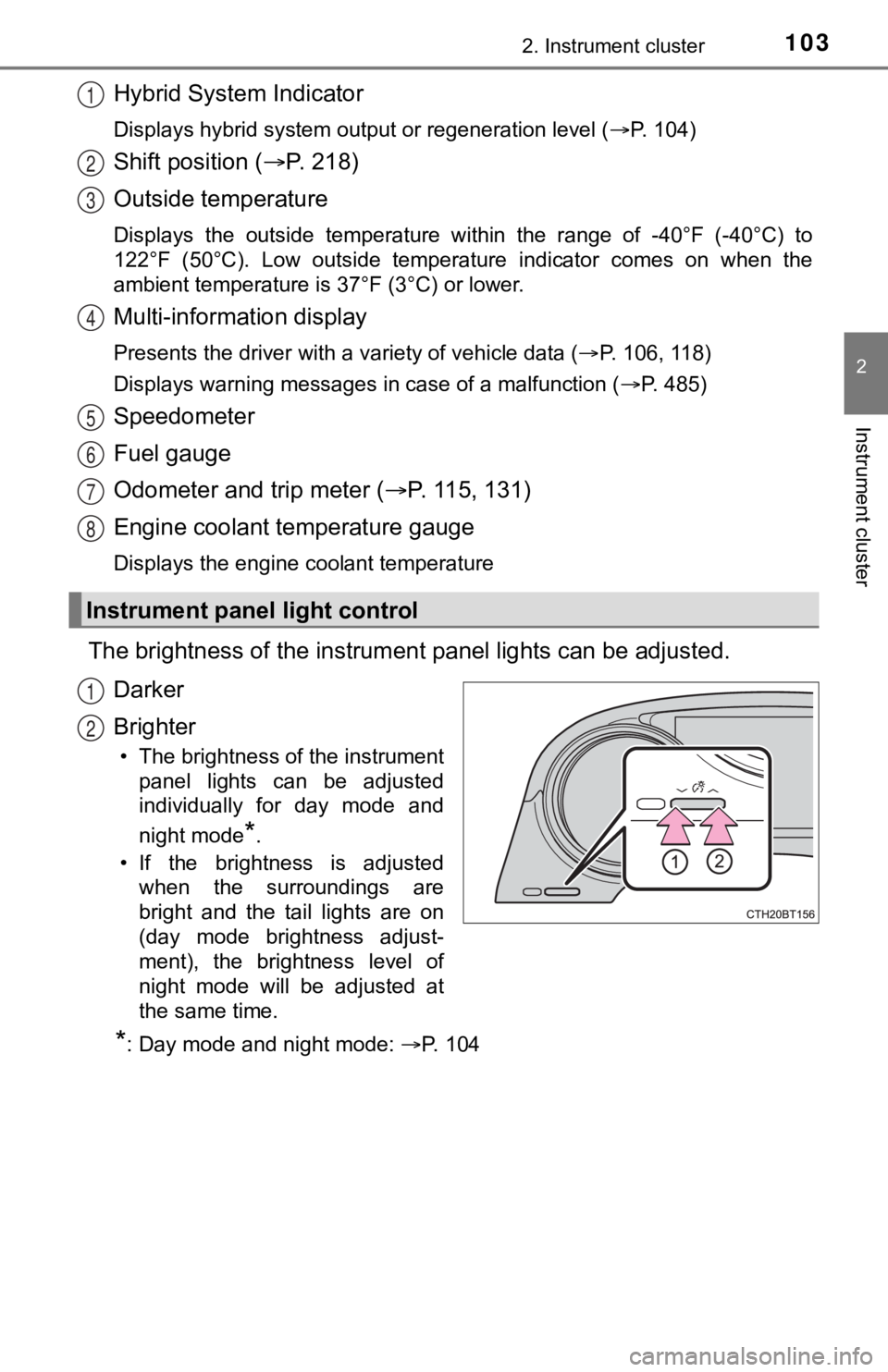
Hybrid System Indicator
Displays hybrid system output or regeneration level (P. 104)
Shift position (P. 2 1 8 )
Outside temperature
Displays the outside temperature within the range of -40°F (-40 °C) to
122°F (50°C). Low outside temperat ure indicator comes on when the
ambient temperature is 37°F (3°C) or lower.
Multi-information display
Presents the driver with a variety of vehicle data ( P. 106, 118)
Displays warning messages in case of a malfunction ( P. 485)
Speedometer
Fuel gauge
Odometer and trip meter (P. 115, 131)
Engine coolant temperature gauge
Displays the engine coolant temperature
The brightness of the instrumen t panel lights can be adjusted.
Darker
Brighter
• The brightness of the instrument panel lights can be adjusted
individually for day mode and
night mode
*.
• If the brightness is adjusted when the surroundings are
bright and the tail lights are on
(day mode brightness adjust-
ment), the brightness level of
night mode will be adjusted at
the same time.
*: Day mode and night mode: P. 1 0 4
Instrument panel light control
1
2
3
4
5
6
7
8
1
2
Page 105 of 592
1052. Instrument cluster
2
Instrument cluster
■Engine speed
On hybrid vehicles, engine speed is precisely controlled in ord er to help
improve fuel efficiency and reduce exhaust emissions etc.
There are times when the engine speed that is displayed may dif fer even
when vehicle operation and driving conditions are the same.
■ Outside temperature display
In the following situations, the correct outside temperature ma y not be dis-
played, or the display may take longer than normal to change:
● When stopped, or driving at low speeds (less than 16 mph [25 km/h])
● When the outside temperature has changed suddenly (at the entra nce/exit
of a garage, tunnel, etc.)
● When “ ” or “E” is displayed, the system may be malfunctioning.
Take your vehicle to your Toyota dealer.
NOTICE
■ To prevent damage to the engine and its components
The engine may be overheating if the engine coolant temperature gauge is
in the red zone (H). In this case, immediately stop the vehicle in a safe
place, and check the engine after it has cooled completely. ( P. 514)
Page 109 of 592
1092. Instrument cluster
2
Instrument cluster
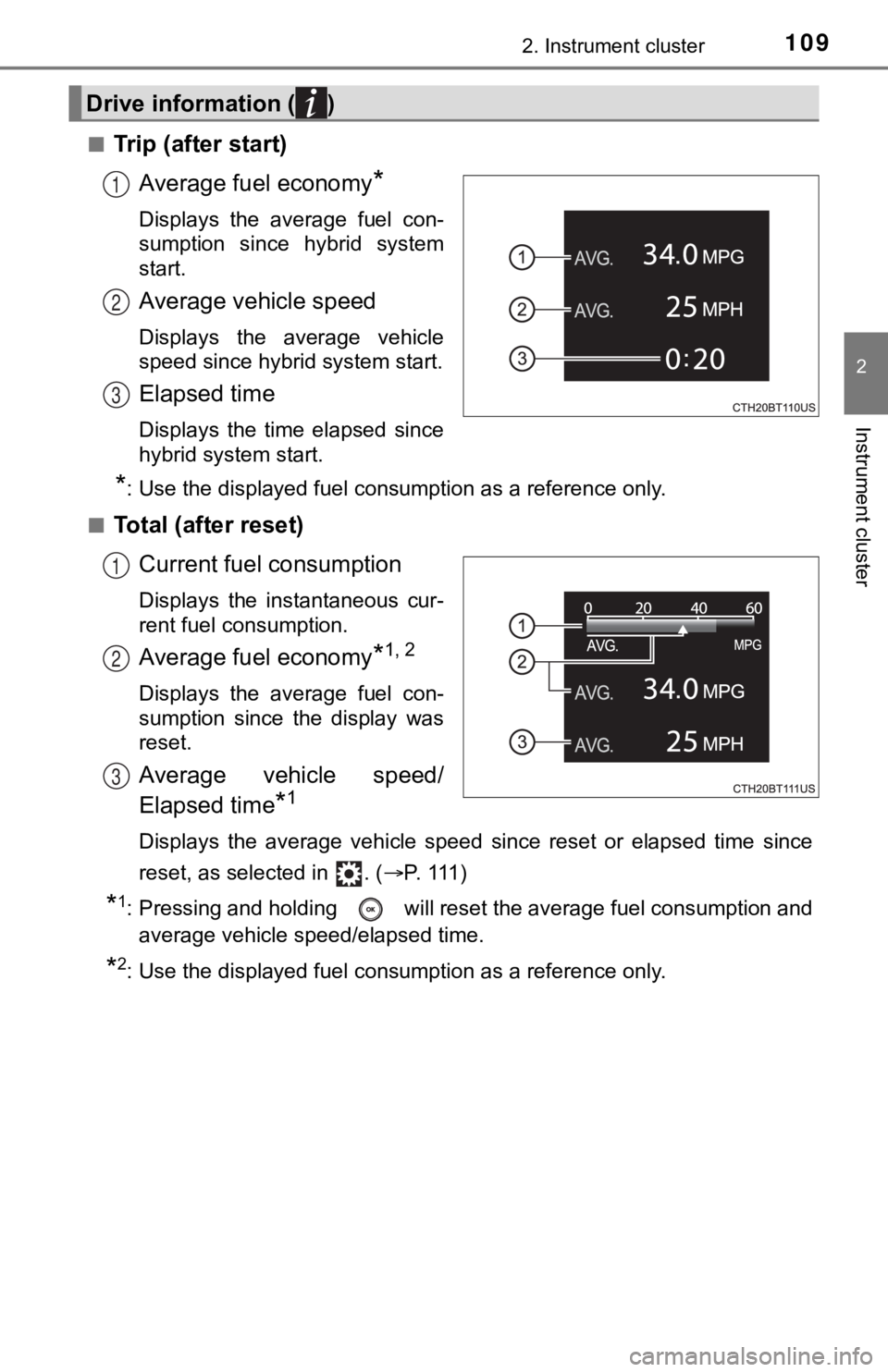
■Trip (after start)Average fuel economy
*
Displays the average fuel con-
sumption since hybrid system
start.
Average vehicle speed
Displays the average vehicle
speed since hybrid system start.
Elapsed time
Displays the time elapsed since
hybrid system start.
*: Use the displayed fuel consumption as a reference only.
■
Total (after reset) Current fuel consumption
Displays the instantaneous cur-
rent fuel consumption.
Average fuel economy*1, 2
Displays the average fuel con-
sumption since the display was
reset.
Average vehicle speed/
Elapsed time
*1
Displays the average vehicle speed since reset or elapsed time since
reset, as selected in . ( P. 111)
*1: Pressing and holding will reset the average fuel consumption and
average vehicle speed/elapsed time.
*2: Use the displayed fuel consumption as a reference only.
Drive information ( )
1
2
3
1
2
3
Page 110 of 592

1102. Instrument cluster
■Tank (after refuel)Driving range
*1, 2
Displays the driving range with
remaining fuel.
Average fuel economy*1, 3
Displays the average fuel con-
sumption since the vehicle was
refueled.
*1: When only a small amount of fuel is added to the tank, the dis play may
not be updated.
When refueling, turn the power switch off. If the vehicle is re fueled with-
out turning the power switch off, the display may not be update d.
*2: This distance is computed based on your average fuel consumpti on. As
a result, the actual distance that can be driven may differ fro m that dis-
played.
*3: Use the displayed fuel consumption as a reference only.
■
Energy monitor
P. 1 4 0
■Speedometer
Displays the vehicle speed.
■Tire pressure (vehicles with a tire inflation pressure display
function)
P. 4 2 3
■Blank (No items)
Displays no drive information contents.
1
2
Page 120 of 592
1202. Instrument cluster
◆Using the odometer/trip meter
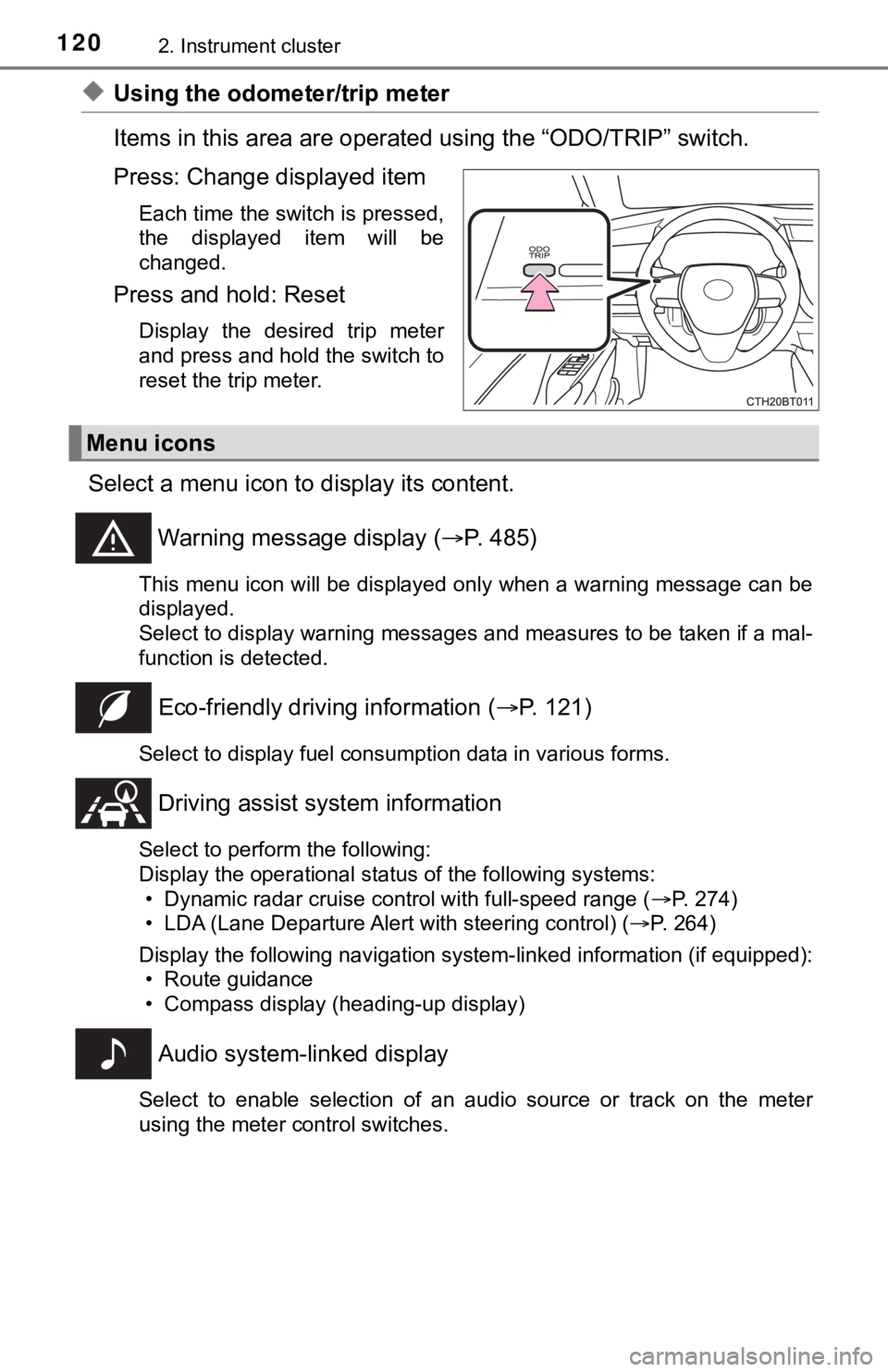
Items in this area are operated using the “ODO/TRIP” switch.
Press: Change displayed item
Each time the switch is pressed,
the displayed item will be
changed.
Press and hold: Reset
Display the desired trip meter
and press and hold the switch to
reset the trip meter.
Select a menu icon to display its content.
Warning message display ( P. 485)
This menu icon will be displayed only when a warning message ca n be
displayed.
Select to display warning messages and measures to be taken if a mal-
function is detected.
Eco-friendly drivin g information (P. 121)
Select to display fuel consumption data in various forms.
Driving assist sys tem information
Select to perform the following:
Display the operational status of the following systems:
• Dynamic radar cruise control with full-speed range ( P. 274)
• LDA (Lane Departure Alert with steering control) ( P. 264)
Display the following navigation system-linked information (if equipped):
• Route guidance
• Compass display (heading-up display)
Audio system-linked display
Select to enable selection of an audio source or track on the m eter
using the meter control switches.
Menu icons
Page 121 of 592
1212. Instrument cluster
2
Instrument cluster
Vehicle information
Select to perform the following:
Display the following information:• Energy monitor ( P. 140)
• Tire inflation pressure ( P. 423)
Enable/Disable the following systems: • Intuitive parking assist (if equipped) ( P. 309)
• BSM (Blind Spot Monitor) function (if equipped) ( P. 295)
• RCTA (Rear Cross Traffic Al ert) function (if equipped) (P. 295)
This function can also be enabled/disabled on .
Settings display ( P. 125)
Select to change the meter display settings and other settings.
■
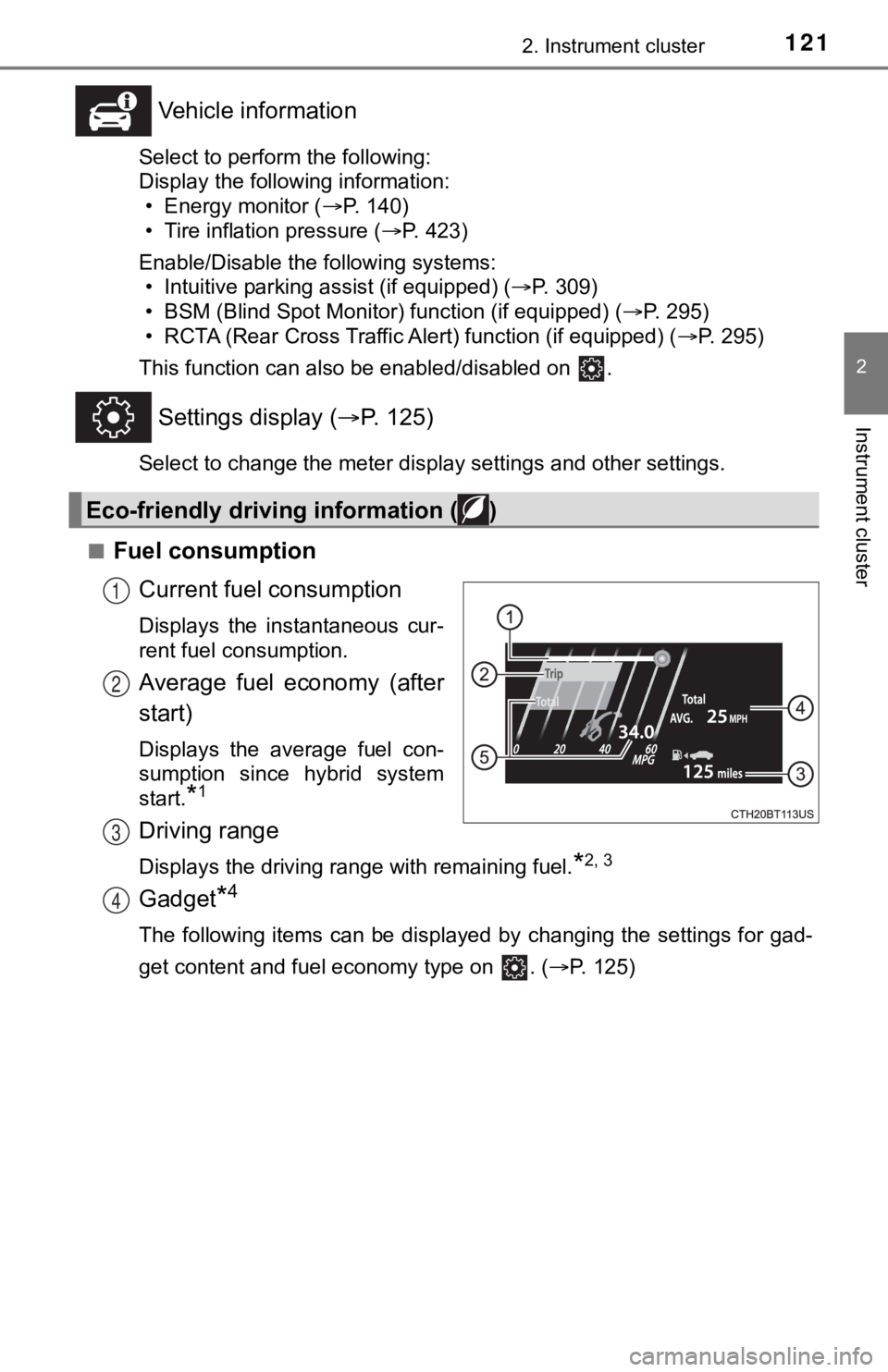
Fuel consumption Current fuel consumption
Displays the instantaneous cur-
rent fuel consumption.
Average fuel economy (after
start)
Displays the average fuel con-
sumption since hybrid system
start.
*1
Driving range
Displays the driving range with remaining fuel.*2, 3
Gadget*4
The following items can be displayed by changing the settings f or gad-
get content and fuel economy type on . ( P. 125)
Eco-friendly driving information ( )
1
2
3
4
Page 122 of 592
1222. Instrument cluster
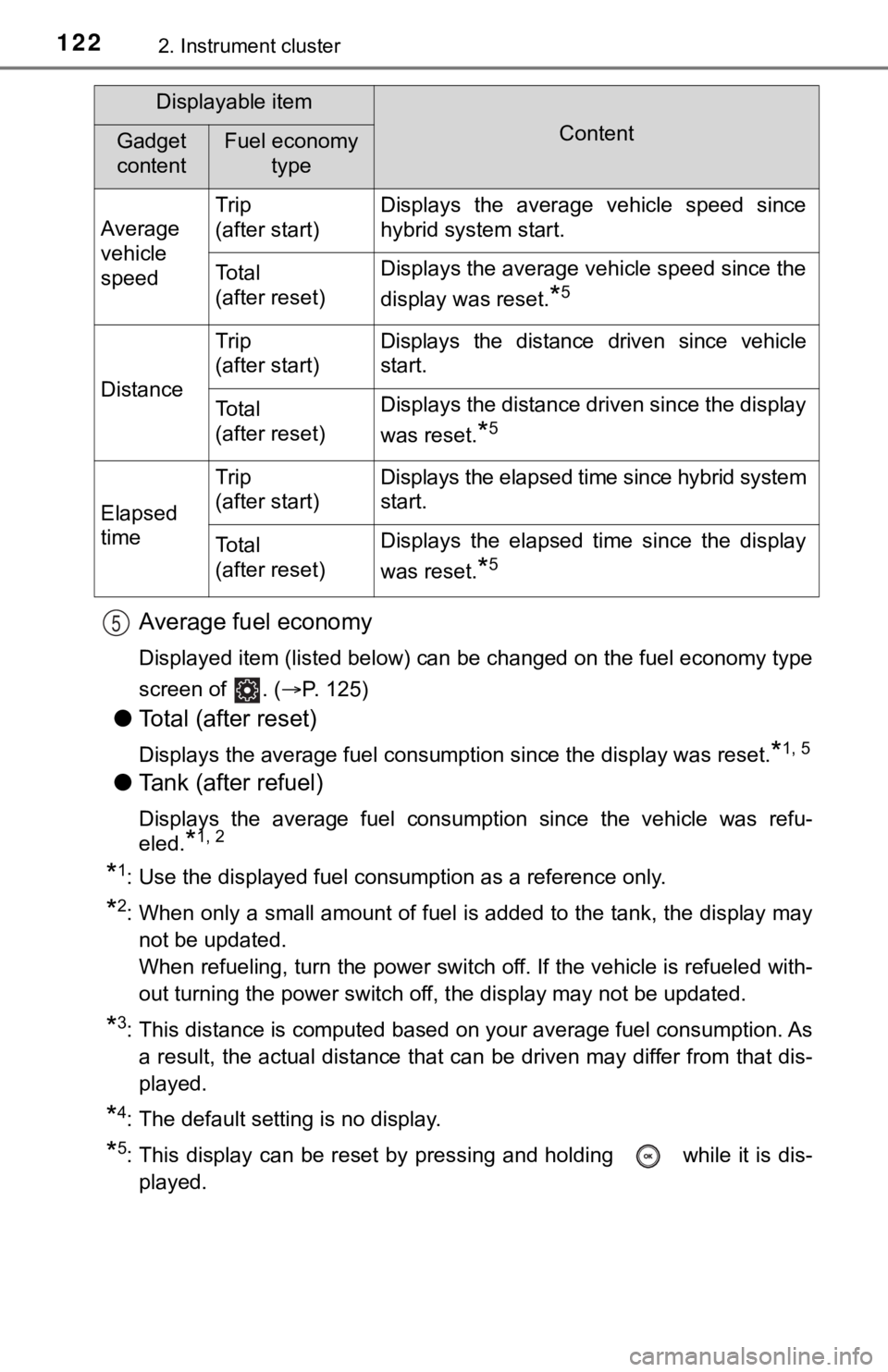
Average fuel economy
Displayed item (listed below) can be changed on the fuel economy type
screen of . ( P. 125)
●Total (after reset)
Displays the average fuel consumption since the display was res et.*1, 5
●Tank (after refuel)
Displays the average fuel consumption since the vehicle was ref u-
eled.
*1, 2
*1: Use the displayed fuel consumption as a reference only.
*2: When only a small amount of fuel is added to the tank, the dis play may
not be updated.
When refueling, turn the power switch off. If the vehicle is re fueled with-
out turning the power switch off, the display may not be update d.
*3: This distance is computed based on your average fuel consumpti on. As
a result, the actual distance that can be driven may differ fro m that dis-
played.
*4: The default setting is no display.
*5: This display can be reset by pressing and holding while it is dis-
played.
Displayable item
ContentGadget
contentFuel economy type
Average
vehicle
speed Trip
(after start)
Displays the average vehicle speed since
hybrid system start.
To t a l
(after reset)Displays the average vehicle speed since the
display was reset.
*5
Distance
Trip
(after start)Displays the distance driven since vehicle
start.
To t a l
(after reset)Displays the distance driven since the display
was reset.
*5
Elapsed
time
Trip
(after start)Displays the elapsed time since hybrid system
start.
To t a l
(after reset)Displays the elapsed time since the display
was reset.
*5
5