clutch TOYOTA CAMRY V20 1986 Service Information
[x] Cancel search | Manufacturer: TOYOTA, Model Year: 1986, Model line: CAMRY V20, Model: TOYOTA CAMRY V20 1986Pages: 2389, PDF Size: 84.44 MB
Page 2312 of 2389
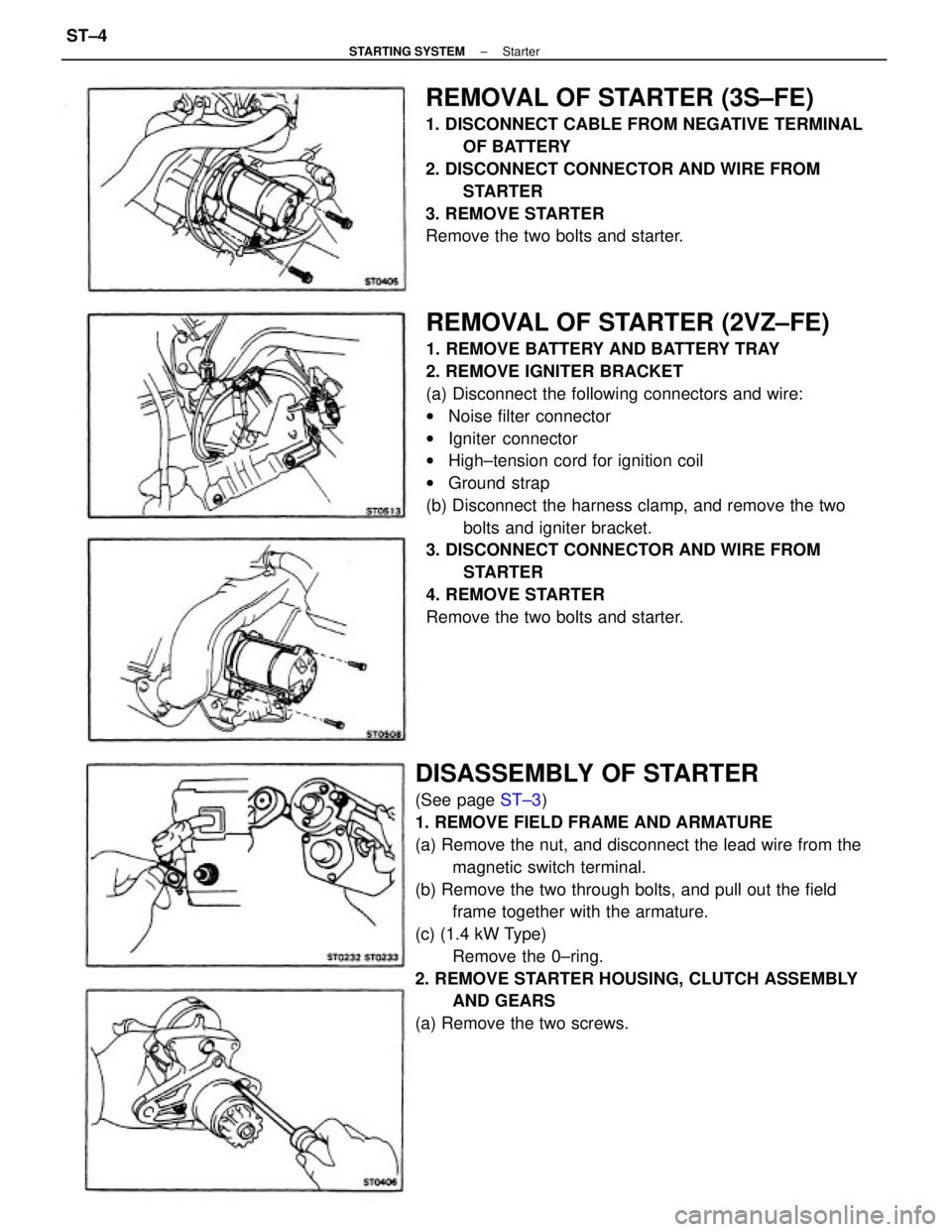
REMOVAL OF STARTER (2VZ±FE)
1. REMOVE BATTERY AND BATTERY TRAY
2. REMOVE IGNITER BRACKET
(a) Disconnect the following connectors and wire:
wNoise filter connector
wIgniter connector
wHigh±tension cord for ignition coil
wGround strap
(b) Disconnect the harness clamp, and remove the two
bolts and igniter bracket.
3. DISCONNECT CONNECTOR AND WIRE FROM
STARTER
4. REMOVE STARTER
Remove the two bolts and starter.
DISASSEMBLY OF STARTER
(See page ST±3)
1. REMOVE FIELD FRAME AND ARMATURE
(a) Remove the nut, and disconnect the lead wire from the
magnetic switch terminal.
(b) Remove the two through bolts, and pull out the field
frame together with the armature.
(c) (1.4 kW Type)
Remove the 0±ring.
2. REMOVE STARTER HOUSING, CLUTCH ASSEMBLY
AND GEARS
(a) Remove the two screws.
REMOVAL OF STARTER (3S±FE)
1. DISCONNECT CABLE FROM NEGATIVE TERMINAL
OF BATTERY
2. DISCONNECT CONNECTOR AND WIRE FROM
STARTER
3. REMOVE STARTER
Remove the two bolts and starter.
± STARTING SYSTEMStarterST±4
Page 2313 of 2389
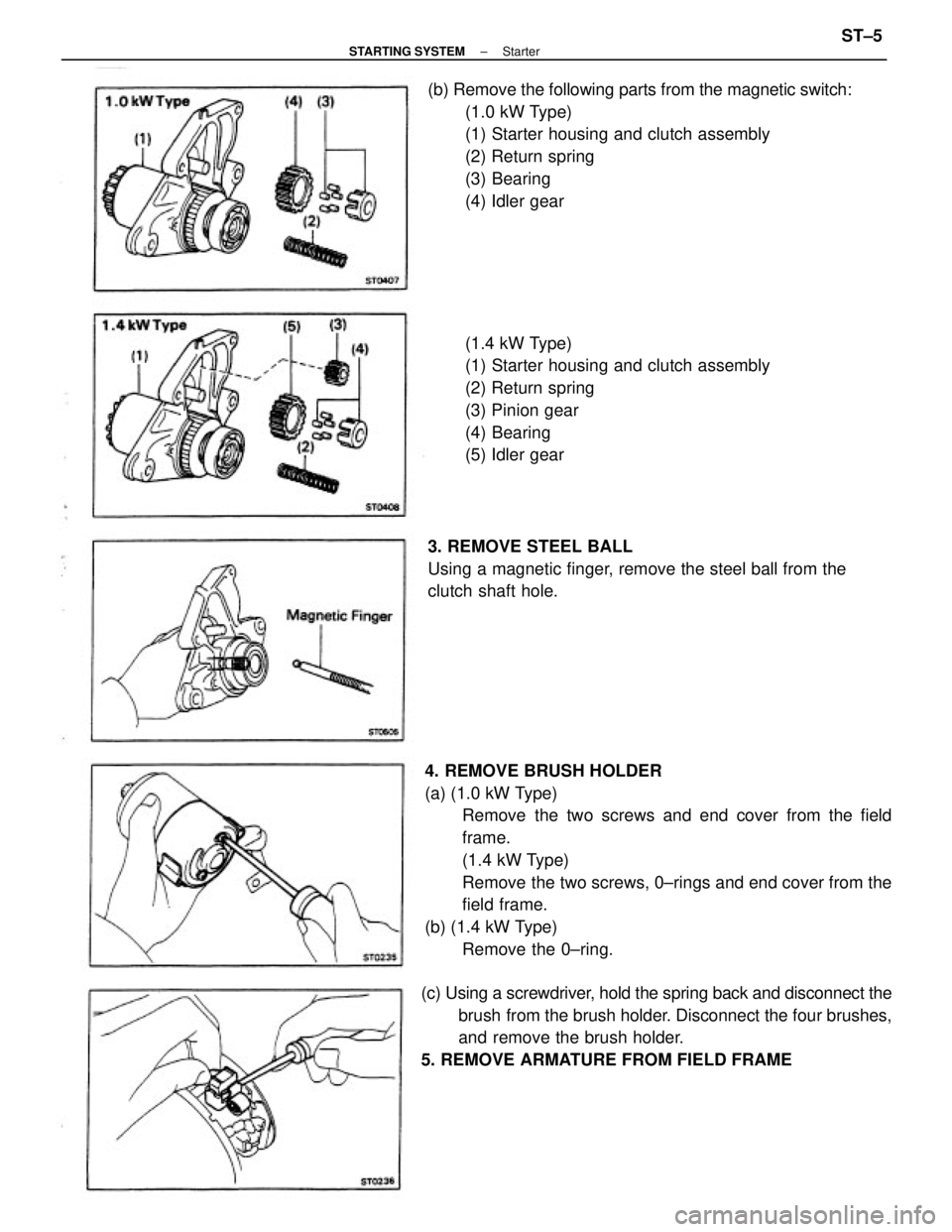
4. REMOVE BRUSH HOLDER
(a) (1.0 kW Type)
Remove the two screws and end cover from the field
frame.
(1.4 kW Type)
Remove the two screws, 0±rings and end cover from the
field frame.
(b) (1.4 kW Type)
Remove the 0±ring. (b) Remove the following parts from the magnetic switch:
(1.0 kW Type)
(1) Starter housing and clutch assembly
(2) Return spring
(3) Bearing
(4) Idler gear
(c) Using a screwdriver, hold the spring back and disconnect the
brush from the brush holder. Disconnect the four brushes,
and remove the brush holder.
5. REMOVE ARMATURE FROM FIELD FRAME(1.4 kW Type)
(1) Starter housing and clutch assembly
(2) Return spring
(3) Pinion gear
(4) Bearing
(5) Idler gear
3. REMOVE STEEL BALL
Using a magnetic finger, remove the steel ball from the
clutch shaft hole.
± STARTING SYSTEMStarterST±5
Page 2316 of 2389
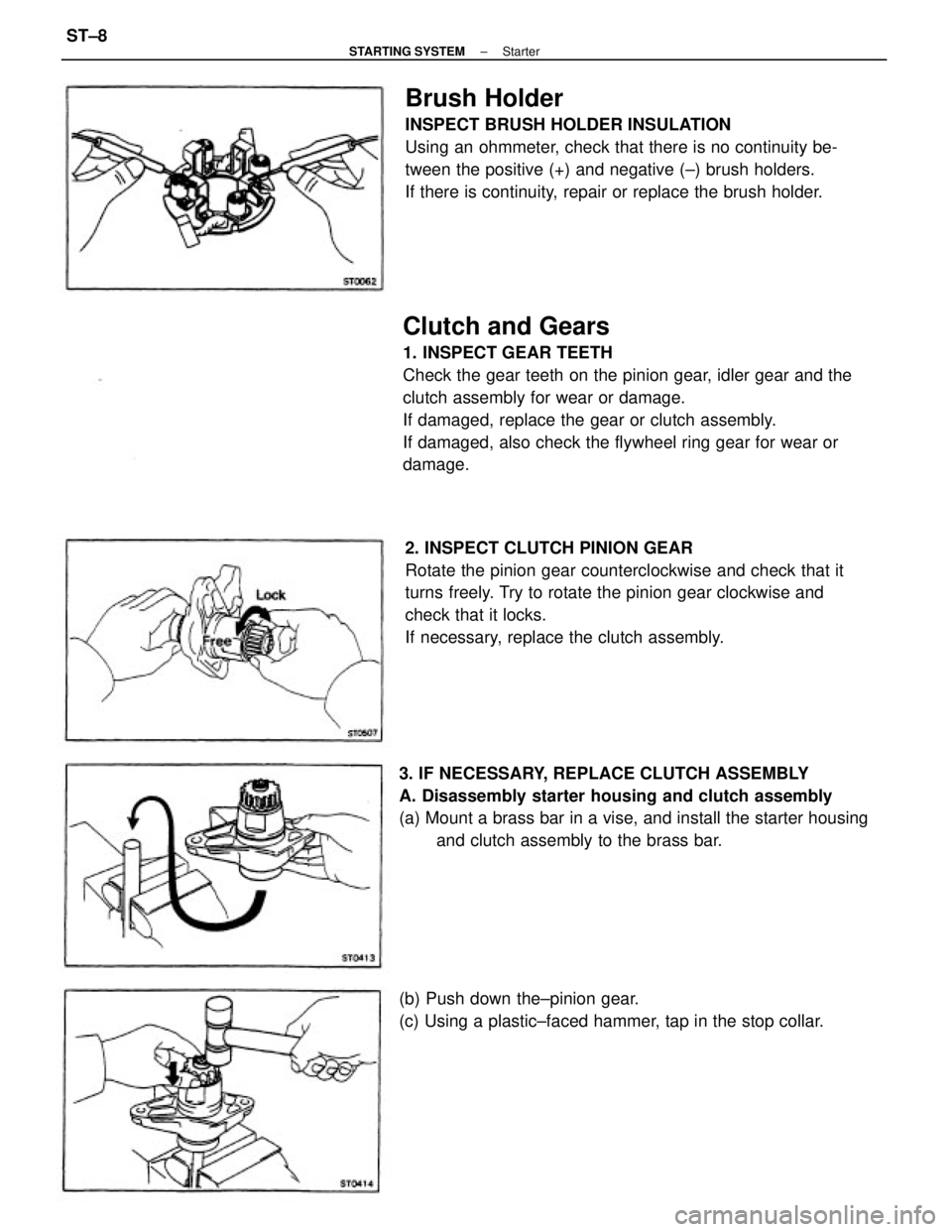
Clutch and Gears
1. INSPECT GEAR TEETH
Check the gear teeth on the pinion gear, idler gear and the
clutch assembly for wear or damage.
If damaged, replace the gear or clutch assembly.
If damaged, also check the flywheel ring gear for wear or
damage.
2. INSPECT CLUTCH PINION GEAR
Rotate the pinion gear counterclockwise and check that it
turns freely. Try to rotate the pinion gear clockwise and
check that it locks.
If necessary, replace the clutch assembly.
Brush Holder
INSPECT BRUSH HOLDER INSULATION
Using an ohmmeter, check that there is no continuity be-
tween the positive (+) and negative (±) brush holders.
If there is continuity, repair or replace the brush holder.
3. IF NECESSARY, REPLACE CLUTCH ASSEMBLY
A. Disassembly starter housing and clutch assembly
(a) Mount a brass bar in a vise, and install the starter housing
and clutch assembly to the brass bar.
(b) Push down the±pinion gear.
(c) Using a plastic±faced hammer, tap in the stop collar.
± STARTING SYSTEMStarterST±8
Page 2317 of 2389
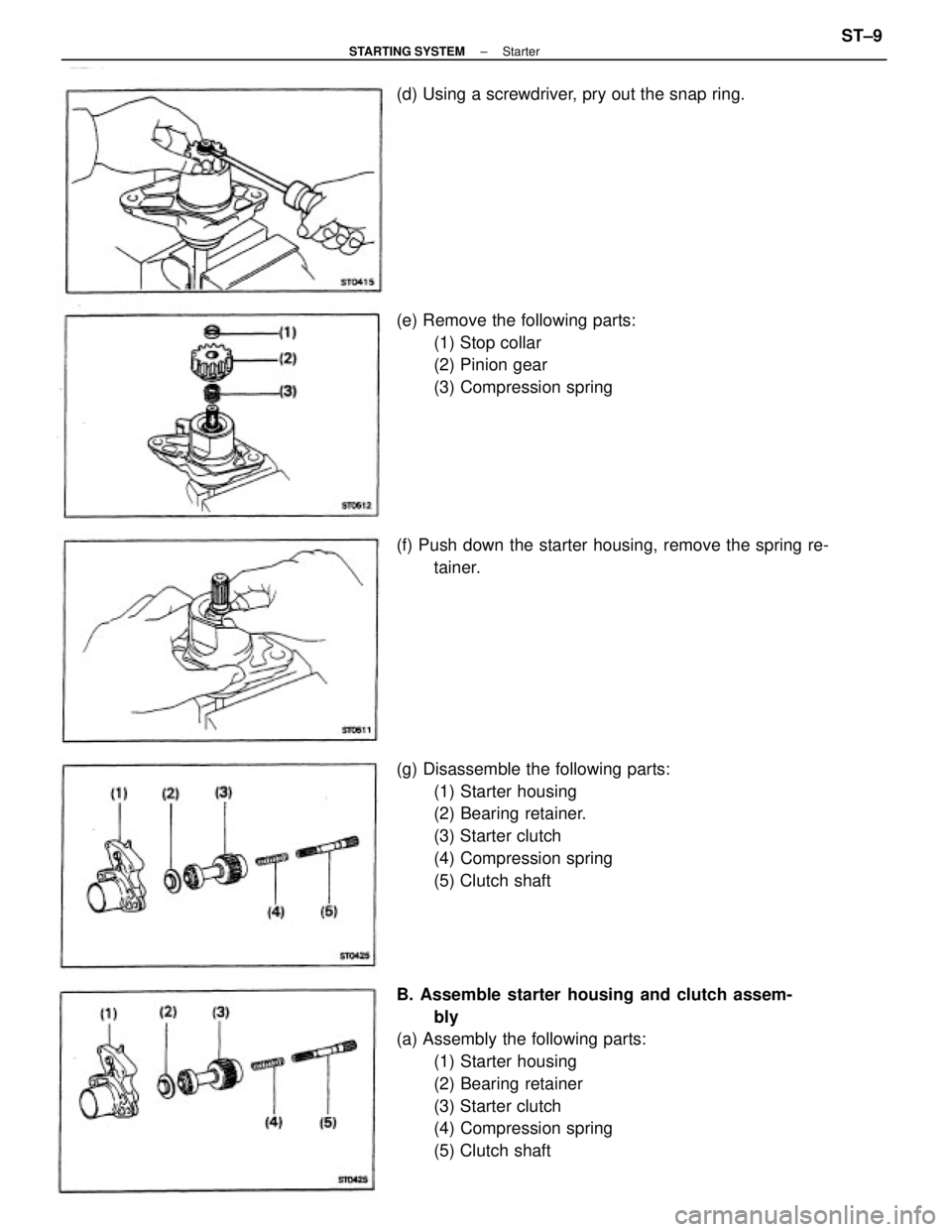
B. Assemble starter housing and clutch assem-
bly
(a) Assembly the following parts:
(1) Starter housing
(2) Bearing retainer
(3) Starter clutch
(4) Compression spring
(5) Clutch shaft (g) Disassemble the following parts:
(1) Starter housing
(2) Bearing retainer.
(3) Starter clutch
(4) Compression spring
(5) Clutch shaft (e) Remove the following parts:
(1) Stop collar
(2) Pinion gear
(3) Compression spring
(f) Push down the starter housing, remove the spring re-
tainer. (d) Using a screwdriver, pry out the snap ring.
± STARTING SYSTEMStarterST±9
Page 2318 of 2389
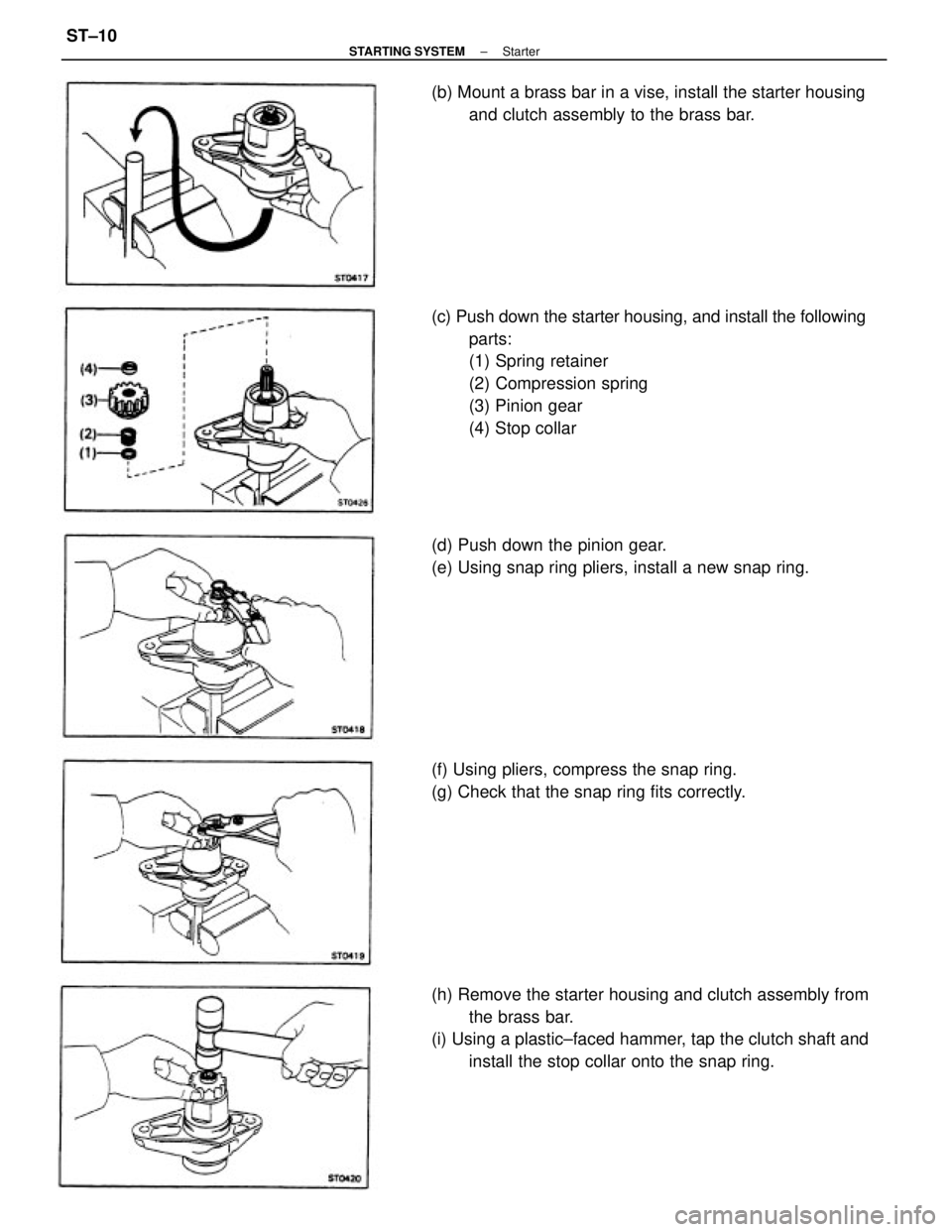
(c) Push down the starter housing, and install the following
parts:
(1) Spring retainer
(2) Compression spring
(3) Pinion gear
(4) Stop collar
(h) Remove the starter housing and clutch assembly from
the brass bar.
(i) Using a plastic±faced hammer, tap the clutch shaft and
install the stop collar onto the snap ring. (d) Push down the pinion gear.
(e) Using snap ring pliers, install a new snap ring. (b) Mount a brass bar in a vise, install the starter housing
and clutch assembly to the brass bar.
(f) Using pliers, compress the snap ring.
(g) Check that the snap ring fits correctly.
± STARTING SYSTEMStarterST±10
Page 2320 of 2389
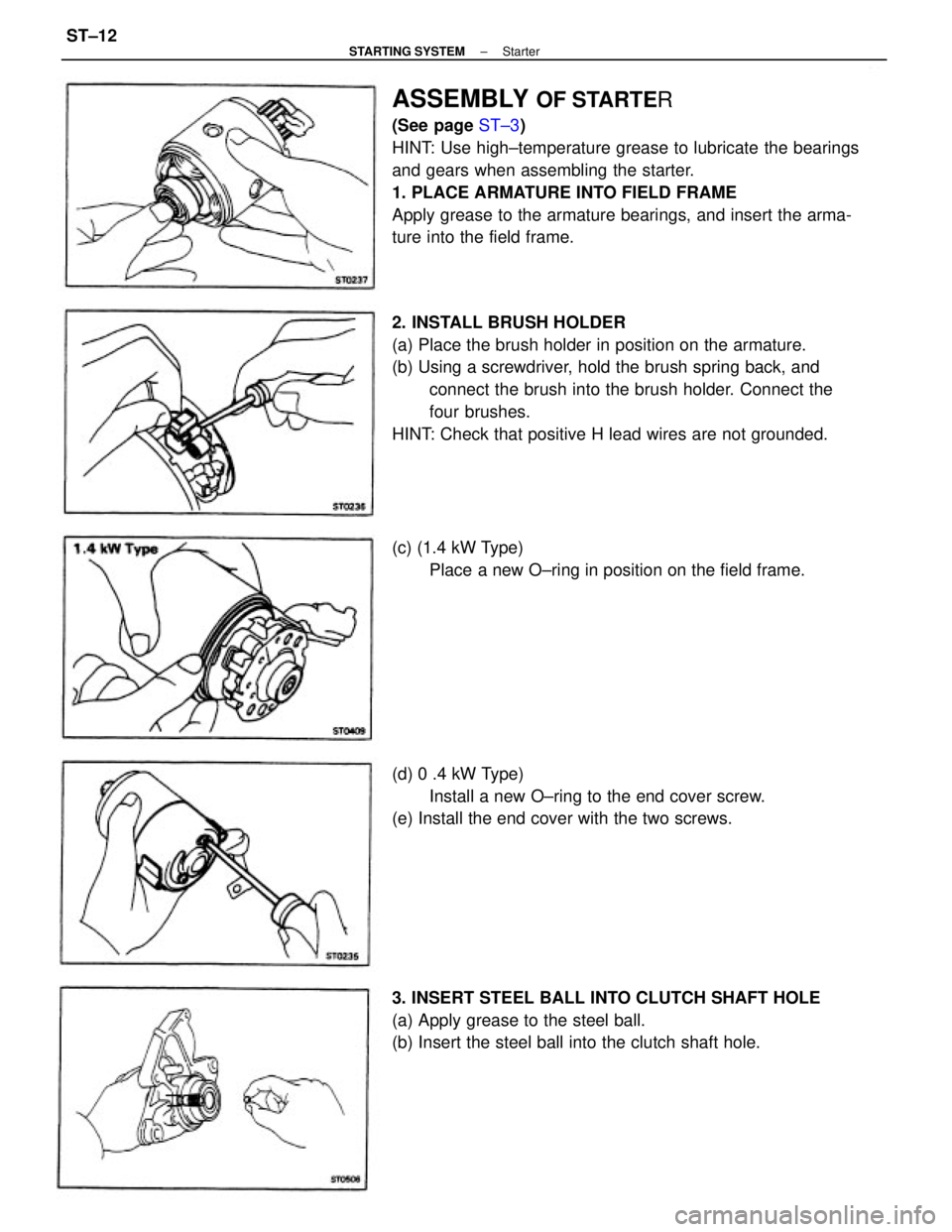
ASSEMBLY OF STARTER
(See page ST±3)
HINT: Use high±temperature grease to lubricate the bearings
and gears when assembling the starter.
1. PLACE ARMATURE INTO FIELD FRAME
Apply grease to the armature bearings, and insert the arma-
ture into the field frame.
2. INSTALL BRUSH HOLDER
(a) Place the brush holder in position on the armature.
(b) Using a screwdriver, hold the brush spring back, and
connect the brush into the brush holder. Connect the
four brushes.
HINT: Check that positive H lead wires are not grounded.
3. INSERT STEEL BALL INTO CLUTCH SHAFT HOLE
(a) Apply grease to the steel ball.
(b) Insert the steel ball into the clutch shaft hole. (d) 0 .4 kW Type)
Install a new O±ring to the end cover screw.
(e) Install the end cover with the two screws. (c) (1.4 kW Type)
Place a new O±ring in position on the field frame.
± STARTING SYSTEMStarterST±12
Page 2321 of 2389
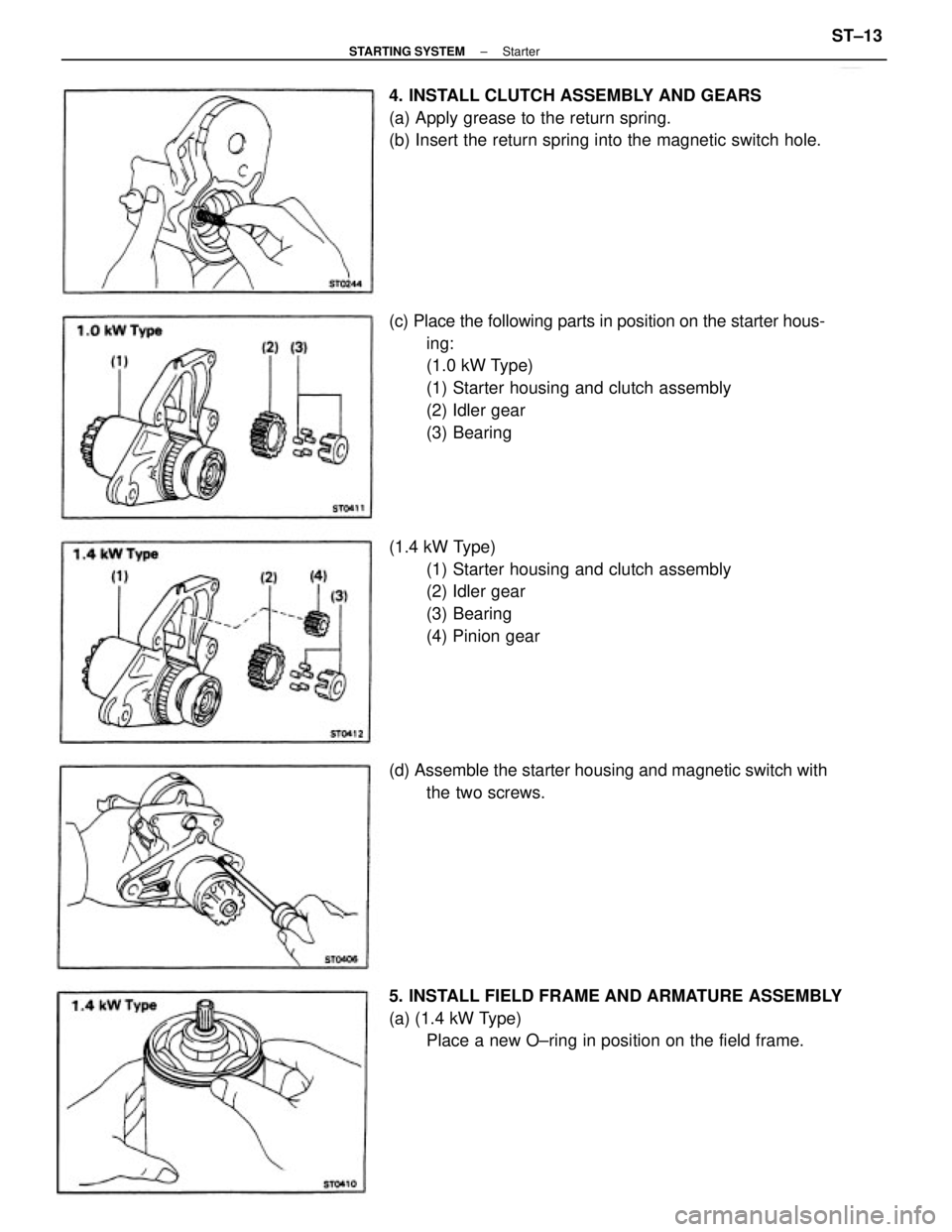
(c) Place the following parts in position on the starter hous-
ing:
(1.0 kW Type)
(1) Starter housing and clutch assembly
(2) Idler gear
(3) Bearing
(1.4 kW Type)
(1) Starter housing and clutch assembly
(2) Idler gear
(3) Bearing
(4) Pinion gear 4. INSTALL CLUTCH ASSEMBLY AND GEARS
(a) Apply grease to the return spring.
(b) Insert the return spring into the magnetic switch hole.
5. INSTALL FIELD FRAME AND ARMATURE ASSEMBLY
(a) (1.4 kW Type)
Place a new O±ring in position on the field frame. (d) Assemble the starter housing and magnetic switch with
the two screws.
± STARTING SYSTEMStarterST±13
Page 2324 of 2389
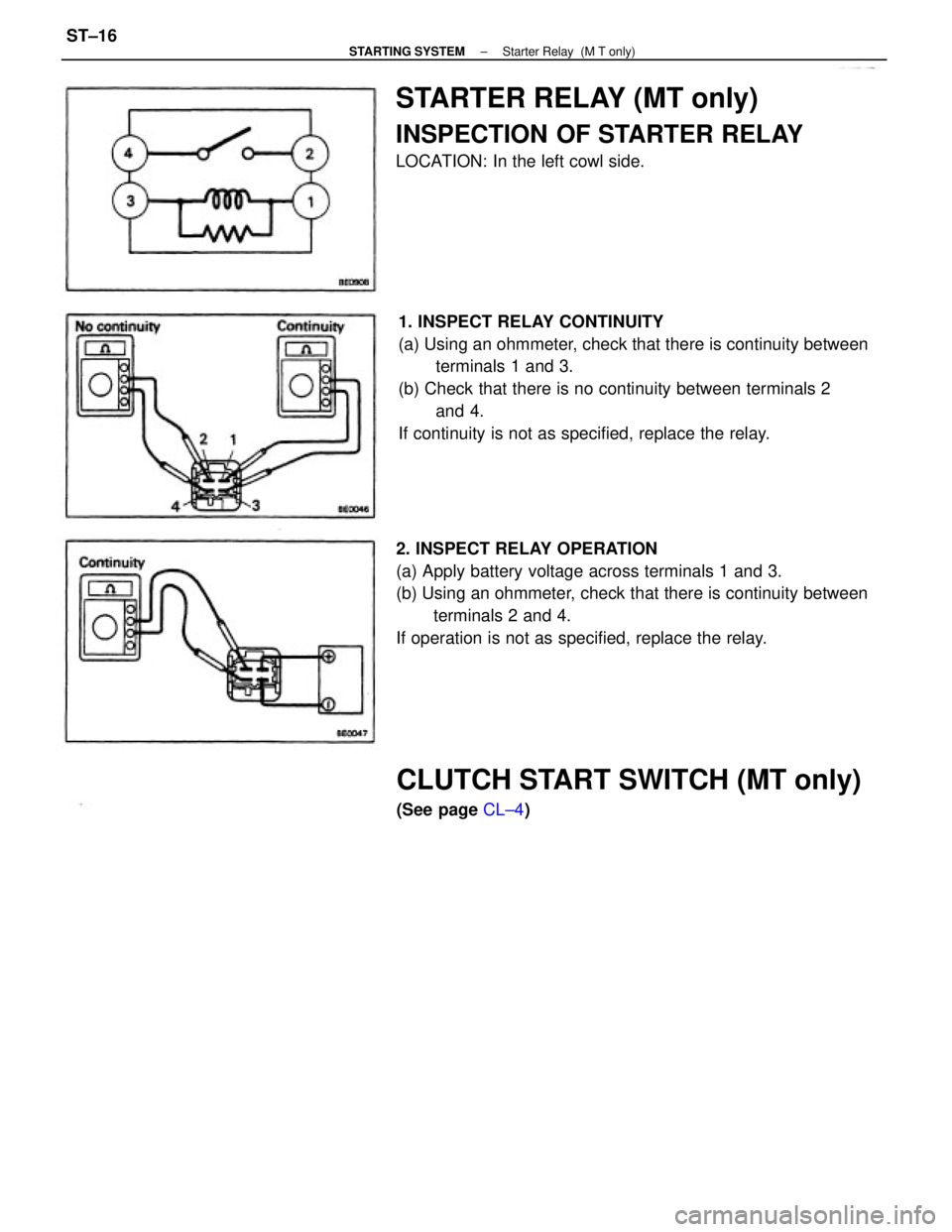
1. INSPECT RELAY CONTINUITY
(a) Using an ohmmeter, check that there is continuity between
terminals 1 and 3.
(b) Check that there is no continuity between terminals 2
and 4.
If continuity is not as specified, replace the relay.
2. INSPECT RELAY OPERATION
(a) Apply battery voltage across terminals 1 and 3.
(b) Using an ohmmeter, check that there is continuity between
terminals 2 and 4.
If operation is not as specified, replace the relay.
STARTER RELAY (MT only)
INSPECTION OF STARTER RELAY
LOCATION: In the left cowl side.
CLUTCH START SWITCH (MT only)
(See page CL±4)
± STARTING SYSTEMStarter Relay (M T only)ST±16
Page 2325 of 2389
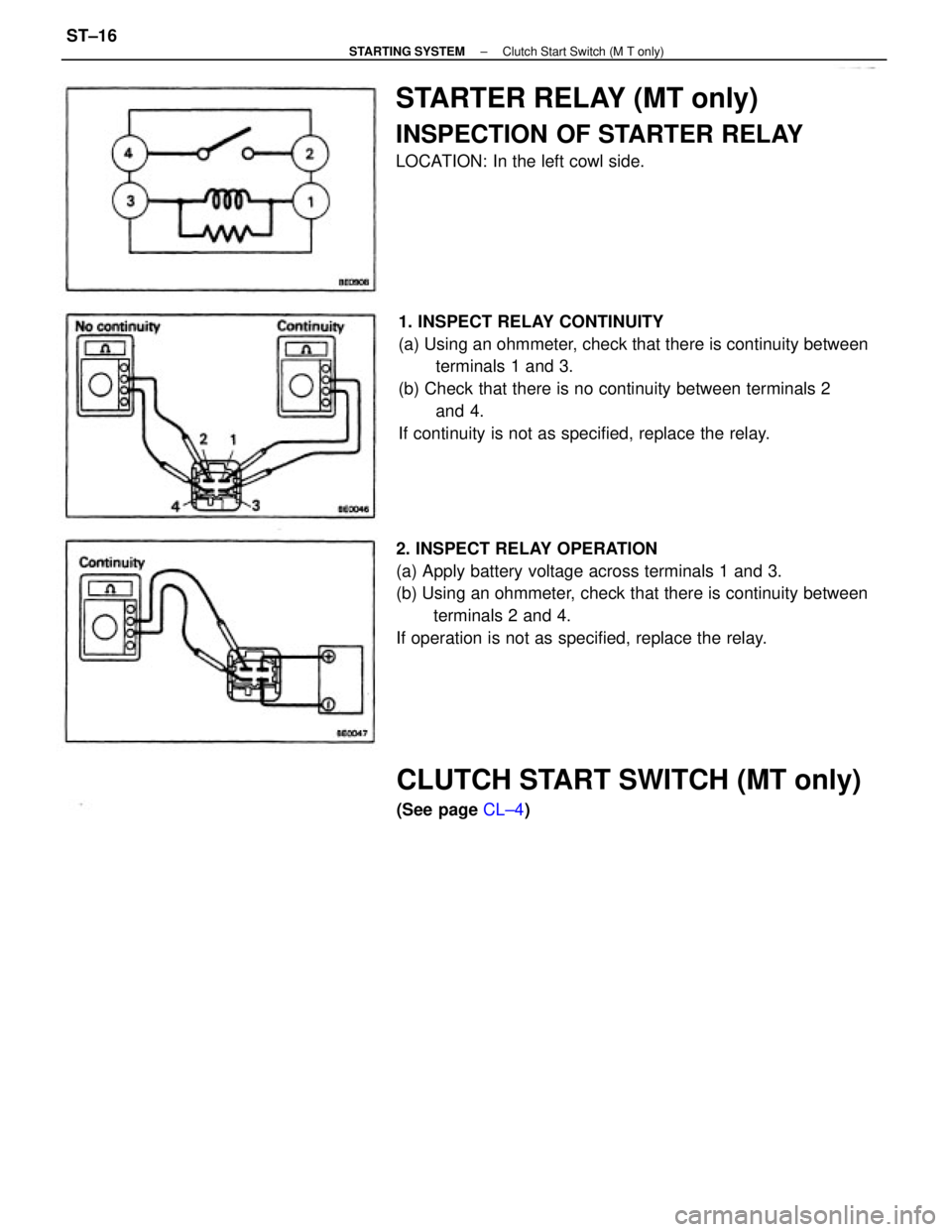
1. INSPECT RELAY CONTINUITY
(a) Using an ohmmeter, check that there is continuity between
terminals 1 and 3.
(b) Check that there is no continuity between terminals 2
and 4.
If continuity is not as specified, replace the relay.
2. INSPECT RELAY OPERATION
(a) Apply battery voltage across terminals 1 and 3.
(b) Using an ohmmeter, check that there is continuity between
terminals 2 and 4.
If operation is not as specified, replace the relay.
STARTER RELAY (MT only)
INSPECTION OF STARTER RELAY
LOCATION: In the left cowl side.
CLUTCH START SWITCH (MT only)
(See page CL±4)
± STARTING SYSTEMClutch Start Switch (M T only)ST±16