brake rotor TOYOTA CAMRY V20 1986 Service Information
[x] Cancel search | Manufacturer: TOYOTA, Model Year: 1986, Model line: CAMRY V20, Model: TOYOTA CAMRY V20 1986Pages: 2389, PDF Size: 84.44 MB
Page 854 of 2389
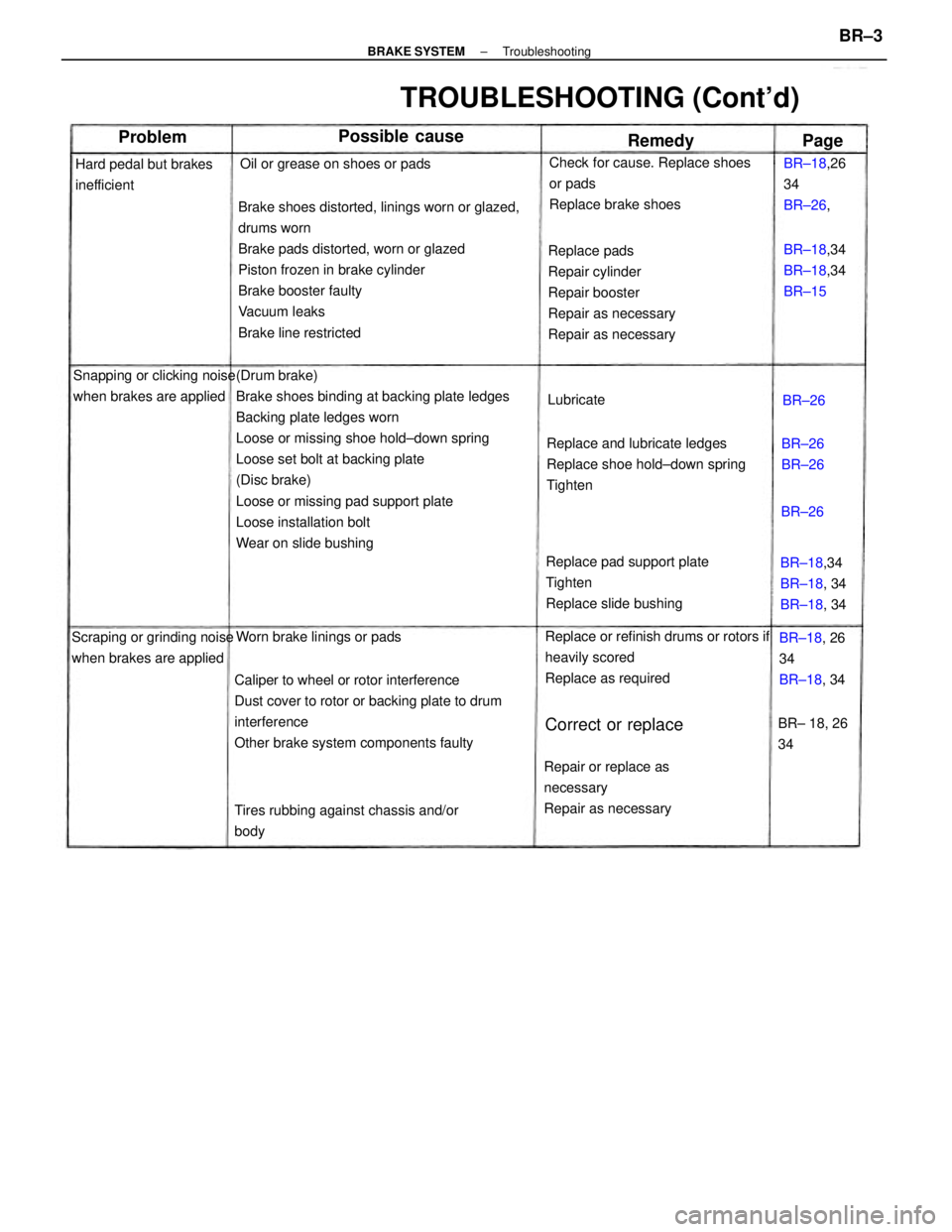
(Drum brake)
Brake shoes binding at backing plate ledges
Backing plate ledges worn
Loose or missing shoe hold±down spring
Loose set bolt at backing plate
(Disc brake)
Loose or missing pad support plate
Loose installation bolt
Wear on slide bushingBrake shoes distorted, linings worn or glazed,
drums worn
Brake pads distorted, worn or glazed
Piston frozen in brake cylinder
Brake booster faulty
Vacuum leaks
Brake line restricted
Caliper to wheel or rotor interference
Dust cover to rotor or backing plate to drum
interference
Other brake system components faultyReplace and lubricate ledges
Replace shoe hold±down spring
TightenReplace pads
Repair cylinder
Repair booster
Repair as necessary
Repair as necessary
Replace pad support plate
Tighten
Replace slide bushing
Replace or refinish drums or rotors if
heavily scored
Replace as required
TROUBLESHOOTING (Cont'd)
Check for cause. Replace shoes
or pads
Replace brake shoes
Repair or replace as
necessary
Repair as necessary
Tires rubbing against chassis and/or
body Snapping or clicking noise
when brakes are applied
Scraping or grinding noise
when brakes are appliedOil or grease on shoes or pads
Hard pedal but brakes
inefficient
Worn brake linings or padsBR±18,34
BR±18, 34
BR±18, 34 BR±18,34
BR±18,34
BR±15 BR±18,26
34
BR±26,
BR±18, 26
34
BR±18, 34
Correct or replaceBR± 18, 26
34
Possible cause
BR±26
BR±26 Lubricate
Problem
Remedy
BR±26
Page
BR±26
± BRAKE SYSTEMTroubleshootingBR±3
Page 855 of 2389
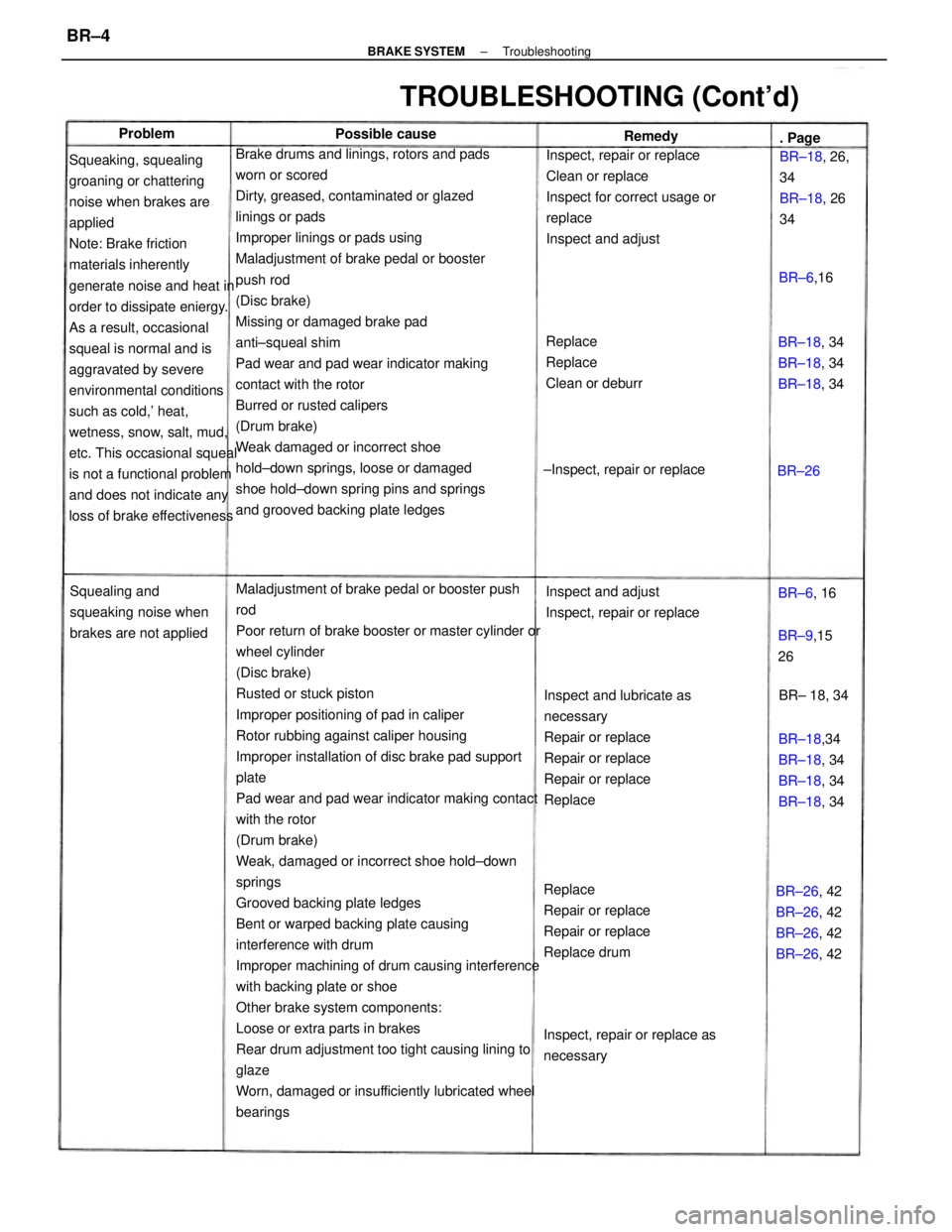
Maladjustment of brake pedal or booster push
rod
Poor return of brake booster or master cylinder or
wheel cylinder
(Disc brake)
Rusted or stuck piston
Improper positioning of pad in caliper
Rotor rubbing against caliper housing
Improper installation of disc brake pad support
plate
Pad wear and pad wear indicator making contact
with the rotor
(Drum brake)
Weak, damaged or incorrect shoe hold±down
springs
Grooved backing plate ledges
Bent or warped backing plate causing
interference with drum
Improper machining of drum causing interference
with backing plate or shoe
Other brake system components:
Loose or extra parts in brakes
Rear drum adjustment too tight causing lining to
glaze
Worn, damaged or insufficiently lubricated wheel
bearings Brake drums and linings, rotors and pads
worn or scored
Dirty, greased, contaminated or glazed
linings or pads
Improper linings or pads using
Maladjustment of brake pedal or booster
push rod
(Disc brake)
Missing or damaged brake pad
anti±squeal shim
Pad wear and pad wear indicator making
contact with the rotor
Burred or rusted calipers
(Drum brake)
Weak damaged or incorrect shoe
hold±down springs, loose or damaged
shoe hold±down spring pins and springs
and grooved backing plate ledges Squeaking, squealing
groaning or chattering
noise when brakes are
applied
Note: Brake friction
materials inherently
generate noise and heat in
order to dissipate eniergy.
As a result, occasional
squeal is normal and is
aggravated by severe
environmental conditions
such as cold,' heat,
wetness, snow, salt, mud,
etc. This occasional squeal
is not a functional problem
and does not indicate any
loss of brake effectivenessInspect, repair or replace
Clean or replace
Inspect for correct usage or
replace
Inspect and adjust
Inspect and lubricate as
necessary
Repair or replace
Repair or replace
Repair or replace
Replace
Replace
Repair or replace
Repair or replace
Replace drum
TROUBLESHOOTING (Cont'd)
Replace
Replace
Clean or deburr
Inspect and adjust
Inspect, repair or replace Squealing and
squeaking noise when
brakes are not applied
BR±26, 42
BR±26, 42
BR±26, 42
BR±26, 42 BR±18,34
BR±18, 34
BR±18, 34
BR±18, 34
Inspect, repair or replace as
necessaryBR±18, 34
BR±18, 34
BR±18, 34 BR±18, 26,
34
BR±18, 26
34
±Inspect, repair or replace
BR±9,15
26 Possible cause
BR± 18, 34 BR±6,16 . Page Remedy
BR±6, 16 Problem
BR±26
± BRAKE SYSTEMTroubleshootingBR±4
Page 869 of 2389
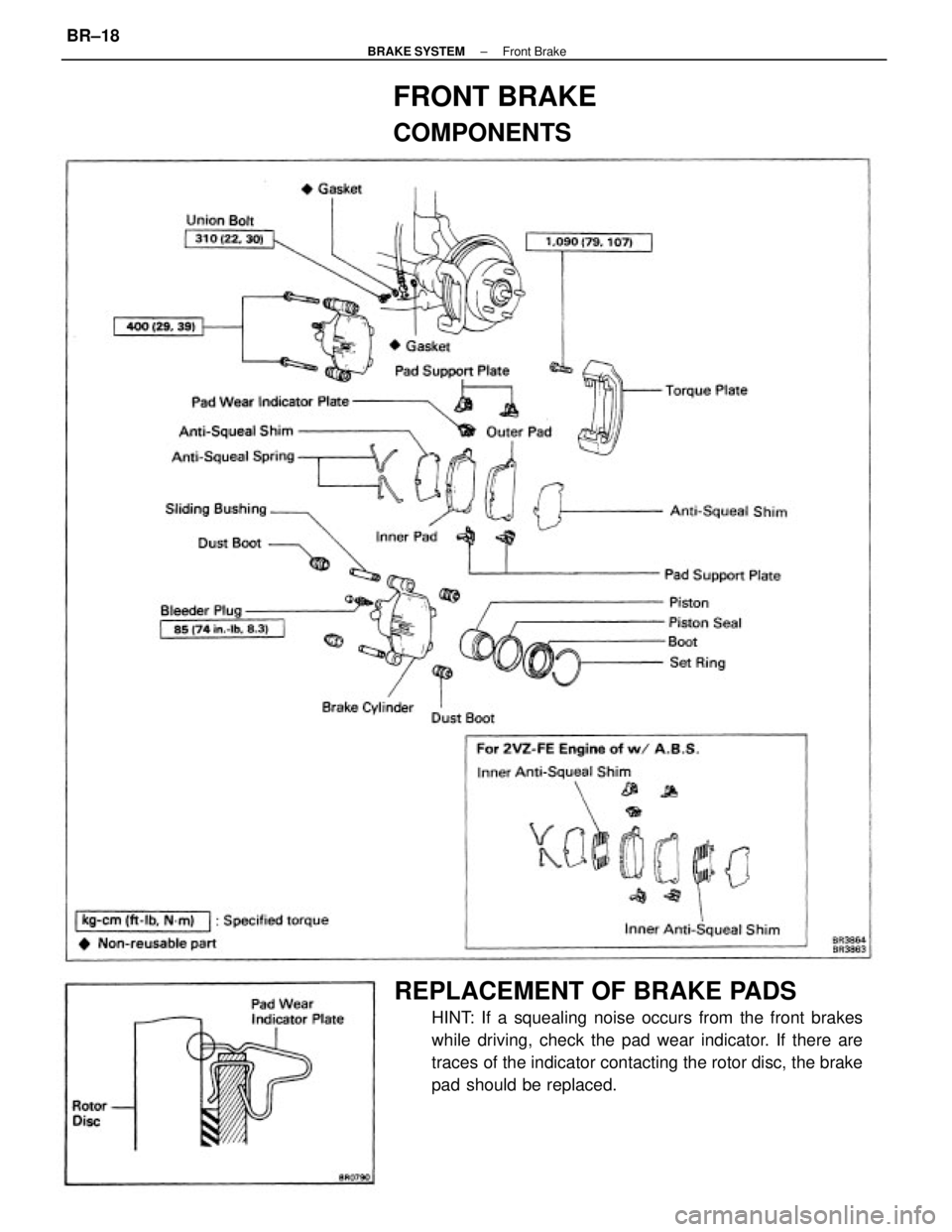
REPLACEMENT OF BRAKE PADS
HINT: If a squealing noise occurs from the front brakes
while driving, check the pad wear indicator. If there are
traces of the indicator contacting the rotor disc, the brake
pad should be replaced.
FRONT BRAKE
COMPONENTS
± BRAKE SYSTEMFront BrakeBR±18
Page 870 of 2389
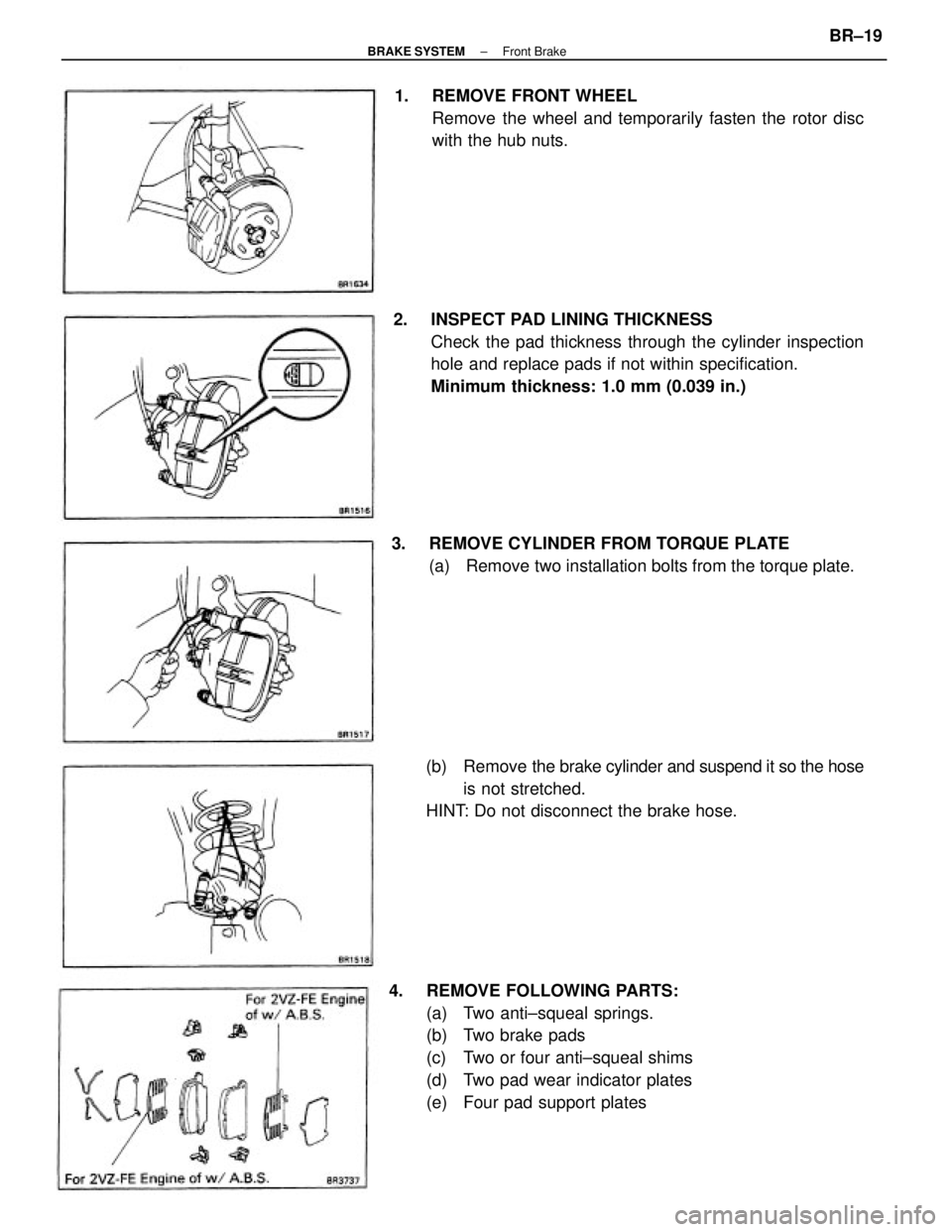
2. INSPECT PAD LINING THICKNESS
Check the pad thickness through the cylinder inspection
hole and replace pads if not within specification.
Minimum thickness: 1.0 mm (0.039 in.)
4. REMOVE FOLLOWING PARTS:
(a) Two anti±squeal springs.
(b) Two brake pads
(c) Two or four anti±squeal shims
(d) Two pad wear indicator plates
(e) Four pad support plates 1. REMOVE FRONT WHEEL
Remove the wheel and temporarily fasten the rotor disc
with the hub nuts.
(b) Remove the brake cylinder and suspend it so the hose
is not stretched.
HINT: Do not disconnect the brake hose. 3. REMOVE CYLINDER FROM TORQUE PLATE
(a) Remove two installation bolts from the torque plate.
± BRAKE SYSTEMFront BrakeBR±19
Page 871 of 2389
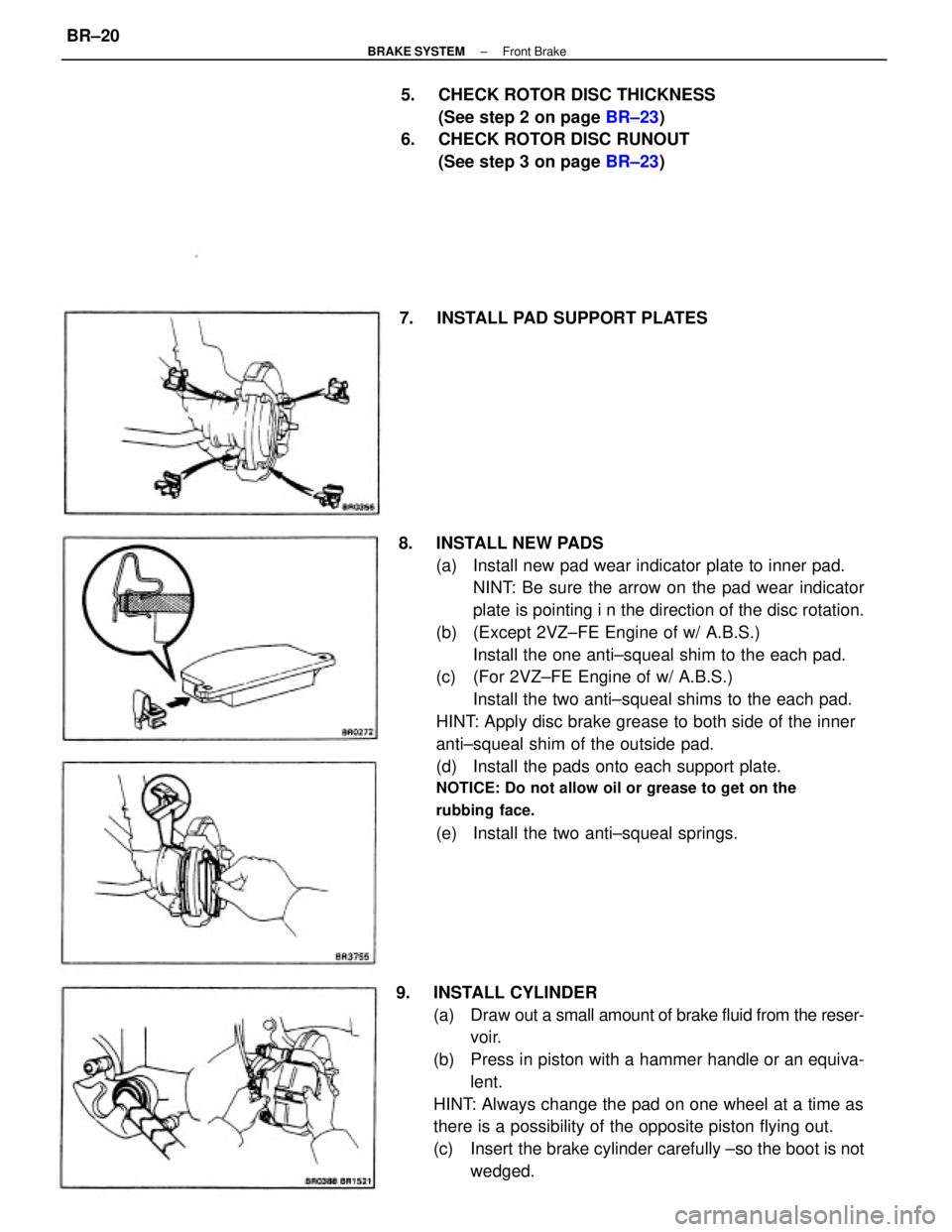
8. INSTALL NEW PADS
(a) Install new pad wear indicator plate to inner pad.
NINT: Be sure the arrow on the pad wear indicator
plate is pointing i n the direction of the disc rotation.
(b) (Except 2VZ±FE Engine of w/ A.B.S.)
Install the one anti±squeal shim to the each pad.
(c) (For 2VZ±FE Engine of w/ A.B.S.)
Install the two anti±squeal shims to the each pad.
HINT: Apply disc brake grease to both side of the inner
anti±squeal shim of the outside pad.
(d) Install the pads onto each support plate.
NOTICE: Do not allow oil or grease to get on the
rubbing face.
(e) Install the two anti±squeal springs.
9. INSTALL CYLINDER
(a) Draw out a small amount of brake fluid from the reser-
voir.
(b) Press in piston with a hammer handle or an equiva-
lent.
HINT: Always change the pad on one wheel at a time as
there is a possibility of the opposite piston flying out.
(c) Insert the brake cylinder carefully ±so the boot is not
wedged. 5. CHECK ROTOR DISC THICKNESS
(See step 2 on page BR±23)
6. CHECK ROTOR DISC RUNOUT
(See step 3 on page BR±23)
7. INSTALL PAD SUPPORT PLATES
± BRAKE SYSTEMFront BrakeBR±20
Page 874 of 2389
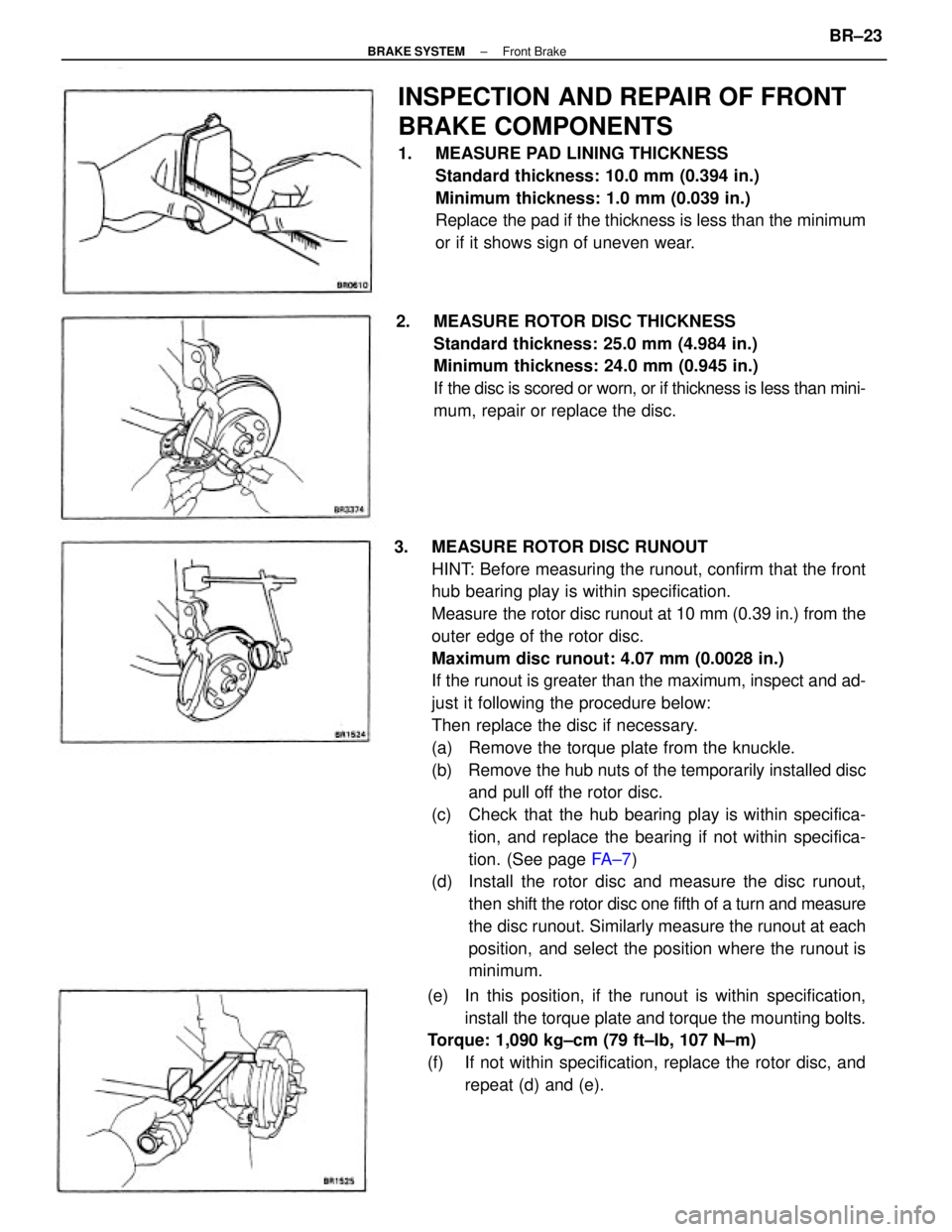
3. MEASURE ROTOR DISC RUNOUT
HINT: Before measuring the runout, confirm that the front
hub bearing play is within specification.
Measure the rotor disc runout at 10 mm (0.39 in.) from the
outer edge of the rotor disc.
Maximum disc runout: 4.07 mm (0.0028 in.)
If the runout is greater than the maximum, inspect and ad-
just it following the procedure below:
Then replace the disc if necessary.
(a) Remove the torque plate from the knuckle.
(b) Remove the hub nuts of the temporarily installed disc
and pull off the rotor disc.
(c) Check that the hub bearing play is within specifica-
tion, and replace the bearing if not within specifica-
tion. (See page FA ± 7)
(d) Install the rotor disc and measure the disc runout,
then shift the rotor disc one fifth of a turn and measure
the disc runout. Similarly measure the runout at each
position, and select the position where the runout is
minimum.
INSPECTION AND REPAIR OF FRONT
BRAKE COMPONENTS
1. MEASURE PAD LINING THICKNESS
Standard thickness: 10.0 mm (0.394 in.)
Minimum thickness: 1.0 mm (0.039 in.)
Replace the pad if the thickness is less than the minimum
or if it shows sign of uneven wear.
2. MEASURE ROTOR DISC THICKNESS
Standard thickness: 25.0 mm (4.984 in.)
Minimum thickness: 24.0 mm (0.945 in.)
If the disc is scored or worn, or if thickness is less than mini-
mum, repair or replace the disc.
(e) In this position, if the runout is within specification,
install the torque plate and torque the mounting bolts.
Torque: 1,090 kg±cm (79 ft±Ib, 107 N±m)
(f) If not within specification, replace the rotor disc, and
repeat (d) and (e).
± BRAKE SYSTEMFront BrakeBR±23
Page 885 of 2389
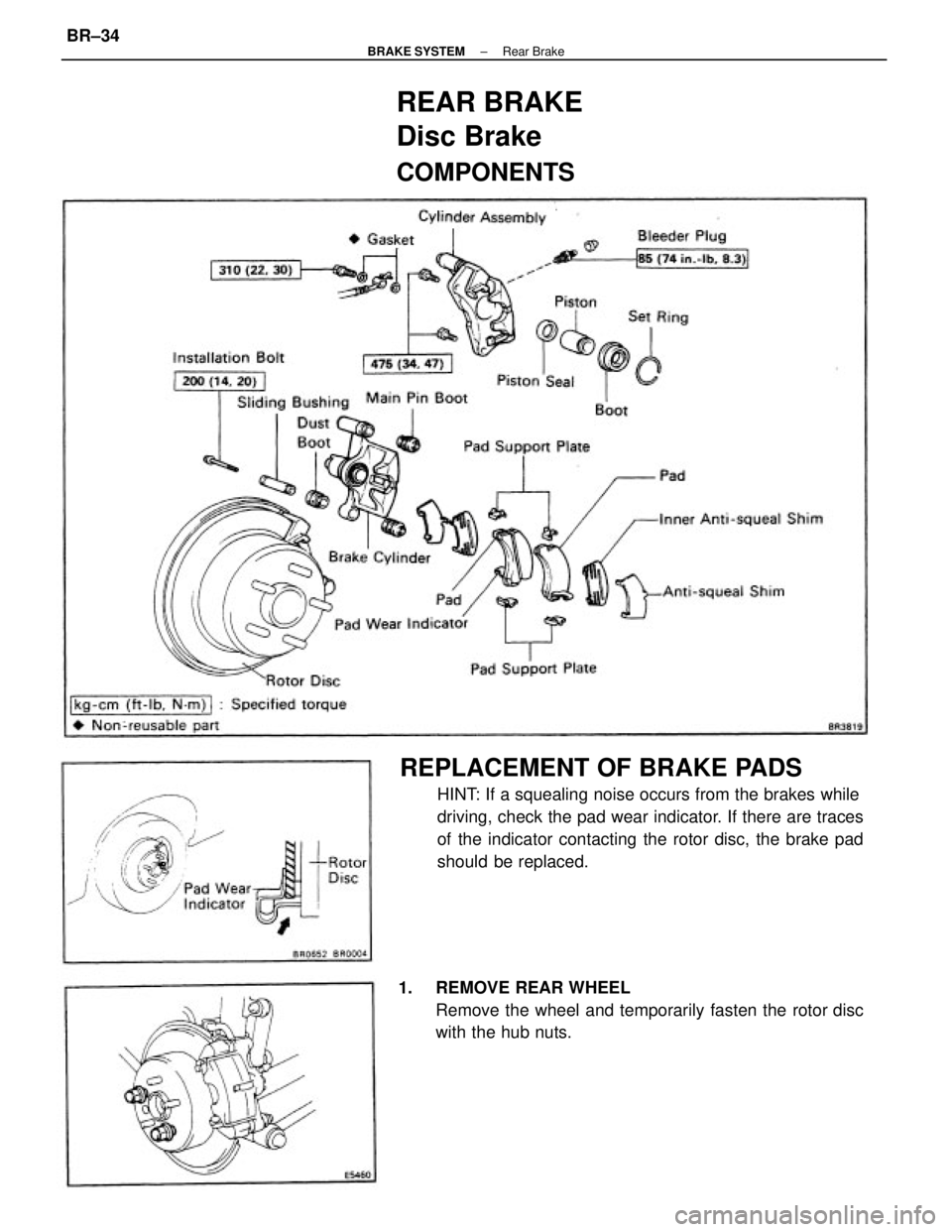
REPLACEMENT OF BRAKE PADS
HINT: If a squealing noise occurs from the brakes while
driving, check the pad wear indicator. If there are traces
of the indicator contacting the rotor disc, the brake pad
should be replaced.
1. REMOVE REAR WHEEL
Remove the wheel and temporarily fasten the rotor disc
with the hub nuts.
REAR BRAKE
Disc Brake
COMPONENTS
± BRAKE SYSTEMRear BrakeBR±34
Page 886 of 2389
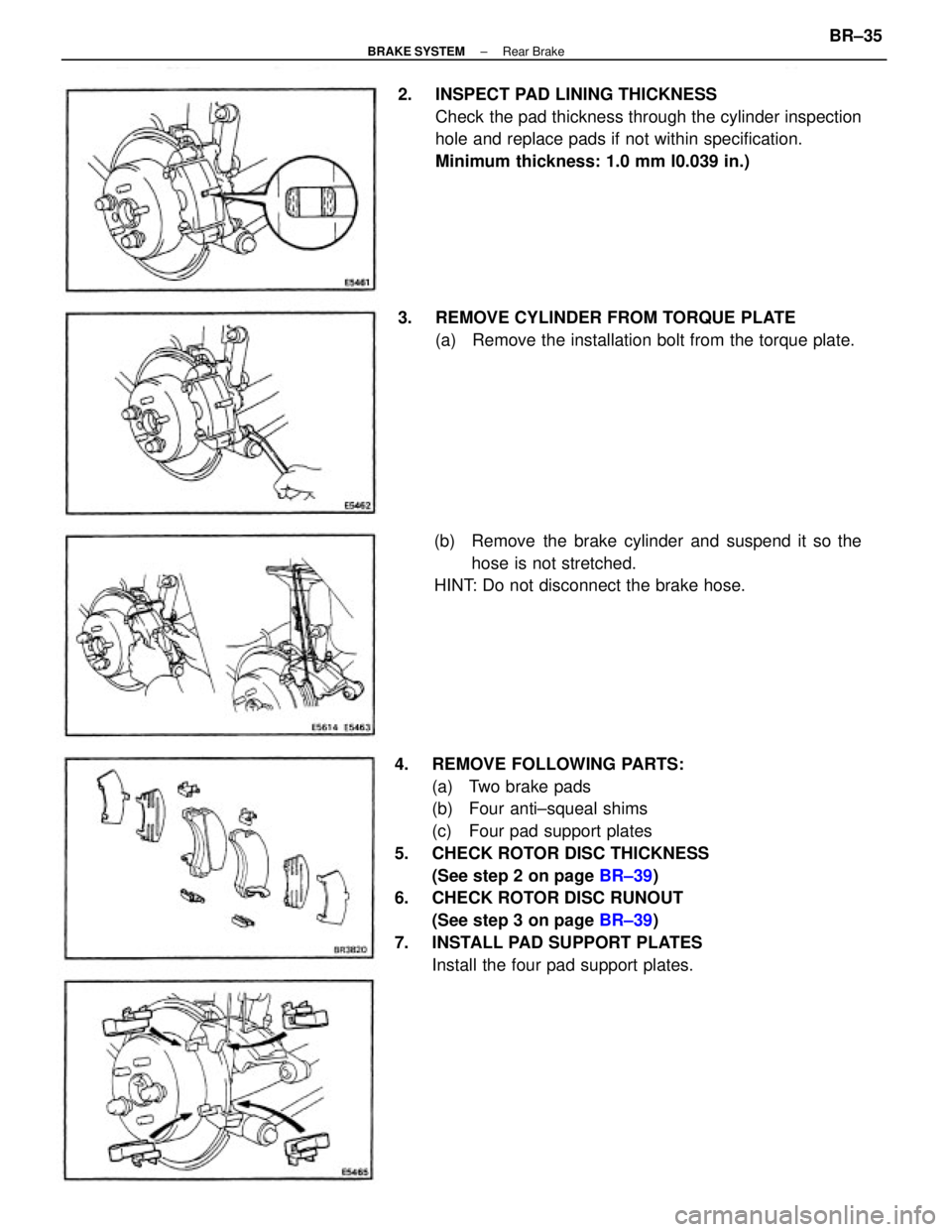
4. REMOVE FOLLOWING PARTS:
(a) Two brake pads
(b) Four anti±squeal shims
(c) Four pad support plates
5. CHECK ROTOR DISC THICKNESS
(See step 2 on page BR±39)
6. CHECK ROTOR DISC RUNOUT
(See step 3 on page BR±39)
7. INSTALL PAD SUPPORT PLATES
Install the four pad support plates. 2. INSPECT PAD LINING THICKNESS
Check the pad thickness through the cylinder inspection
hole and replace pads if not within specification.
Minimum thickness: 1.0 mm I0.039 in.)
(b) Remove the brake cylinder and suspend it so the
hose is not stretched.
HINT: Do not disconnect the brake hose. 3. REMOVE CYLINDER FROM TORQUE PLATE
(a) Remove the installation bolt from the torque plate.
± BRAKE SYSTEMRear BrakeBR±35
Page 890 of 2389
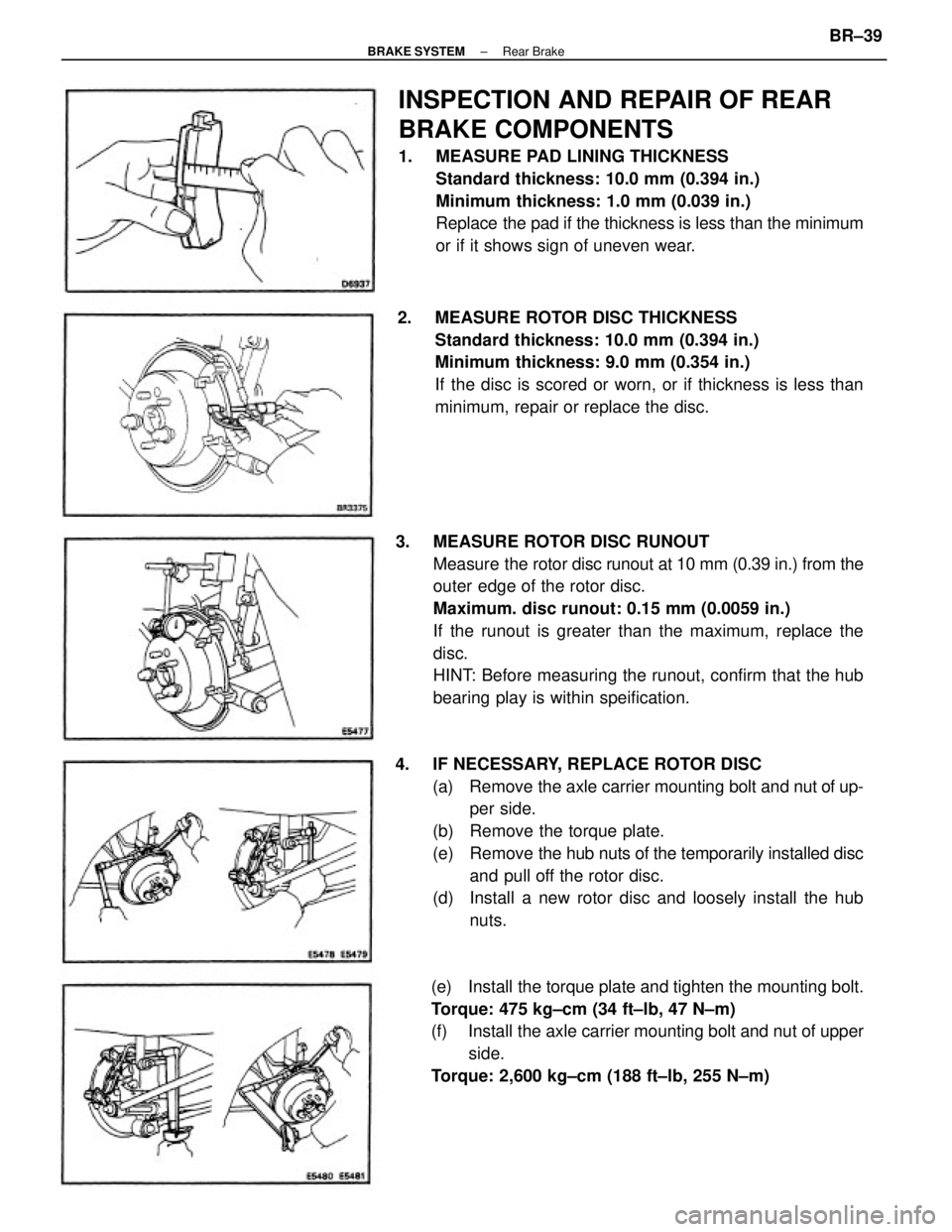
3. MEASURE ROTOR DISC RUNOUT
Measure the rotor disc runout at 10 mm (0.39 in.) from the
outer edge of the rotor disc.
Maximum. disc runout: 0.15 mm (0.0059 in.)
If the runout is greater than the maximum, replace the
disc.
HINT: Before measuring the runout, confirm that the hub
bearing play is within speification.
4. IF NECESSARY, REPLACE ROTOR DISC
(a) Remove the axle carrier mounting bolt and nut of up-
per side.
(b) Remove the torque plate.
(e) Remove the hub nuts of the temporarily installed disc
and pull off the rotor disc.
(d) Install a new rotor disc and loosely install the hub
nuts.
INSPECTION AND REPAIR OF REAR
BRAKE COMPONENTS
1. MEASURE PAD LINING THICKNESS
Standard thickness: 10.0 mm (0.394 in.)
Minimum thickness: 1.0 mm (0.039 in.)
Replace the pad if the thickness is less than the minimum
or if it shows sign of uneven wear.
2. MEASURE ROTOR DISC THICKNESS
Standard thickness: 10.0 mm (0.394 in.)
Minimum thickness: 9.0 mm (0.354 in.)
If the disc is scored or worn, or if thickness is less than
minimum, repair or replace the disc.
(e) Install the torque plate and tighten the mounting bolt.
Torque: 475 kg±cm (34 ft±lb, 47 N±m)
(f) Install the axle carrier mounting bolt and nut of upper
side.
Torque: 2,600 kg±cm (188 ft±lb, 255 N±m)
± BRAKE SYSTEMRear BrakeBR±39
Page 894 of 2389
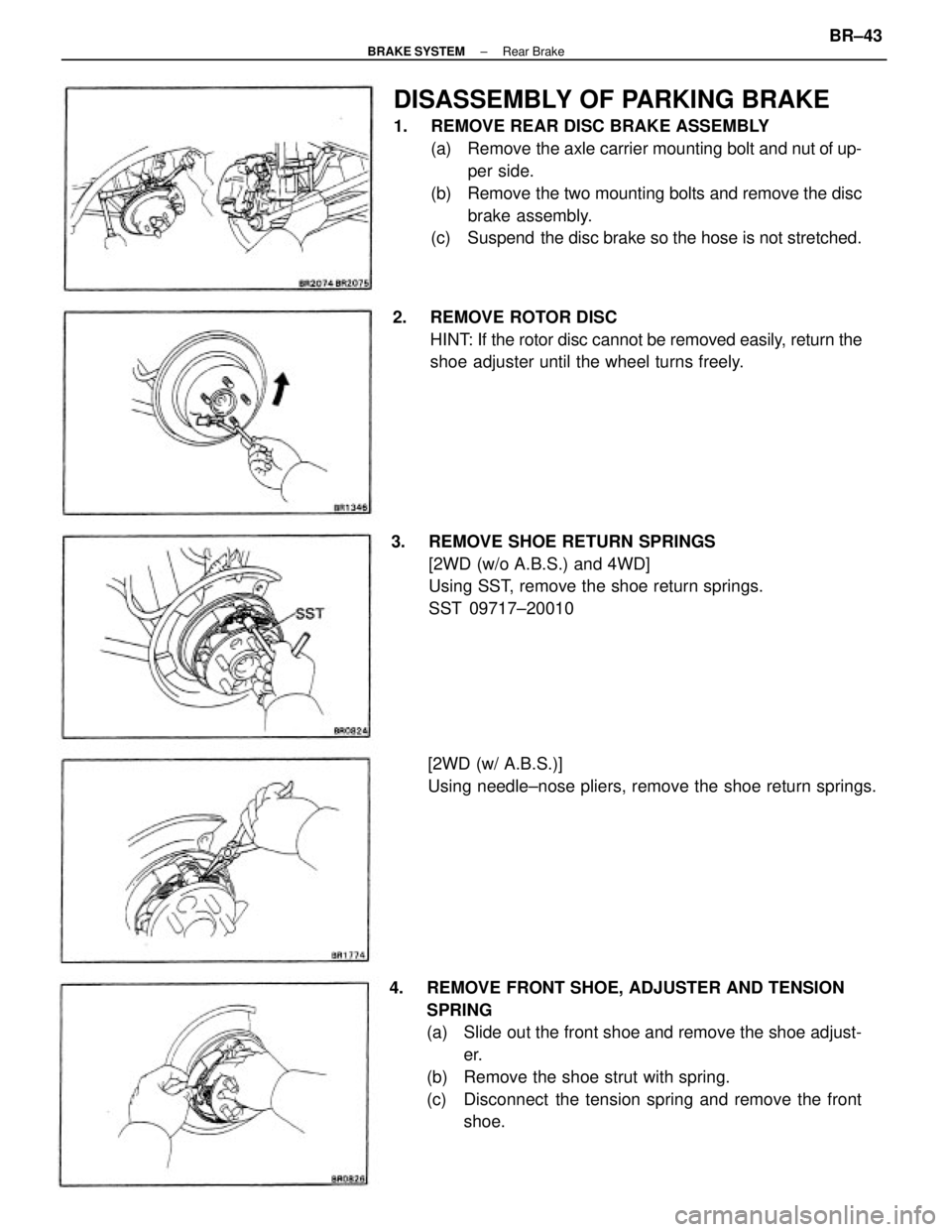
DISASSEMBLY OF PARKING BRAKE
1. REMOVE REAR DISC BRAKE ASSEMBLY
(a) Remove the axle carrier mounting bolt and nut of up-
per side.
(b) Remove the two mounting bolts and remove the disc
brake assembly.
(c) Suspend the disc brake so the hose is not stretched.
4. REMOVE FRONT SHOE, ADJUSTER AND TENSION
SPRING
(a) Slide out the front shoe and remove the shoe adjust-
er.
(b) Remove the shoe strut with spring.
(c) Disconnect the tension spring and remove the front
shoe. 3. REMOVE SHOE RETURN SPRINGS
[2WD (w/o A.B.S.) and 4WD]
Using SST, remove the shoe return springs.
SST 09717±20010 2. REMOVE ROTOR DISC
HINT: If the rotor disc cannot be removed easily, return the
shoe adjuster until the wheel turns freely.
[2WD (w/ A.B.S.)]
Using needle±nose pliers, remove the shoe return springs.
± BRAKE SYSTEMRear BrakeBR±43