CD player TOYOTA COROLLA 2018 Owners Manual (in English)
[x] Cancel search | Manufacturer: TOYOTA, Model Year: 2018, Model line: COROLLA, Model: TOYOTA COROLLA 2018Pages: 608, PDF Size: 9.96 MB
Page 4 of 608

TABLE OF CONTENTS4
COROLLA_TMMMS_TMMC_U (01999-02509)4-4. Refueling
Opening the fuel tank cap .......................... 204
4-5. Using the driving support systems
Toyota Safety Sense P ..... 207
PCS (Pre-Collision System) .... 214
LDA (Lane Departure Alert with steering
control) ............................ 226
Dynamic radar cruise control ............................. 235
Rear view monitor system............................. 247
Driving assist systems....... 257
4-6. Driving tips Winter driving tips.............. 263
5-1. Basic Operations Audio system types ........... 270
Steering wheel audio switches .......................... 271
AUX port/USB port ............ 272
Entune Audio..................... 273
Basic audio operations ...... 276
5-2. Setup Setup menu ....................... 278
General settings ................ 279
Audio settings.................... 281
Display settings ................. 282
Voice settings .................... 283 5-3. Using Entune Audio
Selecting the audio source.............................. 284
List screen operation ......... 285
Optimal use of Entune Audio ................... 287
5-4. Using the radio Radio operation ................. 288
5-5. Playing an audio CD and MP3/WMA/AAC discs
CD player operation........... 290
5-6. Using an external device
Listening to an iPod ........... 296
Listening to a USB memory device ................ 301
Using the AUX port ............ 305
5-7. Connecting Bluetooth
®
Preparations to use wireless
communication ................ 306
Registering a Bluetooth
®
audio player for the
first time ........................... 310
Registering a Bluetooth
®
phone for the
first time ........................... 311
Registering a Bluetooth
®
device .............................. 312
Connecting a Bluetooth
®
device .............................. 315
Displaying a Bluetooth
®
device details................... 318
Detailed Bluetooth
®
system settings................ 319
5Audio system
Page 41 of 608

411-1. For safe use
1
For safety and security
COROLLA_TMMMS_TMMC_U (01999-02509)
WARNING
■SRS airbag precautions
● If a vinyl cover is put on the area where the SRS driver’s knee airbag will
deploy, be sure to remove it.
● Do not use seat accessories which cover the parts where the SRS side
airbags and SRS seat cushion airbag inflate as they may interfere with
inflation of the SRS airbags. Such accessories may prevent the side air-
bags and seat cushion airbag from activating correctly, disable the system
or cause the side airbags and seat cushion airbag to inflate accidentally,
resulting in death or serious injury.
● Do not strike or apply significant levels of force to the area of the SRS air-
bag components.
Doing so can cause the SRS airbags to malfunction.
● Do not touch any of the component parts immediately after the SRS air-
bags have deployed (inflated) as they may be hot.
● If breathing becomes difficult after the SRS airbags have deployed, open a
door or window to allow fresh air in, or leave the vehicle if it is safe to do
so. Wash off any residue as soon as possible to prevent skin irritation.
● If the areas where the SRS airbags are stored, such as the steering wheel
pad and front and rear pillars garnishes, are damaged or cracked, have
them replaced by your Toyota dealer.
● Do not place anything, such as a cushion, on the front passenger's seat.
Doing so will disperse the passenger's weight, which prevents the sensor
from detecting the passenger's weight properly. As a result, the SRS front
airbags for the front passenger may not deploy in the event of a collisi\
on.
■ Modification and disposal of SRS airbag system components
Do not dispose of your vehicle or per form any of the following modifications
without consulting your Toyota dealer. The SRS airbags may malfunction or
deploy (inflate) accidentally, causing death or serious injury.
● Installation, removal, disassembly and repair of the SRS airbags
● Repairs, modifications, removal or replacement of the steering wheel,
instrument panel, dashboard, seats or seat upholstery, front, side and rear
pillars or roof side rails
● Repairs or modifications of the front fender, front bumper, or side of the
occupant compartment
● Installation of a grille guard (bull bars, kangaroo bar, etc.), snow plows,
winches or roof luggage carrier
● Modifications to the vehicle’s suspension system
● Installation of electronic devices such as mobile two-way radios and CD
players
● Modifications to your vehicle for a person with a physical disability
Page 125 of 608

1253-2. Opening, closing and locking the doors
3
Operation of each component
COROLLA_TMMMS_TMMC_U (01999-02509)■
Conditions affecting operation
The smart key system uses weak radio waves. In the following situations, the
communication between the electronic key and the vehicle may be affected,
preventing the smart key system, wireless remote control and engine immobi-
lizer system from operating properly. (Ways of coping: →P. 523)
● When the electronic key battery is depleted
● Near a TV tower, electric power plant, gas station, radio station, large dis-
play, airport or other facility that generates strong radio waves or electrical
noise
● When carrying a portable radio, cellular phone, cordless phone or other
wireless communication device
● When the electronic key is in contact with, or is covered by the following
metallic objects
• Cards to which aluminum foil is attached
• Cigarette boxes that have aluminum foil inside
• Metallic wallets or bags
• Coins
• Hand warmers made of metal
• Media such as CDs and DVDs
● When other wireless keys (that emit radio waves) are being used nearby
● When carrying the electronic key together with the following devices that
emit radio waves
• Another vehicle’s electronic key or a wireless key that emits radio waves
• Personal computers or personal digital assistants (PDAs)
• Digital audio players
• Portable game systems
● If window tint with a metallic content or metallic objects are attached to the
rear window
● When the electronic key is placed near a battery charger or electronic
devices
Page 268 of 608

268
COROLLA_TMMMS_TMMC_U (01999-02509)5-1. Basic Operations
Audio system types ........... 270
Steering wheel audio switches .......................... 271
AUX port/USB port ............ 272
Entune Audio .................... 273
Basic audio operations...... 276
5-2. Setup Setup menu....................... 278
General settings ................ 279
Audio settings ................... 281
Display settings ................. 282
Voice settings.................... 283
5-3. Using Entune Audio Selecting the audio source ............................. 284
List screen operation......... 285
Optimal use of Entune Audio .................. 287
5-4. Using the radio Radio operation................. 288
5-5. Playing an audio CD and MP3/WMA/AAC discs
CD player operation .......... 290
5Audio system
Page 269 of 608

269
5Audio system
COROLLA_TMMMS_TMMC_U (01999-02509)5-6. Using an external
device
Listening to an iPod .......... 296
Listening to a USB memory device................ 301
Using the AUX port ........... 305
5-7. Connecting Bluetooth
®
Preparations to use wireless
communication ................ 306
Registering a Bluetooth
®
audio player for the
first time .......................... 310
Registering a Bluetooth
®
phone for the first time .... 311
Registering a Bluetooth
®
device.............................. 312
Connecting a Bluetooth
®
device.............................. 315
Displaying a Bluetooth
®
device details .................. 318
Detailed Bluetooth
®
system settings ............... 319
5-8. Bluetooth
® Audio
Listening to Bluetooth®
Audio ............................... 320 5-9. Bluetooth
® phone
Using a Bluetooth®
Phone ............................. 322
Making a call ..................... 325
Receiving a call ................. 328
Speaking on the phone ..... 329
Bluetooth
® phone
message function ............ 333
Using the steering wheel switches .......................... 338
Bluetooth
® phone
settings ........................... 339
Contact/ Call History Settings ....... 341
What to do if... (Troubleshooting) ............ 351
5-10. Bluetooth
®
Bluetooth®......................... 355
5-11. Using the voice command system
Voice command system .... 359
Page 272 of 608
2725-1. Basic Operations
COROLLA_TMMMS_TMMC_U (01999-02509)■
iPod
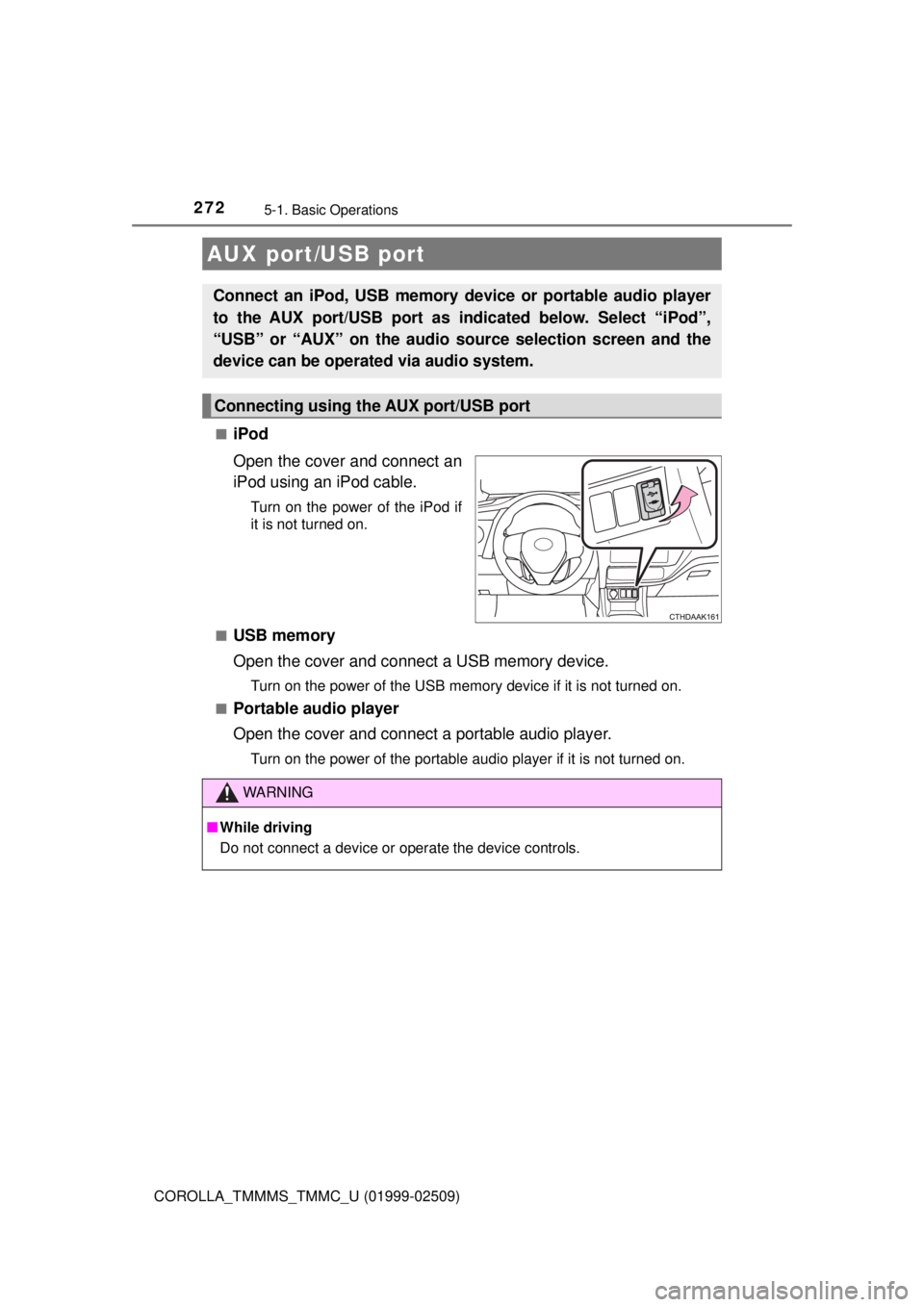
Open the cover and connect an
iPod using an iPod cable.
Turn on the power of the iPod if
it is not turned on.
■
USB memory
Open the cover and connect a USB memory device.
Turn on the power of the USB memory device if it is not turned on.
■
Portable audio player
Open the cover and connect a portable audio player.
Turn on the power of the portable audio player if it is not turned on.
AUX port/USB port
Connect an iPod, USB memory device or portable audio player
to the AUX port/USB port as indicated below. Select “iPod”,
“USB” or “AUX” on the audio source selection screen and the
device can be operated via audio system.
Connecting using the AUX port/USB port
WARNING
■ While driving
Do not connect a device or operate the device controls.
Page 277 of 608
2775-1. Basic Operations
5
Audio system
COROLLA_TMMMS_TMMC_U (01999-02509)
Select to change on/off.
Select to change on/off.
■Using cellular phones
Interference may be heard through Ent une Audio’s speakers if a cellular
phone is being used inside or close to the vehicle while Entune Audio is oper-
ating.
Random playback
Repeat play
WARNING
■ Laser product
This product is a class 1 laser product.
Do not open the cover of the player or attempt to repair the unit yourself.
Refer servicing to qualified personnel.
● Laser products
• Do not take this unit apart or attempt to make any changes yourself.
This is an intricate unit that uses a laser pickup to retrieve information
from the surface of compact discs. The laser is carefully shielded so
that its rays remain inside the cabinet. Therefore, never try to disassem-
ble the player or alter any of its parts since you may be exposed to laser
rays and dangerous voltages.
• This product utilizes a laser.
Use of controls or adjustments or performance of procedures other than
those specified herein may result in hazardous radiation exposure.
THE USE OF OPTICAL INSTRUMENTS WITH THIS PRODUCT WILL
INCREASE EYE HAZARD.
NOTICE
■To prevent battery discharge
Do not leave Entune Audio on longer than necessary when the engine is off.
■ To avoid damaging Entune Audio
Take care not to spill drinks or other fluids on Entune Audio.
Page 290 of 608
290
COROLLA_TMMMS_TMMC_U (01999-02509)
5-5. Playing an audio CD and MP3/WMA/AAC discs
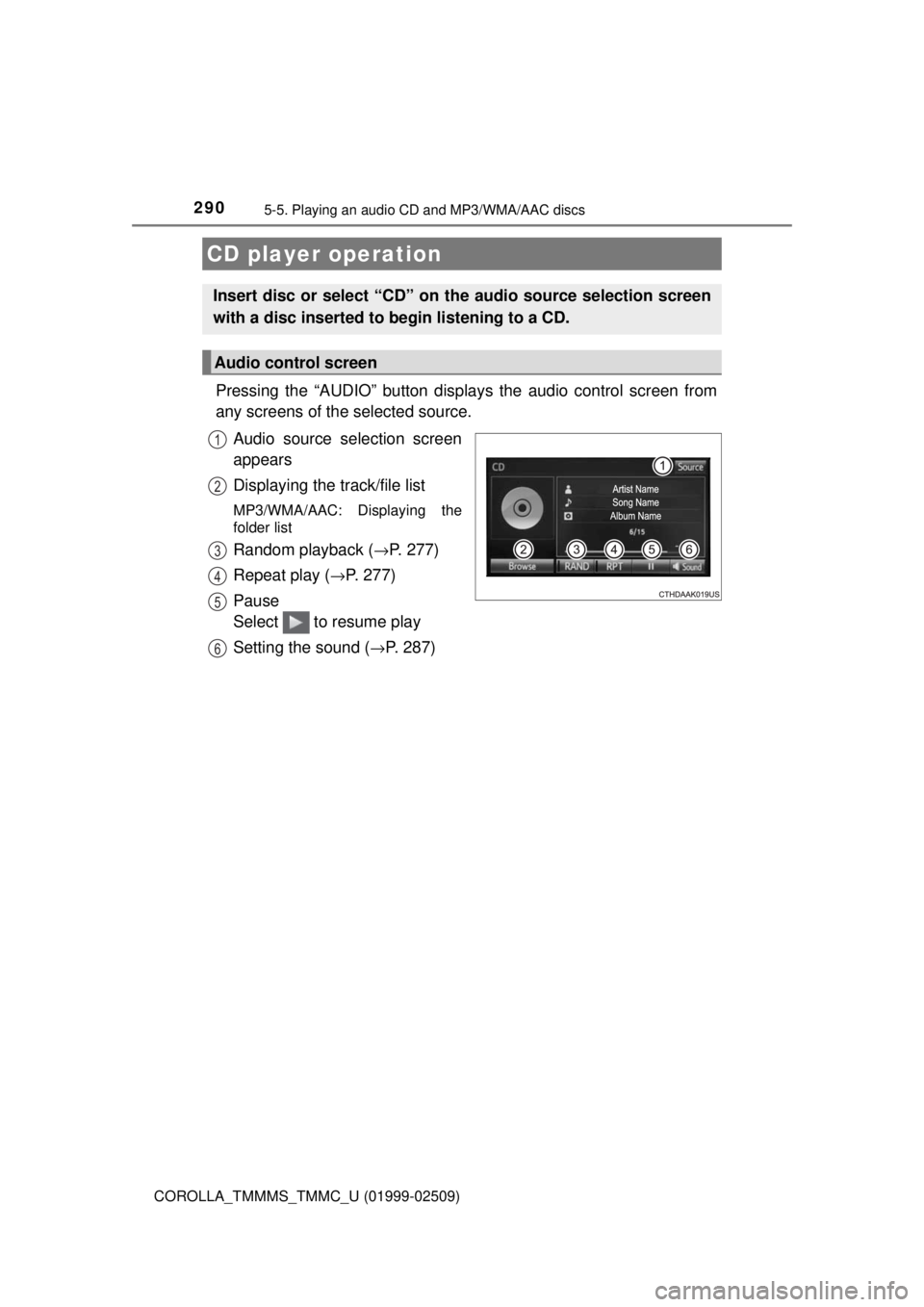
Pressing the “AUDIO” button displays the audio control screen from
any screens of the selected source.
Audio source selection screen
appears
Displaying the track/file list
MP3/WMA/AAC: Displaying the
folder list
Random playback (→P. 277)
Repeat play (
→P. 277)
Pause
Select to resume play
Setting the sound (
→P. 287)
CD player operation
Insert disc or select “CD” on the audio source selection screen
with a disc inserted to begin listening to a CD.
Audio control screen
1
2
3
4
5
6
Page 291 of 608
2915-5. Playing an audio CD and MP3/WMA/AAC discs
5
Audio system
COROLLA_TMMMS_TMMC_U (01999-02509)
■Displaying the title and artist name
If a CD-TEXT disc is inserted, the title of the disc and track will be displayed.
■ Error messages
If an error message is displayed, refer to the following table and take the
appropriate measures. If the problem is not rectified, take the vehicle to your
Toyota dealer.
■ Discs that can be used
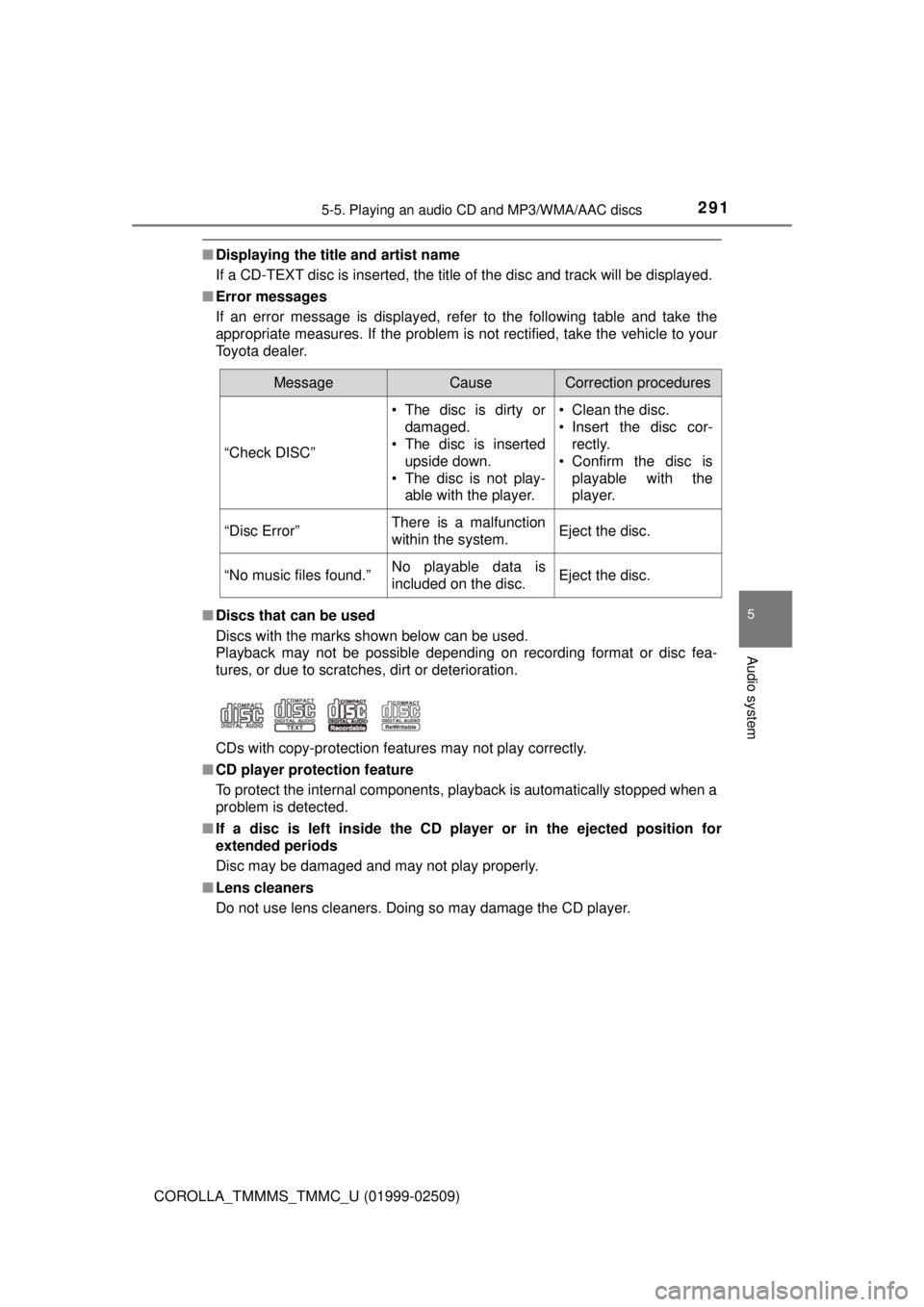
Discs with the marks shown below can be used.
Playback may not be possible depending on recording format or disc fea-
tures, or due to scratches, dirt or deterioration.
CDs with copy-protection features may not play correctly.
■ CD player protection feature
To protect the internal components, playback is automatically stopped when a
problem is detected.
■ If a disc is left inside the CD pl ayer or in the ejected position for
extended periods
Disc may be damaged and may not play properly.
■ Lens cleaners
Do not use lens cleaners. Doing so may damage the CD player.
MessageCauseCorrection procedures
“Check DISC” • The disc is dirty or
damaged.
• The disc is inserted
upside down.
• The disc is not play- able with the player. • Clean the disc.
• Insert the disc cor-
rectly.
• Confirm the disc is playable with the
player.
“Disc Error”There is a malfunction
within the system.Eject the disc.
“No music files found.”No playable data is
included on the disc.Eject the disc.
Page 295 of 608
2955-5. Playing an audio CD and MP3/WMA/AAC discs
5
Audio system
COROLLA_TMMMS_TMMC_U (01999-02509)
NOTICE
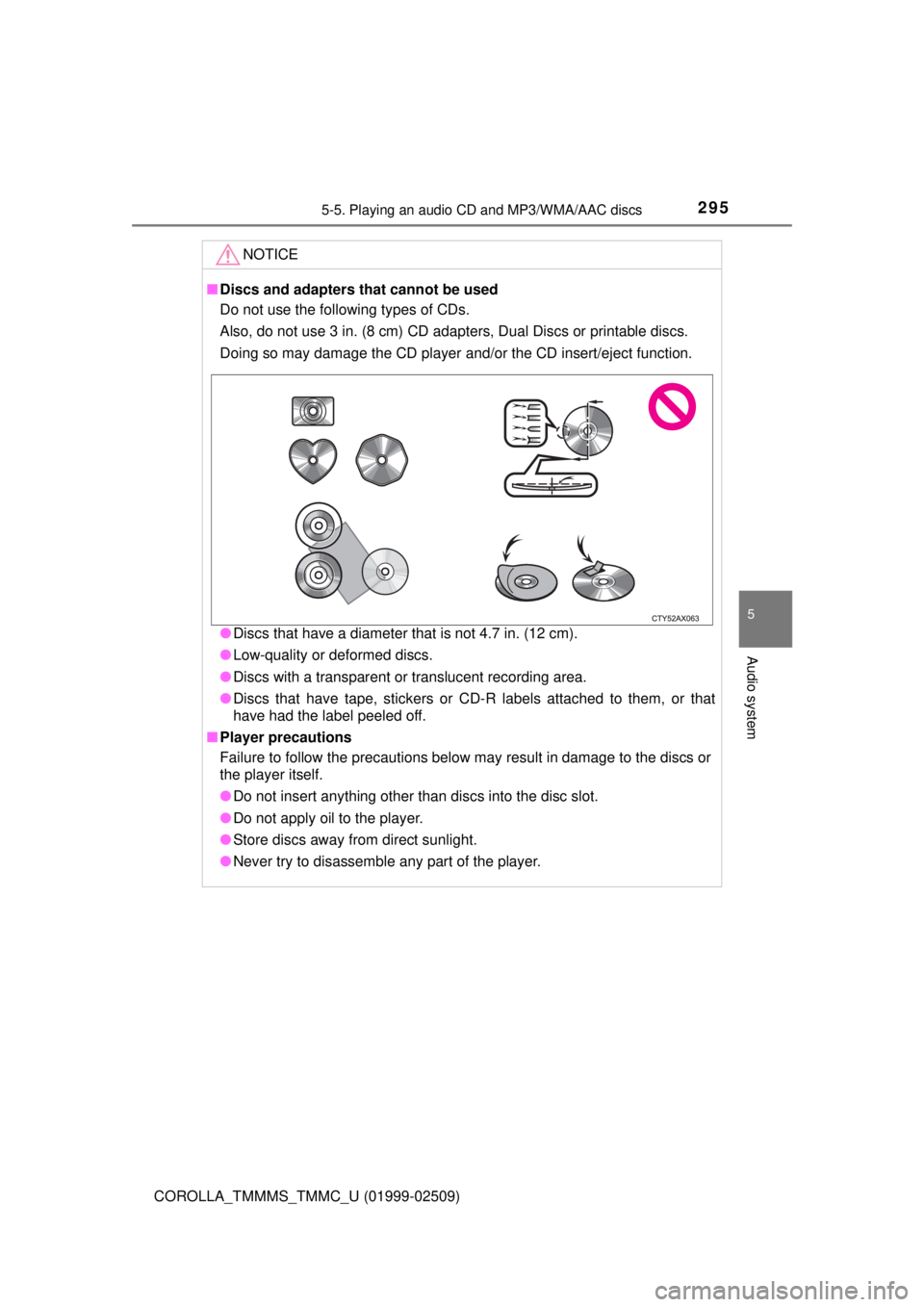
■Discs and adapters that cannot be used
Do not use the following types of CDs.
Also, do not use 3 in. (8 cm) CD adapters, Dual Discs or printable discs.
Doing so may damage the CD player and/or the CD insert/eject function.
● Discs that have a diameter that is not 4.7 in. (12 cm).
● Low-quality or deformed discs.
● Discs with a transparent or translucent recording area.
● Discs that have tape, stickers or CD-R labels attached to them, or that
have had the label peeled off.
■ Player precautions
Failure to follow the precautions below may result in damage to the discs or
the player itself.
● Do not insert anything other than discs into the disc slot.
● Do not apply oil to the player.
● Store discs away from direct sunlight.
● Never try to disassemble any part of the player.