parking brake TOYOTA COROLLA CROSS 2022 Owners Manual
[x] Cancel search | Manufacturer: TOYOTA, Model Year: 2022, Model line: COROLLA CROSS, Model: TOYOTA COROLLA CROSS 2022Pages: 612, PDF Size: 17.18 MB
Page 3 of 612
3TABLE OF CONTENTS
1
2
3
4
5
6
7
8
9
10
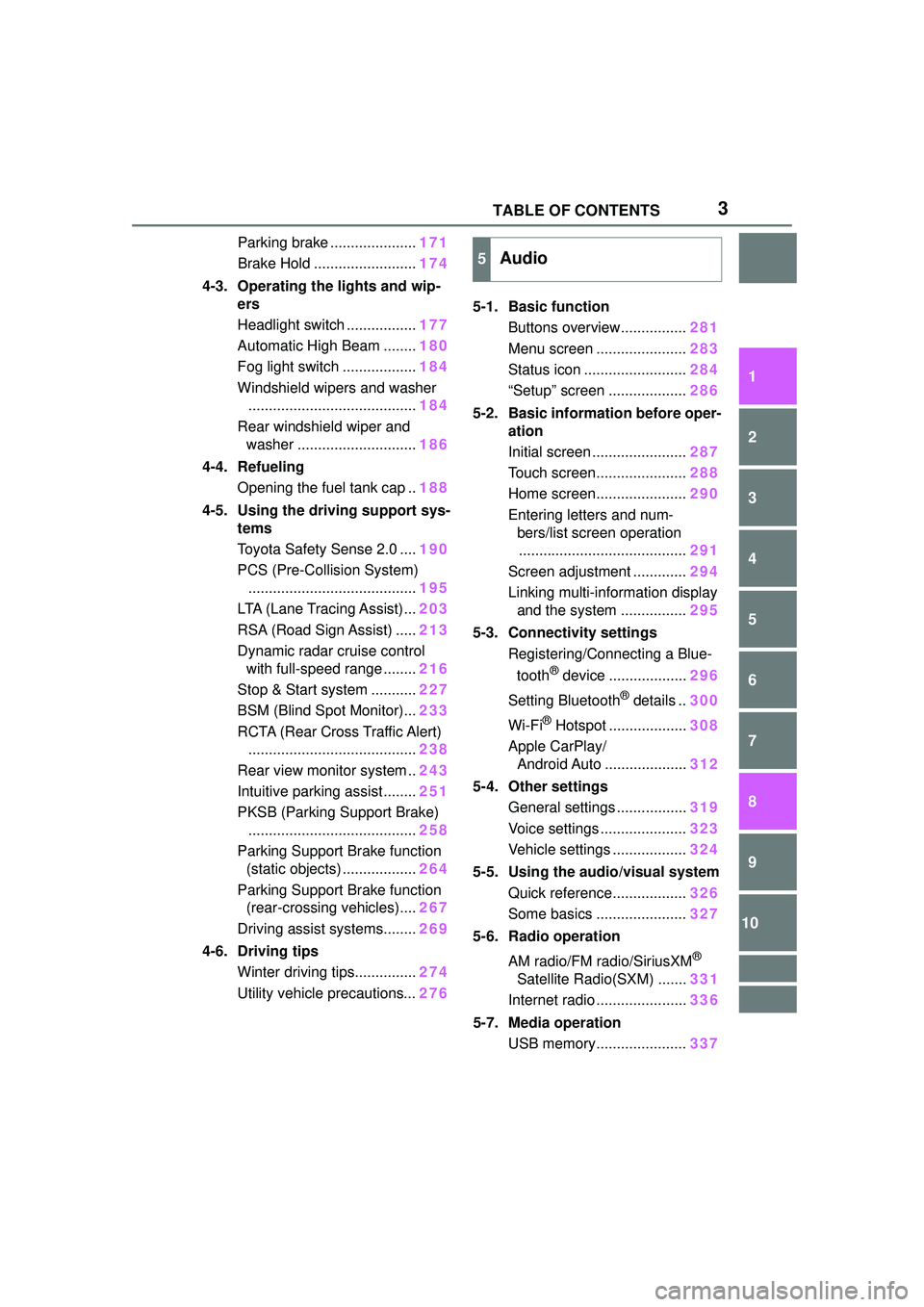
Parking brake .....................171
Brake Hold ......................... 174
4-3. Operating the lights and wip- ers
Headlight switch ................. 177
Automatic High Beam ........ 180
Fog light switch .................. 184
Windshield wipers and washer ......................................... 184
Rear windshield wiper and washer ............................. 186
4-4. Refueling Opening the fuel tank cap .. 188
4-5. Using the driving support sys- tems
Toyota Safety Sense 2.0 .... 190
PCS (Pre-Collision System) ......................................... 195
LTA (Lane Tracing Assist)... 203
RSA (Road Sign Assist) ..... 213
Dynamic radar cruise control with full-speed range ........ 216
Stop & Start system ........... 227
BSM (Blind Spot Monitor)... 233
RCTA (Rear Cross Traffic Alert) ......................................... 238
Rear view monitor system .. 243
Intuitive parking assist ........ 251
PKSB (Parking Support Brake) ......................................... 258
Parking Support Brake function (static objects) .................. 264
Parking Support Brake function (rear-crossing vehicles).... 267
Driving assist systems........ 269
4-6. Driving tips Winter driving tips............... 274
Utility vehicle precautions... 2765-1. Basic function
Buttons overview................ 281
Menu screen ...................... 283
Status icon ......................... 284
“Setup” screen ................... 286
5-2. Basic information before oper- ation
Initial screen ....................... 287
Touch screen...................... 288
Home screen...................... 290
Entering letters and num- bers/list screen operation......................................... 291
Screen adjustment ............. 294
Linking multi-information display and the system ................ 295
5-3. Connectivity settings Registering/Connecting a Blue-
tooth
® device ................... 296
Setting Bluetooth
® details .. 300
Wi-Fi
® Hotspot ................... 308
Apple CarPlay/ Android Auto .................... 312
5-4. Other settings General settings ................. 319
Voice settings ..................... 323
Vehicle settings .................. 324
5-5. Using the audio/visual system Quick reference.................. 326
Some basics ...................... 327
5-6. Radio operation
AM radio/FM radio/SiriusXM
®
Satellite Radio(SXM) ....... 331
Internet radio ...................... 336
5-7. Media operation USB memory...................... 337
5Audio
Page 19 of 612
19Pictorial index
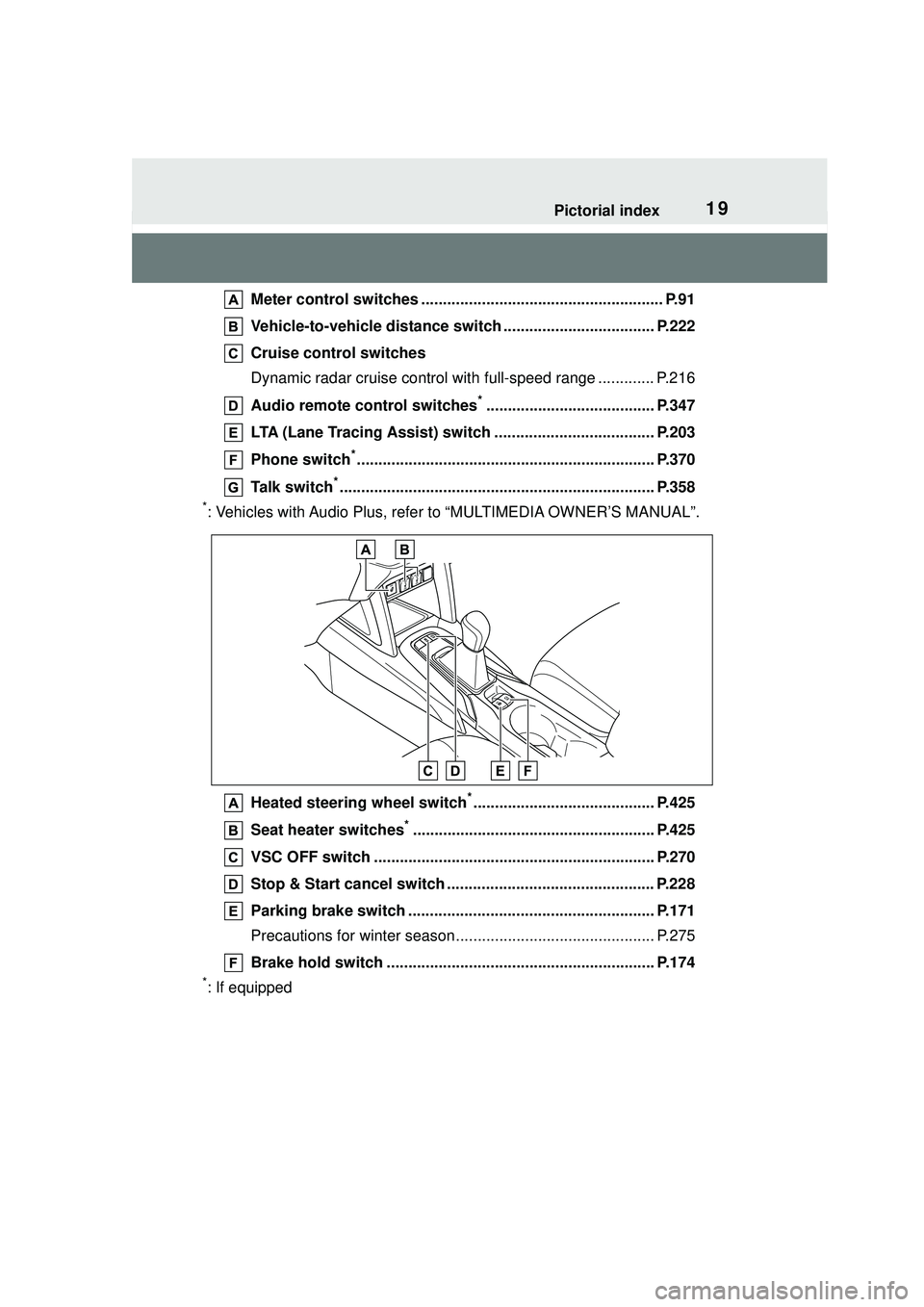
Meter control switches ........................................................ P.91
Vehicle-to-vehicle distance swit ch ................................... P.222
Cruise control switches
Dynamic radar cruise control wit h full-speed range ............. P.216
Audio remote control switches
*....................................... P.347
LTA (Lane Tracing Assist) switch ..................................... P.203
Phone switch
*..................................................................... P.370
Talk switch
*......................................................................... P.358
*: Vehicles with Audio Plus, refer to “MULTIMEDIA OWNER’S MANUAL”.
Heated steering wheel switch
*.......................................... P.425
Seat heater switches
*........................................................ P.425
VSC OFF switch ................................................................. P.270
Stop & Start cancel switch ................................................ P.228
Parking brake switch ......................................................... P.171
Precautions for winter season.... .......................................... P.275
Brake hold switch .............................................................. P.174
*: If equipped
Page 78 of 612
782-1. Instrument cluster
*1: These lights come on when the engine switch is turned to ON to
indicate that a system check is
being performed. They will turn
off after the engine is started, or
after a few seconds. There may
be a malfunction in a system if
the lights do not come on, or turn off. Have the vehicle inspected
by your Toyota dealer.
*2: This light illuminates on the
multi-information display.
The indicators inform the driver
of the operating state of the
vehicle’s various systems.
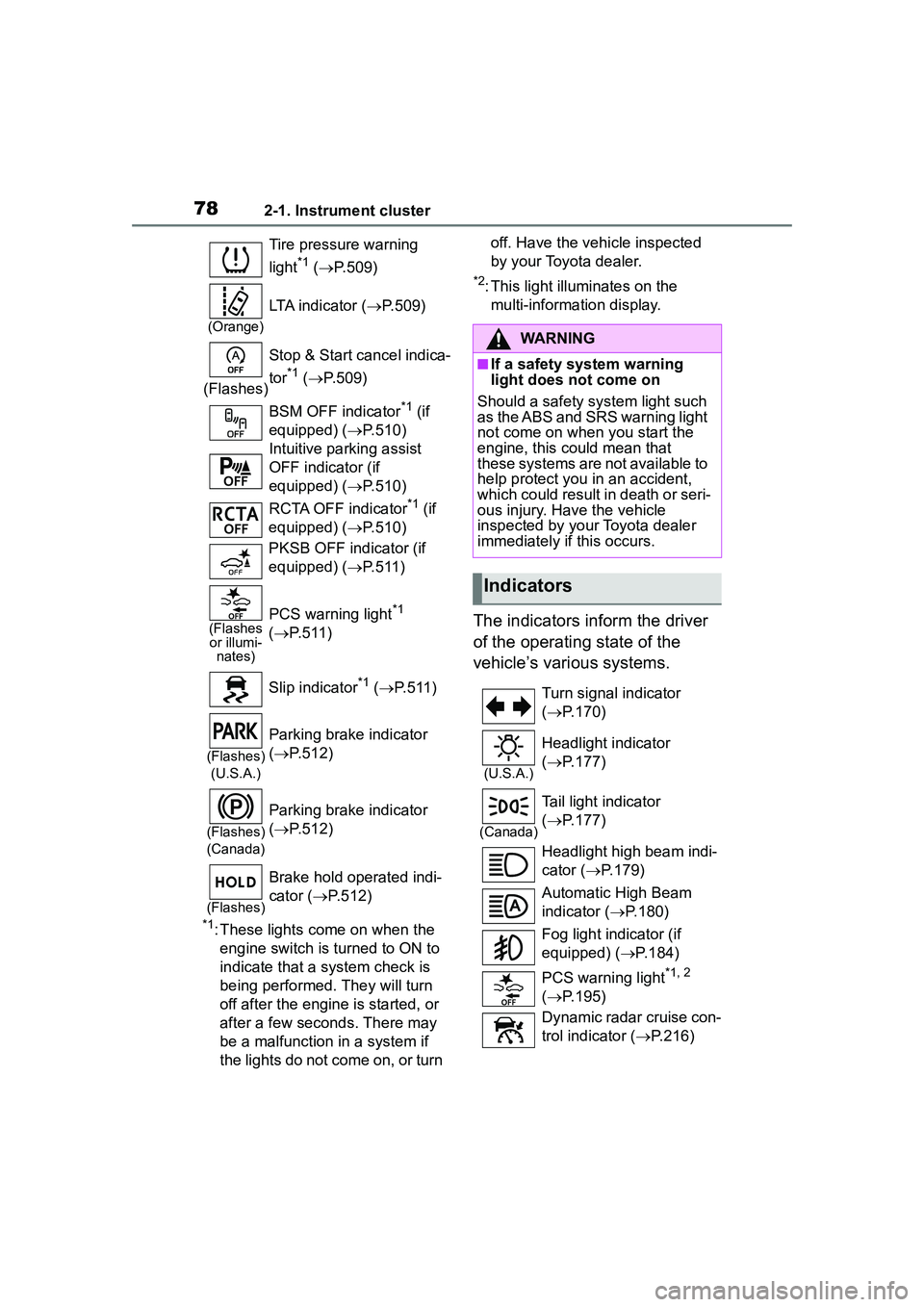
Tire pressure warning
light
*1 ( P.509)
(Orange)
LTA indicator ( P.509)
(Flashes) Stop & Start cancel indica-
tor
*1 (
P.509)
BSM OFF indicator
*1 (if
equipped) ( P.510)
Intuitive parking assist
OFF indicator (if
equipped) ( P.510)
RCTA OFF indicator
*1 (if
equipped) ( P.510)
PKSB OFF indicator (if
equipped) ( P.511)
(Flashes
or illumi- nates)PCS warning light*1
( P.511)
Slip indicator
*1 ( P.511)
(Flashes)
(U.S.A.)
Parking brake indicator
( P.512)
(Flashes)
(Canada)
Parking brake indicator
( P.512)
(Flashes)
Brake hold operated indi-
cator ( P.512)
WARNING
■If a safety system warning
light does not come on
Should a safety system light such
as the ABS and SRS warning light
not come on when you start the
engine, this could mean that
these systems are not available to
help protect you in an accident,
which could result in death or seri-
ous injury. Have the vehicle
inspected by your Toyota dealer
immediately if this occurs.
Indicators
Turn signal indicator
( P.170)
(U.S.A.)
Headlight indicator
( P.177)
(Canada)
Tail light indicator
( P.177)
Headlight high beam indi-
cator ( P.179)
Automatic High Beam
indicator ( P.180)
Fog light indicator (if
equipped) ( P.184)
PCS warning light
*1, 2
( P.195)
Dynamic radar cruise con-
trol indicator ( P.216)
Page 79 of 612
792-1. Instrument cluster
2
Vehicle status information and indicators
*1: These lights come on when the engine switch is turned to ON to
indicate that a system check is
being performed. They will turn
off after the engine is started, or
after a few sec onds. There may
be a malfunction in a system if
the lights do not come on, or turn
off. Have the vehicle inspected
by your Toyota dealer.
*2: This light comes on when the system is turned off.
*3: Depending on the operating con-dition, the color and illuminat-
ing/flashing state of the light
change.
*4: In order to confirm operation, the BSM outside rear view mirror
indicators illumina te in the follow-
ing situations:
• When the engine switch is
turned to ON, the BSM func-
tion is enabled on of the
multi-information display.
• When the BSM function is
enabled on of the
multi-information display, the
engine switch is turned to ON.
If the system is functioning cor-
rectly, the BSM outside rear view
mirror indicators will turn off after a
few seconds.
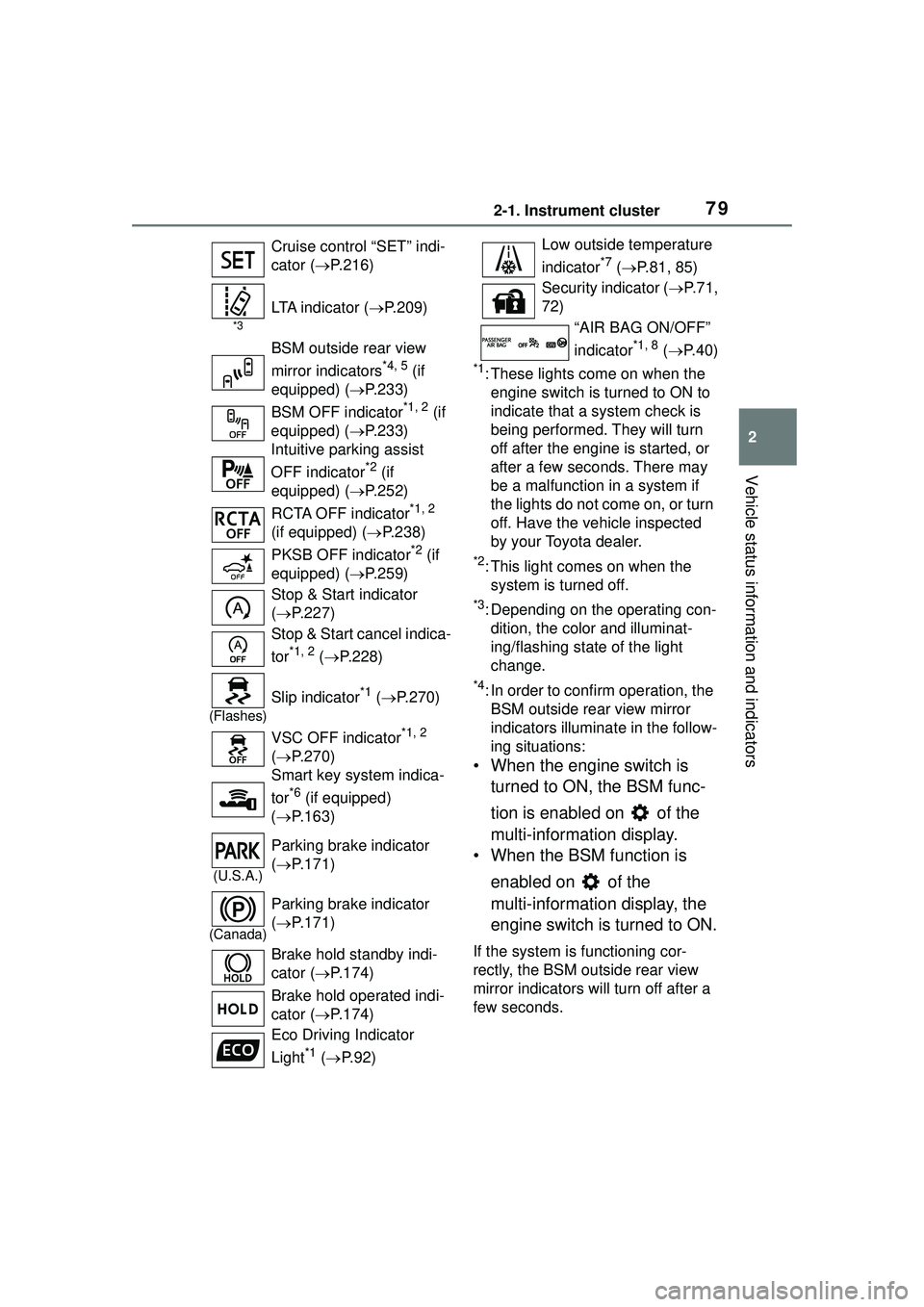
Cruise control “SET” indi-
cator (
P.216)
*3
LTA indicator ( P.209)
BSM outside rear view
mirror indicators
*4, 5 (if
equipped) ( P.233)
BSM OFF indicator
*1, 2 (if
equipped) ( P.233)
Intuitive parking assist
OFF indicator
*2 (if
equipped) ( P.252)
RCTA OFF indicator
*1, 2
(if equipped) ( P.238)
PKSB OFF indicator
*2 (if
equipped) ( P.259)
Stop & Start indicator
( P.227)
Stop & Start cancel indica-
tor
*1, 2 ( P.228)
(Flashes)
Slip indicator*1 ( P.270)
VSC OFF indicator
*1, 2
( P.270)
Smart key system indica-
tor
*6 (if equipped)
( P.163)
(U.S.A.)
Parking brake indicator
( P.171)
(Canada)
Parking brake indicator
( P.171)
Brake hold standby indi-
cator ( P.174)
Brake hold operated indi-
cator ( P.174)
Eco Driving Indicator
Light
*1 ( P. 9 2 )
Low outside temperature
indicator
*7 ( P.81, 85)
Security indicator ( P. 7 1 ,
72)
“AIR BAG ON/OFF”
indicator
*1, 8 ( P. 4 0 )
Page 114 of 612
1143-2. Opening, closing and locking the doors
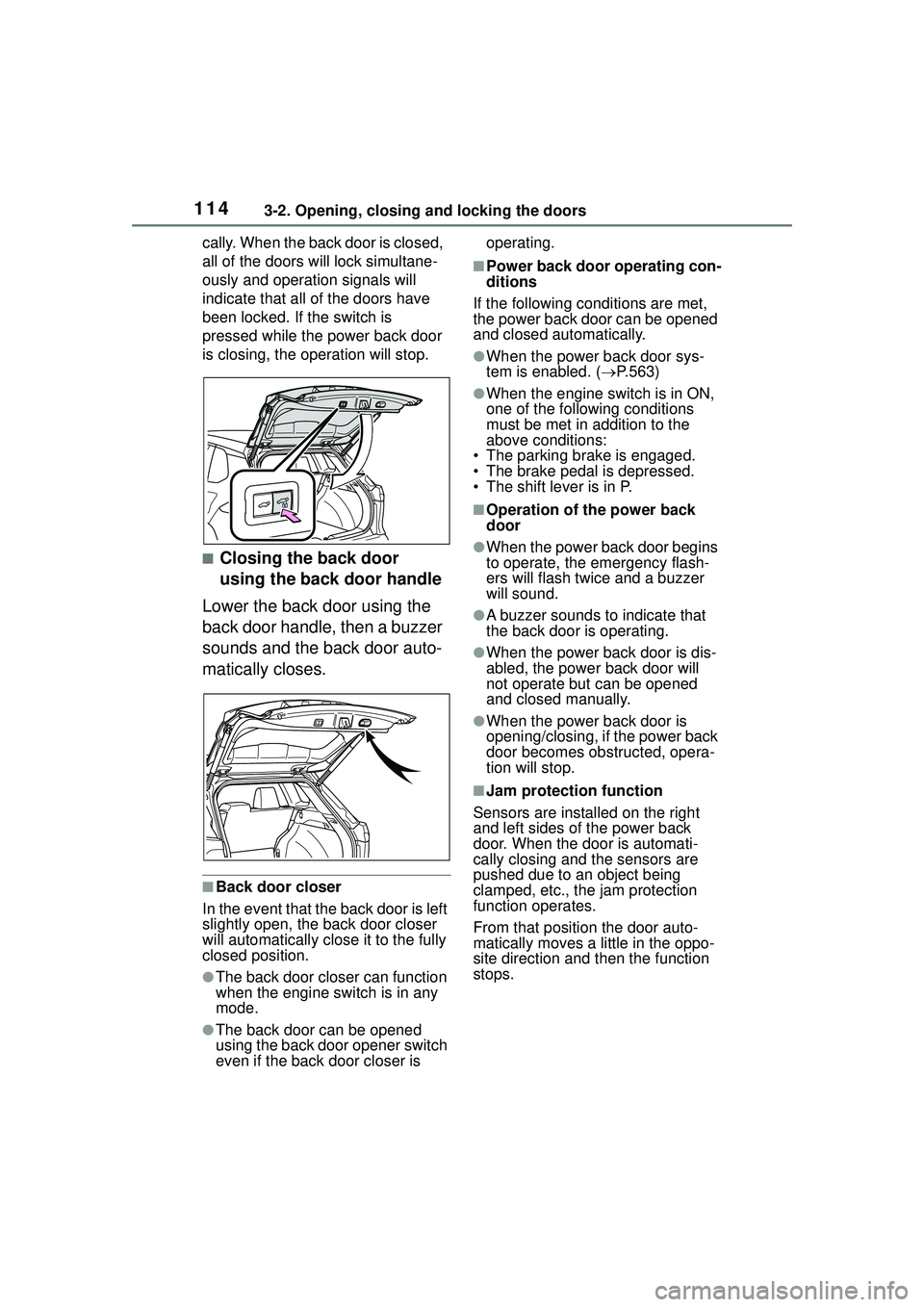
cally. When the back door is closed,
all of the doors will lock simultane-
ously and operation signals will
indicate that all of the doors have
been locked. If the switch is
pressed while the power back door
is closing, the operation will stop.
■Closing the back door
using the back door handle
Lower the back door using the
back door handle, then a buzzer
sounds and the back door auto-
matically closes.
■Back door closer
In the event that the back door is left
slightly open, the back door closer
will automatically close it to the fully
closed position.
●The back door closer can function
when the engine switch is in any
mode.
●The back door can be opened
using the back door opener switch
even if the back door closer is operating.
■Power back door operating con-
ditions
If the following conditions are met,
the power back door can be opened
and closed automatically.
●When the power back door sys-
tem is enabled. ( P.563)
●When the engine switch is in ON,
one of the following conditions
must be met in addition to the
above conditions:
• The parking brake is engaged.
• The brake pedal is depressed.
• The shift lever is in P.
■Operation of the power back
door
●When the power back door begins
to operate, the emergency flash-
ers will flash twice and a buzzer
will sound.
●A buzzer sounds to indicate that
the back door is operating.
●When the power back door is dis-
abled, the powe r back door will
not operate but can be opened
and closed manually.
●When the power back door is
opening/closing, if the power back
door becomes obstructed, opera-
tion will stop.
■Jam protection function
Sensors are installed on the right
and left sides of the power back
door. When the door is automati-
cally closing and the sensors are
pushed due to an object being
clamped, etc., the jam protection
function operates.
From that position the door auto-
matically moves a little in the oppo-
site direction and then the function
stops.
Page 126 of 612
1263-3. Adjusting the seats
WARNING
Observe the following precau-
tions. Failure to do so may result
in death or serious injury.
■When folding the rear seat-
backs down
●Do not fold the seatbacks down
while driving.
●Stop the vehicle on level
ground, set the parking brake
and shift the shift lever to P.
●Do not allow anyone to sit on a
folded seatback or in the lug-
gage compartment while driv-
ing.
●Do not allow children to enter
the luggage compartment.
●Be careful not to get your hand
caught when folding the rear
seatbacks.
●Adjust the position of the front
seats before folding down the
rear seatbacks so that the front
seats do not interfere with the
rear seatbacks when folding
down the rear seatbacks.
■After returning the rear seat-
back to the upright position
●Make sure that the seatback is
securely locked in position by
lightly pushing it back and forth.
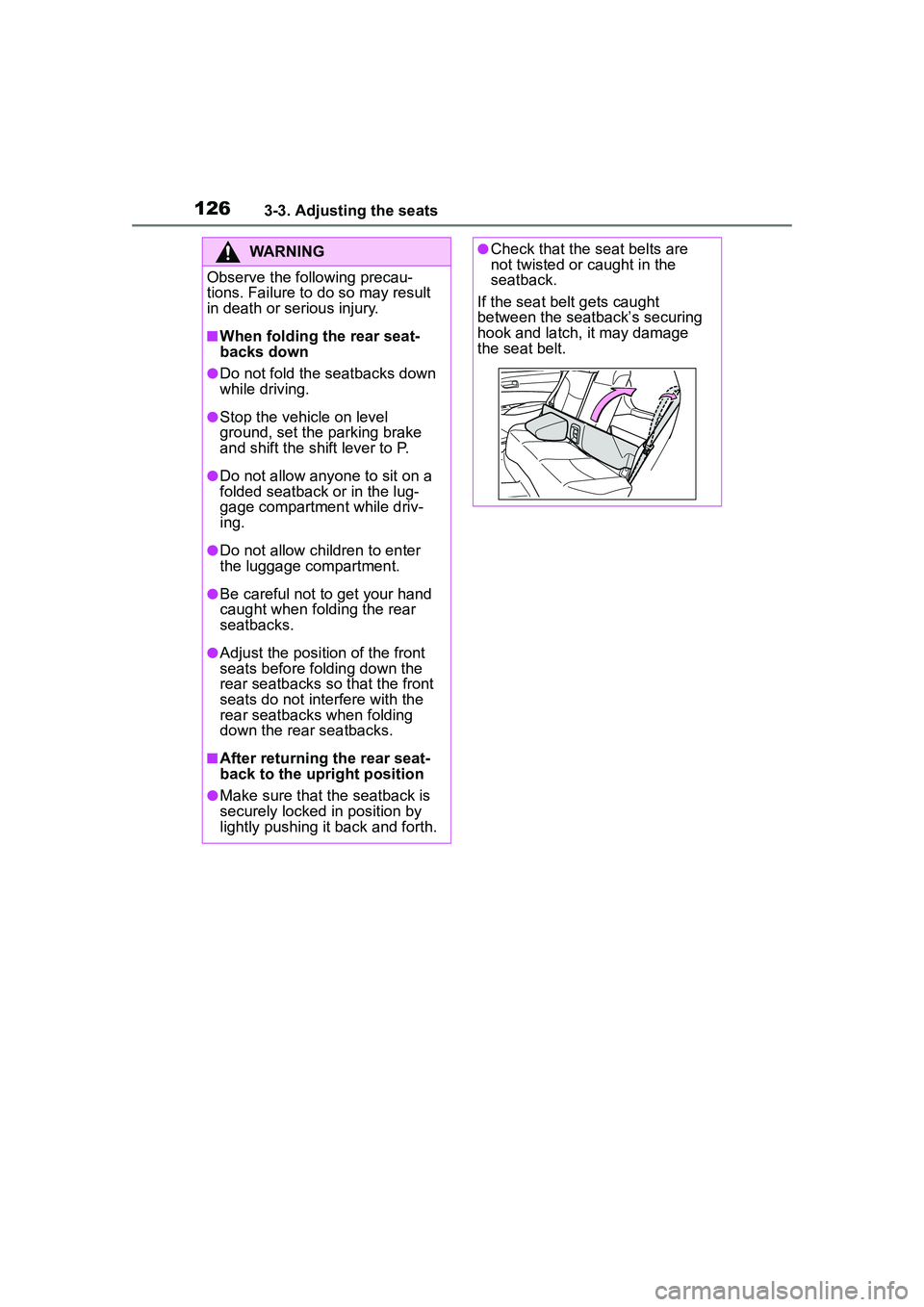
●Check that the seat belts are
not twisted or caught in the
seatback.
If the seat belt gets caught
between the seatback’s securing
hook and latch, it may damage
the seat belt.
Page 139 of 612
139
4
4
Driving
Driving
.4-1. Before drivingDriving the vehicle....... 141
Cargo and luggage ..... 147
Vehicle load limits ....... 150
Trailer towing............... 151
Dinghy towing ............. 161
4-2. Driving procedures Engine (ignition) switch (vehicles without a smart
key system) ............... 162
Engine (ignition) switch (vehicles with a smart key
system)...................... 163
Continuously variable trans- mission ...................... 167
Turn signal lever.......... 170
Parking brake .............. 171
Brake Hold .................. 174
4-3. Operating the lights and wipers
Headlight switch .......... 177
Automatic High Beam . 180
Fog light switch ........... 184
Windshield wipers and washer....................... 184
Rear windshield wiper and washer....................... 186
4-4. Refueling Opening the fuel tank cap.................................. 1884-5. Using the driving support
systems
Toyota Safety Sense 2.0 .................................. 190
PCS (Pre-Collision System) .................................. 195
LTA (Lane Tracing Assist) .................................. 203
RSA (Road Sign Assist) .................................. 213
Dynamic radar cruise con- trol with full-speed range
.................................. 216
Stop & Start system .... 227
BSM (Blind Spot Monitor) .................................. 233
RCTA (Rear Cross Traffic Alert) .......................... 238
Rear view monitor system .................................. 243
Intuitive parking assist . 251
PKSB (Parking Support Brake) ........................ 258
Parking Support Brake func- tion (static objects) .... 264
Parking Support Brake func- tion (rear-crossing vehi-
cles) ........................... 267
Driving assist systems .................................. 269
4-6. Driving tips Winter driving tips........ 274
Page 141 of 612
1414-1. Before driving
4
Driving
4-1.Before driving
■Starting the engine
P.162, 163
■Driving
1 With the brake pedal
depressed, shift the shift
lever to D. ( P.167)
2 Release the parking brake.
( P.171)
3 Gradually release the brake
pedal and gently depress the
accelerator pedal to acceler-
ate the vehicle.
■Stopping
1 With the shift lever in D,
depress the brake pedal.
2 If necessary, set the parking
brake.
If the vehicle is to be stopped for an
extended period of time, shift the
shift lever to P. ( P.167)
■Parking the vehicle
1 With the shift lever in D,
depress the brake pedal to
stop the vehicle completely.
2 Set the parking brake
( P.171), and shift the shift
lever to P. ( P.167)
Check the parking brake indicator
is illuminated.
3 Vehicles without a smart key
system: Turn the engine
switch to OFF to stop the
engine.
Vehicles with a smart key
system: Press the engine
switch to stop the engine.
4 Slowly release the brake
pedal.
5 Lock the door, making sure
that you have the key on your
person.
If parking on a hill, block the wheels
as needed.
■Starting off on a steep
uphill
1 Make sure that the parking
brake is set and shift the shift
lever to D.
2 Gently depress the accelera-
tor pedal.
3 Release the parking brake.
■When starting off on a uphill
The hill-start assist control will acti-
vate.
■Driving in the rain
●Drive carefully when it is raining,
because visibility will be reduced,
the windows may become
fogged-up, and the road will be
slippery.
●Drive carefully when it starts to
rain, because the road surface will
be especially slippery.
●Refrain from high speeds when
driving on an expressway in the
rain, because there may be a
layer of water between the tires
and the road surface, preventing
the steering and brakes from
operating properly.
Driving the vehicle
The following procedures
should be observed to
ensure safe driving:
Driving procedure
Page 144 of 612
1444-1. Before driving
WARNING
●Do not shift the shift lever to P
while the vehicle is moving.
Doing so can damage the trans-
mission and may result in a loss
of vehicle control.
●Do not shift the shift lever to R
while the vehicle is moving for-
ward.
Doing so can damage the trans-
mission and may result in a loss
of vehicle control.
●Do not shift the shift lever to a
driving position while the vehicle
is moving backward.
Doing so can damage the trans-
mission and may result in a loss
of vehicle control.
●Moving the shift lever to N while
the vehicle is moving will disen-
gage the engine from the trans-
mission. Engine braking is not
available when N is selected.
●Be careful not to shift the shift
lever with the accelerator pedal
depressed. Shifting the shift
lever to any positions other than
P or N may lead to unexpected
rapid acceleration of the vehicle
that may cause an accident and
result in death or serious injury.
■If you hear a squealing or
scraping noise (brake pad
wear indicators)
Have the brake pads checked and
replaced by your Toyota dealer as
soon as possible.
Rotor damage may result if the
pads are not replaced when
needed.
It is dangerous to drive the vehicle
when the wear limits of the brake
pads and/or those of the brake
discs are exceeded.
■When the vehicle is stopped
●Do not race the engine.
If the vehicle is in any gear other
than P or N, the vehicle may
accelerate suddenly and unex-
pectedly, causing an accident.
●In order to prevent accidents
due to the vehicle rolling away,
always keep depressing the
brake pedal while the engine is
running, and apply the parking
brake as necessary.
●If the vehicle is stopped on an
incline, in order to prevent acci-
dents caused by the vehicle roll-
ing forward or backward, always
depress the brake pedal and
securely apply the parking
brake as needed.
●Avoid revving or racing the
engine.
Running the engine at high
speed while the vehicle is
stopped may cause the exhaust
system to overheat, which could
result in a fire if combustible
material is nearby.
■When the vehicle is parked
●Do not leave glasses, cigarette
lighters, spray cans, or soft
drink cans in the vehicle when it
is in the sun.
Doing so may result in the fol-
lowing:
• Gas may leak from a cigarette lighter or spray can, and may
lead to a fire.
• The temperature inside the vehicle may cause the plastic
lenses and plastic material of
glasses to deform or crack.
• Soft drink cans may fracture, causing the contents to spray
over the interior of the vehicle,
and may also cause a short cir-
cuit in the vehicle’s electrical
components.
Page 145 of 612
1454-1. Before driving
4
Driving
WARNING
●Do not leave cigarette lighters in
the vehicle. If a cigarette lighter
is in a place such as the glove
box or on the floor, it may be lit
accidentally when luggage is
loaded or the seat is adjusted,
causing a fire.
●Do not attach adhesive discs to
the windshield or windows. Do
not place containers such as air
fresheners on the instrument
panel or dashboard. Adhesive
discs or containers may act as
lenses, causing a fire in the
vehicle.
●Do not leave a door or window
open if the curved glass is
coated with a metallized film
such as a silver-colored one.
Reflected sunlight may cause
the glass to act as a lens, caus-
ing a fire.
●Always apply the parking brake,
shift the shift lever to P, stop the
engine and lock the vehicle.
Do not leave the vehicle unat-
tended while the engine is run-
ning.
If the vehicle is parked with the
shift lever in P but the parking
brake is not set, the vehicle may
start to move, possibly leading
to an accident.
●Do not touch the exhaust pipes
while the engine is running or
immediately after turning the
engine off.
Doing so may cause burns.
■When taking a nap in the vehi-
cle
Always turn the engine off. Other-
wise, if you accidentally move the
shift lever or depress the acceler-
ator pedal, this could cause an
accident or fire due to engine
overheating. Additionally, if the
vehicle is parked in a poorly venti-
lated area, exhaust gases may
collect and enter the vehicle, lead-
ing to death or a serious health
hazard.
■When braking
●When the brakes are wet, drive
more cautiously.
Braking distance increases
when the brakes are wet, and
this may cause one side of the
vehicle to brake differently than
the other side. Also, the parking
brake may not securely hold the
vehicle.
●If the brake booster device does
not operate, do not follow other
vehicles closely and avoid hills
or sharp turns that require brak-
ing.
In this case, braking is still pos-
sible, but the brake pedal
should be depressed more
firmly than usual. Also, the brak-
ing distance will increase. Have
your brakes fixed immediately.
●Do not pump the brake pedal if
the engine stalls.
Each push on the brake pedal
uses up the reserve for the
power-assisted brakes.
●The brake system consists of 2
individual hydraulic systems; if
one of the systems fails, the
other will still operate. In this
case, the brake pedal should be
depressed more firmly than
usual and the braking distance
will increase. Have your brakes
fixed immediately.