apple carplay TOYOTA COROLLA HYBRID 2020 (in English) User Guide
[x] Cancel search | Manufacturer: TOYOTA, Model Year: 2020, Model line: COROLLA HYBRID, Model: TOYOTA COROLLA HYBRID 2020Pages: 556, PDF Size: 19.28 MB
Page 266 of 556
2665-3. Connectivity settings
COROLLA HV_U
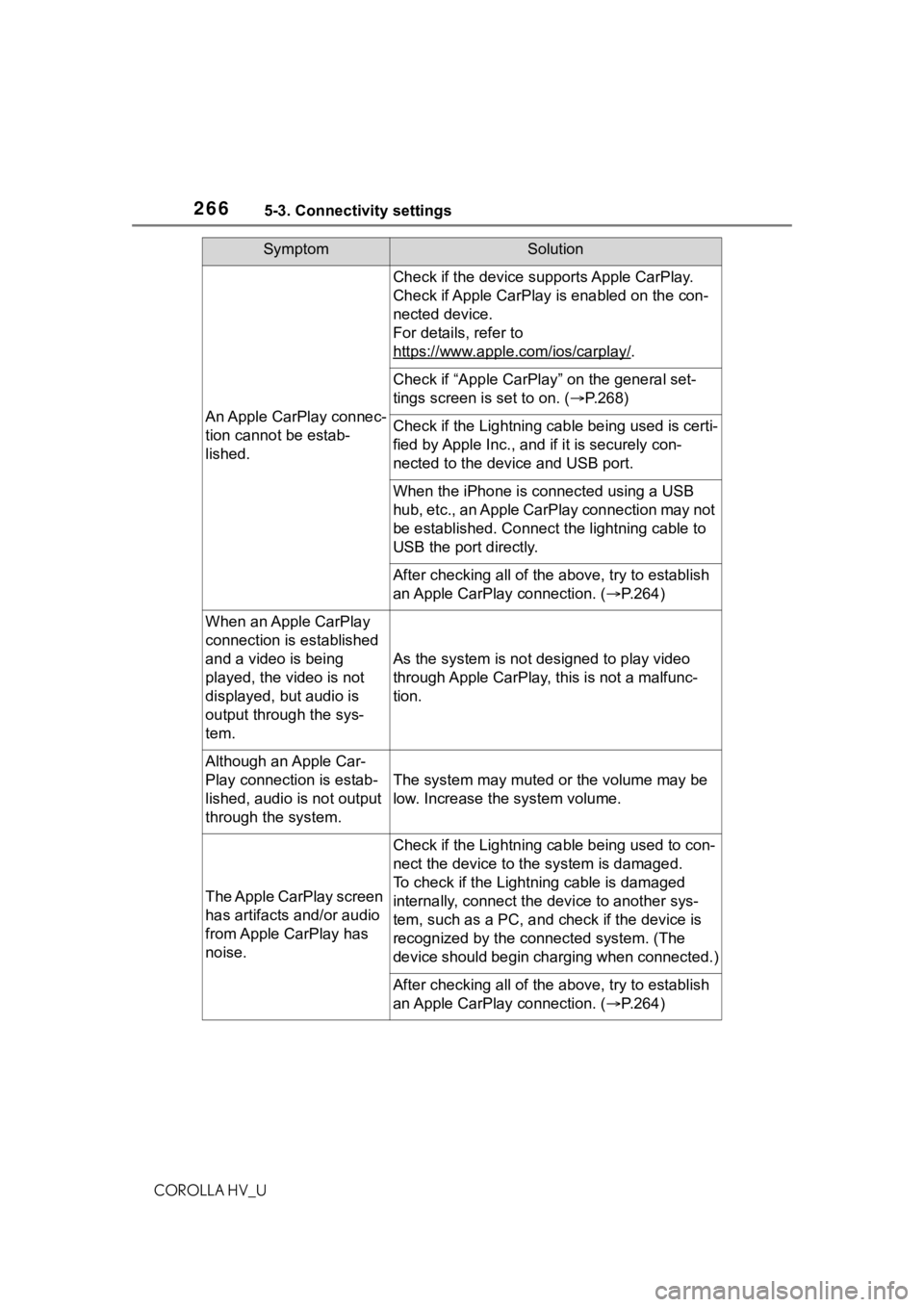
SymptomSolution
An Apple CarPlay connec-
tion cannot be estab-
lished.
Check if the device supports Apple CarPlay.
Check if Apple CarPlay is enabled on the con-
nected device.
For details, refer to
https://www.apple.com/ios/carplay/
.
Check if “Apple CarPlay” on the general set-
tings screen is set to on. (P.268)
Check if the Lightning cable being used is certi-
fied by Apple Inc., and i f it is securely con-
nected to the devic e and USB port.
When the iPhone is c onnected using a USB
hub, etc., an Apple CarPlay connection may not
be established. Connect the lightning cable to
USB the port directly.
After checking all of the above, try to establish
an Apple CarPlay connection. ( P.264)
When an Apple CarPlay
connection is established
and a video is being
played, the video is not
displayed, but audio is
output through the sys-
tem.
As the system is not designed to play video
through Apple CarPlay, this is not a malfunc-
tion.
Although an Apple Car-
Play connection is estab-
lished, audio is not output
through the system.
The system may muted or the volume may be
low. Increase the system volume.
The Apple CarPlay screen
has artifacts and/or audio
from Apple CarPlay has
noise.
Check if the Lightning cable being used to con-
nect the device to th e system is damaged.
To check if the Lightning cable is damaged
internally, connect the device to another sys-
tem, such as a PC, and check if the device is
recognized by the conn ected system. (The
device should begin charging when connected.)
After checking all of the above, try to establish
an Apple CarPlay connection. ( P.264)
Page 267 of 556
2675-3. Connectivity settings
COROLLA HV_U
5
Entune audio
*: Applications not compatible with Apple CarPlay are applications installed
on the iPhone that are not disp layed on the Apple CarPlay scree n appli-
cation list. (such as visual voicemail)
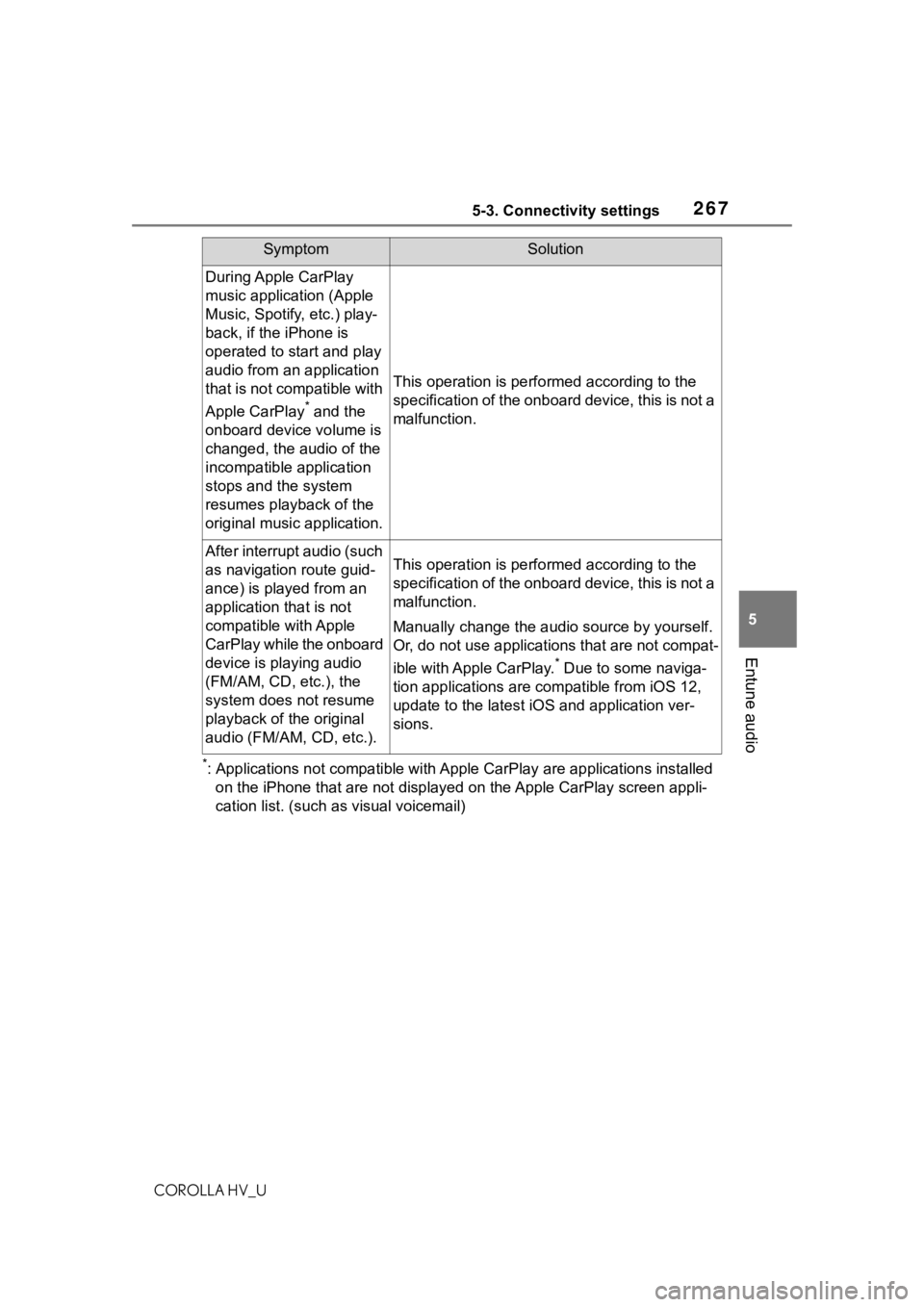
During Apple CarPlay
music application (Apple
Music, Spotify, etc.) play-
back, if the iPhone is
operated to start and play
audio from an application
that is not compatible with
Apple CarPlay
* and the
onboard device volume is
changed, the audio of the
incompatible application
stops and the system
resumes playback of the
original music application.
This operation is perfo rmed according to the
specification of the onboard device, this is not a
malfunction.
After interrupt audio (such
as navigation route guid-
ance) is played from an
application that is not
compatible with Apple
CarPlay while the onboard
device is playing audio
(FM/AM, CD, etc.), the
system does not resume
playback of the original
audio (FM/AM, CD, etc.).This operation is perfo rmed according to the
specification of the onboard device, this is not a
malfunction.
Manually change the audi o source by yourself.
Or, do not use applications that are not compat-
ible with Apple CarPlay.
* Due to some naviga-
tion applications are compatible from iOS 12,
update to the latest iOS and application ver-
sions.
SymptomSolution
Page 268 of 556
2685-4. Other settings
COROLLA HV_U
5-4.Other settings
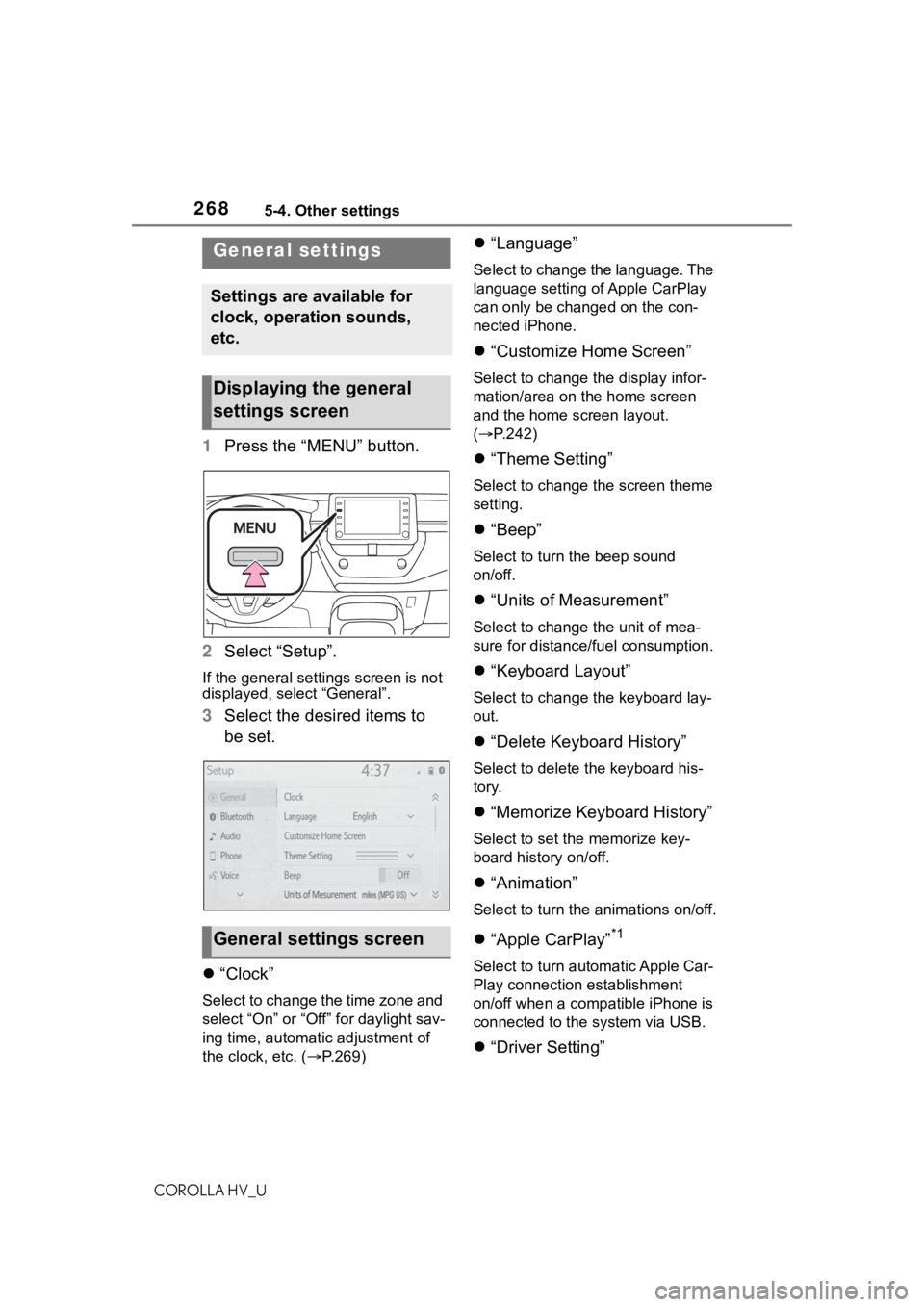
1Press the “MENU” button.
2 Select “Setup”.
If the general settings screen is not
displayed, select “General”.
3Select the desired items to
be set.
“Clock”
Select to change the time zone and
select “On” or “Off” for daylight sav-
ing time, automatic adjustment of
the clock, etc. ( P.269)
“Language”
Select to change the language. The
language setting of Apple CarPlay
can only be chan ged on the con-
nected iPhone.
“Customize Home Screen”
Select to change the display infor-
mation/area on the home screen
and the home screen layout.
( P.242)
“Theme Setting”
Select to change the screen theme
setting.
“Beep”
Select to turn the beep sound
on/off.
“Units of Measurement”
Select to change the unit of mea-
sure for distance/fuel consumption.
“Keyboard Layout”
Select to change the keyboard lay-
out.
“Delete Keyboard History”
Select to delete the keyboard his-
tory.
“Memorize Keyboard History”
Select to set the memorize key-
board history on/off.
“Animation”
Select to turn the animations on/off.
“Apple CarPlay”*1
Select to turn automatic Apple Car-
Play connection establishment
on/off when a compatible iPhone is
connected to the system via USB.
“Driver Setting”
General settings
Settings are available for
clock, operation sounds,
etc.
Displaying the general
settings screen
General settings screen
Page 275 of 556
2755-5. Using the audio/visual system
COROLLA HV_U
5
Entune audio
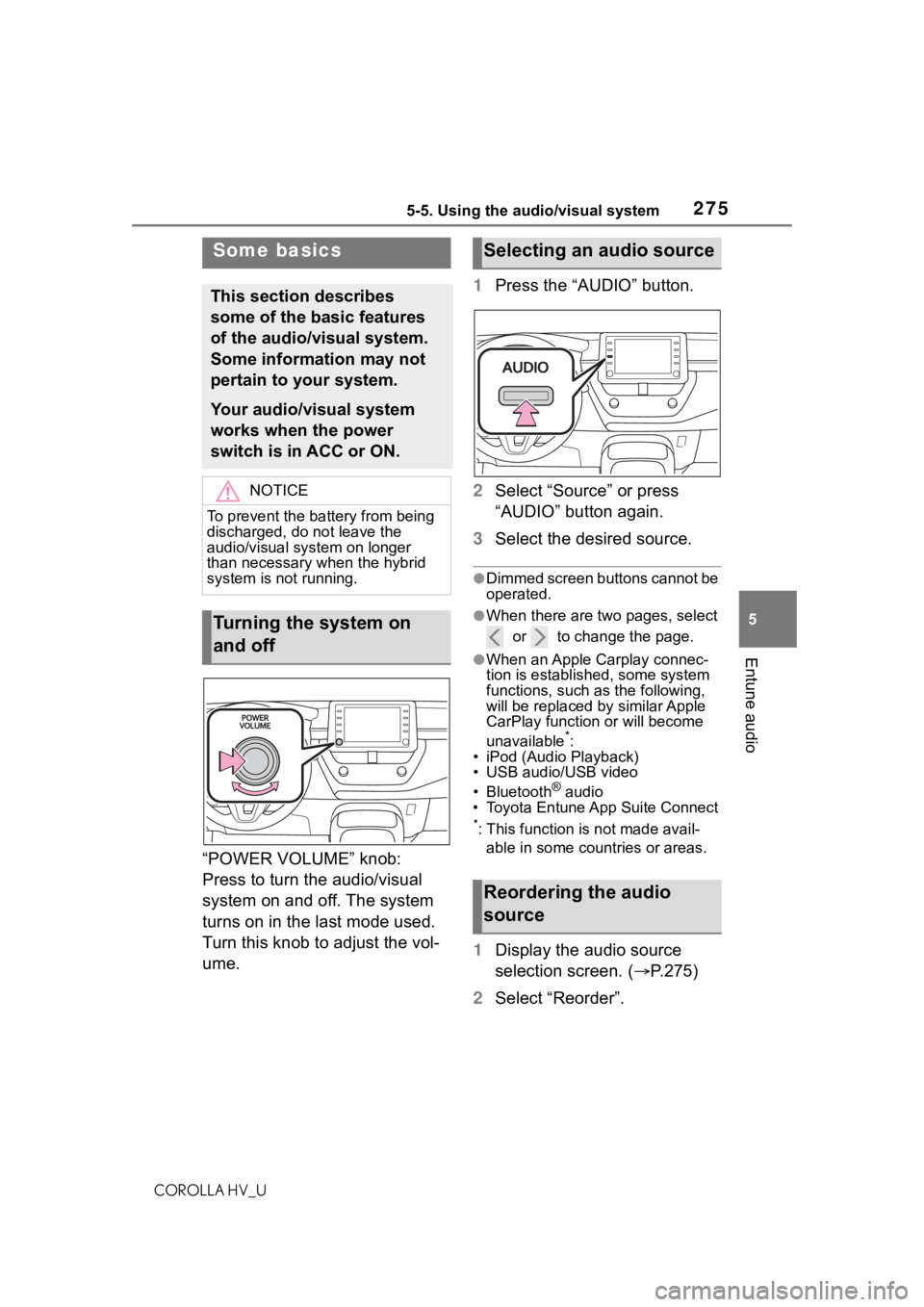
“POWER VOLUME” knob:
Press to turn the audio/visual
system on and off. The system
turns on in the last mode used.
Turn this knob to adjust the vol-
ume. 1
Press the “AUDIO” button.
2 Select “Source” or press
“AUDIO” button again.
3 Select the desired source.
●Dimmed screen buttons cannot be
operated.
●When there are tw o pages, select
or to change the page.
●When an Apple Carplay connec-
tion is established, some system
functions, such as the following,
will be replaced by similar Apple
CarPlay function or will become
unavailable
*:
• iPod (Audio Playback)
• USB audio/USB video
• Bluetooth
® audio
• Toyota Entune App Suite Connect
*: This function is not made avail-
able in some countries or areas.
1 Display the audio source
selection screen. ( P.275)
2 Select “Reorder”.
Some basics
This section describes
some of the basic features
of the audio/visual system.
Some information may not
pertain to your system.
Your audio/visual system
works when the power
switch is in ACC or ON.
NOTICE
To prevent the battery from being
discharged, do not leave the
audio/visual system on longer
than necessary when the hybrid
system is not running.
Turning the system on
and off
Selecting an audio source
Reordering the audio
source
Page 283 of 556
2835-7. Media operation
COROLLA HV_U
5
Entune audio
5-7.Media operation
The USB memory operation
screen can be reached by the
following methods: P. 2 7 5
Connecting a USB memory
( P.276)
When an Apple CarPlay con-
nection is established, this func-
tion will be unavailable
*.
*: This function is not made avail- able in some countries or areas.
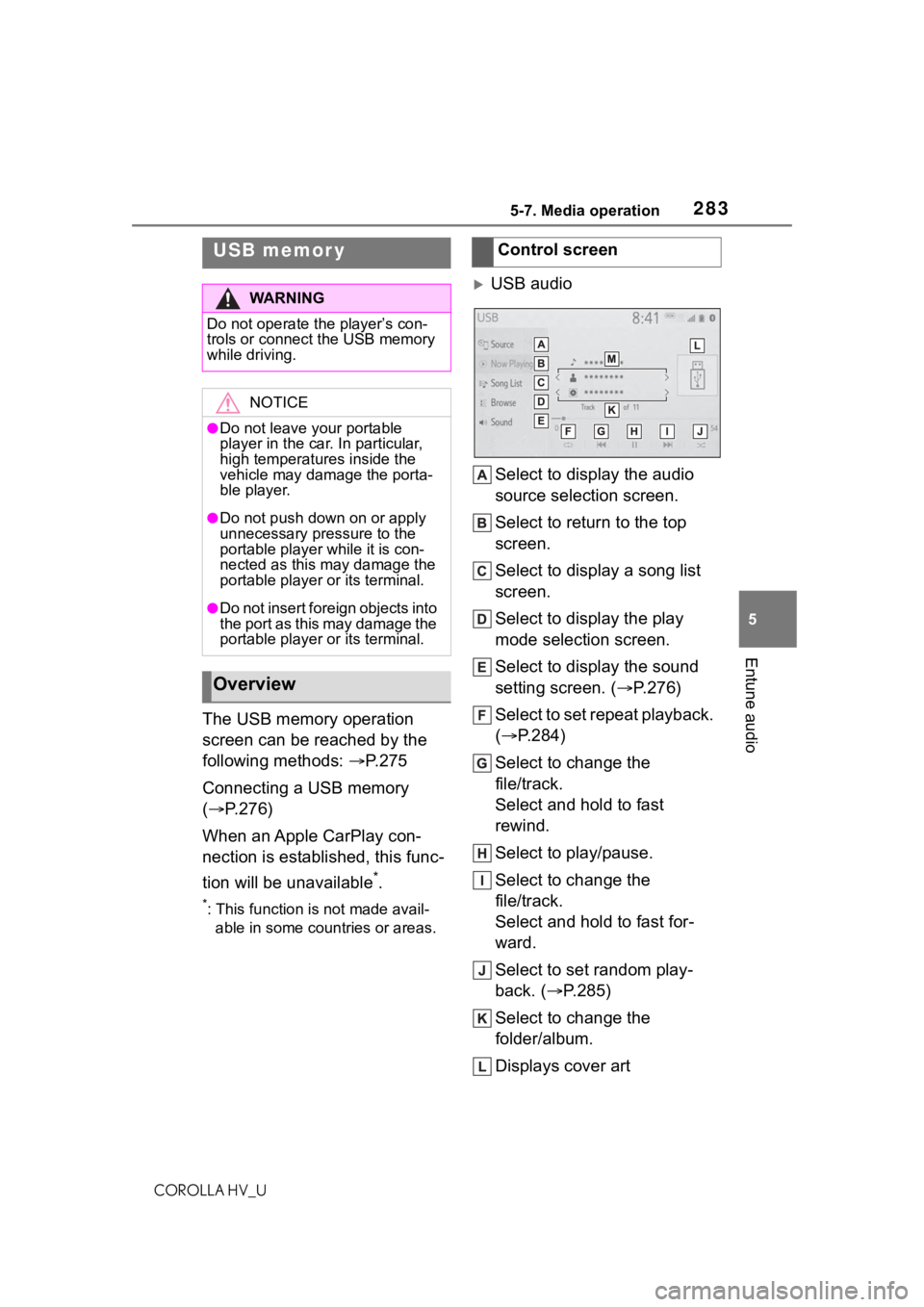
USB audio
Select to display the audio
source selection screen.
Select to return to the top
screen.
Select to display a song list
screen.
Select to display the play
mode selection screen.
Select to display the sound
setting screen. ( P.276)
Select to set repeat playback.
( P.284)
Select to change the
file/track.
Select and hold to fast
rewind.
Select to play/pause.
Select to change the
file/track.
Select and hold to fast for-
ward.
Select to set random play-
back. ( P.285)
Select to change the
folder/album.
Displays cover art
USB memor y
WA R N I N G
Do not operate the player’s con-
trols or connect the USB memory
while driving.
NOTICE
●Do not leave your portable
player in the car. In particular,
high temperatures inside the
vehicle may damage the porta-
ble player.
●Do not push down on or apply
unnecessary pressure to the
portable player while it is con-
nected as this may damage the
portable player or its terminal.
●Do not insert foreign objects into
the port as this may damage the
portable player or its terminal.
Overview
Control screen
Page 286 of 556
2865-7. Media operation
COROLLA HV_U
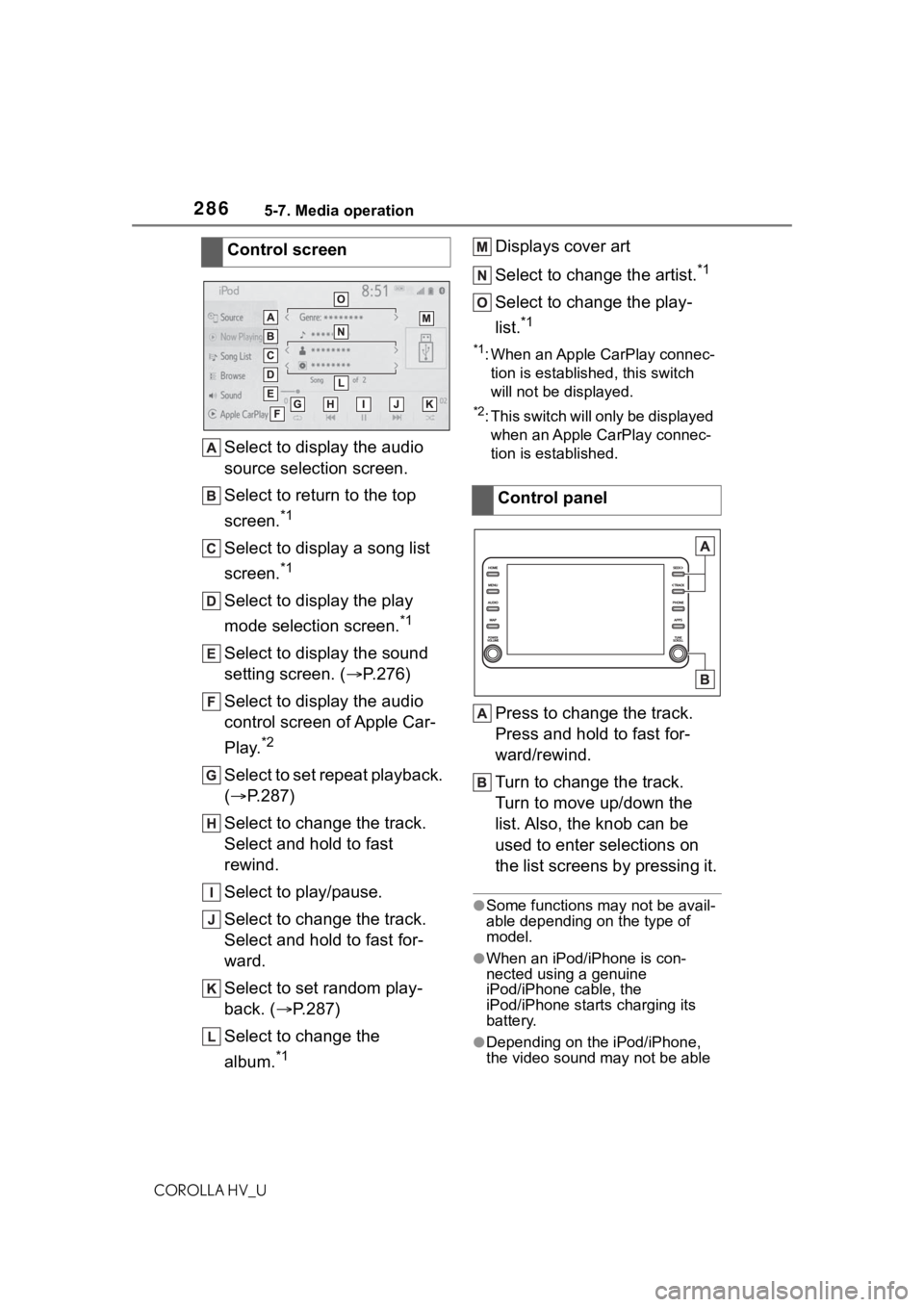
Select to display the audio
source selection screen.
Select to return to the top
screen.
*1
Select to display a song list
screen.
*1
Select to display the play
mode selection screen.
*1
Select to display the sound
setting screen. (P.276)
Select to display the audio
control screen of Apple Car-
Play.
*2
Select to set repeat playback.
( P.287)
Select to change the track.
Select and hold to fast
rewind.
Select to play/pause.
Select to change the track.
Select and hold to fast for-
ward.
Select to set random play-
back. ( P.287)
Select to change the
album.
*1
Displays cover art
Select to change the artist.
*1
Select to change the play-
list.
*1
*1: When an Apple CarPlay connec- tion is established, this switch
will not be displayed.
*2: This switch will only be displayed when an Apple CarPlay connec-
tion is established.
Press to change the track.
Press and hold to fast for-
ward/rewind.
Turn to change the track.
Turn to move up/down the
list. Also, the knob can be
used to enter selections on
the list screens by pressing it.
●Some functions may not be avail-
able depending on the type of
model.
●When an iPod/iPhone is con-
nected using a genuine
iPod/iPhone cable, the
iPod/iPhone starts charging its
battery.
●Depending on the iPod/iPhone,
the video sound may not be able
Control screen
Control panel
Page 289 of 556
2895-7. Media operation
COROLLA HV_U
5
Entune audio
The Bluetooth® audio operation
screen can be reached by the
following methods: P. 2 7 5
Connecting a Bluetooth
® audio
device ( P.290)
Depending on the type of porta-
ble player connected, some
functions may not be available and/or the screen may look dif-
ferently than shown in this man-
ual.
When an Apple CarPlay con-
nection is established, Blue-
tooth
® audio will be suspended
and become unavailable
*.
*: This function is not made avail- able in some countries or areas.
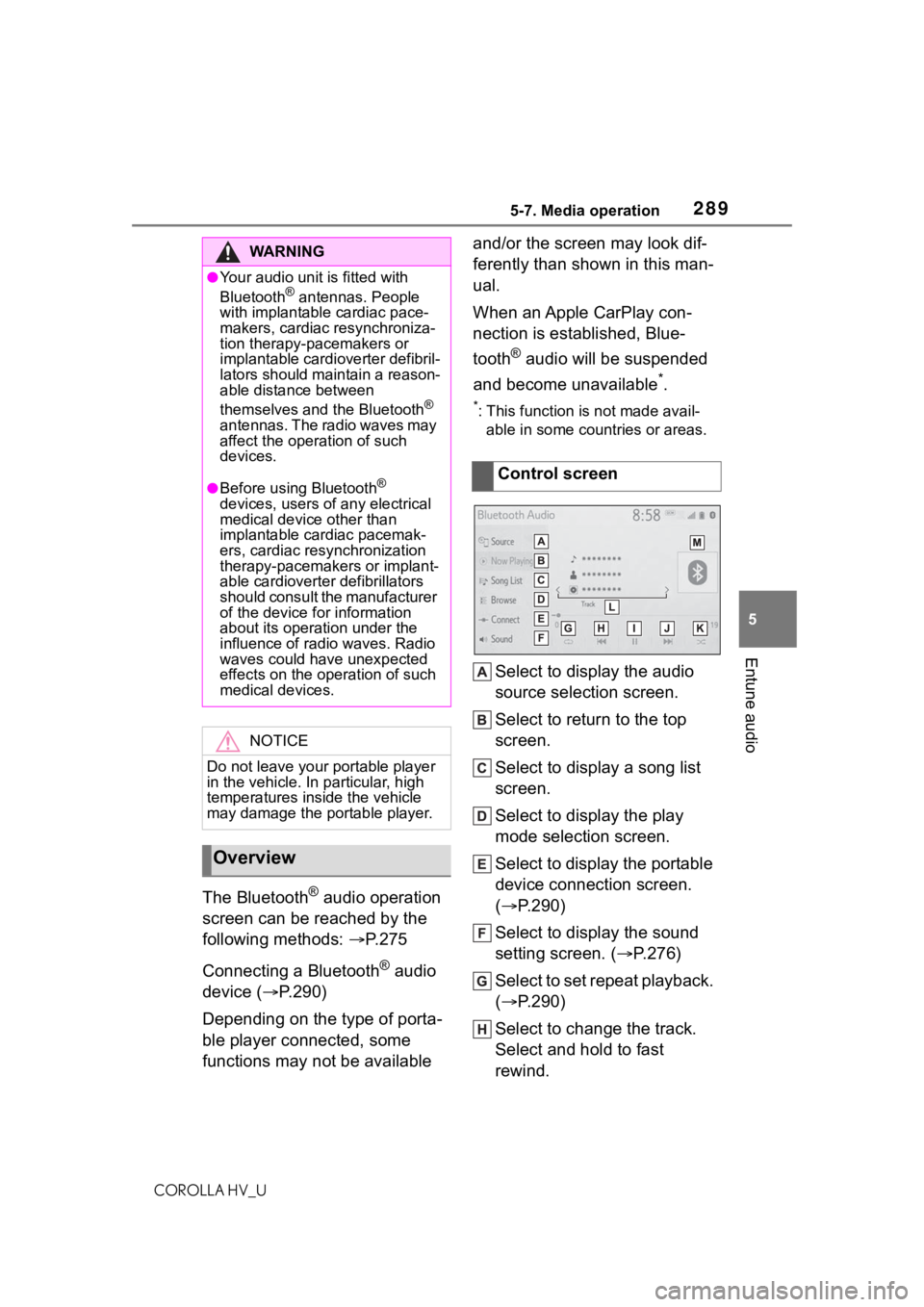
Select to display the audio
source selection screen.
Select to return to the top
screen.
Select to display a song list
screen.
Select to display the play
mode selection screen.
Select to display the portable
device connection screen.
( P.290)
Select to display the sound
setting screen. ( P.276)
Select to set repeat playback.
( P.290)
Select to change the track.
Select and hold to fast
rewind.
WA R N I N G
●Your audio unit is fitted with
Bluetooth® antennas. People
with implantable cardiac pace-
makers, cardiac resynchroniza-
tion therapy-pacemakers or
implantable cardioverter defibril-
lators should maintain a reason-
able distance between
themselves and the Bluetooth
®
antennas. The radio waves may
affect the operation of such
devices.
●Before using Bluetooth®
devices, users of any electrical
medical device other than
implantable cardiac pacemak-
ers, cardiac resynchronization
therapy-pacemakers or implant-
able cardioverter defibrillators
should consult the manufacturer
of the device for information
about its operation under the
influence of radio waves. Radio
waves could have unexpected
effects on the operation of such
medical devices.
NOTICE
Do not leave your portable player
in the vehicle. In particular, high
temperatures inside the vehicle
may damage the portable player.
Overview
Control screen
Page 293 of 556
2935-8. Audio/visual remote controls
COROLLA HV_U
5
Entune audio
5-8.Audio/visual remote controls
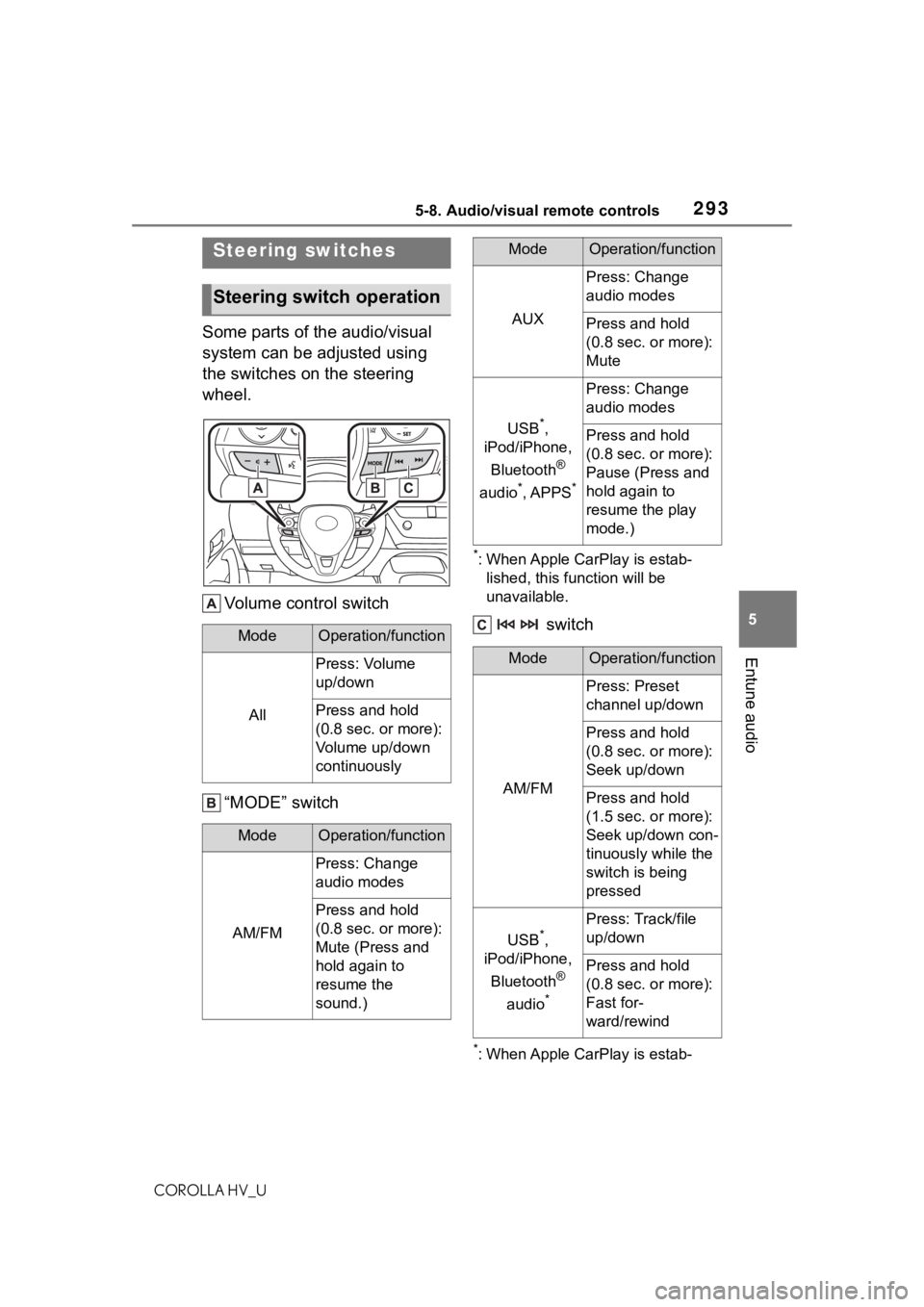
Some parts of the audio/visual
system can be adjusted using
the switches on the steering
wheel. Volume control switch
“MODE” switch
*: When Apple CarPlay is estab-lished, this function will be
unavailable.
switch
*: When Apple CarPlay is estab-
Steering switches
Steering switch operation
ModeOperation/function
All
Press: Volume
up/down
Press and hold
(0.8 sec. or more):
Volume up/down
continuously
ModeOperation/function
AM/FM
Press: Change
audio modes
Press and hold
(0.8 sec. or more):
Mute (Press and
hold again to
resume the
sound.)
AUX
Press: Change
audio modes
Press and hold
(0.8 sec. or more):
Mute
USB*,
iPod/iPhone,
Bluetooth
®
audio
*, APPS*
Press: Change
audio modes
Press and hold
(0.8 sec. or more):
Pause (Press and
hold again to
resume the play
mode.)
ModeOperation/function
AM/FM
Press: Preset
channel up/down
Press and hold
(0.8 sec. or more):
Seek up/down
Press and hold
(1.5 sec. or more):
Seek up/down con-
tinuously while the
switch is being
pressed
USB*,
iPod/iPhone,
Bluetooth
®
audio
*
Press: Track/file
up/down
Press and hold
(0.8 sec. or more):
Fast for-
ward/rewind
ModeOperation/function
Page 308 of 556
3085-11. Voice command system operation
COROLLA HV_U
5-11.Voice command system operation
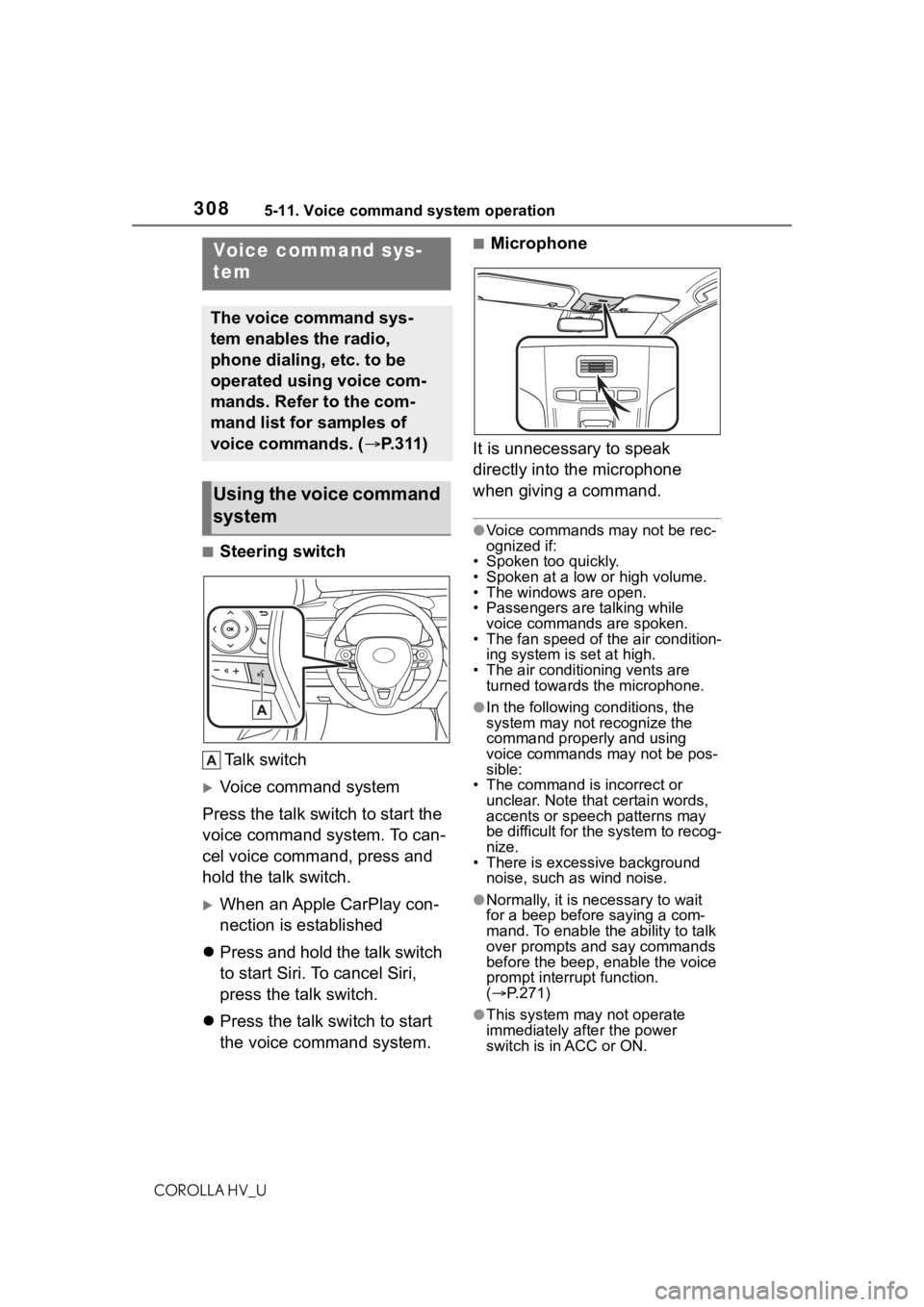
■Steering switchTa l k s w i t c h
Voice command system
Press the talk switch to start the
voice command system. To can-
cel voice command, press and
hold the talk switch.
When an Apple CarPlay con-
nection is established
Press and hold the talk switch
to start Siri. To cancel Siri,
press the talk switch.
Press the talk switch to start
the voice command system.
■Microphone
It is unnecessary to speak
directly into the microphone
when giving a command.
●Voice commands may not be rec-
ognized if:
• Spoken too quickly.
• Spoken at a low or high volume.
• The windows are open.
• Passengers are talking while
voice commands are spoken.
• The fan speed of the air condition- ing system is set at high.
• The air conditioning vents are turned towards the microphone.
●In the following c onditions, the
system may not recognize the
command properly and using
voice commands may not be pos-
sible:
• The command is incorrect or
unclear. Note that certain words,
accents or speech patterns may
be difficult for the system to recog-
nize.
• There is excessive background noise, such as wind noise.
●Normally, it is necessary to wait
for a beep before saying a com-
mand. To enable th e ability to talk
over prompts and say commands
before the beep, enable the voice
prompt interrupt function.
( P.271)
●This system may not operate
immediately after the power
switch is in ACC or ON.
Voice command sys-
tem
The voice command sys-
tem enables the radio,
phone dialing, etc. to be
operated using voice com-
mands. Refer to the com-
mand list for samples of
voice commands. ( P.311)
Using the voice command
system
Page 312 of 556
3125-11. Voice command system operation
COROLLA HV_U
*1: When an Apple CarPlay connec-tion is established, this voice
commands will be unavailable.
*2: If the system does not recognize the name of a con tact, create a
voice tag. ( P.334) The name of
a contact can also be recognized
by adding a voice tag.
■While in a phone call*
*: When an Apple CarPlay connec- tion is established, this voice
commands will be unavailable.
■While incoming message
notification is displayed
*1, 2
*1: Full screen message notification must be turned on within the
phone settings ( P.332)
*2: When an Apple CarPlay connec-
tion is established, this voice
commands will be unavailable.
■Radio
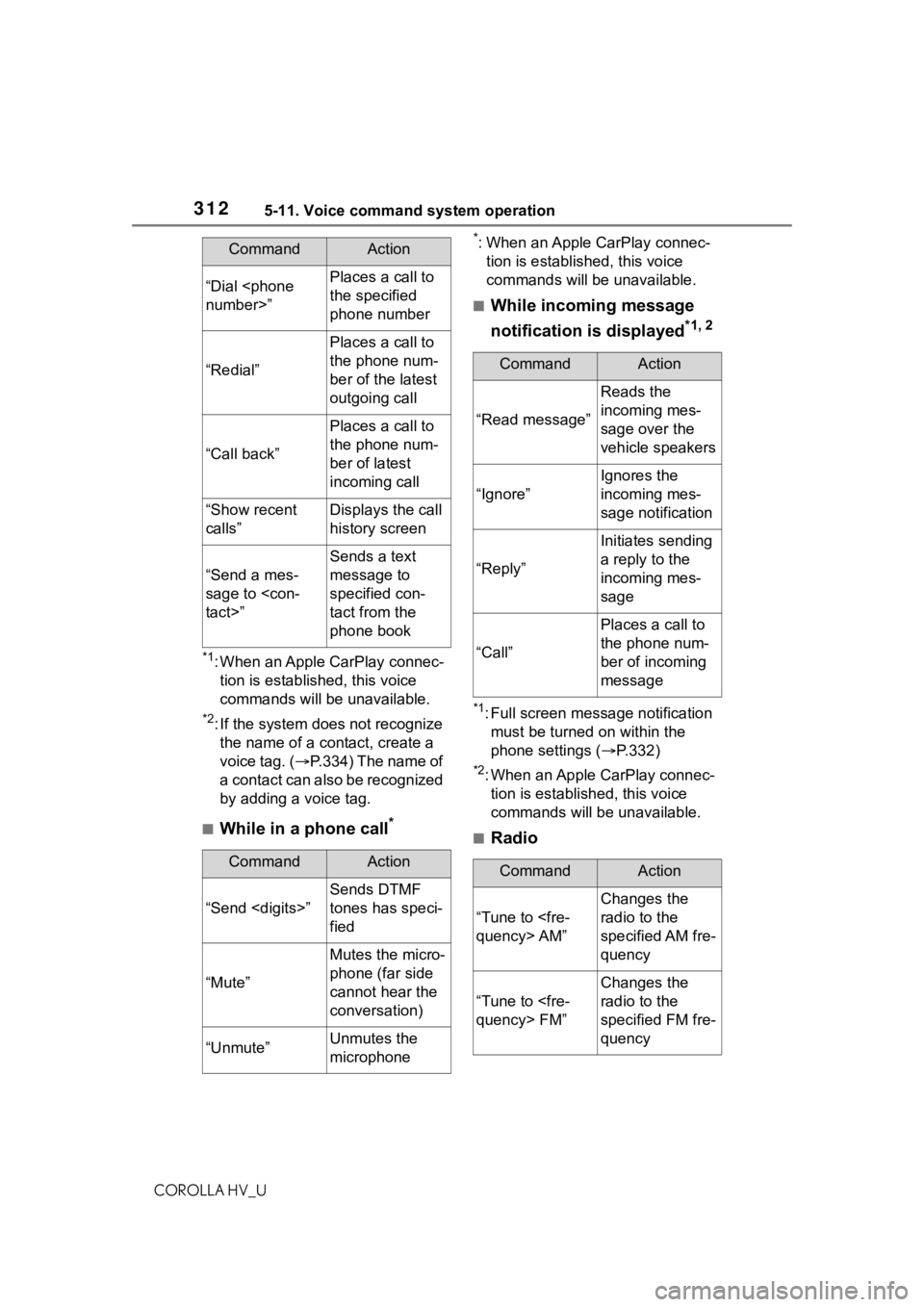
“Dial
the specified
phone number
“Redial”
Places a call to
the phone num-
ber of the latest
outgoing call
“Call back”
Places a call to
the phone num-
ber of latest
incoming call
“Show recent
calls”Displays the call
history screen
“Send a mes-
sage to
Sends a text
message to
specified con-
tact from the
phone book
CommandAction
“Send
Sends DTMF
tones has speci-
fied
“Mute”
Mutes the micro-
phone (far side
cannot hear the
conversation)
“Unmute”Unmutes the
microphone
CommandAction
CommandAction
“Read message”
Reads the
incoming mes-
sage over the
vehicle speakers
“Ignore”
Ignores the
incoming mes-
sage notification
“Reply”
Initiates sending
a reply to the
incoming mes-
sage
“Call”
Places a call to
the phone num-
ber of incoming
message
CommandAction
“Tune to
Changes the
radio to the
specified AM fre-
quency
“Tune to
Changes the
radio to the
specified FM fre-
quency