fuel TOYOTA COROLLA HYBRID 2020 (in English) User Guide
[x] Cancel search | Manufacturer: TOYOTA, Model Year: 2020, Model line: COROLLA HYBRID, Model: TOYOTA COROLLA HYBRID 2020Pages: 556, PDF Size: 19.28 MB
Page 73 of 556
731-4. Hybrid system
COROLLA HV_U
1
For safety and security
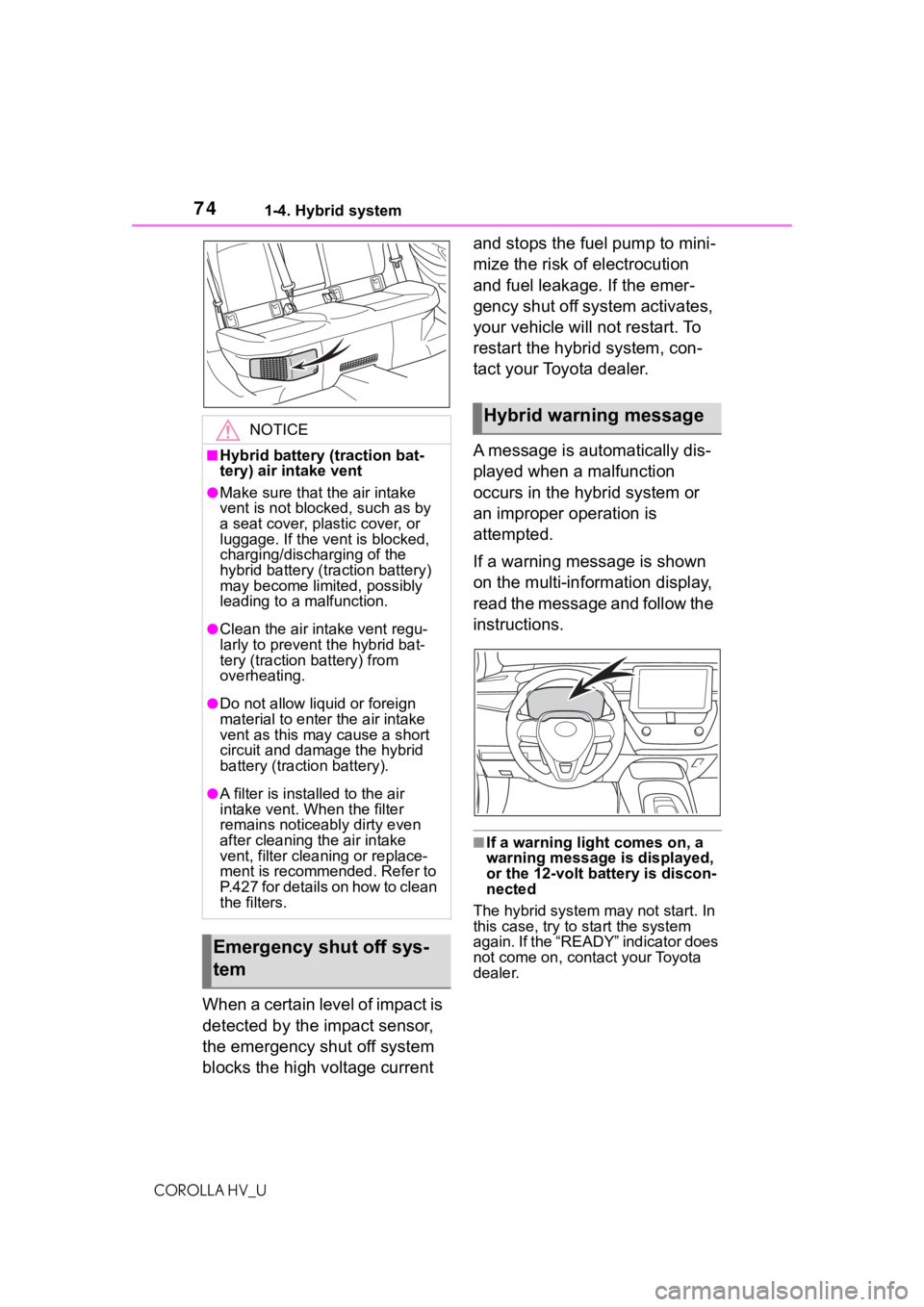
There is an air intake vent under
the right side of the rear seat for
the purpose of cooling the
hybrid battery (traction battery).
If the vent becomes blocked, the
hybrid battery may overheat,
charging/discharging of the
hybrid battery (traction battery)
may become limited.
WA R N I N G
●If your vehicle needs to be
towed, do so with the front
wheels raised. If the wheels
connected to the electric motor
(traction moto r) are on the
ground when towing, the motor
may continue to generate elec-
tricity. This may cause a fire.
( P.445)
●Carefully inspect the ground
under the vehicle. If you find
that liquid has leaked onto the
ground, the fuel system may
have been damaged. Leave the
vehicle as soon as possible.
■Hybrid battery (traction bat-
tery)
●Never resell, hand over or mod-
ify the hybrid battery. To prevent
accidents, hybrid batteries that
have been removed from a dis-
posed vehicle are collected
through Toyota dealer. Do not
dispose of the battery yourself.
Unless the battery is properly col-
lected, the following may occur,
resulting in dea th or serious
injury:
• The hybrid battery may be ille- gally disposed of or dumped,
and it is hazardous to the envi-
ronment or someone may touch
a high voltage part, resulting in
an electric shock.
• The hybrid battery is intended to be used exclusively with your
hybrid vehicle. If the hybrid bat-
tery is used outside of your
vehicle or modified in any way,
accidents such as electric
shock, heat generation, smoke
generation, an explosion and
electrolyte leakage may occur.
When reselling or handing over
your vehicle, the possibility of an
accident is extremely high
because the person receiving the
vehicle may not be aware of these
dangers.
●If your vehicle is disposed of
without the hybrid battery hav-
ing been removed, there is a
danger of serious electric shock
if high voltage parts, cables and
their connectors are touched. In
the event that your vehicle must
be disposed of, the hybrid bat-
tery must be disposed of by
your Toyota dealer or a qualified
service shop. If the hybrid bat-
tery is not disposed of properly,
it may cause electric shock that
can result in dea th or serious
injury.
NOTICE
■Hybrid battery (traction bat-
tery) air intake vent
Do not carry large amounts of
water such as water cooler bottles
in the vehicle. If water spills onto
the hybrid battery (traction bat-
tery), the battery may be dam-
aged. Have the vehicle inspected
by your Toyota dealer.
Hybrid battery (traction
battery) air intake vent
Page 74 of 556
741-4. Hybrid system
COROLLA HV_U
When a certain level of impact is
detected by the impact sensor,
the emergency shut off system
blocks the high voltage current and stops the fuel pump to mini-
mize the risk of electrocution
and fuel leakage. If the emer-
gency shut off system activates,
your vehicle will not restart. To
restart the hybrid system, con-
tact your Toyota dealer.
A message is automatically dis-
played when a malfunction
occurs in the hybrid system or
an improper operation is
attempted.
If a warning message is shown
on the multi-information display,
read the message and follow the
instructions.
■If a warning light comes on, a
warning message
is displayed,
or the 12-volt battery is discon-
nected
The hybrid system may not start. In
this case, try to start the system
again. If the “READY” indicator does
not come on, contact your Toyota
dealer.
NOTICE
■Hybrid battery (traction bat-
tery) air intake vent
●Make sure that the air intake
vent is not blocked, such as by
a seat cover, plastic cover, or
luggage. If the vent is blocked,
charging/discharging of the
hybrid battery (traction battery)
may become limited, possibly
leading to a malfunction.
●Clean the air intake vent regu-
larly to prevent the hybrid bat-
tery (traction battery) from
overheating.
●Do not allow liquid or foreign
material to enter the air intake
vent as this may cause a short
circuit and damage the hybrid
battery (traction battery).
●A filter is installed to the air
intake vent. Wh en the filter
remains noticeably dirty even
after cleaning the air intake
vent, filter cleaning or replace-
ment is recommended. Refer to
P.427 for details on how to clean
the filters.
Emergency shut off sys-
tem
Hybrid warning message
Page 81 of 556
812-1. Instrument cluster
COROLLA HV_U
2
Vehicle status information and indicators
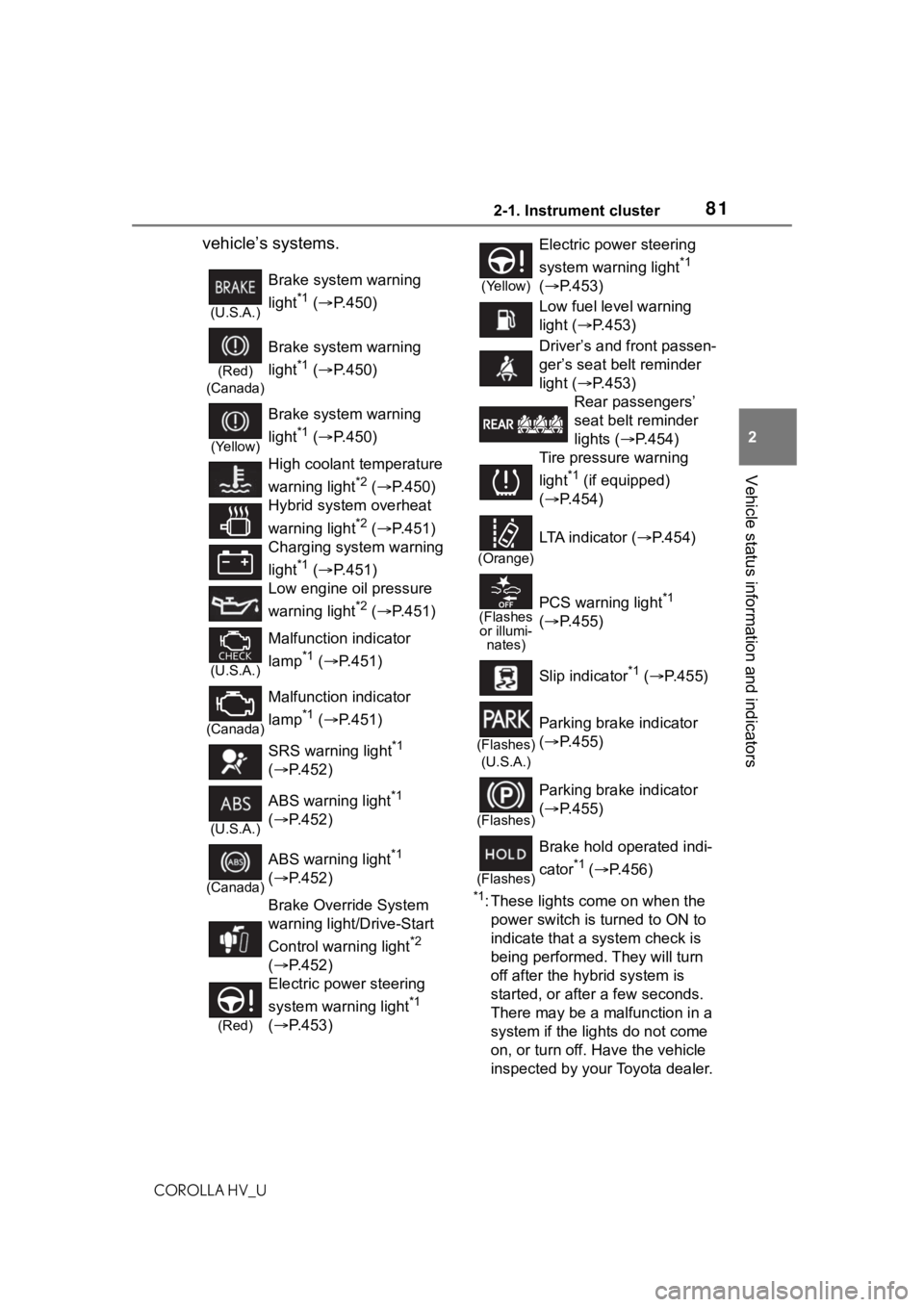
vehicle’s systems.
*1: These lights come on when the power switch is turned to ON to
indicate that a system check is
being performed. They will turn
off after the hybrid system is
started, or after a few seconds.
There may be a malfunction in a
system if the lights do not come
on, or turn off. Have the vehicle
inspected by your Toyota dealer.
(U.S.A.)
Brake system warning
light
*1 ( P.450)
(Red)
(Canada)
Brake system warning
light
*1 ( P.450)
(Yellow)
Brake system warning
light
*1 ( P.450)
High coolant temperature
warning light
*2 ( P.450)
Hybrid system overheat
warning light
*2 ( P.451)
Charging system warning
light
*1 ( P.451)
Low engine oil pressure
warning light
*2 ( P.451)
(U.S.A.)
Malfunction indicator
lamp
*1 ( P.451)
(Canada)
Malfunction indicator
lamp
*1 ( P.451)
SRS warning light
*1
( P.452)
(U.S.A.)
ABS warning light*1
( P.452)
(Canada)
ABS warning light*1
( P.452)
Brake Override System
warning light/Drive-Start
Control warning light
*2
( P.452)
(Red)
Electric power steering
system warning light
*1
( P.453)
(Yellow)
Electric power steering
system warning light
*1
( P.453)
Low fuel level warning
light ( P.453)
Driver’s and front passen-
ger’s seat belt reminder
light ( P.453)
Rear passengers’
seat belt reminder
lights ( P.454)
Tire pressure warning
light
*1 (if equipped)
( P.454)
(Orange)
LTA indicator ( P.454)
(Flashes
or illumi- nates)PCS warning light*1
( P.455)
Slip indicator
*1 ( P.455)
(Flashes)
(U.S.A.)
Parking brake indicator
( P.455)
(Flashes)
Parking brake indicator
( P.455)
(Flashes)
Brake hold operated indi-
cator
*1 ( P.456)
Page 84 of 556
842-1. Instrument cluster
COROLLA HV_U
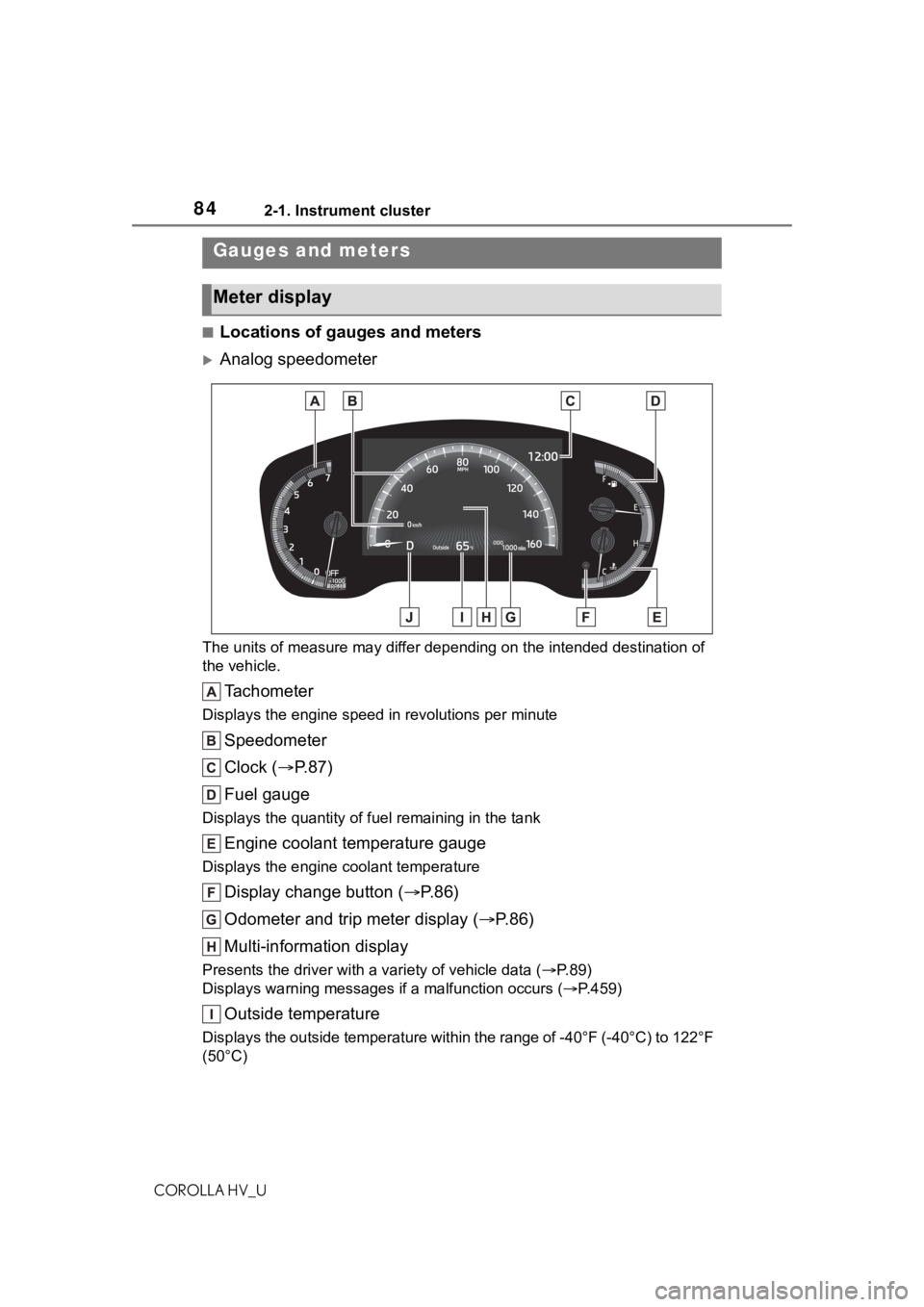
■Locations of gauges and meters
Analog speedometer
The units of measure may differ depending on the intended destination of
the vehicle.
Tachometer
Displays the engine speed in revolutions per minute
Speedometer
Clock ( P. 8 7 )
Fuel gauge
Displays the quantity of fu el remaining in the tank
Engine coolant temperature gauge
Displays the engine coolant temperature
Display change button ( P.86)
Odometer and trip meter display ( P.86)
Multi-information display
Presents the driver with a variety of vehicle data (P.89)
Displays warning messages if a malfunction occurs (P.459)
Outside temperature
Displays the outside temperature within the range of -40°F (-40 °C) to 122°F
(50°C)
Gauges and meters
Meter display
Page 85 of 556
852-1. Instrument cluster
COROLLA HV_U
2
Vehicle status information and indicators
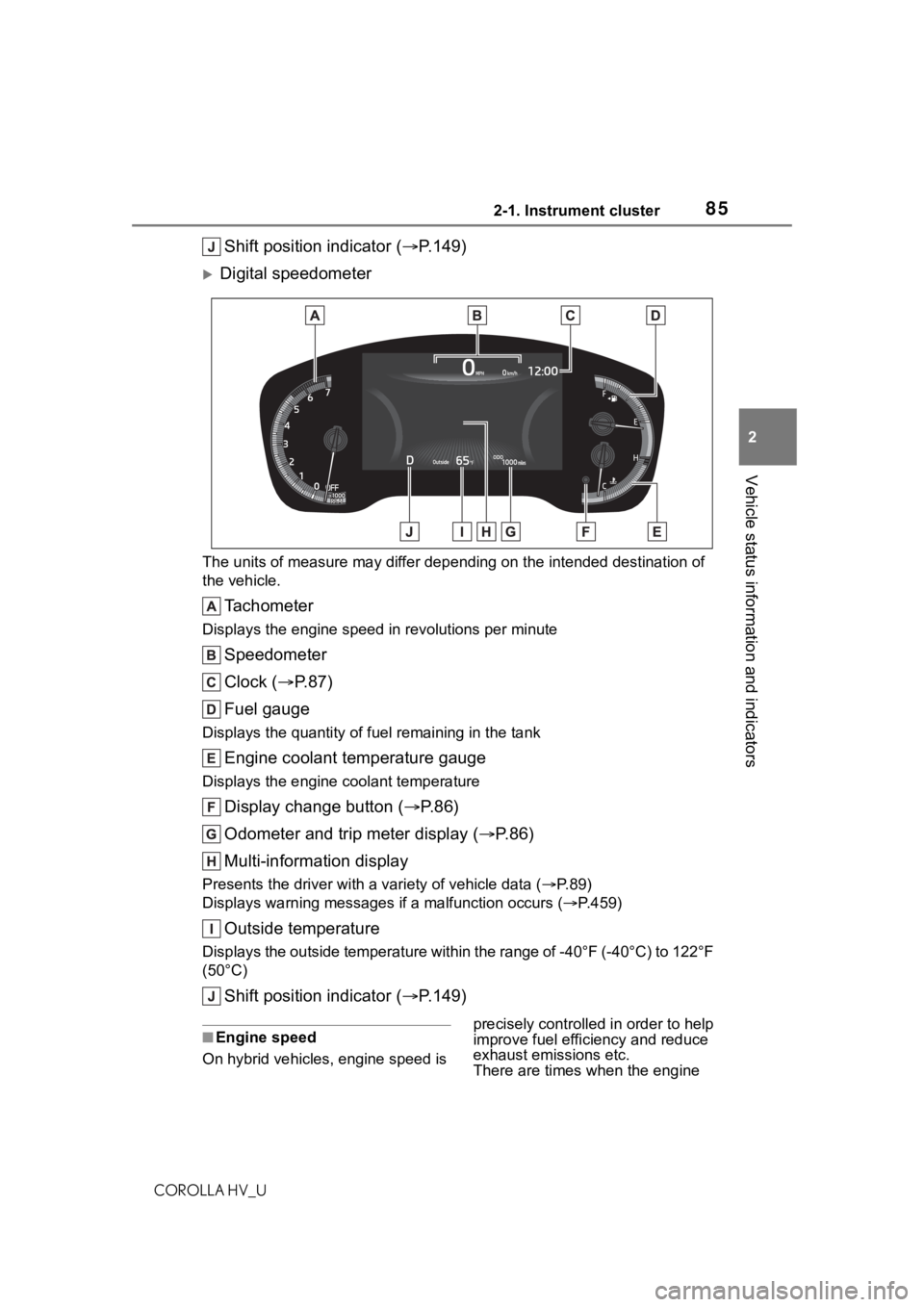
Shift position indicator ( P.149)
Digital speedometer
The units of measure may differ depending on the intended desti nation of
the vehicle.
Tachometer
Displays the engine speed in revolutions per minute
Speedometer
Clock ( P. 8 7 )
Fuel gauge
Displays the quantity of fu el remaining in the tank
Engine coolant temperature gauge
Displays the engine coolant temperature
Display change button ( P.86)
Odometer and trip meter display ( P.86)
Multi-information display
Presents the driver with a variety of vehicle data (P.89)
Displays warning messages if a malfunction occurs (P.459)
Outside temperature
Displays the outside temperature within the range of -40°F (-40 °C) to 122°F
(50°C)
Shift position indicator ( P.149)
■Engine speed
On hybrid vehicles, engine speed is precisely controlled in order to help
improve fuel efficiency and reduce
exhaust emissions etc.
There are times when the engine
Page 90 of 556
902-1. Instrument cluster
COROLLA HV_U
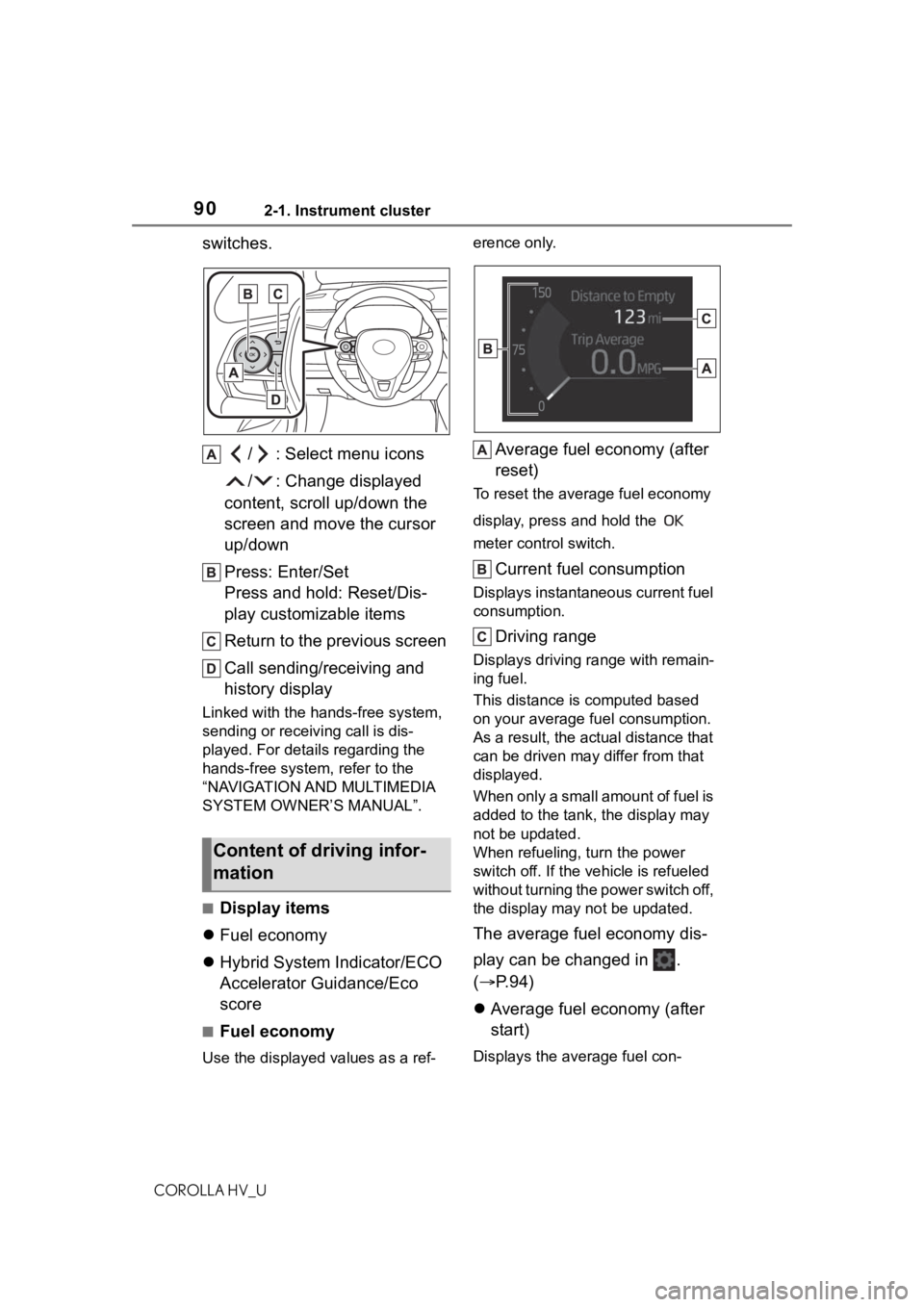
switches./ : Select menu icons
/ : Change displayed
content, scroll up/down the
screen and move the cursor
up/down
Press: Enter/Set
Press and hold: Reset/Dis-
play customizable items
Return to the previous screen
Call sending/receiving and
history display
Linked with the hands-free system,
sending or receiv ing call is dis-
played. For details regarding the
hands-free system, refer to the
“NAVIGATION AND MULTIMEDIA
SYSTEM OWNER’S MANUAL”.
■Display items
Fuel economy
Hybrid System Indicator/ECO
Accelerator Guidance/Eco
score
■Fuel economy
Use the displayed values as a ref- erence only.
Average fuel economy (after
reset)
To reset the average fuel economy
display, press and hold the
meter control switch.
Current fuel consumption
Displays instantaneous current fuel
consumption.
Driving range
Displays driving ra
nge with remain-
ing fuel.
This distance is computed based
on your average f uel consumption.
As a result, the actual distance that
can be driven may differ from that
displayed.
When only a small amount of fuel is
added to the tank, the display may
not be updated.
When refueling, turn the power
switch off. If the ve hicle is refueled
without turning the power switch off,
the display may not be updated.
The average fuel economy dis-
play can be changed in .
( P.94)
Average fuel economy (after
start)
Displays the average fuel con-
Content of driving infor-
mation
Page 91 of 556
912-1. Instrument cluster
COROLLA HV_U
2
Vehicle status information and indicators
sumption since hybrid system start.
Average fuel economy (after
refuel)
Displays the average fuel con-
sumption since the vehicle was
refueled.
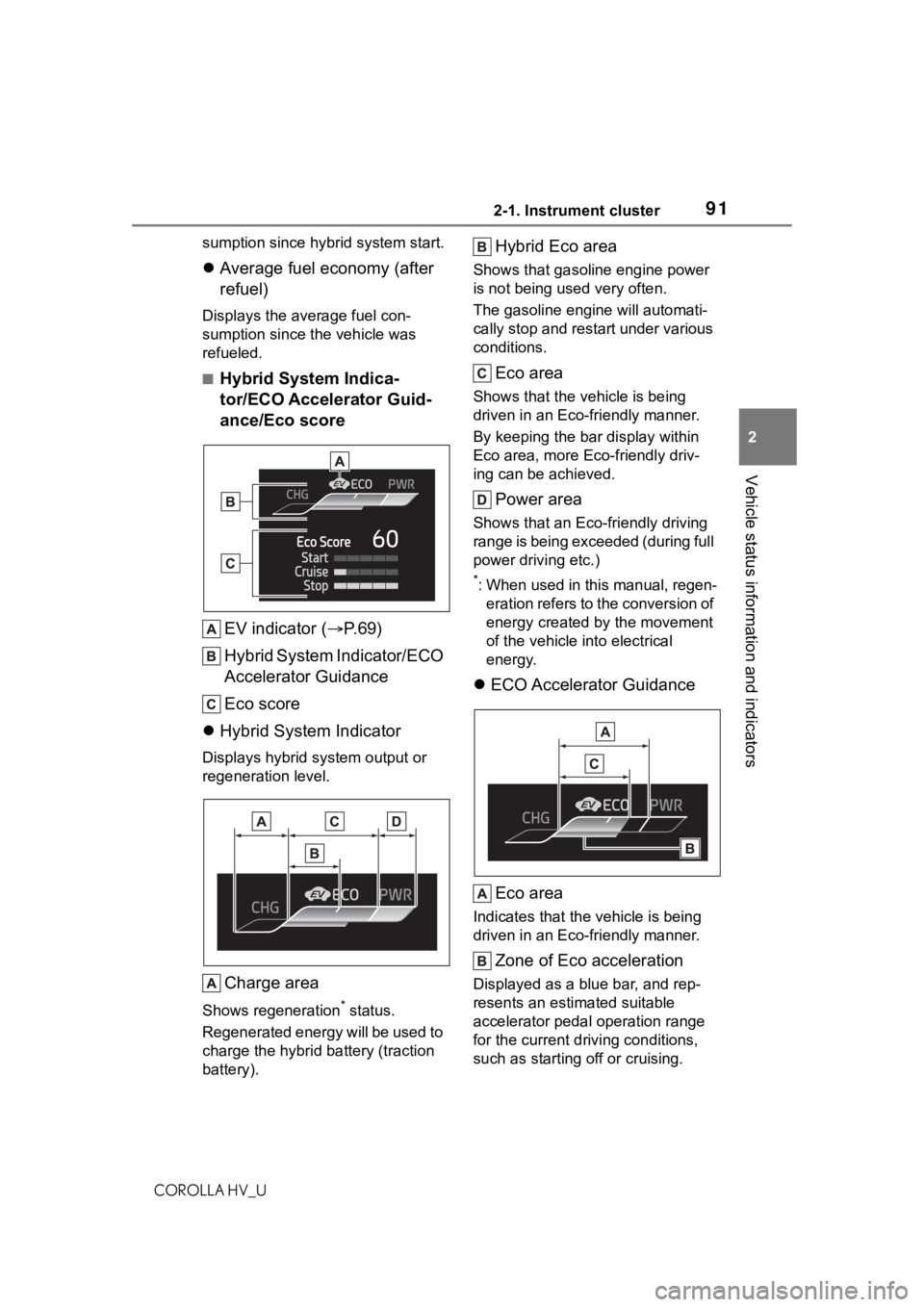
■Hybrid System Indica-
tor/ECO Accelerator Guid-
ance/Eco score
EV indicator ( P.69)
Hybrid System Indicator/ECO
Accelerator Guidance
Eco score
Hybrid System Indicator
Displays hybrid system output or
regeneration level.
Charge area
Shows regeneration* status.
Regenerated energy will be used to
charge the hybrid battery (traction
battery).
Hybrid Eco area
Shows that gasoline engine power
is not being used very often.
The gasoline engi ne will automati-
cally stop and restart under various
conditions.
Eco area
Shows that the vehicle is being
driven in an Eco-friendly manner.
By keeping the bar display within
Eco area, more Eco-friendly driv-
ing can be achieved.
Power area
Shows that an Eco-friendly driving
range is being exceeded (during full
power driving etc.)
*: When used in this manual, regen- eration refers to the conversion of
energy created by the movement
of the vehicle into electrical
energy.
ECO Accelerator Guidance
Eco area
Indicates that the vehicle is being
driven in an Eco-friendly manner.
Zone of Eco acceleration
Displayed as a blue bar, and rep-
resents an estimated suitable
accelerator pedal operation range
for the current driving conditions,
such as starting off or cruising.
Page 94 of 556
942-1. Instrument cluster
COROLLA HV_U
■Meter display settings that
can be changed
Language
Select to change the language dis-
played.
Units
Select to change t he units of mea-
sure displayed.
Speedometer display (7-inch
display)
Select to set the display of the
speedometer to analog/digital.
EV indicator
Select to enable/disable the EV
indicator.
Select to change the displayed con-
tent of the following:
• Hybrid system indicator
Select to display/not display the
Eco Accelerator Guidance. ( P. 9 1 )
• Fuel economy display
Select to change the average fuel
consumption display between after
start/after reset. ( P. 9 0 )
Select to display/not display the
audio system linked display.
Select to change the displayed con-
tent of the following:
• Display contents
Select to display/not display the
energy monitor. ( P. 9 5 ) • Drive information type
Select to change the drive informa-
tion type display between after
start/after reset.
• Drive information items
Select to set the
first and second
items of the drive information dis-
play to any of the following: aver-
age vehicle
speed/distance/elapsed time.
Current trip result display
Select to change the displayed
information about t he current trip,
measured from when the hybrid
system was start ed until it was
stopped, between drive informa-
tion/eco score. (The information will
be displayed temporarily when the
hybrid system is stopped.)
Pop-up display
Select to enable/disable pop-up
displays for each relevant system.
Multi-information display off
Select to turn the multi-information
display off.
To turn the multi-information display
on again, press any of the following
meter control switches
//// /.
Default setting
Select to reset the meter display
settings to the default setting.
■Vehicle functions and set-
tings that can be changed
P.516
■Suspension of the settings dis-
play
●Some settings cannot be changed
Settings display
Page 99 of 556
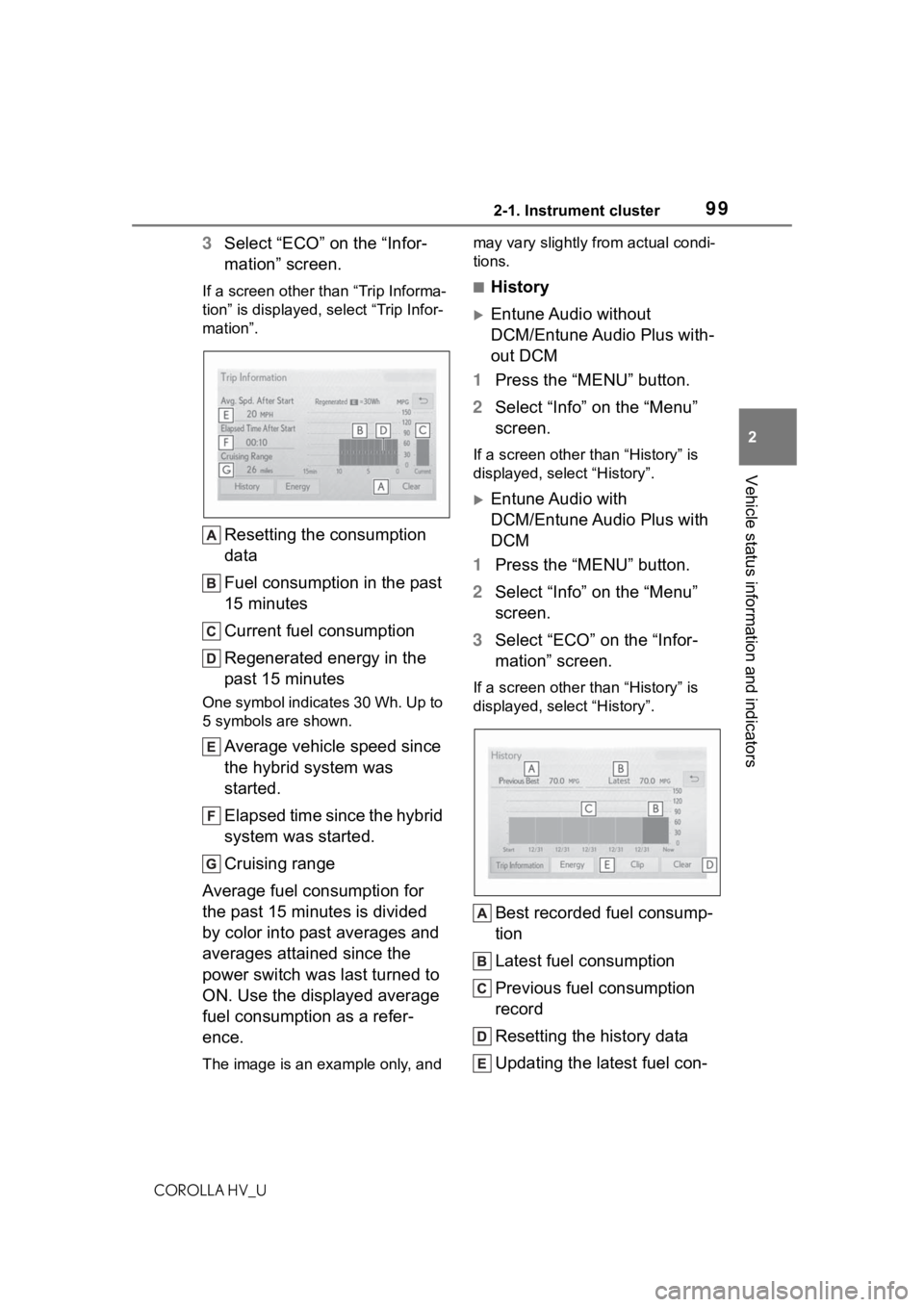
992-1. Instrument cluster
COROLLA HV_U
2
Vehicle status information and indicators
3 Select “ECO” on the “Infor-
mation” screen.
If a screen other than “Trip Informa-
tion” is displayed, select “Trip Infor-
mation”.
Resetting the consumption
data
Fuel consumption in the past
15 minutes
Current fuel consumption
Regenerated energy in the
past 15 minutes
One symbol indicates 30 Wh. Up to
5 symbols are shown.
Average vehicle speed since
the hybrid system was
started.
Elapsed time since the hybrid
system was started.
Cruising range
Average fuel consumption for
the past 15 minutes is divided
by color into past averages and
averages attained since the
power switch was last turned to
ON. Use the displayed average
fuel consumption as a refer-
ence.
The image is an example only, and may vary slightly from actual condi-
tions.
■History
Entune Audio without
DCM/Entune Audio Plus with-
out DCM
1 Press the “MENU” button.
2 Select “Info” on the “Menu”
screen.
If a screen other than “History” is
displayed, select “History”.
Entune Audio with
DCM/Entune Audio Plus with
DCM
1 Press the “MENU” button.
2 Select “Info” on the “Menu”
screen.
3 Select “ECO” on the “Infor-
mation” screen.
If a screen other than “History” is
displayed, select “History”.
Best recorded fuel consump-
tion
Latest fuel consumption
Previous fuel consumption
record
Resetting the history data
Updating the latest fuel con-
Page 100 of 556

1002-1. Instrument cluster
COROLLA HV_U
sumption data
The average fuel consumption
history is divided by color into
past averages and the average
fuel consumption since the last
updated. Use the displayed
average fuel consumption as a
reference.
The image is an example only, and
may vary slightly f rom actual condi-
tions.
■Updating the history data
Update the latest fuel consumption
by selecting “Clip ” to measure the
current fuel consumption again.
■Resetting the data
The fuel consumption data can be
deleted by selecting “Clear”.
■Cruising range
Displays the estimated maximum
distance that can be driven with the
quantity of fuel remaining.
This distance is computed based on
your average fuel consumption.
As a result, the actual distance that
can be driven may differ from that
displayed.