power steering TOYOTA COROLLA HYBRID 2020 (in English) User Guide
[x] Cancel search | Manufacturer: TOYOTA, Model Year: 2020, Model line: COROLLA HYBRID, Model: TOYOTA COROLLA HYBRID 2020Pages: 556, PDF Size: 19.28 MB
Page 144 of 556
1444-2. Driving procedures
COROLLA HV_U
■Conditions affecting operation
P. 1 1 3
■Notes for the entry function
P. 1 1 4
■Steering lock function
●After turning the power switch off
and opening and closing the
doors, the steer ing wheel will be
locked due to the steering lock
function. Operating the power
switch again automatically can-
cels the steering lock.
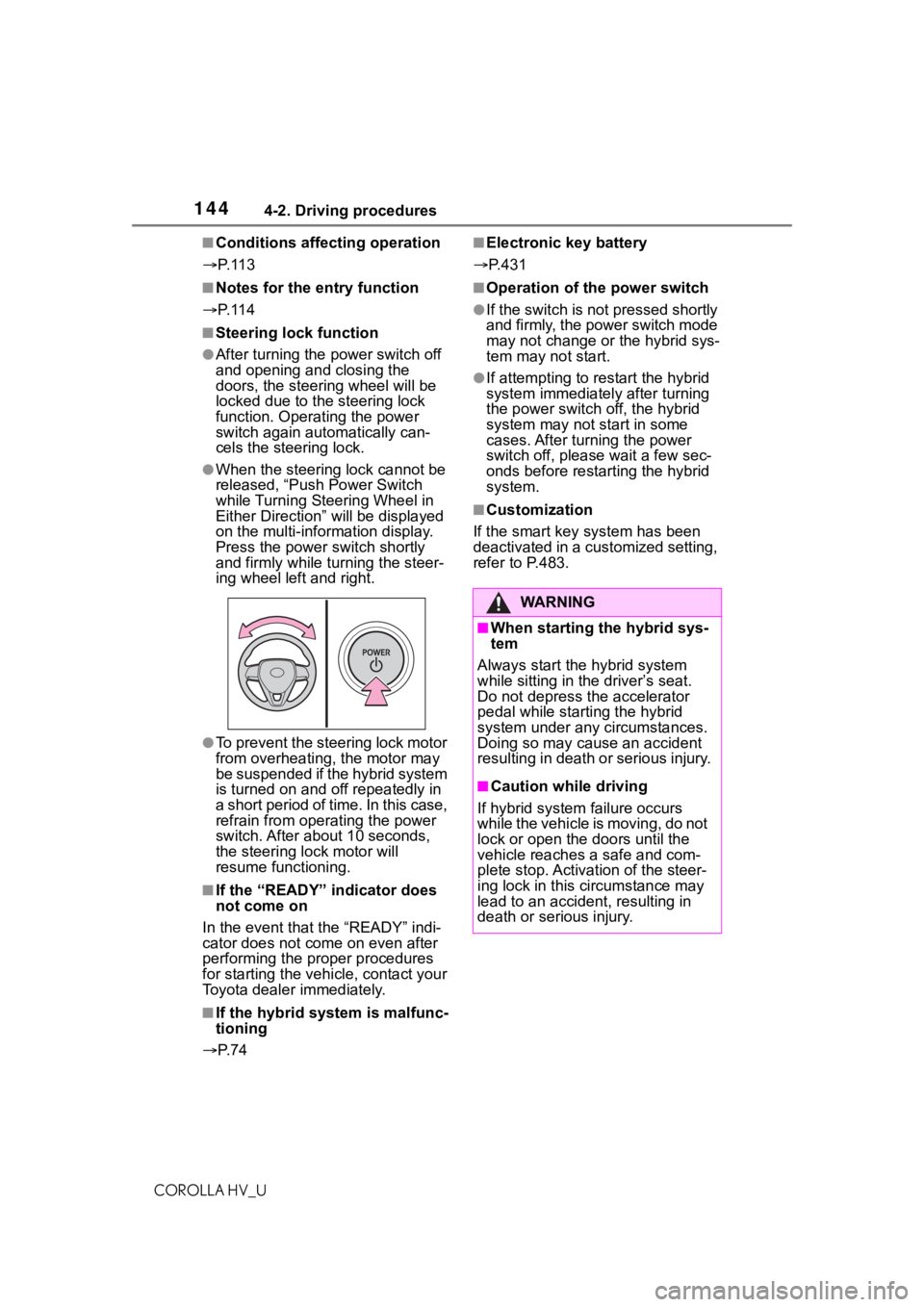
●When the steering lock cannot be
released, “Push Power Switch
while Turning Steering Wheel in
Either Direction” will be displayed
on the multi-information display.
Press the power switch shortly
and firmly while turning the steer-
ing wheel left and right.
●To prevent the steering lock motor
from overheating, the motor may
be suspended if the hybrid system
is turned on and of f repeatedly in
a short period of time. In this case,
refrain from ope rating the power
switch. After about 10 seconds,
the steering lock motor will
resume functioning.
■If the “READY” indicator does
not come on
In the event that the “READY” indi-
cator does not come on even after
performing the proper procedures
for starting the vehicle, contact your
Toyota dealer immediately.
■If the hybrid system is malfunc-
tioning
P. 7 4
■Electronic key battery
P.431
■Operation of the power switch
●If the switch is not pressed shortly
and firmly, the power switch mode
may not change o r the hybrid sys-
tem may not start.
●If attempting to res tart the hybrid
system immediately after turning
the power switch off, the hybrid
system may not start in some
cases. After turning the power
switch off, please wait a few sec-
onds before restarting the hybrid
system.
■Customization
If the smart key system has been
deactivated in a customized setting,
refer to P.483.
WA R N I N G
■When starting the hybrid sys-
tem
Always start the hybrid system
while sitting in the driver’s seat.
Do not depress t he accelerator
pedal while starting the hybrid
system under any circumstances.
Doing so may cause an accident
resulting in death o r serious injury.
■Caution while driving
If hybrid system failure occurs
while the vehicle is moving, do not
lock or open the doors until the
vehicle reaches a safe and com-
plete stop. Activation of the steer-
ing lock in this c ircumstance may
lead to an accident, resulting in
death or serious injury.
Page 145 of 556
1454-2. Driving procedures
COROLLA HV_U
4
Driving
1 Stop the vehicle completely.
2 Set the parking brake
( P.153), and shift the shift
lever to P.
Check the parking brake indicator
is illuminated.
3 Press the power switch.
The hybrid system will stop, and the
meter display will be extinguished.
4Release the brake pedal and
check that “ACCESSORY” or
“IGNITION ON” is not shown
on the multi-information dis-
play. Modes can be changed by
pressing the power switch with
brake pedal released. (The
mode changes each time the
switch is pressed.)
NOTICE
■When starting the hybrid sys-
tem
If the hybrid system becomes diffi-
cult to start, have your vehicle
checked by your Toyota dealer
immediately.
■Symptoms indicating a mal-
function with the power
switch
If the power switch seems to be
operating somewh at differently
than usual, such as the switch
sticking slightly, there may be a
malfunction. Contact your Toyota
dealer immediately.
Stopping the hybrid sys-
tem
WA R N I N G
■Stopping the hybrid system
in an emergency
●If you want to stop the hybrid
system in an emergency while
driving the vehicle, press and
hold the power s witch for more
than 2 seconds, or press it
briefly 3 times or more in suc-
cession. ( P.443)
However, do not touch the
power switch while driving
except in an emergency. Turn-
ing the hybrid s ystem off while
driving will not cause loss of
steering or braking control, how-
ever, power assist to the steer-
ing will be lost. This will make it
more difficult to steer smoothly,
so you should pull over and stop
the vehicle as soon as it is safe
to do so.
●If the power switch is operated
while the vehicle is running, a
warning message will be shown
on the multi-information display
and a buzzer sounds.
●To restart the hybrid system
after performing an emergency
shutdown, shift the shift lever to
N and then pre ss the power
switch.
Changing power switch
modes
Page 221 of 556
2214-5. Using the driving support systems
COROLLA HV_U
4
Driving
■VSC (Vehicle Stability Con-
trol)
Helps the driver to control skid-
ding when swerving suddenly or
turning on slippery road sur-
faces.
■Enhanced VSC (Enhanced
Vehicle Stability Control)
Provides cooperative control of
the ABS, TRAC, VSC and EPS.
Helps to maintai n directional
stability when swerving on slip-
pery road surfaces by con-
trolling steering performance.
■TRAC (Traction Control)
Helps to maintain drive power
and prevent the drive wheels
from spinning when starting the
vehicle or accelerating on slip-
pery roads
■Active Cornering Assist
(ACA)
Helps to prevent the vehicle
from drifting to the outer side by
performing inner wheel brake
control when attempting to
accelerate while turning
■Hill-start assist control
Helps to reduce the backward
movement of the vehicle when
starting on an uphill
■EPS (Electric Power Steer-
ing)
Employs an electric motor to
reduce the amount of effort
needed to turn the steering
wheel.
■The Secondary Collision
Brake
When the SRS airbag sensor
detects a collision and the sys-
tem operates, the brakes and
brake lights are automatically
controlled to reduce the vehicle
speed and help reduce the pos-
sibility of further damage due to
a secondary collision.
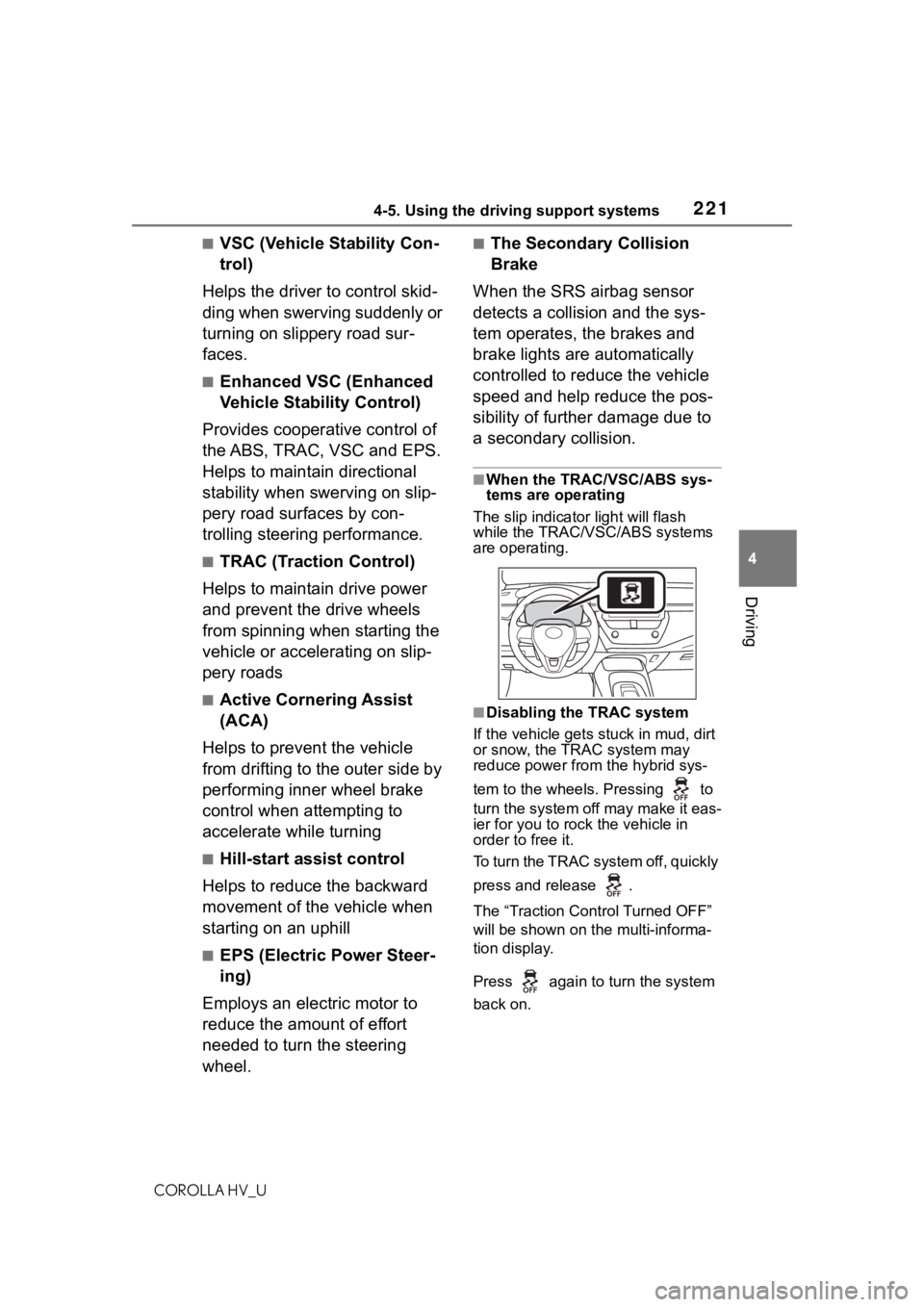
■When the TRAC/VSC/ABS sys-
tems are operating
The slip indicator light will flash
while the TRAC/VSC/ABS systems
are operating.
■Disabling the TRAC system
If the vehicle gets stuck in mud, dirt
or snow, the TRAC system may
reduce power from the hybrid sys-
tem to the wheels . Pressing to
turn the system off may make it eas-
ier for you to rock the vehicle in
order to free it.
To turn the TRAC system off, quickly
press and release .
The “Traction Cont rol Turned OFF”
will be shown on the multi-informa-
tion display.
Press again to turn the system
back on.
Page 223 of 556
2234-5. Using the driving support systems
COROLLA HV_U
4
Driving
●Operating sound heard from the
engine compartment when one or
two minutes passed after the stop
of the hybrid system.
■Active Cornering Assist opera-
tion sounds and vibrations
When the Active Cornering Assist is
operated, operation sounds and
vibrations may b e generated from
the brake system, but this is not a
malfunction.
■EPS operation sound
When the steering wheel is oper-
ated, a motor sou nd (whirring
sound) may be heard. This does not
indicate a malfunction.
■Automatic reactivation of TRAC
and VSC systems
After turning the TRAC and VSC
systems off, the systems will be
automatically re-enabled in the fol-
lowing situations:
●When the power switch is turned
off
●If only the TRAC system is turned
off, the TRAC will turn on when
vehicle speed increases
If both the TRAC and VSC sys-
tems are turned off, automatic
re-enabling will not occur when
vehicle speed increases.
■Operating conditions of Active
Cornering Assist
The system operates when the fol-
lowing occurs.
●TRAC/VSC can operate
●The driver is at tempting to accel-
erate while turning
●The system detects that the vehi-
cle is drifting to the outer side
●The brake pedal is released
■Reduced effectiveness of the
EPS system
The effectiveness of the EPS sys-
tem is reduced to prevent the sys-
tem from overheating when there is
frequent steering input over an extended period o
f time. The steer-
ing wheel may f eel heavy as a
result. Should this occur, refrain
from excessive steering input or
stop the vehicle a nd turn the hybrid
system off. The EPS system should
return to normal within 10 minutes.
■Secondary Collision Brake
operating conditions
The system operates when the SRS
airbag sensor de tects a collision
while the vehicle is in motion.
However, the system does not oper-
ate in any of the following situations.
●The vehicle speed is below 6 mph
(10 km/h)
●Components are damaged
■Secondary Collision Brake
automatic cancellation
The system is automatically can-
celed in any of th e following situa-
tions.
●The vehicle speed drops below
approximately 6 mph (10 km/h)
●A certain amount of time elapses
during operation
●The accelerator pedal is
depressed a large amount
WA R N I N G
■The ABS does not operate
effectively when
●The limits of tire gripping perfor-
mance have been exceeded
(such as excessively worn tires
on a snow covered road).
●The vehicle hydroplanes while
driving at high speed on wet or
slick roads.
Page 228 of 556
2284-6. Driving tips
COROLLA HV_U
Use fluids that are appropriate
to the prevailing outside tem-
peratures.
• Engine oil
• Engine/power control unit coolant
• Washer fluid
Have a service technician
inspect the condition of the
12-volt battery.
Have the vehicle fitted with
four snow tires or purchase a
set of tire chains for the front
tires.
Ensure that all tires are the same
size and brand, and that chains
match the size of the tires.
Perform the following according
Winter driving tips
Carry out the necessary
preparations and inspec-
tions before driving the
vehicle in winter. Always
drive the vehicle in a man-
ner appropriate to the pre-
vailing weather conditions.
Pre-winter preparations
WA R N I N G
■Driving with snow tires
Observe the following precautions
to reduce the risk of accidents.
Failure to do so m ay result in a
loss of vehicle control and cause
death or serious injury.
●Use tires of the size specified.
●Maintain the recommended
level of air pressure.
●Do not drive in excess of 75
mph (120 km/h), regardless of
the type of snow tires being
used.
●Use snow tires on all, not just
some wheels.
■Driving with tire chains
Observe the following precautions
to reduce the risk of accidents.
Failure to do so may result in the
vehicle being unable to be driven
safely, and may cause death or
serious injury.
●Do not drive in excess of the
speed limit specifi ed for the tire
chains being used, or 30 mph
(50 km/h), whichever is lower.
●Avoid driving on bumpy road
surfaces or over potholes.
●Avoid sudden acceleration,
abrupt steering, sudden brak-
ing and shifting operations that
cause sudden engine braking.
●Slow down sufficiently before
entering a curve to ensure that
vehicle control is maintained.
●Do not use LTA (Lane Tracing
Assist) system.
NOTICE
■Repairing or replacing snow
tires (vehicles with a tire pres-
sure warning system)
Request repairs or replacement of
snow tires from Toyota dealers or
legitimate tire retailers.
This is because the removal and
attachment of snow tires affects
the operation of the tire pressure
warning valves and transmitters.
Before driving the vehicle
Page 308 of 556
3085-11. Voice command system operation
COROLLA HV_U
5-11.Voice command system operation
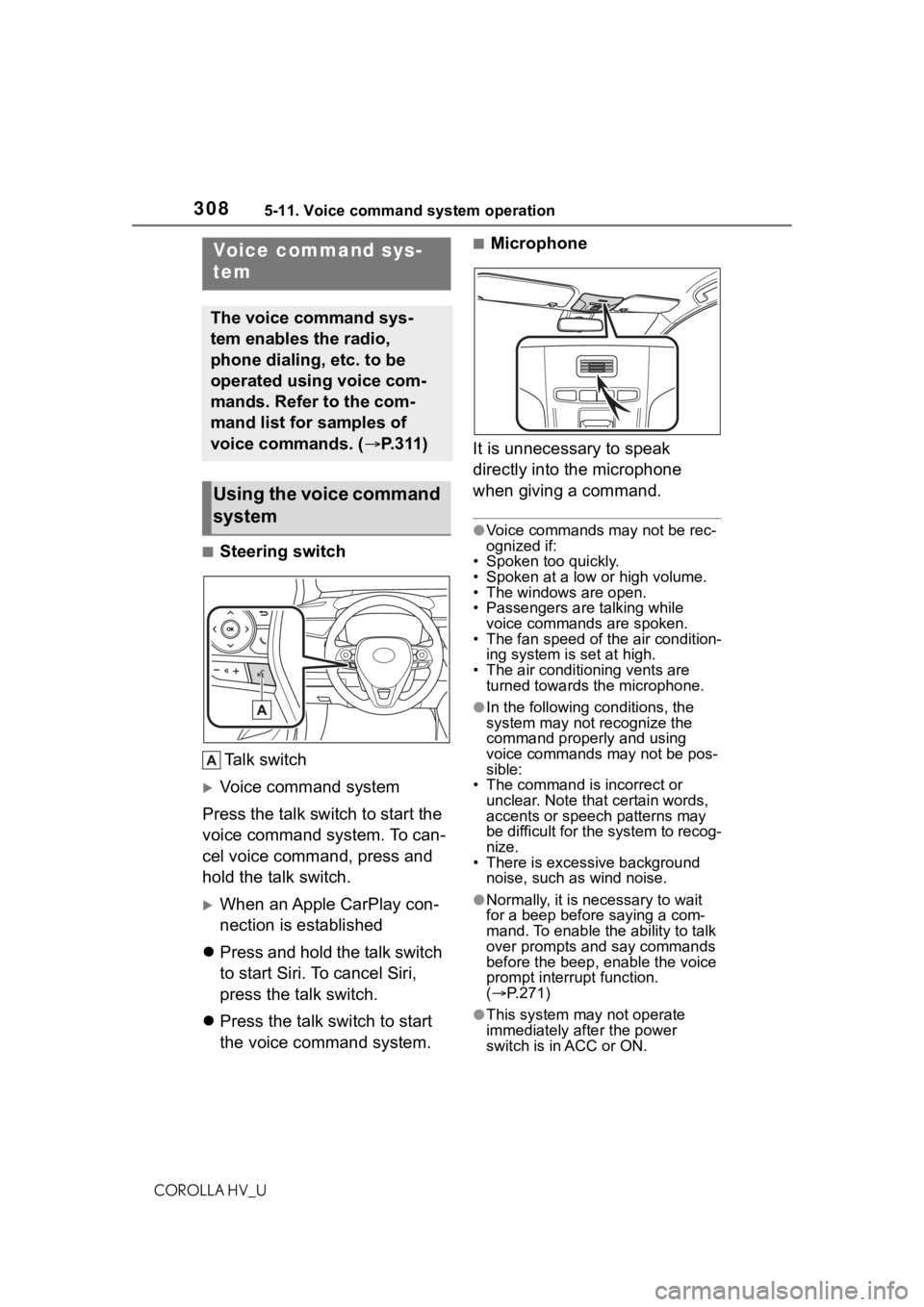
■Steering switchTa l k s w i t c h
Voice command system
Press the talk switch to start the
voice command system. To can-
cel voice command, press and
hold the talk switch.
When an Apple CarPlay con-
nection is established
Press and hold the talk switch
to start Siri. To cancel Siri,
press the talk switch.
Press the talk switch to start
the voice command system.
■Microphone
It is unnecessary to speak
directly into the microphone
when giving a command.
●Voice commands may not be rec-
ognized if:
• Spoken too quickly.
• Spoken at a low or high volume.
• The windows are open.
• Passengers are talking while
voice commands are spoken.
• The fan speed of the air condition- ing system is set at high.
• The air conditioning vents are turned towards the microphone.
●In the following c onditions, the
system may not recognize the
command properly and using
voice commands may not be pos-
sible:
• The command is incorrect or
unclear. Note that certain words,
accents or speech patterns may
be difficult for the system to recog-
nize.
• There is excessive background noise, such as wind noise.
●Normally, it is necessary to wait
for a beep before saying a com-
mand. To enable th e ability to talk
over prompts and say commands
before the beep, enable the voice
prompt interrupt function.
( P.271)
●This system may not operate
immediately after the power
switch is in ACC or ON.
Voice command sys-
tem
The voice command sys-
tem enables the radio,
phone dialing, etc. to be
operated using voice com-
mands. Refer to the com-
mand list for samples of
voice commands. ( P.311)
Using the voice command
system
Page 316 of 556
3165-12. Mobile Assistant operation
COROLLA HV_U
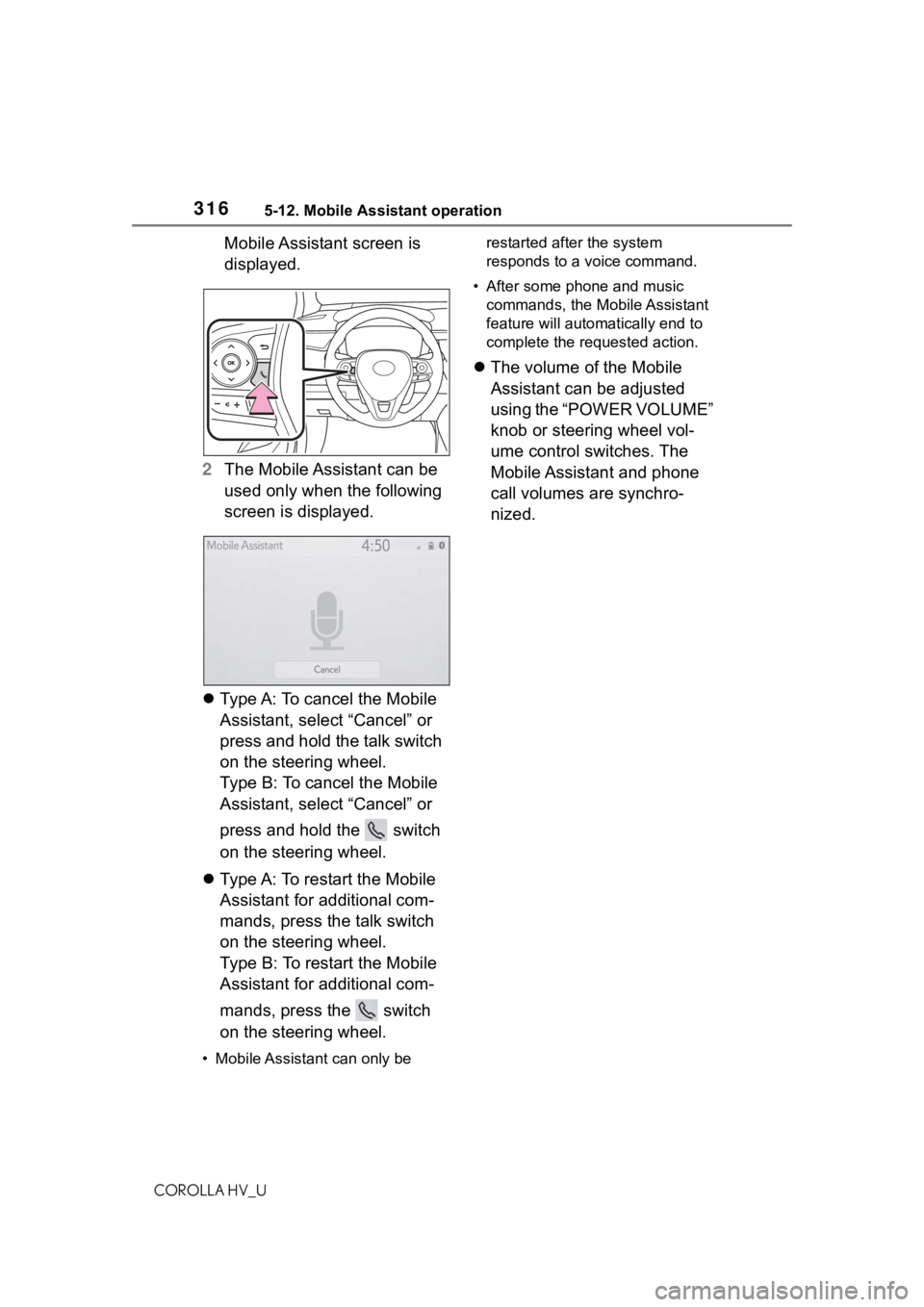
Mobile Assistant screen is
displayed.
2 The Mobile Assistant can be
used only when the following
screen is displayed.
Type A: To cancel the Mobile
Assistant, select “Cancel” or
press and hold the talk switch
on the steering wheel.
Type B: To cancel the Mobile
Assistant, select “Cancel” or
press and hold the switch
on the steering wheel.
Type A: To restart the Mobile
Assistant for additional com-
mands, press the talk switch
on the steering wheel.
Type B: To restart the Mobile
Assistant for additional com-
mands, press the switch
on the steering wheel.
• Mobile Assistant can only be restarted after the system
responds to a voice command.
• After some phone and music commands, the Mobile Assistant
feature will automatically end to
complete the requested action.
The volume of the Mobile
Assistant can be adjusted
using the “POWER VOLUME”
knob or steering wheel vol-
ume control switches. The
Mobile Assistant and phone
call volumes are synchro-
nized.
Page 325 of 556
3255-13. Phone operation (Hands-free system for cellular phones)
COROLLA HV_U
5
Entune audio
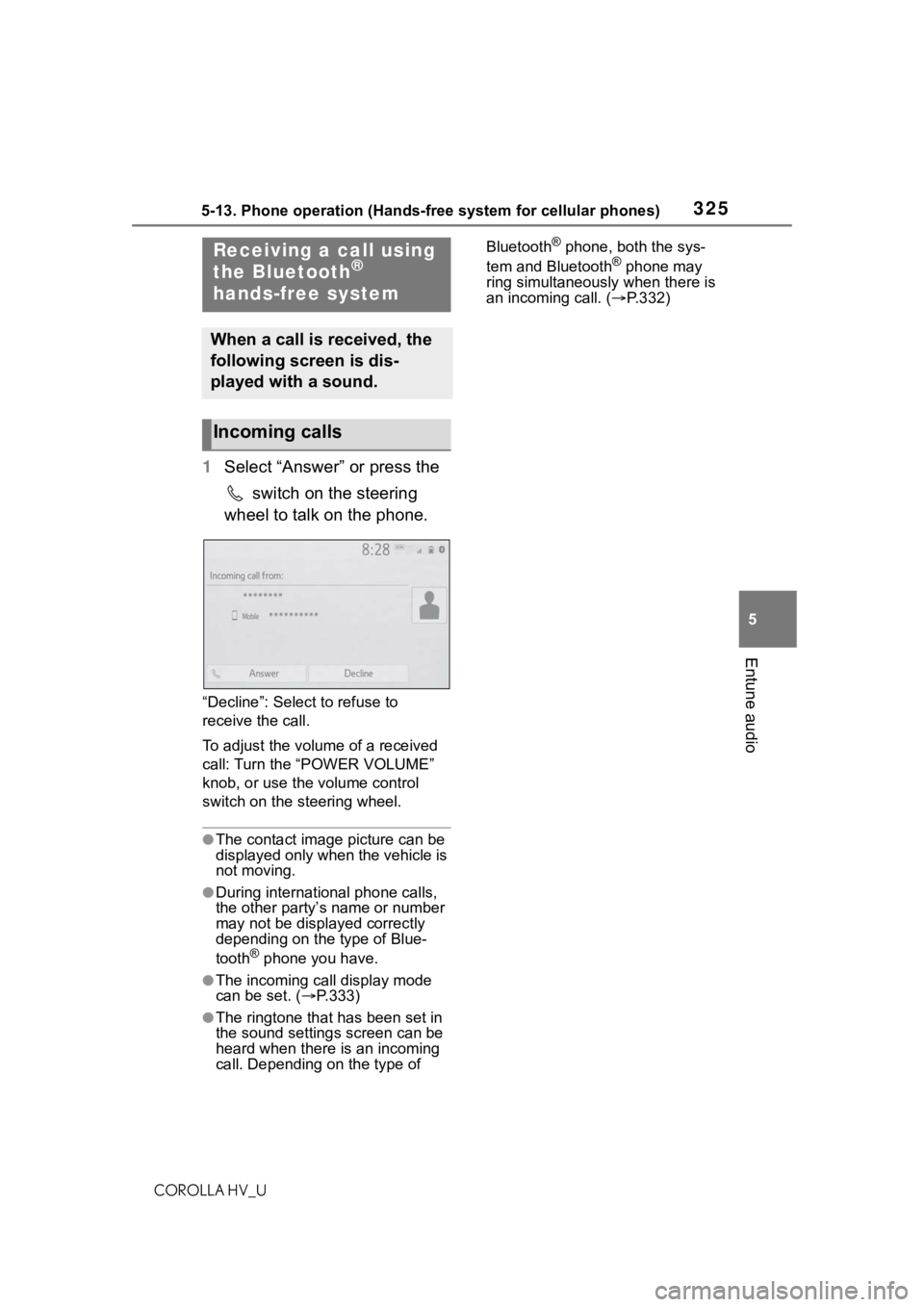
1 Select “Answer” or press the
switch on the steering
wheel to talk on the phone.
“Decline”: Select to refuse to
receive the call.
To adjust the volume of a received
call: Turn the “POWER VOLUME”
knob, or use the volume control
switch on the steering wheel.
●The contact image picture can be
displayed only when the vehicle is
not moving.
●During international phone calls,
the other party’s name or number
may not be displayed correctly
depending on the type of Blue-
tooth
® phone you have.
●The incoming call display mode
can be set. ( P.333)
●The ringtone that has been set in
the sound settings screen can be
heard when there is an incoming
call. Depending on the type of Bluetooth
® phone, both the sys-
tem and Bluetooth® phone may
ring simultaneously when there is
an incoming call. ( P.332)Receiving a call using
the Bluetooth®
hands-free system
When a call is received, the
following screen is dis-
played with a sound.
Incoming calls
Page 329 of 556
3295-13. Phone operation (Hands-free system for cellular phones)
COROLLA HV_U
5
Entune audio
tooth® phone used for receiving
messages, or its registration sta-
tus with the system, some infor-
mation may not be displayed.
●The pop-up screen is separately
available for incoming e-mail and
SMS/MMS messages under the
following conditions:
E-mail:
• “Incoming E-mail Display” is set to “Full Screen”. ( P.333)
• “E-mail Notification Pop-up” is set
to on. ( P.333)
SMS/MMS:
• “Incoming SMS/MMS Display” is set to “Full Screen”. ( P.333)
• “SMS/MMS Notification Pop-up” is set to on. ( P.333)
●Depending on the type of Blue-
tooth® phone being connected,
E-Mail function cannot be used via
Bluetooth
®.
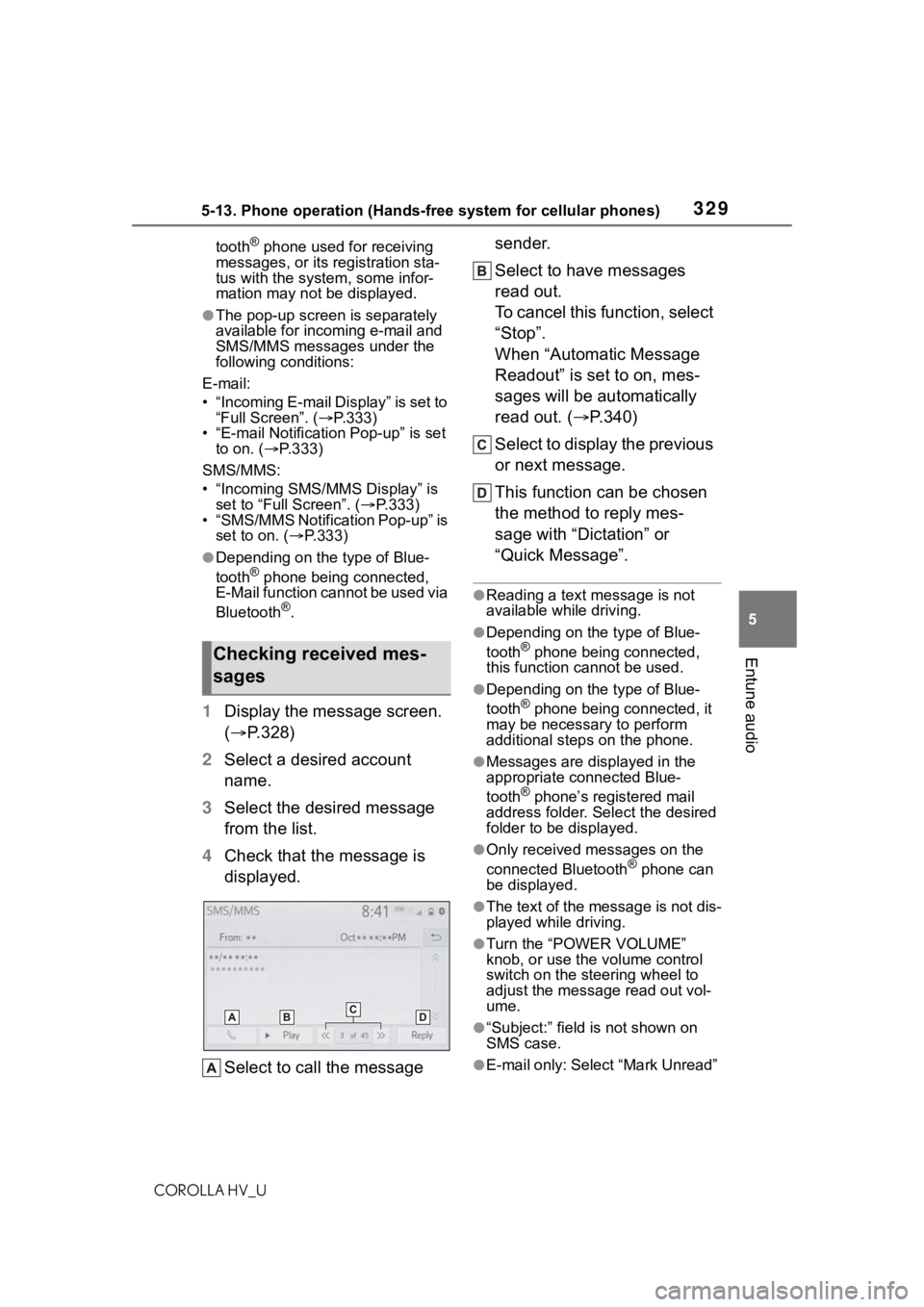
1 Display the message screen.
( P.328)
2 Select a desired account
name.
3 Select the desired message
from the list.
4 Check that the message is
displayed.
Select to call the message sender.
Select to have messages
read out.
To cancel this function, select
“Stop”.
When “Automatic Message
Readout” is set to on, mes-
sages will be automatically
read out. (
P.340)
Select to display the previous
or next message.
This function can be chosen
the method to reply mes-
sage with “Dictation” or
“Quick Message”.
●Reading a text message is not
available while driving.
●Depending on the type of Blue-
tooth® phone being connected,
this function cannot be used.
●Depending on the type of Blue-
tooth® phone being connected, it
may be necessary to perform
additional steps on the phone.
●Messages are displayed in the
appropriate connected Blue-
tooth
® phone’s registered mail
address folder. Select the desired
folder to be displayed.
●Only received messages on the
connected Bluetooth® phone can
be displayed.
●The text of the message is not dis-
played while driving.
●Turn the “POWER VOLUME”
knob, or use the volume control
switch on the steering wheel to
adjust the message read out vol-
ume.
●“Subject:” field is not shown on
SMS case.
●E-mail only: Select “Mark Unread”
Checking received mes-
sages
Page 366 of 556
3666-1. Using the air conditioning system and defogger
COROLLA HV_U
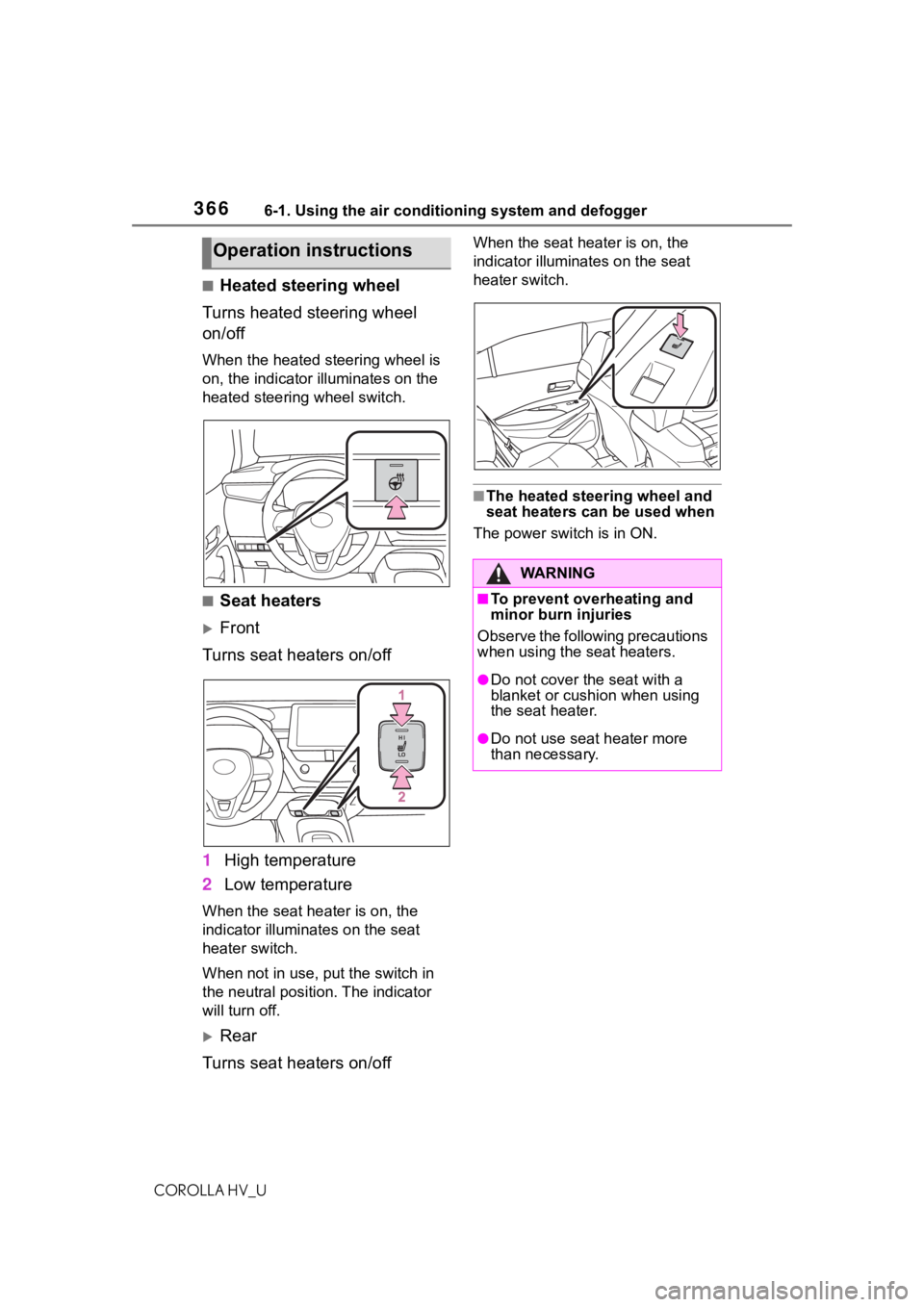
■Heated steering wheel
Turns heated steering wheel
on/off
When the heated steering wheel is
on, the indicator illuminates on the
heated steering wheel switch.
■Seat heaters
Front
Turns seat heaters on/off
1 High temperature
2 Low temperature
When the seat hea ter is on, the
indicator illumina tes on the seat
heater switch.
When not in use, put the switch in
the neutral position. The indicator
will turn off.
Rear
Turns seat heaters on/off
When the seat heater is on, the
indicator illuminates on the seat
heater switch.
■The heated steering wheel and
seat heaters can be used when
The power switch is in ON.
Operation instructions
WA R N I N G
■To prevent overheating and
minor burn injuries
Observe the following precautions
when using the seat heaters.
●Do not cover the seat with a
blanket or cushion when using
the seat heater.
●Do not use seat heater more
than necessary.