automatic transmission TOYOTA FJ CRUISER 2011 1.G User Guide
[x] Cancel search | Manufacturer: TOYOTA, Model Year: 2011, Model line: FJ CRUISER, Model: TOYOTA FJ CRUISER 2011 1.GPages: 528, PDF Size: 10.93 MB
Page 124 of 528
124
2-1. Driving procedures
Engine (ignition) switch
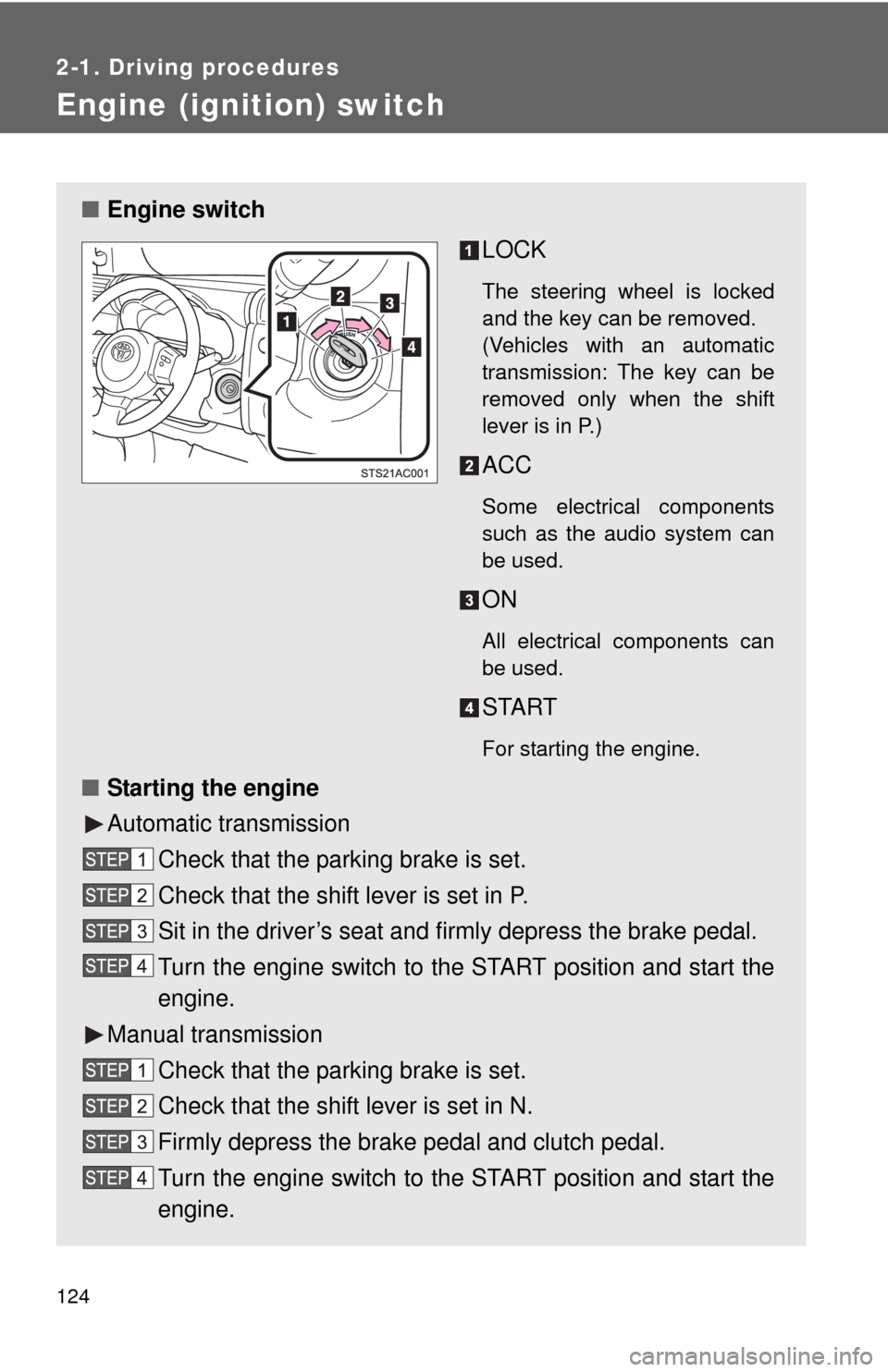
■Engine switch
LOCK
The steering wheel is locked
and the key can be removed.
(Vehicles with an automatic
transmission: The key can be
removed only when the shift
lever is in P.)
ACC
Some electrical components
such as the audio system can
be used.
ON
All electrical components can
be used.
START
For starting the engine.
■Starting the engine
Automatic transmission
Check that the parking brake is set.
Check that the shift lever is set in P.
Sit in the driver’s seat and firmly depress the brake pedal.
Turn the engine switch to the START position and start the
engine.
Manual transmission Check that the parking brake is set.
Check that the shift lever is set in N.
Firmly depress the brake pedal and clutch pedal.
Turn the engine switch to the START position and start the
engine.
Page 127 of 528
127
2-1. Driving procedures
2
When driving
Automatic Transmission
: If equipped
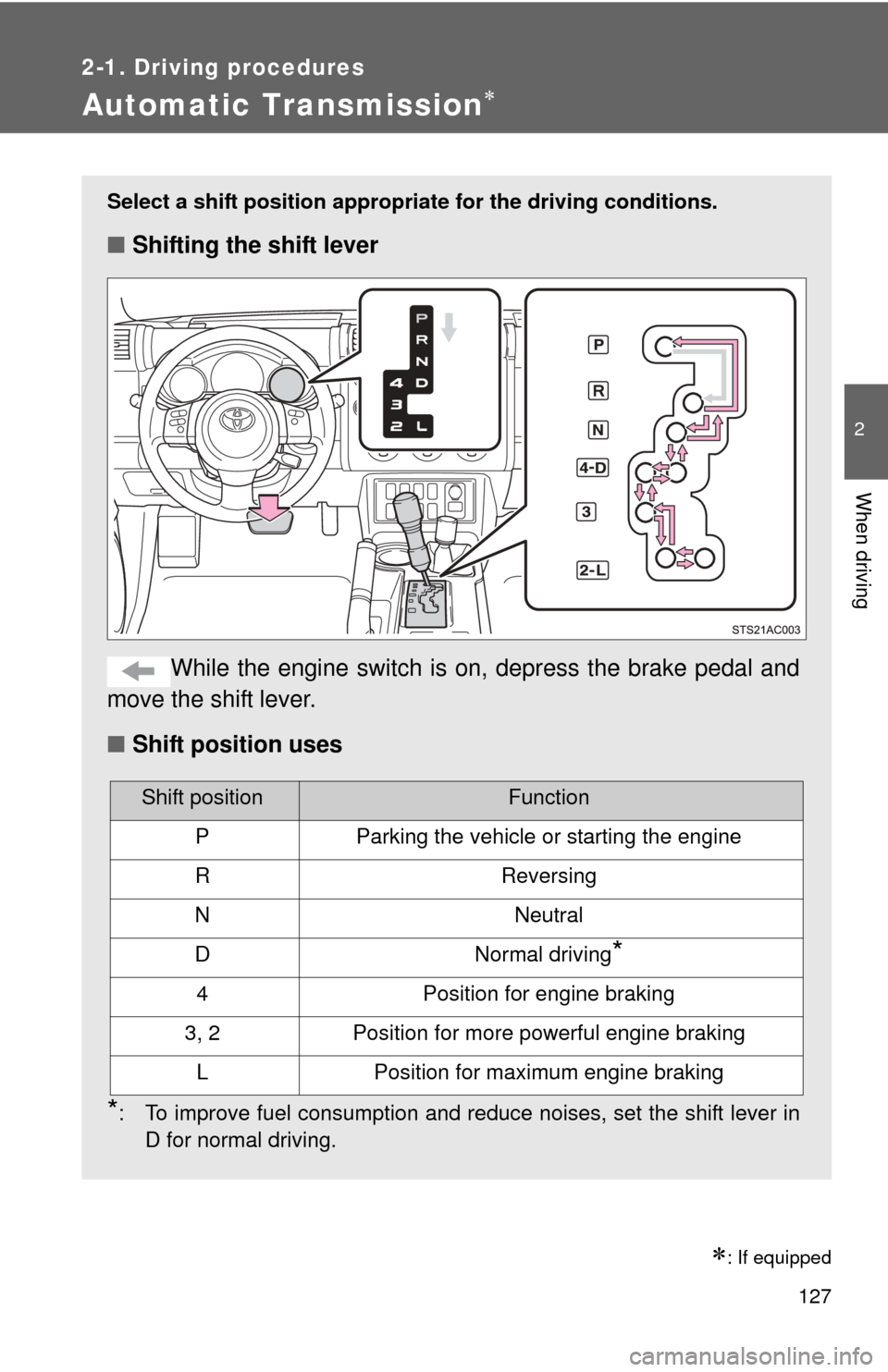
Select a shift position appropriate for the driving conditions.
■Shifting the shift lever
While the engine switch is on, depress the brake pedal and
move the shift lever.
■ Shift position uses
*: To improve fuel consumption and reduce noises, set the shift lever in
D for normal driving.
Shift positionFunction
PParking the vehicle or starting the engine
RReversing
NNeutral
DNormal driving*
4Position for engine braking
3, 2Position for more powerful engine braking
LPosition for maximum engine braking
Page 139 of 528
139
2-2. Instrument cluster
2
When driving
■
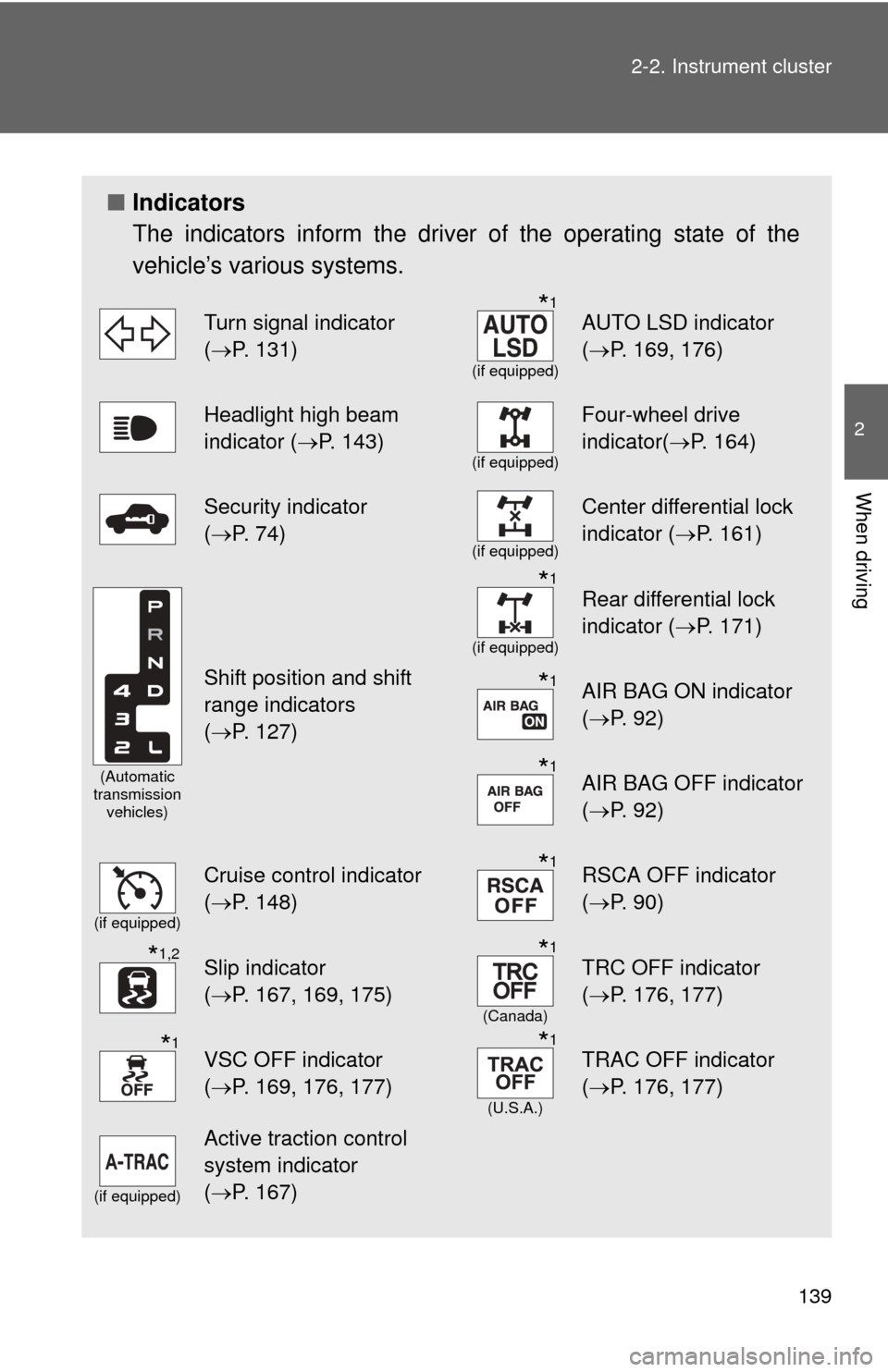
Indicators
The indicators inform the driver of the operating state of the
vehicle’s various systems.
Turn signal indicator
(P. 131)*1
(if equipped)
AUTO LSD indicator
( P. 169, 176)
Headlight high beam
indicator ( P. 143)
(if equipped)
Four-wheel drive
indicator(P. 164)
Security indicator
(P. 74)
(if equipped)
Center differential lock
indicator ( P. 161)
(Automatic
transmission vehicles)
Shift position and shift
range indicators
(P. 127)
*1
(if equipped)
Rear differential lock
indicator ( P. 171)
*1AIR BAG ON indicator
(P. 92)
*1AIR BAG OFF indicator
(P. 92)
(if equipped)
Cruise control indicator
(P. 148)*1RSCA OFF indicator
( P. 90)
*1,2Slip indicator
(P. 167, 169, 175)*1
(Canada)
TRC OFF indicator
( P. 176, 177)
*1VSC OFF indicator
(P. 169, 176, 177)*1
(U.S.A.)
TRAC OFF indicator
( P. 176, 177)
(if equipped)
Active traction control
system indicator
(P. 167)
Page 140 of 528
140 2-2. Instrument cluster
CAUTION
■If a safety system warning light does not come on
Should a safety system light such as ABS and the SRS airbag warning light
not come on when you start the engine, this could mean that these systems
are not available to help protect you in an accident, which could result in
death or serious injury. Have the vehicle inspected by your Toyota dealer
immediately if this occurs.
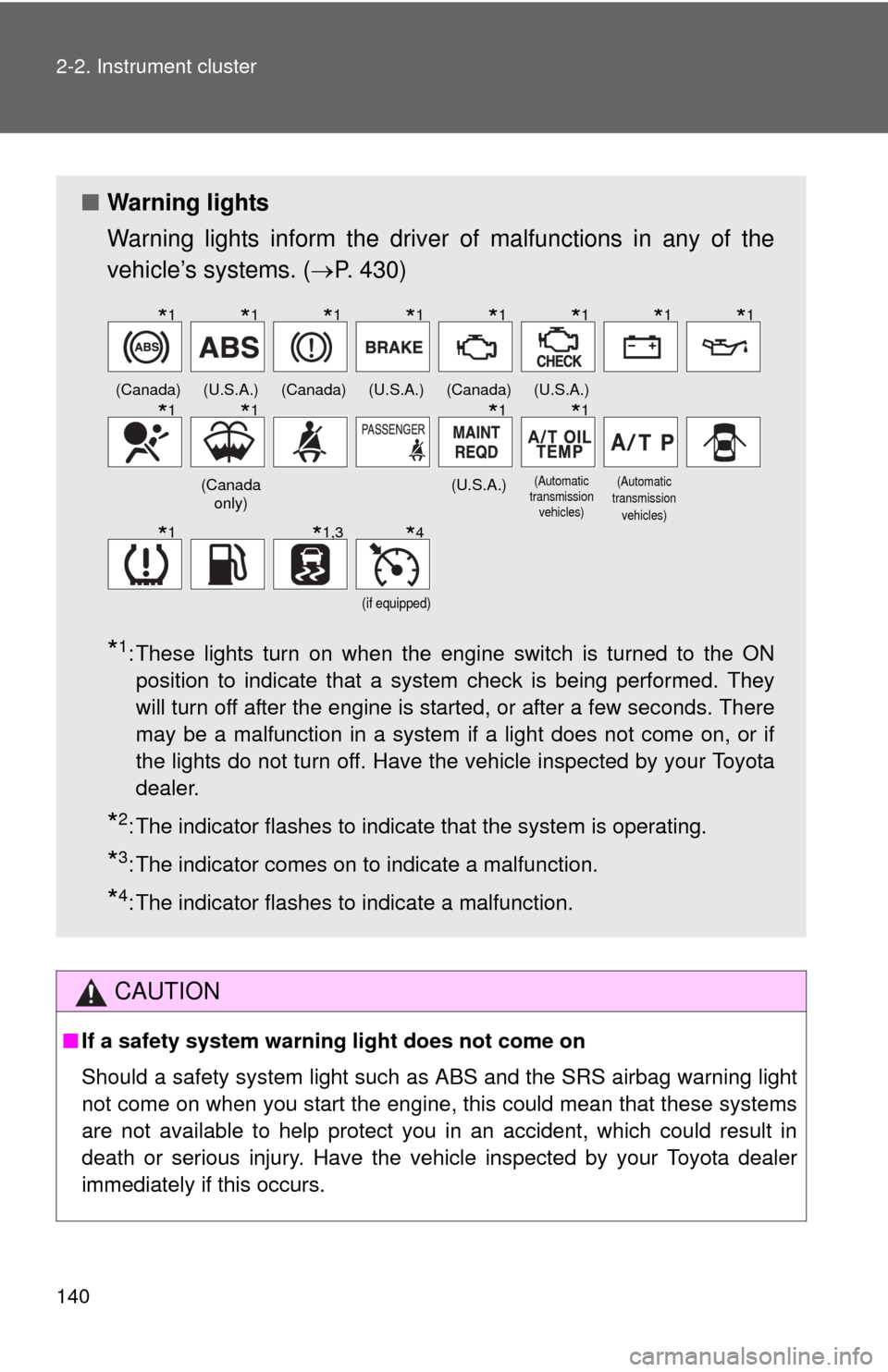
■ Warning lights
Warning lights inform the driver of malfunctions in any of the
vehicle’s systems. ( P. 430)
*1: These lights turn on when the engine switch is turned to the ON
position to indicate that a system check is being performed. They
will turn off after the engine is started, or after a few seconds. There
may be a malfunction in a system if a light does not come on, or if
the lights do not turn off. Have the vehicle inspected by your Toyota
dealer.
*2: The indicator flashes to indicate that the system is operating.
*3: The indicator comes on to indicate a malfunction.
*4: The indicator flashes to indicate a malfunction.
(Canada)(U.S.A.)(Canada)(U.S.A.)(Canada)(U.S.A.)
(Canada only)(U.S.A.)
(Automatic
transmission
vehicles)(Automatic
transmission vehicles)
(if equipped)
*1*1*1*1*1*1*1*1
*1*1*1*1
*1*1,3*4
Page 150 of 528
150 2-4. Using other driving systems
■Cruise control can be set when
●The shift lever is in the D or 4 range (vehicles with an automatic transmis-
sion).
● Vehicle speed is above approximately 25 mph (40 km/h).
■ Accelerating
The vehicle can be accelerated normally. After acceleration, the set speed
resumes.
■ Automatic cruise control cancellation
Cruise control will stop maintaining the vehicle speed in any of the following
situations.
●Actual vehicle speed falls more than approximately 10 mph (16 km/h)
below the preset vehicle speed.
At this time, the memorized set speed is not retained.
● Actual vehicle speed is below approximately 25 mph (40 km/h).
● VSC is activated.
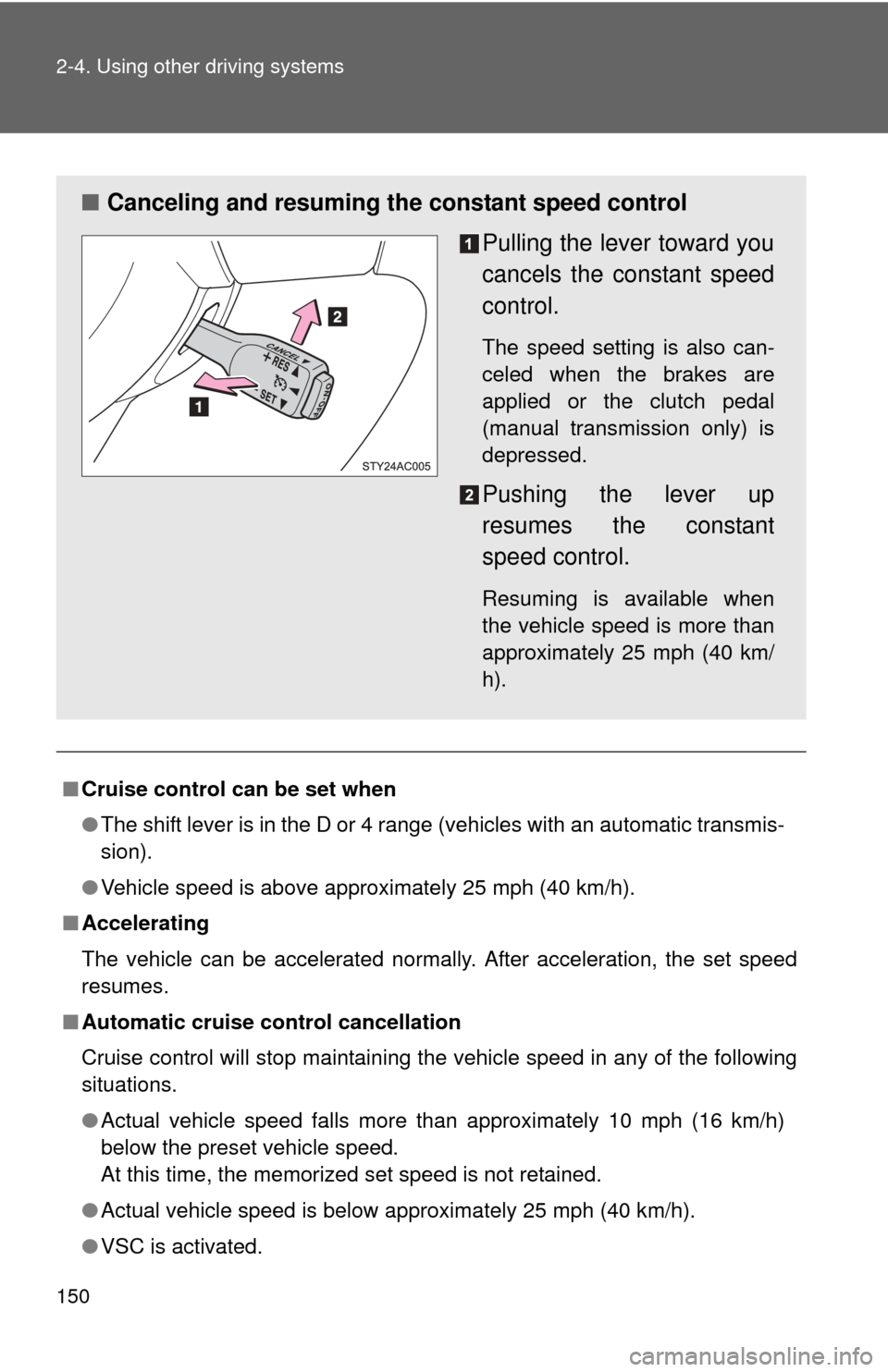
■ Canceling and resuming the constant speed control
Pulling the lever toward you
cancels the constant speed
control.
The speed setting is also can-
celed when the brakes are
applied or the clutch pedal
(manual transmission only) is
depressed.
Pushing the lever up
resumes the constant
speed control.
Resuming is available when
the vehicle speed is more than
approximately 25 mph (40 km/
h).
Page 157 of 528
157
2-4. Using other driving systems
2
When driving
Rear view monitor system
: If equipped
■The rear view monitor system can be operated when
The shift lever is in R, the back door is fully closed and the engine switch is
ON.
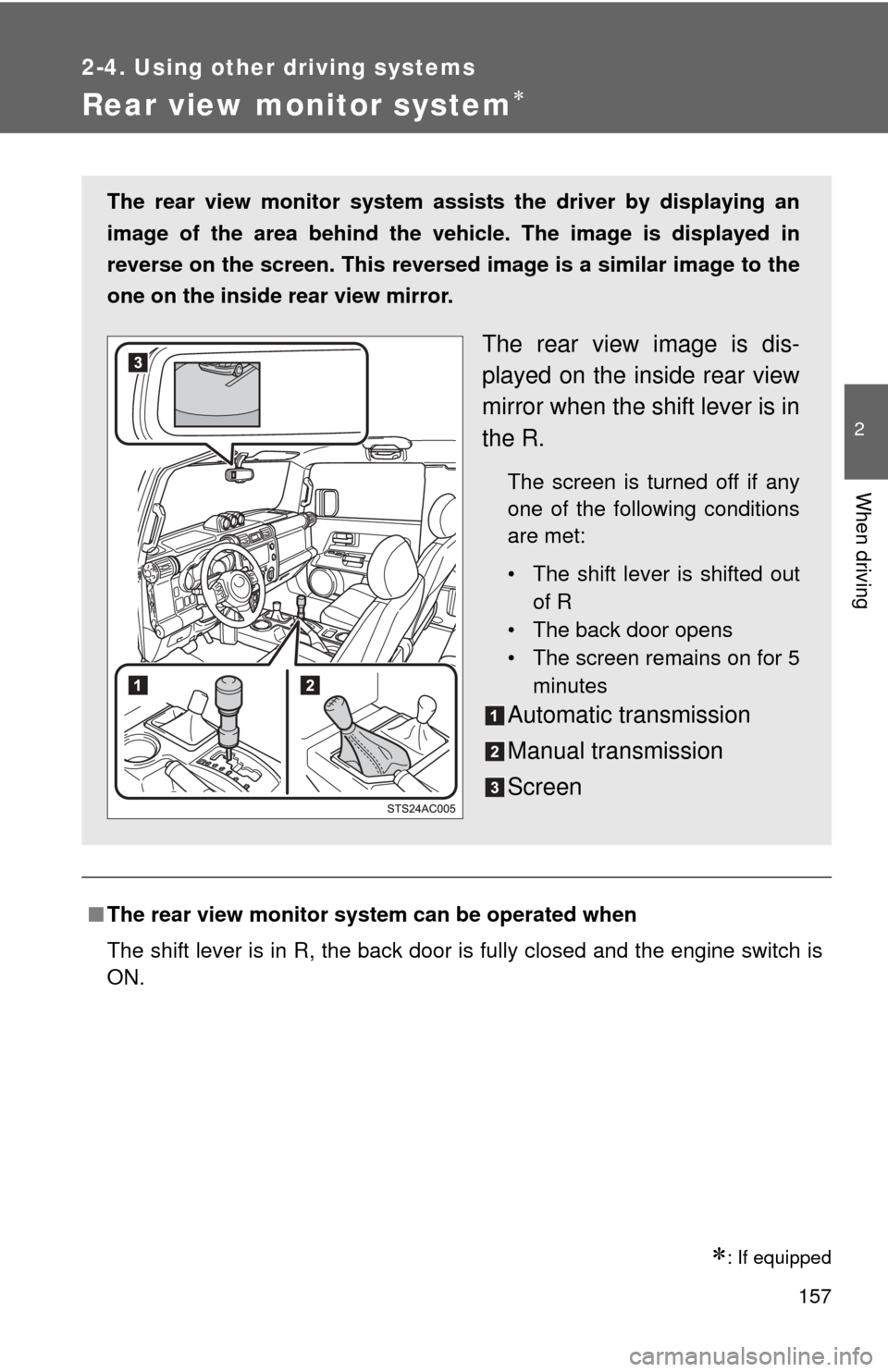
The rear view monitor system assists the driver by displaying an
image of the area behind the veh icle. The image is displayed in
reverse on the screen. This reversed im age is a similar image to the
one on the inside rear view mirror.
The rear view image is dis-
played on the inside rear view
mirror when the shift lever is in
the R.
The screen is turned off if any
one of the following conditions
are met:
• The shift lever is shifted out of R
• The back door opens
• The screen remains on for 5
minutes
Automatic transmission
Manual transmission
Screen
Page 164 of 528

164
2-4. Using other driving systems
Four-wheel drive system (4WD models with an automatic transmission)
Use the front-wheel drive control lever to select the following trans-
fer modes.
The four-wheel drive indicator comes on when the H4, N or L4 mode is
selected.
H2 (high speed position, two-wheel drive)
Use this for normal driving on dry hard-surfaced roads. This position
gives greater economy, quietest ride and least wear.
H4 (high speed position, four-wheel drive)
Use this for driving only on tracks that permit the tires slide, like off-
road, icy or snow-covered roads. This position provides greater traction
than two-wheel drive.
N (neutral position)
No power is delivered to the wheels. The vehicle must be stopped.
L4 (low speed position, four-wheel drive)
Use this for maximum power and traction. Use “L4” for climbing or
descending steep hills, off-road driving, and hard pulling in sand, mud
or deep snow.
Page 167 of 528
167
2-4. Using other driving systems
2
When driving
Active traction control system
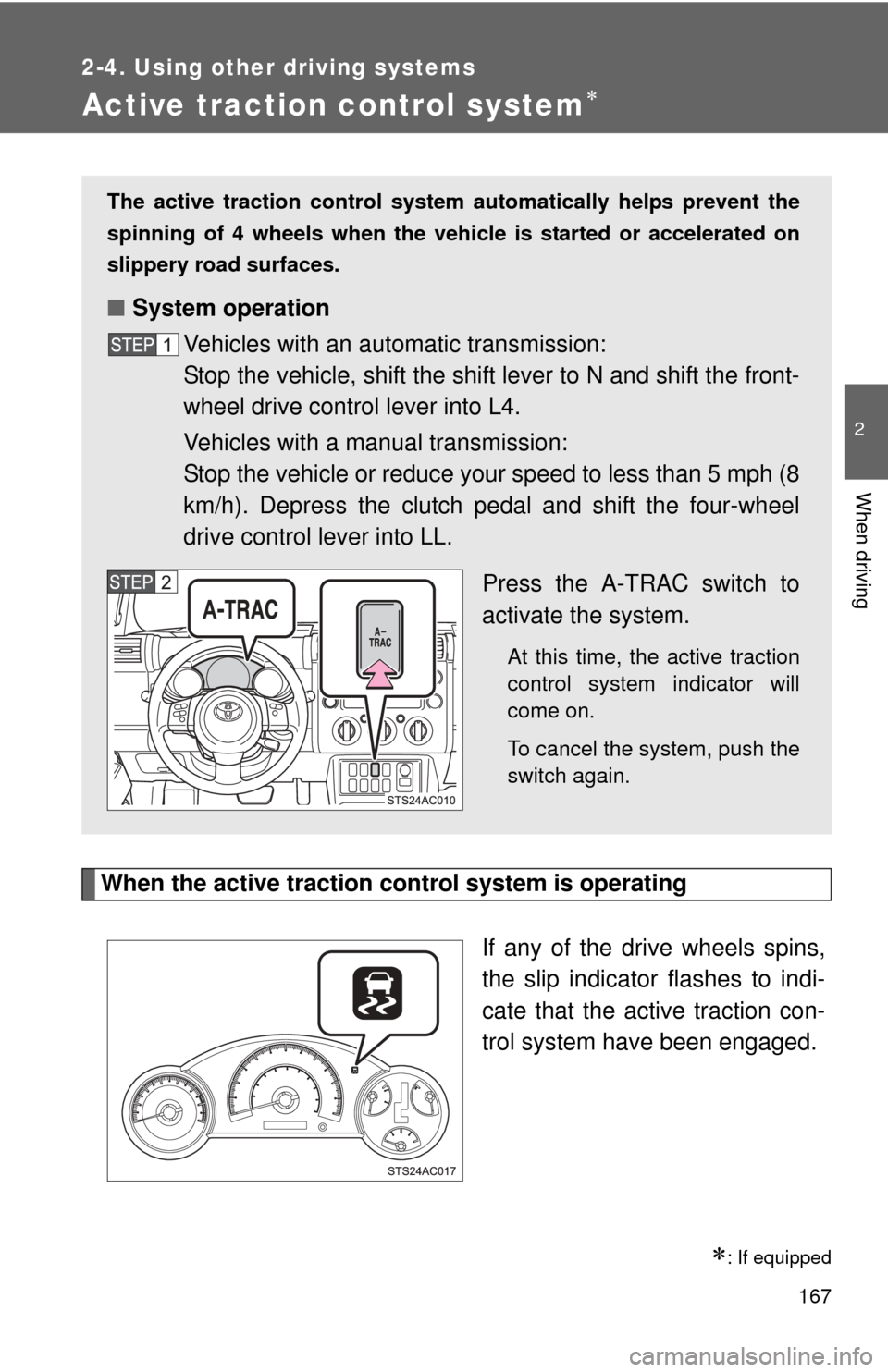
When the active traction control system is operatingIf any of the drive wheels spins,
the slip indicator flashes to indi-
cate that the active traction con-
trol system have been engaged.
: If equipped
The active traction control system automatically helps prevent the
spinning of 4 wheels when the vehicle is started or accelerated on
slippery road surfaces.
■ System operation
Vehicles with an automatic transmission:
Stop the vehicle, shift the shift lever to N and shift the front-
wheel drive control lever into L4.
Vehicles with a manual transmission:
Stop the vehicle or reduce your speed to less than 5 mph (8
km/h). Depress the clutch pedal and shift the four-wheel
drive control lever into LL.
Press the A-TRAC switch to
activate the system.
At this time, the active traction
control system indicator will
come on.
To cancel the system, push the
switch again.
Page 171 of 528
171
2-4. Using other driving systems
2
When driving
Rear differential lock system
Using the rear differential lock systemAutomatic transmission 4WD models: Before using the rear differential lock system.
Stop the vehicle, shift the shift lever to N and shift the front-
wheel drive control lever into L4 to see if this is sufficient. If
this has no effect, additionally use the rear differential lock
system.
Be sure to stop the wheels.
Press the RR DIFF LOCK switch.
Gently depress the accelerator pedal.
After the rear differential is locked, the indicator will come on.
Unlock the rear differential as soon as the vehicle moves.
To unlock the rear differential, push the switch again.
: If equipped
The rear differential lock system is provided for use only when wheel
spinning occurs in a ditch or on a slippery or rugged surface.
The rear differential lock system is effective in case one of the rear
wheels is spinning.
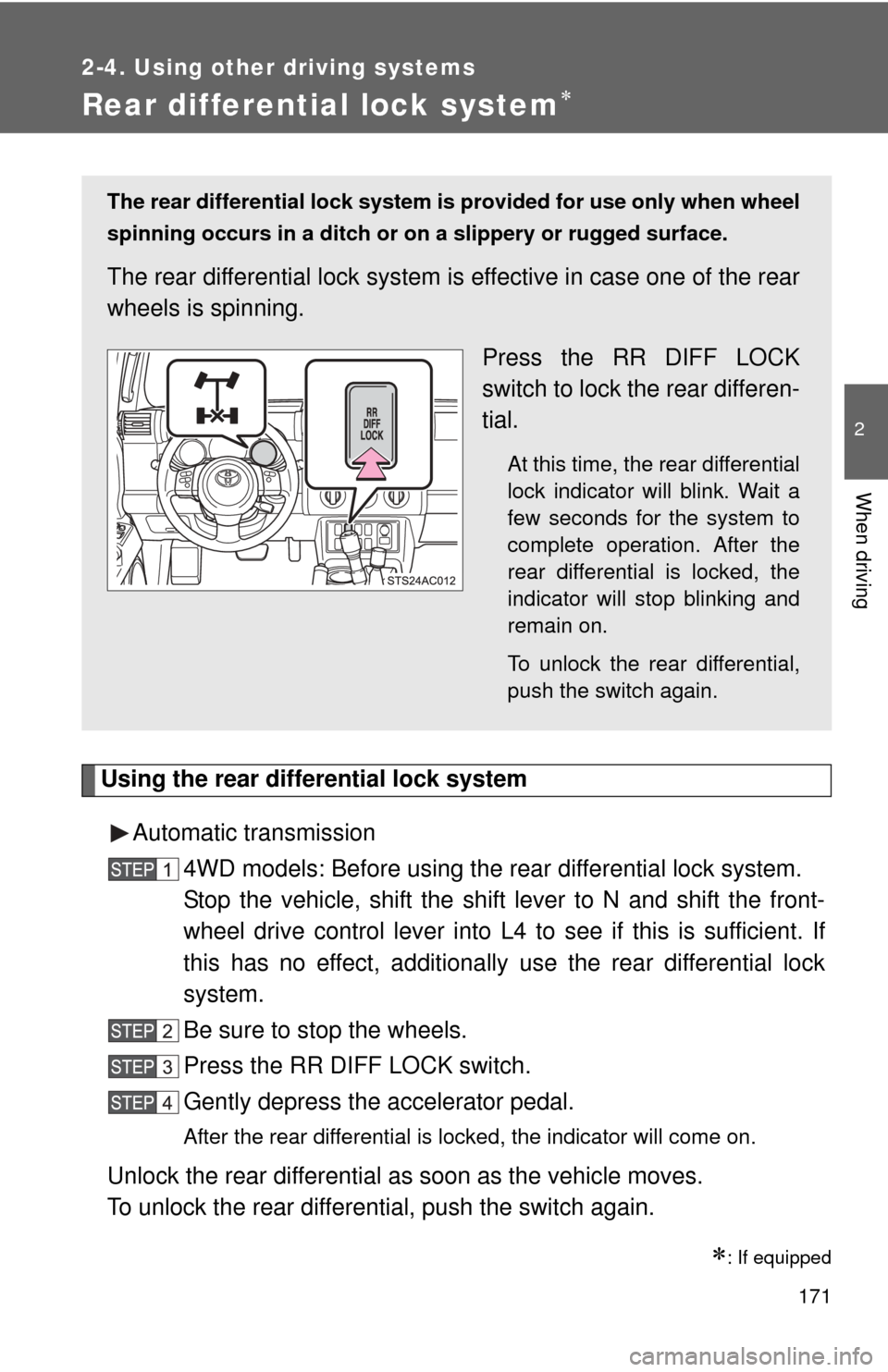
Press the RR DIFF LOCK
switch to lock the rear differen-
tial.
At this time, the rear differential
lock indicator will blink. Wait a
few seconds for the system to
complete operation. After the
rear differential is locked, the
indicator will stop blinking and
remain on.
To unlock the rear differential,
push the switch again.
Page 172 of 528
172 2-4. Using other driving systems
Manual transmissionBefore using the rear differential lock system.
Stop the vehicle or reduce your speed to less than 5 mph (8
km/h). Depress the clutch pedal and shift the four-wheel drive
control lever into LL to see if this is sufficient. If this has no
effect, additionally use the r ear differential lock system.
Be sure to stop the wheels.
Depress the clutch pedal.
Press the RR DIFF LOCK switch.
Slowly release the clutch pedal.
After the rear differential is locked, the indicator will come on.
Unlock the rear differential as soon as the vehicle moves.
To unlock the rear differential, push the switch again.
■ Locking the rear differential
●When the rear differential is locked, VSC is automatically turned off.
(The rear differential lock and VSC OFF indicators will come on.)
● The following systems do not operate when the rear differential is locked.
It is normal operation for the ABS warning light and VSC OFF indicator to
be on at this time.
•ABS
• Brake assist system
•VSC
• TRAC (TRC)
■ The rear differential lock is disengaged when
●Shift the four-wheel drive control lever to H or HL. (4WD models with a
manual transmission)
● Shift the front-wheel drive control lever to H2 or H4. (4WD models with
an automatic transmission)
Never forget to turn off the switch after using this feature.
■ After unlocking the rear differential
Check that the indicator goes off.