key TOYOTA HIGHLANDER 2010 XU40 / 2.G Repair Manual
[x] Cancel search | Manufacturer: TOYOTA, Model Year: 2010, Model line: HIGHLANDER, Model: TOYOTA HIGHLANDER 2010 XU40 / 2.GPages: 608, PDF Size: 11.99 MB
Page 210 of 608
210
2-3. Operating the lights and wipers
Rear window wiper and washer
■The rear window wiper and w asher can be operated when
Vehicles without smart key system
The engine switch is in
the “ON” position.
Vehicles with smart key system
The “ENGINE START STOP” switch is in IGNITION ON mode.
NOTICE
■ When the rear window is dry
Do not use the wipers, as they may damage the rear window.
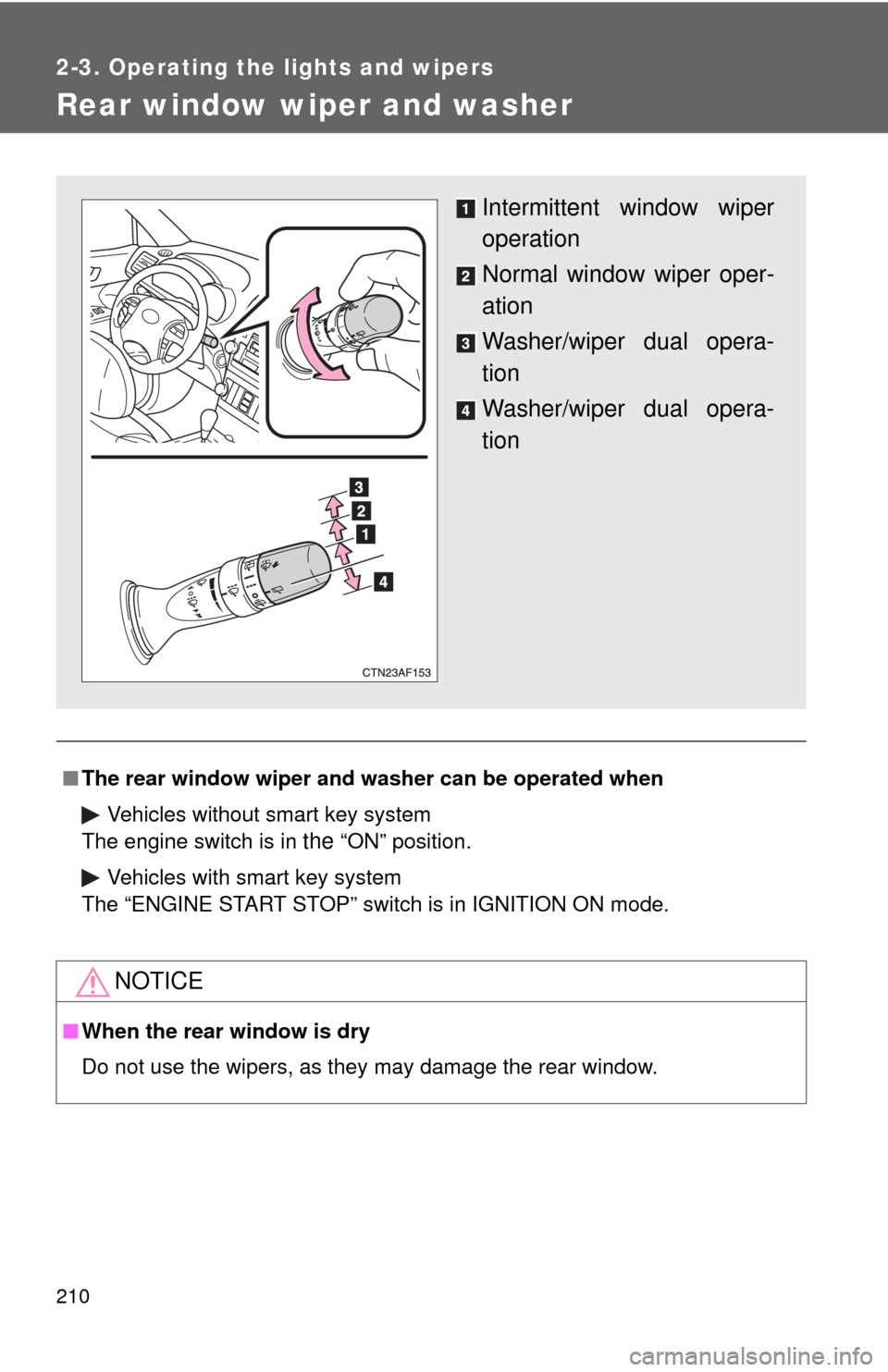
Intermittent window wiper
operation
Normal window wiper oper-
ation
Washer/wiper dual opera-
tion
Washer/wiper dual opera-
tion
Page 220 of 608
220 2-4. Using other driving systems
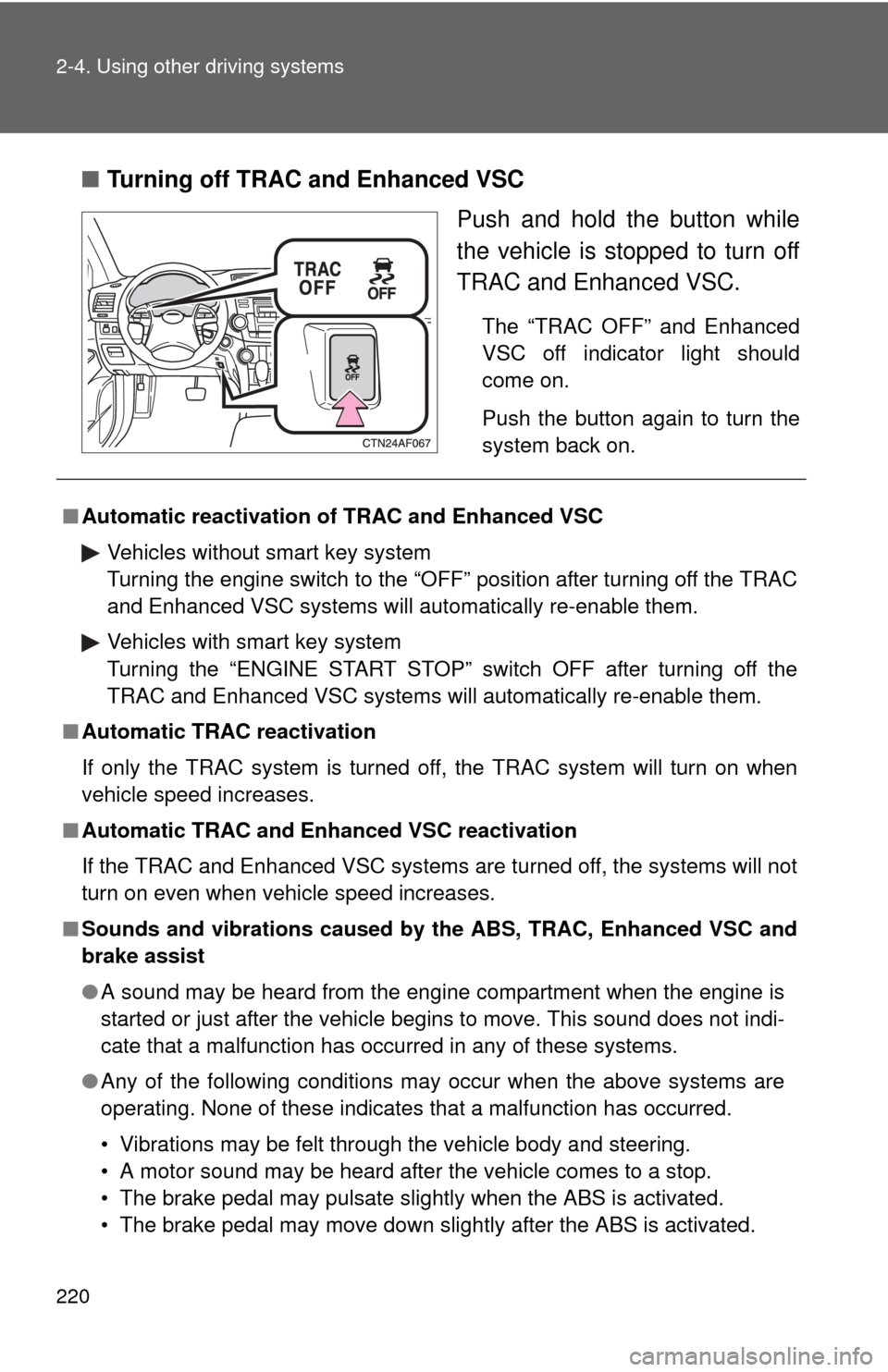
■Turning off TRAC and Enhanced VSC
Push and hold the button while
the vehicle is stopped to turn off
TRAC and Enhanced VSC.
The “TRAC OFF” and Enhanced
VSC off indicator light should
come on.
Push the button again to turn the
system back on.
■Automatic reactivation of TRAC and Enhanced VSC
Vehicles without smart key system
Turning the engine switch to the “OFF” position after turning off the TRAC
and Enhanced VSC systems will automatically re-enable them.
Vehicles with smart key system
Turning the “ENGINE START STOP” switch OFF after turning off the
TRAC and Enhanced VSC systems will automatically re-enable them.
■ Automatic TRAC reactivation
If only the TRAC system is turned off, the TRAC system will turn on when
vehicle speed increases.
■ Automatic TRAC and Enha nced VSC reactivation
If the TRAC and Enhanced VSC systems are turned off, the systems will not
turn on even when vehicle speed increases.
■ Sounds and vibrations caused by the ABS, TRAC, Enhanced VSC and
brake assist
● A sound may be heard from the engine compartment when the engine is
started or just after the vehicle begins to move. This sound does not indi-
cate that a malfunction has occurred in any of these systems.
● Any of the following conditions may occur when the above systems are
operating. None of these indicates that a malfunction has occurred.
• Vibrations may be felt through the vehicle body and steering.
• A motor sound may be heard after the vehicle comes to a stop.
• The brake pedal may pulsate slightly when the ABS is activated.
• The brake pedal may move down slightly after the ABS is activated.
Page 278 of 608
278 3-1. Using the air conditioning system and defogger
■The defogger can be operated when
Vehicles without smart key system
The engine switch is in the “ON” position.
Vehicles with smart key system
The “ENGINE START STOP” switch is in IGNITION ON mode.
■ Outside rear view mirror defoggers (vehicles with outside rear view
mirror defoggers)
Turning the rear window defogger on will turn the outside rear view mirror
defoggers on.
CAUTION
■ Outside rear view mirror defoggers (vehicles with outside rear view
mirror defoggers)
The surfaces of the outside rear view mirrors become hot. Do not touch
them to prevent from burning yourself.
Page 279 of 608
279
3-1. Using the air conditioning system and defogger
3
Interior features
Windshield wiper de-icer
■The de-icer can be operated when
Vehicles without smart key system
The engine switch is in the “ON” position.
Vehicles with smart key system
The “ENGINE START STOP” switch is in IGNITION ON mode.
CAUTION
■ When the windshield wiper de-icer is on
Do not touch the glass at the lower part of the windshield or to the side of the
front pillars as the surfaces can become very hot and burn you.
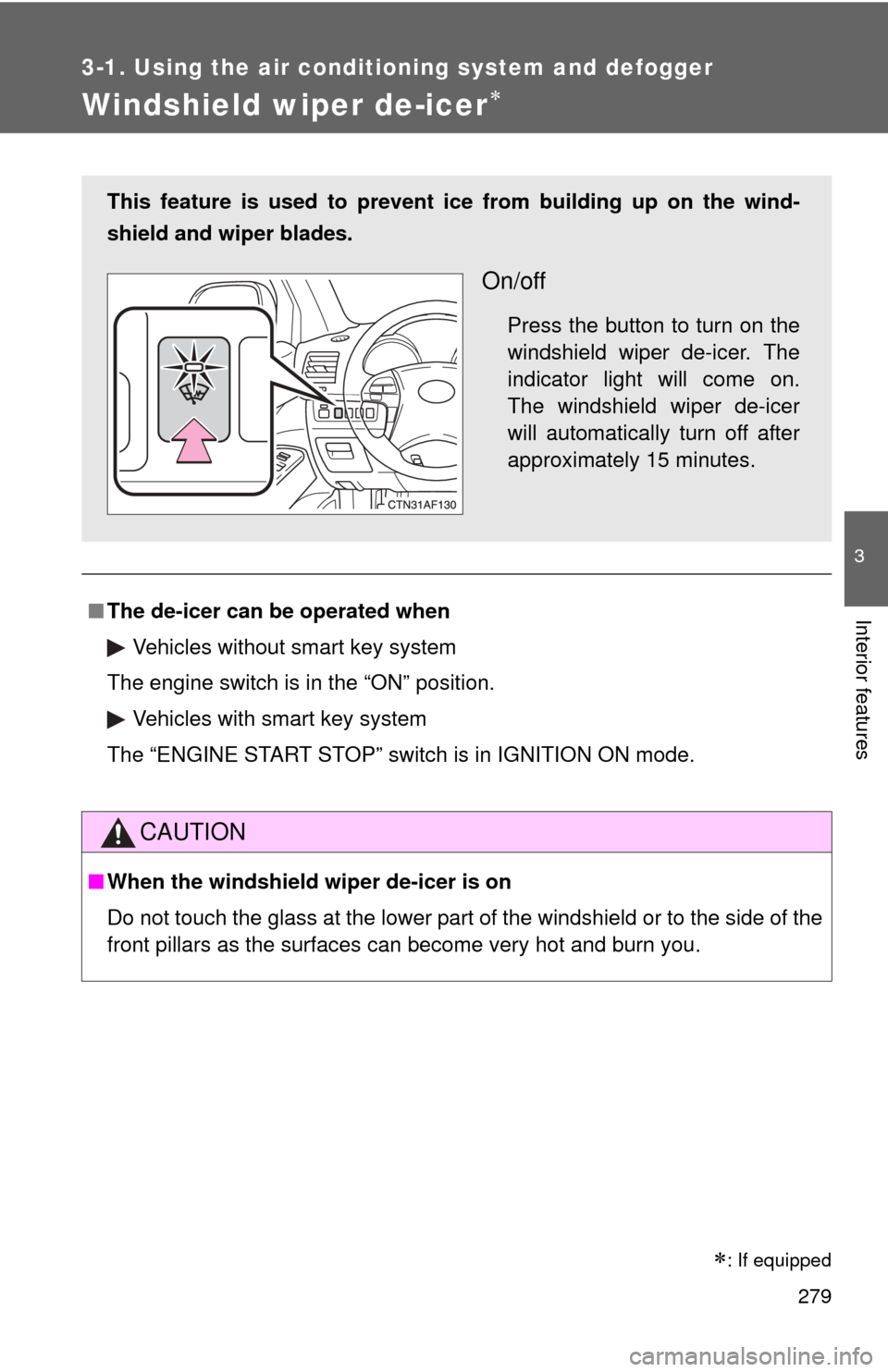
This feature is used to prevent ice from building up on the wind-
shield and wiper blades.
On/off
Press the button to turn on the
windshield wiper de-icer. The
indicator light will come on.
The windshield wiper de-icer
will automatically turn off after
approximately 15 minutes.
: If equipped
Page 314 of 608
314 3-3. Using the rear audio system
■The rear seat entertainmen t system can be used when
Vehicles without smart key system
The engine switch is in the “ACC” or “ON” position.
Vehicles with smart key system
The “ENGINE START STOP” switch is in ACCESSORY or IGNITION ON
mode.
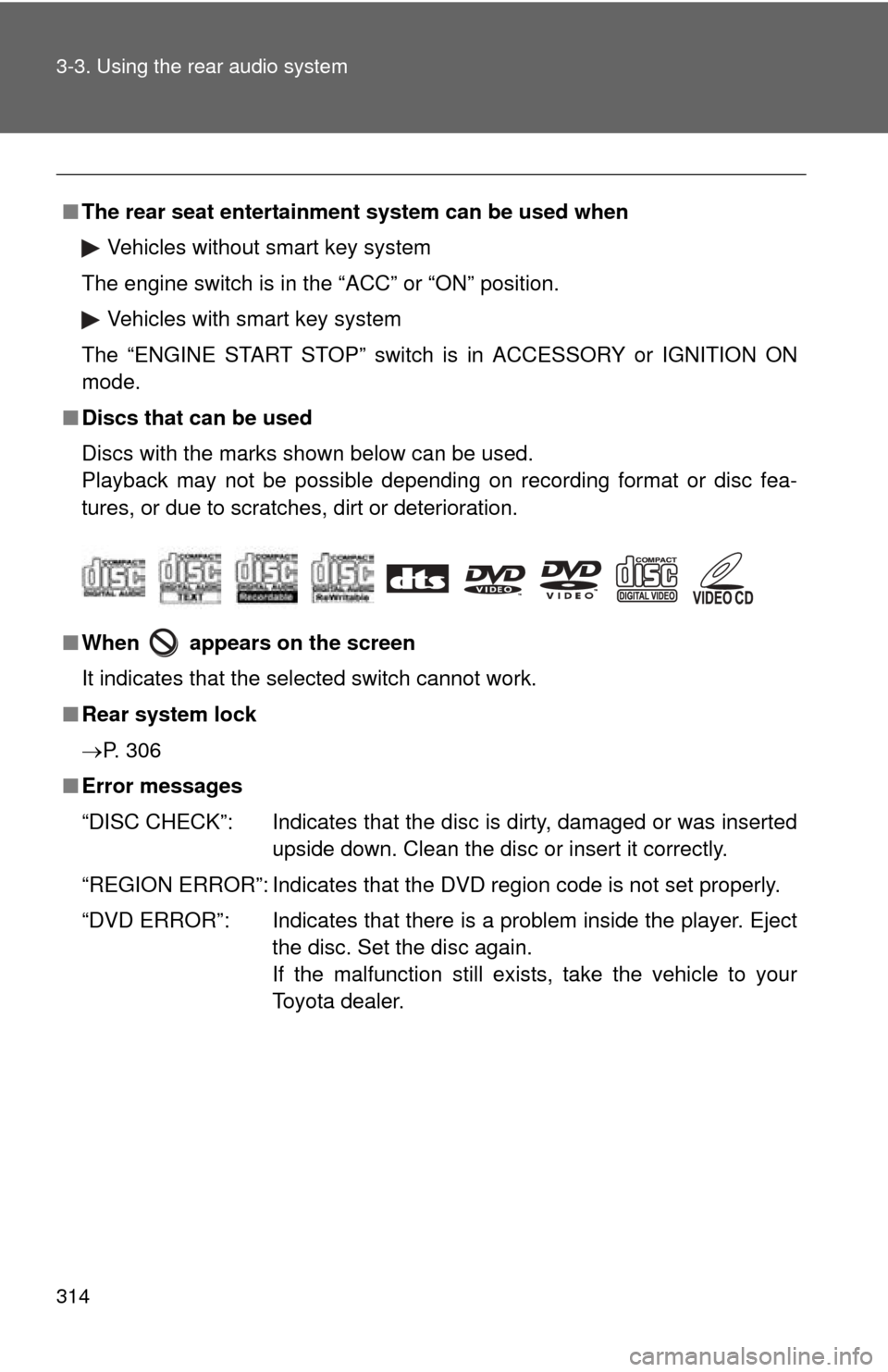
■ Discs that can be used
Discs with the marks shown below can be used.
Playback may not be possible depending on recording format or disc fea-
tures, or due to scratches, dirt or deterioration.
■ When appears on the screen
It indicates that the selected switch cannot work.
■ Rear system lock
P. 306
■ Error messages
“DISC CHECK”: Indicates that the disc is dirty, damaged or was inserted
upside down. Clean the disc or insert it correctly.
“REGION ERROR”: Indicates that the DVD region code is not set properly.
“DVD ERROR”: Indicates that there is a problem inside the player. Eject the disc. Set the disc again.
If the malfunction still exists, take the vehicle to your
Toyota dealer.
Page 349 of 608
349
3-4. Using the hand
s-free phone system (for cellular phone)
3
Interior features
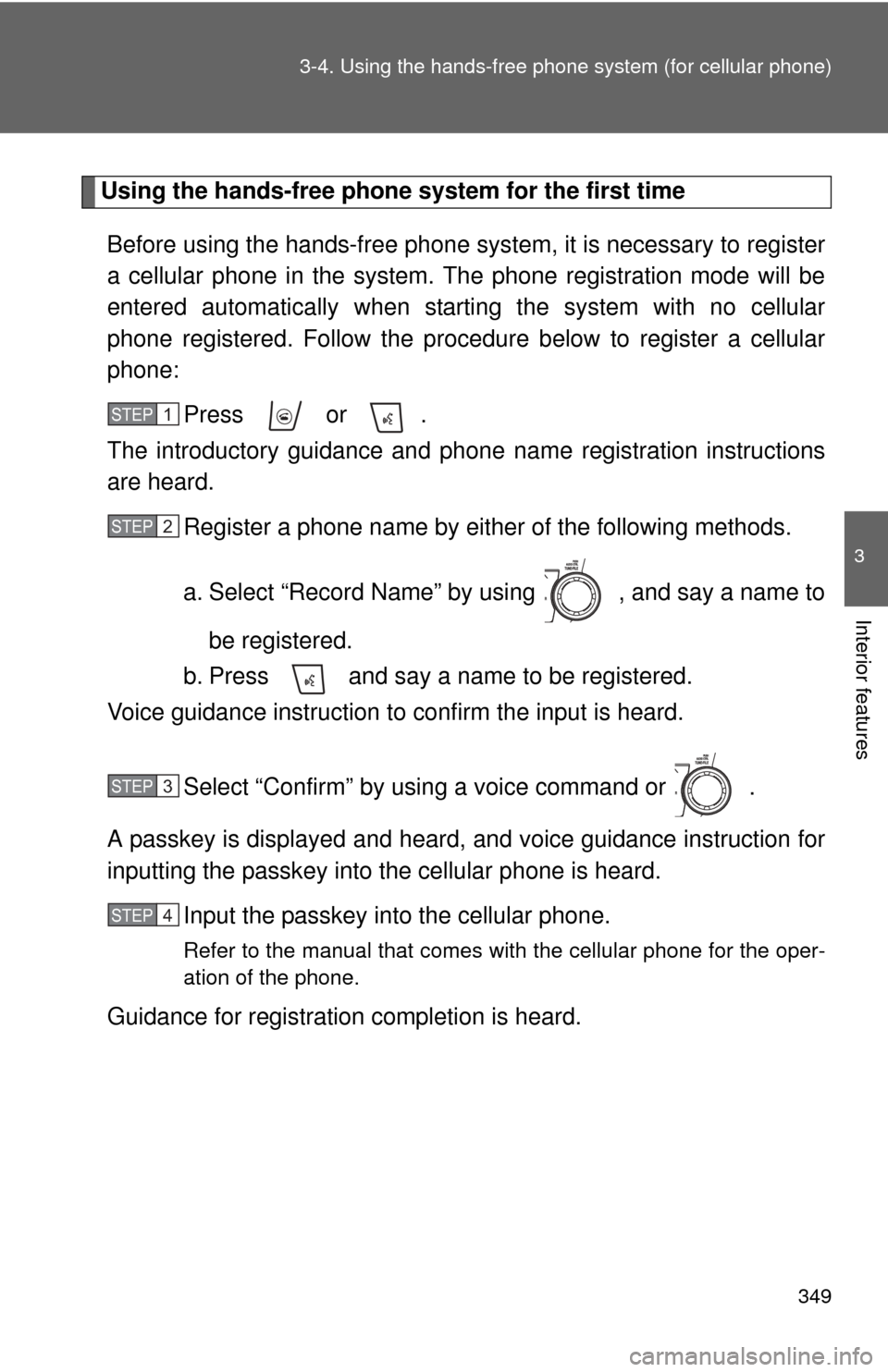
Using the hands-free phone system for the first time
Before using the hands-free phone system, it is necessary to register
a cellular phone in the system. Th e phone registration mode will be
entered automatically when starting the system with no cellular
phone registered. Follow the procedure below to register a cellular
phone:
Press or .
The introductory guidance and phone name registration instructions
are heard.
Register a phone name by either of the following methods.
a. Select “Record Name” by using , and say a name to
be registered.
b. Press and say a name to be registered.
Voice guidance instruction to confirm the input is heard.
Select “Confirm” by using a voice command or .
A passkey is displayed and heard, and voice guidance instruction for
inputting the passkey into the cellular phone is heard.
Input the passkey into the cellular phone.
Refer to the manual that comes with the cellular phone for the oper-
ation of the phone.
Guidance for registration completion is heard.
STEP1
STEP2
STEP3
STEP4
Page 351 of 608
351
3-4. Using the hand
s-free phone system (for cellular phone)
3
Interior features
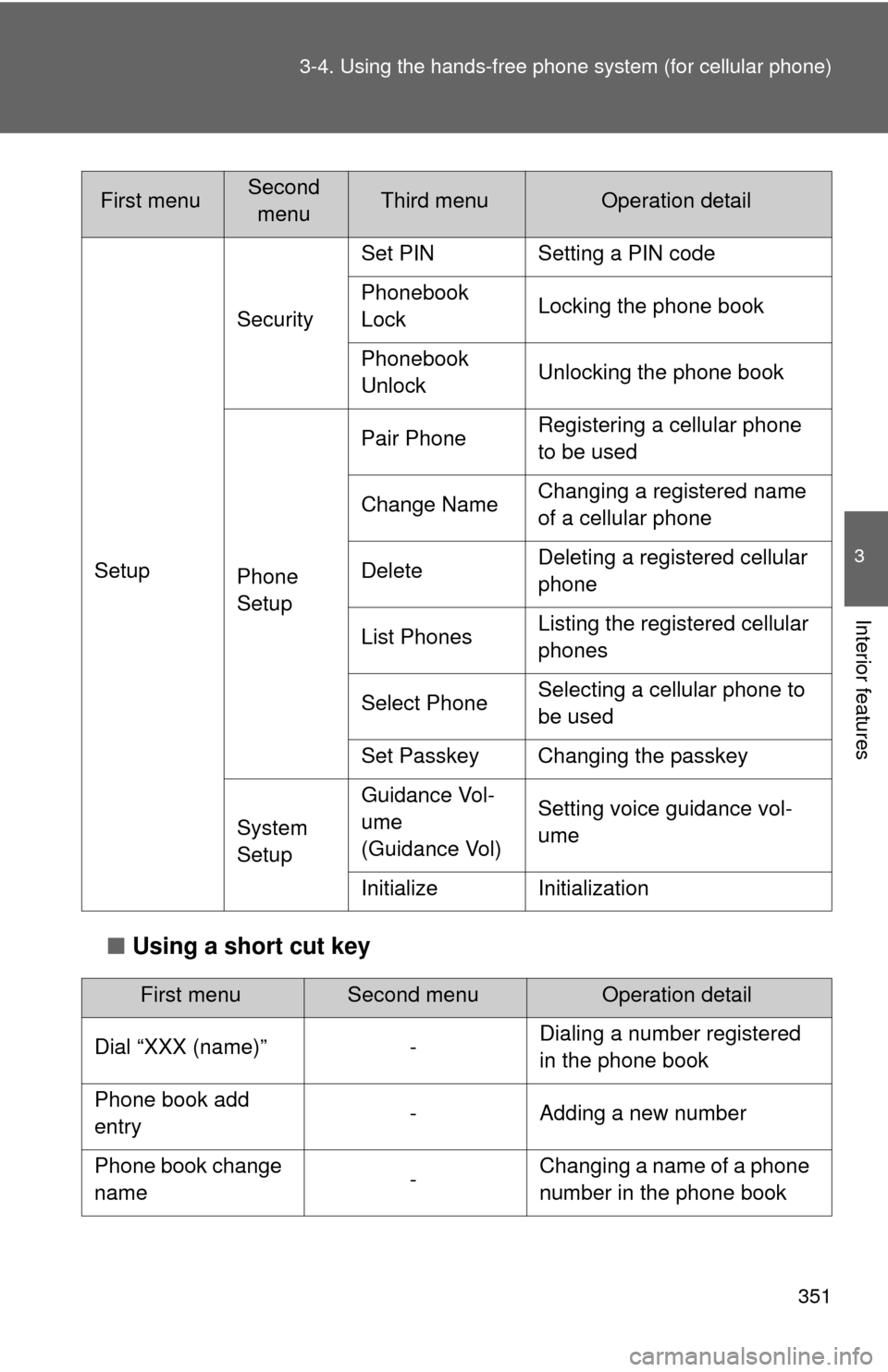
■Using a short cut key
Setup Security
Set PIN Setting a PIN code
Phonebook
Lock
Locking the phone book
Phonebook
Unlock Unlocking the phone book
Phone
Setup Pair Phone
Registering a cellular phone
to be used
Change Name Changing a registered name
of a cellular phone
Delete Deleting a registered cellular
phone
List Phones Listing the registered cellular
phones
Select Phone Selecting a cellular phone to
be used
Set Passkey Changing the passkey
System
Setup Guidance Vol-
ume
(Guidance Vol)
Setting voice guidance vol-
ume
Initialize Initialization
First menuSecond menuOperation detail
Dial “XXX (name)” - Dialing a number registered
in the phone book
Phone book add
entry - Adding a new number
Phone book change
name -Changing a name of a phone
number in the phone book
First menuSecond
menuThird menuOperation detail
Page 352 of 608
352 3-4. Using the hands-free phone system (for cellular phone)
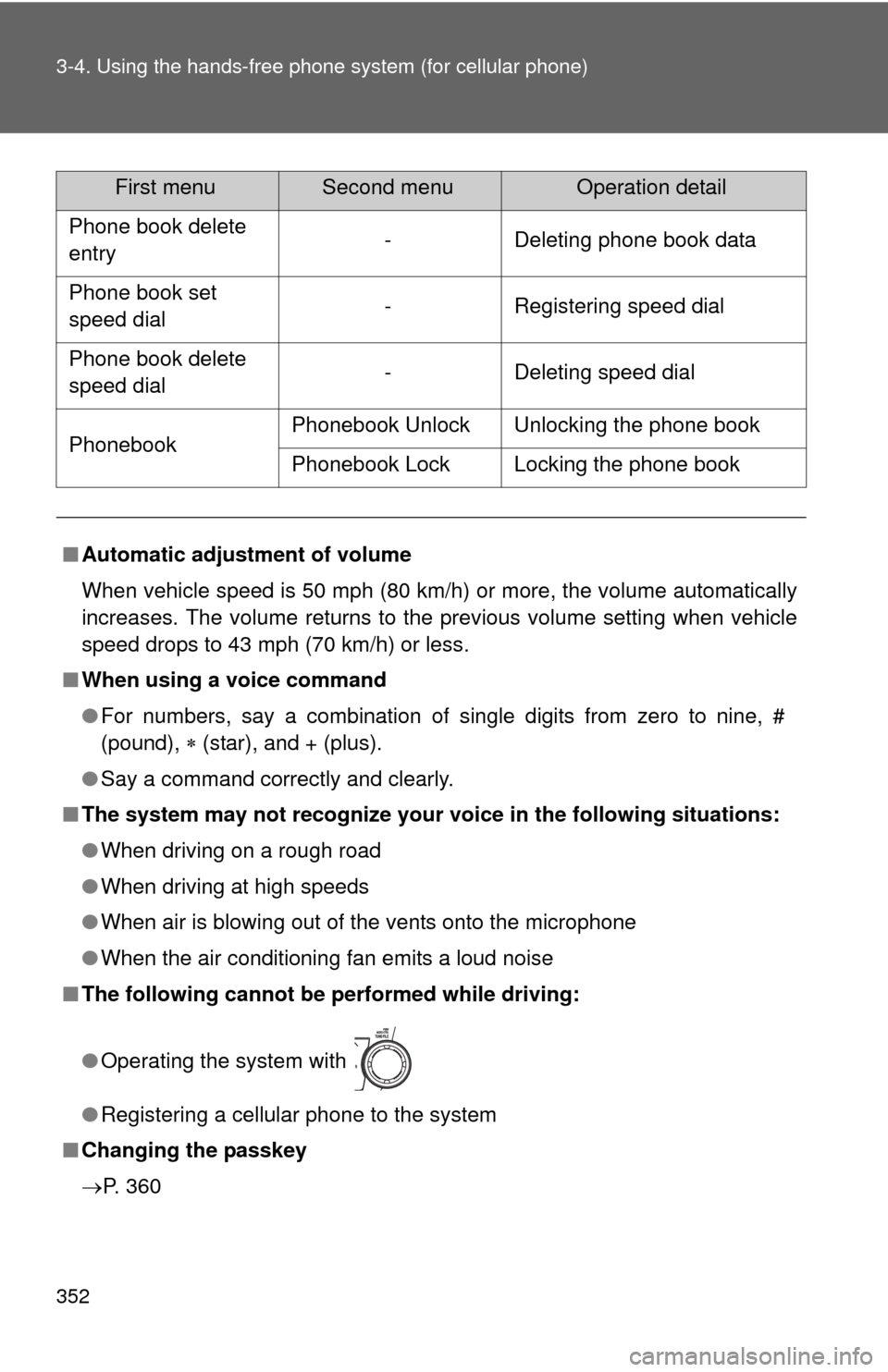
Phone book delete
entry - Deleting phone book data
Phone book set
speed dial - Registering speed dial
Phone book delete
speed dial - Deleting speed dial
Phonebook Phonebook Unlock Unlocking the phone book
Phonebook Lock Locking the phone book
■ Automatic adjustment of volume
When vehicle speed is 50 mph (80 km/h) or more, the volume automatically
increases. The volume returns to the previous volume setting when vehicle
speed drops to 43 mph (70 km/h) or less.
■ When using a voice command
●For numbers, say a combination of single digits from zero to nine, #
(pound), (star), and + (plus).
● Say a command correctly and clearly.
■ The system may not recognize your voice in the following situations:
●When driving on a rough road
● When driving at high speeds
● When air is blowing out of the vents onto the microphone
● When the air conditioning fan emits a loud noise
■ The following cannot be performed while driving:
●Operating the system with
● Registering a cellular phone to the system
■ Changing the passkey
P. 360
First menuSecond menuOperation detail
Page 357 of 608
357
3-4. Using the hands-free phone system (for cellular phone)
3
Interior features
Setting a cellular phone
Registering a cellular phoneSelect “Pair Phone” by using a voice command or , and do the
procedure for registering a cellular phone. ( P. 349)
Registering a cellular phone in the hands-free phone system allows
the system to function. The following function can be used for regis-
tered cellular phones:
■ Functions and operation procedures
To enter menu for each function, fo llow the steps below by using a
voice command or :
●Registering a cellular phone
1. “Setup” 2. “Phone Setup” 3. “Pair Phone”
● Selecting a cellular phone to be used
1. “Setup” 2. “Phone Setup” 3. “Select Phone”
● Changing a registered name
1. “Setup” 2. “Phone Setup” 3. “Change Name”
● Listing the registered cellular phones
1. “Setup” 2. “Phone Setup” 3. “List Phones”
● Deleting a cellular phone
1. “Setup” 2. “Phone Setup” 3. “Delete”
● Changing the passkey
1. “Setup” 2. “Phone Setup” 3. “Set Passkey”
Page 360 of 608
360 3-4. Using the hands-free phone system (for cellular phone)
Deleting a cellular phone
Select “Delete” by using a voice command or .
Pattern A Select a cellular phone to be deleted by either of the following
methods and select “Confirm” by using a voice command or
:
a. Press and say the name of the desired cellular phone.
b. Press and say “List phones”. While the name of the
desired cellular phone is being read aloud, press .
Pattern B
Select a desired cellular phone to be deleted by using .
Changing the passkey
Select “Set Passkey” by using a voice command or .
Pattern A Press , say a 4 to 8-digit number, and select “Confirm”
by using a voice command or .
STEP1
STEP2
STEP2
STEP1
STEP2