alarm TOYOTA HIGHLANDER 2014 XU50 / 3.G User Guide
[x] Cancel search | Manufacturer: TOYOTA, Model Year: 2014, Model line: HIGHLANDER, Model: TOYOTA HIGHLANDER 2014 XU50 / 3.GPages: 712, PDF Size: 11.43 MB
Page 127 of 712
1273-2. Opening, closing and locking the doors
3
Operation of each component
HIGHLANDER_U (OM48A12U)
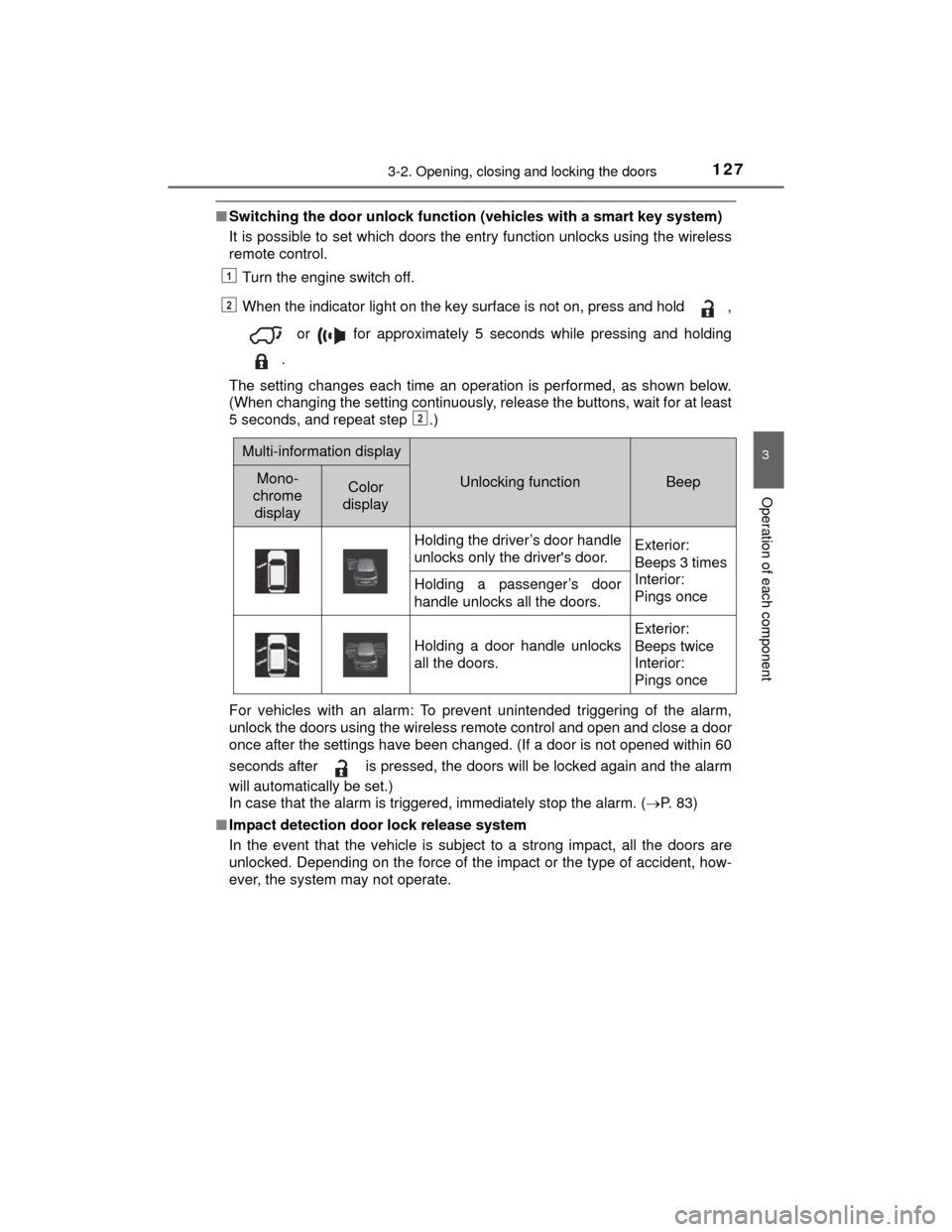
■Switching the door unlock function (vehicles with a smart key system)
It is possible to set which doors the entry function unlocks using the wireless
remote control.
Turn the engine switch off.
When the indicator light on the key surface is not on, press and hold ,
or for approximately 5 seconds while pressing and holding
.
The setting changes each time an operation is performed, as shown below.
(When changing the setting continuously, release the buttons, wait for at least
5 seconds, and repeat step .)
For vehicles with an alarm: To prevent unintended triggering of the alarm,
unlock the doors using the wireless remote control and open and close a door
once after the settings have been changed. (If a door is not opened within 60
seconds after is pressed, the doors will be locked again and the alarm
will automatically be set.)
In case that the alarm is triggered, immediately stop the alarm. ( P. 83)
■ Impact detection door lock release system
In the event that the vehicle is subject to a strong impact, all the doors are
unlocked. Depending on the force of the impact or the type of accident, how-
ever, the system may not operate.
1
2
2
Multi-information display
Unlocking functionBeepMono-
chrome
displayColor
display
Holding the driver’s door handle
unlocks only the driver's door.Exterior:
Beeps 3 times
Interior:
Pings once
Holding a passenger’s door
handle unlocks all the doors.
Holding a door handle unlocks
all the doors.
Exterior:
Beeps twice
Interior:
Pings once
Page 143 of 712

1433-2. Opening, closing and locking the doors
3
Operation of each component
HIGHLANDER_U (OM48A12U)
■Luggage compartment light
P. 133
■ The glass hatch can be opened when
The back door is closed.
■ Opening and closing the glass hatch
●Open the glass hatch slowly and carefully.
● Make sure that the rear window wiper is switched off.
● Do not rotate the rear wiper arm when the glass hatch is open. (If the rear
wiper arm is rotated, turn the wiper switch on after closing the glass hatch.
The rear wiper arm will return to the correct position automatically after
operating once.)
● Make sure that the back door is closed before closing the glass hatch.
■ After closing the glass hatch
Check that the glass hatch is firmly closed. If it is not firmly closed, the rear
window wiper and washer will not operate correctly.
■ Function to prevent the glass hatch being locked with the electronic key
inside (vehicles with a smart key system)
●When all doors are locked, closing the glass hatch with the electronic key
left inside the luggage compartment will sound an alarm.
In this case, the glass hatch can be opened by pressing the glass hatch
opener.
● If the spare electronic key is put in the luggage compartment with all the
doors locked, the key confinement prevention function will activate and the
glass hatch can be opened. In order to prevent theft, take all electronic keys
with you when leaving the vehicle.
● If the electronic key is put in the luggage compartment with all the doors
locked, the key may not be detected depending on the location of the key
and the surrounding radio wave conditions. In this case, the key confine-
ment prevention function cannot be activated, causing the doors to lock
when the glass hatch is closed. Make sure to check where the key is before
closing the glass hatch.
Page 148 of 712
1483-2. Opening, closing and locking the doors
HIGHLANDER_U (OM48A12U)■
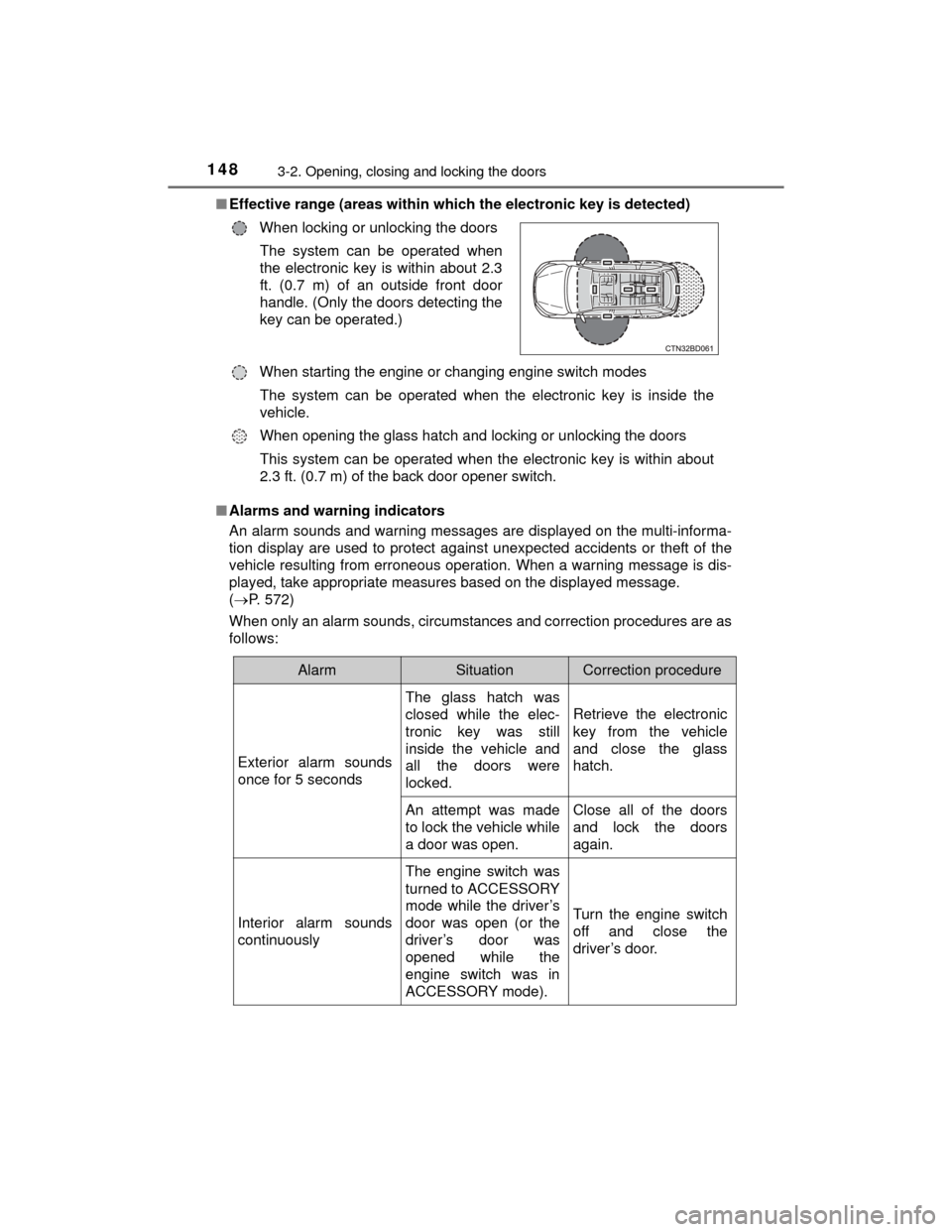
Effective range (areas within whic h the electronic key is detected)
■ Alarms and warning indicators
An alarm sounds and warning messages are displayed on the multi-informa-
tion display are used to protect against unexpected accidents or theft of the
vehicle resulting from erroneous operation. When a warning message is dis-
played, take appropriate measures based on the displayed message.
( P. 572)
When only an alarm sounds, circumstances and correction procedures are as
follows: When locking or unlocking the doors
The system can be operated when
the electronic key is within about 2.3
ft. (0.7 m) of an outside front door
handle. (Only the doors detecting the
key can be operated.)
When starting the engine or changing engine switch modes The system can be operated when the electronic key is inside the
vehicle.
When opening the glass hatch and locking or unlocking the doors
This system can be operated when the electronic key is within about
2.3 ft. (0.7 m) of the back door opener switch.
AlarmSituationCorrection procedure
Exterior alarm sounds
once for 5 seconds
The glass hatch was
closed while the elec-
tronic key was still
inside the vehicle and
all the doors were
locked.
Retrieve the electronic
key from the vehicle
and close the glass
hatch.
An attempt was made
to lock the vehicle while
a door was open.Close all of the doors
and lock the doors
again.
Interior alarm sounds
continuously
The engine switch was
turned to ACCESSORY
mode while the driver’s
door was open (or the
driver’s door was
opened while the
engine switch was in
ACCESSORY mode).
Turn the engine switch
off and close the
driver’s door.
Page 152 of 712

1523-2. Opening, closing and locking the doors
HIGHLANDER_U (OM48A12U)●
If the electronic key is inside the vehicle and a door handle becomes wet
during a car wash, a message may be shown on the multi-information dis-
play and a buzzer will sound outside the vehicle. To turn off the alarm, lock
all the doors.
● The lock sensor may not work properly if it comes into contact with ice,
snow, mud, etc. Clean the lock sensor and attempt to operate it again, or
use the lock sensor on the lower part of the door handle.
● A sudden handle operation or a handle oper ation immediately after entering
the effective range may prevent the doors from being unlocked. Touch the
door unlock sensor and check that the doors are unlocked before pulling the
door handle again.
● Unlocking the vehicle may take more time if another electronic key is within
the effective range.
■ When the vehicle is not driven for extended periods
●To prevent theft of the vehicle, do not leave the electronic key within 6 ft. (2
m) of the vehicle.
● The smart key system can be deactivated in advance. ( P. 662)
■ To operate the system properly
Make sure to carry the electronic key when operating the system. Do not get
the electronic key too close to the vehicle when operating the system from the
outside of the vehicle.
Depending on the position and holding condition of the electronic key, the key
may not be detected correctly and the system may not operate properly. (The
alarm may go off accidentally, or the door lock prevention function may not
operate.)
■ If the smart key system does not operate properly
●Locking and unlocking the doors: Use the mechanical key. (P. 618)
● Starting the engine: P. 619
■ Customization
Settings (e. g. smart key system) can be changed.
(Customizable features: P. 662)
■ If the smart key system has been d eactivated in a customized setting
● Locking and unlocking the doors:
Use the wireless remote control or mechanical key. ( P. 122, 618)
● Starting the engine and changing engine switch modes: P. 619
● Stopping the engine: P. 229
Page 312 of 712

3124-5. Using the driving support systems
HIGHLANDER_U (OM48A12U)
WARNING
■Cautions regarding the assist contents of the system
By means of alarms and brake control, the pre-collision system is intended
to assist the driver in avoiding collisions through the process of LOOK-
JUDGE-ACT. There are limits to the degree of assistance the system can
provide, so please keep in mind the following important points.
●Assisting the driver in watching the road
The pre-collision system is only able to detect obstacles directly in front of
the vehicle, and only within a limited range. It is not a mechanism that
allows careless or inattentive driving, and it is not a system that can assist
the driver in low-visibility conditions. It is still necessary for the driver to
pay close attention to the vehicle’s surroundings.
● Assisting the driver in making correct judgment
When attempting to estimate the possibility of a collision, the only data
available to the pre-collision system is that from obstacles it has detected
directly in front of the vehicle. Theref ore, it is absolutely necessary for the
driver to remain vigilant and to deter mine whether or not there is a possi-
bility of collision in any given situation.
● Assisting the driver in taking action
The pre-collision system’s braking assist feature is designed to help
reduce the severity of a collision, and so only acts when the system has
judged that a collision is unavoidable. This system by itself is not capable
of automatically avoiding a collision or bringing the vehicle to a stop safely.
For this reason, when encountering a dangerous situation the driver must
take direct and immediate action in order to ensure the safety of all
involved.
Page 666 of 712
6669-2. Customization
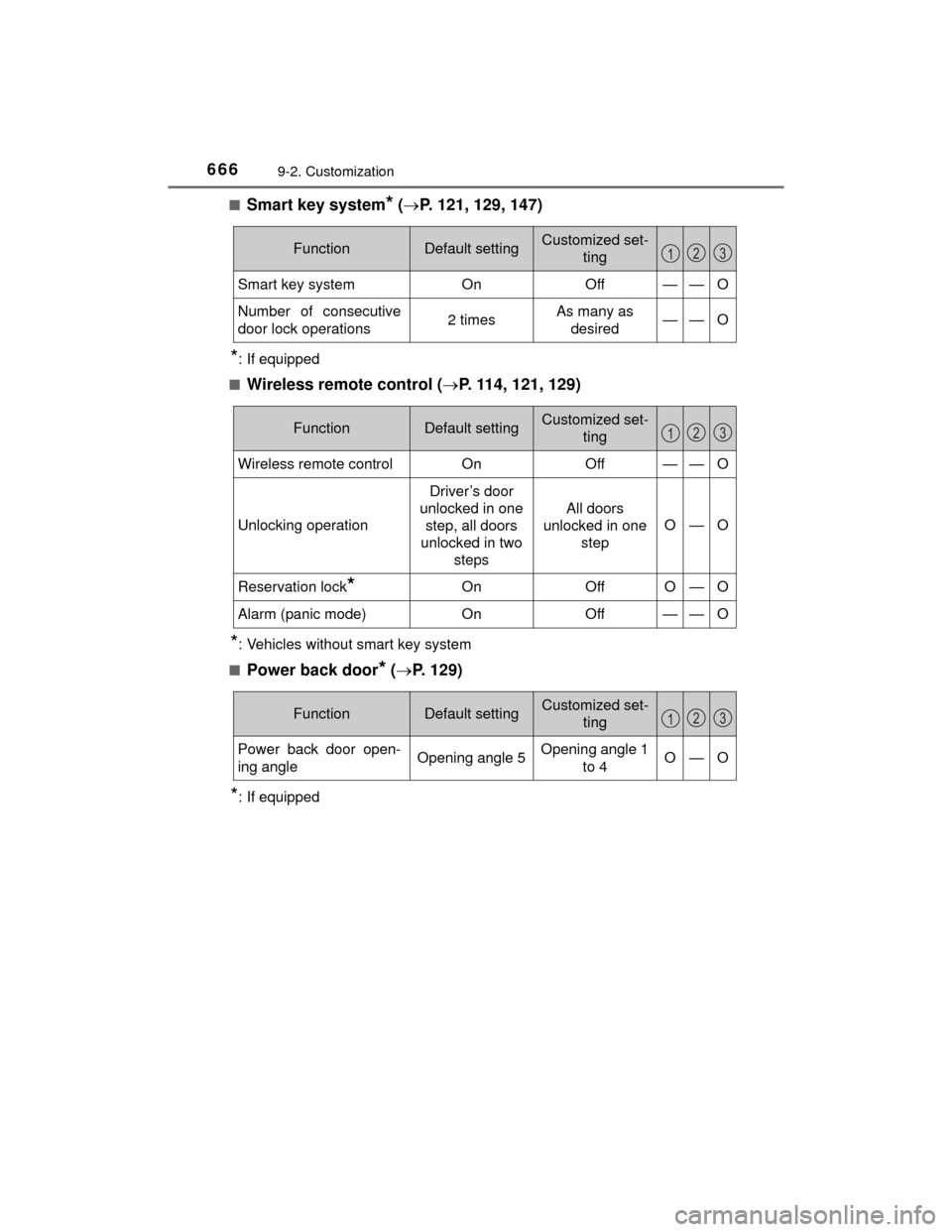
HIGHLANDER_U (OM48A12U)■
Smart key system* (
P. 121, 129, 147)
*: If equipped
■
Wireless remote control ( P. 114, 121, 129)
*: Vehicles without smart key system
■
Power back door* ( P. 129)
*: If equipped
FunctionDefault settingCustomized set-
ting
Smart key systemOnOff——O
Number of consecutive
door lock operations2 timesAs many as desired——O
123
FunctionDefault settingCustomized set- ting
Wireless remote controlOnOff——O
Unlocking operation
Driver’s door
unlocked in one step, all doors
unlocked in two steps
All doors
unlocked in one
step
O—O
Reservation lock*OnOffO—O
Alarm (panic mode)OnOff——O
123
FunctionDefault settingCustomized set- ting
Power back door open-
ing angleOpening angle 5Opening angle 1 to 4O—O
123
Page 691 of 712

691What to do if... (Troubleshooting)
HIGHLANDER_U (OM48A12U)
●The auto power off function will be operated if the vehicle is left in ACCES-
SORY or IGNITION ON mode (the engine is not running) for a period of
time. (P. 230)
●The seat belt reminder light is flashing
Are the driver and the front passenger wearing the seat belts? ( P. 565)
●The parking brake indicator is on
Is the parking brake released? (P. 240)
Depending on the situation, other types of warning buzzer may also sound.
( P. 563, 572)
●Did anyone inside the vehicle open a door during setting the alarm?
The sensor detects it and the alarm sounds. ( P. 82)
Vehicles without a smart key system:
To stop the alarm, turn the engine switch to the “ON” position or start the
engine.
Vehicles with a smart key system:
To stop the alarm, turn the engine switch to IGNITION ON mode or start the
engine.
The engine switch is turned off automatically
(vehicles with a smart key system)
A warning buzzer sounds during driving
An alarm is activated and the horn sounds
(vehicles with an alarm)
Page 694 of 712

694
HIGHLANDER_U (OM48A12U)
Alphabetical index
Alphabetical index
A/CAir conditioning filter ............. 530
Front automatic air conditioning system ............ 428
Front manual air conditioning
system ................................ 422
Rear automatic air conditioning system ............ 438
Rear manual air conditioning system ................................ 435
ABS
(Anti-lock Brake
System) .................................. 298Function ................................ 298
Warning light ......................... 564
Air conditioning filter .............. 530
Air conditioning system Air conditioning filter ............. 530
Front automatic air conditioning system ............ 428
Front manual air conditioning system ................................ 422
Rear automatic air
conditioning system ............ 438
Rear manual air conditioning system ................................ 435 Airbags ....................................... 40
Airbag operating conditions .... 48
Airbag precautions for
your child .............................. 43
Airbag warning light .............. 564
Correct driving posture ........... 28
Curtain shield airbag operating conditions ............. 49
Curtain shield airbag precautions........................... 46
Front passenger occupant classification system ............ 53
General airbag precautions .... 43
Locations of airbags ............... 40
Modification and disposal of airbags ............... 47
Side airbag operating conditions ............................. 49
Side airbag precautions .......... 43
Side and curtain shield airbags operating
conditions ............................. 49
Side and curtain shield airbags precautions.............. 43
SRS airbags ........................... 40
Alarm .......................................... 82
Alarm ...................................... 82
Warning buzzer ............ 563, 572
All-wheel drive system............ 297
Anchor brackets ........................ 65
Antennas (smart key system) .................................. 147
A
Page 708 of 712

708Alphabetical index
HIGHLANDER_U (OM48A12U)
Meter control switches .......... 102
Moon roof switches ............... 182
Outside rear view mirror switches.............................. 176
Panoramic moon roof switches.............................. 186
PCS OFF switch ................... 307
Power back door main switch ................................. 132
Power back door opener and closer switch ................ 129
Power door lock switch ......... 125
Power window switch............ 178
Rear window and outside rear view mirror
defoggers switch ........ 424, 430
Rear window wiper and washer switch ..................... 255
Seat heater switches ............ 442
Seat ventilator switches ........ 442
“SNOW” button ..................... 235
“SOS” button ......................... 473
Talk switch ............................ 417
Telephone switches .............. 397
Tire pressure warning reset switch ........................ 517
Vehicle-to-vehicle distance button ................................. 266
VSC OFF switch ................... 300
Window lock switch............... 179
Windshield wiper and washer switch ..................... 253 Tachometer ................................ 94
Tail lights.................................. 241
Light switch ........................... 241
Replacing light bulbs ............ 539
Wattage ................................ 645
Talk switch ............................... 417
Telephone switches ................ 397
Theft deterrent system Alarm ...................................... 82
Engine immobilizer system ..... 80
Theft prevention labels ............. 85
Tire inflation pressure............. 525
Maintenance data ................. 642
Warning light......................... 565
Tire information ....................... 649 Glossary ............................... 656
Size....................................... 652
Tire identification number ..... 651
Uniform Tire Quality Grading .............................. 654
Tire pressure warning system.................................... 516Function ................................ 516
Initializing .............................. 516
Installing tire pressure
warning valves and
transmitters ........................ 516
Registering ID codes ............ 518
Tire pressure warning reset switch ................................. 517
Warning light......................... 565T