key TOYOTA HIGHLANDER 2014 XU50 / 3.G Owner's Manual
[x] Cancel search | Manufacturer: TOYOTA, Model Year: 2014, Model line: HIGHLANDER, Model: TOYOTA HIGHLANDER 2014 XU50 / 3.GPages: 712, PDF Size: 11.43 MB
Page 116 of 712
1163-1. Key information
HIGHLANDER_U (OM48A12U)
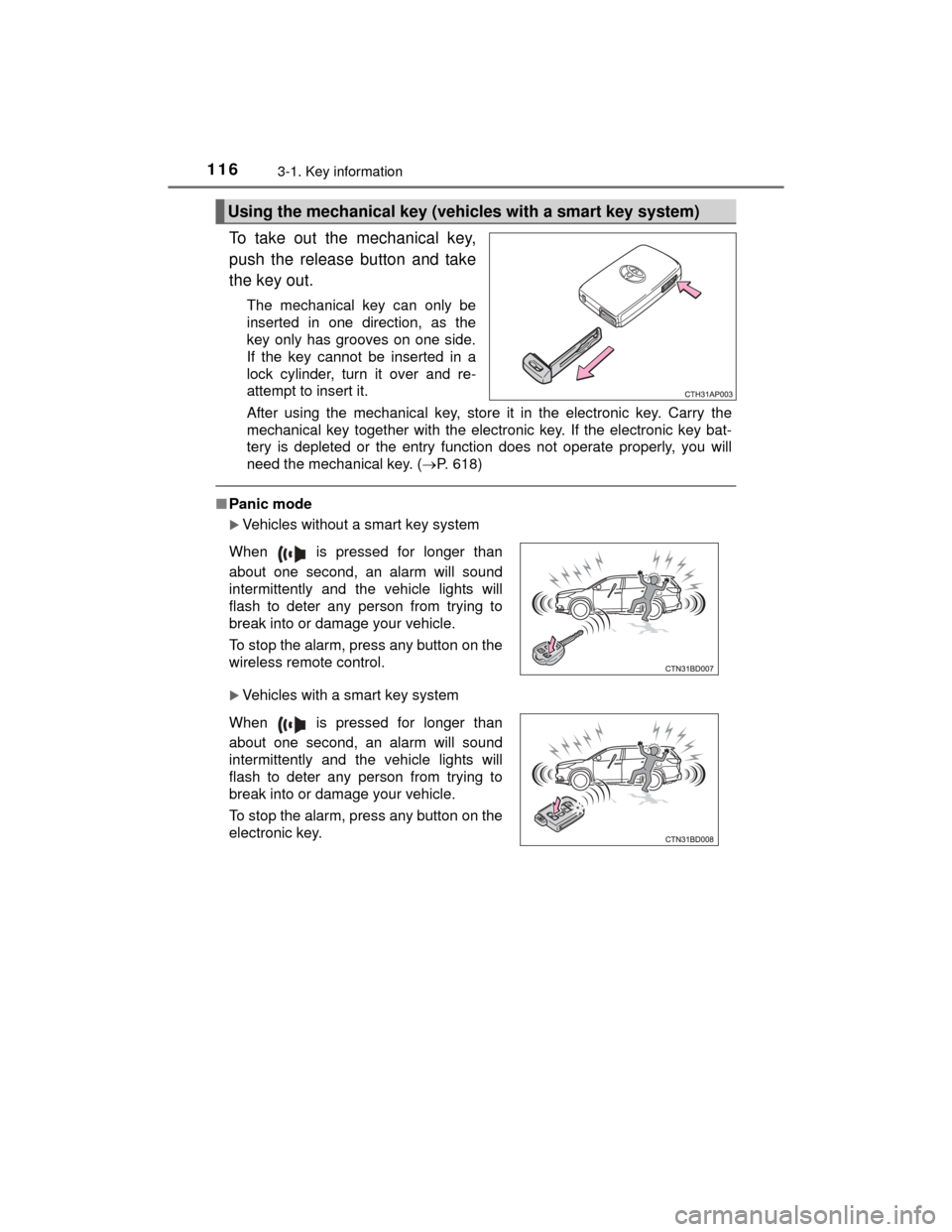
To take out the mechanical key,
push the release button and take
the key out.
The mechanical key can only be
inserted in one direction, as the
key only has grooves on one side.
If the key cannot be inserted in a
lock cylinder, turn it over and re-
attempt to insert it.
After using the mechanical key, store it in the electronic key. Carry the
mechanical key together with the electronic key. If the electronic key bat-
tery is depleted or the entry function does not operate properly, you will
need the mechanical key. (P. 618)
■Panic mode
Vehicles without a smart key system
Vehicles with a smart key system
Using the mechanical key (vehicles with a smart key system)
When is pressed for longer than
about one second, an alarm will sound
intermittently and the vehicle lights will
flash to deter any person from trying to
break into or damage your vehicle.
To stop the alarm, press any button on the
wireless remote control.
When is pressed for longer than
about one second, an alarm will sound
intermittently and the vehicle lights will
flash to deter any person from trying to
break into or damage your vehicle.
To stop the alarm, press any button on the
electronic key.
Page 117 of 712
1173-1. Key information
3
Operation of each component
HIGHLANDER_U (OM48A12U)■
When required to leave the vehicle’s key with a parking attendant
Lock the glove box as circumstances demand. ( P. 447)
Vehicles without a smart key system: Carry the master key for your own use
and provide the attendant with the valet key.
Vehicles with a smart key system: Remove the mechanical key for your own
use and provide the attendant with the electronic key only.
■ If you lose your keys
New genuine keys can be made by your Toyota dealer using a master key
(vehicles without a smart key system) or the other key (vehicles with a smart
key system) and the key number stamped on your key number plate. Keep
the plate in a safe place such as your wallet, not in the vehicle.
■ When riding in an aircraft
When bringing a key with wireless remote control function onto an aircraft,
make sure you do not press any buttons on the key while inside the aircraft
cabin. If you are carrying the key in your bag etc., ensure that the buttons are
not likely to be pressed accidentally. Pressing a button may cause the key to
emit radio waves that could interfere with the operation of the aircraft.
■ Conditions affecting operation
Vehicles without a smart key system
The wireless remote control function may not operate normally in the follow-
ing situations:
● When the wireless key battery is depleted
● Near a TV tower, electric power plant, gas station, radio station, large dis-
play, airport or other fac ility that generates strong radio waves or electrical
noise
● When carrying a portable radio, cellular phone or other wireless communi-
cation device
● When multiple wireless keys are in the vicinity
● When the wireless key is in contact with, or is covered by a metallic object
● When a wireless key (that emits radio waves) is being used nearby
● When the wireless key has been left near an electrical appliance such as a
personal computer
● If window tint with a metallic content or metallic objects are attached to the
rear window
Vehicles with a smart key system
P. 150
Page 118 of 712

1183-1. Key information
HIGHLANDER_U (OM48A12U)■
Key battery depletion
Vehicles without a smart key system
If the wireless remote control function does not operate, the battery may be
depleted. Replace the battery when necessary. ( P. 532)
Vehicles with a smart key system
● The standard battery life is 1 to 2 years.
● If the battery becomes low, an alarm will sound in the cabin when the engine
stops. ( P. 587)
● As the electronic key always receives radio waves, the battery will become
depleted even if the electronic key is not used. The following symptoms indi-
cate that the electronic key battery may be depleted. Replace the battery
when necessary. ( P. 532)
• The smart key system or the wireless remote control does not operate.
• The detection area becomes smaller.
• The LED indicator on the key surface does not turn on.
● To avoid serious deterioration, do not leave the electronic key within 3 ft. (1
m) of the following electrical appliances that produce a magnetic field:
•TVs
• Personal computers
• Cellular phones, cordless phones and battery chargers
• Recharging cellular phones or cordless phones
• Table lamps
• Induction cookers
■ When the key battery is fully depleted
P. 532
■ Confirmation of the registered key number (vehicles with a smart key
system)
The number of electronic keys already registered to the vehicle can be con-
firmed. Ask your Toyota dealer for details.
■ If a wrong key is used (vehicles with a smart key system)
The key cylinder rotates freely to isolate inside mechanism.
■ Customization
Settings (e.g. wireless remote control system) can be changed.
(Customizable features: P. 662)
Page 119 of 712

1193-1. Key information
3
Operation of each component
HIGHLANDER_U (OM48A12U)■
Certification for wireless remote co ntrol (vehicles without a smart key
system)
For vehicles sold in the U.S.A. and Canada
TRW Automotive
Automobile Entry/Security Transmitter
Model: 226624-101, 226624-102
FCC ID: GQ4-52T
IC: 1470A-33T
Auto Alarm/Security system Receiver
Model: 230433
FCC ID: GQ4-45R
MADE IN U.S.A.
This device complies with Part 15 of the FCC Rules and with Industry Canada
license-exempt RSS standard(s). Operation is subject to the following two
conditions:
(1) This device may not cause harmful interference, and
(2) This device must accept any interference received, including interference
that may cause undesired operation of the device.
Le présent appareil est conforme aux CNR d’Industrie Canada applicables
aux appareils radio exempts de licence. L’exploitation est autorisée aux deux
conditions suivantes:
(1) l’appareil ne doit pas produire de brouillage, et
(2) l’utilisateur de l’appareil doit accepter tout brouillage radioélectrique subi,
même si le brouillage est susceptible d’en compromettre le fonctionnement.
WARNING: Changes or modifications not expresly approved by TRW Auto-
motive U.S. LLC could void the user's authority to operate the equipment.
■ Certification for wireless remote control (vehicles with a smart key sys-
tem)
P. 153
Page 120 of 712
1203-1. Key information
HIGHLANDER_U (OM48A12U)
NOTICE
■To prevent key damage
●Do not drop the keys, subject them to strong shocks or bend them.
● Do not expose the keys to high temperatures for long periods of time.
● Do not get the keys wet or wash them in an ultrasonic washer etc.
● Do not attach metallic or magnetic materials to the keys or place the keys
close to such materials.
● Do not disassemble the keys.
● Do not attach a sticker or anything else to the surface of the key with a
wireless remote control function.
● Vehicles with a smart key system: Do not place the keys near objects that
produce magnetic fields, such as TVs, audio systems and induction cook-
ers, or medical electrical equipment , such as low-frequency therapy equip-
ment.
■ Carrying the electronic key on your person (vehicles with a smart key
system)
Carry the electronic key 3.9 in. (10 cm) or more away from electric appli-
ances that are turned on. Radio waves emitted from electric appliances
within 3.9 in. (10 cm) of the electronic key may interfere with the key, caus-
ing the key to not function properly.
■ In case of a smart key system malfunction or other key-related prob-
lems (vehicles with a smart key system)
Take your vehicle with all the electr onic keys provided with your vehicle to
your Toyota dealer.
■ When an electronic key is lost (vehicles with a smart key system)
If the electronic key remains lost, the risk of vehicle theft increases signifi-
cantly. Visit your Toyota dealer imm ediately with all remaining electronic
keys that was provided with your vehicle.
Page 121 of 712
121
3
Operation of each component
HIGHLANDER_U (OM48A12U)
3-2. Opening, closing and locking the doors
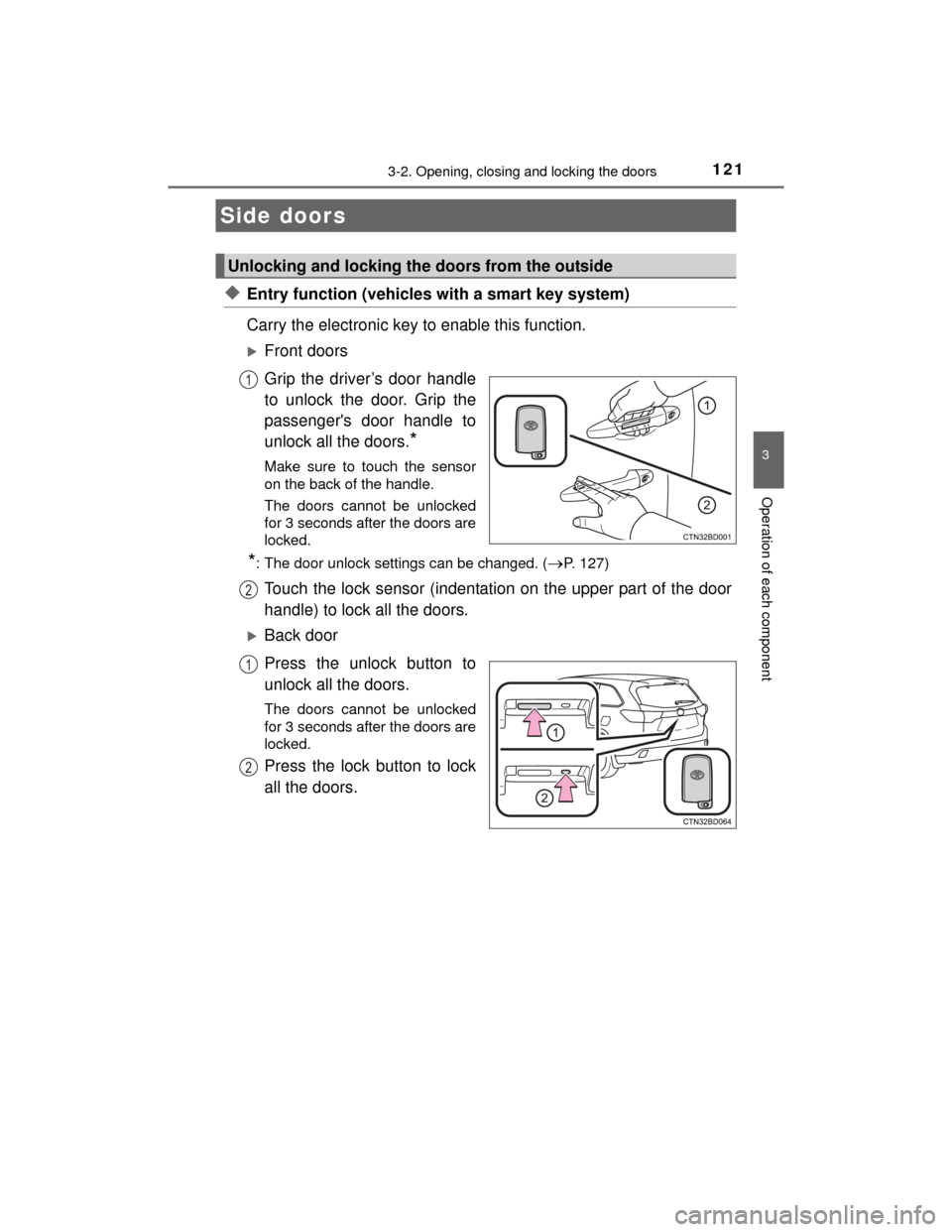
◆Entry function (vehicles with a smart key system)
Carry the electronic key to enable this function.
Front doors
Grip the driver’s door handle
to unlock the door. Grip the
passenger's door handle to
unlock all the doors.
*
Make sure to touch the sensor
on the back of the handle.
The doors cannot be unlocked
for 3 seconds after the doors are
locked.
*: The door unlock settings can be changed. (P. 127)
Touch the lock sensor (indentation on the upper part of the door
handle) to lock all the doors.
Back door
Press the unlock button to
unlock all the doors.
The doors cannot be unlocked
for 3 seconds after the doors are
locked.
Press the lock button to lock
all the doors.
Side doors
Unlocking and locking the doors from the outside
1
2
1
2
Page 122 of 712
1223-2. Opening, closing and locking the doors
HIGHLANDER_U (OM48A12U)
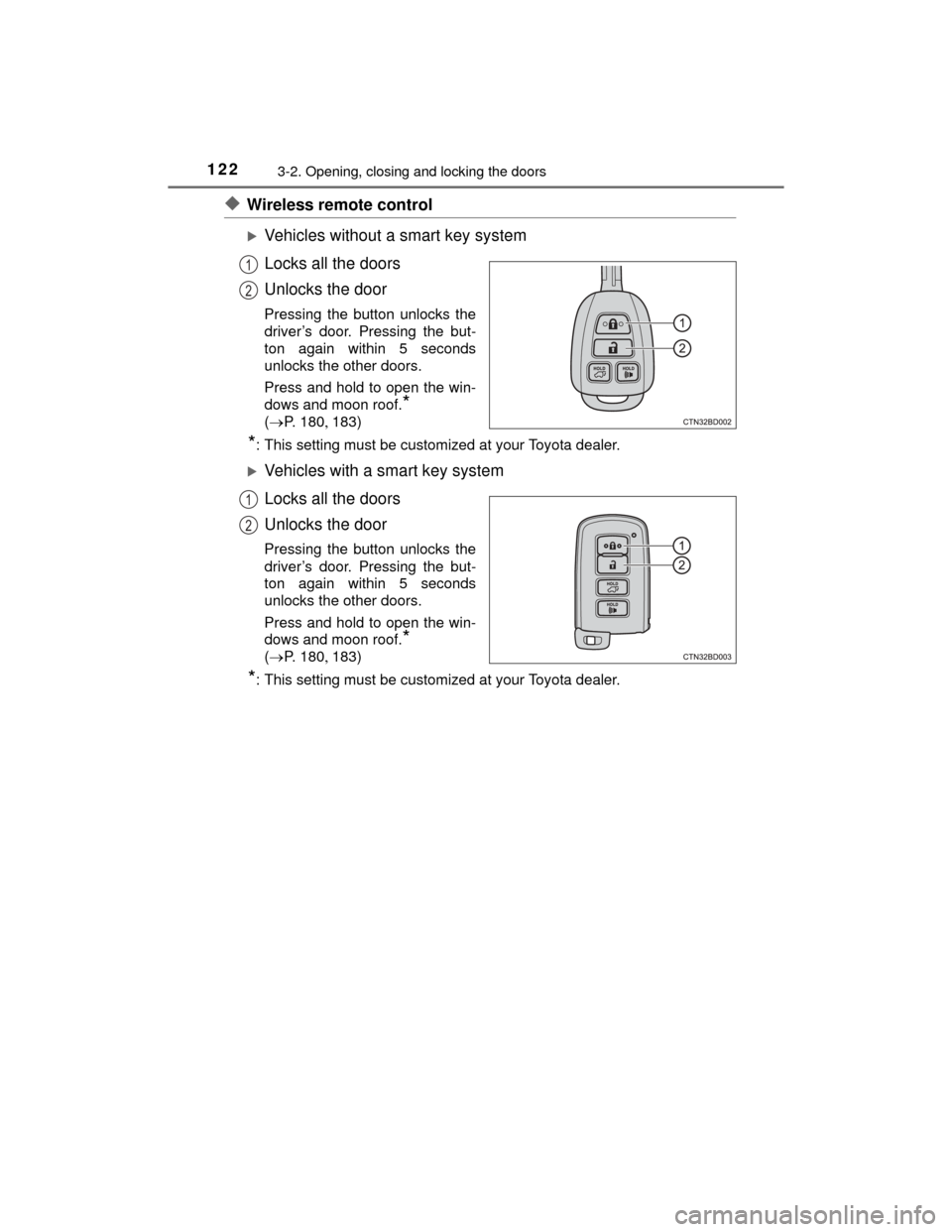
◆Wireless remote control
Vehicles without a smart key system
Locks all the doors
Unlocks the door
Pressing the button unlocks the
driver’s door. Pressing the but-
ton again within 5 seconds
unlocks the other doors.
Press and hold to open the win-
dows and moon roof.
*
( P. 180183)
*: This setting must be customized at your Toyota dealer.
Vehicles with a smart key system
Locks all the doors
Unlocks the door
Pressing the button unlocks the
driver’s door. Pressing the but-
ton again within 5 seconds
unlocks the other doors.
Press and hold to open the win-
dows and moon roof.
*
( P. 180183)
*: This setting must be customized at your Toyota dealer.
1
2
1
2
Page 123 of 712
1233-2. Opening, closing and locking the doors
3
Operation of each component
HIGHLANDER_U (OM48A12U)
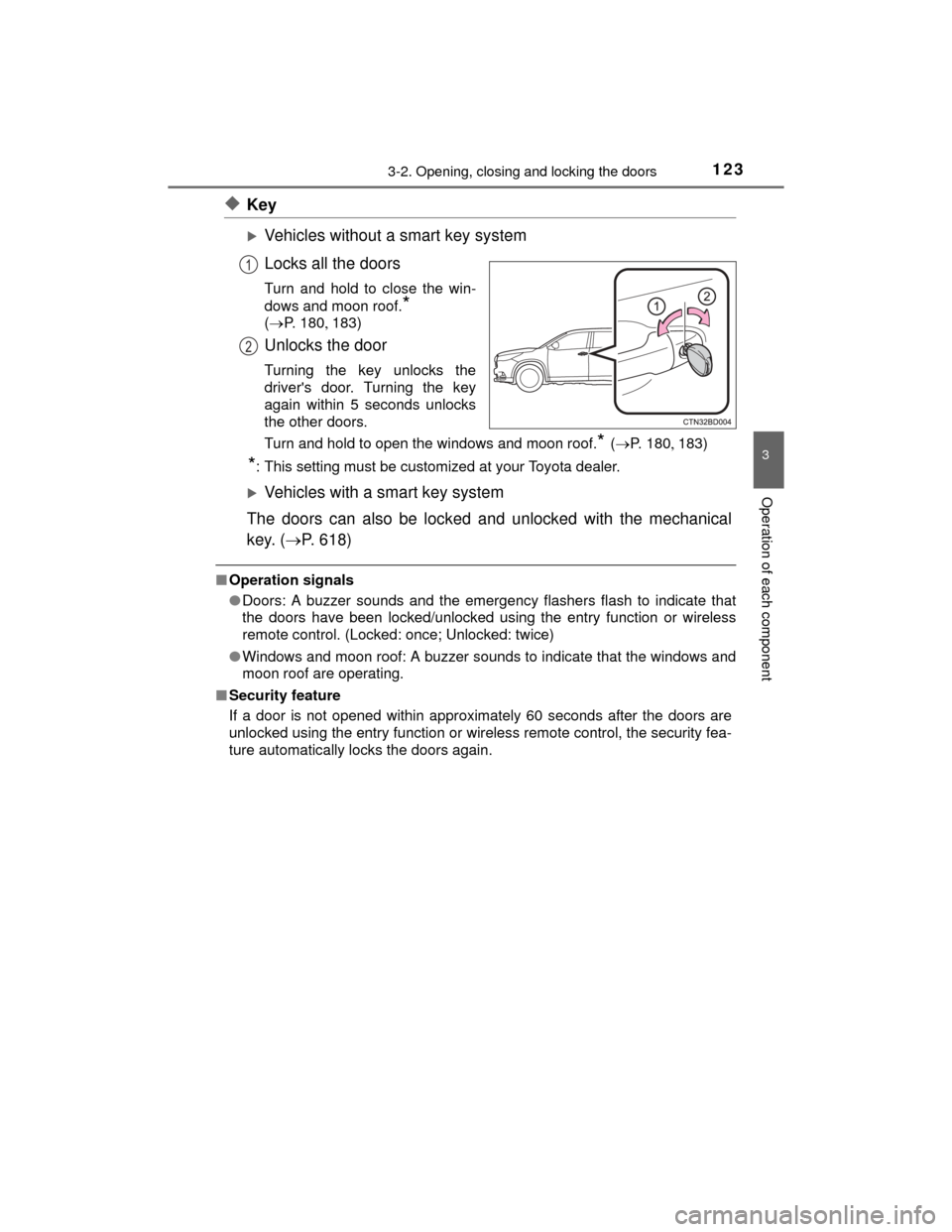
◆Key
Vehicles without a smart key system
Locks all the doors
Turn and hold to close the win-
dows and moon roof.
*
( P. 180183)
Unlocks the door
Turning the key unlocks the
driver's door. Turning the key
again within 5 seconds unlocks
the other doors.
Turn and hold to open the windows and moon roof.
* (P. 180 183)
*: This setting must be customized at your Toyota dealer.
Vehicles with a smart key system
The doors can also be locked and unlocked with the mechanical
key. ( P. 618)
■Operation signals
●Doors: A buzzer sounds and the emergency flashers flash to indicate that
the doors have been locked/unlocked using the entry function or wireless
remote control. (Locked: once; Unlocked: twice)
● Windows and moon roof: A buzzer sounds to indicate that the windows and
moon roof are operating.
■ Security feature
If a door is not opened within approximately 60 seconds after the doors are
unlocked using the entry function or wireless remote control, the security fea-
ture automatically locks the doors again.
1
2
Page 124 of 712
1243-2. Opening, closing and locking the doors
HIGHLANDER_U (OM48A12U)■
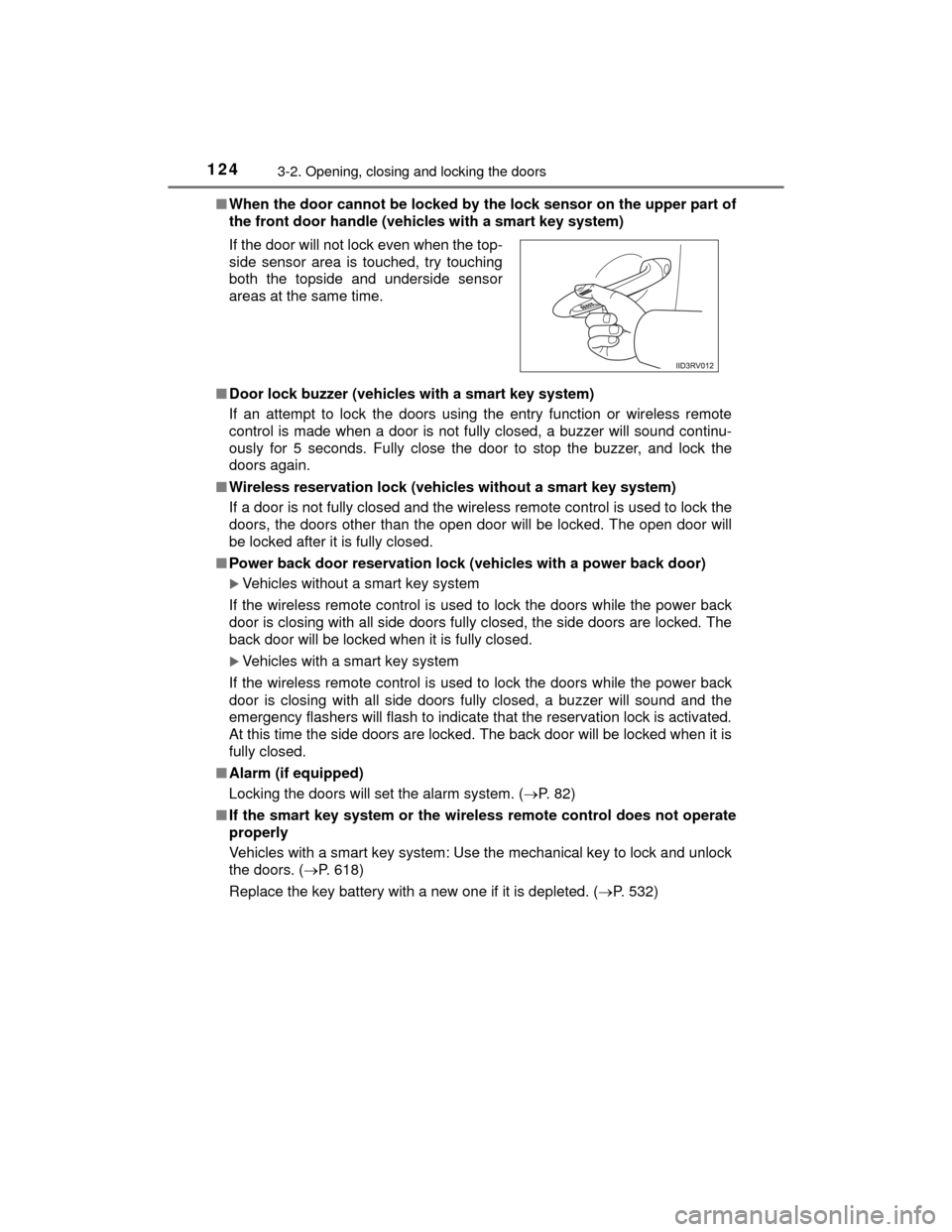
When the door cannot be locked by the lock sensor on the upper part of
the front door handle (vehicles with a smart key system)
■ Door lock buzzer (vehicl es with a smart key system)
If an attempt to lock the doors using the entry function or wireless remote
control is made when a door is not fully closed, a buzzer will sound continu-
ously for 5 seconds. Fully close the door to stop the buzzer, and lock the
doors again.
■ Wireless reservation lock (vehicles without a smart key system)
If a door is not fully closed and the wireless remote control is used to lock the
doors, the doors other than the open door will be locked. The open door will
be locked after it is fully closed.
■ Power back door reservation lock (vehicles with a power back door)
Vehicles without a smart key system
If the wireless remote control is used to lock the doors while the power back
door is closing with all side doors fully closed, the side doors are locked. The
back door will be locked when it is fully closed.
Vehicles with a smart key system
If the wireless remote control is used to lock the doors while the power back
door is closing with all side doors fully closed, a buzzer will sound and the
emergency flashers will flash to indicate that the reservation lock is activated.
At this time the side doors are locked. The back door will be locked when it is
fully closed.
■ Alarm (if equipped)
Locking the doors will set the alarm system. ( P. 82)
■ If the smart key system or the wire less remote control does not operate
properly
Vehicles with a smart key system: Use the mechanical key to lock and unlock
the doors. ( P. 618)
Replace the key battery with a new one if it is depleted. (P. 532) If the door will not lock even when the top-
side sensor area is touched, try touching
both the topside and underside sensor
areas at the same time.
Page 125 of 712
1253-2. Opening, closing and locking the doors
3
Operation of each component
HIGHLANDER_U (OM48A12U)
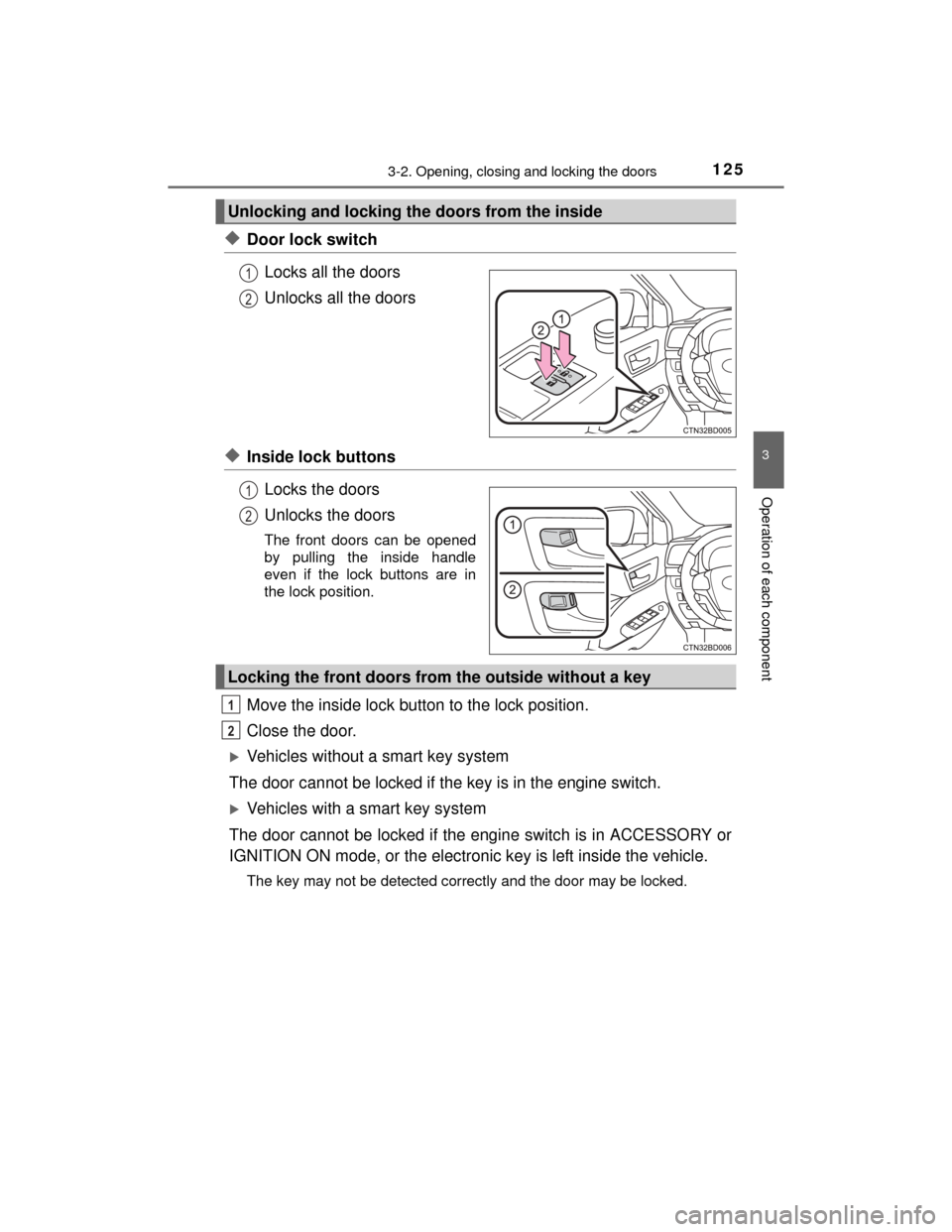
◆Door lock switchLocks all the doors
Unlocks all the doors
◆Inside lock buttonsLocks the doors
Unlocks the doors
The front doors can be opened
by pulling the inside handle
even if the lock buttons are in
the lock position.
Move the inside lock button to the lock position.
Close the door.
Vehicles without a smart key system
The door cannot be locked if the key is in the engine switch.
Vehicles with a smart key system
The door cannot be locked if the engine switch is in ACCESSORY or
IGNITION ON mode, or the electronic key is left inside the vehicle.
The key may not be detected correctly and the door may be locked.
Unlocking and locking the doors from the inside
1
2
1
2
Locking the front doors from the outside without a key
1
2