battery TOYOTA HIGHLANDER HYBRID 2009 XU40 / 2.G Owner's Manual
[x] Cancel search | Manufacturer: TOYOTA, Model Year: 2009, Model line: HIGHLANDER HYBRID, Model: TOYOTA HIGHLANDER HYBRID 2009 XU40 / 2.GPages: 592, PDF Size: 11.8 MB
Page 180 of 592

180 2-1. Driving procedures
■Steering lock release
■ If the hybrid system does not start
The immobilizer system may not have been deactivated. ( →P. 123)
■ When the “POWER” switch in dicator flashes in amber
The system may be malfunctioning. Have the vehicle inspected by your
Toyota dealer immediately.
■ If the “READY” indicator does not come on
If the “READY” indicator does not come on when you press the “POWER”
switch with the shift lever in P and the brake pedal depressed, contact your
Toyota dealer immediately.
■ Auto power off function
If the vehicle is left in ACCESSORY mode for more than an hour with the
shift lever in P, the “POWER” switch will automatically turn off.
■ When the ambient temperature is lo w, such as during winter driving
conditions
It may take time until the “READY” indicator comes on.
■ Sounds and vibrations specific to a hybrid vehicle
→P. 3 2
■ When the hybrid system is malfunctioning
→P. 501
■ Electronic key battery depletion
→P. 5 1
Make sure that the steering wheel lock is
released.
To release the steering wheel lock, gently
turn the wheel left or right while pressing
the “POWER” switch.
When the steering wheel lock is not
released, the “POWER” switch indicator
will flash in green.
Page 181 of 592

181
2-1. Driving procedures
2
When driving
■
When the electronic key battery is depleted
→P. 464
■ Conditions affecting operation
→P. 49
■ Note for the entry function
→P. 51
CAUTION
■When starting the hybrid system
Always start the hybrid system while sitting in the driver's seat. Do not
depress the accelerator pedal while starting the hybrid system under any cir-
cumstances.
Doing so may cause an accident resulting in death or serious injury.
■ Stopping the hybrid system in an emergency
If you want to stop the hybrid system in an emergency while driving the vehi-
cle, push and hold the “POWER” switch for more than 3 seconds.
However, do not touch the “POWER” switch while driving except in an emer-
gency. If the hybrid system stops while the vehicle is being driven, this could
lead to an unexpected accident.
NOTICE
■To prevent 12-volt battery from being discharge
Do not leave the “POWER” switch in ACCESSORY or ON mode for long
periods without the hybrid system on.
■ When starting the hybrid system
●Do not race a cold hybrid system.
● If the hybrid system becomes difficult to start, have the hybrid system
checked immediately by your Toyota dealer.
Page 182 of 592
182
2-1. Driving procedures
EV-Drive Mode
■Situations in which EV-Drive Mode cannot be turned on
It may not be possible to turn EV-Drive Mode on in the following situations. If
it cannot be turned on, a buzzer will sound and a message will be shown on
the multi-information display.
●The temperature of the hybrid system is high.
The vehicle has been left in the sun, driven on a hill, driven at high
speeds, etc.
● The temperature of the hybrid system is low.
The vehicle has been left in temperatures lower than about 32
°F (0°C)
for a long period of time etc.
● The gasoline engine is warming up.
● The hybrid battery (traction battery) is low.
The remaining battery level indicated in the “Energy Monitor” display is
level 3 or lower. ( →P. 35)
● Vehicle speed is about 25 mph (40 km/h) or more.
● The accelerator pedal is depressed firmly or the vehicle is on a hill etc.
● The windshield defogger is in use.
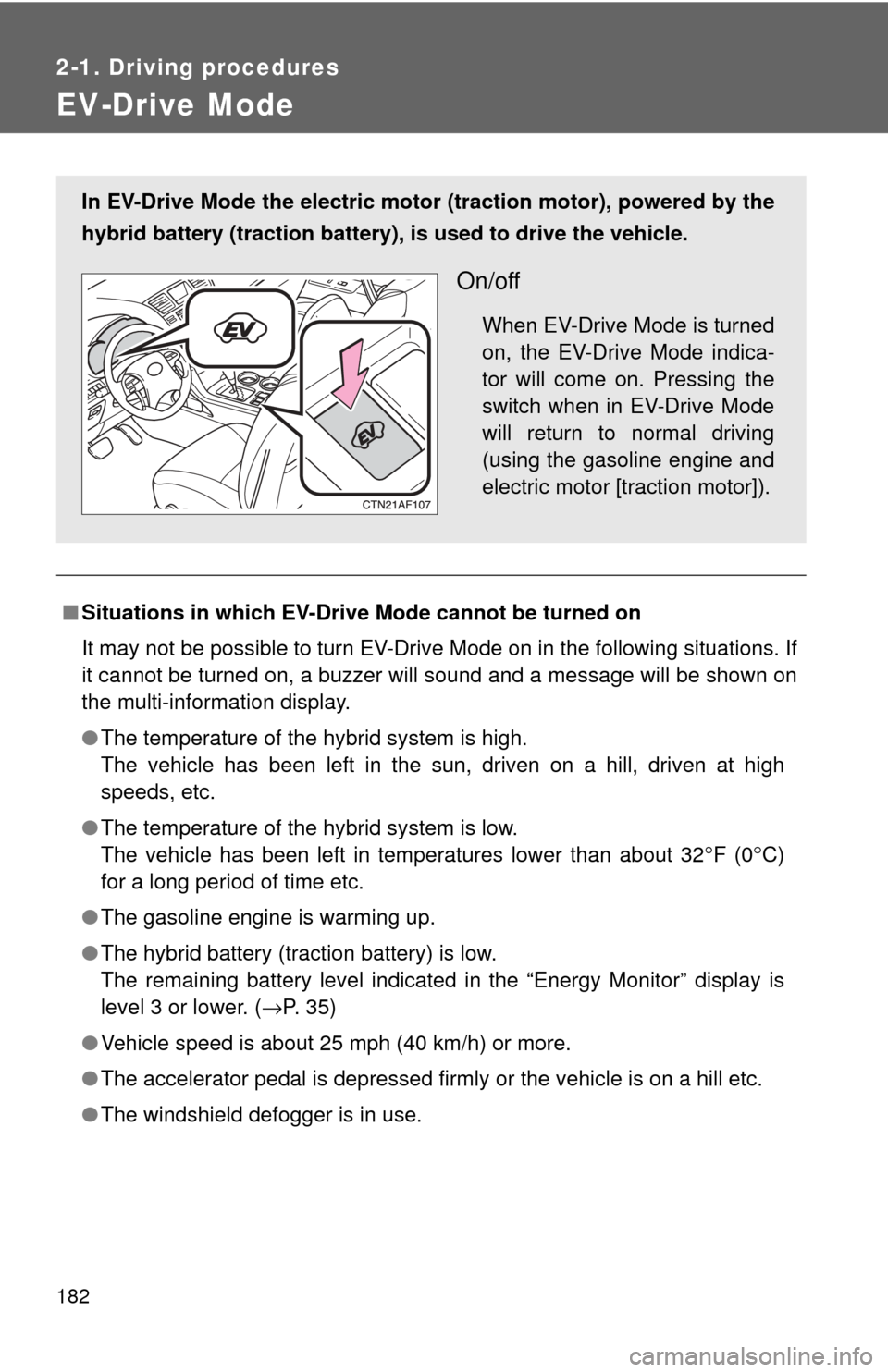
In EV-Drive Mode the electric motor (traction motor), powered by the
hybrid battery (traction battery), is used to drive the vehicle.
On/off
When EV-Drive Mode is turned
on, the EV-Drive Mode indica-
tor will come on. Pressing the
switch when in EV-Drive Mode
will return to normal driving
(using the gasoline engine and
electric motor [traction motor]).
Page 183 of 592

183
2-1. Driving procedures
2
When driving
■
Automatic cancelation of EV-Drive Mode
When driving in EV-Drive Mode, the gasoline engine may automatically
restart in the following situations. When EV-Drive Mode is canceled, a
buzzer will sound and the EV-Drive Mode indicator will flash and go off.
●The hybrid battery (traction battery) becomes low.
The remaining battery level indicated in the “Energy Monitor” display is
level 2 or lower. ( →P. 35)
● Vehicle speed becomes more than about 25 mph (40 km/h).
● The accelerator pedal is depressed firmly or the vehicle is on a hill etc.
■ Possible driving distance when driving in EV-Drive Mode
Possible driving distance when driving in EV-Drive Mode is up to about 1/2
mile (1 km) if driven at a speed of about 25 mph (40 km/h) or less. (Possible
driving distance depends on the hybrid battery [traction battery] level and
driving conditions.)
■ Fuel economy
Highlander is designed to achieve the best possible fuel economy during
normal driving (using the gasoline engine and electric motor [traction
motor]). Driving in EV-Drive Mode more than necessary may lower fuel
economy.
CAUTION
■Caution while driving
When driving in EV-Drive Mode, pay special attention to the area around the
vehicle. Because there is no engine noise, pedestrians, people riding bicy-
cles or other people and vehicles in the area may not be aware of the vehicle
starting off or approaching them, so take extra care while driving.
Page 185 of 592
185
2-1. Driving procedures
2
When driving
■
When in heavy traffic
If the shift lever is in N, the hybrid battery (traction battery) will not be
charged. To help prevent the battery from discharging, avoid putting the shift
lever in N for an extended period of time.
■ Eco Driving Mode
When the accelerator pedal is depressed in Eco Driving Mode, it may take
more time to accelerate than usual. This is normal operation.
■ If the shift lever cannot be shifted from P
→P. 524
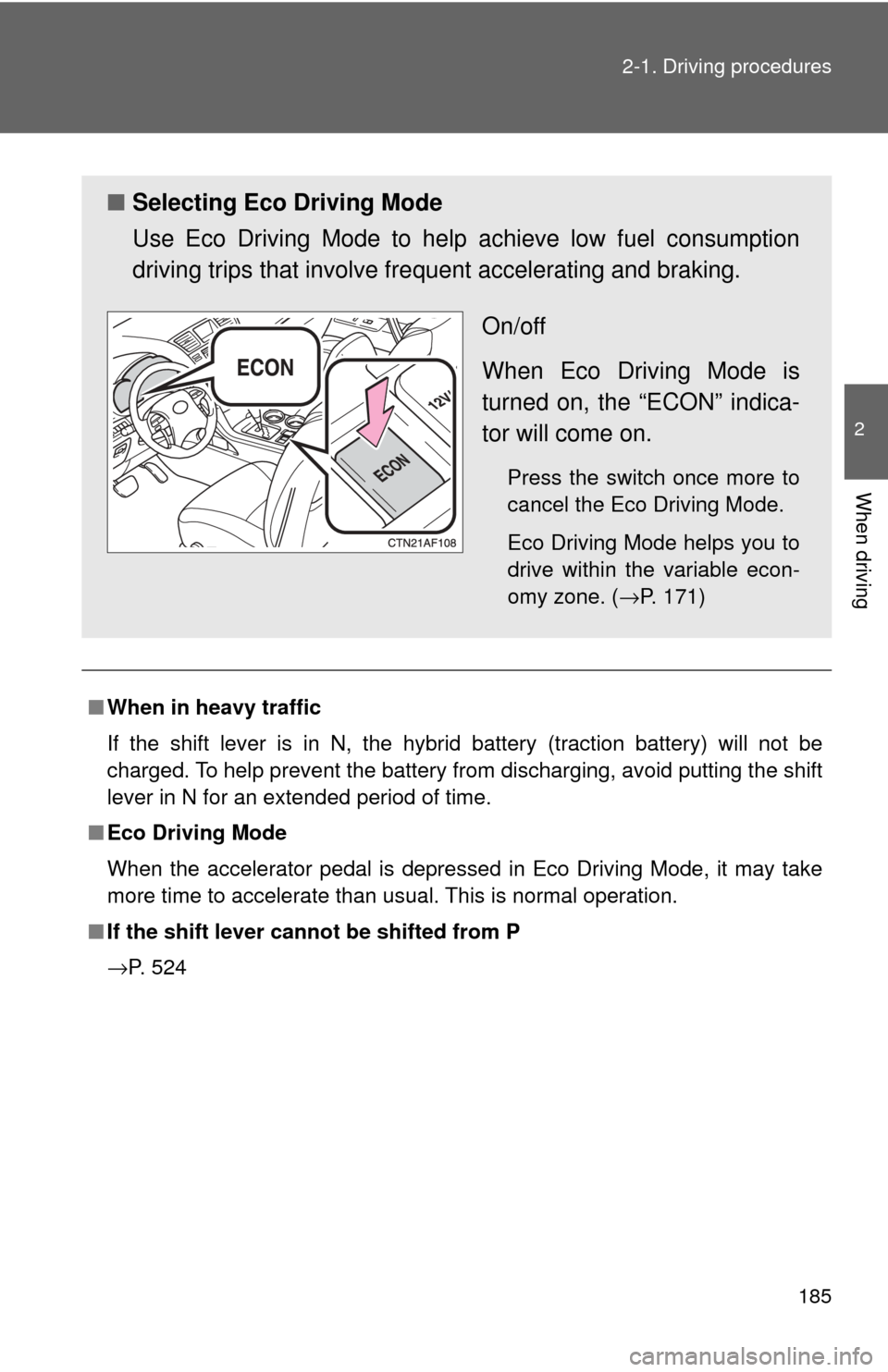
■ Selecting Eco Driving Mode
Use Eco Driving Mode to help achieve low fuel consumption
driving trips that involve fre quent accelerating and braking.
On/off
When Eco Driving Mode is
turned on, the “ECON” indica-
tor will come on.
Press the switch once more to
cancel the Eco Driving Mode.
Eco Driving Mode helps you to
drive within the variable econ-
omy zone. ( →P. 171)
Page 190 of 592
190 2-2. Instrument cluster
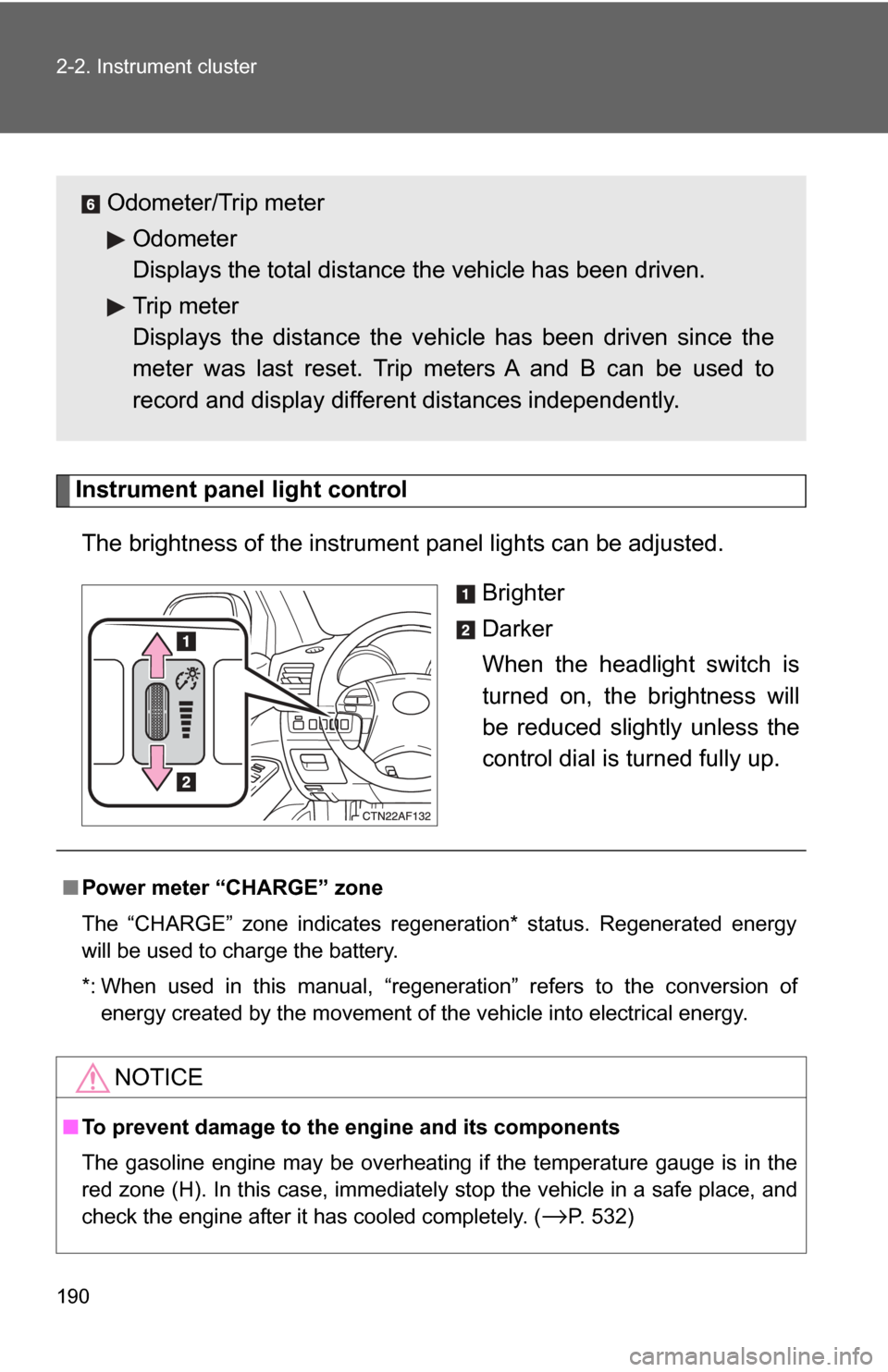
Instrument panel light controlThe brightness of the instrument panel lights can be adjusted. Brighter
Darker
When the headlight switch is
turned on, the brightness will
be reduced slightly unless the
control dial is turned fully up.
Odometer/Trip meterOdometer
Displays the total distance the vehicle has been driven.
Trip meter
Displays the distance the v ehicle has been driven since the
meter was last reset. Trip meters A and B can be used to
record and display differ ent distances independently.
■Power meter “CHARGE” zone
The “CHARGE” zone indicates regeneration* status. Regenerated energy
will be used to charge the battery.
*: When used in this manual, “regeneration” refers to the conversion of
energy created by the movement of the vehicle into electrical energy.
NOTICE
■To prevent damage to the engine and its components
The gasoline engine may be overheating if the temperature gauge is in the
red zone (H). In this case, immediately stop the vehicle in a safe place, and
check the engine after it has cooled completely. (
→P. 532)
Page 208 of 592

208 2-3. Operating the lights and wipers
■Automatic light off system
The headlights and tail lights turn off 30 seconds after driver’s door is
opened and closed if the “POWER” switch has been turned to ACCESSORY
mode or OFF.
To turn the lights on again, change the “POWER” switch to ON mode, or turn
the headlight switch off and then back to or .
■ Customization that can be configured at Toyota dealer
Settings (e.g. daytime running light system) can be changed.
(Customizable features →P. 567)
NOTICE
■To prevent 12-volt battery from being discharged
Do not leave the lights on longer than necessary when the hybrid system is
off.
Page 230 of 592

230 2-5. Driving information
NOTICE
■To prevent the water damage
Take all necessary safety measures to ensure that water damage to the
hybrid battery, hybrid system or other components does not occur.
●Water entering the engine compartment may cause severe damage to the
hybrid system. Water entering the interior may cause the hybrid battery
stowed under the rear seats to short circuit.
● Water entering the hybrid transaxle will cause deterioration in transmission
quality. The malfunction indicator may come on, and the vehicle may not
be drivable.
● Water can wash the grease from wheel bearings, causing rusting and pre-
mature failure, and may also enter the transaxle case, reducing the gear
oil’s lubricating qualities.
■ When you drive through water
If driving through water, such as when crossing shallow streams, first check
the depth of the water and the bottom of the river bed for firmness. Drive
slowly and avoid deep water.
■ Inspection after o ff-road driving
● Sand and mud that has accumulate d in brake drums and around brake
discs may affect braking efficiency and may damage brake system compo-
nents.
● Always perform a maintenance inspection after each day of off-road driv-
ing that has taken you through rough terrain, sand, mud, or water. For
scheduled maintenance information, refer to the “Scheduled Maintenance
Guide” or “Owner’s Manual Supplement”.
Page 236 of 592
236
2-5. Driving information
Winter driving tips
Carry out the necessary preparations and inspections before driving
the vehicle in winter. Always drive the vehicle in a manner appropri-
ate to the prevailing weather conditions.
■ Pre-winter preparations
●Use fluids that are appropriate to the prevailing outside tem-
peratures.
• Engine oil
• Engine/power control unit coolant
• Washer fluid
● Have a service technician inspect the level and specific grav-
ity of battery electrolyte.
● Have the vehicle fitted with four snow tires or purchase a set
of tire chains for the front tires.
Ensure that all tires are the same size and brand, and that chains
match the size of the tires.
■Before driving the vehicle
Observe the following according to the driving conditions.
●Do not try to forcibly open a window or move a wiper that is
frozen. Pour warm water over the frozen area to melt the ice.
Wipe away the water immediately to prevent it from freezing.
● To ensure proper operation of th e climate control system fan,
remove any snow that has accumulated on the air inlet vents
in front of the windshield.
● Remove any ice that has accumu lated on the vehicle chassis.
● Periodically check for and remove any excess ice or snow
that may have accumulated in the wheel well or on the
brakes.
Page 259 of 592
259
3-1. Using the air conditioning system
and defogger
3
Interior features
■Using the system in recirculated air mode
The windows will fog up more easily if the recirculated air mode is used for
an extended period.
■ Window defogger feature
In order to prevent the windows from fogging up, recirculated air mode may
automatically switch to outside air mode if the ambient temperature drops.
This feature can be cancelled by pushing and holding the air intake mode
switch for longer than 2 seconds. The feature will be reactivated when the
“POWER” switch is turned to ACCESSORY mode or OFF.
■ When outside air temperature approaches 32°F (0°C)
The air conditioning system may not operate even when is pressed.
■ When is selected for the air outlets used
For your driving comfort, air flowing to the feet may be warmer than air flow-
ing to the upper body depending on the position of the temperature adjust-
ment dial.
CAUTION
■ To prevent the windshield from fogging up
Do not set the air outlet selection dial to during cool air operation in
extremely humid weather. The difference between the temperature of the
outside air and that of the windshield can cause the outer surface of the
windshield to fog up, blocking your vision.
NOTICE
■To prevent 12-volt battery from being discharged
Do not leave the air conditioning system on longer than necessary when the
hybrid system is off.