brake TOYOTA HIGHLANDER HYBRID 2009 XU40 / 2.G Owner's Manual
[x] Cancel search | Manufacturer: TOYOTA, Model Year: 2009, Model line: HIGHLANDER HYBRID, Model: TOYOTA HIGHLANDER HYBRID 2009 XU40 / 2.GPages: 592, PDF Size: 11.8 MB
Page 187 of 592
187
2-1. Driving procedures
2
When driving
Parking brake
NOTICE
■Before driving
Fully release the parking brake.
Driving the vehicle with the parking brake set will lead to brake components
overheating, which may affect braking performance and increase brake
wear.
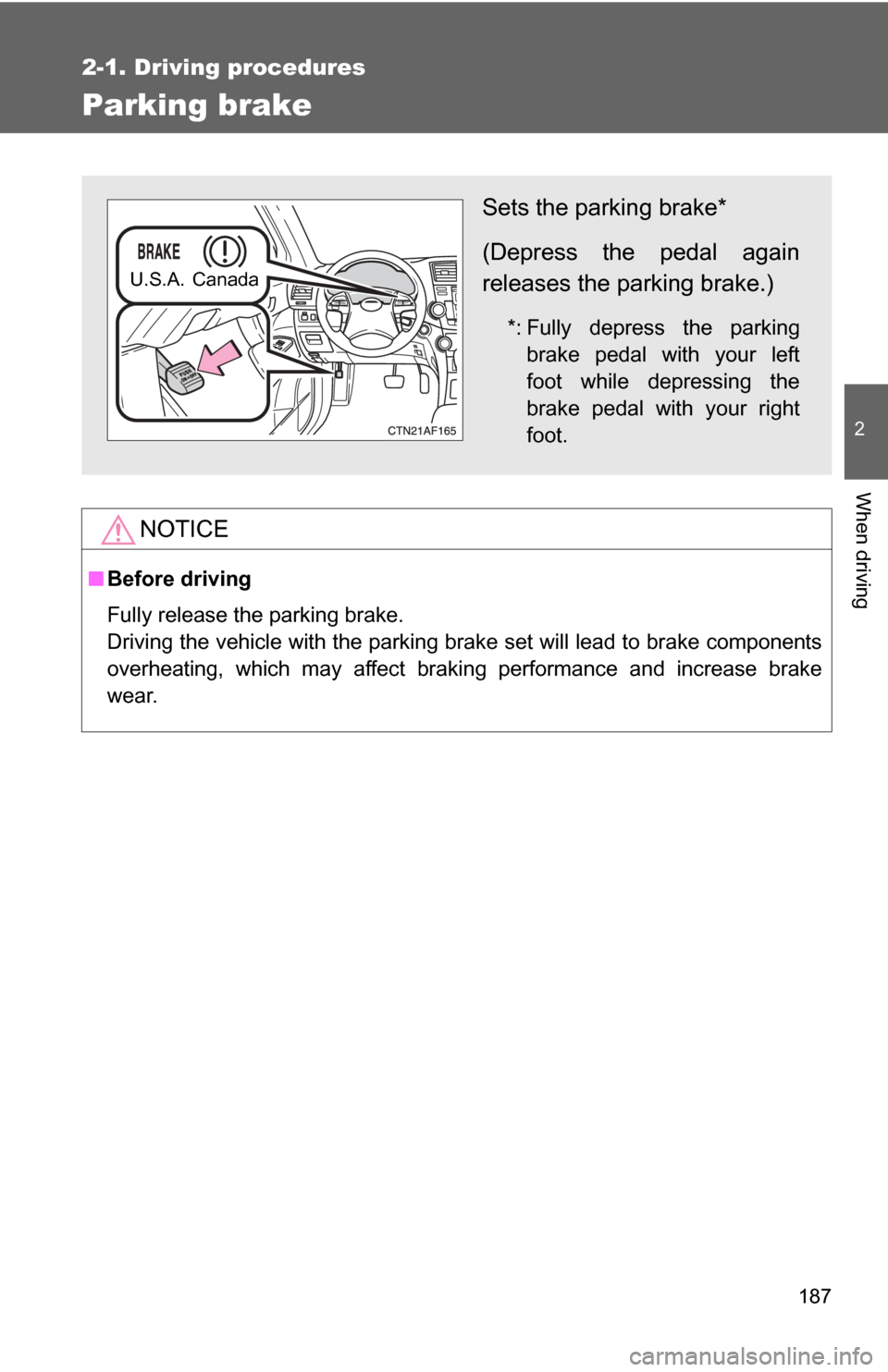
Sets the parking brake*
(Depress the pedal again
releases the parking brake.)
*: Fully depress the parking
brake pedal with your left
foot while depressing the
brake pedal with your right
foot.
U.S.A. Canada
Page 207 of 592
207
2-3. Operating the lights and wipers
2
When driving
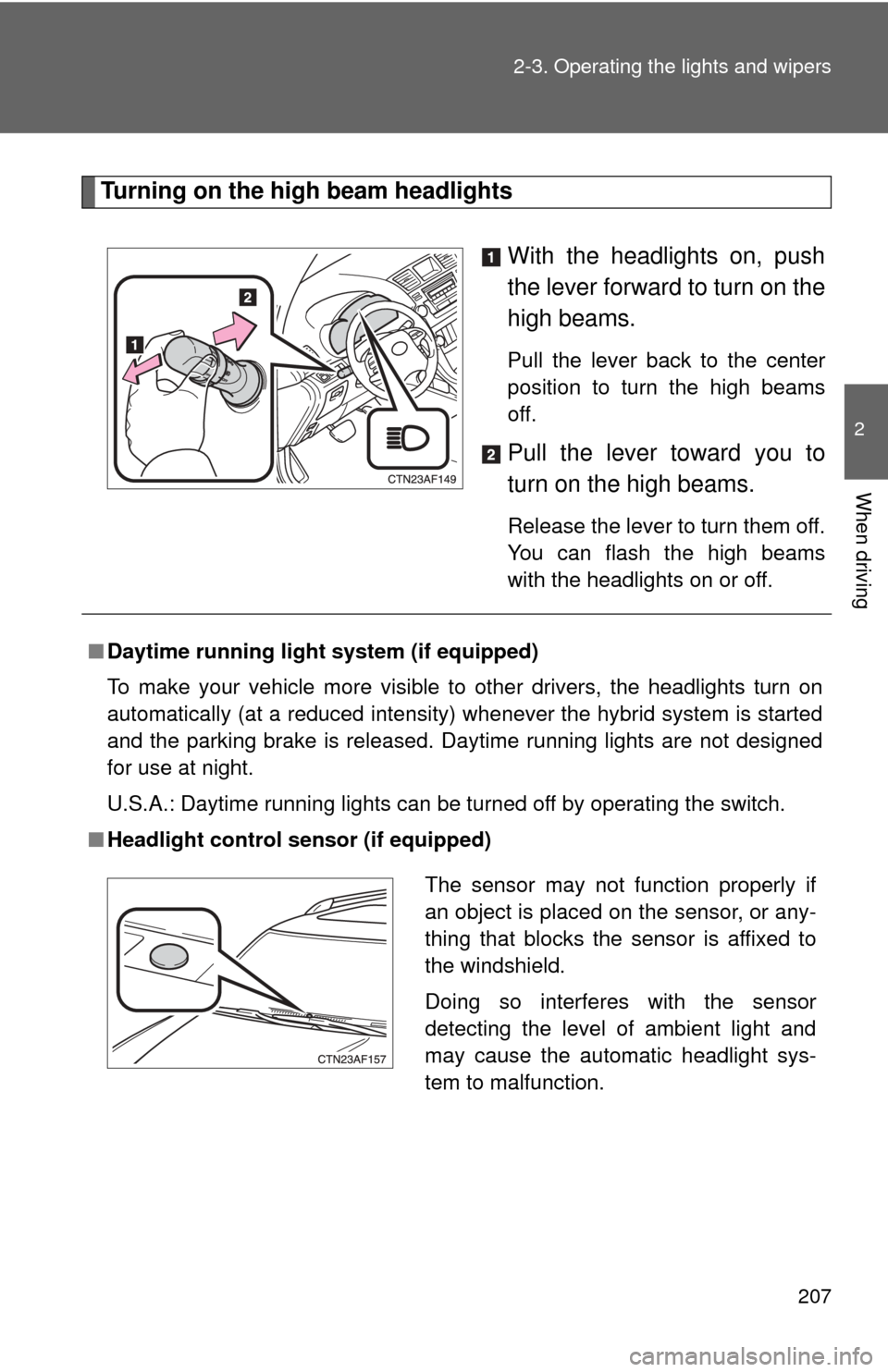
Turning on the high beam headlights
With the headlights on, push
the lever forward to turn on the
high beams.
Pull the lever back to the center
position to turn the high beams
off.
Pull the lever toward you to
turn on the high beams.
Release the lever to turn them off.
You can flash the high beams
with the headlights on or off.
■Daytime running light system (if equipped)
To make your vehicle more visible to other drivers, the headlights turn on
automatically (at a reduced intensity) whenever the hybrid system is started
and the parking brake is released. Da ytime running lights are not designed
for use at night.
U.S.A.: Daytime running lights can be turned off by operating the switch.
■ Headlight control sensor (if equipped)
The sensor may not function properly if
an object is placed on the sensor, or any-
thing that blocks the sensor is affixed to
the windshield.
Doing so interferes with the sensor
detecting the level of ambient light and
may cause the automatic headlight sys-
tem to malfunction.
Page 214 of 592
214 2-4. Using other driving systems
■Cruise control can be set when
●The shift lever is in D.
● Vehicle speed is above approximately 25 mph (40 km/h). Within the limits
of the hybrid system’s capabilities, cruising speed can be maintained on
up or down grades.
■ Accelerating
The vehicle can be accelerated normally.
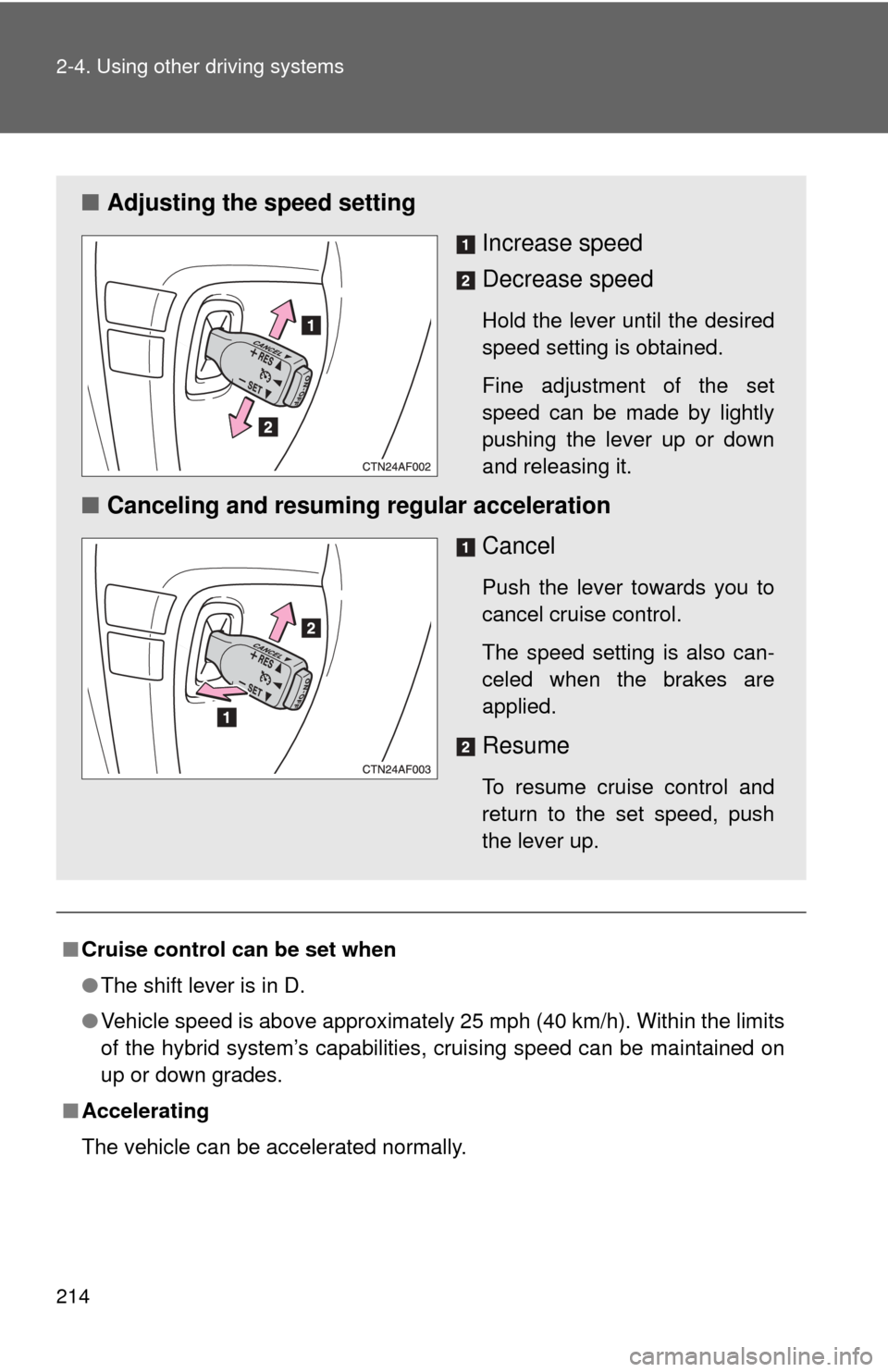
■ Adjusting the speed setting
Increase speed
Decrease speed
Hold the lever until the desired
speed setting is obtained.
Fine adjustment of the set
speed can be made by lightly
pushing the lever up or down
and releasing it.
■Canceling and resuming regular acceleration
Cancel
Push the lever towards you to
cancel cruise control.
The speed setting is also can-
celed when the brakes are
applied.
Resume
To resume cruise control and
return to the set speed, push
the lever up.
Page 220 of 592
220
2-4. Using other driving systems
Driving assist systems
To help enhance driving safety and performance, the following sys-
tems operate automatically in res ponse to various driving situations.
Be aware, however, that these systems are supplementary and
should not be relied upon too h eavily when operating the vehicle.
■ABS (Anti-lock Brake System)
Helps to prevent wheel lock when the brakes are applied suddenly, or if
the brakes are applied while driving on a slippery road surface.
■Brake assist
Generates an increased level of braking force after the brake pedal is
depressed when the system detects a panic stop situation.
■VSC (Vehicle Stability Control)
Helps the driver to control skidding when swerving suddenly or turning
on slippery road surfaces.
■TRAC (Traction Control)
Maintains drive power and prevents the four wheels from spinning
when starting the vehicle or accelerating on slippery roads.
■Hill-start assist control
→P. 224
■ EPS (Electric Power Steering)
Employs an electric motor to reduce the amount of effort needed to turn
the steering wheel.
■VDIM (Vehicle Dynamics Integrated Management)
Provides integrated control of the ABS, brake assist, VSC, TRAC and
EPS systems.
Maintains vehicle stability when swerving on slippery road surfaces by
controlling the brakes, hybrid system output, and the movement of the
four wheels.
Page 221 of 592
221
2-4. Using other
driving systems
2
When driving
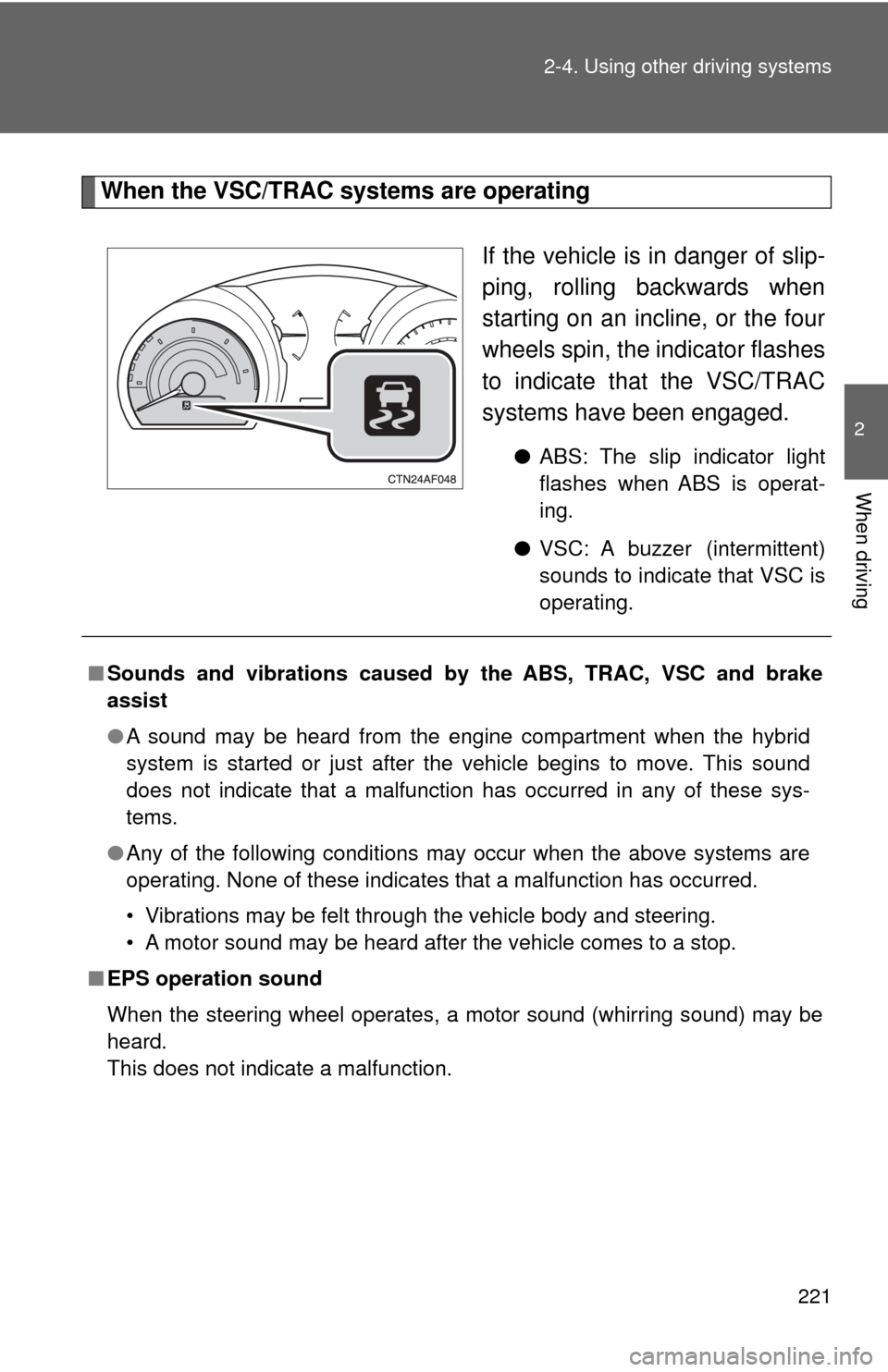
When the VSC/TRAC systems are operating
If the vehicle is in danger of slip-
ping, rolling backwards when
starting on an incline, or the four
wheels spin, the indicator flashes
to indicate that the VSC/TRAC
systems have been engaged.
●ABS: The slip indicator light
flashes when ABS is operat-
ing.
● VSC: A buzzer (intermittent)
sounds to indicate that VSC is
operating.
■Sounds and vibrations caused by the ABS, TRAC, VSC and brake
assist
●A sound may be heard from the engine compartment when the hybrid
system is started or just after the vehicle begins to move. This sound
does not indicate that a malfunction has occurred in any of these sys-
tems.
● Any of the following conditions may occur when the above systems are
operating. None of these indicates that a malfunction has occurred.
• Vibrations may be felt through the vehicle body and steering.
• A motor sound may be heard after the vehicle comes to a stop.
■ EPS operation sound
When the steering wheel operates, a motor sound (whirring sound) may be
heard.
This does not indicate a malfunction.
Page 224 of 592
224
2-4. Using other driving systems
Hill-start assist control
■Hill-start assist cont rol operating conditions
The system operates in the following situations:
• The shift lever is in a position other than P.
• The parking brake is not applied.
• The accelerator pedal is not depressed.
■ Hill-start assist control
●While hill-start assist control is operating, the brakes remain automati-
cally applied after the driver releases the brake pedal. The stop lights and
the high mounted stoplight turn on.
● Hill-start assist control operates for about 2 seconds after the brake pedal
is released.
● If the slip indicator does not flash and the buzzer does not sound when
the brake pedal is further depressed, slightly reduce the pressure on the
brake pedal (do not allow the vehicl e to roll backward) and then firmly
depress it again. If the system still does not operate, check that the oper-
ating conditions explained above have been met.
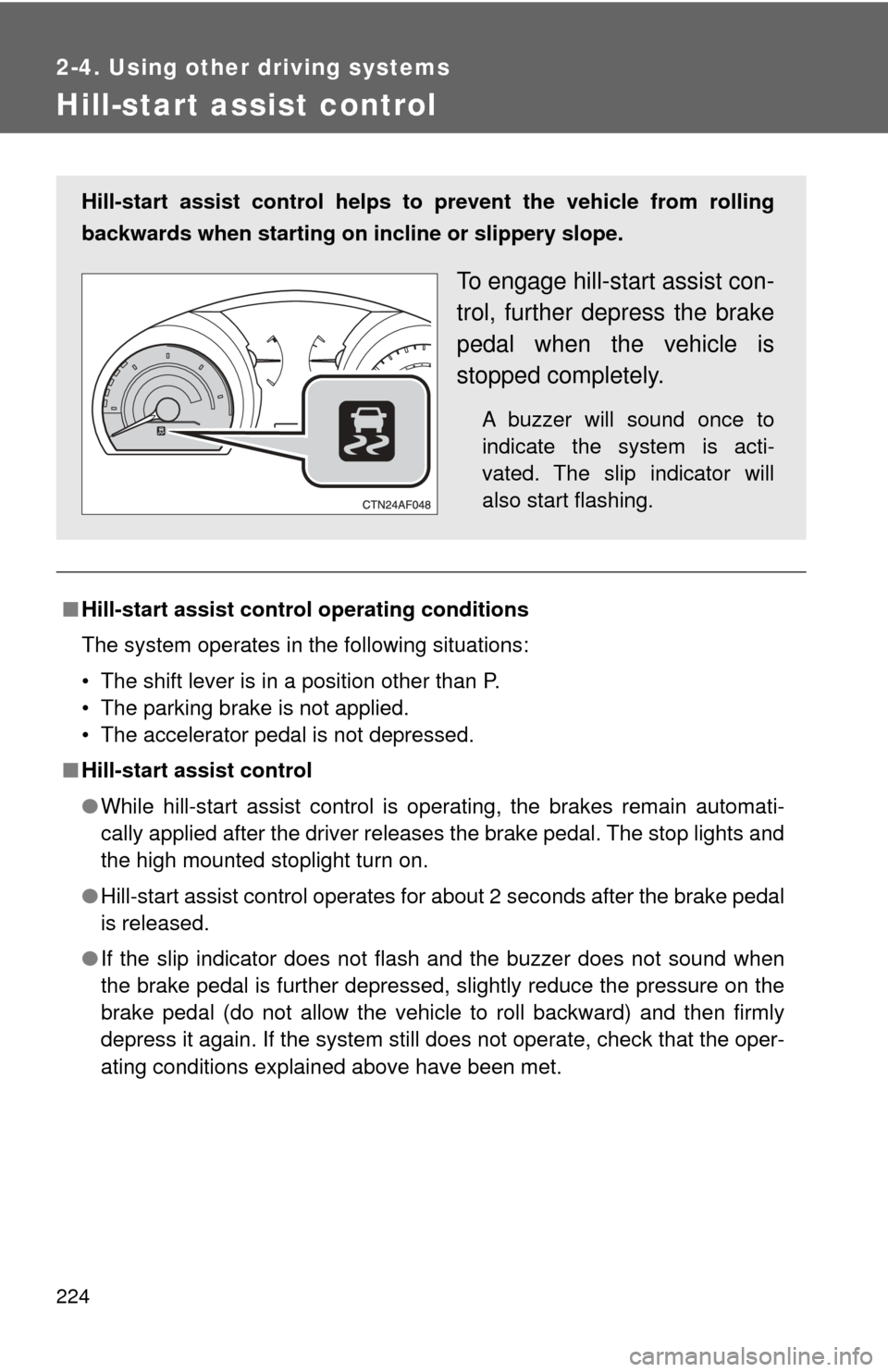
Hill-start assist control helps to prevent the vehicle from rolling
backwards when starting on incline or slippery slope.
To engage hill-start assist con-
trol, further depress the brake
pedal when the vehicle is
stopped completely.
A buzzer will sound once to
indicate the system is acti-
vated. The slip indicator will
also start flashing.
Page 225 of 592
225
2-4. Using other
driving systems
2
When driving
■Hill-start assist control buzzer
●When hill-start assist control is activated, the buzzer will sound once.
● In the following situations, hill-start assist control will be canceled and the
buzzer will sound.
• No attempt is made to drive the vehicle within approximately 2 seconds
of releasing the brake pedal.
• The shift lever is moved to P.
• The parking brake is applied.
• The brake pedal is depressed again.
CAUTION
■ Hill-start assist control
●Hill-start assist control may not operate effectively on extremely steep
inclines or roads covered in ice.
● Do not use hill-start assist control to stop or park the vehicle on an incline.
Page 229 of 592

229
2-5. Driving information
2
When driving
CAUTION
■
Off-road driving precautions
Always observe the following precautions to minimize the risk of serious per-
sonal injury or damage to your vehicle:
●Drive carefully when off the road. Do not take unnecessary risks by driving
in dangerous places.
● Do not grip the steering wheel spok es when driving off-road. A bad bump
could jerk the wheel and injure your hands. Keep both hands and espe-
cially your thumbs on the outside of the rim.
● Always check your brakes for effectiveness immediately after driving in
sand, mud, water or snow.
● After driving through tall grass, mud, rock, sand, rivers, etc., check that
there is no grass, bush, paper, rags, stone, sand, etc. adhering or trapped
on the underbody. Clear off any such matter from the underbody. If the
vehicle is used with these materials trapped or adhering to the underbody,
a breakdown or fire could occur.
● When driving off-road or in rugged terrain, do not drive at excessive
speeds, jump, make sharp turns, strike objects, etc. This may cause loss
of control or vehicle rollover causing death or serious injury. You are also
risking expensive damage to your vehicle’s suspension and chassis.
Page 230 of 592

230 2-5. Driving information
NOTICE
■To prevent the water damage
Take all necessary safety measures to ensure that water damage to the
hybrid battery, hybrid system or other components does not occur.
●Water entering the engine compartment may cause severe damage to the
hybrid system. Water entering the interior may cause the hybrid battery
stowed under the rear seats to short circuit.
● Water entering the hybrid transaxle will cause deterioration in transmission
quality. The malfunction indicator may come on, and the vehicle may not
be drivable.
● Water can wash the grease from wheel bearings, causing rusting and pre-
mature failure, and may also enter the transaxle case, reducing the gear
oil’s lubricating qualities.
■ When you drive through water
If driving through water, such as when crossing shallow streams, first check
the depth of the water and the bottom of the river bed for firmness. Drive
slowly and avoid deep water.
■ Inspection after o ff-road driving
● Sand and mud that has accumulate d in brake drums and around brake
discs may affect braking efficiency and may damage brake system compo-
nents.
● Always perform a maintenance inspection after each day of off-road driv-
ing that has taken you through rough terrain, sand, mud, or water. For
scheduled maintenance information, refer to the “Scheduled Maintenance
Guide” or “Owner’s Manual Supplement”.
Page 233 of 592

233
2-5. Driving information
2
When driving
CAUTION
■Things that must not be carried in the luggage compartment
The following things may cause a fire if loaded in the luggage compart-
ment.
●Receptacles containing gasoline
●Aerosol cans
■Storage precautions
●Do not place anything on the luggage cover, and do not stack anything
in the luggage compartment higher than the seatbacks.
Such items may be thrown about and possibly injure people in the
vehicle during sudden braking or in an accident.
●Do not place cargo or luggage in or on the following locations as the
item may get under the brake or accelerator pedal and prevent the
pedals from being depressed properly,
block the driver’s vision, or hit
the driver or passengers, causing an accident.
• Driver’s feet
• Front passenger or rear seats (when stacking items)
• Luggage cover
• Instrument panel
• Dashboard
• Auxiliary box or tray that has no lid
●Secure all items in the occupant compartment, as they may shift and
injure someone during an accident or sudden braking.
●Never allow anyone to ride in the luggage compartment. It is not
designed for passengers. They should ride in their seats with their seat
belts properly fastened. Otherwise, they are much more likely to suffer
serious bodily injury, in the even t of sudden braking or a collision.
■Capacity and distribution
●Do not exceed the maximum axle weight rating or the total vehicle
weight rating.
●Even if the total load of occupant's weight and the cargo load is less
than the total load capacity, do not apply the load unevenly.
Improper loading may cause deterioration of steering or braking con-
trol which may cause death or serious injury.