power steering TOYOTA HIGHLANDER HYBRID 2009 XU40 / 2.G Owners Manual
[x] Cancel search | Manufacturer: TOYOTA, Model Year: 2009, Model line: HIGHLANDER HYBRID, Model: TOYOTA HIGHLANDER HYBRID 2009 XU40 / 2.GPages: 592, PDF Size: 11.8 MB
Page 2 of 592

TABLE OF CONTENTSIndex
2
1-1. Hybrid systemHybrid system ...................... 30
1-2. Key information Keys ..................................... 42
1-3. Opening, closing and
locking the doors
Smart key system................. 44
Wireless remote control ....... 65
Side doors ............................ 74
Back door ............................. 78
Glass hatch .......................... 84
1-4. Adjustable components (seats, mirrors,
steering wheel)
Front seats ........................... 86
Rear seats ............................ 89
Head restraints ..................... 98
Seat belts ........................... 101
Steering wheel ................... 108
Anti-glare inside rear view mirror ................................ 109
Outside rear view mirrors .............................. 111
1-5. Opening and closing the windows and moon roof
Power windows .................. 113
Moon roof ........................... 115 1-6. Refueling
Opening the fuel tank cap .................................... 118
1-7. Theft deterrent system Immobilizer system ............. 123
Alarm .................................. 127
Theft prevention labels (U.S.A.)............................. 130
1-8. Safety information Correct driving posture ....... 131
SRS airbags ....................... 133
Front passenger occupant classification system ......... 145
Child restraint systems ....... 151
Installing child restraints ..... 155
2-1. Driving procedures Driving the vehicle .............. 168
Power (ignition) switch........ 178
EV-Drive Mode ................... 182
Transmission ...................... 184
Turn signal lever ................. 186
Parking brake ..................... 187
Horn .................................... 188
1Before driving
2When driving
Page 16 of 592
16
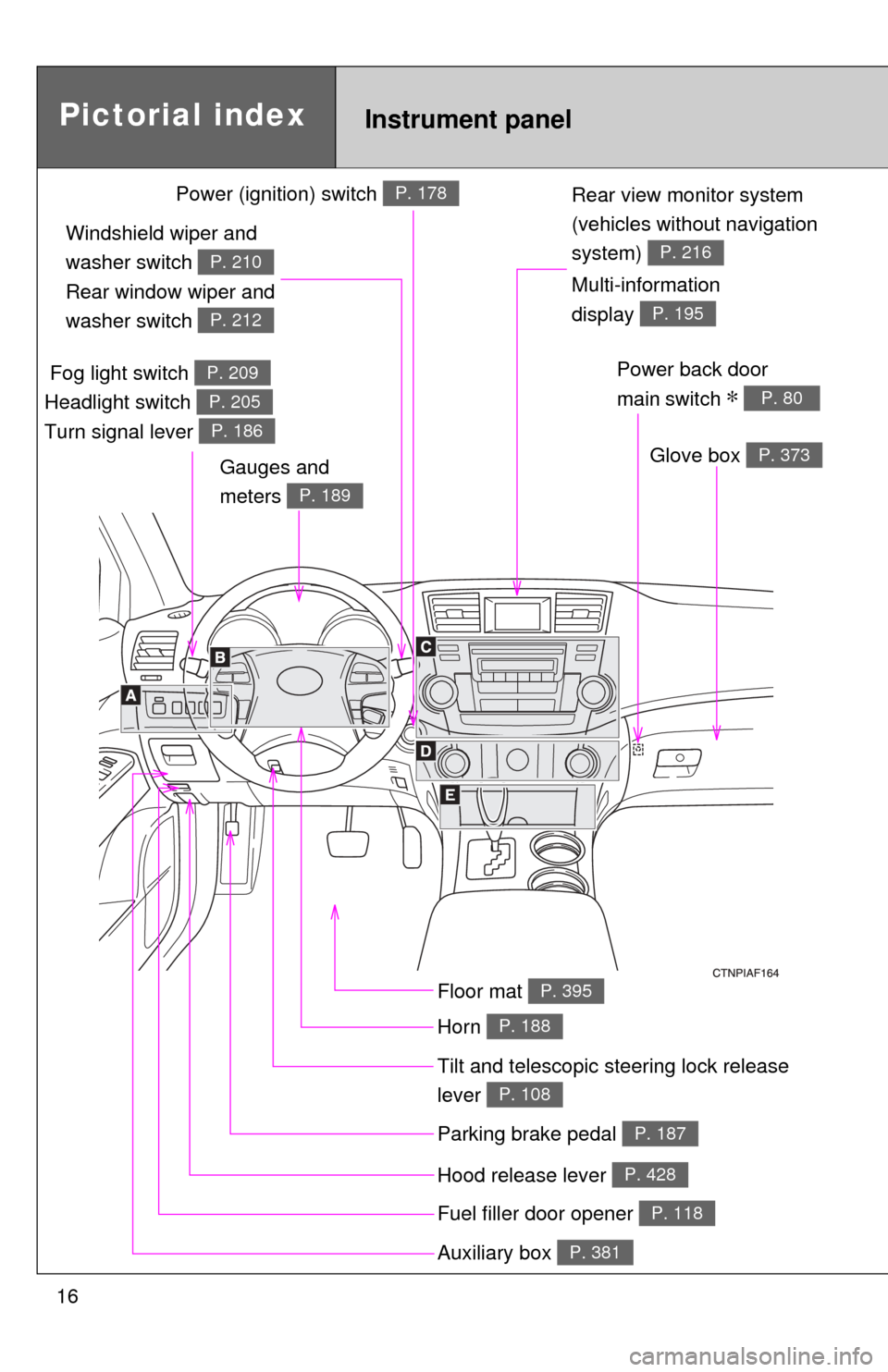
Rear view monitor system
(vehicles without navigation
system)
P. 216
Tilt and telescopic steering lock release
lever
P. 108
Glove box P. 373
Pictorial indexInstrument panel
Power back door
main switch
∗ P. 80
Parking brake pedal P. 187
Hood release lever P. 428
Auxiliary box P. 381
Power (ignition) switch P. 178
Multi-information
display
P. 195
Fuel filler door opener P. 118
Fog light switch
Headlight switch
Turn signal lever P. 209
P. 205
P. 186
Windshield wiper and
washer switch
Rear window wiper and
washer switch
P. 210
P. 212
Gauges and
meters
P. 189
Floor mat P. 395
Horn P. 188
Page 29 of 592
Before driving1
29
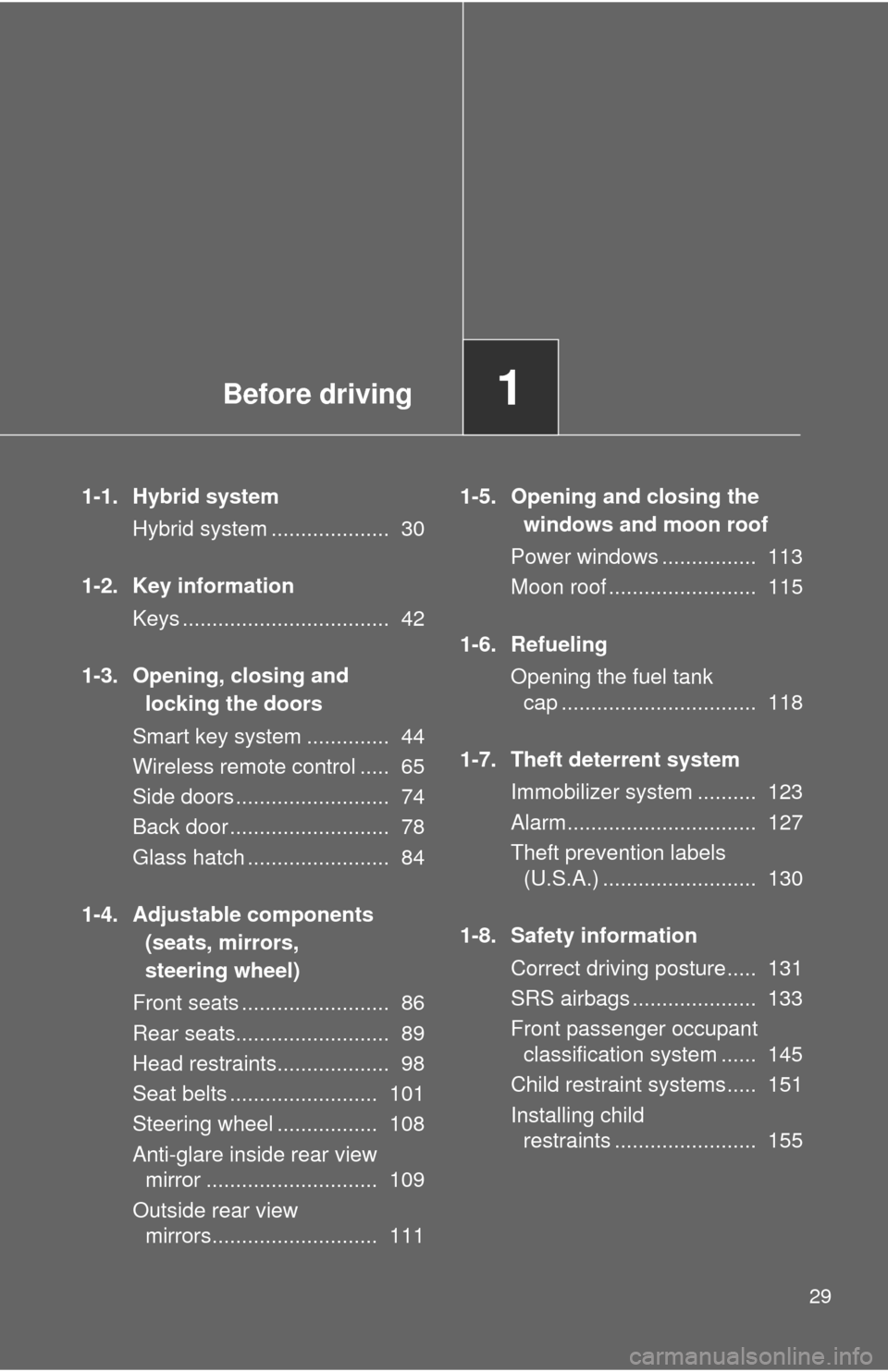
1-1. Hybrid systemHybrid system .................... 30
1-2. Key information Keys ................................... 42
1-3. Opening, closing and locking the doors
Smart key system .............. 44
Wireless remote control ..... 65
Side doors .......................... 74
Back door ........................... 78
Glass hatch ........................ 84
1-4. Adjustable components (seats, mirrors,
steering wheel)
Front seats ......................... 86
Rear seats.......................... 89
Head restraints................... 98
Seat belts ......................... 101
Steering wheel ................. 108
Anti-glare inside rear view mirror ............................. 109
Outside rear view mirrors............................ 111 1-5. Opening and closing the
windows and moon roof
Power windows ................ 113
Moon roof ......................... 115
1-6. Refueling Opening the fuel tank cap ................................. 118
1-7. Theft deterrent system Immobilizer system .......... 123
Alarm................................ 127
Theft prevention labels (U.S.A.) .......................... 130
1-8. Safety information Correct driving posture..... 131
SRS airbags ..................... 133
Front passenger occupant classification system ...... 145
Child restraint systems..... 151
Installing child restraints ........................ 155
Page 35 of 592
35
1-1. Hybrid system
1
Before driving
■
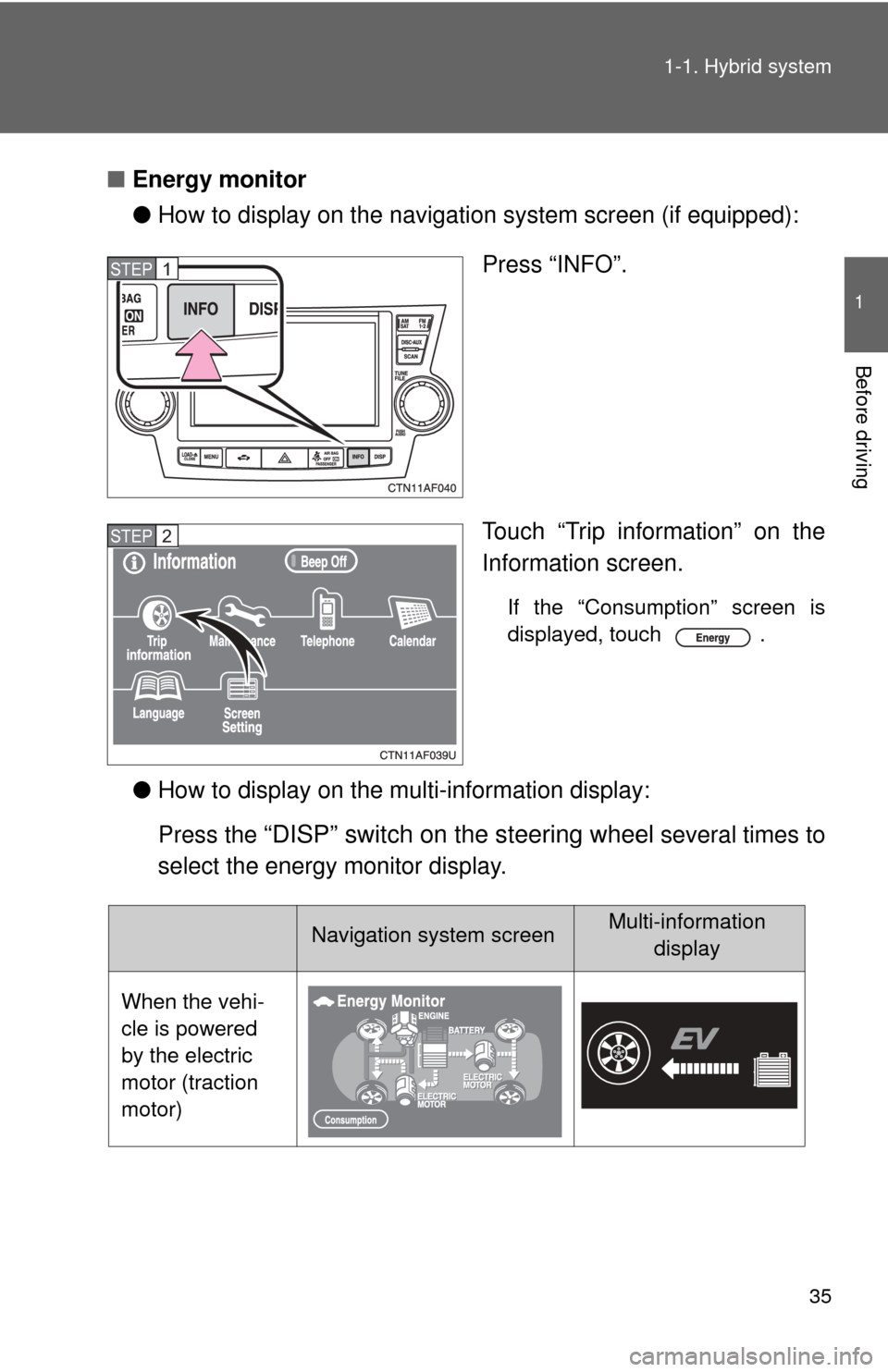
Energy monitor
●How to display on the navigation system screen (if equipped):
Press “INFO”.
Touch “Trip information” on the
Information screen.
If the “Consumption” screen is
displayed, touch .
●How to display on the mu lti-information display:
Press the
“DISP” switch on the steering wheel several times to
select the energy monitor display.
STEP1
STEP2
Navigation system screenMulti-information display
When the vehi-
cle is powered
by the electric
motor (traction
motor)
Page 87 of 592
87
1-4. Adjustable components (s
eats, mirrors, steering wheel)
1
Before driving
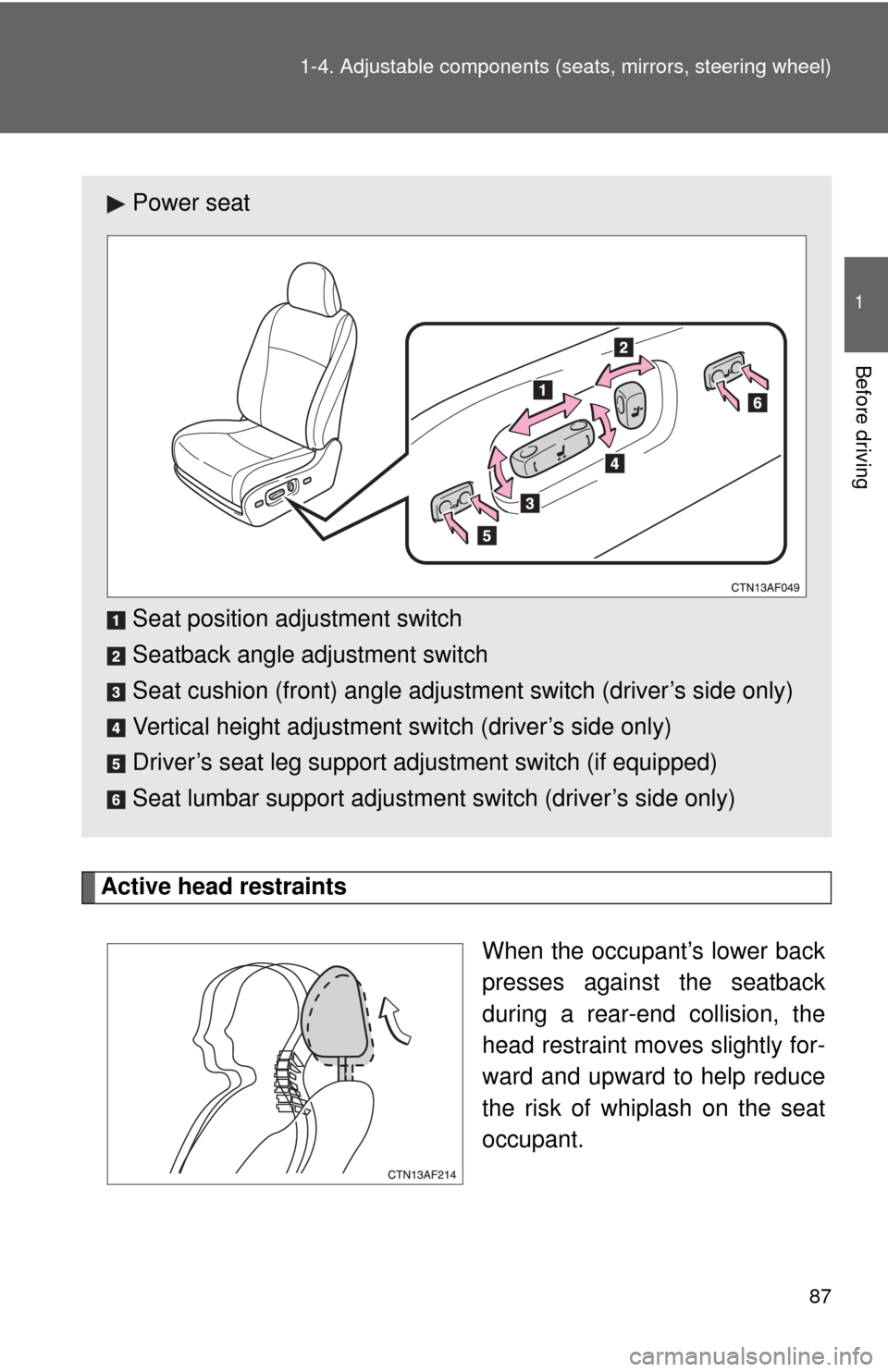
Active head restraints
When the occupant’s lower back
presses against the seatback
during a rear-end collision, the
head restraint moves slightly for-
ward and upward to help reduce
the risk of whiplash on the seat
occupant.
Power seat
Seat position adjustment switch
Seatback angle adjustment switch
Seat cushion (front) angle adjustment switch (driver’s side only)
Vertical height adjustment switch (driver’s side only)
Driver’s seat leg support adjustment switch (if equipped)
Seat lumbar support adjustment switch (driver’s side only)
Page 109 of 592
109
1
1-4. Adjustable components (seats, mirrors, steering wheel)
Before driving
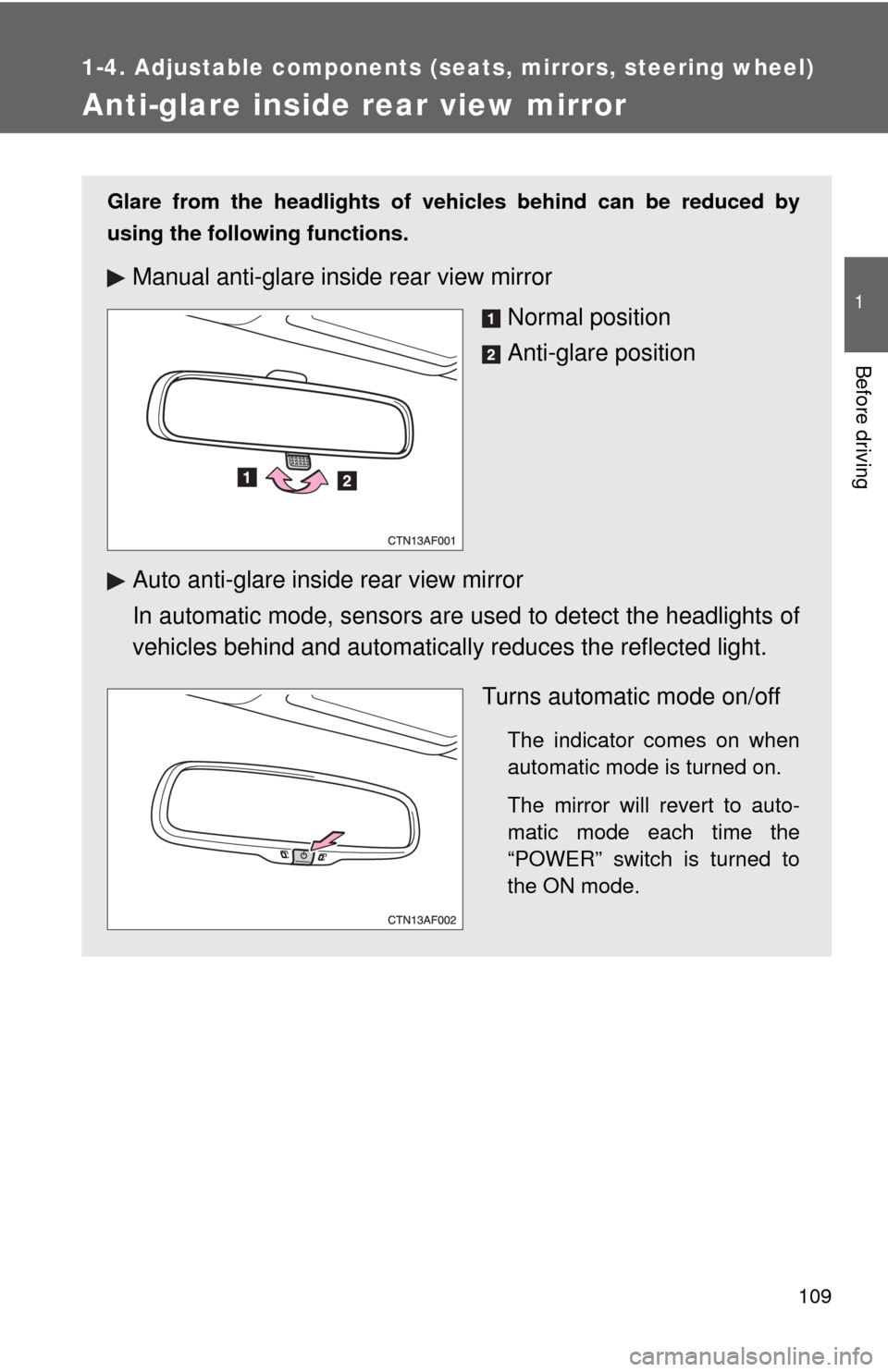
Anti-glare inside rear view mirror
Glare from the headlights of vehicles behind can be reduced by
using the following functions.
Manual anti-glare inside rear view mirror
Normal position
Anti-glare position
Auto anti-glare inside rear view mirror
In automatic mode, sensors are used to detect the headlights of
vehicles behind and automatical ly reduces the reflected light.
Turns automatic mode on/off
The indicator comes on when
automatic mode is turned on.
The mirror will revert to auto-
matic mode each time the
“POWER” switch is turned to
the ON mode.
Page 111 of 592
111
1
1-4. Adjustable components (seats, mirrors, steering wheel)
Before driving
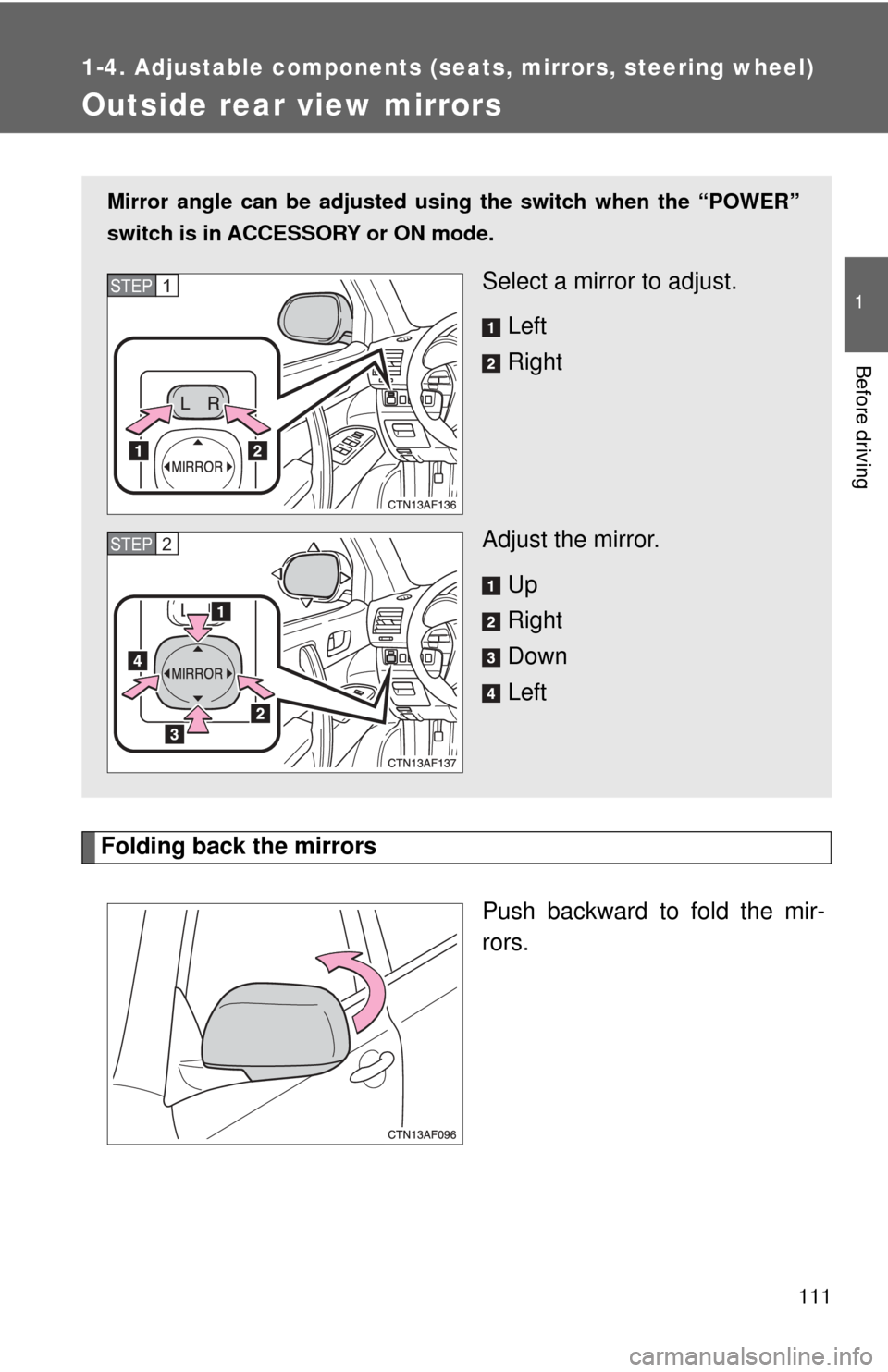
Outside rear view mirrors
Folding back the mirrorsPush backward to fold the mir-
rors.
Mirror angle can be adjusted usin g the switch when the “POWER”
switch is in ACCESSORY or ON mode.
Select a mirror to adjust.
Left
Right
Adjust the mirror. Up
Right
Down
LeftSTEP1
STEP2
Page 135 of 592

135
1-8. Safety information
1
Before driving
The main SRS airbag system co
mponents are shown above. The
SRS airbag system is controlled by the airbag sensor assembly. The
airbag sensor assembly consists of a safing sensor and an airbag
sensor.
In certain types of severe frontal or side impacts, the SRS airbag sys-
tem triggers the airbag inflators. A chemical reaction in the inflators
quickly fills the airbags with non-toxic gas to help rest rain the motion
of the occupants.
■ SRS warning light
This warning light system monitors the airbag sensor assembly, front airbag
sensors, side and curtain shield airbag sensor assemblies, curtain shield air-
bag sensor assemblies, driver's seat position sensor, driver's seat belt
buckle switch, front passenger occupant classification system, “AIR BAG
ON” and “AIR BAG OFF” indicator lights, front passenger’s seat belt buckle
switch, front seat belt pretensioner assemblies, inflators, interconnecting wir-
ing and power sources. ( →P. 501)
■ If the SRS airbags deploy (inflate)
●Bruising and slight abrasions may result from contact with a deploying
(inflating) SRS airbag.
● A loud noise and white powder will be emitted.
● Parts of the airbag module (steering wheel hub, airbag cover and inflator)
as well as the front seats, and parts of the front and rear pillars and roof
side rail, may be hot for several minutes. The airbag itself may also be
hot.
● The windshield may crack.
Page 173 of 592

173
2-1. Driving procedures
2
When driving
CAUTION
●
Do not under any circumstances shift the shift lever to P, R or N while the
vehicle is moving.
Doing so can cause significant damage to the transmission system and
may result in a loss of vehicle control.
● Do not shift the shift lever to N while the vehicle is moving.
Doing so may cause the engine brake to not operate properly and lead to
an accident.
● Do not turn the hybrid system off while driving.
The power steering system will not operate properly if the hybrid system is
off.
● Use engine braking to maintain a safe speed when driving down a steep
hill.
Using the brakes continuously may cause the brakes to overheat and lose
effectiveness. ( →P. 184)
● When stopped on an inclined surface, use the brake pedal and parking
brake to prevent the vehicle from rolling backward or forward and causing
an accident.
● Do not adjust the position of the steering wheel, the seat, or the inside or
outside rear view mirrors while driving.
Doing so may result in a loss of vehicle control that can cause accidents
that may result in death or serious injury.
● Always check that all passengers' arms, heads or other parts of their bod-
ies are not outside the vehicle, as this may result in death or serious injury.
● Do not drive in excess of the speed limit. Even if the legal speed limit per-
mits it, do not drive over 85 mph (140 km/h) unless your vehicle has high-
speed capability tires. Driving over 85 mph (140 km/h) may result in tire
failure, loss of control and possible injury. Be sure to consult a tire dealer
to determine whether the tires on your vehicle are high-speed capability
tires or not before driving at such speeds.
■ When driving on slippery road surfaces
●Sudden braking, acceleration and steering may cause tire slippage and
reduce your ability to control the vehicle, resulting in an accident.
Page 177 of 592

177
2-1. Driving procedures
2
When driving
NOTICE
■
When driving the vehicle
Do not use the accelerator pedal or depress the accelerator and brake ped-
als together to hold the vehicle on a hill.
■ When parking the vehicle
Always put the shift lever in P. Failure to do so may cause the vehicle to
move or the vehicle may accelerate suddenly if the accelerator pedal is acci-
dentally depressed.
■ Avoiding damage to vehicle parts
●Do not turn the steering wheel fully in either direction and hold it there for a
long time.
Doing so may damage the power steering motor.
● When driving over bumps in the road, drive as slowly as possible to avoid
damaging the wheels, underside of the vehicle, etc.
■ When encountering flooded roads
Do not drive on a road that has flooded after heavy rain etc. Doing so may
cause the following serious damage to the vehicle.
●Engine stalling
● Short in electrical components
● Engine damage caused by water immersion
In the event that you drive on a flooded road and the vehicle is flooded, be
sure to have your Toyota dealer check the following.
● Brake function
● Changes in quantity and quality of oil and fluid used for the engine, hybrid
transaxle, rear motor transaxle, etc.
● Lubricant condition for the bearings and suspension joints (where possi-
ble) and the function of all joints, bearings, etc.