headlights TOYOTA HIGHLANDER HYBRID 2015 XU50 / 3.G User Guide
[x] Cancel search | Manufacturer: TOYOTA, Model Year: 2015, Model line: HIGHLANDER HYBRID, Model: TOYOTA HIGHLANDER HYBRID 2015 XU50 / 3.GPages: 604, PDF Size: 9.61 MB
Page 251 of 604

2514-3. Operating the lights and wipers
4
Driving
HIGHLANDER_HV_U (OM48F02U)●
The following factors may affect the amount of time taken to turn high beam
on or off:
• The brightness of headlights, fog lights, and tail lights of oncoming and
preceding vehicles
• The movement and direction of oncoming and preceding vehicles
• When an oncoming or preceding vehicle only has operational lights on one side
• When an oncoming or preceding vehicle is a two-wheeled vehicle
• The condition of the road (gradient, curve, condition of the road surface etc.)
• The number of passengers and amount of luggage
● High beam may be turned on or off when unexpected by the driver.
● Small vehicles, such as bicycles, may not be detected.
● In the situations below, the system may not be able to correctly detect the
surrounding brightness levels, and may flash or expose nearby pedestrians
to the high beam. Therefore, you should consider turning the high beams on
or off manually rather than relying on the Automatic High Beam system.
• In bad weather (rain, snow, fog, sandstorms etc.)
• The windshield is obscured by fog, mist, ice, dirt etc.
• The windshield is cracked or damaged.
• The camera sensor is deformed or dirty.
• Surrounding brightness levels are equal to those of headlights, tail lights
or fog lights.
• Vehicles ahead have headlights or tail lights that are either switched off, dirty, changing color, or have improperly adjusted aim.
• When driving through an area of in termittently changing brightness and
darkness.
• When frequently and repeatedly driving ascending/descending roads, or
roads with rough, bumpy or uneven surfaces (such as stone-paved
roads, gravel tracks etc.).
• When frequently and repeatedly taking curves or driving on a winding
road.
• There is a highly reflective object ahead of the vehicle, such as a sign or a mirror.
• The vehicle’s headlights are damaged or dirty.
• The vehicle is listing or tilting, due to a flat tire, a trailer being towed etc.
• The driver believes that the high beam may be causing problems or dis- tress to other drivers or pedestrians nearby.
Page 252 of 604

2524-3. Operating the lights and wipers
HIGHLANDER_HV_U (OM48F02U)■
Temporarily lowering sensor sensitivity
The sensitivity of the sensor can be temporarily lowered.
Turn the power switch off while the following conditions are met.
• The headlight switch is in or .
• The headlight switch lever is in high beam position.
• Automatic High Beam switch is on. Turn the power switch to ON mode.
Within 5 seconds after , repeat pulling the headlight switch lever to the
original position then pushing it to the high beam position quickly 9 times,
then leave the lever in high beam position.
Automatic High Beam (headlights) may turn on even the vehicle is stopped.
■ If the Automatic High Beam indicator turns to yellow
It may indicate a malfunction in the system. Contact your Toyota dealer.
1
2
32
Page 254 of 604
2544-3. Operating the lights and wipers
HIGHLANDER_HV_U (OM48F02U)
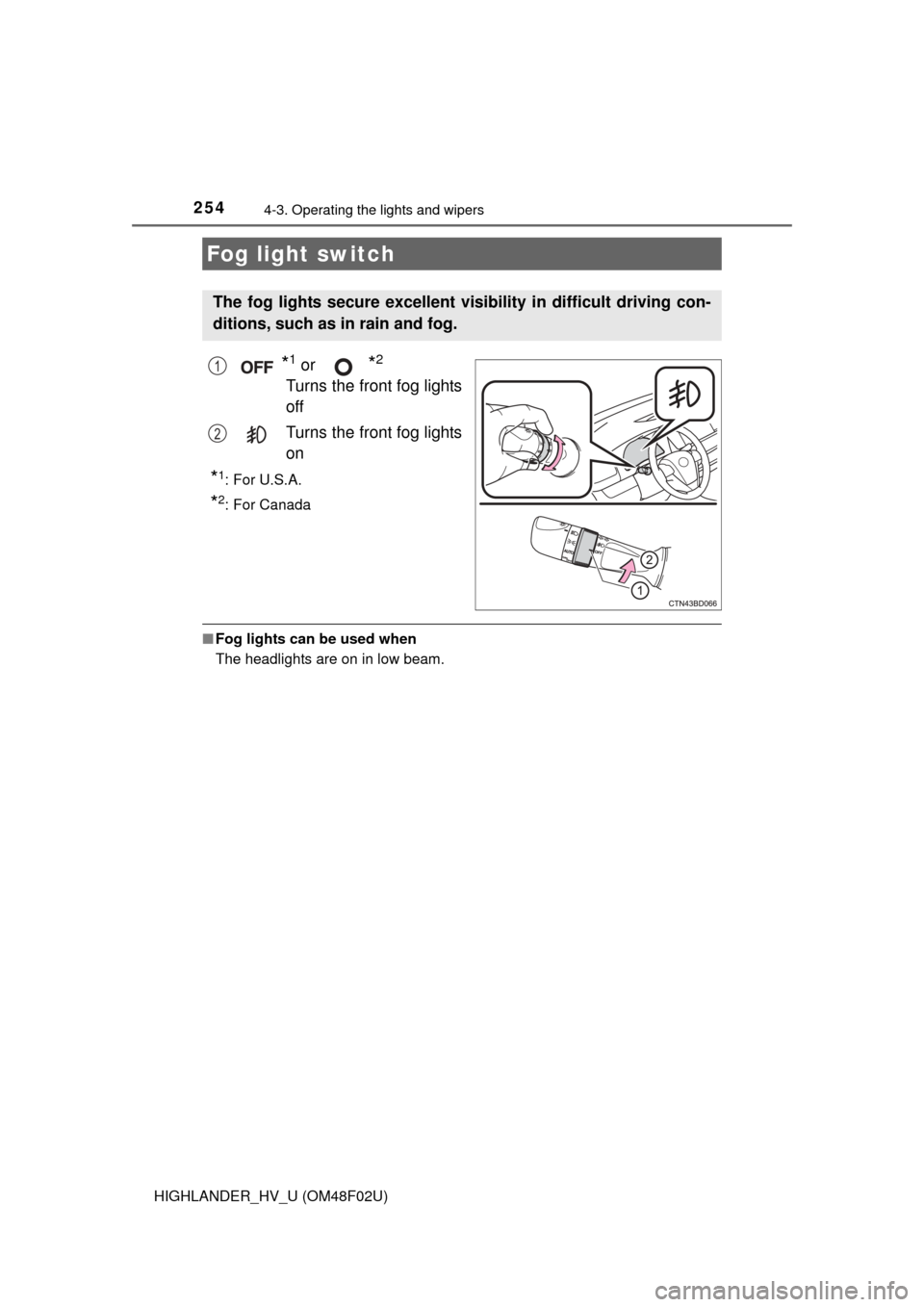
*1 or *2
Turns the front fog lights
off
Turns the front fog lights
on
*1:For U.S.A.
*2: For Canada
■Fog lights can be used when
The headlights are on in low beam.
Fog light switch
The fog lights secure excellent visi bility in difficult driving con-
ditions, such as in rain and fog.
1
2
Page 288 of 604

2884-5. Using the driving support systems
HIGHLANDER_HV_U (OM48F02U)■
Conditions in which the function may not operate correctly
In the following situations, the camera sensor may be unable to recognize
lane markers causing the lane departure warning function to operate incor-
rectly. However, this does not indicate a malfunction.
●When driving through an area with no lane markers, such as a tollbooth, a
crossing or before a ticket checkpoint
● When driving on a sharp curve
● When lane markers are extremely narrow or extremely wide
● When the vehicle leans to one side an unusual amount due to a heavy load
or improper tire inflation pressure
● When the following distance between your vehicle and the vehicle ahead is
extremely short
● When the lane markers are yellow (These may be more difficult for the sys-
tem to recognize compared to white markers.)
● When the lane markers are broken, Botts’ dots (raised pavement markers)
or stones
● When the lane markers are on a curb etc.
● When lane markers are obscured or partially obscured by sand, dirt, etc.
● When there are shadows on the road running parallel with lane markers, or
if a shadow covers the lane markers
● When driving on a particularly bright road surface, such as concrete
● When driving on a road surface that is bright due to reflected light
● When driving in a location where the light level changes rapidly, such as the
entrance to or exit from a tunnel
● When sunlight or the headlights of oncoming vehicles are shining directly
into the camera lens
● When driving on roads that are branching or merging
● When driving on a road surface that is wet due to rain, previous rainfall,
standing water, etc.
● When the vehicle experiences strong up-and-down motion such as when
driving on an extremely rough road or on a seam in the pavement
● When headlight brightness at nighttime is reduced due to dirt on the lenses,
or when the headlights are misaligned
● When driving on winding roads or roads that are uneven
● When driving on rough or unpaved roads
■ When changing the tires
Depending on the tires used, sufficient performance may not be maintainable.
■ Warning messages for the LDA system
Warning messages are used to indicate a system malfunction or to inform t\
he
driver of the need for caution while driving. ( P. 473)
Page 290 of 604
2904-5. Using the driving support systems
HIGHLANDER_HV_U (OM48F02U)
NOTICE
■To prevent damage to or incorr ect operation of the LDA system
● Do not modify the headlights or attach stickers to the surface of the lights.
● Do not modify the suspension or replace it with non-genuine parts.
● Do not install or place anything on the hood or the grille. Also, do not install
a grille guard (bull bars, kangaroo bar etc.).
● If your windshield needs repairs, contact your Toyota dealer.
■ Camera sensor
Observe the following to ensure that the LDA system functions correctly.
● Keep the windshield clean at all times.
Performance could be affected if the windshield is dirty, or if raindrops,
condensation or ice are adhering to the windshield.
● Do not spill liquid onto the camera sensor
● Do not attach window tinting to the windshield.
● Do not install an antenna in front of the camera lens.
● If the windshield is fogged up, use the windshield defogger to remove fog
from the windshield.
When it is cold, using the heater with air blowing to the feet may allow the
upper part of the windshield to fog up. This will have a negative effect on
the images.
● Do not scratch the camera lens, or let it get dirty.
When cleaning the inside of the windshield, be careful not to get any glass
cleaner etc. on the lens. Also, do not touch the lens.
For lens repair, contact your Toyota dealer.
● Do not change the installation position or direction of the camera sensor or
remove it. The direction of the camera sensor is precisely adjusted.
● Do not subject the camera sensor to strong impact or force, and do not
disassemble the camera sensor.
● Do not replace windshield with non-genuine windshield.
Contact your Toyota dealer.
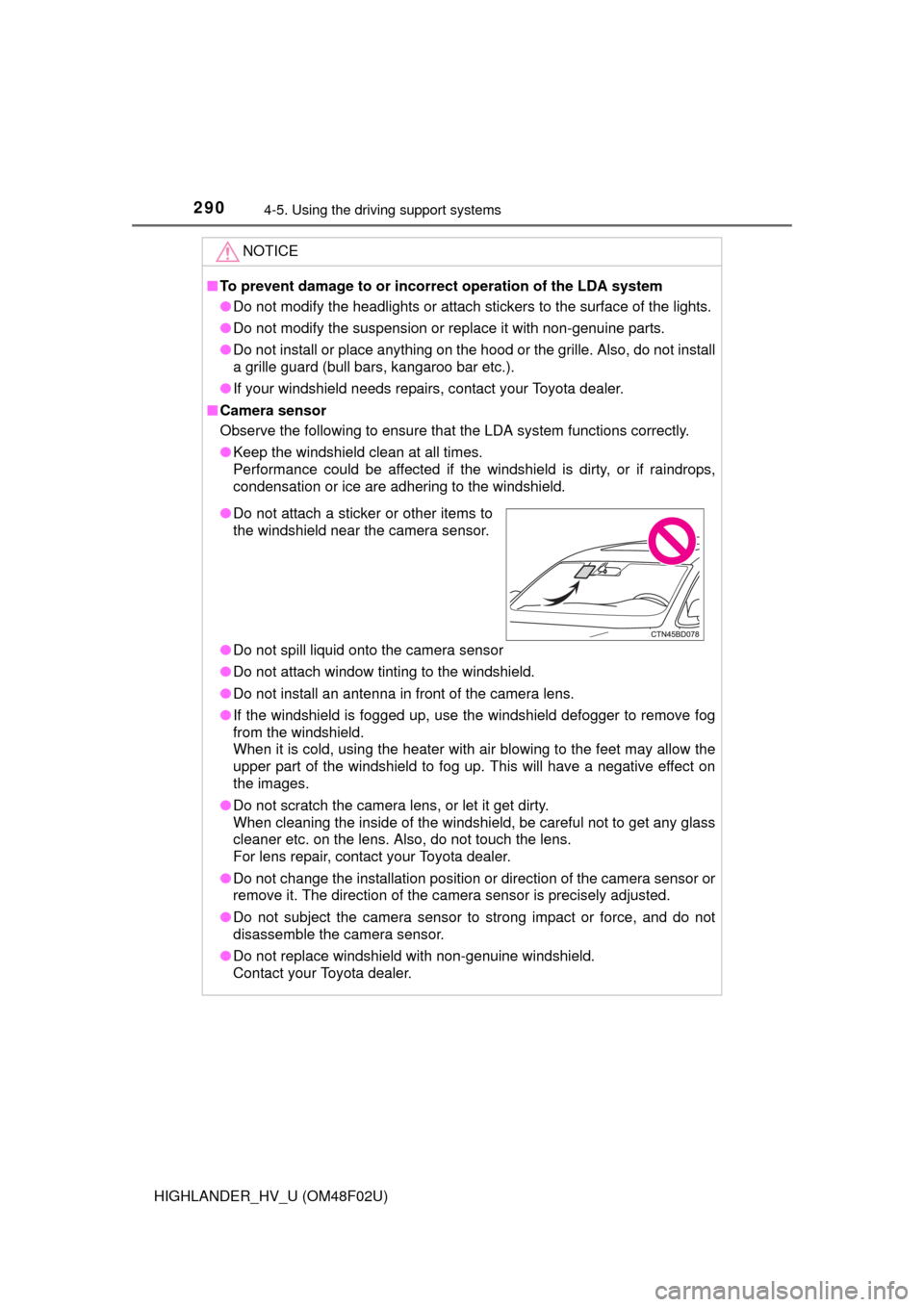
●Do not attach a sticker or other items to
the windshield near the camera sensor.
Page 438 of 604
4386-3. Do-it-yourself maintenance
HIGHLANDER_HV_U (OM48F02U)■
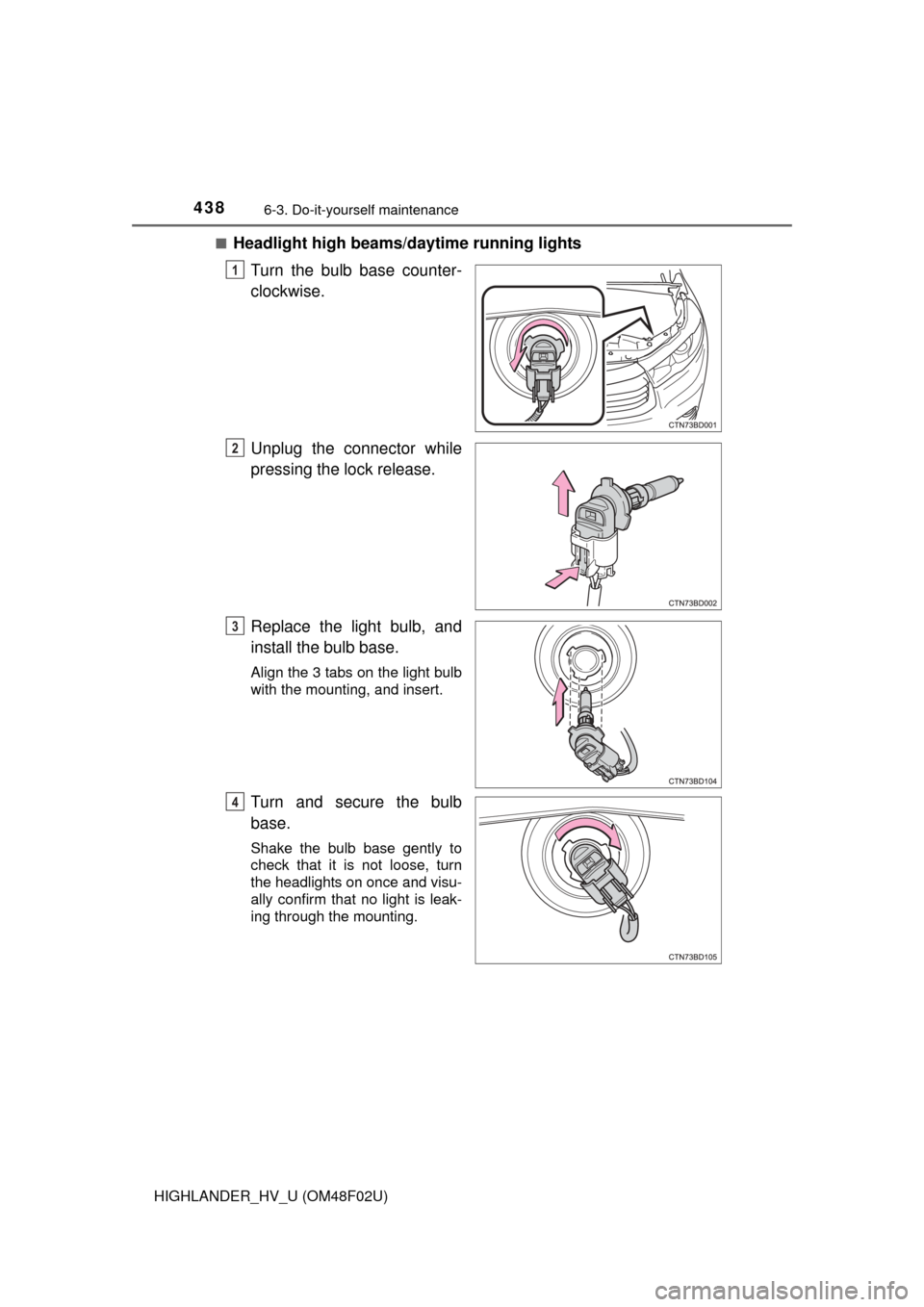
Headlight high beams/
daytime running lights
Turn the bulb base counter-
clockwise.
Unplug the connector while
pressing the lock release.
Replace the light bulb, and
install the bulb base.
Align the 3 tabs on the light bulb
with the mounting, and insert.
Turn and secure the bulb
base.
Shake the bulb base gently to
check that it is not loose, turn
the headlights on once and visu-
ally confirm that no light is leak-
ing through the mounting.
1
2
3
4
Page 447 of 604
4476-3. Do-it-yourself maintenance
HIGHLANDER_HV_U (OM48F02U)
6
Maintenance and care
■Replacing the following bulbs
If any of the lights listed below has burnt out, have it replaced by
your Toyota dealer.
● Side turn signal lights
● Daytime running lights (LED type)
● High mounted stoplight
● Outer foot lights (if equipped)
■LED light bulbs
The side turn signal, daytime running lights (LED type), high mounted stop-
light and outer foot lights (if equipped) consist of a number of LEDs. If any of
the LEDs burns out, take your vehicle to your Toyota dealer to have the light
replaced.
■ Condensation build-up on the inside of the lens
Temporary condensation build-up on the inside of the headlight lens does not
indicate a malfunction.
Contact your Toyota dealer for more information in the following situations:
●Large drops of water have built up on the inside of the lens.
● Water has built up inside the headlight.
■ When replacing light bulbs
P. 433
WARNING
■Replacing light bulbs
● Turn off the lights. Do not attempt to replace the bulb immediately after
turning off the lights.
The bulbs become very hot and may cause burns.
● Do not touch the glass portion of the light bulb with bare hands. When it is
unavoidable to hold the glass portion, use and hold with a clean dry cloth
to avoid getting moisture and oils on the bulb.
Also, if the bulb is scratched or dropped, it may blow out or crack.
● Fully install light bulbs and any parts used to secure them. Failure to do so
may result in heat damage, fire, or water entering the headlight unit. This
may damage the headlights or cause condensation to build up on the lens.
■ To prevent damage or fire
Make sure bulbs are fully seated and locked.
Page 477 of 604
4777-2. Steps to take in an emergency
7
When trouble arises
HIGHLANDER_HV_U (OM48F02U)
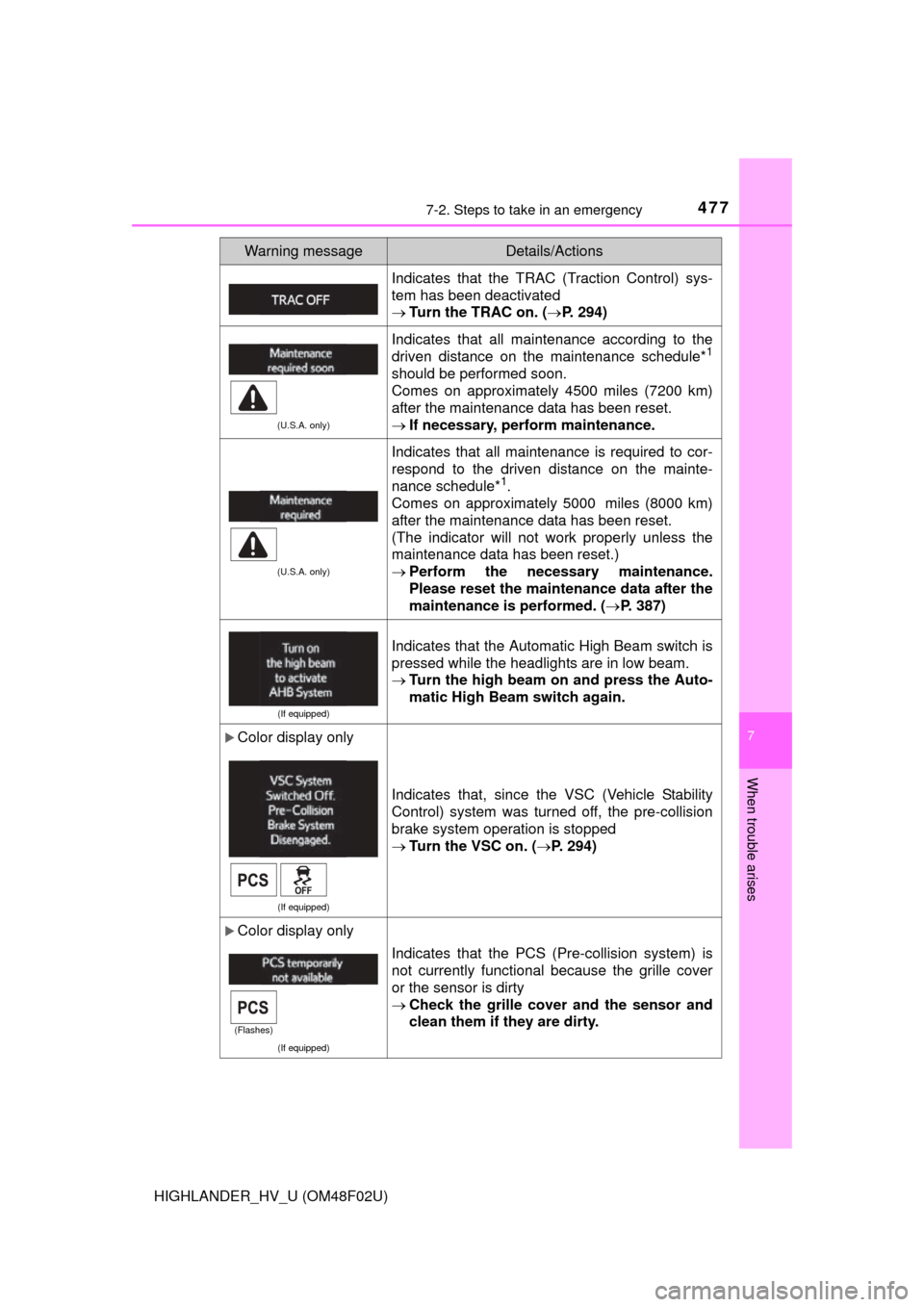
Indicates that the TRAC (Traction Control) sys-
tem has been deactivated
Turn the TRAC on. ( P. 294)
(U.S.A. only)
Indicates that all maintenance according to the
driven distance on the maintenance schedule*1
should be performed soon.
Comes on approximately 4500 miles (7200 km)
after the maintenance data has been reset.
If necessary, perform maintenance.
(U.S.A. only)
Indicates that all maintenance is required to cor-
respond to the driven distance on the mainte-
nance schedule*
1.
Comes on approximately 5000 miles (8000 km)
after the maintenance data has been reset.
(The indicator will not work properly unless the
maintenance data has been reset.)
Perform the necessary maintenance.
Please reset the maintenance data after the
maintenance is performed. ( P. 387)
(If equipped)
Indicates that the Automatic High Beam switch is
pressed while the headlights are in low beam.
Turn the high beam on and press the Auto-
matic High Beam switch again.
Color display only
(If equipped)
Indicates that, since the VSC (Vehicle Stability
Control) system was turned off, the pre-collision
brake system operation is stopped
Turn the VSC on. ( P. 294)
Color display only
(If equipped)
Indicates that the PCS (Pre-collision system) is
not currently functional because the grille cover
or the sensor is dirty
Check the grille cover and the sensor and
clean them if they are dirty.
Warning messageDetails/Actions
(Flashes)
Page 510 of 604
5107-2. Steps to take in an emergency
HIGHLANDER_HV_U (OM48F02U)
One of the following may be the cause of the problem:
●The electronic key may not be functioning properly. ( P. 514)
● There may not be sufficient fuel in the vehicle’s tank.
Refuel the vehicle.
● There may be a malfunction in the immobilizer system. (P. 9 1 )
● There may be a malfunction in the steering lock system.
● The hybrid system may be malfunctioning due to an electrical prob-
lem such as electronic key battery depletion or a blown fuse. How-
ever, depending on the type of malfunction, an interim measure is
available to start the hybrid system. ( P. 511)
One of the following may be the cause of the problem:
● The 12-volt battery may be discharged. ( P. 516)
● The 12-volt battery terminal conn ections may be loose or corroded.
If the hybrid system will not star t
Reasons for the hybrid system not starting vary depending on
the situation. Check the follo wing and perform the appropriate
procedure:
The hybrid system will not start even though the correct starting
procedure is being followed. ( P. 229)
The interior lights and headlights are dim, or the horn does not
sound or sounds at a low volume.
Page 518 of 604
5187-2. Steps to take in an emergency
HIGHLANDER_HV_U (OM48F02U)
Once the hybrid system has started, remove the jumper cables in
the exact reverse order from which they were connected.
Close the exclusive jump starting terminal cover, and reinstall the
fuse box cover to its original position.
When installing, first hook the fuse box cover onto the two rear tabs.
Once the hybrid system starts, have the vehicle inspected at your
Toyota dealer as soon as possible.
■ Starting the hybrid system when th e 12-volt battery is discharged
The hybrid system cannot be started by push-starting.
■ To prevent 12-volt battery discharge
●Turn off the headlights and the audio system while the hybrid system is off.
● Turn off any unnecessary electrical components when the vehicle is running
at a low speed for an extended period, such as in heavy traffic.
■ When recharging or repl acing the 12-volt battery
● In some cases, it may not be possible to unlock the doors using the smart
key system when the 12-volt battery is discharged. Use the wireless remote
control or the mechanical key to lock or unlock the doors.
● The hybrid system may not start on the first attempt after the 12-volt battery
has recharged but will start normally after the second attempt. This is not a
malfunction.
● The power switch mode is memorized by the vehicle. When the 12-volt bat-
tery is reconnected, the system will return to the mode it was in before the
12-volt battery was discharged. Before disconnecting the 12-volt battery,
turn the power switch off.
If you are unsure what mode the power switch was in before the 12-volt bat-
tery discharged, be especially careful when reconnecting the 12-volt battery.
● The power back door must be initialized. ( P. 567)
■ Charging the 12-volt battery
The electricity stored in the 12-volt battery will discharge gradually even when
the vehicle is not in use, due to natural discharge and the draining effects of
certain electrical appliances. If the vehicle is left for a long time, the 12-volt
battery may discharge, and the hybrid system may be unable to start. (The
12-volt battery recharges automatically while the hybrid system is operating.)
8
9