display TOYOTA iA 2016 Accessories, Audio & Navigation (in English)
[x] Cancel search | Manufacturer: TOYOTA, Model Year: 2016, Model line: iA, Model: TOYOTA iA 2016Pages: 90, PDF Size: 1.1 MB
Page 8 of 90
8
2.2 Navigation menu
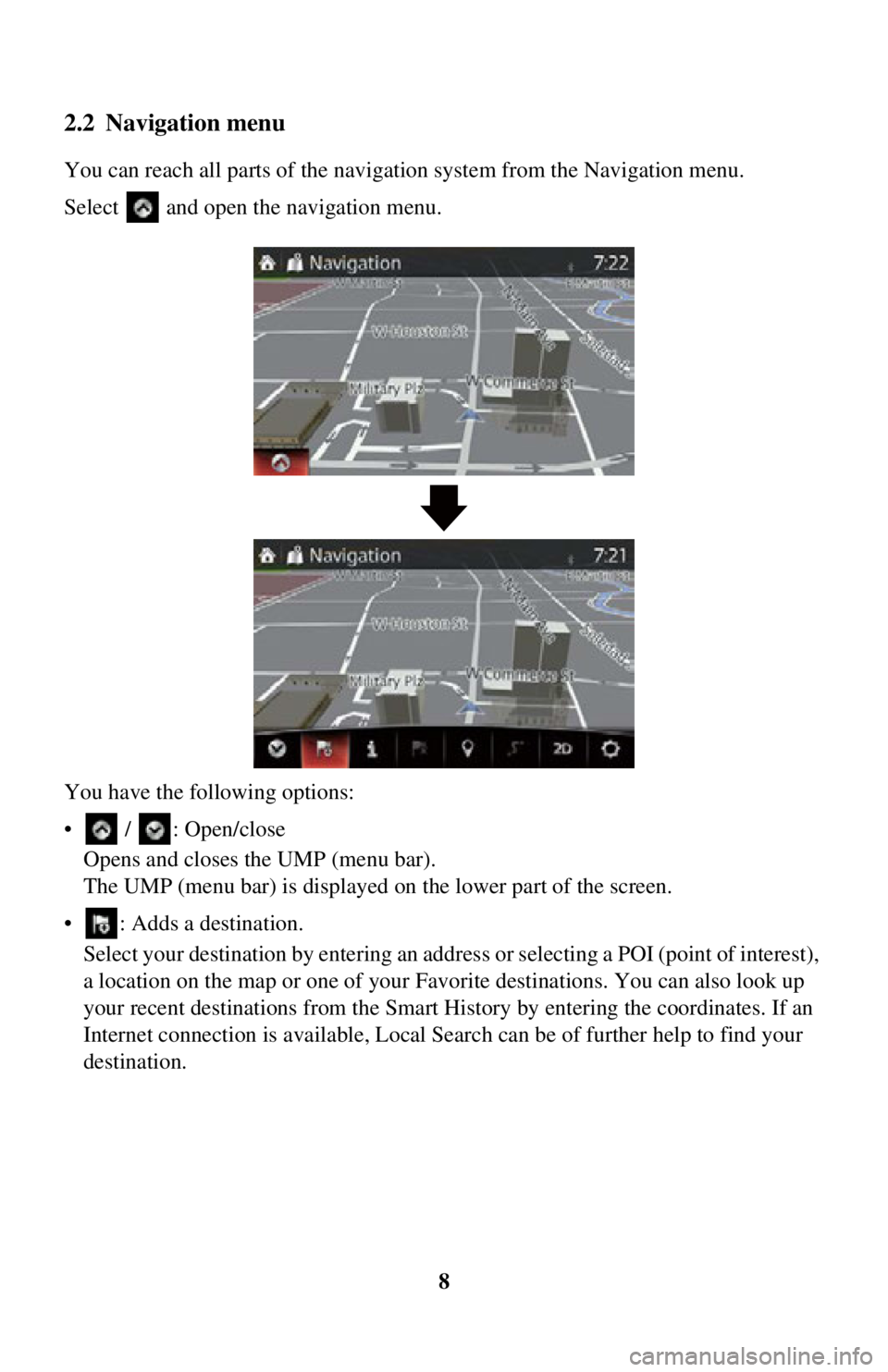
You can reach all parts of the navigation system from the Navigation menu.
Select and open the navigation menu.
You have the following options:
• / : Open/close Opens and closes the UMP (menu bar).
The UMP (menu bar) is displayed on the lower part of the screen.
• : Adds a destination. Select your destination by entering an addr ess or selecting a POI (point of interest),
a location on the map or one of your Favorite destinations. You can also look up
your recent destinations from the Smart History by entering the coordinates. If an
Internet connection is available, Local Search can be of further help to find your
destination.
Page 9 of 90
9
1
2
3
4
5
6
• : Displays the screen where traffic information and the GPS reception conditions can be set and verified.
• : Cancels waypoint/route
• : Finds Places nearby You can search for points of intere st (POI) near the vehicle position.
• : Displays the route parameters and the route in its full length on the map. You can also perform route-related actions such as editing or canceling your route,
picking route alternatives, avoiding parts of the route, simulating navigation or
adding the destination to your Favorites.
• / / : Changes View mode The map view mode can be changed (2D north up/2D heading up/3D).
• : Switches to the Settings screen where you change navigation settings.
Some functions are not available depending on some countries and regions.
Page 12 of 90
12
2.4 Map screen
2.4.1 Navigating on the map
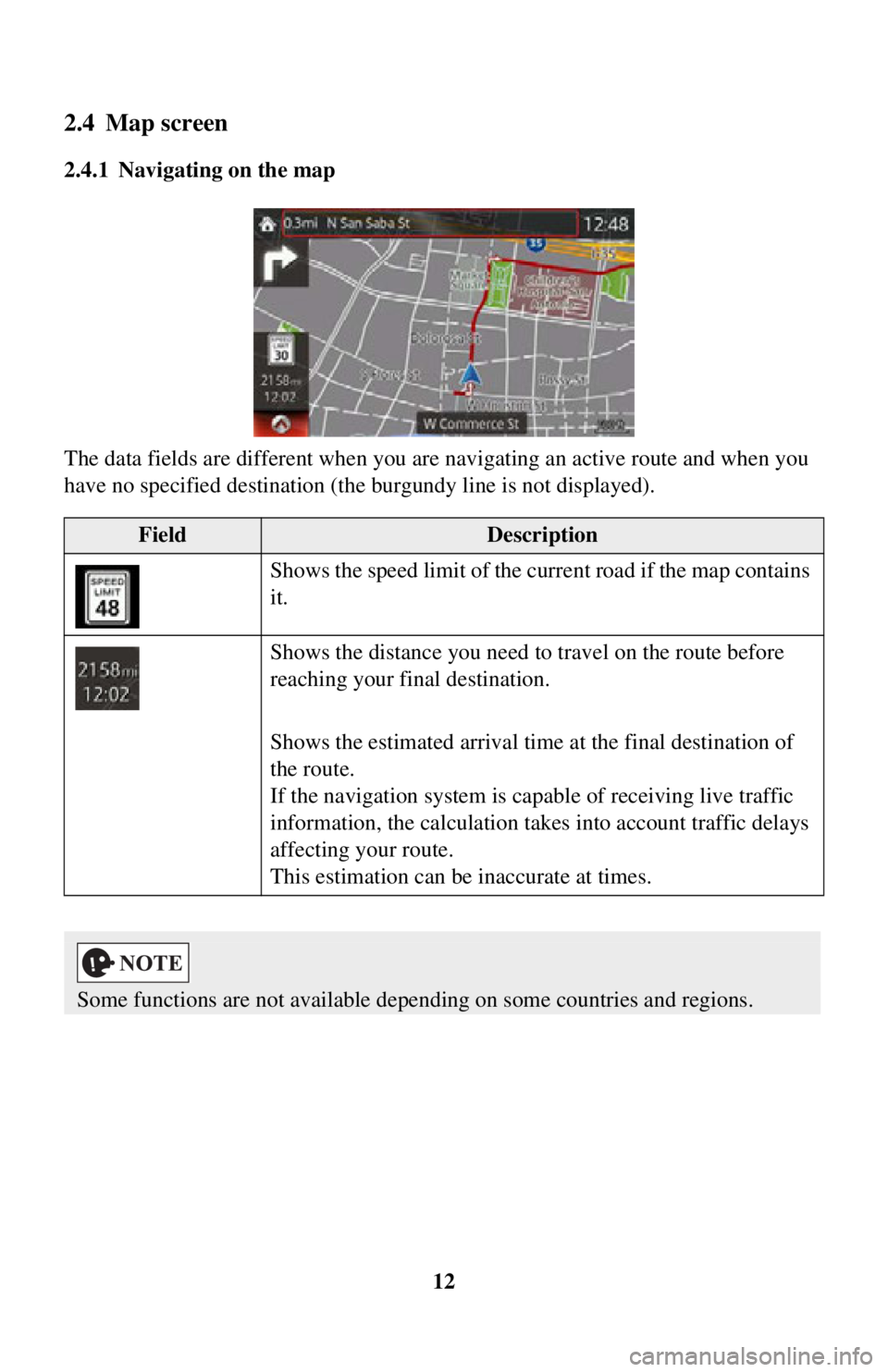
The data fields are different when you are navigating an active route and when you
have no specified destination (the burgundy line is not displayed).
FieldDescription
Shows the speed limit of the curr ent road if the map contains
it.
Shows the distance you need to travel on the route before
reaching your final destination.
Shows the estimated arrival time at the final destination of
the route.
If the navigation system is cap able of receiving live traffic
information, the calculation takes into account traffic delays
affecting your route.
This estimation can be inaccurate at times.
Some functions are not available depending on some countries and regions.
Page 13 of 90
13
1
2
3
4
5
6
2.4.2 Position markers
2.4.2.1 Selected map location (Cursor) and selected map object
You can mark a map location in the following ways:
• Select the map during route guidance.
• Select the map when asked so that the des tination can be confirmed after the search
is completed.
• Select the destination from the map. (page 54)
When a map location is selected, the Cursor appears at the selected point on the map.
A symbol with a combined crosshair and red circle is displayed for easy
visibility of any map scale size.
The location of the Cursor can be used as the destination of the route.
You can search for a POI (point of interest), or you can save it as one of your
Favorites destinations.
You can also select some of the objects on the map. If you select the map at the icon
of a POI (point of interest) or a traffic event, the object will be selected. You can then
get information about this object or use it as a route point.
2.4.3 Objects on the map
2.4.3.1 Streets and roads
The navigation system shows the roads in diff erent widths and colors so that they can
be easily identified. A highway/freeway will be thicke r and a different color than a
small street.
Some functions are not available depending on some countries and regions.
Page 14 of 90

14
2.4.3.2 Turn preview and Next street
When navigating a route, the top section of the Map screen shows information about
the next maneuver, street or city.
There is an area at the top left part of
screen which indicates the next operation.
Displays both the event type (such as turning, detouring, exiting expressways) and
the distance from th e current position.
When the next event approach es, the second event is displayed using a small icon. If
there is no second event, only the next event is displayed.
Most of these icons are very intuitive. The same symbols are used in both fields:
IconDescription
Turn left.
Turn right.
Turn back.
Bear right.
Turn sharp left.
Keep left.
Continue straight in the intersection.
Page 16 of 90

16
2.4.3.3 Lane information and Signposts
When navigating on multilane roads, it is im
portant to take the appropriate lane in
order to follow the recommended route. If lane information is available in the map
data, the navigation system displays the lanes and their directions using small arrows
at the bottom of the map. Highlighted ar rows represent the lanes and direction you
need to take.
Lane guidance is provided constantly if there is map information. Signposts are
displayed at the top of the map. The color and style of the signposts are similar to the
real ones you see above road or by the roadside. They show the available
destinations and the number of the road the lane leads to.
When navigating a route, only the signpost that points to the lane(s) to be taken is
displayed in bright colors; all others are darker. All signposts and lane guidance
arrows are displayed in vivid colors while driving (when there is no recommended
route).
If you want to hide the currently displa yed signposts, touch anywhere and the normal
Map screen returns until new signpost information is received.
Page 17 of 90
17
1
2
3
4
5
6
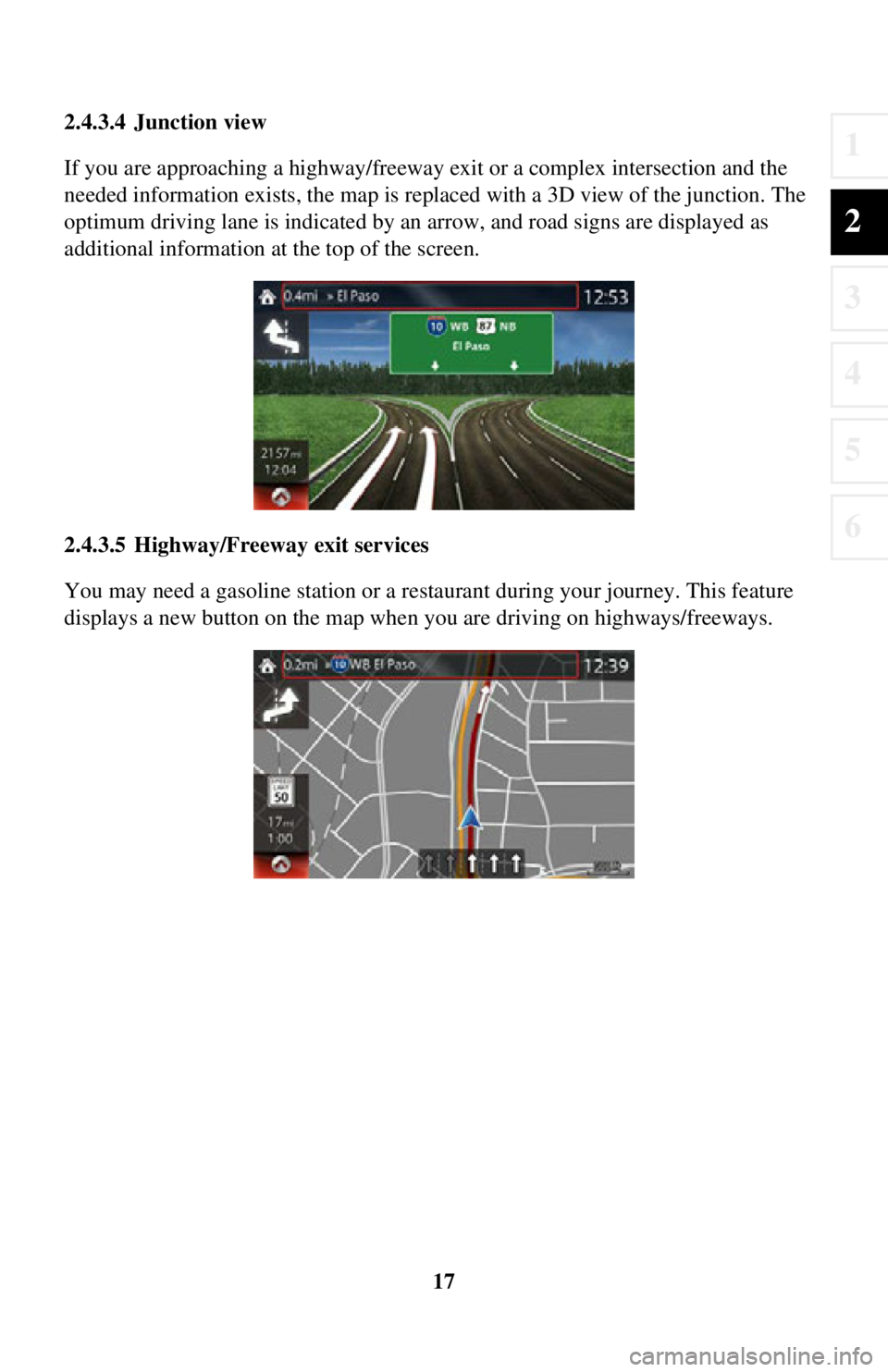
2.4.3.4 Junction view
If you are approaching a highway/freeway exit or a complex intersection and the
needed information exists, the map is replaced with a 3D view of the junction. The
optimum driving lane is indicated by an arrow, and road signs are displayed as
additional information at the top of the screen.
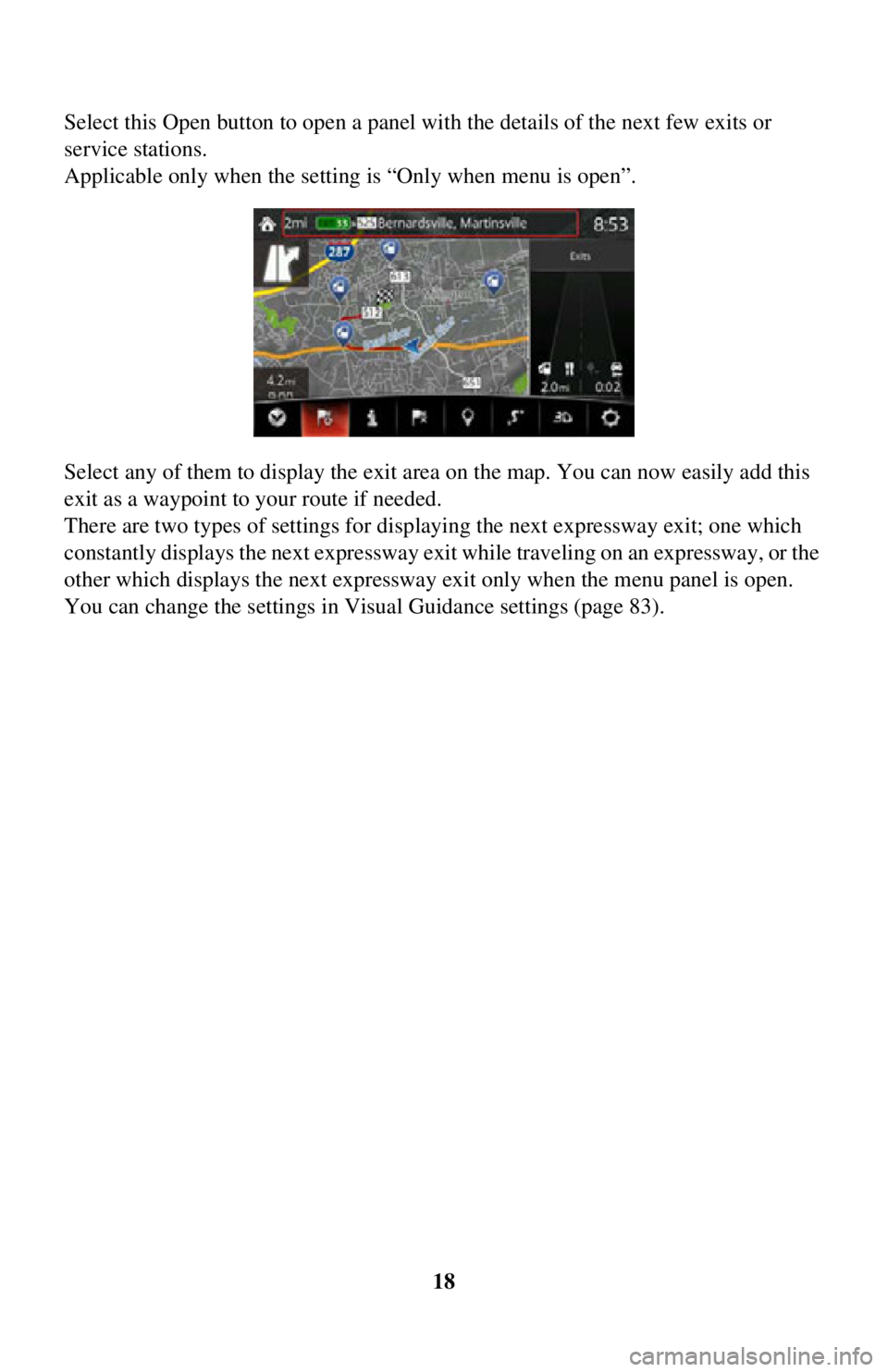
2.4.3.5 Highway/Freeway exit services
You may need a gasoline station or a restaurant during your journey. This feature
displays a new button on the map when you are driving on highways/freeways.
Page 18 of 90
18
Select this Open button to open a panel with the details of the next few exits or
service stations.
Applicable only when the setting is “Only when menu is open”.
Select any of them to display the exit area
on the map. You can now easily add this
exit as a waypoint to your route if needed.
There are two types of settings for disp laying the next expressway exit; one which
constantly displays the next expressway ex it while traveling on an expressway, or the
other which displays the next expressway exit only when the menu panel is open.
You can change the settings in Vi sual Guidance settings (page 83).
Page 19 of 90

19
1
2
3
4
5
6
2.4.3.6 Elements of the active route
The navigation system shows the route in the following way:
SymbolNameDescription
Current car position
marker If there is a road close
by, a blue-colored arrow
symbol moves to the road which is the closest.
The red mark present around a blue-colored
arrow symbol indicates the correct GPS
information. It may be indicated away from the
road because there is no existing road
information.
Waypoint
(intermediate
destination) An intermediate destination of the route before
reaching the fina
l destination.
Destination (end
point) The final destination of the route.
Route color The route always stands out with its color on the map, both in daytime and in nighttime
mode.
Streets and roads that
are excluded from the
navigation You can choose whether you want to use or
avoid certain road types (page 80). However,
when the navigation system cannot avoid such
roads, the route will include them and it will
show them in a color that
is different from the
route color.
Streets and roads that
are affected by traffic
events Road segments may be affected by traffic
events received. These streets and roads are
displayed in an alternate color, and small
symbols displayed along the route show the
type of traffic event.
Some functions are not available depending on some countries and regions.
Page 20 of 90

20
2.4.4 Manipulating the map
By touching and dragging any part of the map screen, it can be moved to a location
close to the currently displayed map.
In addition, the map operation button is
displayed, and by touching each of the
buttons, you can zoom in and out of maps, change the map perspective and select a
destination.
ActionButton(s)Description
Map movement
using touch and
drag No buttons You can move the map in any direction: select and
hold the map, and move your finger towards the
direction you want to move the map.
Zooming in
and out , Changes how much of the map is displayed on the
screen.
The navigation system uses high-quality vector
maps that let you examine the map at various
zoom levels, always with optimized content.
Map scaling has a limit in 3D map view mode. If
you zoom out further, the map switches to 2D view
mode.
Select the button once to mo
dify the view in large
steps, or select and hold the button to modify it
continuously and smoothly.