window TOYOTA LAND CRUISER 2010 J200 User Guide
[x] Cancel search | Manufacturer: TOYOTA, Model Year: 2010, Model line: LAND CRUISER, Model: TOYOTA LAND CRUISER 2010 J200Pages: 592, PDF Size: 7.98 MB
Page 27 of 592
27
1-2. Opening, closing and locking the doors
1
Before driving
L/C200_U
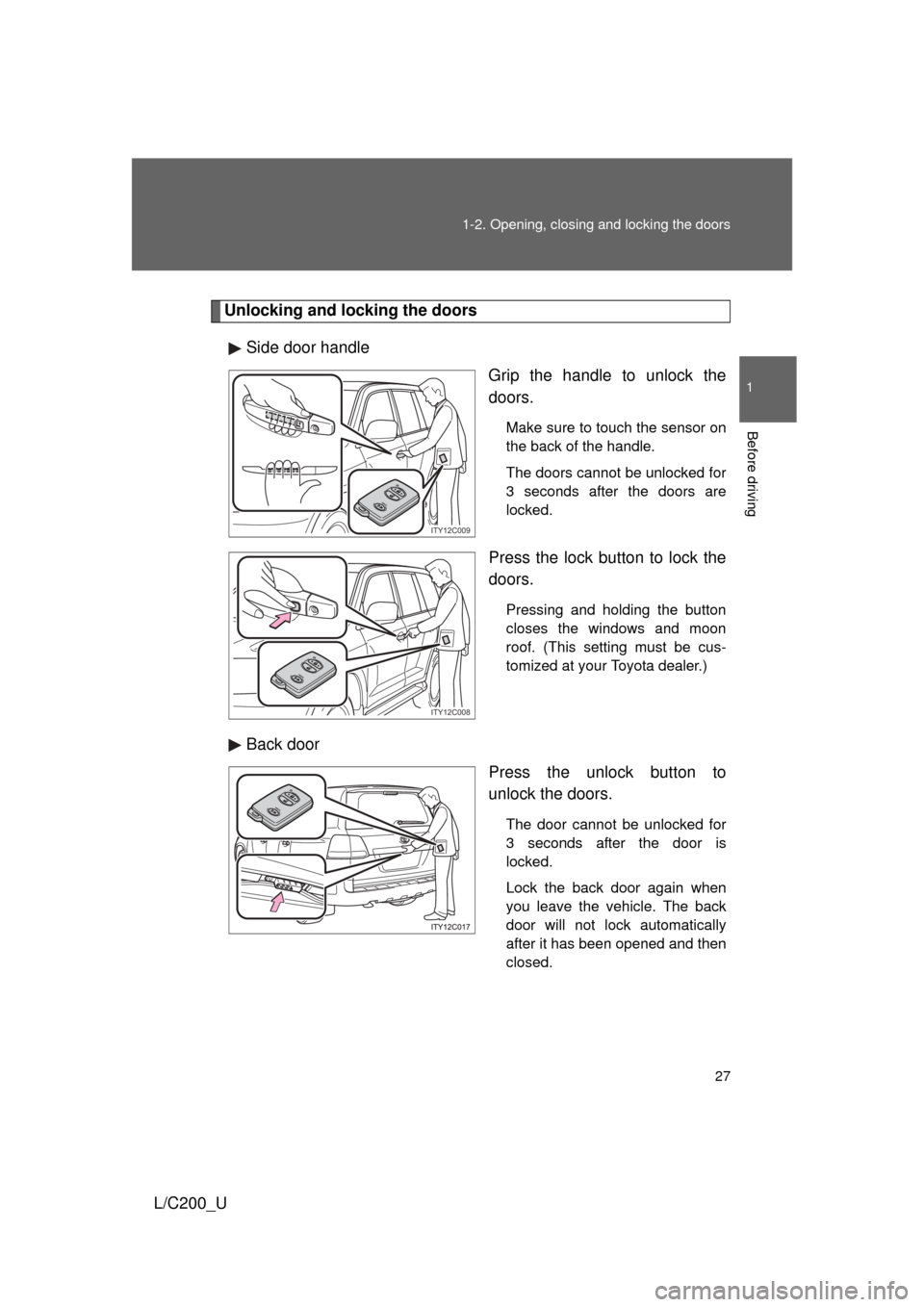
Unlocking and locking the doors
Side door handle Grip the handle to unlock the
doors.
Make sure to touch the sensor on
the back of the handle.
The doors cannot be unlocked for
3 seconds after the doors are
locked.
Press the lock button to lock the
doors.
Pressing and holding the button
closes the windows and moon
roof. (This setting must be cus-
tomized at your Toyota dealer.)
Back door
Press the unlock button to
unlock the doors.
The door cannot be unlocked for
3 seconds after the door is
locked.
Lock the back door again when
you leave the vehicle. The back
door will not lock automatically
after it has been opened and then
closed.
ITY12C009
ITY12C008
Page 30 of 592
30 1-2. Opening, closing and locking the doors
L/C200_U
■Operation signals
A buzzer sounds and the emergency flashers flash to indicate that the doors
have been locked/unlocked. (Locked: Once; Unlocked: Twice)
■ Conditions affecting operation
The smart key system uses weak radio waves. In the following situations,
the communication between the electronic key and the vehicle may be
affected, preventing the smart key system and wireless remote control from
operating properly. (Ways of coping P. 531)
● When the electronic key battery is depleted
● Near a TV tower, electric power plant, gas station, radio station, large dis-
play, airport or other facility that generates strong radio waves or electri-
cal noise
● When carrying a portable radio, ce llular phone, cordless phone or other
wireless communication devices
● When the electronic key has come into contact with, or is covered by a
metallic object
● When multiple electronic keys are in the vicinity
● When carrying or using the electronic key together with the following
devices that emit radio waves
• Another vehicle’s electronic key
• A wireless key that emits radio waves
• Personal computer
● If window tint with a metallic content or metallic objects are attached to
the rear window
Page 33 of 592
33
1-2. Opening, closing and locking the doors
1
Before driving
L/C200_U
■
Note for the smart key system
● Even when the electronic key is within the effective range (detection
areas), the system may not operate properly in the following cases.
• The electronic key is too close to the window or outside door handle,
near the ground, or in a high place when the doors are locked or
unlocked.
• The electronic key is near the ground or in a high place, or too close to the rear bumper center when the back door is locked or unlocked.
• The electronic key is on the instrument panel, floor or in the glove box when the engine is started or “ENGINE START STOP” switch modes
are changed.
● As long as the electronic key is within the effective range, the doors may
be locked or unlocked by anyone.
● Even if the electronic key is not inside the vehicle, it may be possible to
start the engine if the electronic key is near the window.
● The doors may unlock if a large amount of water splashes on the door
handle, such as in the rain or in a car wash. (The doors will automatically
be locked after approximately 60 seconds if the doors are not opened
and closed.)
● Gripping the door handle when wearing a glove may not unlock the door.
● If the wireless remote control is used to lock the doors when the elec-
tronic key is near the vehicle, there is a possibility that the door may not
be unlocked by the smart key system. (Use the wireless remote control to
unlock the doors.)
● A sudden approach to the effective range or door handle operation may
prevent the doors from being unlocked. In this case, return the door han-
dle to the original position and check that the doors unlock before pulling
the door handle.
■ When the vehicle is not dr iven for extended periods
To prevent theft of the vehicle, do not leave the electronic key within 6 ft. (2
m) of the vehicle.
■ Security feature
If a door is not opened within approximately 60 seconds after the vehicle is
unlocked, the security feature automatically locks the vehicle again.
Page 39 of 592
39
1
1-2. Opening, closing and locking the doors
Before driving
L/C200_U
Wireless remote control
■Operation signals
● Doors: A buzzer sounds and the emergency flashers flash to indicate
that the doors have been locked/unlocked. (Locked: Once; Unlocked:
Tw i c e )
● Windows and moon roof: A buzzer sounds when the windows and moon
roof begin to open.
■ Door lock buzzer
If a door is not fully closed, a buzzer sounds continuously for 10 seconds if
an attempt to lock the door is made. Fully close the door to stop the buzzer,
and lock the vehicle once more.
■ Security feature
P. 3 3
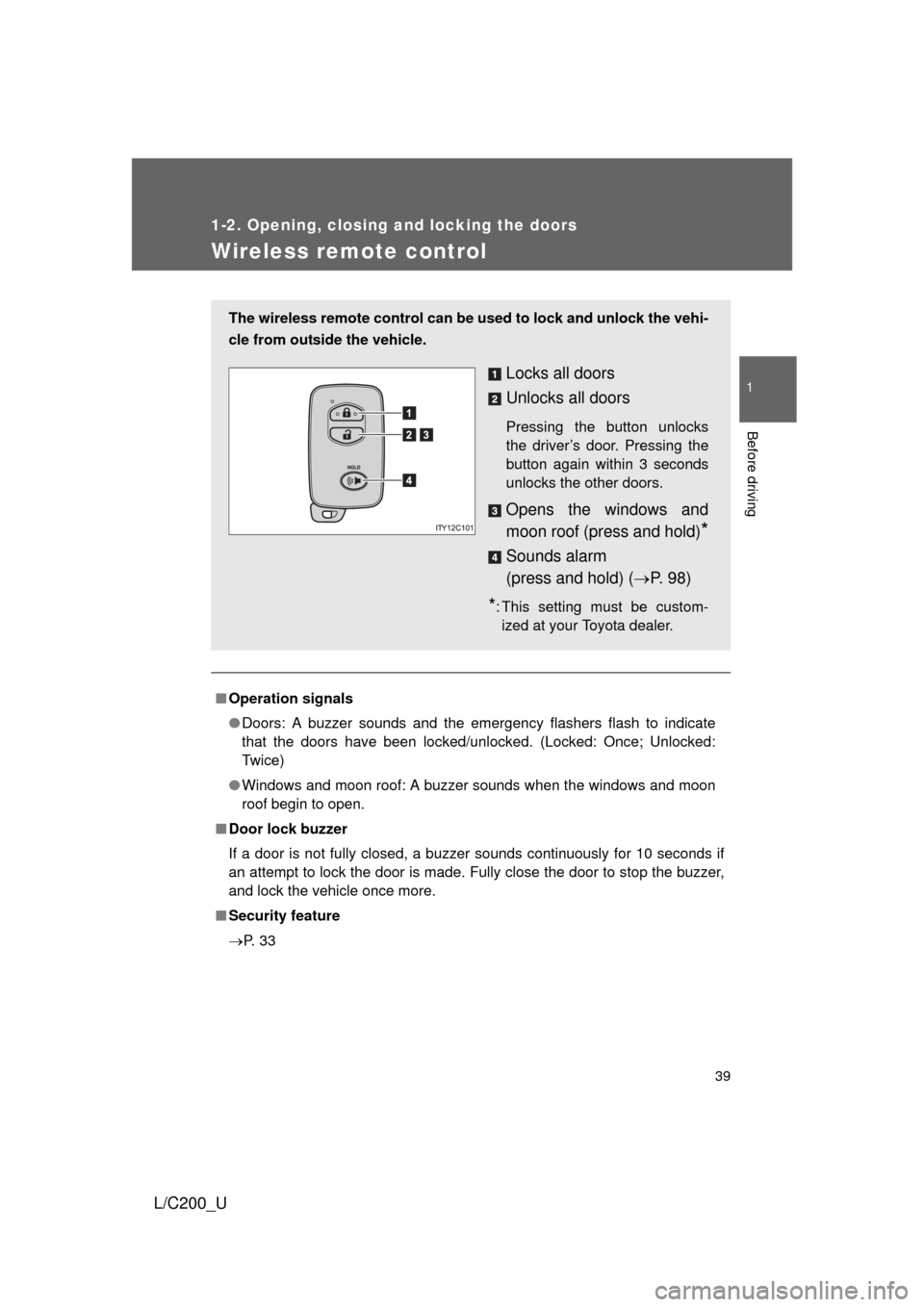
The wireless remote control can be used to lock and unlock the vehi-
cle from outside the vehicle.
Locks all doors
Unlocks all doors
Pressing the button unlocks
the driver’s door. Pressing the
button again within 3 seconds
unlocks the other doors.
Opens the windows and
moon roof (press and hold)
*
Sounds alarm
(press and hold) ( P. 9 8 )
*: This setting must be custom-
ized at your Toyota dealer.
Page 86 of 592
86
L/C200_U
1-4. Opening and closing the windows and moon roof
Power windows
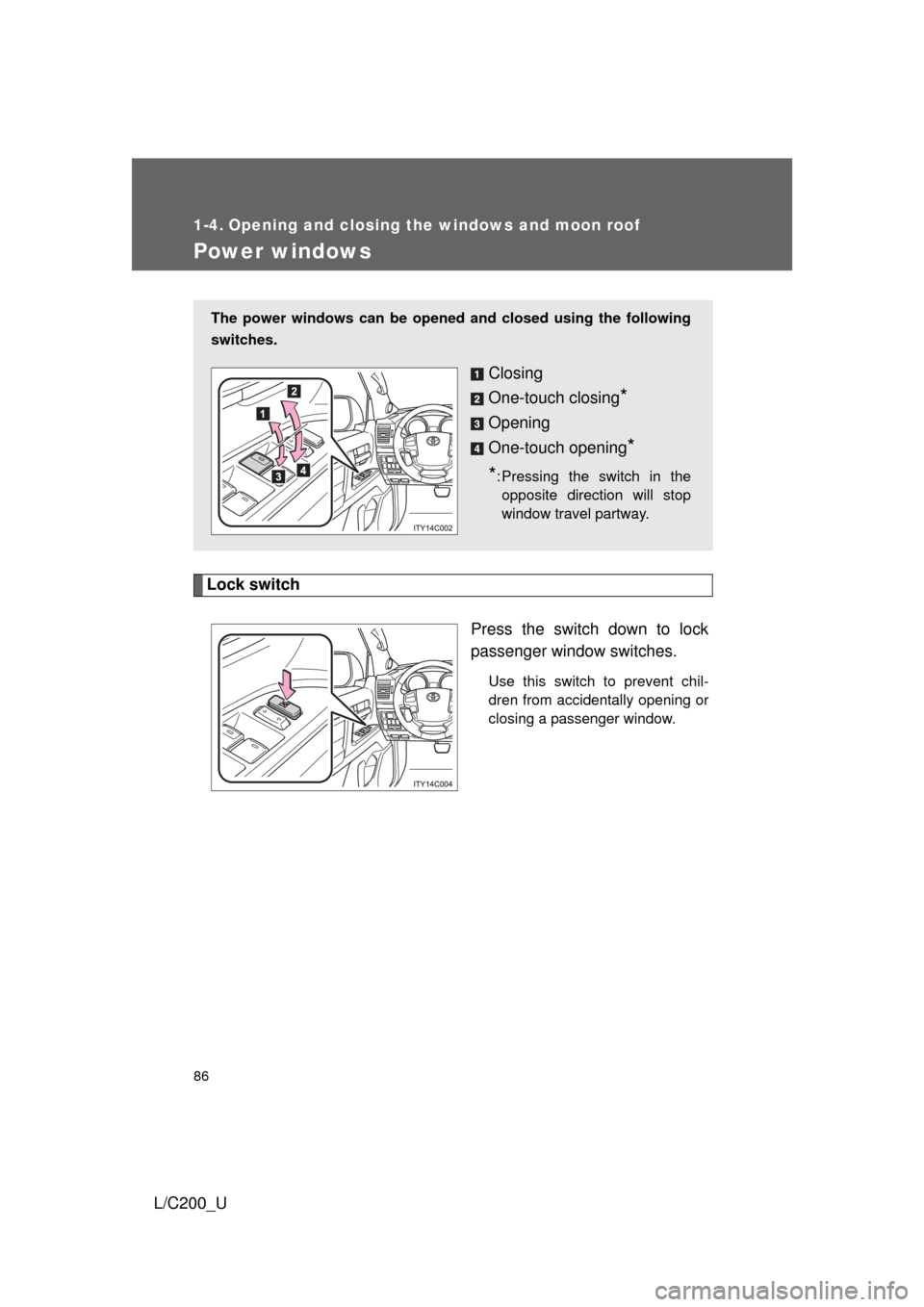
Lock switchPress the switch down to lock
passenger window switches.
Use this switch to prevent chil-
dren from accidentally opening or
closing a passenger window.
The power windows can be opened and closed using the following
switches.
Closing
One-touch closing
*
Opening
One-touch opening
*
*
: Pressing the switch in the opposite direction will stop
window travel partway.
Page 87 of 592
87
1-4. Opening and closing the windows and moon roof
1
Before driving
L/C200_U
■
The power windows can be operated when
The “ENGINE START STOP” switch is in IGNITION ON mode.
■ Door lock linked window operation
The following functions can be used if customized at your Toyota dealer.
● The power windows can be opened and closed using the mechanical
key. ( P. 42)
● The power windows can be opened using the wireless remote control.
(P. 3 9 )
● The power windows can be closed using the smart key system. ( P. 27)
■ Operating the power windows after turning the “ENGINE START STOP”
switch OFF
The power windows can be operated for approximately 45 seconds even
after the “ENGINE START STOP” switch is turned ACCESSORY mode or
turned OFF. They cannot, however, be operated once the driver’s or front
passenger’s door is opened.
■ Jam protection function
If an object becomes caught between the window and the window frame,
window travel is stopped and the window is opened slightly.
■ Customization
Settings (e.g. linked door lock operation) can be changed. (Customizable
features P. 567)
Page 88 of 592
88 1-4. Opening and closing the windows and moon roof
L/C200_U
CAUTION
■Closing the windows
Observe the following precautions.
Failing to do so may result in death or serious injury.
● Check to make sure that all passengers do not have any part of their body
in a position where it could be caught when a window is being operated.
● Do not allow children to operate the power windows.
Closing a power window on someone can cause death or serious injury.
■ Jam protection function
● Never try jamming any part of your body to activate the jam protection
function intentionally.
● The jam protection function may not work if something gets caught just
before the window fully closes.
Page 89 of 592
89
1
1-4. Opening and closing the windows and moon roof
Before driving
L/C200_U
Moon roof
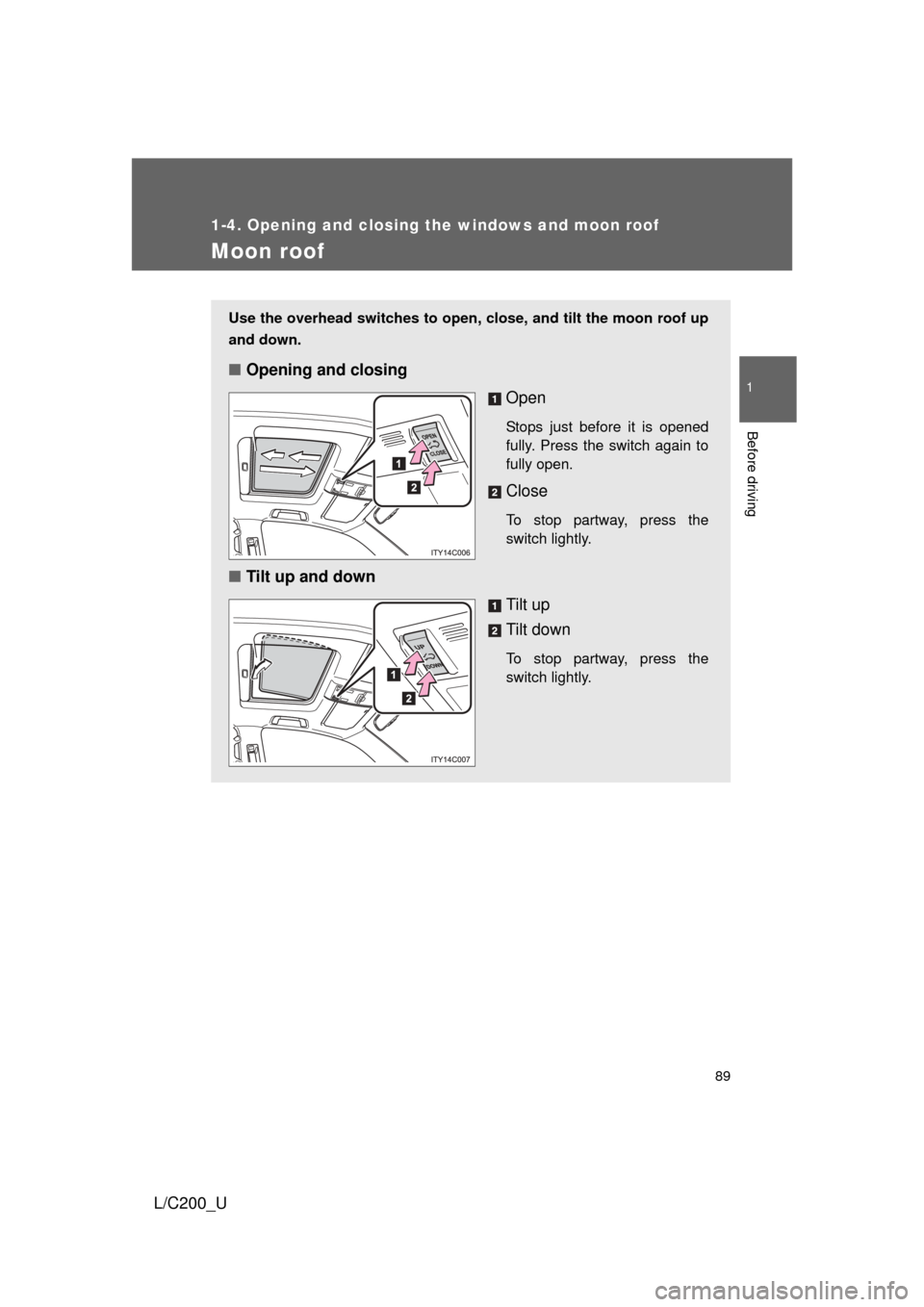
Use the overhead switches to open, close, and tilt the moon roof up
and down.
■Opening and closing
Open
Stops just before it is opened
fully. Press the switch again to
fully open.
Close
To stop partway, press the
switch lightly.
■Tilt up and down
Tilt up
Tilt down
To stop partway, press the
switch lightly.
Page 90 of 592
90 1-4. Opening and closing the windows and moon roof
L/C200_U
■The moon roof can be operated when
The “ENGINE START STOP” switch is in IGNITION ON mode.
■ Door lock linked moon roof operation
The following functions can be used if customized at your Toyota dealer.
● The moon roof can be opened and closed using the mechanical key.
(P. 4 2 )
● The moon roof can be opened using the wireless remote control.
(P. 3 9 )
● The moon roof can be closed using the smart key system. ( P. 27)
■ Operating the moon roof after tu rning the “ENGINE START STOP”
switch OFF
The moon roof can be operated for approximately 45 seconds even after the
“ENGINE START STOP” switch is turned to ACCESSORY mode or turned
OFF. It cannot, however, be operated once the driver’s or front passenger’s
door is opened.
■ Jam protection function
If an object is detected between the moon roof and the frame while closing
or tilting down, travel is stopped and the moon roof opens slightly.
■ If the moon roof cannot be closed automatically
Keep the switch depressed.
■ To reduce moon roof wind noise
Drive with the moon roof opened automatically (just before fully opened
position).
■ Sunshade
The sunshade can be opened and closed manually. However, the sunshade
will open automatically when the moon roof is opened.
Page 91 of 592
91
1-4. Opening and closing the windows and moon roof
1
Before driving
L/C200_U
■
Moon roof open warning buzzer
The buzzer sounds and message is shown on the multi-information display
in the instrument panel when the “ENGINE START STOP” switch is turned
OFF and the driver’s door is opened with the moon roof open.
■ Customization
Settings (e.g. linked door lock operation) can be changed. (Customizable
features P. 567)
CAUTION
■Opening the moon roof
Observe the following precautions.
Failing to do so may cause death or serious injury.
● Do not allow any passengers to put their hands or heads outside the vehi-
cle while it is moving.
● Do not sit on top of the moon roof.
■ Closing the moon roof
Observe the following precautions.
Failing to do so may result in death or serious injury.
● Check to make sure that all passengers do not have any part of their bod-
ies in a position where they could be caught when the moon roof is being
operated.
● Do not allow children to operate the moon roof.
Closing the moon roof on someone can cause death or serious injury.
■ Jam protection function
● Never try jamming any part of your body to activate the jam protection
function intentionally.
● The jam protection function may not work if something gets caught just
before the moon roof fully closes.