Center differential lock TOYOTA LAND CRUISER 2013 J200 User Guide
[x] Cancel search | Manufacturer: TOYOTA, Model Year: 2013, Model line: LAND CRUISER, Model: TOYOTA LAND CRUISER 2013 J200Pages: 720, PDF Size: 21.46 MB
Page 255 of 720
255 2-4. Using other driving systems
2
When driving
LC200_OM_OM60F57U_(U)
■Automatic system cancelation
In the following situations, the Multi-terrain Select indicator will go off, and
Multi-terrain Select will be canceled automatically.
●When the four-wheel drive control switch is in “H4”.
●When Active TRAC and VSC are off.
●When Crawl Control is on.
■When it is difficult to generate traction
MUD & SAND mode provides the largest amount of tire slippage, followed
by LOOSE ROCK, MOGUL, ROCK & DIRT and ROCK mode.
Drivability can be improved by selecting a mode which provides a smaller
amount of tire slippage than the current mode when the amount of tire slip-
page is large, or conversely selecting a mode which provides a larger
amount of tire slippage than the current mode when the amount of tire slip-
page is small.
■When the vehicle is stuck
Switching the transfer and differential
For the operation of the following functions, refer to the following pages.
●Four-wheel drive system (P. 240)
●Center differential lock (P. 240)
■When the brake system operates continuously
The brake system may overheat. In this case, a buzzer will sound, either the
“TRAC OFF” will be displayed on the multi-information display, and Multi-ter-
rain Select will be temporarily inoperable. In this event, stop the vehicle
immediately in a safe place, and allow the brake system to cool down suffi-
ciently. (There is no problem with continuing normal driving.)
After a short time, the message on the multi-information display will go off,
and you will be able to use Multi-terrain Select.
■When there is a malfunction in the system
The slip indicator light will come on. Have the vehicle inspected by your
Toyota dealer immediately.
Page 574 of 720
574 4-3. Do-it-yourself maintenance
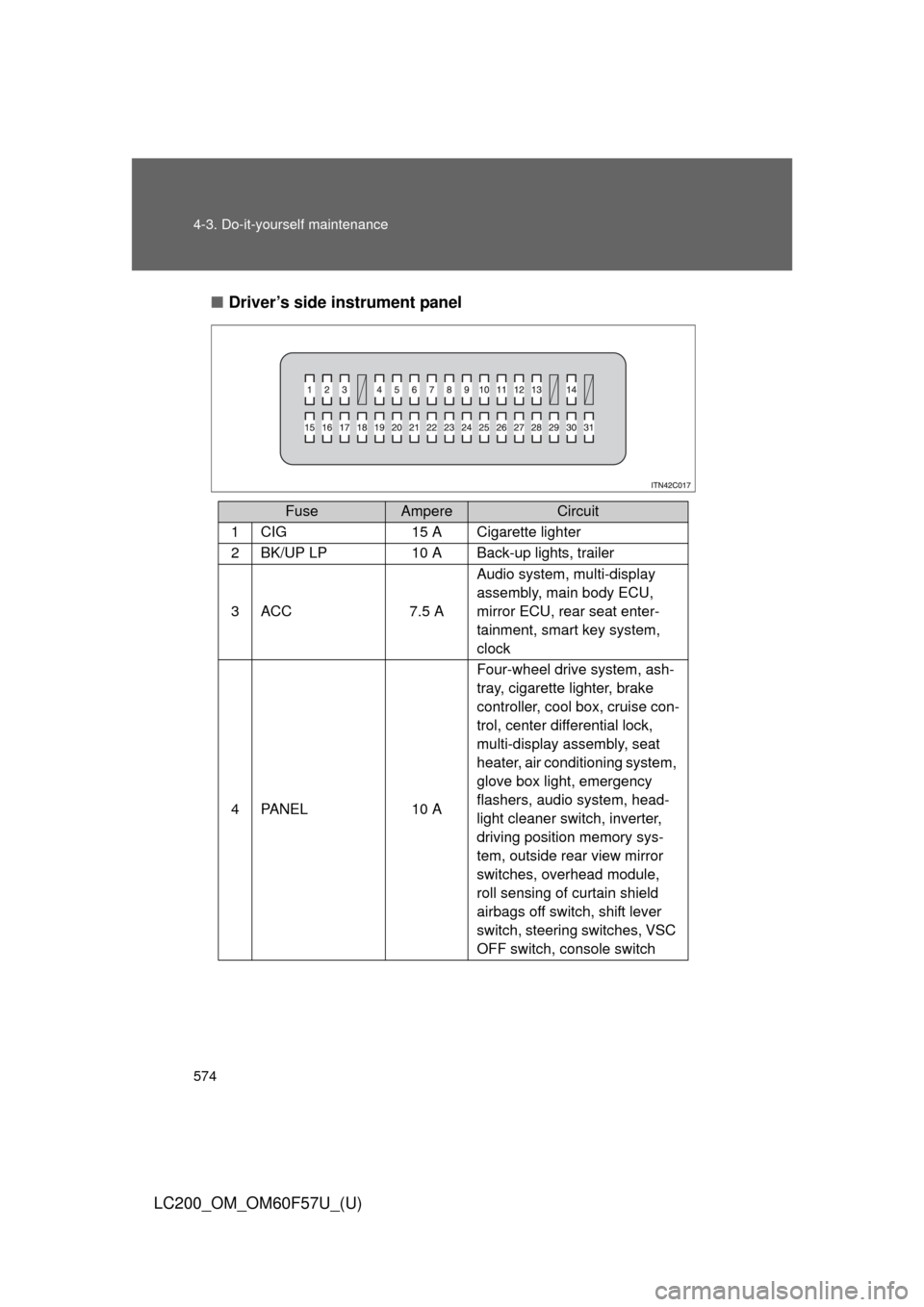
LC200_OM_OM60F57U_(U)■Driver’s side instrument panel
FuseAmpereCircuit
1CIG15 A Cigarette lighter
2BK/UP LP10 A Back-up lights, trailer
3ACC7.5 AAudio system, multi-display
assembly, main body ECU,
mirror ECU, rear seat enter-
tainment, smart key system,
clock
4PA N E L10 AFour-wheel drive system, ash-
tray, cigarette lighter, brake
controller, cool box, cruise con-
trol, center differential lock,
multi-display assembly, seat
heater, air conditioning system,
glove box light, emergency
flashers, audio system, head-
light cleaner switch, inverter,
driving position memory sys-
tem, outside rear view mirror
switches, overhead module,
roll sensing of curtain shield
airbags off switch, shift lever
switch, steering switches, VSC
OFF switch, console switch
Page 611 of 720
5
When trouble arises
611 5-2. Steps to take in an emergency
LC200_OM_OM60F57U_(U)
■If the malfunction indicator lamp comes on while driving
First check the following:
●Is the fuel empty?
If it is, fill the fuel tank immediately.
●Is the fuel tank cap loose?
If it is, tighten it securely.
The malfunction indicator lamp will go off after taking several driving trips. If
the malfunction indicator lamp does not go off even after several trips, con-
tact your Toyota dealer as soon as possible.
■If the low speed four-wheel drive indicator light or the center differen-
tial lock indicator light blinks
Take the specified steps. (P. 243)
If the brake system warning light or the malfunction indicator light also
comes on, or the low speed four-wheel drive indicator light or the center dif-
ferential lock indicator light continues to blink after taking the specified steps,
there may be a malfunction in the engine, the brake system or the four-
wheel drive system. In this case, you may not be able to transfer between
“H4” and “L4” modes, and the center differential lock may not be able to be
locked or unlocked. Have the vehicle inspected by your Toyota dealer imme-
diately.
■Front passenger detection sensor and passenger seat belt reminder
●If luggage is placed on the front passenger seat, the front passenger
detection sensor may cause the warning light to flash, even if a passen-
ger is not sitting in the seat.
●If a cushion is placed on the seat, the sensor may not detect a passen-
ger, and the warning light may not operate properly.
Page 709 of 720
709 Alphabetical index
LC200_OM_OM60F57U_(U)
Back door
Back door ............................... 51
Wireless remote control key ... 44
Back-up lights
Replacing light bulbs ............ 581
Wattage ................................ 675
Battery
If the vehicle has discharged
battery ............................... 654
Preparing and checking
before winter ...................... 310
Bluetooth
® audio
(vehicles without
navigation system) ............... 402
Bluetooth
® audio
(vehicles with
navigation system)
*
Bluetooth® phone (vehicles
without navigation
system ................................... 423
Bluetooth
® phone (vehicles
with navigation system)
*
Bottle holder ............................ 472
Brake
Fluid...................................... 536
Parking brake ....................... 177
Brake assist ............................. 282
Break-in tips ............................ 155
Brightness control
Instrument light control ......... 182Care
Exterior ..................................512
Interior ...................................515
Seat belts ..............................516
Card holder ...............................474
Cargo capacity .........................302
Cargo net hooks.......................495
CD player
*/changer*...............365
Center differential
lock/unlock switch.................240
Chains .......................................312
Child-protectors .........................47
Child restraint system
Booster seats, definition ........135
Booster seats, installation .....140
Convertible seats,
definition .............................135
Convertible seats,
installation ...........................140
Front passenger occupant
classification system ...........129
Infant seats, definition ...........135
Infant seats, installation.........140
Installing CRS with
LATCH system....................141
Installing CRS with
seat belts ............................143
Installing CRS with top
tether strap..........................148
BC
*: For vehicles with a navigation system,
refer to the “Navigation System Owner’s Manual”.