park assist TOYOTA MIRAI 2019 (in English) User Guide
[x] Cancel search | Manufacturer: TOYOTA, Model Year: 2019, Model line: MIRAI, Model: TOYOTA MIRAI 2019Pages: 528, PDF Size: 11.84 MB
Page 271 of 528

2715-5. Using the driving support systems
5
Driving
MIRAI_OM_USA_OM62054U(18MY)_O
M62048U(19MY)●
The following situations may occur during use.
• Depending on the shape of the obstacle and other factors, the detection
distance may shorten, or detection may be impossible.
• Obstacles may not be detected if they are too close to the sen sor.
• There will be a short delay between obstacle detection and dis play. Even
at slow speeds, there is a possibility that the obstacle will c ome within the
sensor’s detection areas before the display is shown and the bu zzer
sounds.
• Thin posts or objects lower than the sensor may not be detecte d when
approached, even if they have been detected once.
• It might be difficult to hear beeps due to the volume of audio system or air
flow noise of the air conditioning system.
■ Muting the buzzer sound
●To mute the buzzer sound
The buzzer can be temporarily muted by pressing of the meter c ontrol
switches while an obstacle detection display is shown on the mu lti-informa-
tion display.
● To cancel the mute
Mute will be automatically canceled in the following situations .
• When the shift position is changed
• When the vehicle speed has reac hed or exceeded approximately 6 mph
(10 km/h)
• When the intuitive parking assist is turned off once and turned on again
• When the power switch is turned off once and turned to ON mode again
• When a sensor is malfunctioning
■ If “Parking Assist Unavailable Clean Parking Assist Sensor” is displayed
on the multi-information display
A sensor may be dirty or covered with snow or ice. In such case s, if it is
removed from the sensor, the system should return to normal.
Also, due to the sensor being frozen at low temperatures, a mal function dis-
play may appear or an obstacle may not be detected. If the sens or thaws out,
the system should return to normal.
■ If “Parking Assist Malfunction Visit Your Dealer” is displayed on the
multi-information display
Depending on the malfunction of the sensor, the device may not be working
normally.
Have the vehicle inspected by your Toyota dealer.
■ Customization
Some functions can be customized.
(Customizable features: P. 492)
Page 272 of 528

2725-5. Using the driving support systems
MIRAI_OM_USA_OM62054U(18MY)_O
M62048U(19MY)■
Certification for the intuitive parking assist
For U.S.A.
This device complies with Part 15 of the FCC Rules. Operation i s subject to
the following two conditions: (1) This device may not cause har mful interfer-
ence, and (2) This device must accept any interference received, including
interference that may cause undesired operation.
For Canada
This ISM device complies with Canadian ICES-001.
Cet appareil ISM est conforme a la norme NMB-001 du Canada.
Page 273 of 528
2735-5. Using the driving support systems
5
Driving
MIRAI_OM_USA_OM62054U(18MY)_O
M62048U(19MY)
WARNING
■When using the intuitive parking assist
Observe the following precautions.
Failing to do so may result in the vehicle being unable to be d riven safely
and possibly cause an accident.
● Do not use the sensor at speeds in excess of 6 mph (10 km/h).
● The sensors’ detection areas and reaction times are limited. When moving
forward or reversing, check the areas surrounding the vehicle ( especially
the sides of the vehicle) for safety, and drive slowly, using t he brake to
control the vehicle’s speed.
● Do not install accessories within the sensors’ detection areas.
NOTICE
■When using intuitive parking assist
In the following situations, the system may not function correctly due to a
sensor malfunction, etc. Have the vehicle checked by your Toyot a dealer.
● The intuitive parking assist operation display flashes, and a buzzer sounds
when no obstacles are detected.
● If the area around a sensor collides with something, or is subjected to
strong impact.
● If the bumper collides with something.
● If the display shows continuously without beeping, except when the buzzer
mute switch has been turned on.
● If a display error occurs, first check the sensor.
If the error occurs even if there is no ice, snow or mud on the sensor, it is
likely that the sensor is malfunctioning.
■ Notes when washing the vehicle
Do not apply intensive bursts of water or steam to the sensor a rea.
Doing so may result in the sensor malfunctioning.
Page 280 of 528

2805-5. Using the driving support systems
MIRAI_OM_USA_OM62054U(18MY)_O
M62048U(19MY)
■Sensor detection range
The detection range of the Parking Support Brake function (for static objects)
differs from the detection range of the intuitive parking assist (P. 269).
Therefore, even if the intuitive parking assist detects and provides a warning
for an approaching obstacle, the P arking Support Brake function (for static
objects) may not start operating.
■ System operation
When the vehicle is stopped by system operation, the Parking Support Brake
function (for static objects) stops and the PKSB OFF indicator illuminates.
Even if operated, the brake control is released after 2 seconds , so the vehicle
can start moving in that state. Also, depressing the brake peda l releases the
brake control, so if the accelerator pedal is depressed again, the vehicle can
start moving.
■ System recovery
When the Parking Support Brake function (for static objects) is stopped by the
system operation and you would like to resume operation, turn the Parking
Support Brake function (for static objects) ON again and resume operation
( P. 276), or after briefly turning the power switch OFF turn it ON again.
Furthermore, when the vehicle moves with an obstacle no longer in the trav-
eling direction of the vehicle, or when the traveling direction of the vehicle
changes (such as when switching from moving forward to reverse, and vice
versa), the system operation automatically resumes.
■ Obstacles not detected by the sensors
The following obstacles may not be detected by the sensors.
●Objects such as people, cloth and snow, that are difficult for sonic waves to
reflect off of. (In particular, people may also not be detected depending on
the type of clothing they are wearing.)
● Objects not perpendicular with the ground, objects not at a rig ht angle to the
traveling direction of the vehicle, uneven objects or waving objects
● Low objects
● Thin objects such as wires, fences, ropes and signposts
● Objects that are extremely close to the bumper
● Non-static obstacles
■ Intuitive parking assist buzzer
Regardless of whether the intuitive parking assist is on or off ( P. 266), if the
Parking Support Brake function (for static objects) is not stop ped (P. 276),
when the front or rear sensors detect an obstacle and brake control is per-
formed, the intuitive parking assist buzzer sounds and a notifi cation of the
approximate distance to the object is provided.
Page 281 of 528
2815-5. Using the driving support systems
5
Driving
MIRAI_OM_USA_OM62054U(18MY)_O
M62048U(19MY)■
Situations when the system may operate even though there is no possi-
bility of a collision
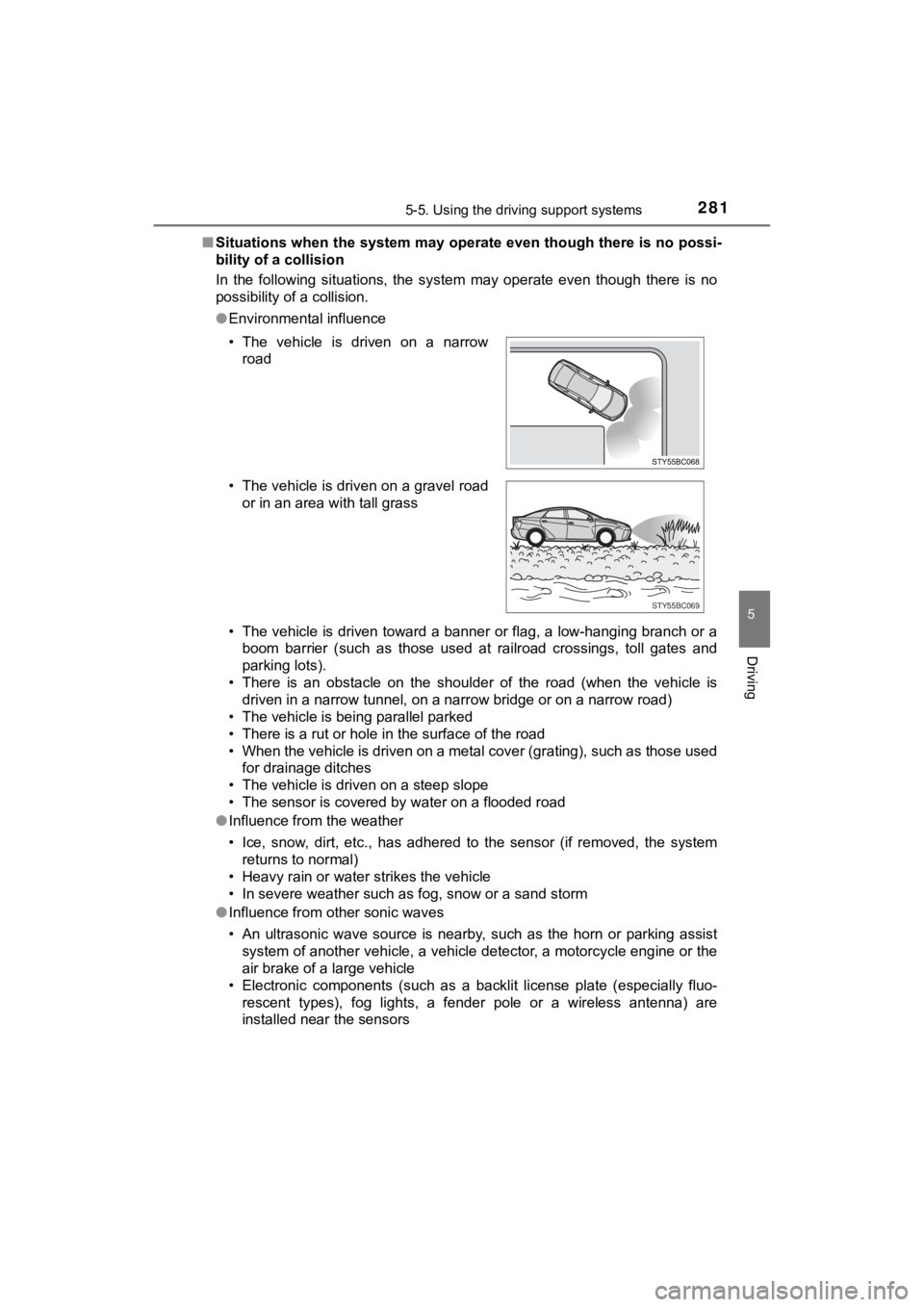
In the following situations, the system may operate even though there is no
possibility of a collision.
● Environmental influence
• The vehicle is driven toward a banner or flag, a low-hanging branch or a
boom barrier (such as those used at railroad crossings, toll gates and
parking lots).
• There is an obstacle on the shoulder of the road (when the veh icle is
driven in a narrow tunnel, on a narrow bridge or on a narrow road)
• The vehicle is being parallel parked
• There is a rut or hole in the surface of the road
• When the vehicle is driven on a metal cover (grating), such as those used
for drainage ditches
• The vehicle is driven on a steep slope
• The sensor is covered by water on a flooded road
● Influence from the weather
• Ice, snow, dirt, etc., has adhered to the sensor (if removed, the system
returns to normal)
• Heavy rain or water strikes the vehicle
• In severe weather such as fog, snow or a sand storm
● Influence from other sonic waves
• An ultrasonic wave source is nearby, such as the horn or parki ng assist
system of another vehicle, a vehicle detector, a motorcycle eng ine or the
air brake of a large vehicle
• Electronic components (such as a backlit license plate (especially fluo-
rescent types), fog lights, a fender pole or a wireless antenna ) are
installed near the sensors
• The vehicle is driven on a narrow
road
• The vehicle is driven on a gravel road or in an area with tall grass
STY55BC069
Page 283 of 528

2835-5. Using the driving support systems
5
Driving
MIRAI_OM_USA_OM62054U(18MY)_O
M62048U(19MY)●
Influence from other sonic waves
• An ultrasonic wave source is nearby, such as the horn or parki ng assist
system of another vehicle, a vehicle detector, a motorcycle eng ine or the
air brake of a large vehicle
• Electronic components (such as a backlit license plate [especi ally fluores-
cent types], fog lights, a fender pole or a wireless antenna) a re installed
near the sensors
● Changes in the vehicle
• The vehicle is tilted a large amount
• The height of the vehicle has drastically changed due to the c arried load
(the nose tilts up or down)
• The direction of the sensor has deviated due to a collision or other impact
■ When removing and instal ling the 12-volt battery
The system needs to be initialized.
The system can be initialized by driving the vehicle straight a head for 5 sec-
onds or more at a speed of approximately 22 mph (35 km/h) or hi gher.
■ When “PKSB Unavailable” is displayed on the multi-information display
and the PKSB OFF indicator flashes
●Ice, snow, dirt, etc., may have adhered to the sensor. If this occurs, remove
the ice, snow, dirt, etc., from the sensor to return the system to normal.
Also, a warning message may be displayed at low temperatures du e to ice
forming on the sensor, and the sensor may not detect obstacles. Once the
ice melts, the system will return to normal.
● If this message is shown even after removing dirt from the sensor, or shown
when the sensor was not dirty to begin with, have the vehicle i nspected at
your Toyota dealer.
● System initialization may not have been performed after removal and instal-
lation of the 12-volt battery. Perform system initialization.
■ When “PKSB Malfunction Visit Your Dealer” is displayed on the m ulti-
information display, the PKSB OFF indicator flashes and the buz zer
sounds
The system may not be operating properly. Have the vehicle inspected at
your Toyota dealer.
Page 298 of 528

2985-5. Using the driving support systems
MIRAI_OM_USA_OM62054U(18MY)_O
M62048U(19MY)■
Reduced effectiveness of the EPS system
The effectiveness of the EPS system is reduced to prevent the s ystem from
overheating when there is frequent steering input over an exten ded period of
time. The steering wheel may feel heavy as a result. Should thi s occur, refrain
from excessive steering input or stop the vehicle and turn the fuel cell system
off. The EPS system should return to normal within 10 minutes.
■ Automatic reactivation of TRAC and VSC systems
After turning the TRAC and VSC systems off, the systems will be automati-
cally re-enabled in the following situations:
● When the power switch is turned off
● If only the TRAC system is turned off, the TRAC will turn on wh en vehicle
speed increases
If both the TRAC and VSC systems are turned off, automatic re-e nabling will
not occur when vehicle speed increases
■ Operating conditions of hill-start assist control
When the following four conditions are met, the hill-start assi st control will
operate:
● The shift position is in a position other than P or N (when sta rting off forward/
backward on an upward incline).
● The vehicle is stopped.
● The accelerator pedal is not depressed.
● The parking brake is not engaged.
■ Automatic system cancelation of hill-start assist control
The hill-start assist control will turn off in any of the following situations:
● Shift the shift position to P or N.
● The accelerator pedal is depressed.
● The parking brake is engaged.
● Approximately 2 seconds elapse after the brake pedal is release d.
Page 299 of 528
2995-5. Using the driving support systems
5
Driving
MIRAI_OM_USA_OM62054U(18MY)_O
M62048U(19MY)
WARNING
■The ABS does not operate effectively when
● The limits of tire gripping performance have been exceeded (suc h as
excessively worn tires on a snow covered road).
● The vehicle hydroplanes while driving at high speed on wet or s lick roads.
■ Stopping distance when the ABS is operating may exceed that of nor-
mal conditions
The ABS is not designed to shorten the vehicle’s stopping distance. Always
maintain a safe distance from the vehicle in front of you, espe cially in the
following situations:
● When driving on dirt, gravel or snow-covered roads
● When driving with tire chains
● When driving over bumps in the road
● When driving over roads with potholes or uneven surfaces
■ TRAC may not operate effectively when
Directional control and power may not be achievable while driving on slip-
pery road surfaces, even if the TRAC system is operating.
Drive the vehicle carefully in conditions where stability and p ower may be
lost.
■ Hill- start assist control does not operate effectively when
● Do not overly rely on the hill-start assist control. The hill-s tart assist control
may not operate effectively on steep inclines and roads covered with ice.
● Unlike the parking brake, hill-start assist control is not inte nded to hold the
vehicle stationary for an extended period of time. Do not attempt to use
hill-start assist control to hold the vehicle on an incline, as doing so may
lead to an accident.
■ When the TRAC, VSC and/or ABS is activated
The slip indicator flashes. Always drive carefully. Reckless dr iving may
cause an accident. Exercise particular care when the indicator flashes.
■ When the TRAC/VSC systems are turned off
Be especially careful and drive at a speed appropriate to the r oad condi-
tions. As these are the systems to help ensure vehicle stabilit y and driving
force, do not turn the TRAC/VSC systems off unless necessary.
Page 415 of 528
4158-2. Steps to take in an emergency
MIRAI_OM_USA_OM62054U(18MY)_O
M62048U(19MY)
8
When trouble arises
■While towing
If the fuel cell system is off, the power assist for the brakes and steering will
not function, making steering and braking more difficult.
■ Wheel nut wrench
Wheel nut wrench is installed in trunk. (P. 386 434)
■ Before transporting or towing in frozen areas
Operate the water release function. Otherwise, the fuel cell sy stem may
freeze and the vehicle may not be able to be started. ( P. 190)
WARNING
Observe the following precautions.
Failure to do so may result in death or serious injury.
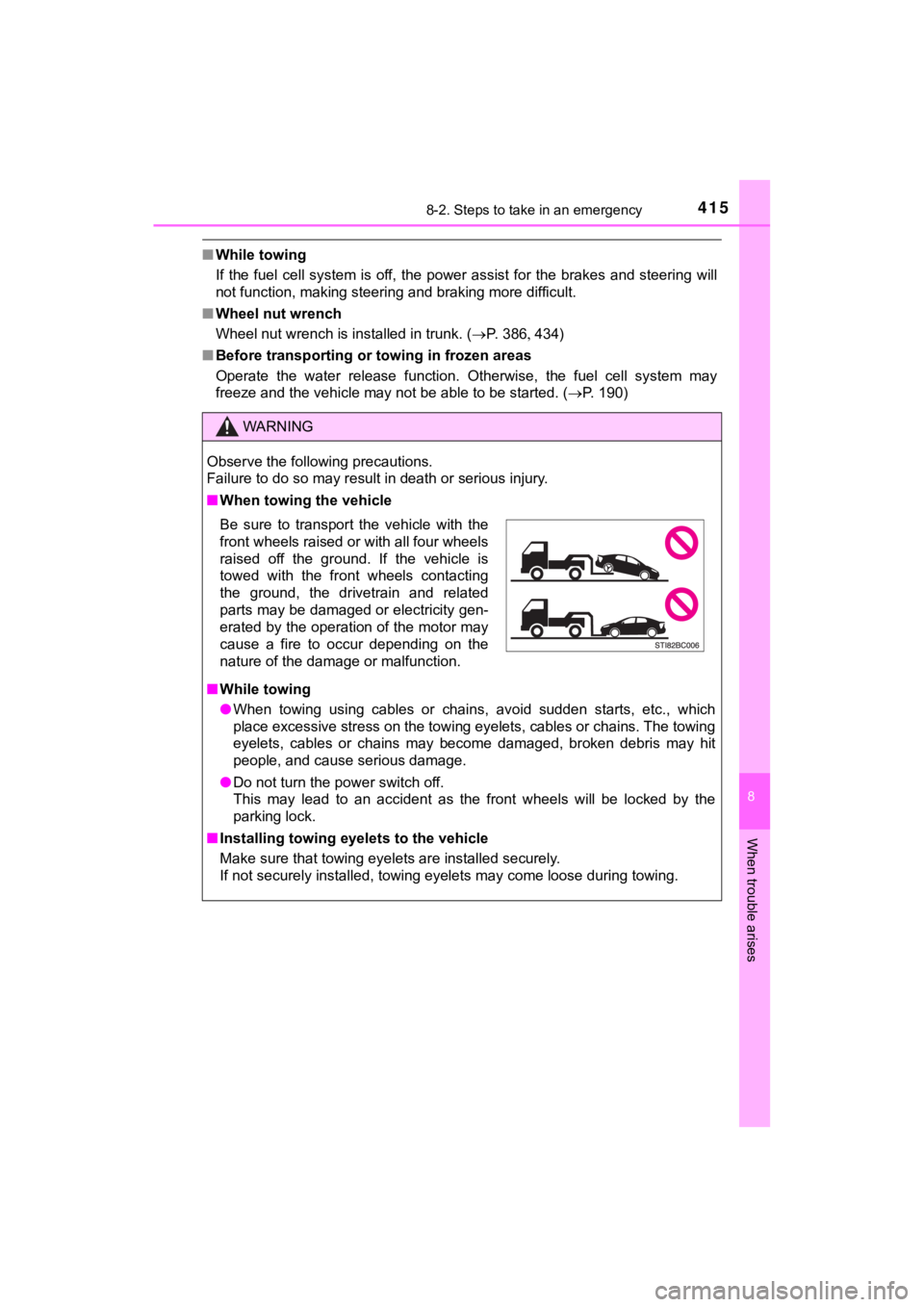
■When towing the vehicle
■ While towing
● When towing using cables or chains, avoid sudden starts, etc., which
place excessive stress on the towing eyelets, cables or chains. The towing
eyelets, cables or chains may become damaged, broken debris may hit
people, and cause serious damage.
● Do not turn the power switch off.
This may lead to an accident as the front wheels will be locked by the
parking lock.
■ Installing towing eyelets to the vehicle
Make sure that towing eyelets are installed securely.
If not securely installed, towing eyelets may come loose during towing.
Be sure to transport the vehicle with the
front wheels raised or with all four wheels
raised off the ground. If the vehicle is
towed with the front wheels contacting
the ground, the drivetrain and related
parts may be damaged or electricity gen-
erated by the operation of the motor may
cause a fire to occur depending on the
nature of the damage or malfunction.
Page 419 of 528
4198-2. Steps to take in an emergency
MIRAI_OM_USA_OM62054U(18MY)_O
M62048U(19MY)
8
When trouble arises
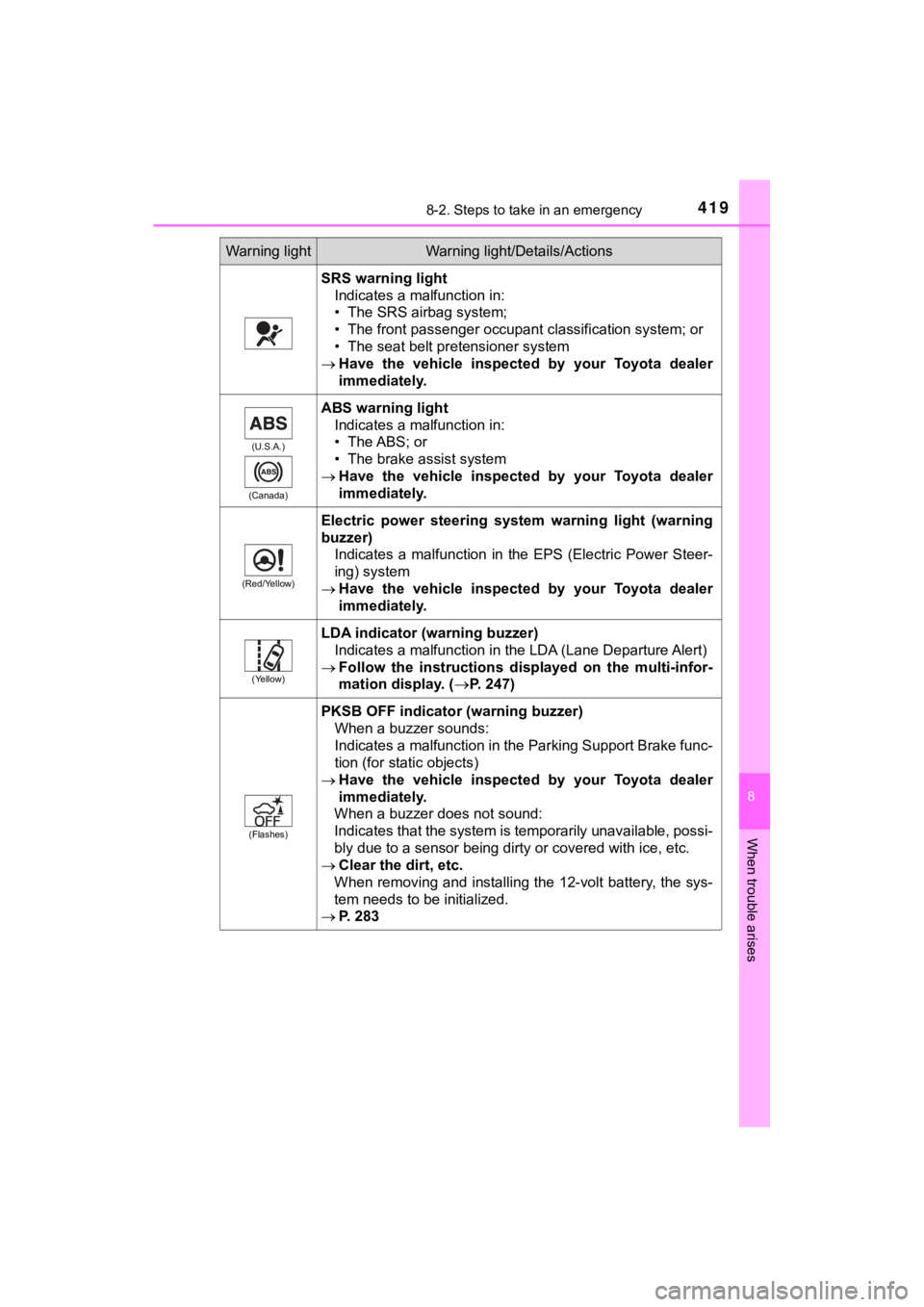
SRS warning lightIndicates a malfunction in:
• The SRS airbag system;
• The front passenger occupant classification system; or
• The seat belt pretensioner system
Have the vehicle inspected by your Toyota dealer
immediately.
(U.S.A.)
(Canada)
ABS warning light Indicates a malfunction in:
• The ABS; or
• The brake assist system
Have the vehicle inspected by your Toyota dealer
immediately.
(Red/Yellow)
Electric power steering system warning light (warning
buzzer)
Indicates a malfunction in the EPS (Electric Power Steer-
ing) system
Have the vehicle inspected by your Toyota dealer
immediately.
(Yellow)
LDA indicator (warning buzzer)
Indicates a malfunction in the LDA (Lane Departure Alert)
Follow the instructions dis played on the multi-infor-
mation display. (
P. 247)
(Flashes)
PKSB OFF indicator (warning buzzer) When a buzzer sounds:
Indicates a malfunction in the Parking Support Brake func-
tion (for static objects)
Have the vehicle inspected by your Toyota dealer
immediately.
When a buzzer does not sound:
Indicates that the system is temporarily unavailable, possi-
bly due to a sensor being dirty or covered with ice, etc.
Clear the dirt, etc.
When removing and installing the 12-volt battery, the sys-
tem needs to be initialized.
P. 283
Warning lightWarning light/Details/Actions