change time TOYOTA PRIUS PLUG-IN HYBRID 2015 1.G User Guide
[x] Cancel search | Manufacturer: TOYOTA, Model Year: 2015, Model line: PRIUS PLUG-IN HYBRID, Model: TOYOTA PRIUS PLUG-IN HYBRID 2015 1.GPages: 692, PDF Size: 12.42 MB
Page 244 of 692
244 2-1. Driving procedures
PRIUS PHV_OM_OM47A11U_(U)
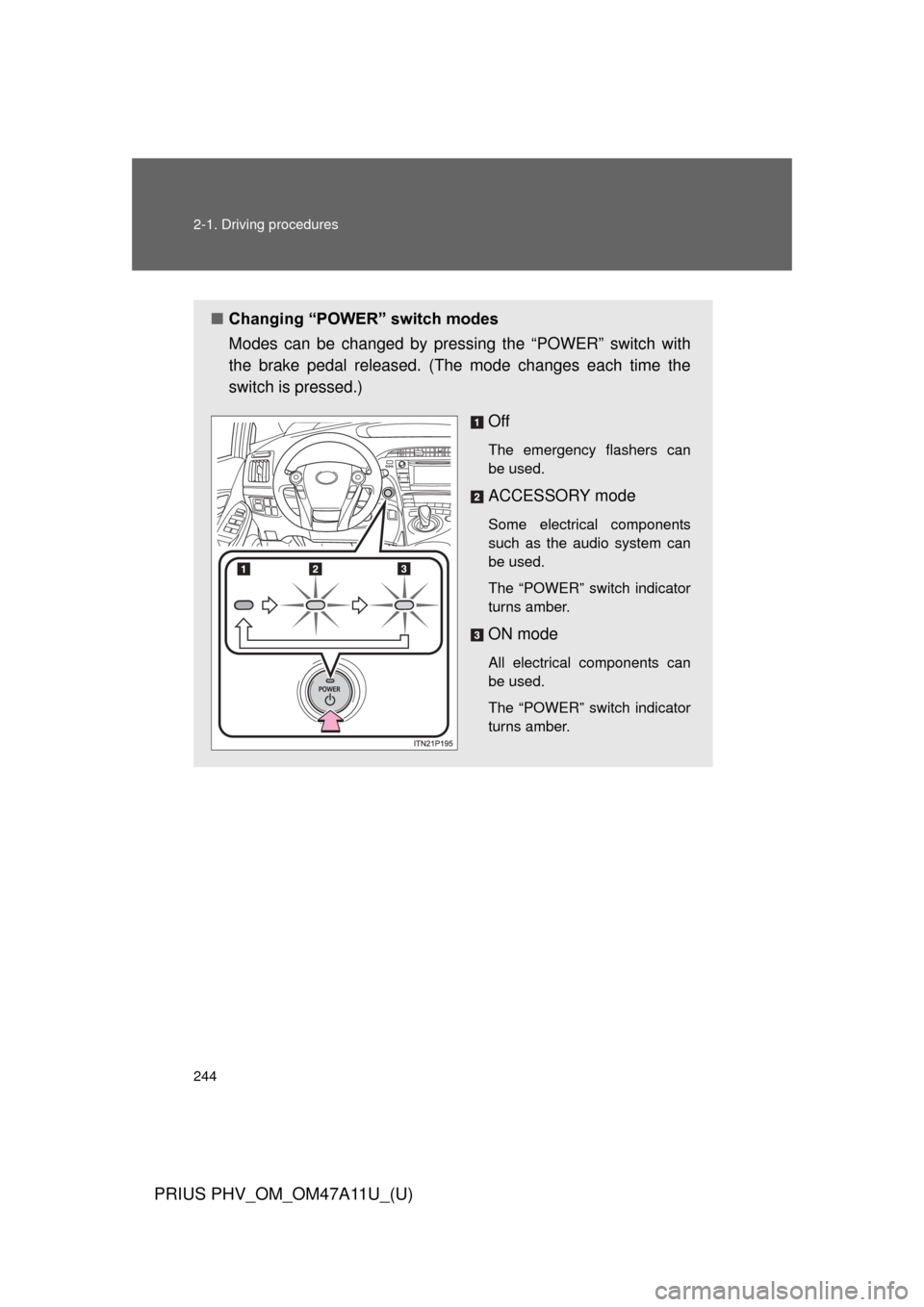
■Changing “POWER” switch modes
Modes can be changed by pres sing the “POWER” switch with
the brake pedal released. (The mode changes each time the
switch is pressed.)
Off
The emergency flashers can
be used.
ACCESSORY mode
Some electrical components
such as the audio system can
be used.
The “POWER” switch indicator
turns amber.
ON mode
All electrical components can
be used.
The “POWER” switch indicator
turns amber.
Page 258 of 692

258 2-1. Driving procedures
PRIUS PHV_OM_OM47A11U_(U)
NOTICE
■Hybrid battery (tract ion battery) charge
If the shift position is in N, the hybrid battery (traction battery) will not be
charged. To help prevent the battery from discharging, avoid leaving the N
position selected for an extended period of time.
■ Situations where shift control system malfunctions are possible
If any of the following situations occurs, shift control system malfunctions are
possible.
Immediately stop the vehicle in a safe place on level ground, apply the park-
ing brake, and then contact your Toyota dealer.
● When the “P LOCK MALFUNCTION” warning message appears on the
multi-information display. ( P. 552)
● When the shift position indicator remains off.
■ Notes regarding shift lever an d P position switch operation
Avoid repeatedly operating the shift lever and P position switch in quick suc-
cession.
The system protection function may activate and it will not be temporarily
possible to shift the shift position other than P. If this happens, please wait
for approximately 20 seconds before attempting to change the shift position
again.
Page 278 of 692
278 2-2. Instrument cluster
PRIUS PHV_OM_OM47A11U_(U)
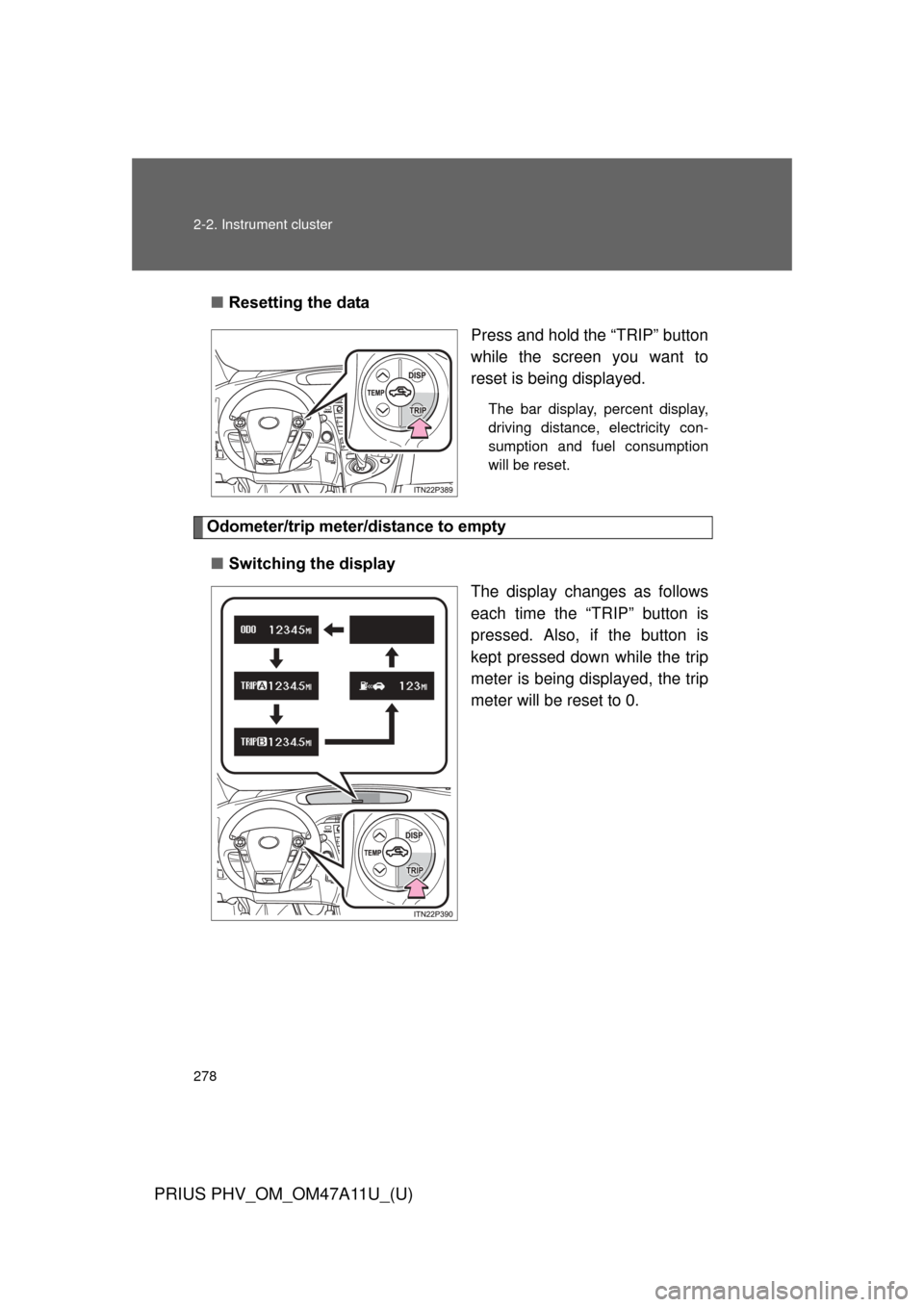
■Resetting the data
Press and hold the “TRIP” button
while the screen you want to
reset is being displayed.
The bar display, percent display,
driving distance, electricity con-
sumption and fuel consumption
will be reset.
Odometer/trip meter/distance to empty
■ Switching the display
The display changes as follows
each time the “TRIP” button is
pressed. Also, if the button is
kept pressed down while the trip
meter is being displayed, the trip
meter will be reset to 0.
Page 280 of 692
280 2-2. Instrument cluster
PRIUS PHV_OM_OM47A11U_(U)
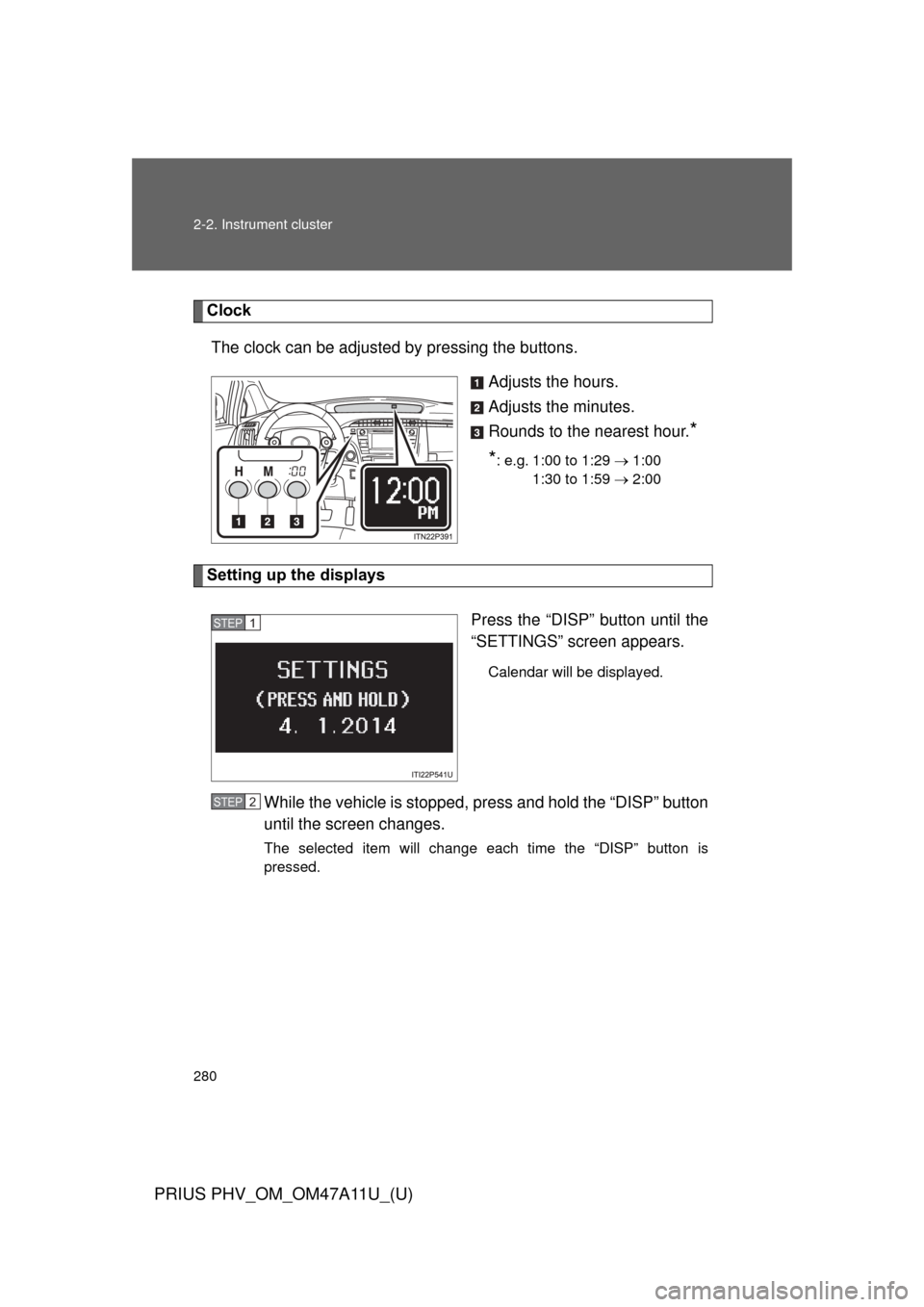
ClockThe clock can be adjusted by pressing the buttons. Adjusts the hours.
Adjusts the minutes.
Rounds to the nearest hour.
*
*
: e.g. 1:00 to 1:29 1:00
1:30 to 1:59 2:00
Setting up the displays
Press the “DISP” button until the
“SETTINGS” screen appears.
Calendar will be displayed.
While the vehicle is stopped, press and hold the “DISP” button
until the screen changes.
The selected item will change each time the “DISP” button is
pressed.
STEP 1
STEP 2
Page 288 of 692

288 2-2. Instrument cluster
PRIUS PHV_OM_OM47A11U_(U)
■Driving in Eco drive mode
The multi-information display will automatically switch the display to Hybrid
System Indicator, regardless of which display is currently being shown.
(P. 273)
■ Touch tracer display (if equipped)
●The touch tracer display can be set to not display even if the steering
switches are touched.
● Only the circular, rubber-covered switches have a built-in touch sensor.
Touching any of the other switches will not display the touch tracer dis-
play.
■ Display settings can be changed when
The vehicle speed is less than approximately 5 mph (8 km/h).
■ Engine speed
On hybrid vehicles, engine speed is precisely controlled in order to help
improve fuel efficiency and reduce exhaust emissions etc. There are times
when the engine speed that is displayed may differ even when vehicle oper-
ation and driving conditions are the same.
■ When the 12-volt battery is disconnected
The following data will be reset.
●Average fuel consumption
● Distance to empty
● Average vehicle speed
● EV driving ratio
● Clock
● Display settings
● Trip meter
Page 295 of 692
295
2-2. Instrument cluster
PRIUS PHV_OM_OM47A11U_(U)
2
When driving
■
When driving on snowy roads or in other bright environments
When the highest level of brightness has been reached, the display can b\
e
made even brighter by pressing and holding “ ” on the brightness control
button.
Pressing “ ” on the brightness control button or turning the “POWER” switch
off will cause the brightness level to revert to the original level.
■ Display speed setting function
The speedometer can be set to display only when a desired vehicle speed is
reached.
Press and hold the “HUD” main switch while the vehicle is stopped
and while the head-up display is showing only the speedometer.
The speedometer will begin to flash.
Set the desired display speed on the speedometer by pressing “ ”
and “ ” on the display position adjustment button.
Press “ ” to raise the speed and “ ” to lower. The speed will change
by 1 mph (1.6 km/h) each time the button is pressed, and continu-
ously by 10 mph (16 km/h) when the button is pressed and held.
Press and hold the “HUD” main switch to finish setting.
■ Head-up display
The head-up display may seem dark and hard to see when viewed through
sunglasses, especially polarized sunglasses.
Adjust the brightness of the head-up display or remove your sunglasses.
■ When the 12-volt battery is disconnected
The head-up display settings will be reset.
STEP 1
STEP 2
STEP 3
Page 314 of 692
314 2-4. Using other driving systems
PRIUS PHV_OM_OM47A11U_(U)
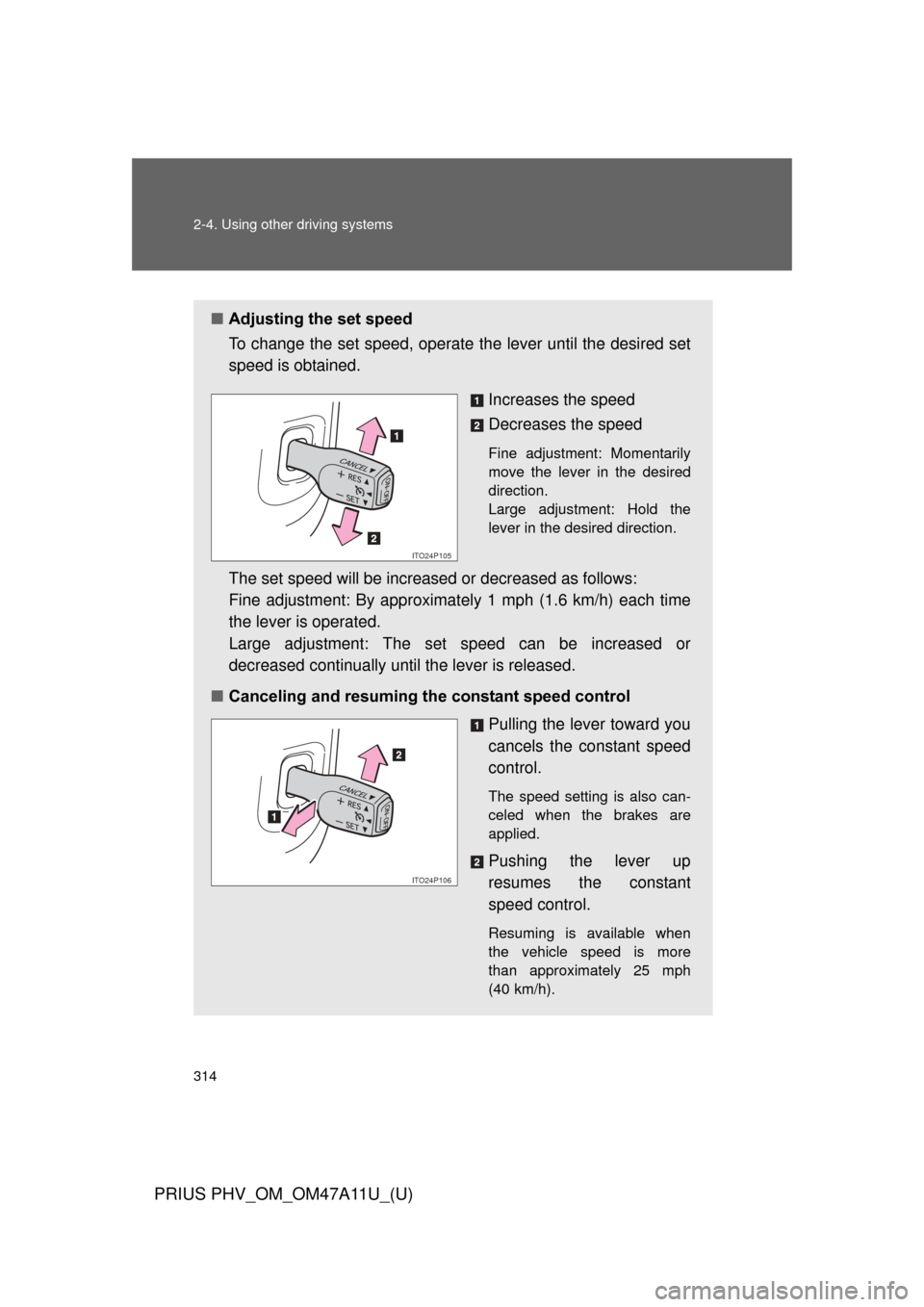
■Adjusting the set speed
To change the set speed, operate the lever until the desired set
speed is obtained.
Increases the speed
Decreases the speed
Fine adjustment: Momentarily
move the lever in the desired
direction.
Large adjustment: Hold the
lever in the desired direction.
The set speed will be increased or decreased as follows:
Fine adjustment: By approximately 1 mph (1.6 km/h) each time
the lever is operated.
Large adjustment: The set speed can be increased or
decreased continually until the lever is released.
■ Canceling and resuming the constant speed control
Pulling the lever toward you
cancels the constant speed
control.
The speed setting is also can-
celed when the brakes are
applied.
Pushing the lever up
resumes the constant
speed control.
Resuming is available when
the vehicle speed is more
than approximately 25 mph
(40 km/h).
ITO24P105
ITO24P106
Page 319 of 692
319
2-4. Using other
driving systems
PRIUS PHV_OM_OM47A11U_(U)
2
When driving
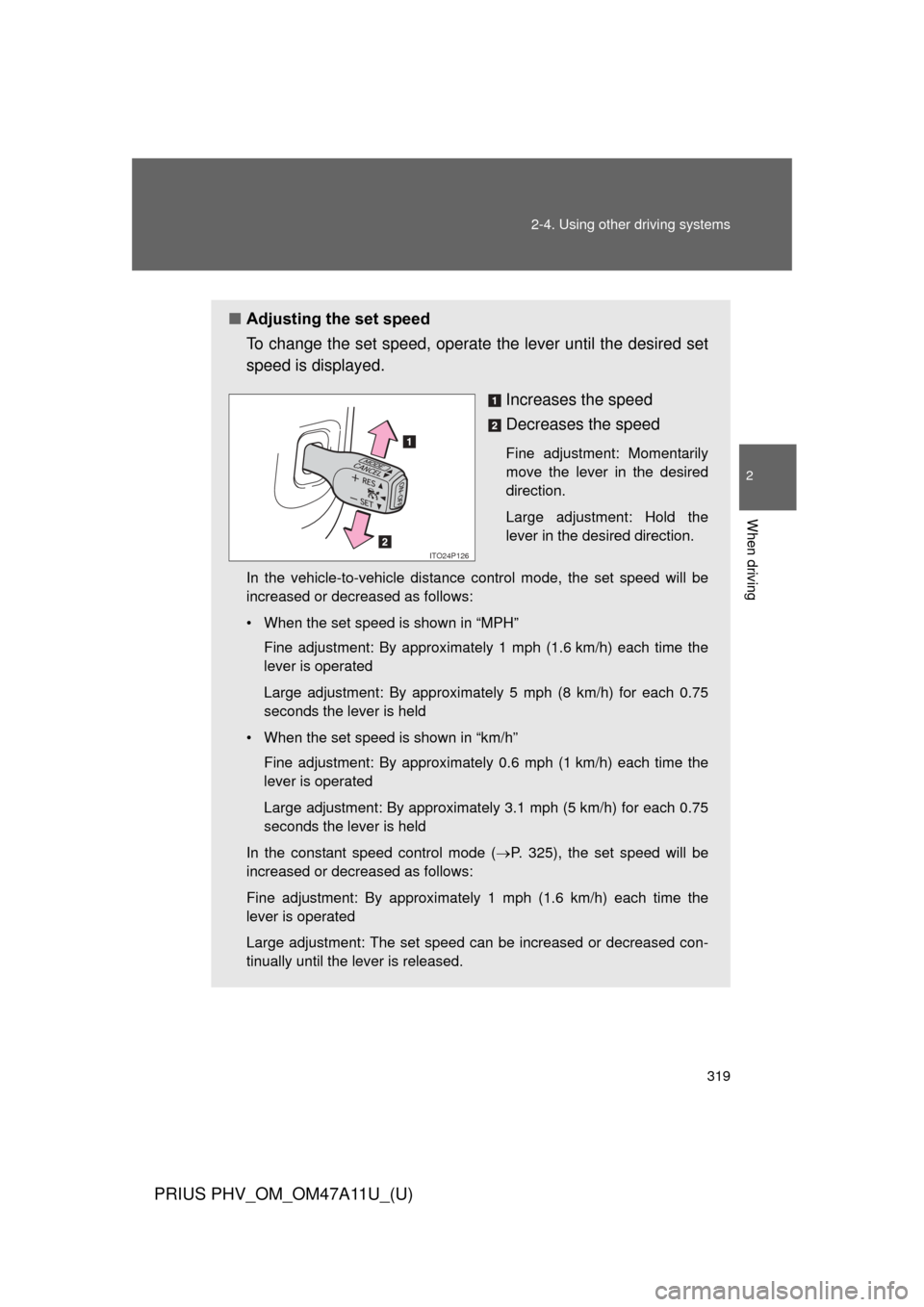
■Adjusting the set speed
To change the set speed, operate the lever until the desired set
speed is displayed.
Increases the speed
Decreases the speed
Fine adjustment: Momentarily
move the lever in the desired
direction.
Large adjustment: Hold the
lever in the desired direction.
In the vehicle-to-vehicle distance control mode, the set speed will be
increased or decreased as follows:
• When the set speed is shown in “MPH” Fine adjustment: By approximately 1 mph (1.6 km/h) each time the
lever is operated
Large adjustment: By approximately 5 mph (8 km/h) for each 0.75
seconds the lever is held
• When the set speed is shown in “km/h” Fine adjustment: By approximately 0.6 mph (1 km/h) each time the
lever is operated
Large adjustment: By approximately 3.1 mph (5 km/h) for each 0.75
seconds the lever is held
In the constant speed control mode ( P. 325), the set speed will be
increased or decreased as follows:
Fine adjustment: By approximately 1 mph (1.6 km/h) each time the
lever is operated
Large adjustment: The set speed can be increased or decreased con-
tinually until the lever is released.
ITO24P126
Page 373 of 692
373
3-1. Using the air conditioning system
and defogger
PRIUS PHV_OM_OM47A11U_(U)
3
Interior features
■If air flow from the vents decreases dramatically
The filter may be clogged. Contact your Toyota dealer.
■ Operation of the air conditio ning system in Eco drive mode
In the Eco drive mode, the air conditioning system is controlled as follows to
prioritize fuel efficiency:
● Engine speed and compressor operation controlled to restrict heating/
cooling capacity
● Fan speed restricted when automatic mode is selected
To improve air conditioning performance, perform the following operations:
● Adjust the fan speed
● Turn off Eco drive mode ( P. 251)
● Customize the air conditioning control of Eco drive mode. ( P. 647)
■ When outside air temperature is below 32°F (0°C)
The cooling and dehumidification function may not operate even when
is pressed.
■ Ventilation and air conditioning odors
●To let fresh air in, set the air conditioning system to the outside air mode.
● During use, various odors from inside and outside the vehicle may enter
into and accumulate in the air conditioning system. This may then cause
odor to be emitted from the vents.
● To reduce potential odors from occurring:
• It is recommended that the air conditioning system be set to outside air
mode prior to turning the vehicle off.
• The start timing of the blower may be delayed for a short period of time immediately after the air conditioning system is started in automatic
mode.
■ Customization
Settings (e.g. enable/disable automatic operation of the air conditioning
compressor when the “AUTO” switch ON) can be changed.
(Customizable features P. 647)
Page 390 of 692
390 3-3. Using the interior lights
PRIUS PHV_OM_OM47A11U_(U)
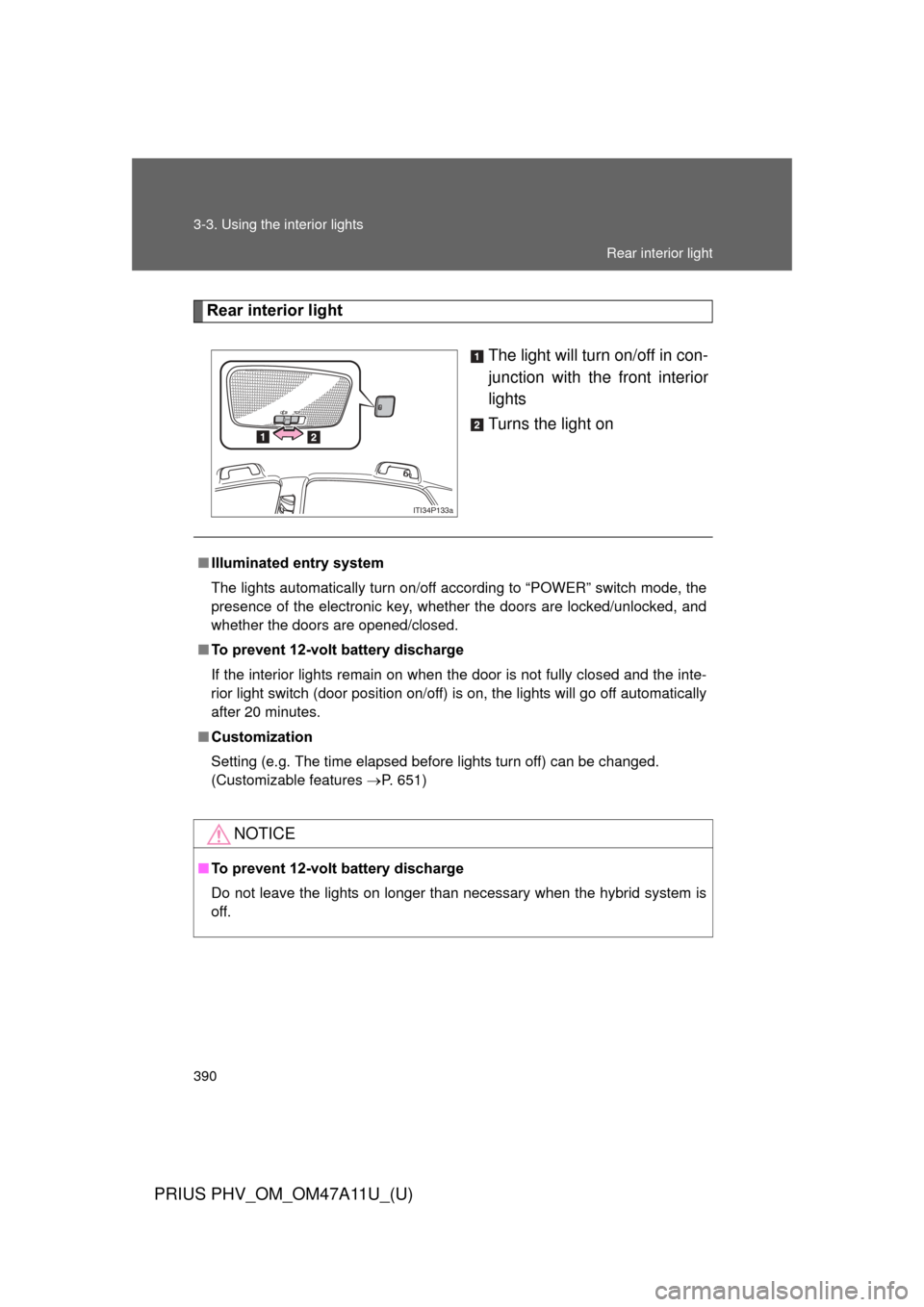
Rear interior lightThe light will turn on/off in con-
junction with the front interior
lights
Turns the light on
ITI34P133a
■Illuminated entry system
The lights automatically turn on/off according to “POWER” switch mode, the
presence of the electronic key, whether the doors are locked/unlocked, and
whether the doors are opened/closed.
■ To prevent 12-volt battery discharge
If the interior lights remain on when the door is not fully closed and the inte-
rior light switch (door position on/off) is on, the lights will go off automatically
after 20 minutes.
■ Customization
Setting (e.g. The time elapsed before lights turn off) can be changed.
(Customizable features P. 651)
NOTICE
■To prevent 12-volt battery discharge
Do not leave the lights on longer than necessary when the hybrid system is
off.
Rear interior light