lock TOYOTA PRIUS PLUG-IN HYBRID 2020 Owner's Manual
[x] Cancel search | Manufacturer: TOYOTA, Model Year: 2020, Model line: PRIUS PLUG-IN HYBRID, Model: TOYOTA PRIUS PLUG-IN HYBRID 2020Pages: 816, PDF Size: 132.85 MB
Page 88 of 816
881-3. Theft deterrent system
Prius Plug-in Hybrid_OM_OM47D72E_(EE)
■System maintenance
The vehicle has a maintenance-free type alarm system.
■ Items to check before locking the vehicle
To prevent unexpected triggering of the alarm and vehicle theft, make sure of
the following.
● Nobody is in the vehicle.
● The side windows are closed before the alarm is set.
● No valuables or other personal items are left in the vehicle.
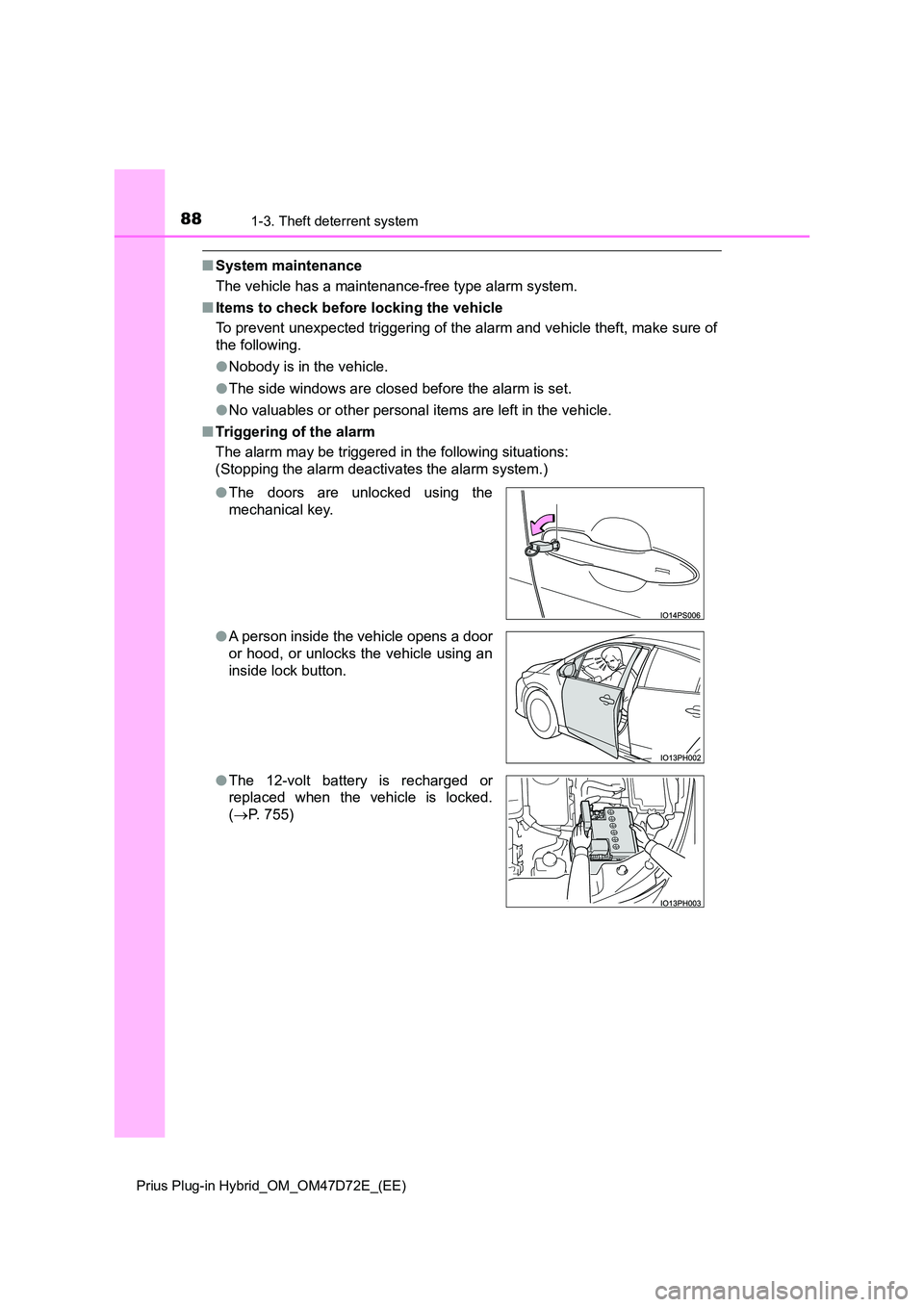
■ Triggering of the alarm
The alarm may be triggered in the following situations:
(Stopping the alarm deactivates the alarm system.)
● The doors are unlocked using the
mechanical key.
● A person inside the vehicle opens a door
or hood, or unlocks the vehicle using an
inside lock button.
● The 12-volt battery is recharged or
replaced when the vehicle is locked.
( P. 755)
Page 89 of 816
891-3. Theft deterrent system
1
Prius Plug-in Hybrid_OM_OM47D72E_(EE)
For safety and security
■Alarm-operated door lock
In the following cases, depending on the situation, the door may automatically
lock to prevent improper entry into the vehicle:
● When a person remaining in the vehicle unlocks the door and the alarm is
activated.
● While the alarm is activated, a person remaining in the vehicle unlocks the
door.
● When recharging or replacing the 12-volt battery
NOTICE
■To ensure the system operates correctly
Do not modify or remove the system. If modified or removed, the proper
operation of the system cannot be guaranteed.
Page 91 of 816
911-3. Theft deterrent system
1
Prius Plug-in Hybrid_OM_OM47D72E_(EE)
For safety and security
■When the message asking if you wish to cancel the intrusion sensor is
not displayed
The message may not be displayed if other message is displayed. In this
case, turn the power switch to ON mode, follow the instructions on the display
and turn the power switch off again.
■ Canceling and automatic re-enabling of the intrusion sensor
● The alarm will still be set even when the intrusion sensor is canceled.
● After the intrusion sensor is canceled, pressing the power switch or unlock-
ing the doors using the entry function or wireless remote control will re-
enable the intrusion sensor.
● The intrusion sensor will automatically be re-enabled when the alarm sys-
tem is deactivated.
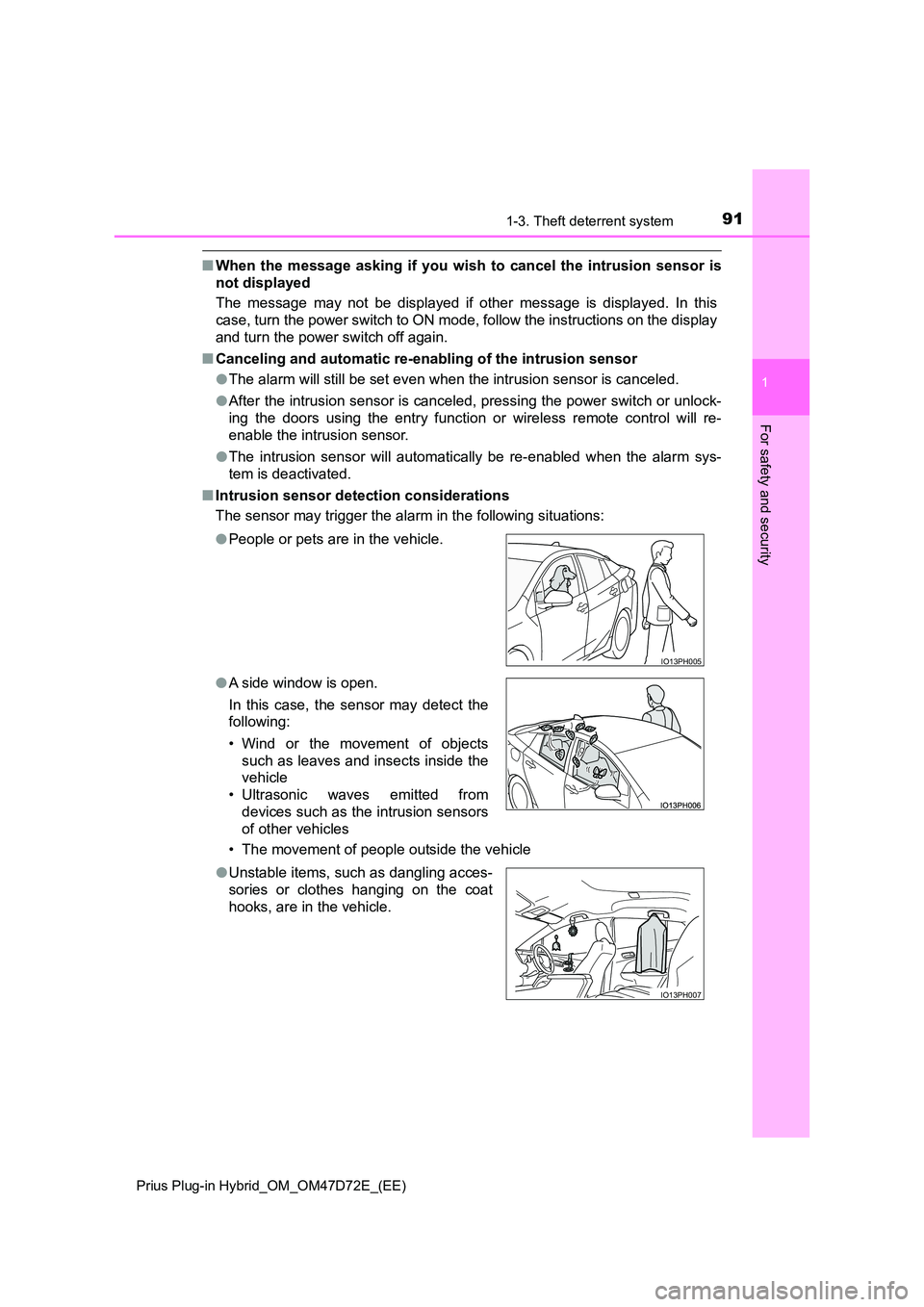
■ Intrusion sensor detection considerations
The sensor may trigger the alar m in the following situations:
• The movement of people outside the vehicle
● People or pets are in the vehicle.
● A side window is open.
In this case, the sensor may detect the
following:
• Wind or the movement of objects
such as leaves and insects inside the
vehicle
• Ultrasonic waves emitted from
devices such as the intrusion sensors
of other vehicles
IO13PH005
● Unstable items, such as dangling acces-
sories or clothes hanging on the coat
hooks, are in the vehicle.
IO13PH007
Page 93 of 816
93
2Plug-in hybrid system
Prius Plug-in Hybrid_OM_OM47D72E_(EE)
2-1. Plug-in hybrid system
Plug-in hybrid system
features.............................. 94
Plug-in hybrid system
precautions ...................... 108
Plug-in hybrid vehicle
driving tips ....................... 115
EV driving range ................ 119
2-2. Charging
Charging equipment .......... 121
Charging cable................... 126
Smart lid & connector
locking system ................. 140
Power sources that
can be used ..................... 149
Charging methods ............. 152
Charging tips...................... 157
Things to know before
charging ........................... 160
How to charge.................... 165
Using the charging schedule
function ............................ 176
Solar charging system ....... 188
When normal charging
cannot be carried out ....... 192
Page 109 of 816
1092-1. Plug-in hybrid system
2
Plug-in hybrid system
Prius Plug-in Hybrid_OM_OM47D72E_(EE)
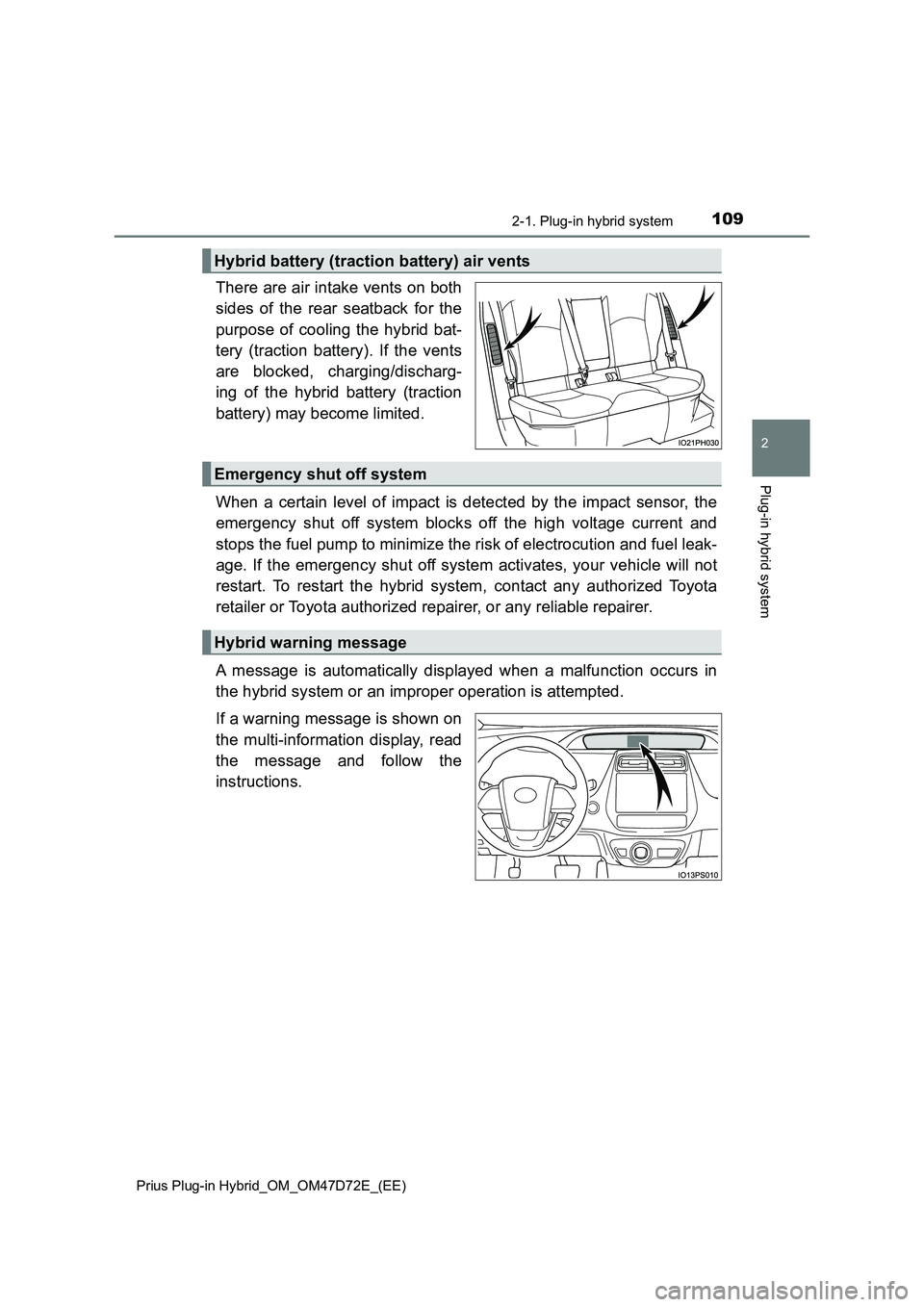
There are air intake vents on both
sides of the rear seatback for the
purpose of cooling the hybrid bat-
tery (traction battery). If the vents
are blocked, charging/discharg-
ing of the hybrid battery (traction
battery) may become limited.
When a certain level of impact is detected by the impact sensor, the
emergency shut off system blocks off the high voltage current and
stops the fuel pump to minimize the risk of electrocution and fuel leak-
age. If the emergency shut off system activates, your vehicle will not
restart. To restart the hybrid system, contact any authorized Toyota
retailer or Toyota authorized repairer, or any reliable repairer.
A message is automatically displayed when a malfunction occurs in
the hybrid system or an improper operation is attempted.
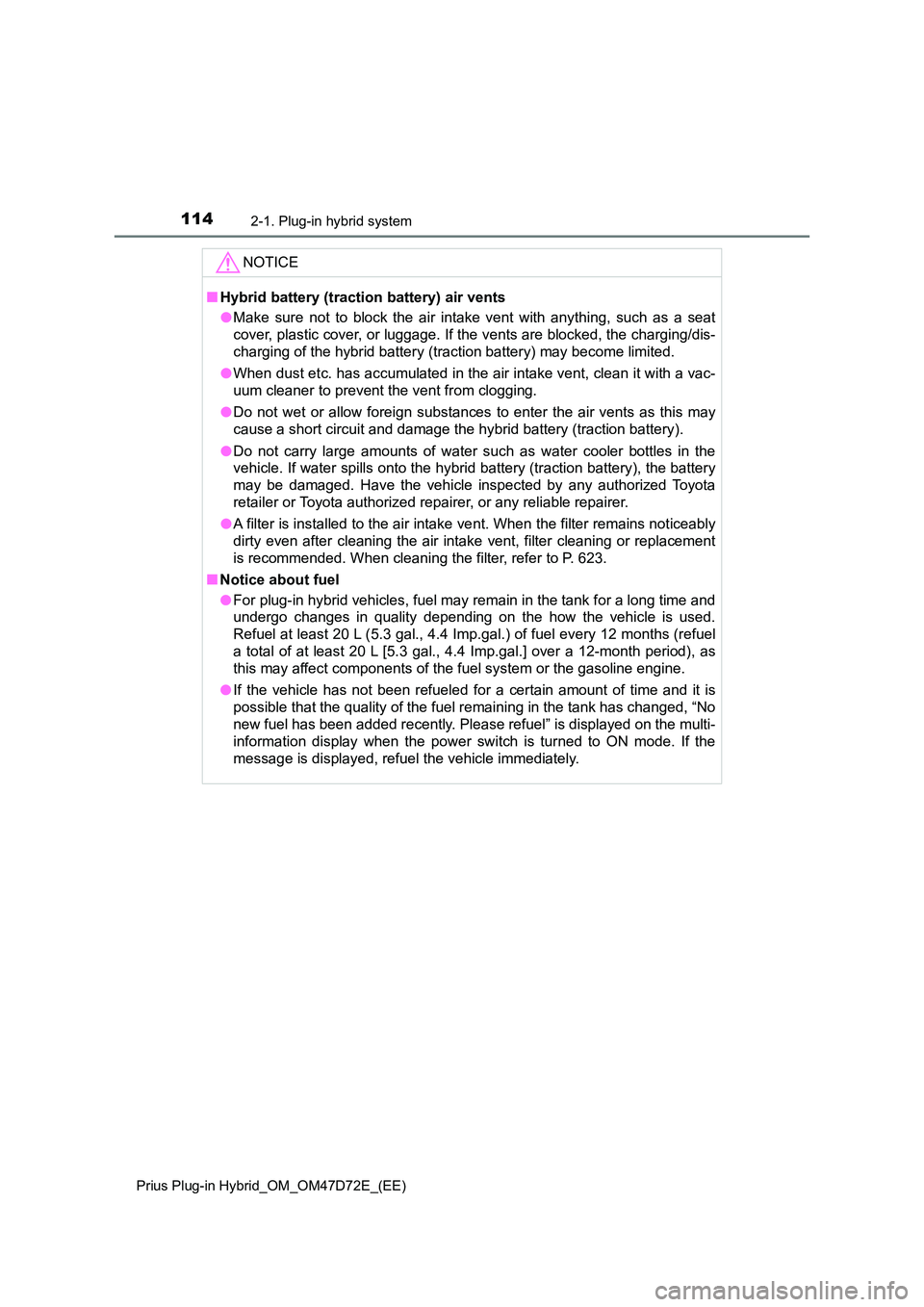
If a warning message is shown on
the multi-information display, read
the message and follow the
instructions.
Hybrid battery (traction battery) air vents
Emergency shut off system
Hybrid warning message
Page 114 of 816
1142-1. Plug-in hybrid system
Prius Plug-in Hybrid_OM_OM47D72E_(EE)
NOTICE
■Hybrid battery (traction battery) air vents
● Make sure not to block the air intake vent with anything, such as a seat
cover, plastic cover, or luggage. If the vents are blocked, the charging/dis-
charging of the hybrid battery (traction battery) may become limited.
● When dust etc. has accumulated in the air intake vent, clean it with a vac-
uum cleaner to prevent the vent from clogging.
● Do not wet or allow foreign substances to enter the air vents as this may
cause a short circuit and damage the hybrid battery (traction battery).
● Do not carry large amounts of water such as water cooler bottles in the
vehicle. If water spills onto the hybrid battery (traction battery), the battery
may be damaged. Have the vehicle inspected by any authorized Toyota
retailer or Toyota authorized repairer, or any reliable repairer.
● A filter is installed to the air intake vent. When the filter remains noticeably
dirty even after cleaning the air intake vent, filter cleaning or replacement
is recommended. When cleaning the filter, refer to P. 623.
■ Notice about fuel
● For plug-in hybrid vehicles, fuel may remain in the tank for a long time and
undergo changes in quality depending on the how the vehicle is used.
Refuel at least 20 L (5.3 gal., 4.4 Imp.gal.) of fuel every 12 months (refuel
a total of at least 20 L [5.3 gal., 4.4 Imp.gal.] over a 12-month period), as
this may affect components of the fuel system or the gasoline engine.
● If the vehicle has not been refueled for a certain amount of time and it is
possible that the quality of the fuel remaining in the tank has changed, “No
new fuel has been added recently. Please refuel” is displayed on the multi-
information display when the power switch is turned to ON mode. If the
message is displayed, refuel the vehicle immediately.
Page 121 of 816
121
2
2-2. Charging
Plug-in hybrid system
Prius Plug-in Hybrid_OM_OM47D72E_(EE)
Charging equipment
*: The number of equipped charging cables may differ depending on the tar-
get region.
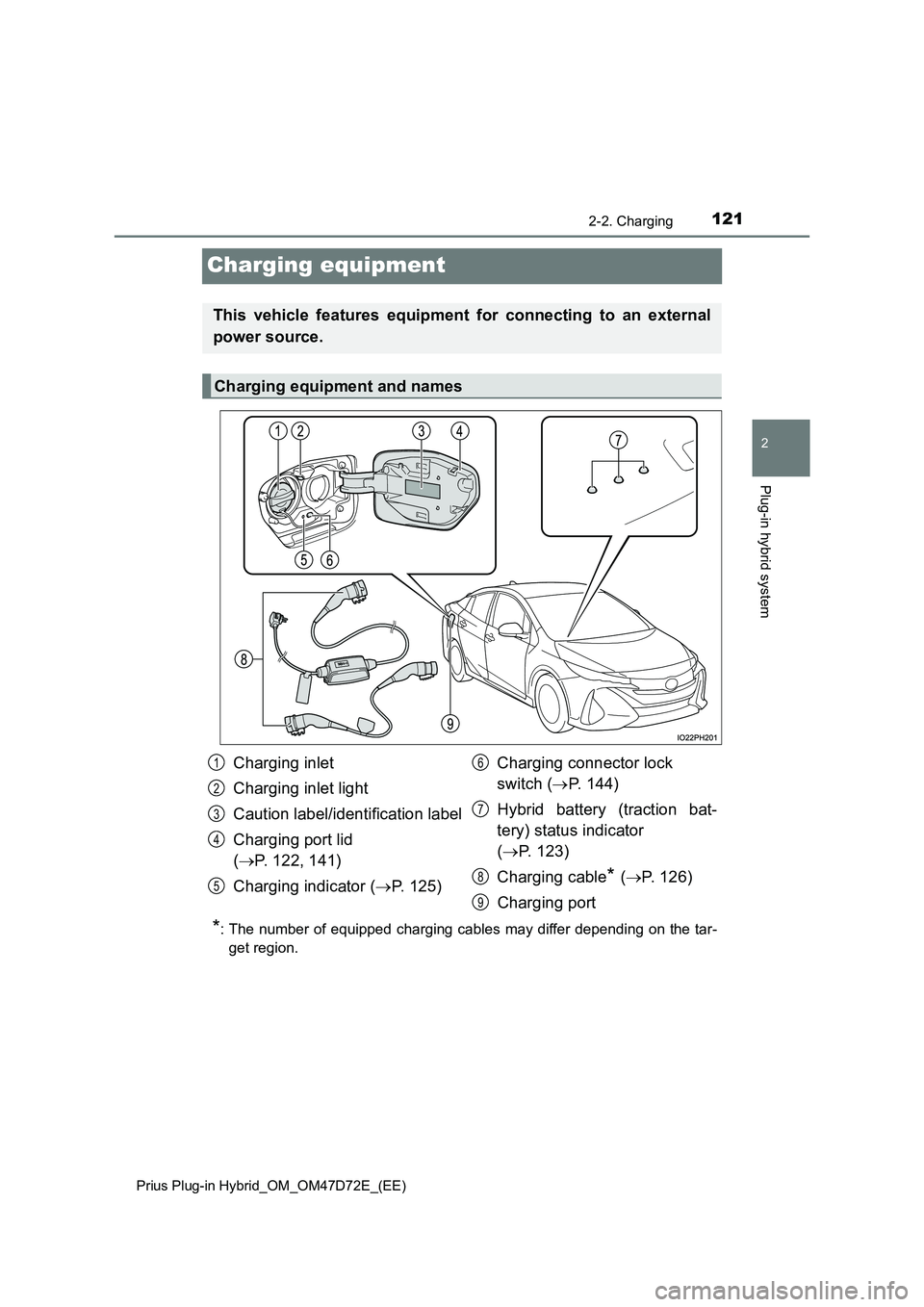
This vehicle features equipment for connecting to an external
power source.
Charging equipment and names
Charging inlet
Charging inlet light
Caution label/identification label
Charging port lid
( P. 122, 141)
Charging indicator ( P. 125)
Charging connector lock
switch ( P. 144)
Hybrid battery (traction bat-
tery) status indicator
( P. 123)
Charging cable* ( P. 126)
Charging port
1
2
3
4
5
6
7
8
9
Page 122 of 816
1222-2. Charging
Prius Plug-in Hybrid_OM_OM47D72E_(EE)
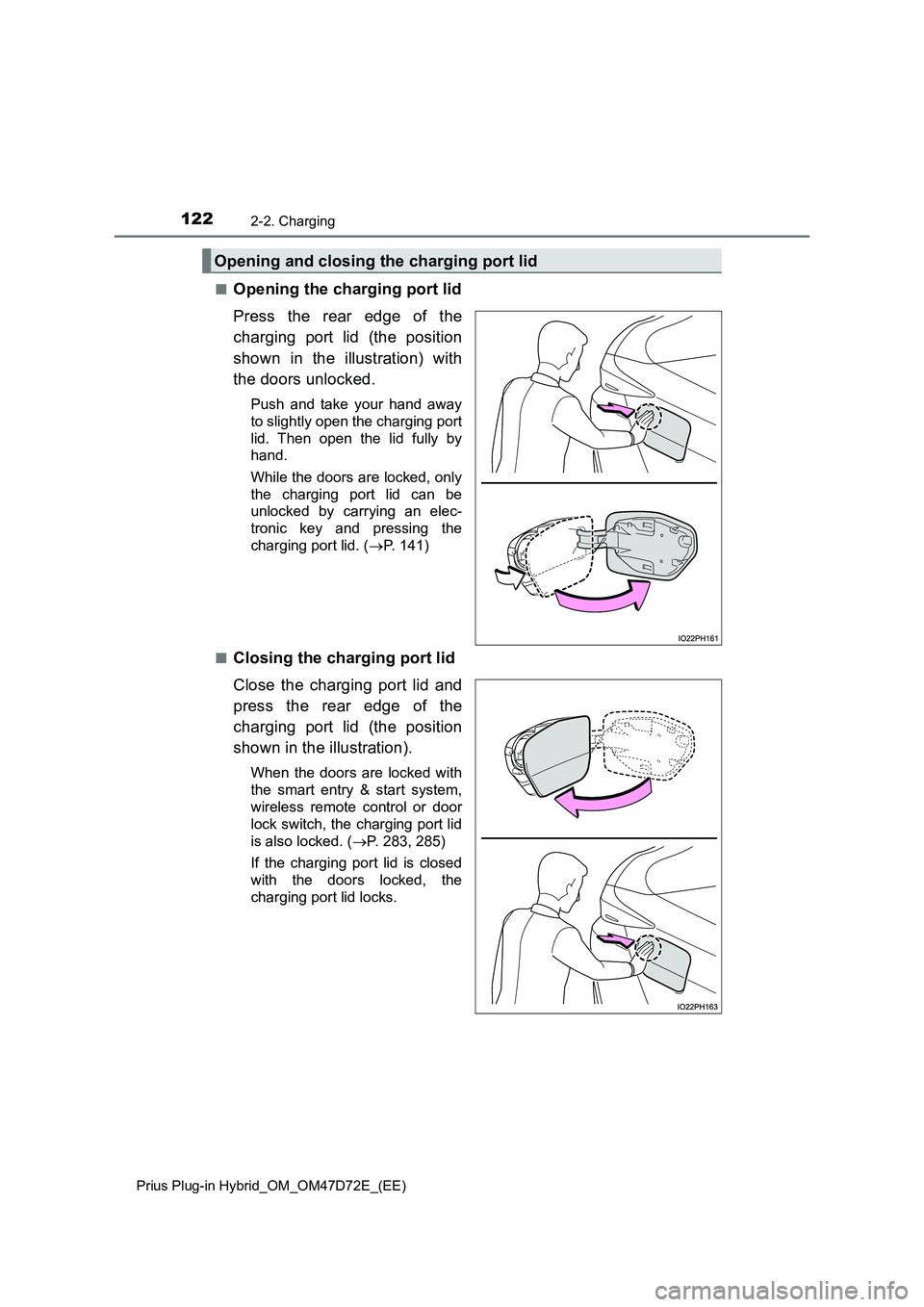
■Opening the charging port lid
Press the rear edge of the
charging port lid (the position
shown in the illustration) with
the doors unlocked.
Push and take your hand away
to slightly open the charging port
lid. Then open the lid fully by
hand.
While the doors are locked, only
the charging port lid can be
unlocked by carrying an elec-
tronic key and pressing the
charging port lid. (P. 1 4 1 )
■
Closing the charging port lid
Close the charging port lid and
press the rear edge of the
charging port lid (the position
shown in the illustration).
When the doors are locked with
the smart entry & start system,
wireless remote control or door
lock switch, the charging port lid
is also locked. (P. 283, 285)
If the charging port lid is closed
with the doors locked, the
charging port lid locks.
Opening and closing the charging port lid
Page 124 of 816
1242-2. Charging
Prius Plug-in Hybrid_OM_OM47D72E_(EE)
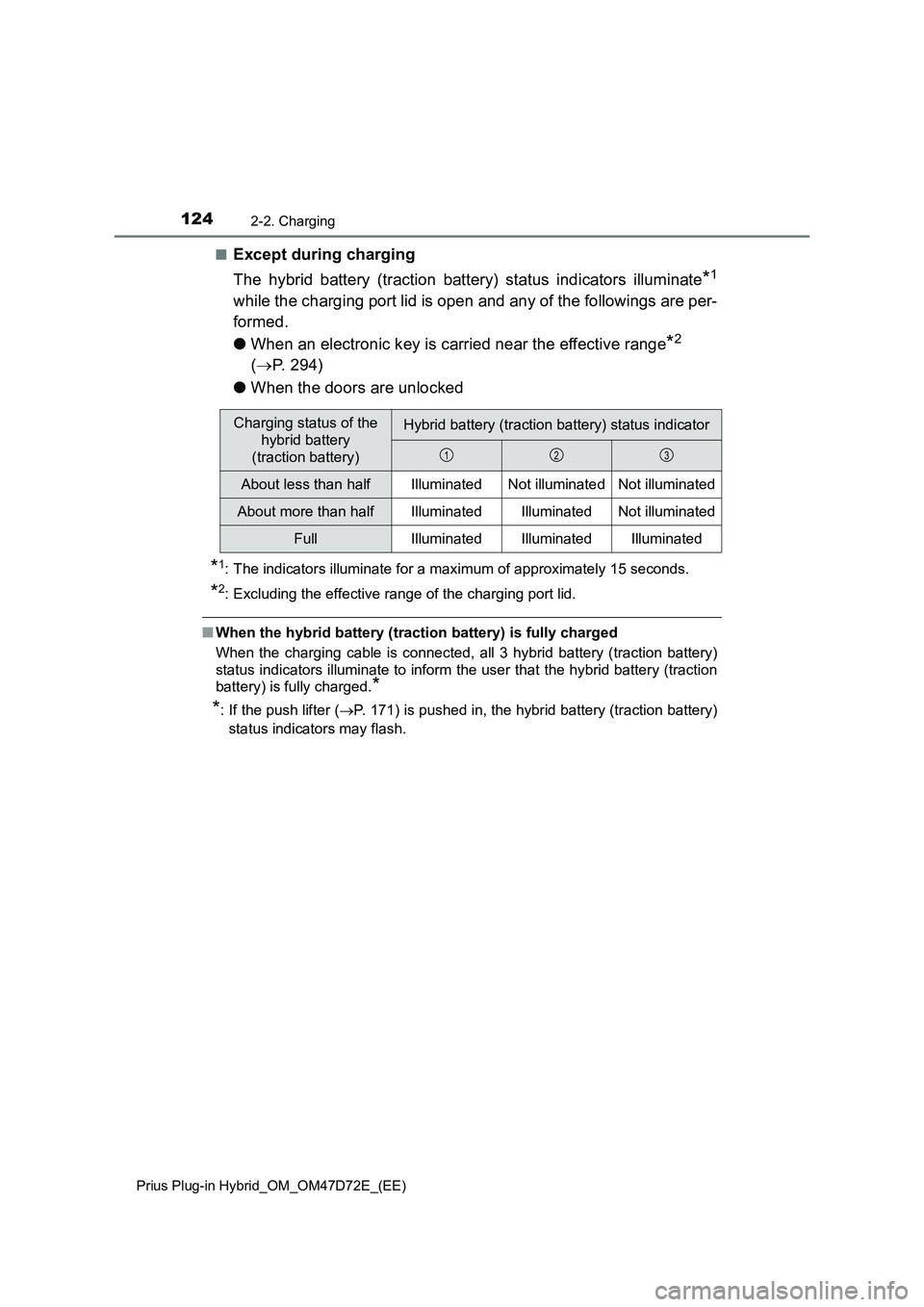
■Except during charging
The hybrid battery (traction battery) status indicators illuminate
*1
while the charging port lid is open and any of the followings are per-
formed.
●When an electronic key is carried near the effective range
*2
(P. 294)
●When the doors are unlocked
*1: The indicators illuminate for a maximum of approximately 15 seconds.
*2: Excluding the effective range of the charging port lid.
■When the hybrid battery (traction battery) is fully charged
When the charging cable is connected, all 3 hybrid battery (traction battery)
status indicators illuminate to inform the user that the hybrid battery (traction
battery) is fully charged.
*
*
: If the push lifter (P. 171) is pushed in, the hybrid battery (traction battery)
status indicators may flash.
Charging status of the
hybrid battery
(traction battery)Hybrid battery (traction battery) status indicator
About less than halfIlluminatedNot illuminatedNot illuminated
About more than halfIlluminatedIlluminatedNot illuminated
FullIlluminatedIlluminatedIlluminated
123
Page 140 of 816
1402-2. Charging
Prius Plug-in Hybrid_OM_OM47D72E_(EE)
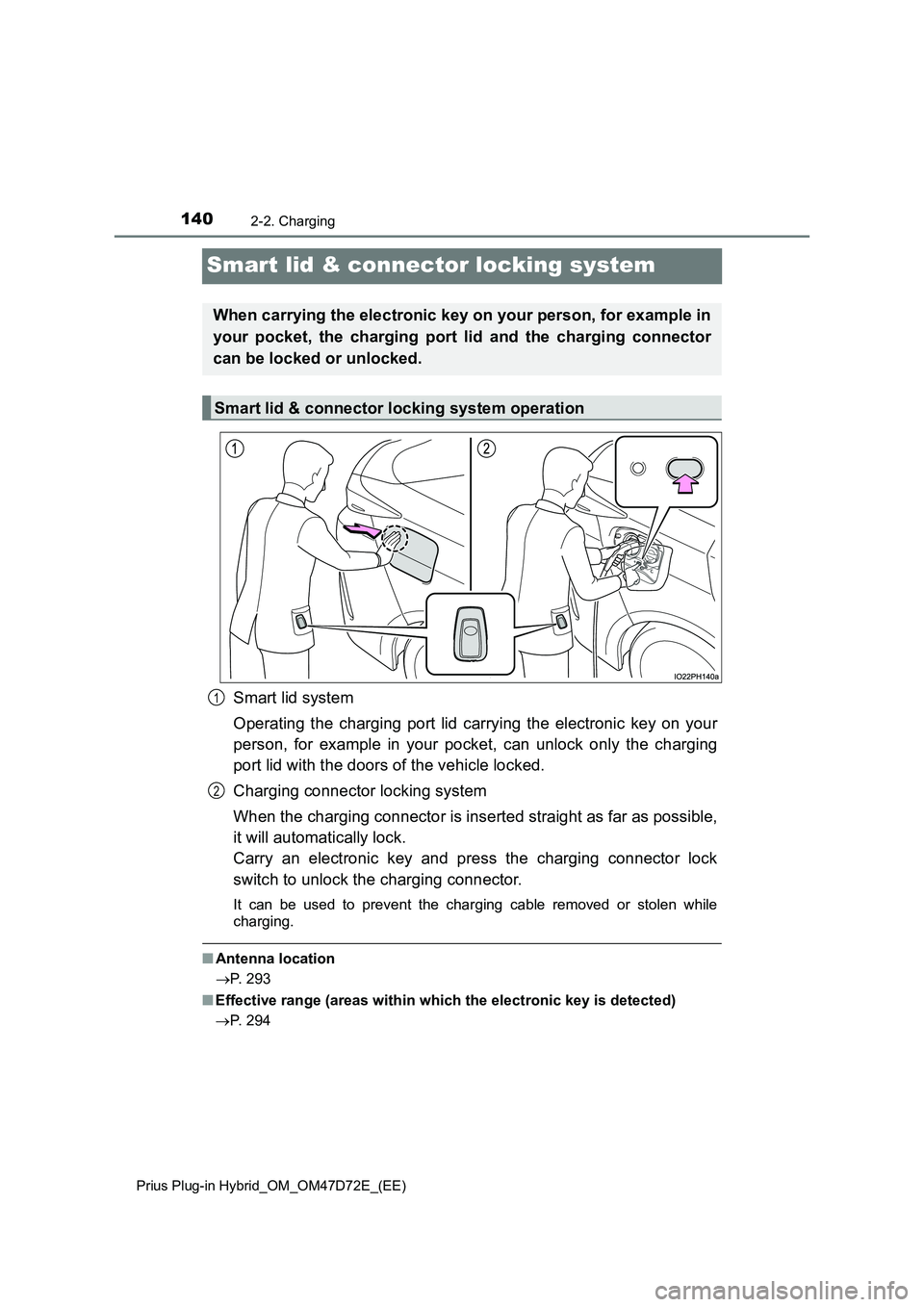
Smart lid & connector locking system
Smart lid system
Operating the charging port lid carrying the electronic key on your
person, for example in your pocket, can unlock only the charging
port lid with the doors of the vehicle locked.
Charging connector locking system
When the charging connector is inserted straight as far as possible,
it will automatically lock.
Carry an electronic key and press the charging connector lock
switch to unlock the charging connector.
It can be used to prevent the charging cable removed or stolen while
charging.
■ Antenna location
P. 293
■ Effective range (areas within which the electronic key is detected)
P. 294
When carrying the electronic key on your person, for example in
your pocket, the charging port lid and the charging connector
can be locked or unlocked.
Smart lid & connector locking system operation
1
2