display TOYOTA PRIUS V 2013 (in English) User Guide
[x] Cancel search | Manufacturer: TOYOTA, Model Year: 2013, Model line: PRIUS V, Model: TOYOTA PRIUS V 2013Pages: 32, PDF Size: 4.4 MB
Page 21 of 32
OVERVIEW
FEATURES/OPERATIONS
SAFETY AND EMERGENCY FEATURES
19
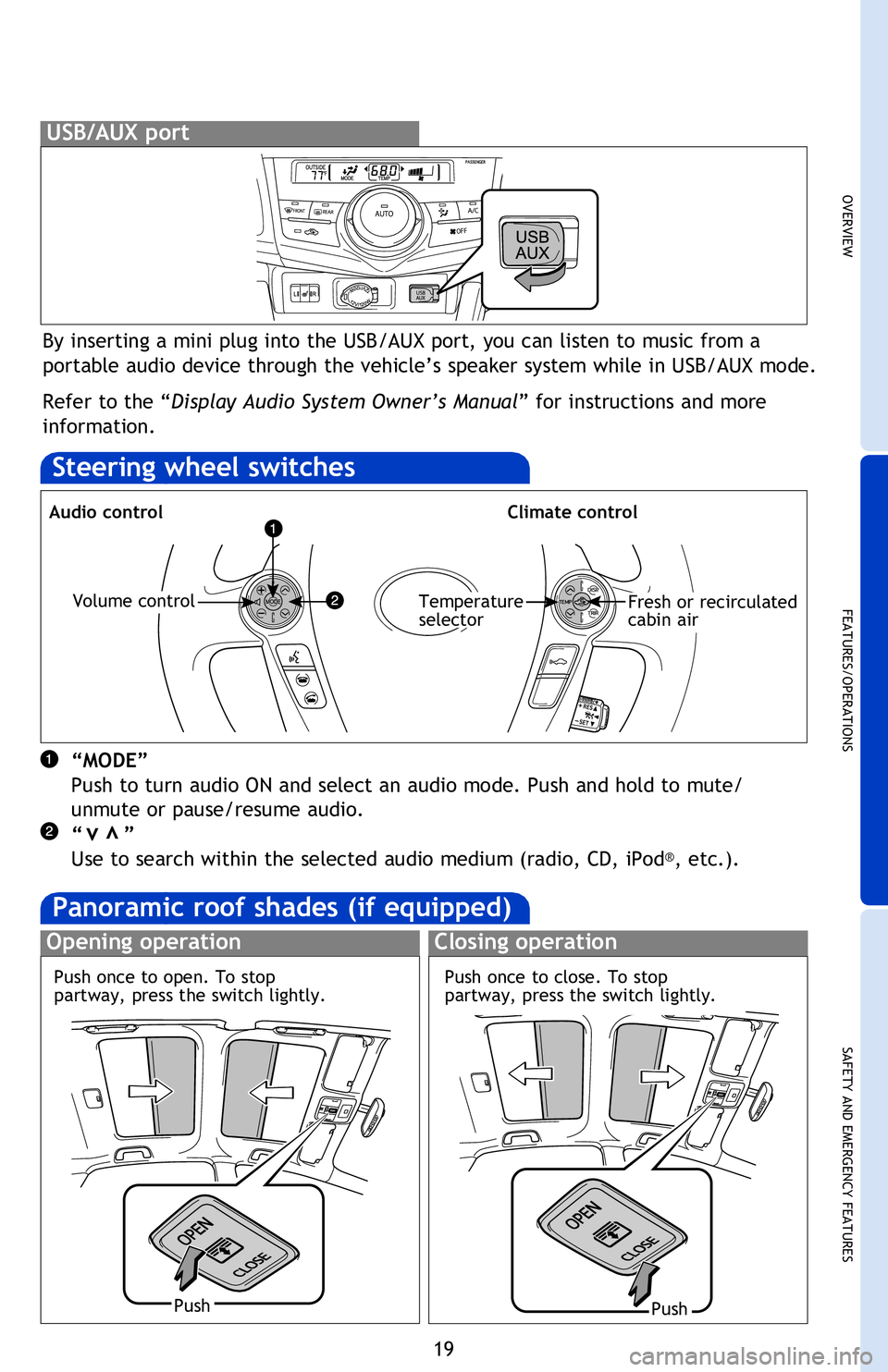
By inserting a mini plug into the USB/AUX port, you can listen to music from a
portable audio device through the vehicle’s speaker system while in USB/AUX mode.
Refer to the “Display Audio System Owner’s Manual” for instructions and more
information.
USB/AUX port
Steering wheel switches
Audio controlClimate control
“MODE”
Push to turn audio ON and select an audio mode. Push and hold to mute/
unmute or pause/resume audio.
“ ”
Use to search within the selected audio medium (radio, CD, iPod
®, etc.).
vv
Volume controlTemperature
selectorFresh or recirculated
cabin air
Turn to tune
radio stations
manually or
select tracks
or files
Push to pause
or resume
playing
Panoramic roof shades (if equipped)
Opening operationClosing operation
PushPush
Access to
navigation
system
1
Refer to the “Display Audio System Owner’s Manual ” for instructions and more
information.
1 Refer to the “Navigation System with Entune Quick Reference Guide.”
2 Refer to the “Navigation System Owner’s Manual .”
Push once to close. To stop
partway, press the switch lightly.
Push once to open. To stop
partway, press the switch lightly.
2013Prius-v.indd 1910/2/12 6:52 PM
Page 24 of 32
22
FEATURES/OPERATIONS
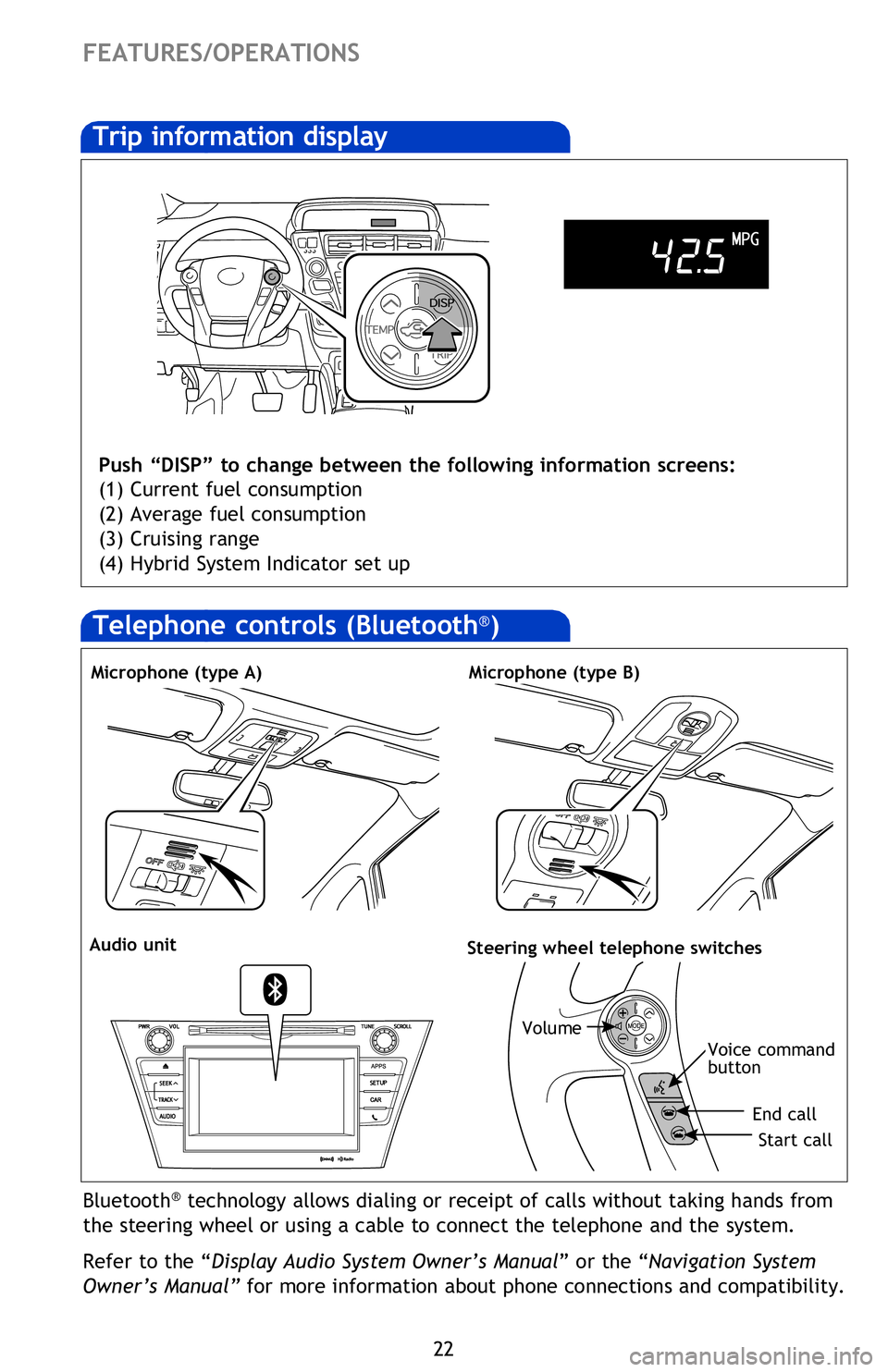
Trip information display
Push “DISP” to change between the following information screens:
(1) Current fuel consumption
(2) Average fuel consumption
(3) Cruising range
(4) Hybrid System Indicator set up
Bluetooth® technology allows dialing or receipt of calls without taking hands from
the steering wheel or using a cable to connect the telephone and the system.
Refer to the “Display Audio System Owner’s Manual ” or the “Navigation System
Owner’s Manual” for more information about phone connections and compatibility.
Microphone (type A)
Audio unitSteering wheel telephone switches
Volume
Start call
End call
Voice command
button
Microphone (type B)
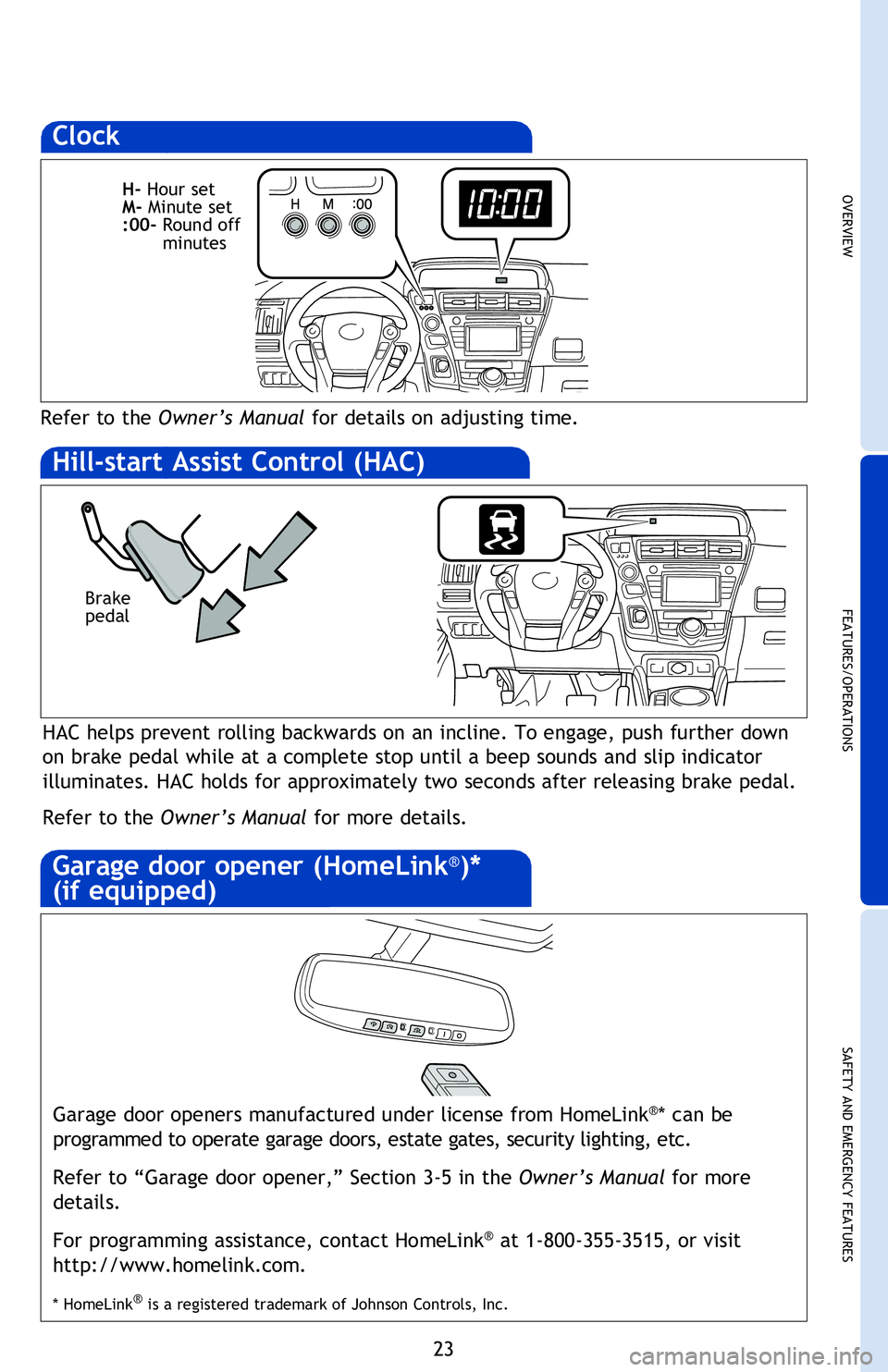
Clock
Refer to the Owner’s Manual for details on adjusting time.
HAC helps prevent rolling backwards on an incline. To engage, push further down
on brake pedal while at a complete stop until a beep sounds and slip indicator
illuminates. HAC holds for approximately two seconds after releasing brake pedal.
Refer to the Owner’s Manual for more details.
Hill-start Assist Control (HAC)
Garage door openers manufactured under license from HomeLink®* can be
programmed to operate garage doors, estate gates, security lighting, etc.
Refer to “Garage door opener,” Section 3-5 in the Owner’s Manual for more
details.
For programming assistance, contact HomeLink
® at 1-800-355-3515, or visit
http://www.homelink.com.
* HomeLink® is a registered trademark of Johnson Controls, Inc.
Garage door opener (HomeLink®)*
(if equipped)
Telephone controls (Bluetooth®)
2013Prius-v.indd 2210/2/12 7:13 PM
Page 25 of 32
OVERVIEW
FEATURES/OPERATIONS
SAFETY AND EMERGENCY FEATURES
23
Bluetooth® technology allows dialing or receipt of calls without taking hands from
the steering wheel or using a cable to connect the telephone and the system.
Refer to the “Display Audio System Owner’s Manual ” or the “Navigation System
Owner’s Manual” for more information about phone connections and compatibility.
Start call
End call
Voice command
button
Clock
Refer to the Owner’s Manual for details on adjusting time.
H- Hour set
M- Minute set
:00- Round off
minutes
HAC helps prevent rolling backwards on an incline. To engage, push further down
on brake pedal while at a complete stop until a beep sounds and slip indicator
illuminates. HAC holds for approximately two seconds after releasing brake pedal.
Refer to the Owner’s Manual for more details.
Brake
pedal
Hill-start Assist Control (HAC)
Garage door openers manufactured under license from HomeLink®* can be
programmed to operate garage doors, estate gates, security lighting, etc.
Refer to “Garage door opener,” Section 3-5 in the Owner’s Manual for more
details.
For programming assistance, contact HomeLink
® at 1-800-355-3515, or visit
http://www.homelink.com.
* HomeLink® is a registered trademark of Johnson Controls, Inc.
Garage door opener (HomeLink®)*
(if equipped)
2013Prius-v.indd 2310/2/12 6:52 PM