clutch TOYOTA PROACE 2022 (in English) User Guide
[x] Cancel search | Manufacturer: TOYOTA, Model Year: 2022, Model line: PROACE, Model: TOYOTA PROACE 2022Pages: 360, PDF Size: 70.79 MB
Page 181 of 360
181
Driving
6
For more information on Memorising speeds or the Speed Limit Recognition and Recommendation, refer to the corresponding sections.
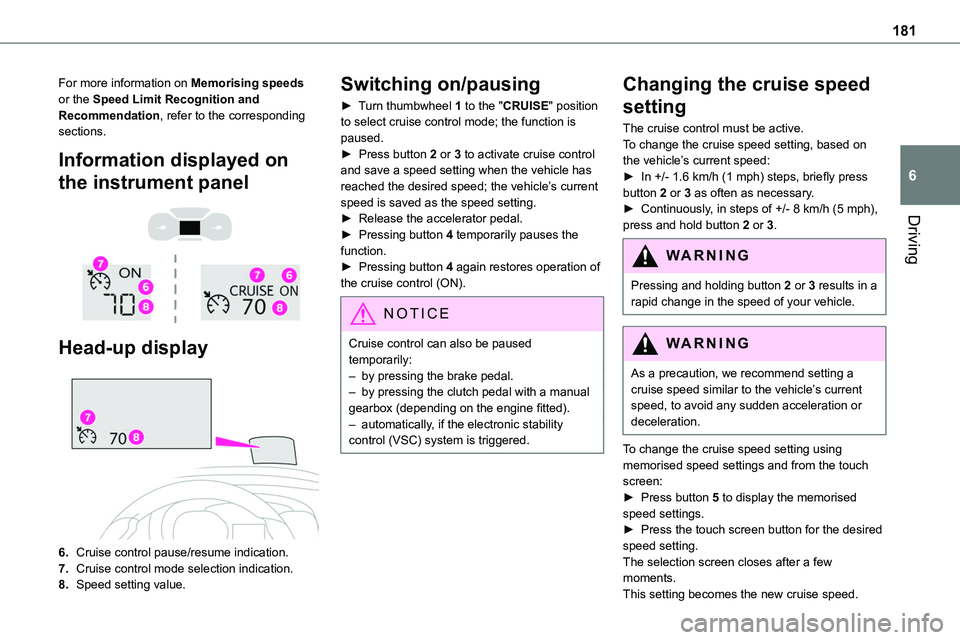
Information displayed on
the instrument panel
Head-up display
6.Cruise control pause/resume indication.
7.Cruise control mode selection indication.
8.Speed setting value.
Switching on/pausing
► Turn thumbwheel 1 to the "CRUISE" position to select cruise control mode; the function is paused.► Press button 2 or 3 to activate cruise control and save a speed setting when the vehicle has reached the desired speed; the vehicle’s current speed is saved as the speed setting.► Release the accelerator pedal.
► Pressing button 4 temporarily pauses the function.► Pressing button 4 again restores operation of the cruise control (ON).
NOTIC E
Cruise control can also be paused temporarily:– by pressing the brake pedal.– by pressing the clutch pedal with a manual gearbox (depending on the engine fitted).– automatically, if the electronic stability control (VSC) system is triggered.
Changing the cruise speed
setting
The cruise control must be active.To change the cruise speed setting, based on the vehicle’s current speed:► In +/- 1.6 km/h (1 mph) steps, briefly press button 2 or 3 as often as necessary.► Continuously, in steps of +/- 8 km/h (5 mph),
press and hold button 2 or 3.
WARNI NG
Pressing and holding button 2 or 3 results in a rapid change in the speed of your vehicle.
WARNI NG
As a precaution, we recommend setting a cruise speed similar to the vehicle’s current speed, to avoid any sudden acceleration or deceleration.
To change the cruise speed setting using memorised speed settings and from the touch screen:► Press button 5 to display the memorised speed settings.► Press the touch screen button for the desired speed setting.The selection screen closes after a few moments.
This setting becomes the new cruise speed.
Page 183 of 360
183
Driving
6
NOTIC E
If the driver operates a direction indicator to overtake a slower vehicle, the cruise control allows the vehicle to temporarily approach the vehicle in front to assist the overtaking manoeuvre, without ever exceeding the speed setting.
WARNI NG
Some vehicles present on the road may not be properly seen or may be misinterpreted by the radar (e.g. a lorry), which may lead to a poor assessment of distance and lead to the vehicle accelerating or braking inappropriately.
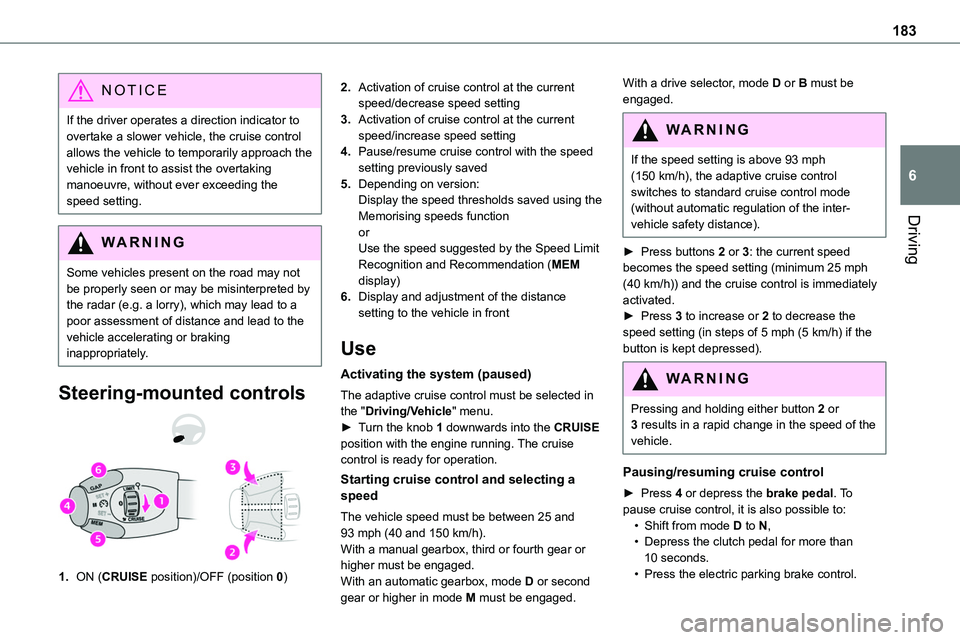
Steering-mounted controls
1.ON (CRUISE position)/OFF (position 0)
2.Activation of cruise control at the current speed/decrease speed setting
3.Activation of cruise control at the current speed/increase speed setting
4.Pause/resume cruise control with the speed setting previously saved
5.Depending on version:Display the speed thresholds saved using the Memorising speeds function
orUse the speed suggested by the Speed Limit Recognition and Recommendation (MEM display)
6.Display and adjustment of the distance setting to the vehicle in front
Use
Activating the system (paused)
The adaptive cruise control must be selected in the "Driving/Vehicle" menu.► Turn the knob 1 downwards into the CRUISE position with the engine running. The cruise control is ready for operation.
Starting cruise control and selecting a speed
The vehicle speed must be between 25 and 93 mph (40 and 150 km/h).With a manual gearbox, third or fourth gear or higher must be engaged.With an automatic gearbox, mode D or second gear or higher in mode M must be engaged.
With a drive selector, mode D or B must be engaged.
WARNI NG
If the speed setting is above 93 mph (150 km/h), the adaptive cruise control switches to standard cruise control mode (without automatic regulation of the inter-vehicle safety distance).
► Press buttons 2 or 3: the current speed becomes the speed setting (minimum 25 mph (40 km/h)) and the cruise control is immediately activated.► Press 3 to increase or 2 to decrease the speed setting (in steps of 5 mph (5 km/h) if the button is kept depressed).
WARNI NG
Pressing and holding either button 2 or 3 results in a rapid change in the speed of the vehicle.
Pausing/resuming cruise control
► Press 4 or depress the brake pedal. To pause cruise control, it is also possible to:• Shift from mode D to N,• Depress the clutch pedal for more than 10 seconds.• Press the electric parking brake control.