lane assist TOYOTA PROACE VERSO EV 2024 Owners Manual
[x] Cancel search | Manufacturer: TOYOTA, Model Year: 2024, Model line: PROACE VERSO EV, Model: TOYOTA PROACE VERSO EV 2024Pages: 360, PDF Size: 70.22 MB
Page 3 of 360
3
Contents
Under-inflation detection 168Driving and manoeuvring aids - General recommendations 169Head-up display 171Memorising speeds 172Speed Limit Recognition and Recommendation 173Speed limiter 175Cruise control - particular recommendations 177Cruise control 178Adaptive Cruise Control 180Active Safety Brake with Collision Risk Alert and Intelligent emergency braking assistance 184Lane departure warning system 186Distraction detection 187Blind Spot Monitoring System 189Parking sensors 190VisioPark Light 192Top Rear Vision 192
7Practical information
Compatibility of fuels 196Refuelling 196Misfuel prevention (Diesel) 198Charging system (Electric) 198Charging the traction battery (Electric) 206Energy economy mode 210Snow chains 210Towing device 2 11Roof bars / Roof rack 212Bonnet 213Engine compartment 214Checking levels 215Speed checks 217AdBlue® (Diesel engines) 220
Free-wheeling 223Advice on care and maintenance 224
8In the event of a breakdown
Warning triangle 227Running out of fuel (Diesel) 227Tool box 228Temporary puncture repair kit 229Spare wheel 233Changing a bulb 238Changing a fuse 24312 V battery / Accessory battery 246Towing 250
9Technical data
Engine technical data and towed loads 253Diesel engines 254Electric motor 258Dimensions 260Identification markings 262
10Bluetooth® audio system
First steps 263Steering mounted controls 264Menus 265Radio 265DAB (Digital Audio Broadcasting) radio 267Media 268Telephone 271Frequently asked questions 274
11TOYOTA Pro Touch
First steps 276Steering mounted controls 277Menus 278
Applications 279Radio 280DAB (Digital Audio Broadcasting) radio 282Media 282Telephone 284Settings 287Frequently asked questions 289
12TOYOTA Pro Touch with navigation system
First steps 291Steering mounted controls 292Menus 293Voice commands 294Navigation 298Connected navigation 301Applications 303Radio 306DAB (Digital Audio Broadcasting) radio 308Media 308Telephone 310Settings 313Frequently asked questions 315
13Event data recorders
■Alphabetical index
Page 185 of 360
185
Driving
6
WARNI NG
It is possible that warnings are not given, are given too late or seem unjustified.The driver must always stay in control of the vehicle and be prepared to react at any time to avoid an accident.
WARNI NG
Following an impact, the system is automatically deactivated.Have it checked by any authorized Toyota retailer or Toyota authorized repairer, or any reliable repairer.
Collision Risk Alert
This function warns the driver that their vehicle is at risk of a collision with the vehicle in front, or with a pedestrian or cyclist present in their traffic lane.
Modifying the alert trigger threshold
This trigger threshold determines the sensitivity with which the function warns of the risk of collision.The threshold is set via the vehicle
configuration menu with the audio system or touch screen.► Select one of the three pre-defined thresholds: "Far", "Normal" or "Close".
The last threshold selected is memorised when the ignition is switched off.
Operation
Depending on the degree of risk of collision detected by the system and the alert trigger threshold chosen by the driver, several different levels of alert may be triggered and displayed on the instrument panel.
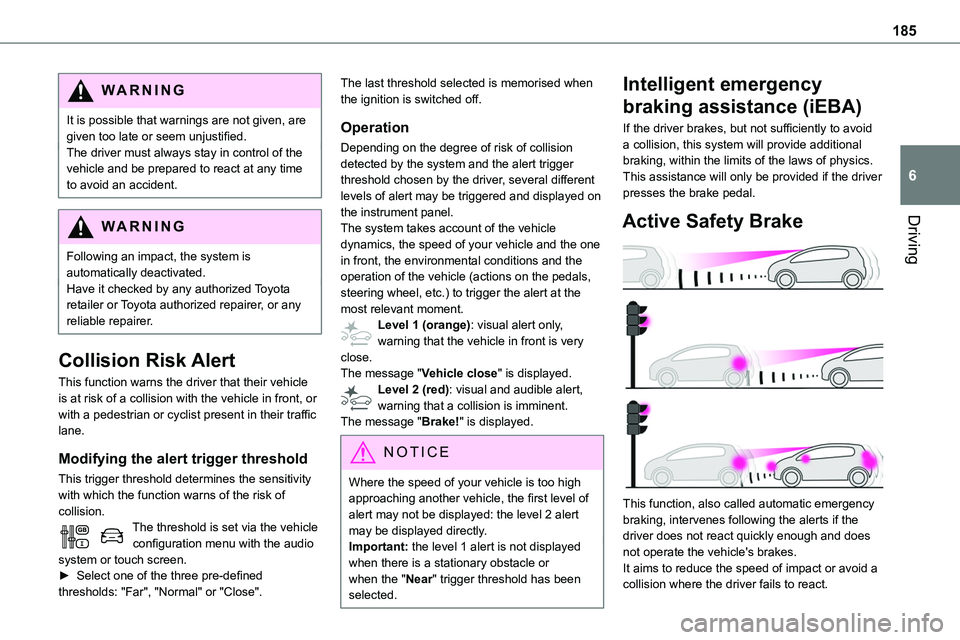
The system takes account of the vehicle dynamics, the speed of your vehicle and the one in front, the environmental conditions and the operation of the vehicle (actions on the pedals, steering wheel, etc.) to trigger the alert at the most relevant moment.Level 1 (orange): visual alert only, warning that the vehicle in front is very close.The message "Vehicle close" is displayed.Level 2 (red): visual and audible alert, warning that a collision is imminent.The message "Brake!" is displayed.
NOTIC E
Where the speed of your vehicle is too high approaching another vehicle, the first level of alert may not be displayed: the level 2 alert may be displayed directly.
Important: the level 1 alert is not displayed when there is a stationary obstacle or when the "Near" trigger threshold has been selected.
Intelligent emergency
braking assistance (iEBA)
If the driver brakes, but not sufficiently to avoid a collision, this system will provide additional braking, within the limits of the laws of physics.This assistance will only be provided if the driver presses the brake pedal.
Active Safety Brake
This function, also called automatic emergency braking, intervenes following the alerts if the driver does not react quickly enough and does not operate the vehicle's brakes.It aims to reduce the speed of impact or avoid a collision where the driver fails to react.
Page 324 of 360
324
Hill start assist 158–159Histogramme, fuel consumption 27–28Horn 11 2
I
Ignition 153–154, 312
Ignition on 154Immobiliser, electronic 150Indicator, AdBlue® range 20Indicator, coolant temperature 18–19Indicator, engine oil level 19–20Indicator lamps, operation 99Indicators, direction 100Inflating tyres 219, 262Inflating tyres and accessories (using the kit) 229–232Information, vehicle 318Infrared camera 170Instrument panel 10, 171Intelligent Traction Control 11 4Internet browser 301, 304ISOFIX 142, 142–143
J
Jack 233Jump starting 247
K
Key 30–34, 36–37Key, electronic 30, 154Keyless Entry and Starting 30–36, 151, 153–154Key not recognised 154Key with remote control 34–35
Kit, hands-free 271, 285–286, 310Kit, puncture repair 230–232Kit, temporary puncture repair 229–232
L
Labels 6, 62Labels, identification 262Lane Departure Warning System (LDWS) 186–187Leather (care) 226Level, AdBlue® 217Level, brake fluid 216Level, Diesel additive 217–218Level, engine coolant 18–19, 216Level, engine oil 19–20, 215Level, headlamp wash 106Level, power steering fluid 216Levels and checks 214–217Level, screenwash fluid 106, 217Lighting 99Lighting dimmer 24Lighting, exterior 99, 102
Lighting, guide-me home 101Lighting, interior 96, 104Lighting, mood 104Lighting, welcome 101–102Loading 79, 212Loading area fittings 78Load reduction mode 210Load restraint 79
Locating your vehicle 31Locking 30–31, 34–35Locking from the inside 39Locking the doors 39–40Low fuel level 196–198Lumbar 52, 55–56
M
Mains socket (domestic network) 201Maintenance (advice) 199, 224Maintenance, routine 171, 217, 220Manoeuvring aids (recommendations) 169Map reading lamps 96Markings, identification 262Massage function 55–56Mat 74–75, 171Memorising a speed 172Menu 284Menu, main 27, 265Menus (audio) 278–279, 293–294Menu short cuts 27Messages 312