power steering TOYOTA RAV4 2006 Service User Guide
[x] Cancel search | Manufacturer: TOYOTA, Model Year: 2006, Model line: RAV4, Model: TOYOTA RAV4 2006Pages: 2000, PDF Size: 45.84 MB
Page 1545 of 2000
BC–42BRAKE CONTROL – VEHICLE STABILITY CONTROL SYSTEM
BC
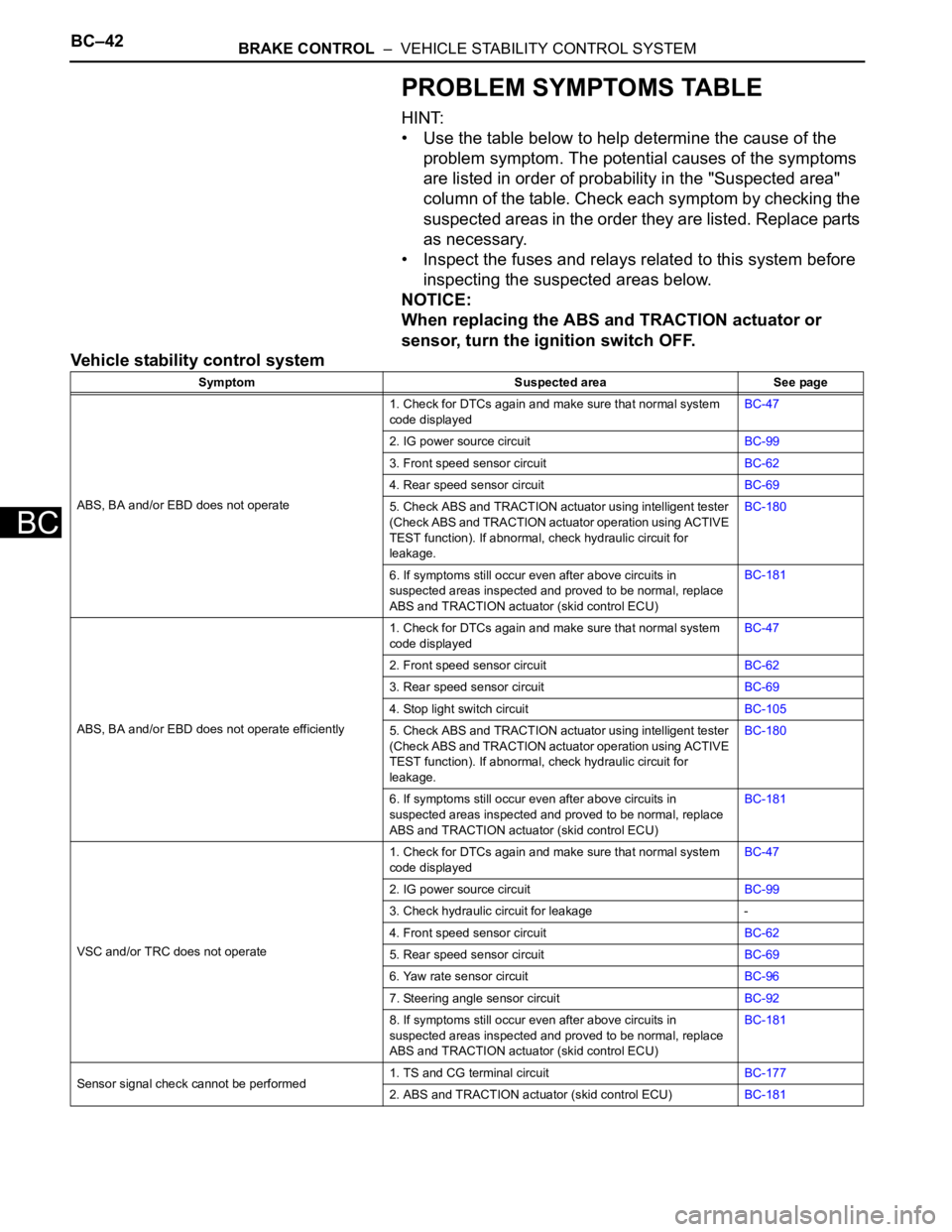
PROBLEM SYMPTOMS TABLE
HINT:
• Use the table below to help determine the cause of the
problem symptom. The potential causes of the symptoms
are listed in order of probability in the "Suspected area"
column of the table. Check each symptom by checking the
suspected areas in the order they are listed. Replace parts
as necessary.
• Inspect the fuses and relays related to this system before
inspecting the suspected areas below.
NOTICE:
When replacing the ABS and TRACTION actuator or
sensor, turn the ignition switch OFF.
Vehicle stability control system
Symptom Suspected area See page
ABS, BA and/or EBD does not operate1. Check for DTCs again and make sure that normal system
code displayedBC-47
2. IG power source circuitBC-99
3. Front speed sensor circuitBC-62
4. Rear speed sensor circuitBC-69
5. Check ABS and TRACTION actuator using intelligent tester
(Check ABS and TRACTION actuator operation using ACTIVE
TEST function). If abnormal, check hydraulic circuit for
leakage.BC-180
6. If symptoms still occur even after above circuits in
suspected areas inspected and proved to be normal, replace
ABS and TRACTION actuator (skid control ECU)BC-181
ABS, BA and/or EBD does not operate efficiently1. Check for DTCs again and make sure that normal system
code displayedBC-47
2. Front speed sensor circuitBC-62
3. Rear speed sensor circuitBC-69
4. Stop light switch circuitBC-105
5. Check ABS and TRACTION actuator using intelligent tester
(Check ABS and TRACTION actuator operation using ACTIVE
TEST function). If abnormal, check hydraulic circuit for
leakage.BC-180
6. If symptoms still occur even after above circuits in
suspected areas inspected and proved to be normal, replace
ABS and TRACTION actuator (skid control ECU)BC-181
VSC and/or TRC does not operate1. Check for DTCs again and make sure that normal system
code displayedBC-47
2. IG power source circuitBC-99
3. Check hydraulic circuit for leakage -
4. Front speed sensor circuitBC-62
5. Rear speed sensor circuitBC-69
6. Yaw rate sensor circuitBC-96
7. Steering angle sensor circuitBC-92
8. If symptoms still occur even after above circuits in
suspected areas inspected and proved to be normal, replace
ABS and TRACTION actuator (skid control ECU)BC-181
Sensor signal check cannot be performed1. TS and CG terminal circuitBC-177
2. ABS and TRACTION actuator (skid control ECU)BC-181
Page 1597 of 2000
STEERING COLUMN – STEERING COLUMN ASSEMBLYSR–13
SR
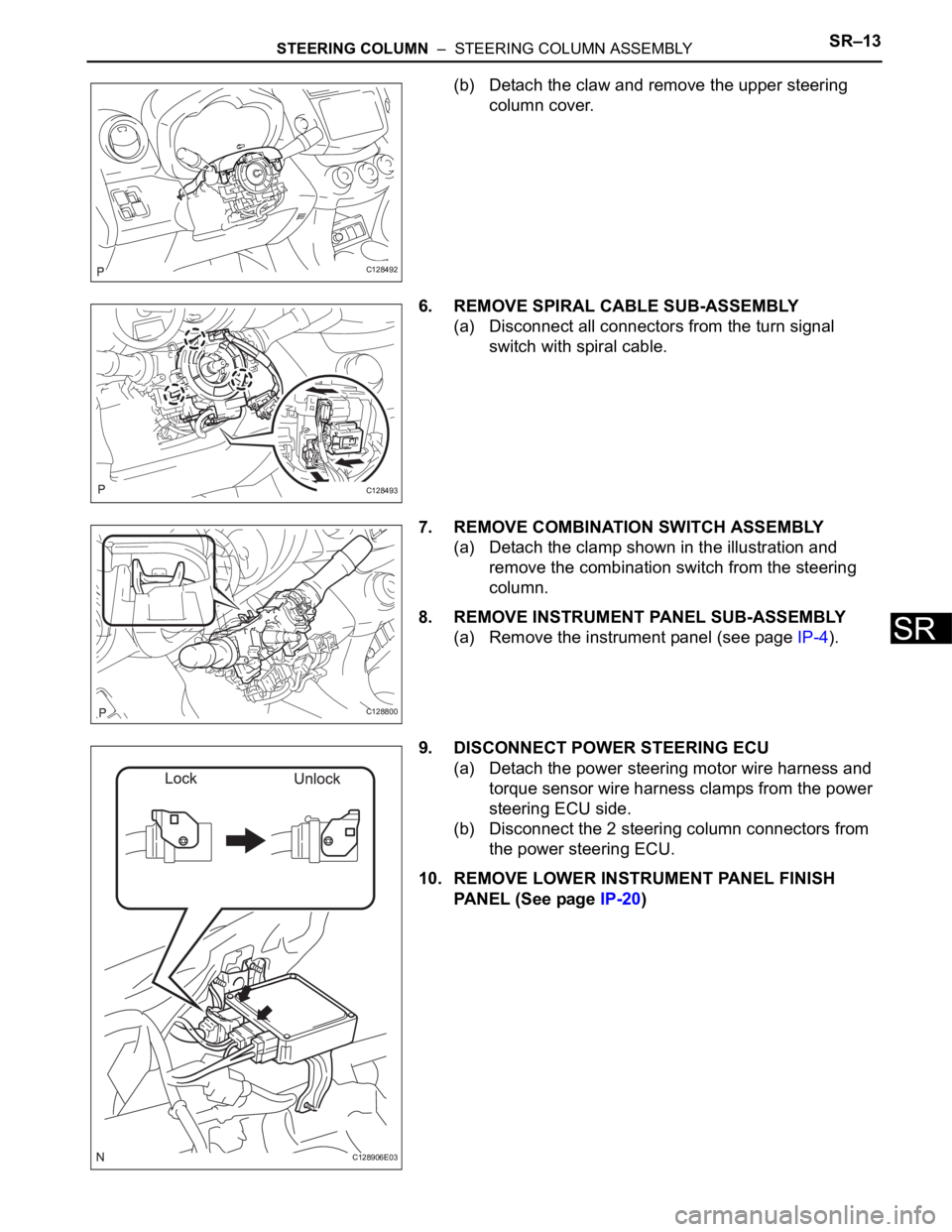
(b) Detach the claw and remove the upper steering
column cover.
6. REMOVE SPIRAL CABLE SUB-ASSEMBLY
(a) Disconnect all connectors from the turn signal
switch with spiral cable.
7. REMOVE COMBINATION SWITCH ASSEMBLY
(a) Detach the clamp shown in the illustration and
remove the combination switch from the steering
column.
8. REMOVE INSTRUMENT PANEL SUB-ASSEMBLY
(a) Remove the instrument panel (see page IP-4).
9. DISCONNECT POWER STEERING ECU
(a) Detach the power steering motor wire harness and
torque sensor wire harness clamps from the power
steering ECU side.
(b) Disconnect the 2 steering column connectors from
the power steering ECU.
10. REMOVE LOWER INSTRUMENT PANEL FINISH
PANEL (See page IP-20)
C128492
C128493
C128800
C128906E03
Page 1601 of 2000
STEERING COLUMN – STEERING COLUMN ASSEMBLYSR–17
SR
INSPECTION
1. CHECK TORQUE SENSOR
(a) Check the torque sensor (see page PS-19).
2. CHECK POWER STEERING MOTOR
(a) Check the power steering motor (see page PS-22).
3. CHECK MOTOR ROTATION ANGLE SENSOR
(a) Check the motor rotation angle sensor (see page
PS-25).
REASSEMBLY
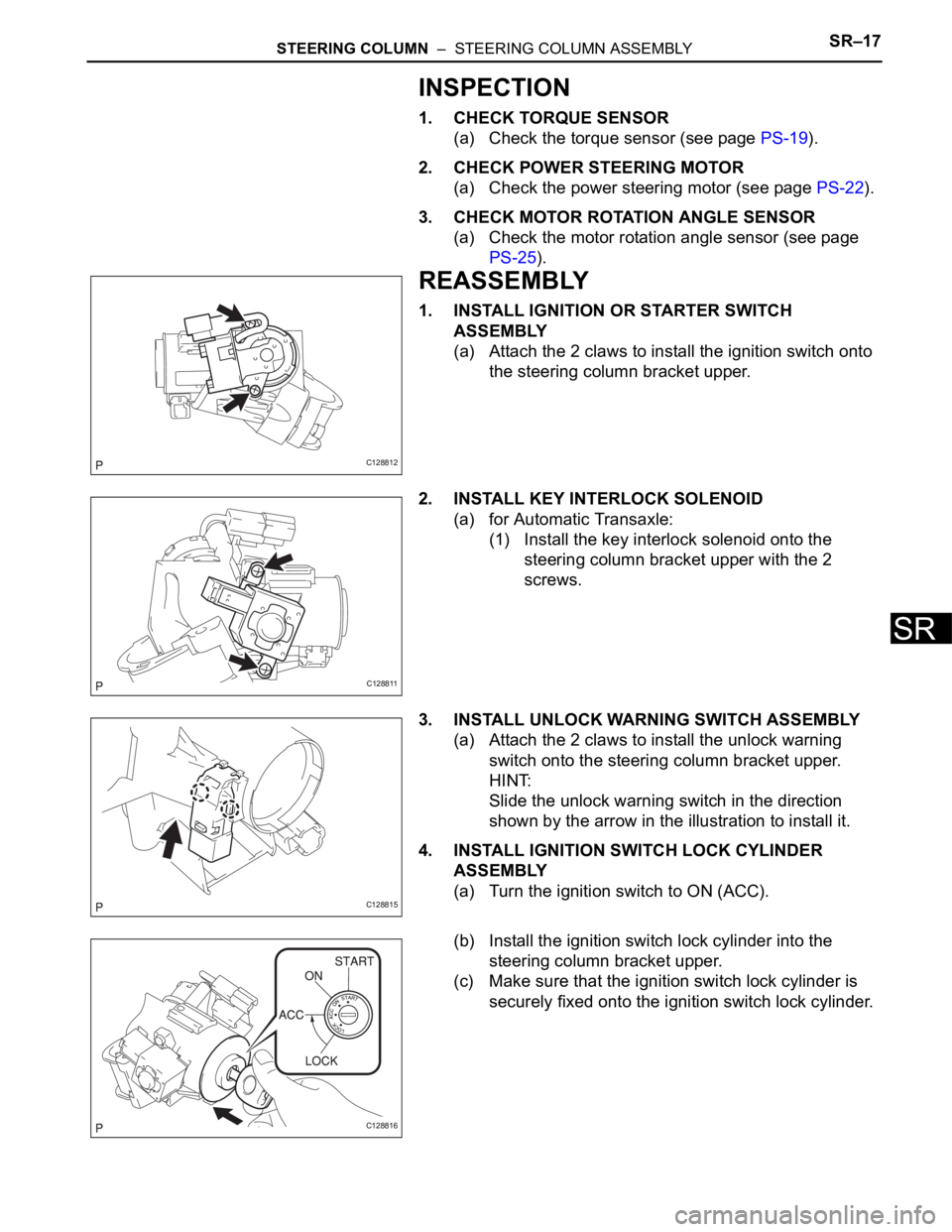
1. INSTALL IGNITION OR STARTER SWITCH
ASSEMBLY
(a) Attach the 2 claws to install the ignition switch onto
the steering column bracket upper.
2. INSTALL KEY INTERLOCK SOLENOID
(a) for Automatic Transaxle:
(1) Install the key interlock solenoid onto the
steering column bracket upper with the 2
screws.
3. INSTALL UNLOCK WARNING SWITCH ASSEMBLY
(a) Attach the 2 claws to install the unlock warning
switch onto the steering column bracket upper.
HINT:
Slide the unlock warning switch in the direction
shown by the arrow in the illustration to install it.
4. INSTALL IGNITION SWITCH LOCK CYLINDER
ASSEMBLY
(a) Turn the ignition switch to ON (ACC).
(b) Install the ignition switch lock cylinder into the
steering column bracket upper.
(c) Make sure that the ignition switch lock cylinder is
securely fixed onto the ignition switch lock cylinder.
C128812
C128811
C128815
C128816
Page 1604 of 2000
SR–20STEERING COLUMN – STEERING COLUMN ASSEMBLY
SR
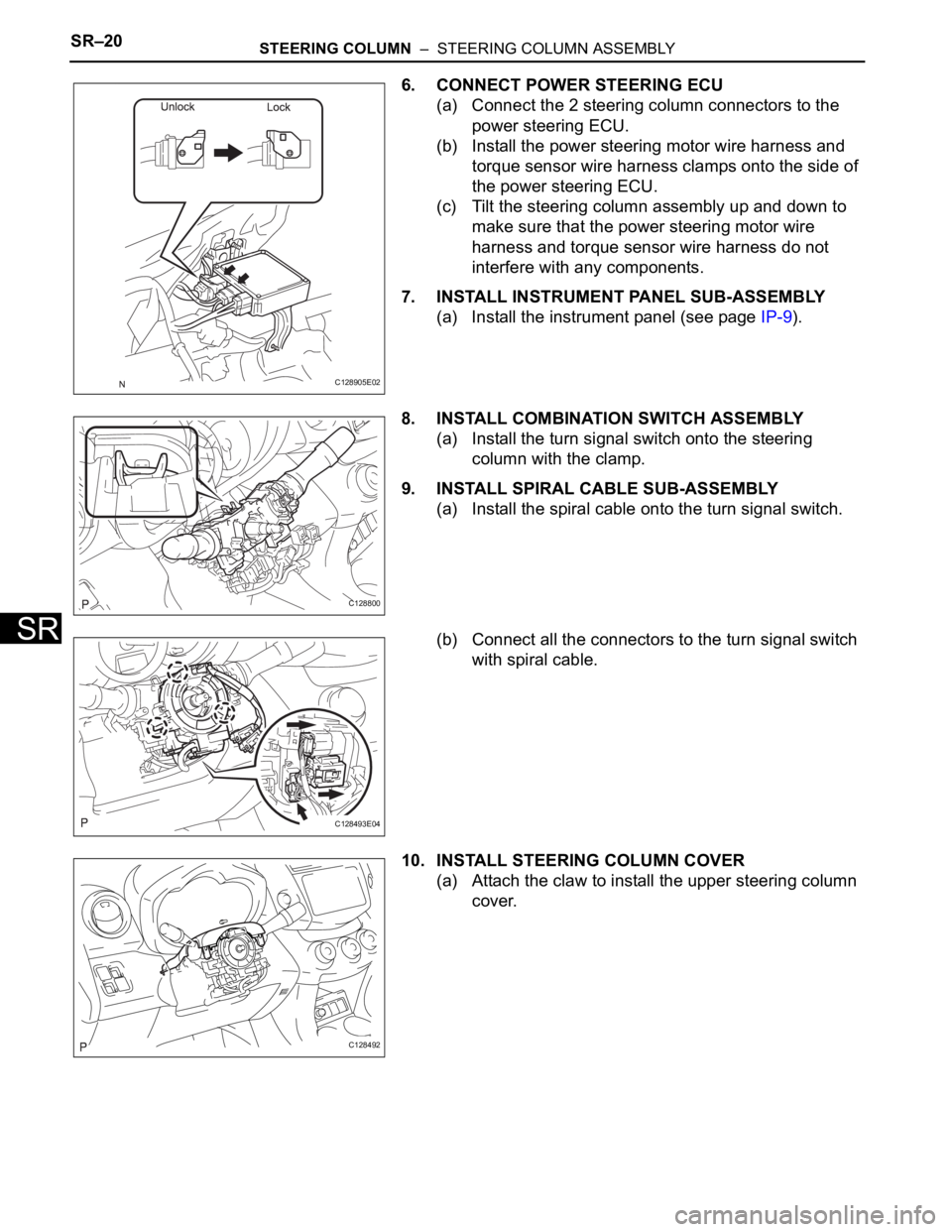
6. CONNECT POWER STEERING ECU
(a) Connect the 2 steering column connectors to the
power steering ECU.
(b) Install the power steering motor wire harness and
torque sensor wire harness clamps onto the side of
the power steering ECU.
(c) Tilt the steering column assembly up and down to
make sure that the power steering motor wire
harness and torque sensor wire harness do not
interfere with any components.
7. INSTALL INSTRUMENT PANEL SUB-ASSEMBLY
(a) Install the instrument panel (see page IP-9).
8. INSTALL COMBINATION SWITCH ASSEMBLY
(a) Install the turn signal switch onto the steering
column with the clamp.
9. INSTALL SPIRAL CABLE SUB-ASSEMBLY
(a) Install the spiral cable onto the turn signal switch.
(b) Connect all the connectors to the turn signal switch
with spiral cable.
10. INSTALL STEERING COLUMN COVER
(a) Attach the claw to install the upper steering column
cover.
C128905E02
C128800
C128493E04
C128492
Page 1606 of 2000
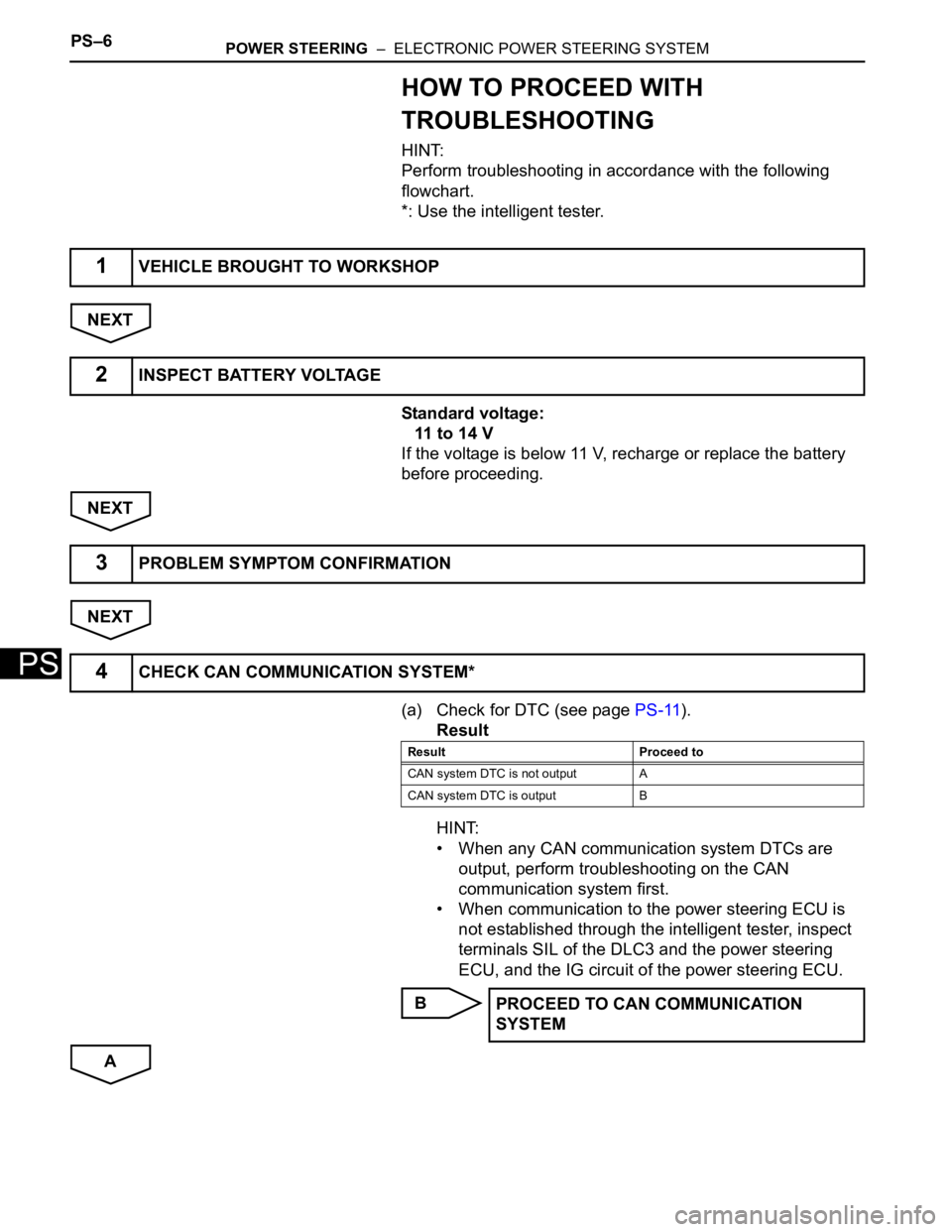
PS–6POWER STEERING – ELECTRONIC POWER STEERING SYSTEM
PS
HOW TO PROCEED WITH
TROUBLESHOOTING
HINT:
Perform troubleshooting in accordance with the following
flowchart.
*: Use the intelligent tester.
NEXT
Standard voltage:
11 to 14 V
If the voltage is below 11 V, recharge or replace the battery
before proceeding.
NEXT
NEXT
(a) Check for DTC (see page PS-11).
Result
HINT:
• When any CAN communication system DTCs are
output, perform troubleshooting on the CAN
communication system first.
• When communication to the power steering ECU is
not established through the intelligent tester, inspect
terminals SIL of the DLC3 and the power steering
ECU, and the IG circuit of the power steering ECU.
B
A
1VEHICLE BROUGHT TO WORKSHOP
2INSPECT BATTERY VOLTAGE
3PROBLEM SYMPTOM CONFIRMATION
4CHECK CAN COMMUNICATION SYSTEM*
Result Proceed to
CAN system DTC is not output A
CAN system DTC is output B
PROCEED TO CAN COMMUNICATION
SYSTEM
Page 1607 of 2000
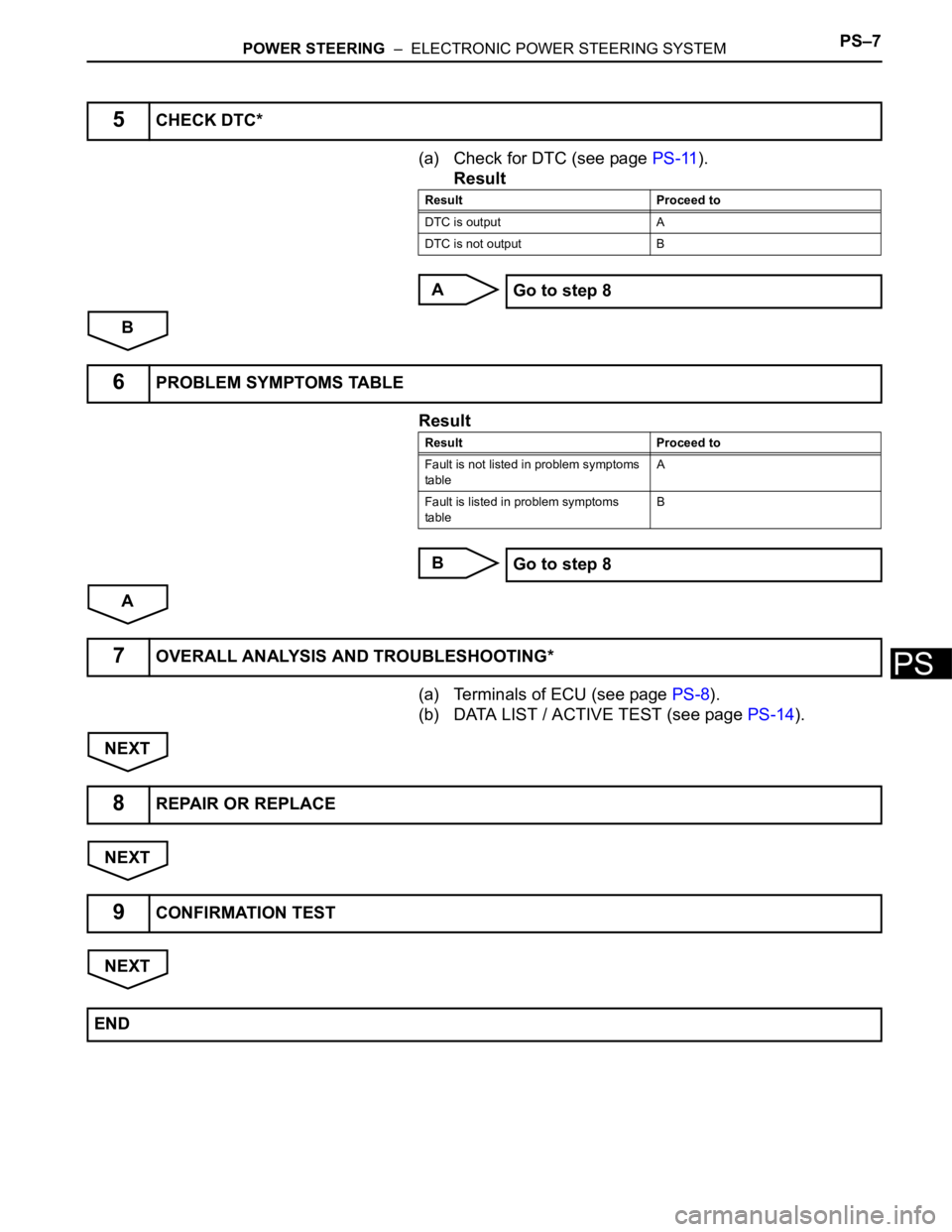
POWER STEERING – ELECTRONIC POWER STEERING SYSTEMPS–7
PS
(a) Check for DTC (see page PS-11).
Result
A
B
Result
B
A
(a) Terminals of ECU (see page PS-8).
(b) DATA LIST / ACTIVE TEST (see page PS-14).
NEXT
NEXT
NEXT
5CHECK DTC*
Result Proceed to
DTC is output A
DTC is not output B
Go to step 8
6PROBLEM SYMPTOMS TABLE
Result Proceed to
Fault is not listed in problem symptoms
tableA
Fault is listed in problem symptoms
tableB
Go to step 8
7OVERALL ANALYSIS AND TROUBLESHOOTING*
8REPAIR OR REPLACE
9CONFIRMATION TEST
END
Page 1608 of 2000
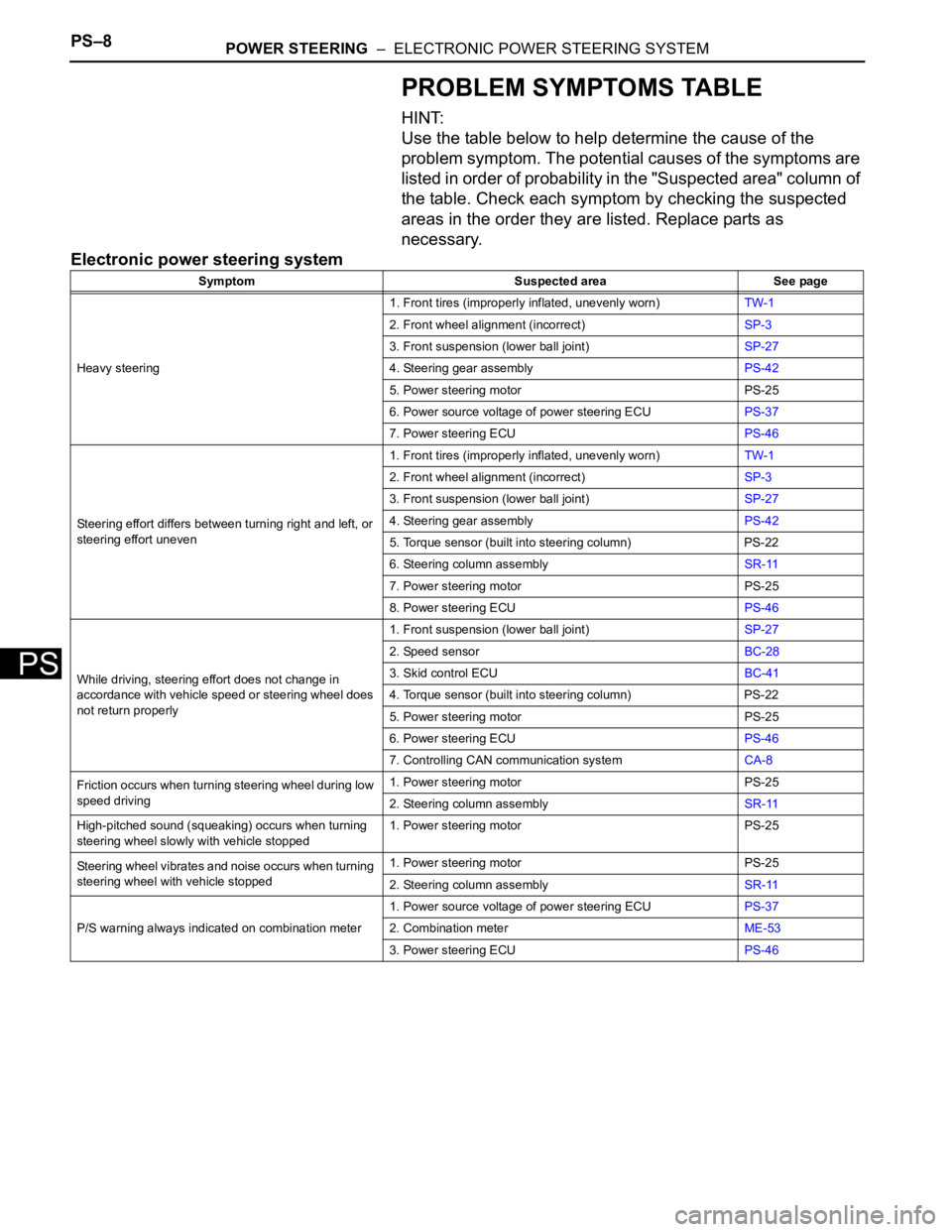
PS–8POWER STEERING – ELECTRONIC POWER STEERING SYSTEM
PS
PROBLEM SYMPTOMS TABLE
HINT:
Use the table below to help determine the cause of the
problem symptom. The potential causes of the symptoms are
listed in order of probability in the "Suspected area" column of
the table. Check each symptom by checking the suspected
areas in the order they are listed. Replace parts as
necessary.
Electronic power steering system
Symptom Suspected area See page
Heavy steering1. Front tires (improperly inflated, unevenly worn)TW-1
2. Front wheel alignment (incorrect)SP-3
3. Front suspension (lower ball joint)SP-27
4. Steering gear assemblyPS-42
5. Power steering motor PS-25
6. Power source voltage of power steering ECUPS-37
7. Power steering ECUPS-46
Steering effort differs between turning right and left, or
steering effort uneven1. Front tires (improperly inflated, unevenly worn)TW-1
2. Front wheel alignment (incorrect)SP-3
3. Front suspension (lower ball joint)SP-27
4. Steering gear assemblyPS-42
5. Torque sensor (built into steering column) PS-22
6. Steering column assemblySR-11
7. Power steering motor PS-25
8. Power steering ECUPS-46
While driving, steering effort does not change in
accordance with vehicle speed or steering wheel does
not return properly1. Front suspension (lower ball joint)SP-27
2. Speed sensorBC-28
3. Skid control ECUBC-41
4. Torque sensor (built into steering column) PS-22
5. Power steering motor PS-25
6. Power steering ECUPS-46
7. Controlling CAN communication systemCA-8
Friction occurs when turning steering wheel during low
speed driving1. Power steering motor PS-25
2. Steering column assemblySR-11
High-pitched sound (squeaking) occurs when turning
steering wheel slowly with vehicle stopped1. Power steering motor PS-25
Steering wheel vibrates and noise occurs when turning
steering wheel with vehicle stopped1. Power steering motor PS-25
2. Steering column assemblySR-11
P/S warning always indicated on combination meter1. Power source voltage of power steering ECUPS-37
2. Combination meterME-53
3. Power steering ECUPS-46
Page 1609 of 2000
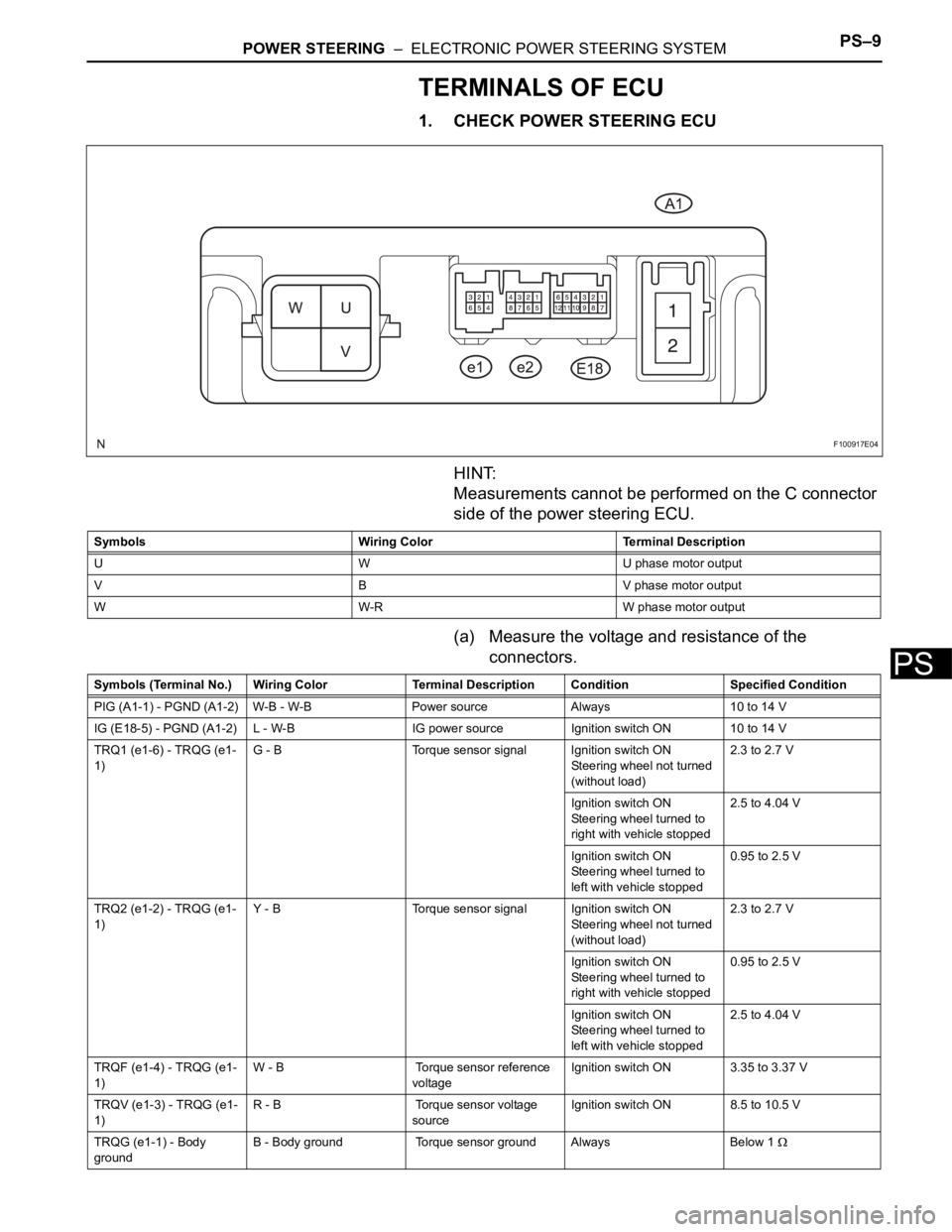
POWER STEERING – ELECTRONIC POWER STEERING SYSTEMPS–9
PS
TERMINALS OF ECU
1. CHECK POWER STEERING ECU
HINT:
Measurements cannot be performed on the C connector
side of the power steering ECU.
(a) Measure the voltage and resistance of the
connectors.
F100917E04
Symbols Wiring Color Terminal Description
U W U phase motor output
V B V phase motor output
W W-R W phase motor output
Symbols (Terminal No.) Wiring Color Terminal Description ConditionSpecified Condition
PIG (A1-1) - PGND (A1-2) W-B - W-B Power source Always 10 to 14 V
IG (E18-5) - PGND (A1-2) L - W-B IG power source Ignition switch ON 10 to 14 V
TRQ1 (e1-6) - TRQG (e1-
1)G - B Torque sensor signal Ignition switch ON
Steering wheel not turned
(without load)2.3 to 2.7 V
Ignition switch ON
Steering wheel turned to
right with vehicle stopped2.5 to 4.04 V
Ignition switch ON
Steering wheel turned to
left with vehicle stopped0.95 to 2.5 V
TRQ2 (e1-2) - TRQG (e1-
1)Y - B Torque sensor signal Ignition switch ON
Steering wheel not turned
(without load)2.3 to 2.7 V
Ignition switch ON
Steering wheel turned to
right with vehicle stopped0.95 to 2.5 V
Ignition switch ON
Steering wheel turned to
left with vehicle stopped2.5 to 4.04 V
TRQF (e1-4) - TRQG (e1-
1)W - B Torque sensor reference
voltageIgnition switch ON 3.35 to 3.37 V
TRQV (e1-3) - TRQG (e1-
1)R - B Torque sensor voltage
sourceIgnition switch ON 8.5 to 10.5 V
TRQG (e1-1) - Body
groundB - Body ground Torque sensor ground Always Below 1
Page 1610 of 2000
PS–10POWER STEERING – ELECTRONIC POWER STEERING SYSTEM
PS
If the result is not as specified, the ECU may have a
malfunction.
DIAGNOSIS SYSTEM
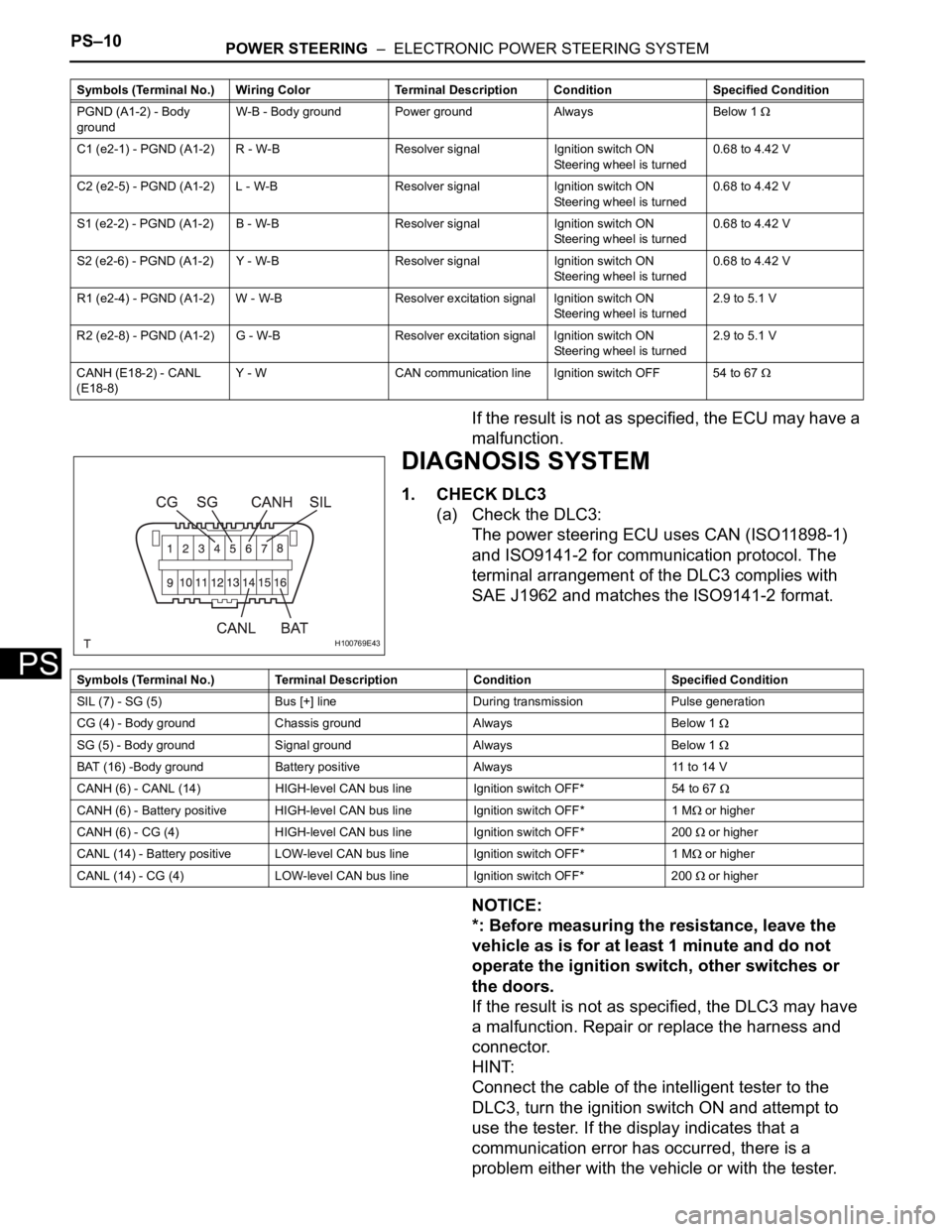
1. CHECK DLC3
(a) Check the DLC3:
The power steering ECU uses CAN (ISO11898-1)
and ISO9141-2 for communication protocol. The
terminal arrangement of the DLC3 complies with
SAE J1962 and matches the ISO9141-2 format.
NOTICE:
*: Before measuring the resistance, leave the
vehicle as is for at least 1 minute and do not
operate the ignition switch, other switches or
the doors.
If the result is not as specified, the DLC3 may have
a malfunction. Repair or replace the harness and
connector.
HINT:
Connect the cable of the intelligent tester to the
DLC3, turn the ignition switch ON and attempt to
use the tester. If the display indicates that a
communication error has occurred, there is a
problem either with the vehicle or with the tester.
PGND (A1-2) - Body
groundW-B - Body ground Power ground Always Below 1
C1 (e2-1) - PGND (A1-2) R - W-B Resolver signal Ignition switch ON
Steering wheel is turned0.68 to 4.42 V
C2 (e2-5) - PGND (A1-2) L - W-B Resolver signal Ignition switch ON
Steering wheel is turned0.68 to 4.42 V
S1 (e2-2) - PGND (A1-2) B - W-B Resolver signal Ignition switch ON
Steering wheel is turned0.68 to 4.42 V
S2 (e2-6) - PGND (A1-2) Y - W-B Resolver signal Ignition switch ON
Steering wheel is turned0.68 to 4.42 V
R1 (e2-4) - PGND (A1-2) W - W-B Resolver excitation signal Ignition switch ON
Steering wheel is turned2.9 to 5.1 V
R2 (e2-8) - PGND (A1-2) G - W-B Resolver excitation signal Ignition switch ON
Steering wheel is turned2.9 to 5.1 V
CANH (E18-2) - CANL
(E18-8)Y - W CAN communication line Ignition switch OFF 54 to 67
Symbols (Terminal No.) Wiring Color Terminal Description ConditionSpecified Condition
H100769E43
Symbols (Terminal No.) Terminal Description Condition Specified Condition
SIL (7) - SG (5) Bus [+] line During transmission Pulse generation
CG (4) - Body ground Chassis ground Always Below 1
SG (5) - Body ground Signal ground Always Below 1
BAT (16) -Body ground Battery positive Always 11 to 14 V
CANH (6) - CANL (14) HIGH-level CAN bus line Ignition switch OFF*54 to 67
CANH (6) - Battery positive HIGH-level CAN bus line Ignition switch OFF* 1 M or higher
CANH (6) - CG (4) HIGH-level CAN bus line Ignition switch OFF* 200
or higher
CANL (14) - Battery positive LOW-level CAN bus line Ignition switch OFF* 1 M
or higher
CANL (14) - CG (4) LOW-level CAN bus line Ignition switch OFF* 200
or higher
Page 1611 of 2000
POWER STEERING – ELECTRONIC POWER STEERING SYSTEMPS–11
PS
• If communication is normal when the tester is
connected to another vehicle, inspect the DLC3
of the original vehicle.
• If communication is still not possible when the
tester is connected to another vehicle, the
problem may be in the tester itself. Consult the
Service Department listed in the tester's
instruction manual.
2. WARNING LIGHT
(a) When a problem occurs in the electronic power
steering system, the P/S warning light on the
combination meter comes on to inform the driver of
the problem.
DTC CHECK / CLEAR
1. CHECK DTC
(a) When using intelligent tester:
(1) Connect the intelligent tester (with CAN VIM) to
the DLC3.
(2) Turn the ignition switch ON and press the
intelligent tester main switch ON.
(3) Read the DTCs by following the prompts on the
intelligent tester.
HINT:
Refer to the intelligent tester operator's manual
for further details.
(b) When not using intelligent tester:
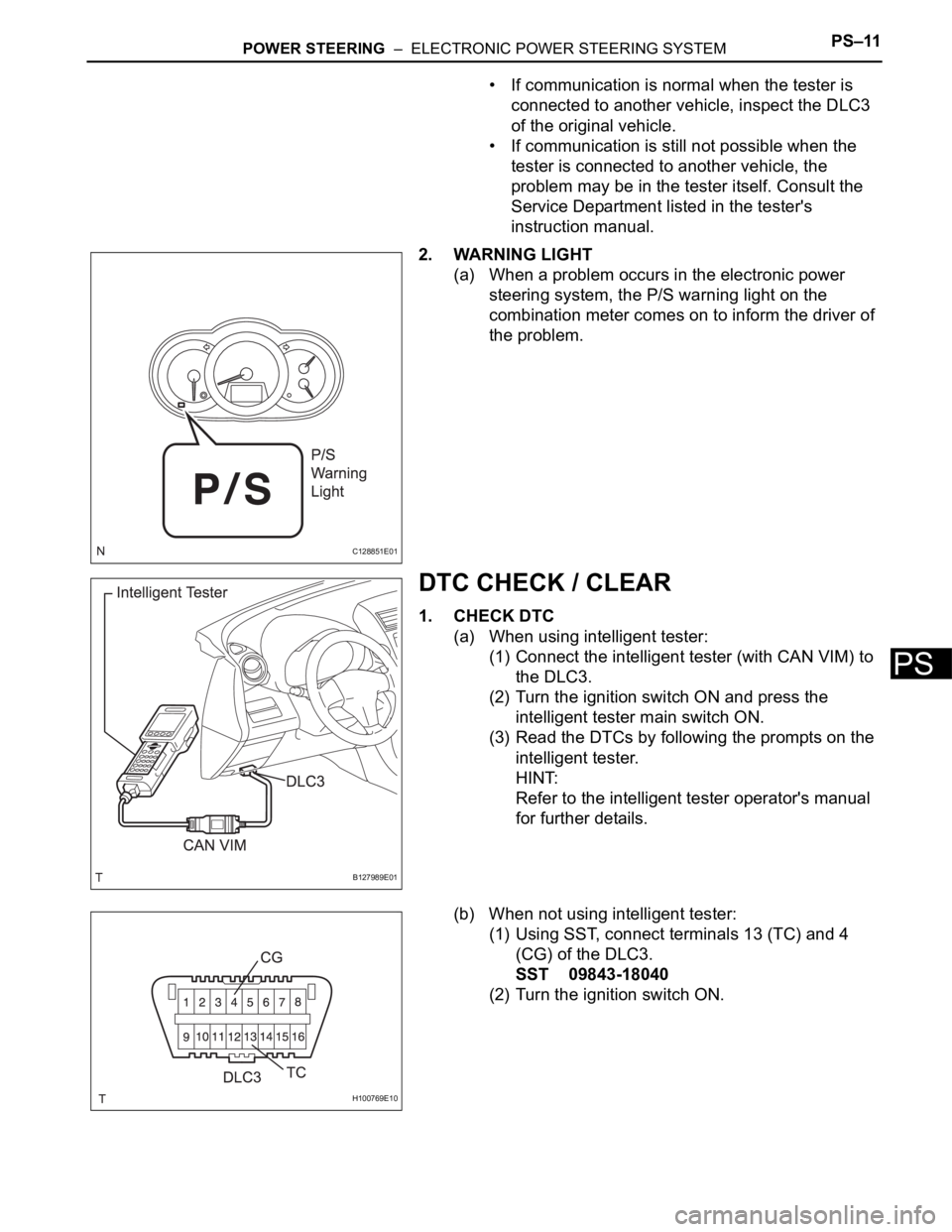
(1) Using SST, connect terminals 13 (TC) and 4
(CG) of the DLC3.
SST 09843-18040
(2) Turn the ignition switch ON.
C128851E01
B127989E01
H100769E10