steering TOYOTA RAV4 2006 Service Owner's Manual
[x] Cancel search | Manufacturer: TOYOTA, Model Year: 2006, Model line: RAV4, Model: TOYOTA RAV4 2006Pages: 2000, PDF Size: 45.84 MB
Page 1334 of 2000
TF–6GF1A TRANSFER – ACTIVE TORQUE CONTROL 4WD SYSTEM
TF
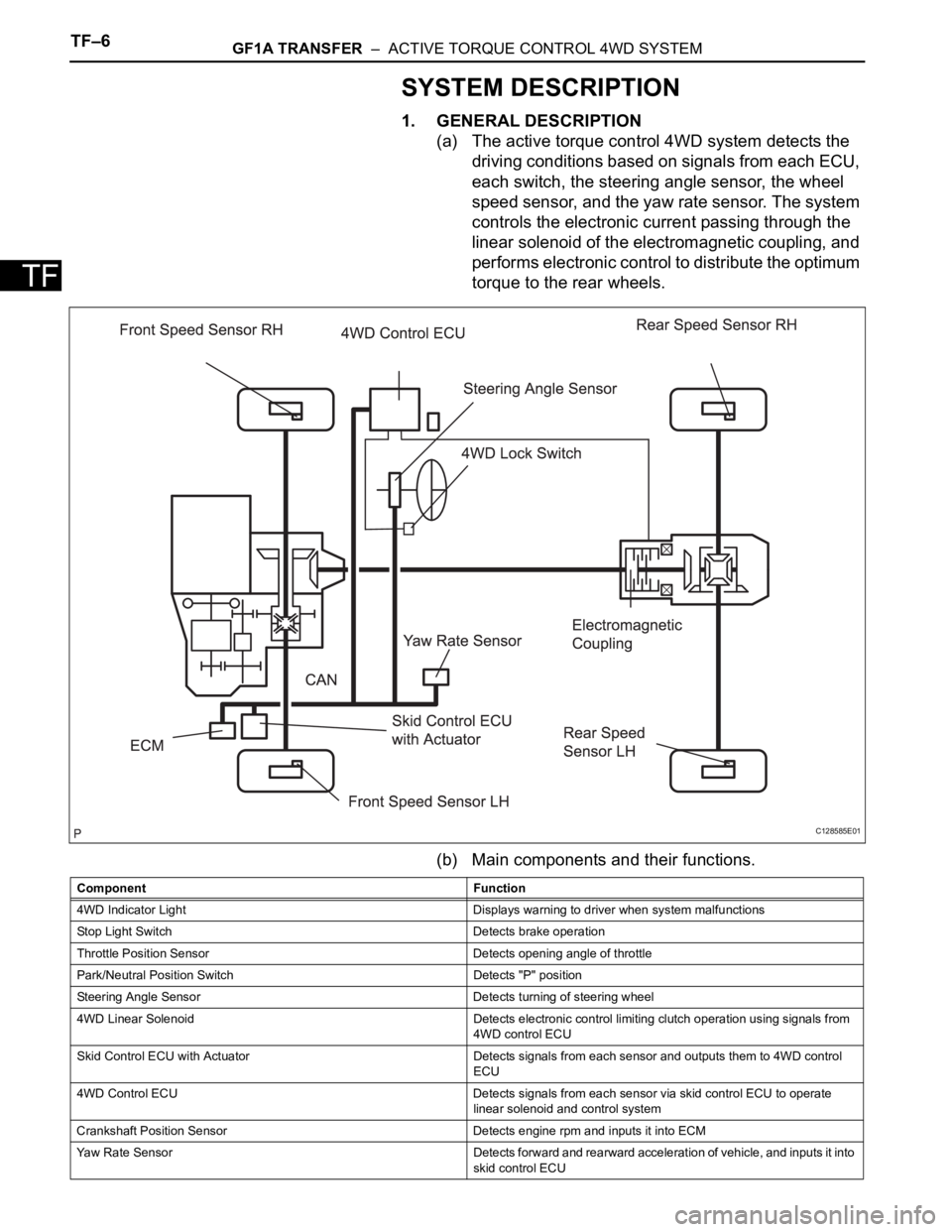
SYSTEM DESCRIPTION
1. GENERAL DESCRIPTION
(a) The active torque control 4WD system detects the
driving conditions based on signals from each ECU,
each switch, the steering angle sensor, the wheel
speed sensor, and the yaw rate sensor. The system
controls the electronic current passing through the
linear solenoid of the electromagnetic coupling, and
performs electronic control to distribute the optimum
torque to the rear wheels.
(b) Main components and their functions.
C128585E01
Component Function
4WD Indicator Light Displays warning to driver when system malfunctions
Stop Light Switch Detects brake operation
Throttle Position Sensor Detects opening angle of throttle
Park/Neutral Position Switch Detects "P" position
Steering Angle Sensor Detects turning of steering wheel
4WD Linear Solenoid Detects electronic control limiting clutch operation using signals from
4WD control ECU
Skid Control ECU with Actuator Detects signals from each sensor and outputs them to 4WD control
ECU
4WD Control ECU Detects signals from each sensor via skid control ECU to operate
linear solenoid and control system
Crankshaft Position Sensor Detects engine rpm and inputs it into ECM
Yaw Rate Sensor Detects forward and rearward acceleration of vehicle, and inputs it into
skid control ECU
Page 1335 of 2000

GF1A TRANSFER – ACTIVE TORQUE CONTROL 4WD SYSTEMTF–7
TF2. DRIVING FUNCTION
Ambient Temperature Detects external ambient temperature and inputs it into body ECU
Electromagnetic Coupling Based on amount of current sent from 4WD control ECU, torque is
distributed to rear wheels
4WD Lock Switch Change of side auto mode for lock mode
4WD Lock Mode Indicator Light Lock mode control status is communicated to driver through indicator
light illumination
When lock mode is turned ON, indicator light blinks twice and then
remains illuminated.
When lock mode is turned OFF, indicator light turns OFF. Component Function
Vehicle Condition Status
Control at Vehicle Startup This controls the amount of sideway sliding that occurs at rear of
vehicles when accelerating from stop to improve acceleration and hill
climbing capacity
Slip Control at Vehicle Startup This helps prevent vehicle from sliding sideways. When accelerating a
stopped vehicle with the steering wheel turned, it ensures steering
stability
Slip Control This ensures high turning performance and that stability is not affected
by road surface conditions during mid and high speed running
Control During Acceleration This controls straight-line running when accelerating during mid and
high speeds to ensure straight-line stability of the vehicle
Page 1343 of 2000
GF1A TRANSFER – ACTIVE TORQUE CONTROL 4WD SYSTEMTF–15
TF
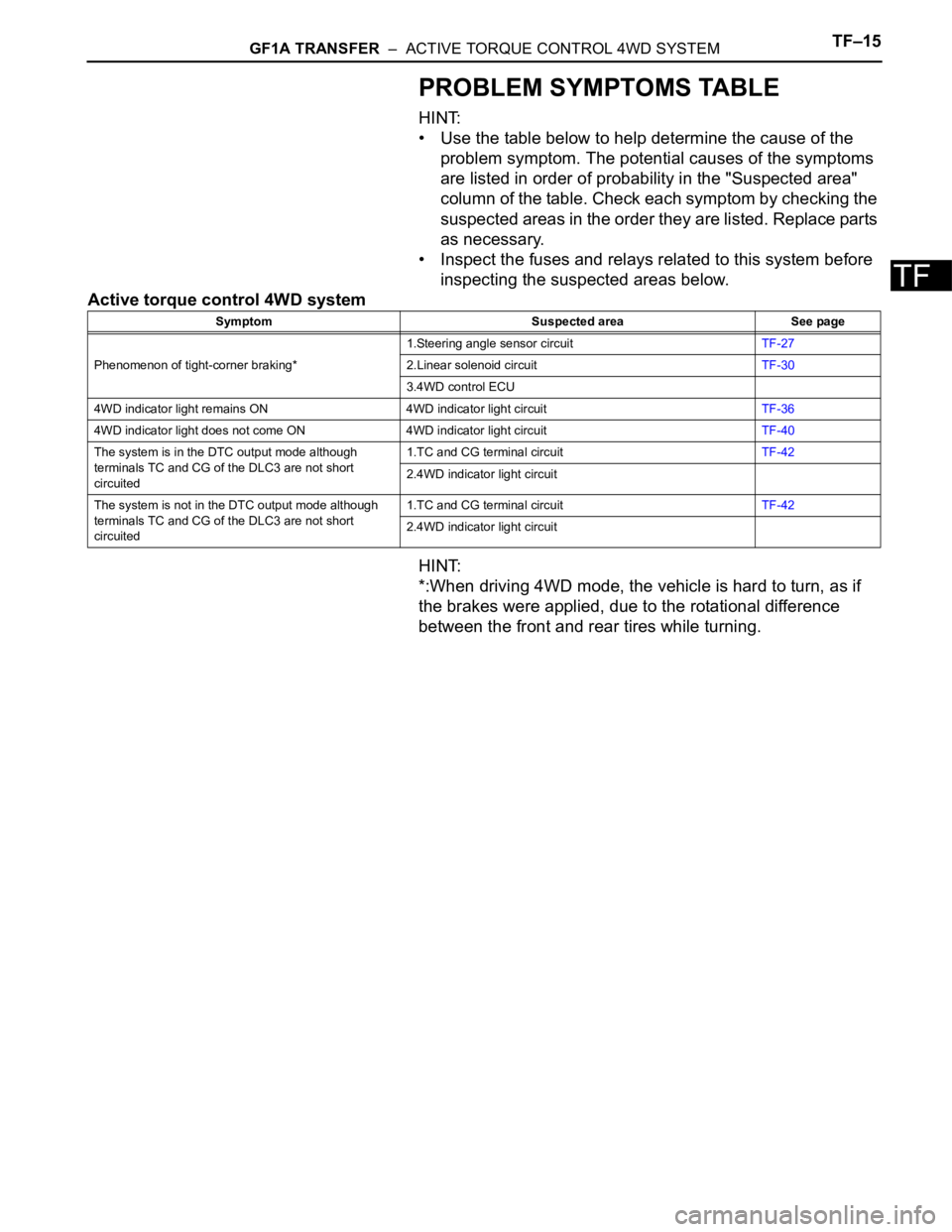
PROBLEM SYMPTOMS TABLE
HINT:
• Use the table below to help determine the cause of the
problem symptom. The potential causes of the symptoms
are listed in order of probability in the "Suspected area"
column of the table. Check each symptom by checking the
suspected areas in the order they are listed. Replace parts
as necessary.
• Inspect the fuses and relays related to this system before
inspecting the suspected areas below.
Active torque control 4WD system
HINT:
*:When driving 4WD mode, the vehicle is hard to turn, as if
the brakes were applied, due to the rotational difference
between the front and rear tires while turning.
Symptom Suspected area See page
Phenomenon of tight-corner braking*1.Steering angle sensor circuitTF-27
2.Linear solenoid circuitTF-30
3.4WD control ECU
4WD indicator light remains ON 4WD indicator light circuitTF-36
4WD indicator light does not come ON 4WD indicator light circuitTF-40
The system is in the DTC output mode although
terminals TC and CG of the DLC3 are not short
circuited1.TC and CG terminal circuitTF-42
2.4WD indicator light circuit
The system is not in the DTC output mode although
terminals TC and CG of the DLC3 are not short
circuited1.TC and CG terminal circuitTF-42
2.4WD indicator light circuit
Page 1349 of 2000

GF1A TRANSFER – ACTIVE TORQUE CONTROL 4WD SYSTEMTF–21
TF
DATA LIST / ACTIVE TEST
1. READ DATA LIST
HINT:
Using the intelligent tester's (with CAN VIM) DATA LIST
allows switch, sensor and other item values to be read
without removing any parts. Reading the DATA LIST
early in troubleshooting is one way to save time.
(a) Connect the intelligent tester (with CAN VIM) to the
DLC3.
(b) Turn the ignition switch ON.
(c) Read the DATA LIST according to the display on the
tester.
4WD control ECU
Item Measurement Item/Range
(Display)Normal Condition Diagnostic Note
4WD WARN LAMP 4WD indicator light /OFF or ON OFF: 4WD indicator light OFF
ON: 4WD indicator light ON-
SLIP INDI LAMP Slip indicator light /OFF or ON OFF: SLIP indicator light OFF
ON: SLIP indicator light ON-
STOP LAMP SW Stop light switch /OFF or ON OFF: Brake pedal released
ON: Brake pedal depressed-
STEERING ANGLE Steering angle value /
Min.: -3276.8 deg
Max.: 3276.7 degMin.: -3276.8 deg
Max.: 3276.7 deg-
FR WHEEL SPD FR wheel speed /
Min.: 0 km/h (0 mph)
Reading : Max.: 326.4 km/h
(202.8 mph)Actual wheel speed Almost no difference from the
speedometer
FL WHEEL SPD FL wheel speed /
Min.: 0 km/h (0 mph)
Reading : Max.: 326.4 km/h
(202.8 mph)Actual wheel speed Almost no difference from the
speedometer
RR WHEEL SPD RR wheel speed /
Min.: 0 km/h (0 mph)
Reading : Max.: 326.4 km/h
(202.8 mph)Actual wheel speed Almost no difference from the
speedometer
RLWHEEL SPD RL wheel speed /
Min.: 0 km/h (0 mph)
Reading : Max.: 326.4 km/h
(202.8 mph)Actual wheel speed Almost no difference from the
speedometer
AMBI TEMP Ambient temperature /
Min.: -128
C (198.4 F)
Max.: 127 C (260.6 F)Min.: -128 (198.4
F)
Max.: 127 (260.6
F)-
COOLANT TEMP Engine coolant temperature /
Min.: 0
C (32 F)
Max.: 127.5
C (261.5 F)Min.: 0
C (32 F)
Max.: 127.5 C (261.5 F)-
LOCK SW 4WD lock switch / OFF or ON OFF: 4WD lock switch off
ON: 4WD lock switch on-
SLC CUR SLC solenoid (4WD linear
solenoid) current /
Min.: 0 A
Max.: 3 AMin.: 0 A
Max.: 3 A-
Page 1351 of 2000
GF1A TRANSFER – ACTIVE TORQUE CONTROL 4WD SYSTEMTF–23
TF
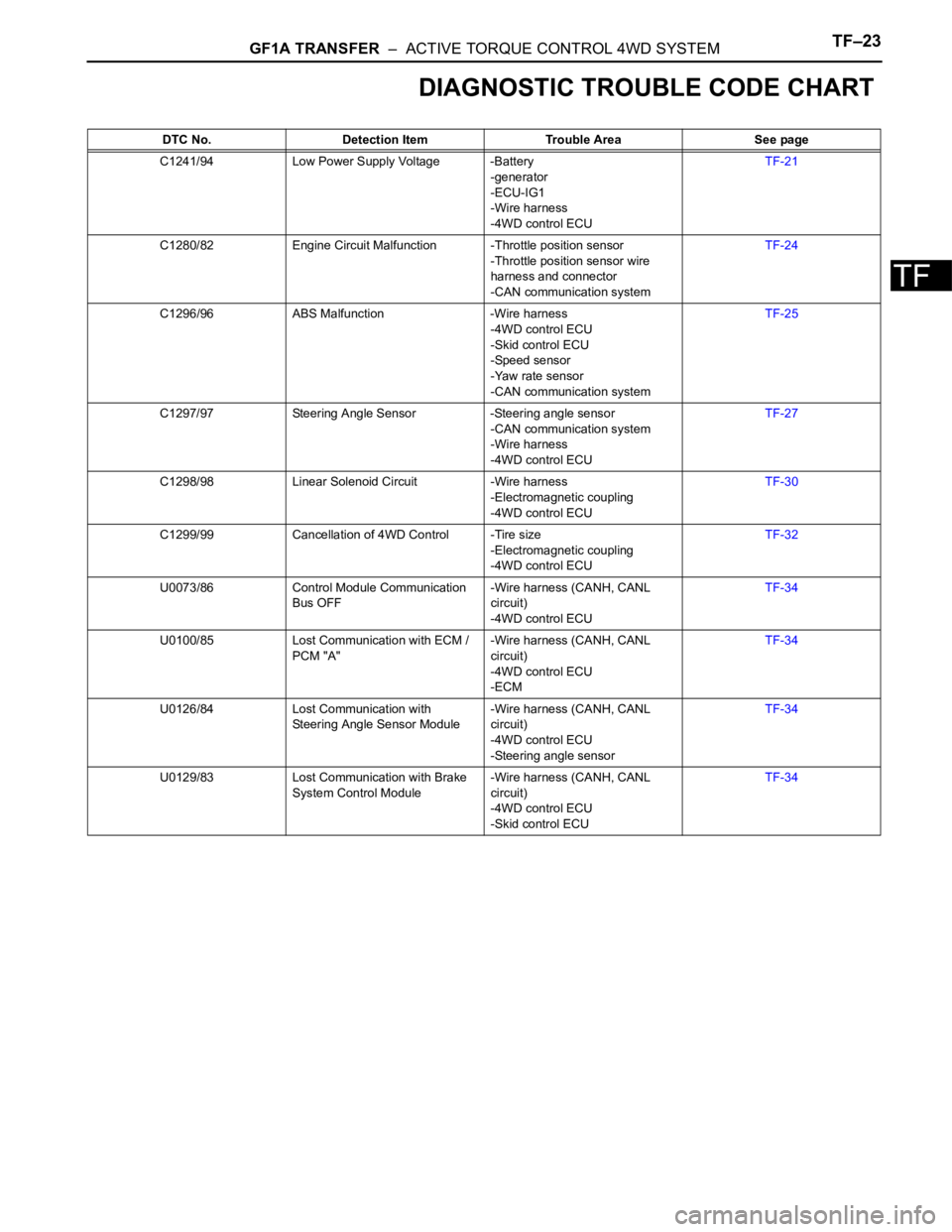
DIAGNOSTIC TROUBLE CODE CHART
DTC No. Detection Item Trouble Area See page
C1241/94 Low Power Supply Voltage -Battery
-generator
-ECU-IG1
-Wire harness
-4WD control ECUTF-21
C1280/82 Engine Circuit Malfunction -Throttle position sensor
-Throttle position sensor wire
harness and connector
-CAN communication systemTF-24
C1296/96 ABS Malfunction -Wire harness
-4WD control ECU
-Skid control ECU
-Speed sensor
-Yaw rate sensor
-CAN communication systemTF-25
C1297/97 Steering Angle Sensor -Steering angle sensor
-CAN communication system
-Wire harness
-4WD control ECUTF-27
C1298/98 Linear Solenoid Circuit -Wire harness
-Electromagnetic coupling
-4WD control ECUTF-30
C1299/99 Cancellation of 4WD Control -Tire size
-Electromagnetic coupling
-4WD control ECUTF-32
U0073/86 Control Module Communication
Bus OFF-Wire harness (CANH, CANL
circuit)
-4WD control ECUTF-34
U0100/85 Lost Communication with ECM /
PCM "A"-Wire harness (CANH, CANL
circuit)
-4WD control ECU
-ECMTF-34
U0126/84 Lost Communication with
Steering Angle Sensor Module-Wire harness (CANH, CANL
circuit)
-4WD control ECU
-Steering angle sensorTF-34
U0129/83 Lost Communication with Brake
System Control Module-Wire harness (CANH, CANL
circuit)
-4WD control ECU
-Skid control ECUTF-34
Page 1358 of 2000
TF–30GF1A TRANSFER – ACTIVE TORQUE CONTROL 4WD SYSTEM
TF
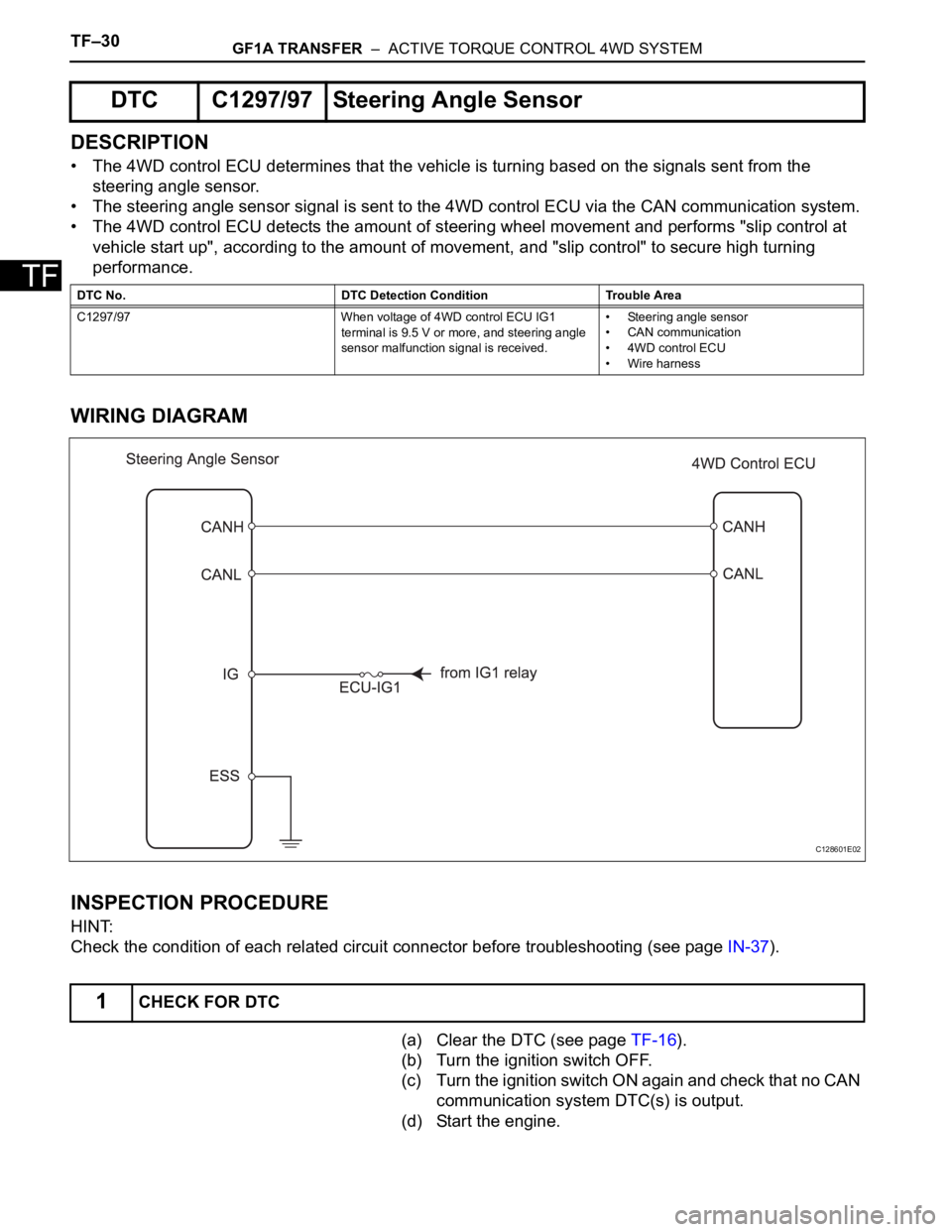
DESCRIPTION
• The 4WD control ECU determines that the vehicle is turning based on the signals sent from the
steering angle sensor.
• The steering angle sensor signal is sent to the 4WD control ECU via the CAN communication system.
• The 4WD control ECU detects the amount of steering wheel movement and performs "slip control at
vehicle start up", according to the amount of movement, and "slip control" to secure high turning
performance.
WIRING DIAGRAM
INSPECTION PROCEDURE
HINT:
Check the condition of each related circuit connector before troubleshooting (see page IN-37).
(a) Clear the DTC (see page TF-16).
(b) Turn the ignition switch OFF.
(c) Turn the ignition switch ON again and check that no CAN
communication system DTC(s) is output.
(d) Start the engine.
DTC C1297/97 Steering Angle Sensor
DTC No. DTC Detection Condition Trouble Area
C1297/97 When voltage of 4WD control ECU IG1
terminal is 9.5 V or more, and steering angle
sensor malfunction signal is received.• Steering angle sensor
• CAN communication
• 4WD control ECU
• Wire harness
1CHECK FOR DTC
C128601E02
Page 1359 of 2000
GF1A TRANSFER – ACTIVE TORQUE CONTROL 4WD SYSTEMTF–31
TF
(e) Drive the vehicle and turn the steering wheel to the right
and left at a speed of 35 km/h (24 mph) and check that
no brake control system (steering angle sensor) DTC
(C1231/31) is output (see page BC-57).
Result
HINT:
When DTCs indicating a CAN communication system
malfunction are output, repair the CAN communication
system before repairing each corresponding sensor.
B
C
A
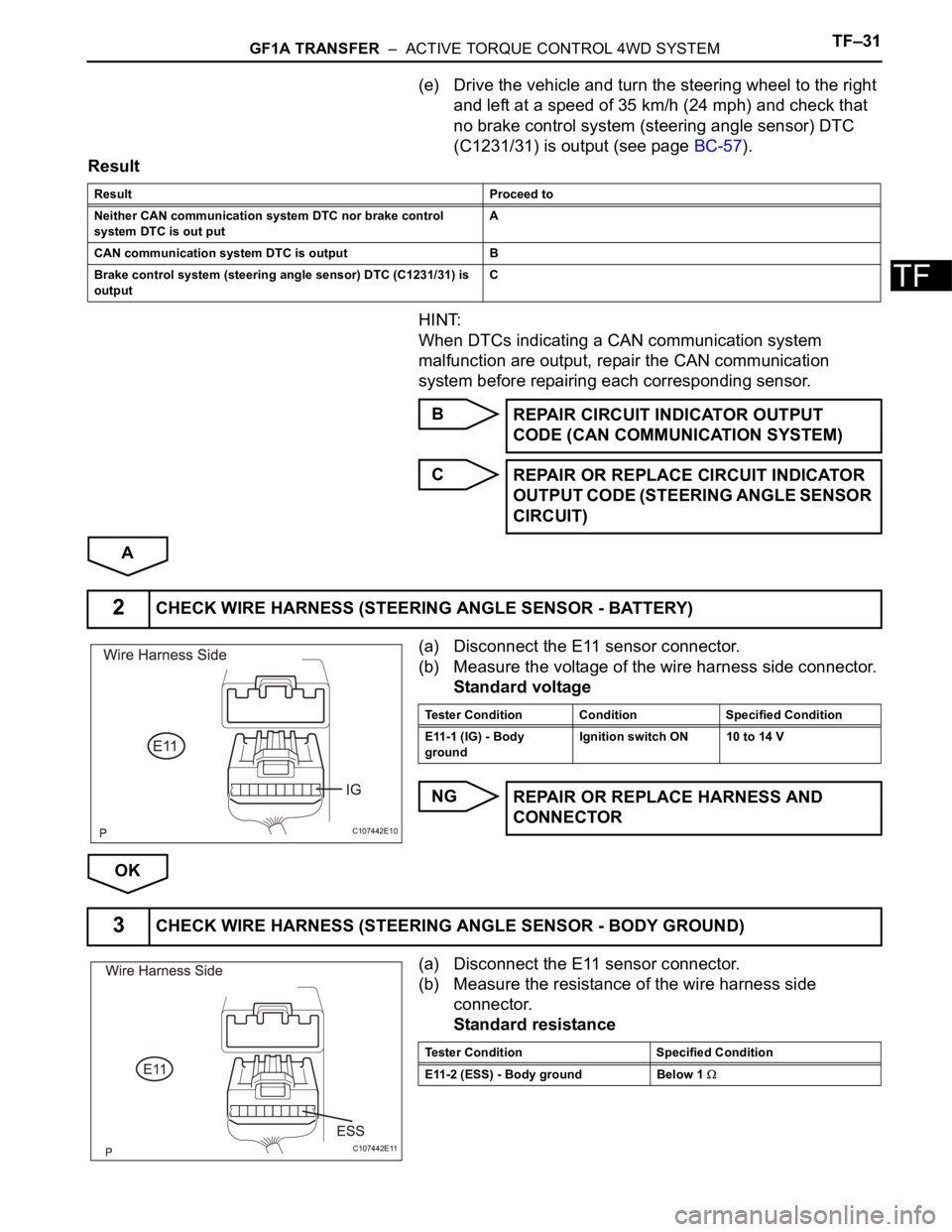
(a) Disconnect the E11 sensor connector.
(b) Measure the voltage of the wire harness side connector.
Standard voltage
NG
OK
(a) Disconnect the E11 sensor connector.
(b) Measure the resistance of the wire harness side
connector.
Standard resistance
Result Proceed to
Neither CAN communication system DTC nor brake control
system DTC is out putA
CAN communication system DTC is output B
Brake control system (steering angle sensor) DTC (C1231/31) is
output C
REPAIR CIRCUIT INDICATOR OUTPUT
CODE (CAN COMMUNICATION SYSTEM)
REPAIR OR REPLACE CIRCUIT INDICATOR
OUTPUT CODE (STEERING ANGLE SENSOR
CIRCUIT)
2CHECK WIRE HARNESS (STEERING ANGLE SENSOR - BATTERY)
C107442E10
Tester Condition Condition Specified Condition
E11-1 (IG) - Body
groundIgnition switch ON 10 to 14 V
REPAIR OR REPLACE HARNESS AND
CONNECTOR
3CHECK WIRE HARNESS (STEERING ANGLE SENSOR - BODY GROUND)
C107442E11
Tester Condition Specified Condition
E11-2 (ESS) - Body ground Below 1
Page 1360 of 2000
TF–32GF1A TRANSFER – ACTIVE TORQUE CONTROL 4WD SYSTEM
TF
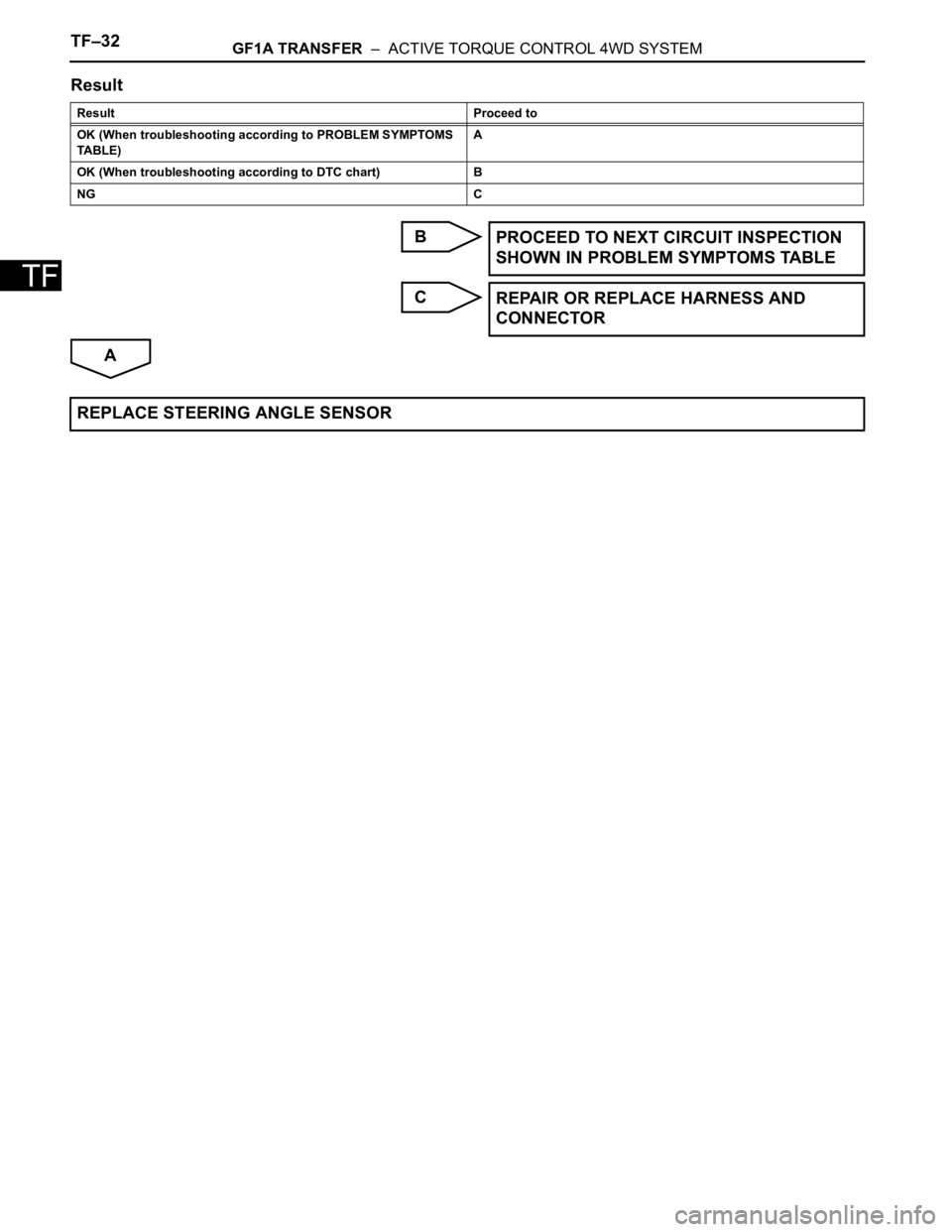
Result
B
C
A
Result Proceed to
OK (When troubleshooting according to PROBLEM SYMPTOMS
TABLE)A
OK (When troubleshooting according to DTC chart) B
NG C
PROCEED TO NEXT CIRCUIT INSPECTION
SHOWN IN PROBLEM SYMPTOMS TABLE
REPAIR OR REPLACE HARNESS AND
CONNECTOR
REPLACE STEERING ANGLE SENSOR
Page 1363 of 2000
DRIVE SHAFT – FRONT DRIVE SHAFT ASSEMBLY (for 2WD)DS–7
DS
REMOVAL
(2005/11-2006/01)
1. REMOVE FRONT WHEEL
2. DRAIN AUTOMATIC TRANSAXLE FLUID
(a) Drain the automatic transaxle fluid for U140F (see
page AX-147).
(b) Drain the automatic transaxle fluid for U241E (see
page AX-146).
3. REMOVE FRONT AXLE HUB NUT (See page AH-6)
4. DISCONNECT FRONT SPEED SENSOR LH
(a) Disconnect the speed sensor (see page BC-191).
5. DISCONNECT FRONT SPEED SENSOR RH
HINT:
Use the same procedures described for the LH side.
6. DISCONNECT FRONT DISC BRAKE CYLINDER
ASSEMBLY LH (See page BR-40)
7. DISCONNECT FRONT DISC BRAKE CALIPER
ASSEMBLY RH
HINT:
Use the same procedures described for the LH side.
8. REMOVE FRONT STABILIZER LINK ASSEMBLY LH
(See page SP-30)
9. REMOVE FRONT STABILIZER LINK ASSEMBLY RH
HINT:
Use the same procedures described for the LH side.
10. DISCONNECT FRONT SUSPENSION LOWER NO. 1
ARM SUB-ASSEMBLY LH (See page AH-7)
11. DISCONNECT FRONT SUSPENSION LOWER NO. 1
ARM SUB-ASSEMBLY RH
HINT:
Use the same procedures described for the LH side.
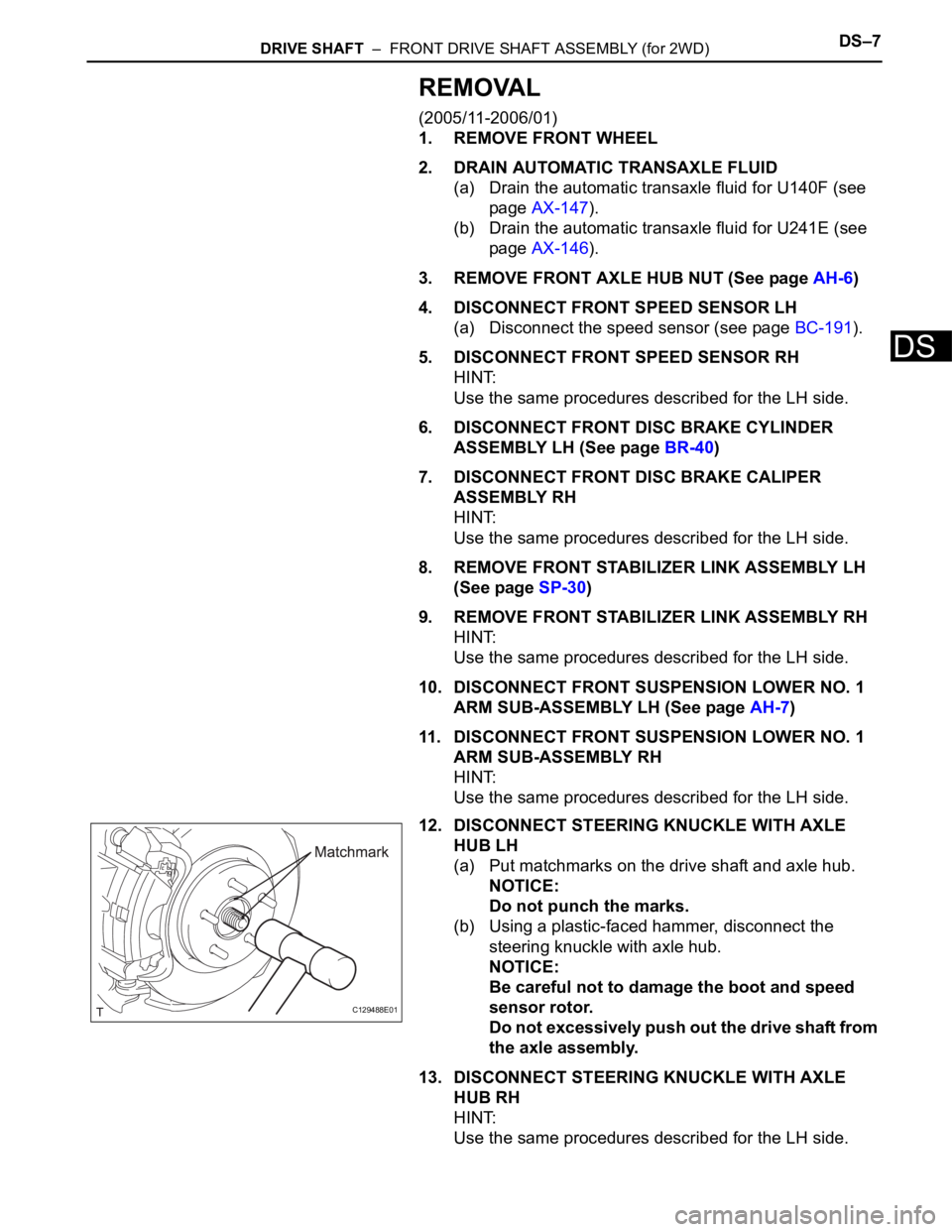
12. DISCONNECT STEERING KNUCKLE WITH AXLE
HUB LH
(a) Put matchmarks on the drive shaft and axle hub.
NOTICE:
Do not punch the marks.
(b) Using a plastic-faced hammer, disconnect the
steering knuckle with axle hub.
NOTICE:
Be careful not to damage the boot and speed
sensor rotor.
Do not excessively push out the drive shaft from
the axle assembly.
13. DISCONNECT STEERING KNUCKLE WITH AXLE
HUB RH
HINT:
Use the same procedures described for the LH side.
C129488E01
Page 1365 of 2000
DRIVE SHAFT – FRONT DRIVE SHAFT ASSEMBLY (for 2WD)DS–9
DS
REMOVAL
(2006/01- )
1. REMOVE FRONT WHEEL
2. DRAIN AUTOMATIC TRANSAXLE FLUID
(a) Drain the automatic transaxle fluid for U140F (see
page AX-147).
(b) Drain the automatic transaxle fluid for U241E (see
page AX-146).
(c) Drain the automatic transaxle fluid for U151E (see
page AX-172).
3. REMOVE FRONT AXLE HUB NUT (See page AH-8)
4. DISCONNECT FRONT SPEED SENSOR LH
(a) Disconnect the speed sensor (see page BC-191).
5. REMOVE FRONT SPEED SENSOR RH
HINT:
Use the same procedures described for the LH side.
6. DISCONNECT FRONT DISC BRAKE CYLINDER
ASSEMBLY LH (See page BR-40)
7. DISCONNECT FRONT DISC BRAKE CYLINDER
ASSEMBLY RH
HINT:
Use the same procedures described for the LH side.
8. REMOVE FRONT STABILIZER LINK ASSEMBLY LH
(See page SP-30)
9. REMOVE FRONT STABILIZER LINK ASSEMBLY RH
HINT:
Use the same procedures described for the LH side.
10. DISCONNECT FRONT SUSPENSION LOWER NO. 1
ARM SUB-ASSEMBLY LH (See page SP-21)
11. DISCONNECT FRONT SUSPENSION LOWER NO. 1
ARM SUB-ASSEMBLY RH
HINT:
Use the same procedures described for the LH side.
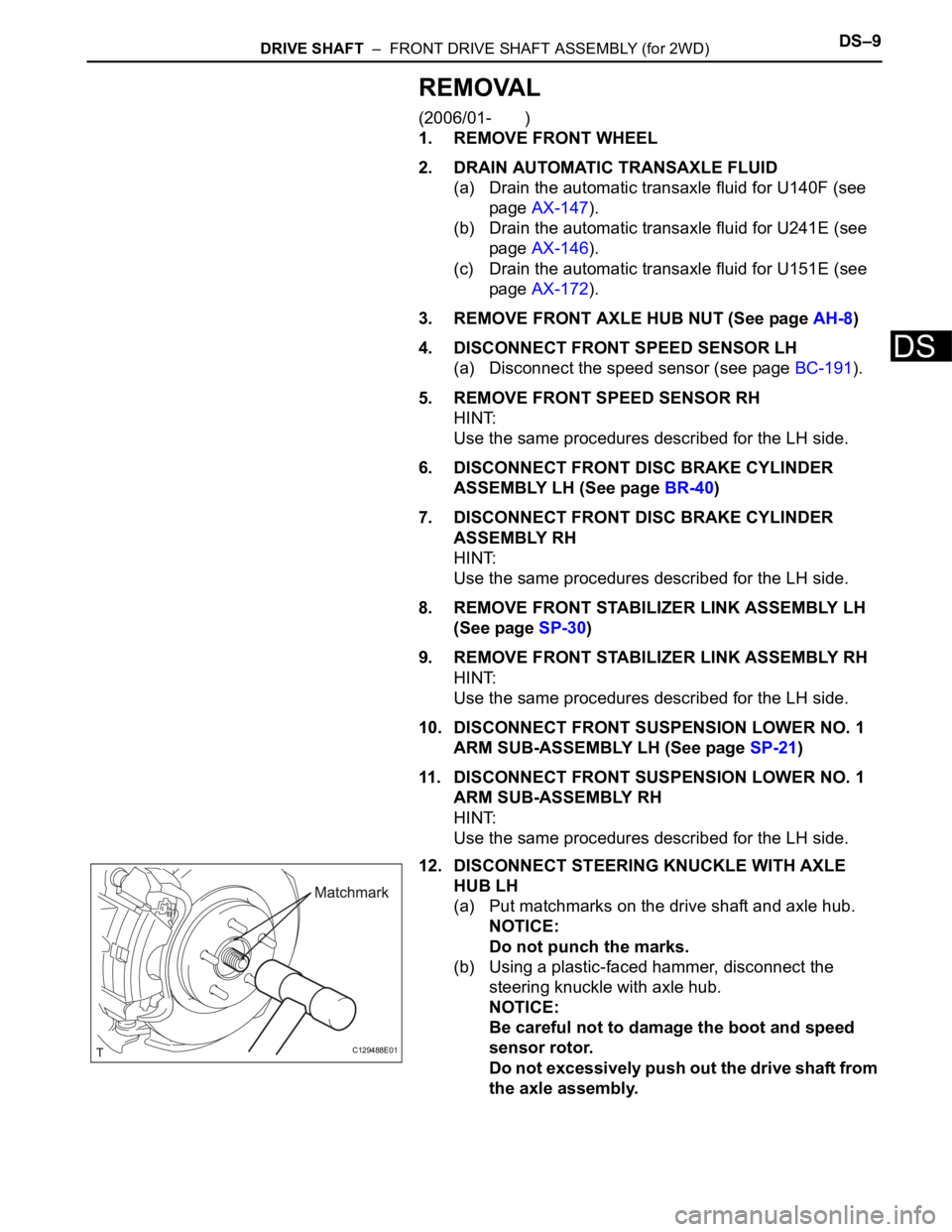
12. DISCONNECT STEERING KNUCKLE WITH AXLE
HUB LH
(a) Put matchmarks on the drive shaft and axle hub.
NOTICE:
Do not punch the marks.
(b) Using a plastic-faced hammer, disconnect the
steering knuckle with axle hub.
NOTICE:
Be careful not to damage the boot and speed
sensor rotor.
Do not excessively push out the drive shaft from
the axle assembly.
C129488E01