lights TOYOTA RAV4 2009 XA30 / 3.G Owners Manual
[x] Cancel search | Manufacturer: TOYOTA, Model Year: 2009, Model line: RAV4, Model: TOYOTA RAV4 2009 XA30 / 3.GPages: 516, PDF Size: 10.61 MB
Page 2 of 516
TABLE OF CONTENTSIndex
2
1-1. Key informationKeys ..................................... 24
1-2. Opening, closing and locking
the doors
Smart key system................. 26
Wireless remote control ....... 38
Side doors ............................ 42
Back door ............................. 46
1-3. Adjustable components
(seats, mirrors,
steering wheel)
Front seats ........................... 49
Rear seats ............................ 54
Head restraints ..................... 65
Seat belts ............................. 68
Steering wheel ..................... 77
Anti-glare inside rear view mirror .................................. 78
Outside rear view mirrors ..... 80
1-4. Opening a nd closing the
windo ws and moon roof
Power windows .................... 82
Moon roof ............................. 85
1-5. Refueling Opening the fuel tank cap .... 88 1-6. Theft deterrent system
Engine immobilizer system ................................ 92
Theft prevention labels ......... 94
1-7. Safety information Correct driving posture ......... 95
SRS airbags ......................... 97
Front passenger occupant classification system ......... 110
Child restraint systems ....... 116
Installing child restraints ..... 120
2-1. Driving procedures Driving the vehicle .............. 134
Engine (ignition) switch (vehicles with smart key
system) ............................. 143
Engine (ignition) switch (vehicles without smart
key system) ...................... 147
Automatic transmission ...... 150
Turn signal lever ................. 153
Parking brake ..................... 154
Horn .................................... 155
2-2. Instrument cluster Gauges and meters ............ 156
Indicators and warning lights ................................. 159
Trip information display ...... 162
1Before driving
2When driving
Page 3 of 516
1
2
3
4
5
6
7
3
2-3. Operating the lights and wipers
Headlight switch .................. 165
Fog light switch ................... 168
Windshield wipers and washer .............................. 169
Rear window wiper and washer .............................. 171
2-4. Using other driving systems Cruise control ...................... 172
Rear view monitor system .............................. 175
Driving assist systems ........ 180
Hill-start assist control ......... 187
Downhill assist control system .............................. 189
Four-wheel drive lock switch ................................ 192
2-5. Driving information Utility vehicle precautions ... 193
Cargo and luggage ............. 198
Vehicle load limits................. 204
Winter driving tips ............... 206
Trailer towing ...................... 210
Dinghy towing ..................... 218 3-1. Using the air conditioning
system and defogger
Manual air conditioning system .............................. 220
Automatic air conditioning system .............................. 225
Rear window and outside rear view mirror
defoggers ......................... 233
Windshield wiper de-icer .... 235
3-2. Using the audio system Audio system types ............ 236
Using the radio ................... 239
Using the CD player ........... 245
Playing back MP3 and WMA discs ....................... 252
Optimal use of the audio system .............................. 259
Using the AUX adapter....... 262
Using the steering wheel audio switches.................. 263
3-3. Using the hands-free phone system (for cellular phone)
Hands-free phone system (for cellular phone)
features ............................ 266
Using the hands-free phone system
(for cellular phone) ........... 270
Making a phone call ........... 278
Setting a cellular phone ...... 284
Security and system setup ................................ 289
3Interior features
Page 4 of 516
TABLE OF CONTENTSIndex
4
Using the phone book ........ 292
3-4. Using the interior lights Interior lights list ................. 300
• Personal/interior light main switch ...................... 301
• Personal/interior lights...... 301
• Interior light ...................... 302
• Luggage compartment light .................................. 302
3-5. Using the storage features List of storage features....... 304
• Glove box ......................... 305
• Console box ..................... 306
• Overhead console ............ 307
• Cup holders ...................... 308
• Bottle holders ................... 309
• Auxiliary box ..................... 311
3-6. Other interior features Sun visors .......................... 312
Vanity mirrors ..................... 313
Clock .................................. 314
Power outlets ..................... 315
Seat heaters ....................... 318
Armrest............................... 320
Coat hooks ......................... 321
Floor mat ............................ 322
Luggage compartment features ............................ 323 4-1. Maintenance and care
Cleaning and protecting the vehicle exterior ........... 332
Cleaning and protecting the vehicle interior ............ 335
4-2. Maintenance Maintenance requirements .................... 338
General maintenance ......... 340
Emission inspection and maintenance (I/M)
programs .......................... 343
4-3. Do-it-yourself maintenance Do-it-yourself service precautions ....................... 344
Hood ................................... 348
Positioning a floor jack........ 350
Engine compartment .......... 352
Tires.................................... 368
Tire inflation pressure........... 375
Wheels................................ 380
Air conditioning filter ........... 382
Key battery ......................... 384
Checking and replacing fuses ................................. 388
Light bulbs .......................... 400
4Maintenance and care
Page 6 of 516
6
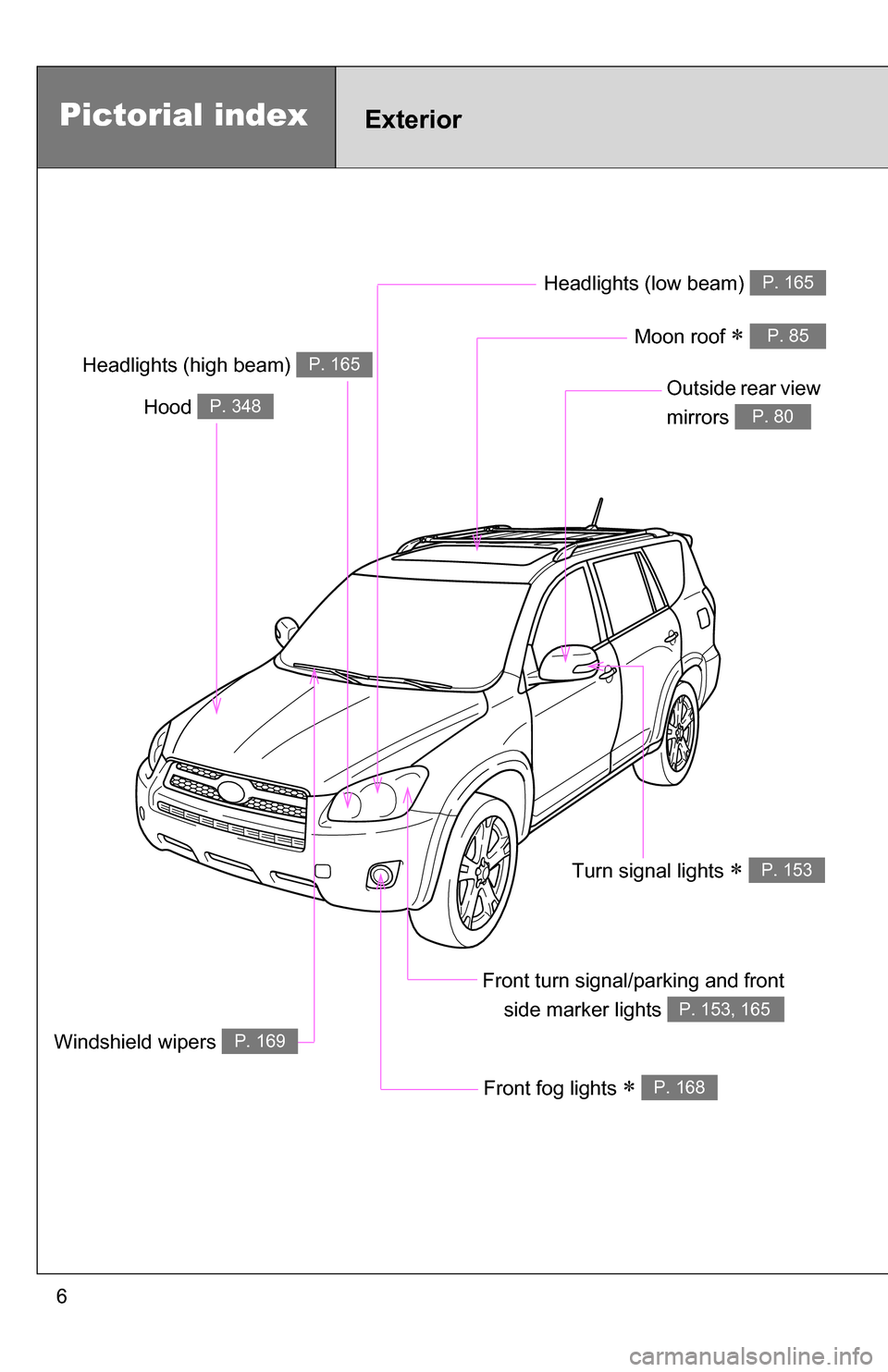
Headlights (low beam) P. 165
Pictorial indexExterior
Front fog lights P. 168
Hood P. 348Outside rear view
mirrors
P. 80
Front turn signal/parking and frontside marker lights
P. 153, 165
Headlights (high beam) P. 165
Moon roof P. 85
Windshield wipers P. 169
Turn signal lights P. 153
Page 7 of 516
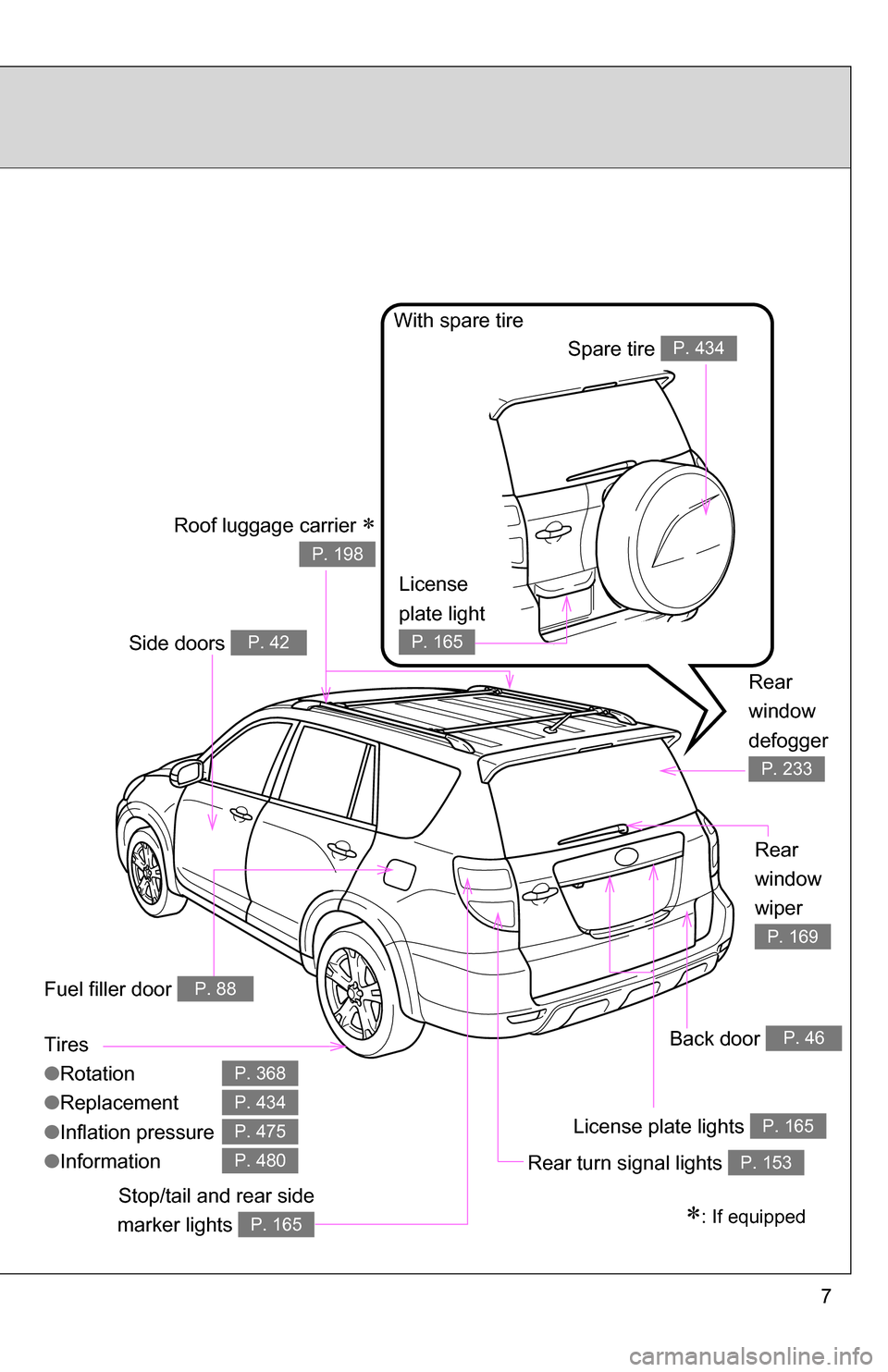
7
Tires
●Rotation
● Replacement
● Inflation pressure
● Information
P. 368
P. 434
P. 475
P. 480
Back door P. 46
Rear turn signal lights P. 153
: If equippedStop/tail and rear side
marker lights
P. 165
Rear
window
wiper
P. 169
License plate lights P. 165
Side doors P. 42
Rear
window
defogger
P. 233
License
plate light
P. 165
With spare tire Spare tire
P. 434
Fuel filler door P. 88
Roof luggage carrier
P. 198
Page 9 of 516
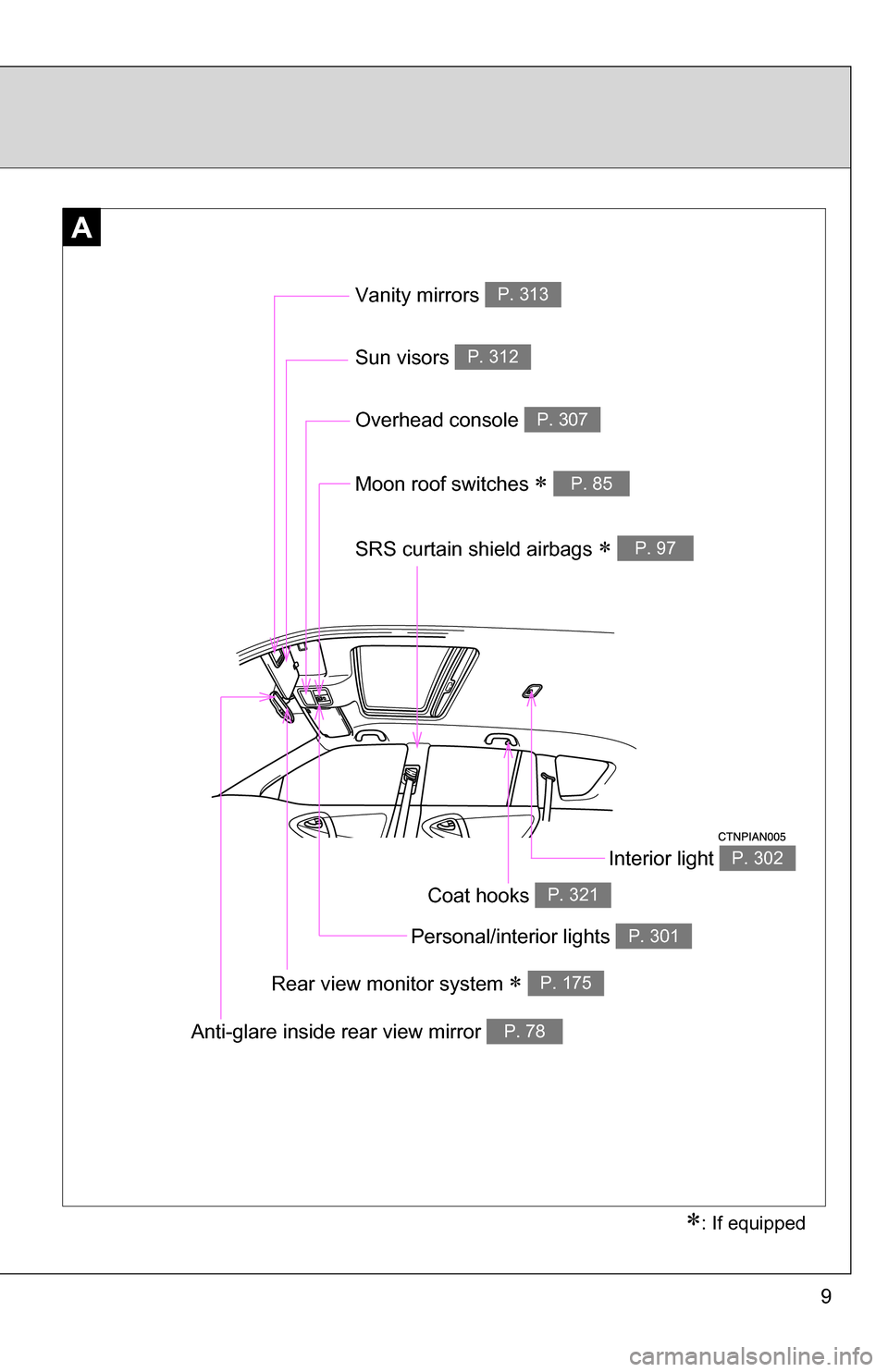
9
A
Vanity mirrors P. 313
Moon roof switches P. 85
Sun visors P. 312
SRS curtain shield airbags P. 97
: If equipped
Interior light P. 302
Anti-glare inside rear view mirror P. 78
Personal/interior lights P. 301
Overhead console P. 307
Rear view monitor system P. 175
Coat hooks P. 321
Page 33 of 516
33
1-2. Opening, closing and locking the doors
1
Before driving
●
The doors may unlock if a large amount of water splashes on the door
handle, such as in the rain or in a car wash. (The doors will automatically
be locked after approximately 60 seconds if the doors are not opened
and closed.)
● Gripping the door handle when wearing a glove may not unlock the door.
● If the wireless remote control is used to lock the doors when the elec-
tronic key is near the vehicle, there is a possibility that the door may not
be unlocked by the entry function. (Use the wireless remote control to
unlock the doors.)
■ When the vehicle is not dr iven for extended periods
To prevent theft of the vehicle, do not leave the electronic key within 6 ft. (2
m) of the vehicle.
■ Security feature
If a door is not opened within approximately 60 seconds after the vehicle is
unlocked, the anti-theft system automatically locks the vehicle again.
■ Alarms and warning indicators
A combination of exterior and interior alarms as well as warning lights are
used to prevent the theft of the vehicle and accidents resulting from errone-
ous operation.
●When any warning lights come on:
Take appropriate measures in response to which warning light comes on.
( P. 422)
Page 39 of 516

39
1-2. Opening, closing and locking the doors
1
Before driving
■
Panic mode
Vehicles without smart key system
Vehicles with smart key system
■ Door lock buzzer
If a door is not fully closed, a buzzer sounds continuously if an attempt to
lock the door is made. Fully close the door to stop the buzzer, and lock the
vehicle once more.
■ Key battery depletion
Vehicles without smart key system
The standard battery life is 1 to 2 years. (The battery becomes depleted
even if the key is not used.) If the wireless remote control function does not
operate, the battery may be depleted. Replace the battery when necessary.
( P. 384)
Vehicles with smart key system
P. 384
When is pushed for longer than
about one second, an alarm will sound for
about 60 seconds and the vehicle lights
will flash to deter any person from trying
to break into or damage your vehicle.
To stop the alarm, push any button on the
wireless remote control.
When is pushed for longer than
about one second, an alarm will sound for
about 60 seconds and the vehicle lights
will flash to deter any person from trying
to break into or damage your vehicle.
To stop the alarm, push any button on the
wireless remote control.
Page 47 of 516
47
1-2. Opening, closing and locking the doors
1
Before driving
CAUTION
■
Caution while parking
If the open back door hides the stop, tail or rear turn signal lights, other road
users must be warned of the presence of your vehicle by a warning triangle
or other device.
■ When children are in the vehicle
Observe the following precautions.
Failure to do so may result in death or serious injury.
●Do not leave children alone in the luggage compartment.
If a child is accidentally locked in the luggage compartment, they could
overheat.
● Do not allow a child to open or close the back door.
Doing so may cause the back door to operate unexpectedly, or cause the
child’s hands, head, or neck to be caught by the closing back door.
■ Operating the back door
Observe the following precautions.
Failure to do so may cause parts of the body to be caught, resulting in seri-
ous injury.
●When opening or closing the back door, thoroughly check to make sure
the surrounding area is safe.
● If anyone is in the vicinity, make sure they are safe and let them know that
the back door is about to open or close.
Page 78 of 516
78
1-3. Adjustable components (seats, mirrors, steering wheel)
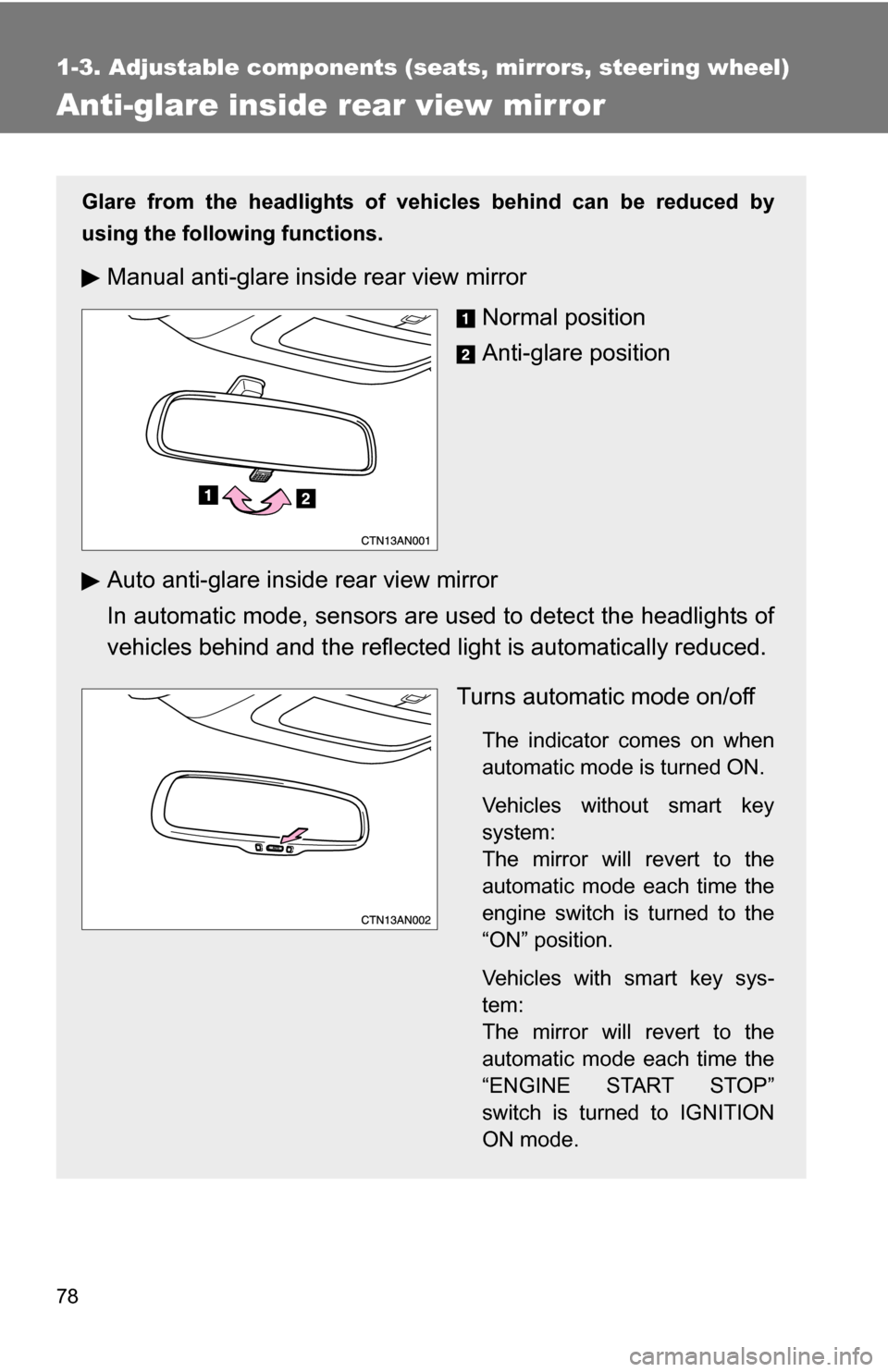
Anti-glare inside rear view mirror
Glare from the headlights of vehicles behind can be reduced by
using the following functions.
Manual anti-glare inside rear view mirrorNormal position
Anti-glare position
Auto anti-glare inside rear view mirror
In automatic mode, sensors are used to detect the headlights of
vehicles behind and the reflecte d light is automatically reduced.
Turns automatic mode on/off
The indicator comes on when
automatic mode is turned ON.
Vehicles without smart key
system:
The mirror will revert to the
automatic mode each time the
engine switch is turned to the
“ON” position.
Vehicles with smart key sys-
tem:
The mirror will revert to the
automatic mode each time the
“ENGINE START STOP”
switch is turned to IGNITION
ON mode.