battery location TOYOTA RAV4 HYBRID 2021 Owners Manual
[x] Cancel search | Manufacturer: TOYOTA, Model Year: 2021, Model line: RAV4 HYBRID, Model: TOYOTA RAV4 HYBRID 2021Pages: 752, PDF Size: 31.25 MB
Page 9 of 752

9
Toyota Safety Sense 2.0
Anti-lock brake system
SRS airbag system
Seat belt pretensioner system
Be sure to check with your
Toyota dealer for precautionary
measures or special instructions
regarding installation of a mobile
two-way radio system.
High voltage parts and cables
on the hybrid vehicles emit
approximately the same amount
of electromagnetic waves as the
conventional gasoline powered
vehicles or home electronic
appliances despite of their elec-
tromagnetic shielding.
Unwanted noise may occur in
the reception of the mobile two-
way radio.
The vehicle is equipped with
sophisticated computers that will
record certain data, such as:
• Engine speed/ Electric motor speed (traction motor speed)
• Accelerator status
• Brake status
• Vehicle speed
• Operation status of the driving assist systems
• Images from the cameras Your vehicle is equipped with
cameras. Contact your
Toyota dealer for the location
of recording cameras. • Hybrid battery (traction bat-
tery) status
The recorded data varies
according to the vehicle grade
level and options with which it is
equipped.
These computers do not record
conversations or sounds, and
only record images outside of
the vehicle in certain situations.
Data Transmission
Your vehicle may transmit the data
recorded in these computers to
Toyota without notification to you.
Data usage
Toyota may use the data recorded
in this computer to diagnose mal-
functions, conduct research and
development, and improve quality.
Toyota will not disclose the
recorded data to a third party
except:
• With the consen t of the vehicle
owner or with the consent of the
lessee if the vehicle is leased
• In response to an official request by the police, a court of law or a
government agency
• For use by Toyota in a lawsuit
• For research purposes where the data is not tied to a specific vehi-
cle or vehicle owner
Recorded image information
can be erased by your Toyota
dealer.
The image recording function can
be disabled. However, if the func-
tion is disabled, data from when the
system operates will not be avail-
Vehicle data recording
Page 588 of 752
5887-3. Do-it-yourself maintenance
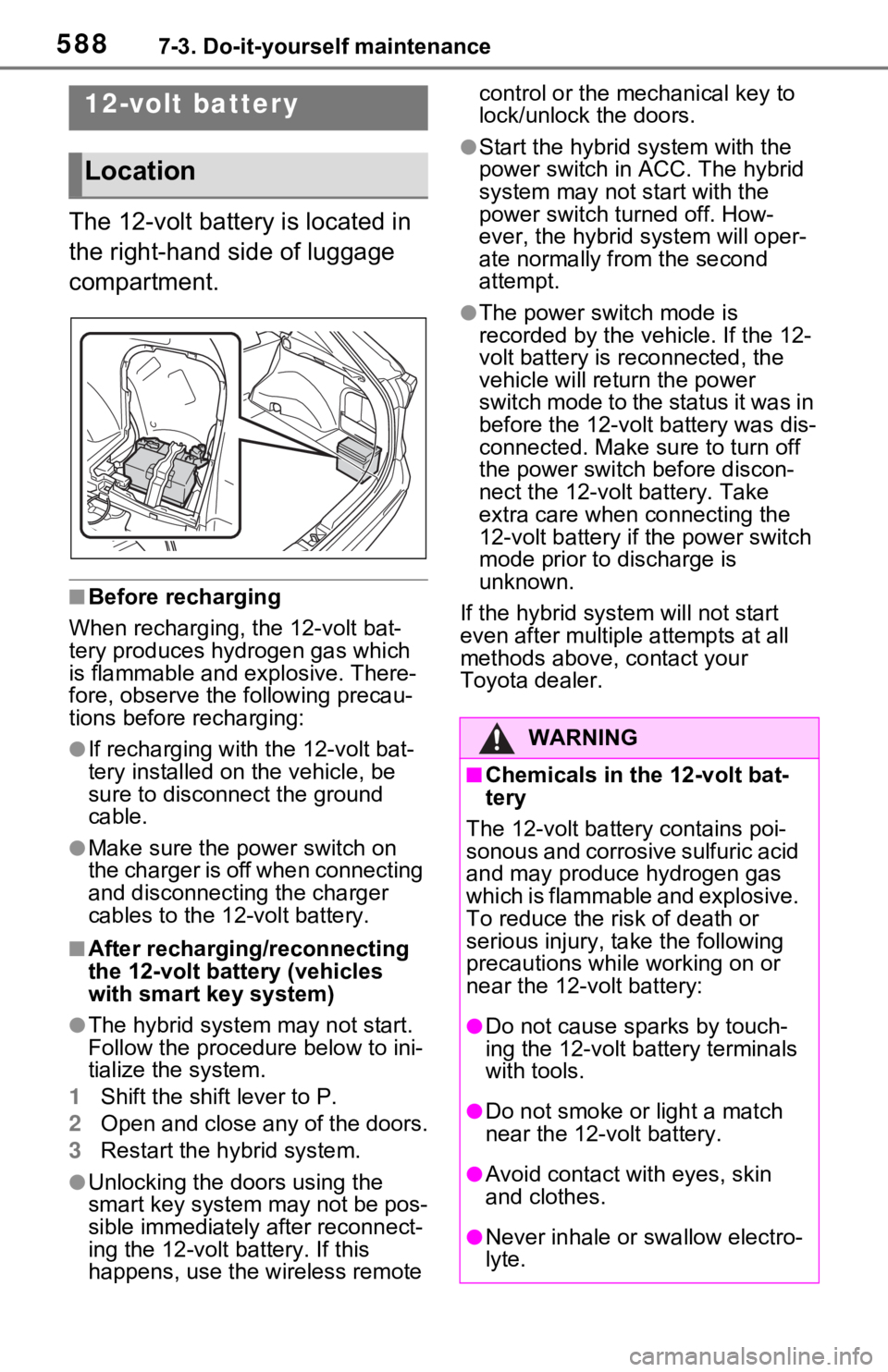
The 12-volt battery is located in
the right-hand side of luggage
compartment.
■Before recharging
When recharging, the 12-volt bat-
tery produces hydrogen gas which
is flammable and explosive. There-
fore, observe the following precau-
tions before recharging:
●If recharging with the 12-volt bat-
tery installed on the vehicle, be
sure to disconnect the ground
cable.
●Make sure the power switch on
the charger is off when connecting
and disconnecting the charger
cables to the 12-volt battery.
■After recharging/reconnecting
the 12-volt battery (vehicles
with smart key system)
●The hybrid system may not start.
Follow the procedure below to ini-
tialize the system.
1 Shift the shift lever to P.
2 Open and close any of the doors.
3 Restart the hybrid system.
●Unlocking the doors using the
smart key system may not be pos-
sible immediately after reconnect-
ing the 12-volt battery. If this
happens, use the wireless remote control or the mechanical key to
lock/unlock the doors.
●Start the hybrid system with the
power switch in
ACC. The hybrid
system may not start with the
power switch turned off. How-
ever, the hybrid system will oper-
ate normally from the second
attempt.
●The power switch mode is
recorded by the vehicle. If the 12-
volt battery is reconnected, the
vehicle will return the power
switch mode to the status it was in
before the 1 2-volt battery was dis-
connected. Make sure to turn off
the power switch before discon-
nect the 12-volt battery. Take
extra care when connecting the
12-volt battery if the power switch
mode prior to discharge is
unknown.
If the hybrid sys tem will not start
even after multiple attempts at all
methods above, contact your
Toyota dealer.
12-volt battery
Location
WARNING
■Chemicals in the 12-volt bat-
tery
The 12-volt battery contains poi-
sonous and corrosive sulfuric acid
and may produce hydrogen gas
which is flammable and explosive.
To reduce the risk of death or
serious injury, take the following
precautions while working on or
near the 12-volt battery:
●Do not cause sparks by touch-
ing the 12-volt battery terminals
with tools.
●Do not smoke or light a match
near the 12-volt battery.
●Avoid contact with eyes, skin
and clothes.
●Never inhale or swallow electro-
lyte.
Page 738 of 752

738Alphabetical Index
DefoggerOutside rear view mirrors ..... 526
Rear window ........................ 526
Windshield............................ 526
Digital Rear-view Mirror ......... 165
Dimensions ............................. 684
Dinghy towing ........................ 209
Display BSM (Blind Spot Monitor)..... 283
Consumption screen ............ 113
Drive information .................. 108
Driving information ............... 105
Dynamic radar cruise control with full-speed range .......... 271
Energy monitor ..................... 113
Intuitive parking assist .......... 291
LTA (Lane Tracing Assist).... 264
Multi-information display ...... 103
RCTA ................................... 283
Warning messages .............. 654
Do-it-yourself maintenance ....................................... 573, 577
Door lock
Back door ............................. 133
Side doors ............................ 127
Smart key system................. 147
Wireless remote control ....... 122
Doors Automatic door locking and unlocking system................ 132
Back door ............................. 133
Door glasses ........................ 176
Door lock .............................. 127
Open door warning buzzer ... 131
Outside rear view mirrors ..... 174
Rear door child-protectors.... 132
Side doors ............................ 127
Drive information ................... 108
Driver’s seat belt reminder light ............................................... 649
Driver’s seat position memory ............................................... 156 Driving position memory .......156
Memory recall function .........158
Driving Break-in tips .........................190
Correct posture .......................29
Driving mode select switch ...366
Hybrid vehicle dri ving tips .....376
Procedures ...........................189
Winter drive tips....................378
Driving informatio n display ...105
Driving mode select switch ...366
Driving position memory .......156 Memory recall function .........158
Driving support system informa- tion display............................107
Dynamic radar cruise control with full-speed rangeFunction................................271
Warning message . ...............654
E
ECB (Electronically Controlled
Brake System).......................369
Eco drive mode .......................366
EDR (Event data recorder) .......10
E-Four (Electronic On-Demand AWD system) ........................370
Elapsed time ...........................108
Electric motor Location ..................................72
Specification .........................686
Electric Power Steering (EPS) Function................................370
Warning light ........................644
Electronically Controlled Brake System (ECB) ........................369
Electronic key Battery-saving function .........148
If the electronic key does not operate properly .................670
Replacing the battery ...........618
Electronic sunshade ..............182
Page 741 of 752

Alphabetical Index741
Retaining hooks (floor mat) .... 28
Horn ......................................... 162
Hybrid battery (tr action battery)
Location.................................. 76
Specification ......................... 686
Hybrid battery air vent ............. 79
Hybrid system .......................... 72 ACC.............................. 211, 216
Emergency shut off system .... 80
Energy monitor/consumption screen ................................ 113
EV drive mode...................... 217
High voltage components....... 76
How to start the hybrid system ................................... 210, 212
Hybrid System Indicator ... 94, 98
Hybrid system precautions ..... 76
Hybrid vehicle driving tips .... 376
If the hybrid sy stem will not start
........................................... 667
If your vehicle has to be stopped in an emergency................. 635
Ignition switch (power switch)
................................... 210, 212
Overheating.......................... 677
Power (ignition) switch . 210, 212
Regenerative braking ............. 73
Starting the hybrid system ................................... 210, 212
Hybrid System Indicator .... 94, 98
Hybrid transmission .............. 219 S mode ................................. 221
I
I/M test ..................................... 576
Identification
Engine .................................. 685
Vehicle ................................. 684
Ignition switch (power switch) ....................................... 210, 212Auto power off function ........ 216
Changing the power switch modes.........................211, 216
If your vehicle has to be stopped in an emergency .................635
Starting the hybrid system ...................................210, 212
Immobilizer system ..................81
Indicators ..................................88
Info button (Menu screen) .....389
Initialization Items to initialize ...................718
Maintenance .........................573
Moon roof .............................180
Panoramic moon r oof ...........183
Parking Support Brake .........302
Power back door ..................142
Power windows ....................176
Tire pressure warning system ...........................................600
Initial screen............................393 Caution screen .....................393
Restarting the system ...........393
Inside rear view m irror ...163, 165
Instrument panel light control
.........................................96, 102
Interior lights...........................534 Switch ...................................534
Wattage ................................692
Intuitive parking assist Function................................291
Warning message . ...............294
iPod/iPhone (Apple CarPlay) .446
J
Jack Positioning a floor jack .........580
Vehicle-equipped jack ..........659
Jack handle .............................659
Jam protection function Electronic sunshade .............183
Moon roof .............................179
Panoramic moon r oof ...........183
Power back door ..................140
Page 749 of 752
Alphabetical Index749
Dinghy towing....................... 209
Emergency towing................ 639
Towing eyelet ............... 639, 659
Trailer sway control .............. 369
Trailer towing........................ 200
Toyota Apps ........................... 518 Entering keyword ................. 520
Toyota Apps button (Setup screen) .................................. 392
Toyota Apps settings ............. 522
Toyota parking assist monitor ............................................... 321Distance guide line display mode ........................................... 326
Driving precautions .............. 321
Estimated course line display mode .................................. 324
Parking assist gui de line display
mode .................................. 325
Screen display...................... 322
Things you should know....... 331
Toyota parking assist monitor precautions......................... 327
Using the system.................. 323
Toyota Safety Sen se 2.0 ........ 244
Automatic High Beam .......... 232
Dynamic radar cruise control with full-speed range .......... 271
LTA (Lane Tracing Assist).... 258
PCS (Pre-Collision System) . 250
RSA (Road Sign Assist) ....... 268
TRAC (Traction Control) ........ 369
Traction battery (Hybrid battery) ................................................. 76Hybrid battery (traction battery) air intake and discharge vents............................................. 79
Location.................................. 76
Specification ......................... 686
Warning messages ................ 80
Traction Control (TRAC) ........ 369
Traction motor (e lectric motor)72 Trailer sway contro
l................369
Trailer towing ..........................200
Trail Mode................................367
Transmission Driving mode select switch ...366
Hybrid transmission ..............219
Trip meters ..........................94, 98
Troubleshooting In other situations .................508
When making/receiving a call ...........................................506
When registering/connecting a cellular phone .....................505
When using the Bluetooth
® mes-
sage function ......................507
When using the hands-free sys-
tem with a Bluetooth
® device
...........................................505
When using the phonebook..506
Turn signal lights Replacing light bulbs ............624
Turn signal lever . ..................223
Wattage ................................692
U
USB charging ports ................547
USB memory ...........................444
USB port ..................................434
Utility vehicle pre cautions .....381
V
Vanity lights
Vanity lights ..........................546
Wattage ................................692
Vanity mirrors .........................546
Vehicle button (Setup screen) ...............................................392
Vehicle data recordings .............9
Vehicle identification number684
Vehicle proximity notification