check oil TOYOTA RAV4 HYBRID 2022 Owners Manual
[x] Cancel search | Manufacturer: TOYOTA, Model Year: 2022, Model line: RAV4 HYBRID, Model: TOYOTA RAV4 HYBRID 2022Pages: 752, PDF Size: 23.11 MB
Page 6 of 752
6TABLE OF CONTENTS
Wireless remote control/elec-tronic key battery ......... 600
Checking and replacing fuses .................................... 603
Headlight aim ................ 606
Light bulbs..................... 607
8-1. Essential information Emergency flashers ...... 616
If your vehicle has to be stopped in an emergency
.................................... 617
If the vehicle is submerged or water on the road is rising
.................................... 618
8-2. Steps to take in an emer- gency
If your vehicle needs to be
towed........................... 619
If you think something is wrong .......................... 623
If a warning light turns on or a warning buzzer sounds 624
If a warning message is dis- played.......................... 635
If you have a flat tire...... 640
If the hybrid system will not start ............................. 649
If you lose your keys ..... 650
If the fuel filler door cannot be opened ........................ 651
If the electronic key does not operate properly (vehicles
with smart key system) 652
If the 12-volt battery is dis- charged ....................... 654If your vehicle overheats
659
If the vehicle becomes stuck .................................... 662
9-1. Specifications Maintenance data (fuel, oil level, etc.) .................... 666
Fuel information............. 675
Tire information ............. 677
9-2. Customization Customizable features... 687
9-3. Initialization Items to initialize ............ 699
10-1.For owners Reporting safet y defects for
U.S. owners ................. 702
Reporting safet y defects for
Canadian owners ........ 703
Seat belt instructions for Canadian owners (in
French) ........................ 703
SRS airbag instructions for Canadian owners (in
French) ........................ 705
Headlight aim instructions for Canadian owners (in
French) ........................ 712
What to do if... (Trouble- shooting) ..................... 716
Alphabetical Index ........ 719
8When trouble arises
9Vehicle specifications
10For owners
Index
Page 17 of 752
17Pictorial index
Precautions against winter season ......................................P.369
To prevent freezing (windshield wiper de-icer)
*...................P.519
Precautions against car wash
(Rain-sensing windshield wipers)
*.......................................P.555
Replacing the wiper insert .................................... ...............P.597
Fuel filler door ............................................... .....................P.236
Refueling method ............................................... ..................P.236
Fuel type/fuel tan k capacity .................................................P.667
Tires ....................................................................................P.578
Tire size/inflation pressure ................................... ................P.672
Winter tires/tire chain ........................................ ...................P.369
Checking/rotation/tire pressure warning system
*.................P.578
Coping with flat tires......................................... ....................P.640
Hood ....................................................................................P.567
Opening ........................................................ .......................P.567
Engine oil ..................................................... ........................P.668
Coping with overheat ........................................... ................P.659
Warning messages ..............................................................P.635
Headlights..................................................... ......................P.224
Turn signal lights ...............................................................P.217
Parking lights .....................................................................P.224
Daytime running lights .. ....................................................P.224
Side marker lights ............................................. .................P.224
Fog lights
*............................................................... ............P.231
LED accessory lights
*........................................................P.224
Stop lights/tail lights/turn s ignal lights ....................P.217, 224
Tail lights .................................................... ........................P.224
Light bulbs of the exterior lights for driving
(Replacing method: P.607, Watts: P.674)
E
F
G
H
I
J
K
L
M
N
O
P
Page 88 of 752
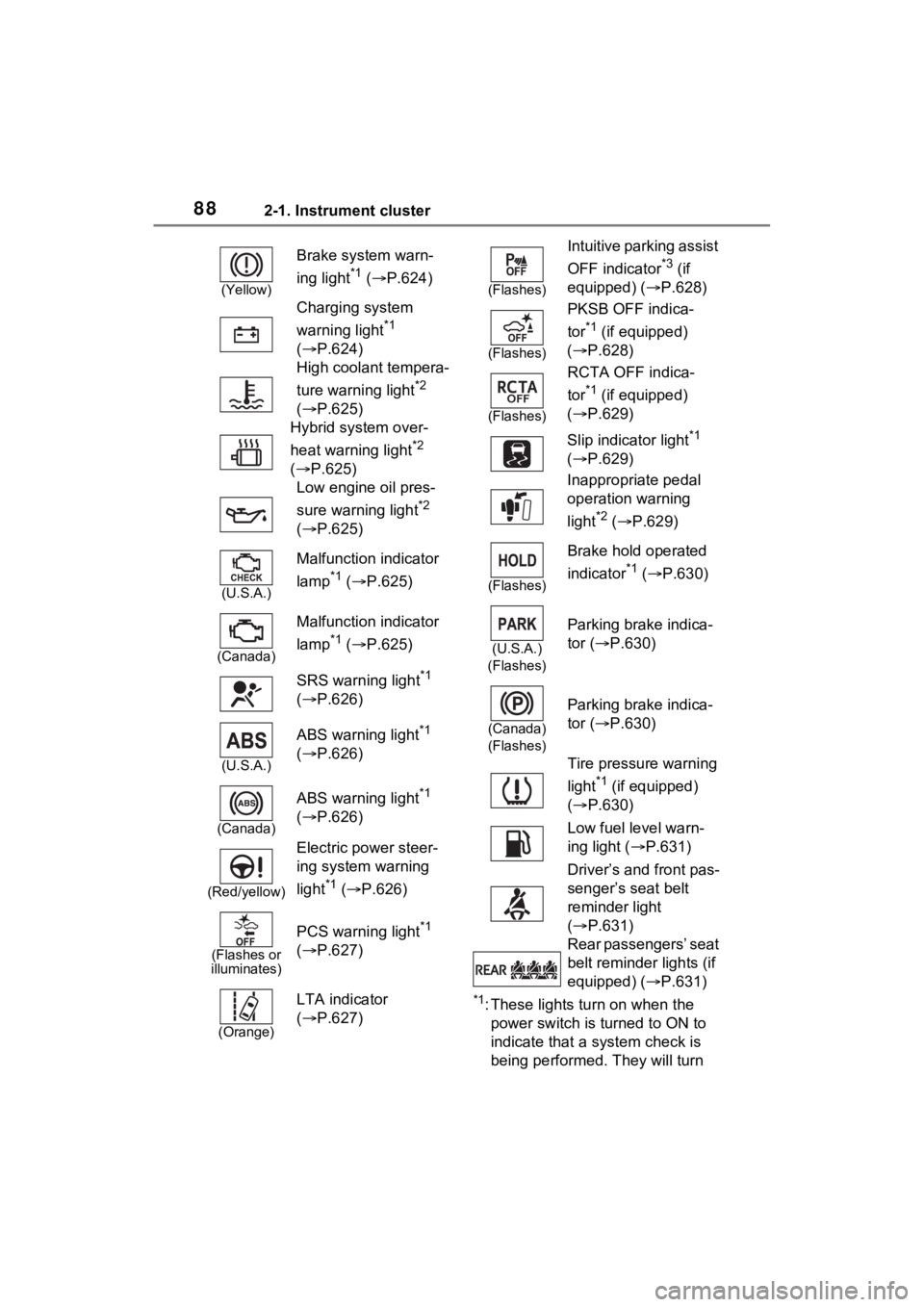
882-1. Instrument cluster
*1: These lights turn on when the
power switch is turned to ON to
indicate that a system check is
being performed. They will turn
(Yellow)
Brake system warn-
ing light
*1 ( P.624)
Charging system
warning light
*1
( P.624)
High coolant tempera-
ture warning light
*2
( P.625)
Hybrid system over-
heat warning light
*2
( P.625)
Low engine oil pres-
sure warning light
*2
( P.625)
(U.S.A.)
Malfunction indicator
lamp
*1 ( P.625)
(Canada)
Malfunction indicator
lamp
*1 ( P.625)
SRS warning light
*1
( P.626)
(U.S.A.)
ABS warning light*1
( P.626)
(Canada)
ABS warning light*1
( P.626)
(Red/yellow)
Electric power steer-
ing system warning
light
*1 ( P.626)
(Flashes or
illuminates)
PCS warning light*1
( P.627)
(Orange)
LTA indicator
( P.627)
(Flashes)
Intuitive parking assist
OFF indicator
*3 (if
equipped) ( P.628)
(Flashes)
PKSB OFF indica-
tor
*1 (if equipped)
( P.628)
(Flashes)
RCTA OFF indica-
tor
*1 (if equipped)
( P.629)
Slip indicator light
*1
( P.629)
Inappropriate pedal
operation warning
light
*2 ( P.629)
(Flashes)
Brake hold operated
indicator
*1 ( P.630)
(U.S.A.)
(Flashes)
Parking brake indica-
tor ( P.630)
(Canada)
(Flashes)
Parking brake indica-
tor ( P.630)
Tire pressure warning
light
*1 (if equipped)
( P.630)
Low fuel level warn-
ing light ( P.631)
Driver’s and front pas-
senger’s seat belt
reminder light
( P.631)
Rear passengers’ seat
belt reminder lights (if
equipped) ( P.631)
Page 255 of 752
2554-5. Using the driving support systems
4
Driving
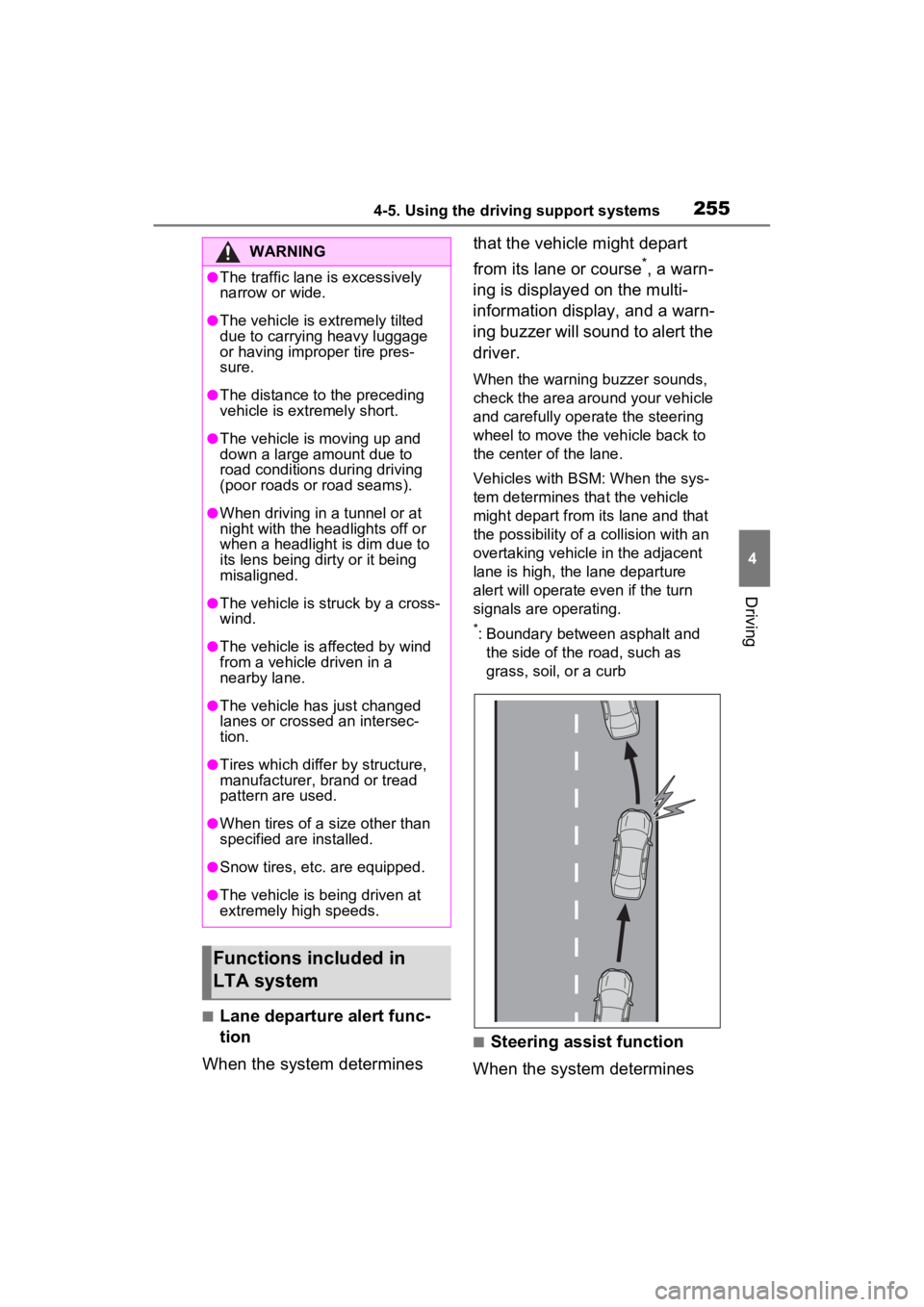
■Lane departure alert func-
tion
When the system determines that the vehicle might depart
from its lane or course
*, a warn-
ing is displayed on the multi-
information display, and a warn-
ing buzzer will sound to alert the
driver.
When the warning buzzer sounds,
check the area around your vehicle
and carefully operate the steering
wheel to move the vehicle back to
the center of the lane.
Vehicles with BSM: When the sys-
tem determines that the vehicle
might depart from its lane and that
the possibility of a collision with an
overtaking vehicle in the adjacent
lane is high, the lane departure
alert will operate even if the turn
signals are operating.
*: Boundary between asphalt and the side of the road, such as
grass, soil, or a curb
■Steering assist function
When the system determines
WARNING
●The traffic lane is excessively
narrow or wide.
●The vehicle is extremely tilted
due to carrying heavy luggage
or having improper tire pres-
sure.
●The distance to the preceding
vehicle is extremely short.
●The vehicle is moving up and
down a large amount due to
road conditions during driving
(poor roads or road seams).
●When driving in a tunnel or at
night with the headlights off or
when a headlight is dim due to
its lens being dirty or it being
misaligned.
●The vehicle is struck by a cross-
wind.
●The vehicle is affected by wind
from a vehicle driven in a
nearby lane.
●The vehicle has just changed
lanes or crossed an intersec-
tion.
●Tires which differ by structure,
manufacturer, b rand or tread
pattern are used.
●When tires of a size other than
specified are installed.
●Snow tires, etc. are equipped.
●The vehicle is being driven at
extremely high speeds.
Functions included in
LTA system
Page 374 of 752
3744-6. Driving tips
WARNING
●When driving off-road or in rug-
ged terrain, do not drive at
excessive speeds, jump, make
sharp turns, strike objects, etc.
This may cause loss of control
or vehicle rollover causing
death or serious injury. You are
also risking expensive damage
to your vehicle’s suspension
and chassis.
NOTICE
■To prevent the water damage
Take all necessary safety mea-
sures to ensure that water dam-
age to the hybrid battery (traction
battery), hybrid s ystem or other
components does not occur.
●Water entering the engine com-
partment may cause severe
damage to the hybrid system.
Water entering the interior may
cause the hybrid battery (trac-
tion battery) stowed under the
rear seats to short circuit.
●Water entering t he hybrid trans-
mission will cause deterioration
in transmission quality. The
malfunction indicator may come
on, and the vehicle may not be
drivable.
●Water can wash the grease
from wheel bearings, causing
rusting and premature failure,
and may also enter the hybrid
transaxle case, reducing the
gear oil’s lubricating qualities.
■When you drive through
water
If driving through water, such as
when crossing shallow streams,
first check the depth of the water
and the bottom of the riverbed for
firmness. Drive slowly and avoid
deep water.
■Inspection after off-road driv-
ing
●Sand and mud that has accu-
mulated around brake discs
may affect braking efficiency
and may damage brake system
components.
●Always perform a maintenance
inspection after each day of off-
road driving that has taken you
through rough terrain, sand,
mud, or water. For scheduled
maintenance information, refer
to the “Scheduled Maintenance
Guide” or “Owner’s Manual
Supplement”.
Page 386 of 752
3865-2. Basic information before operation
with a metal object, such as
the following, it may not oper-
ate properly:
• Magnetic isolation cards
• Metallic foil, such as the inner
packaging of a cigarette box
• Metallic wallets or bags
• Coins
• Discs, such as a CD or DVD
If the operable part of a
capacitive touch screen but-
ton is wiped, it may operate
unintentionally.
If the capacitive touch screen
button is being touched when
the power switch is changed
to ACC or ON, the button may
not operate properly. In this
case, remove anything touch-
ing the button, turn the power
switch to OFF and then turn it
to ACC or ON, or restart the
system by press and hold the
“POWER VOLUME” knob for
3 seconds or more.
●Capacitive touch screen button
sensor sensitivity can be adjusted.
( P.416)
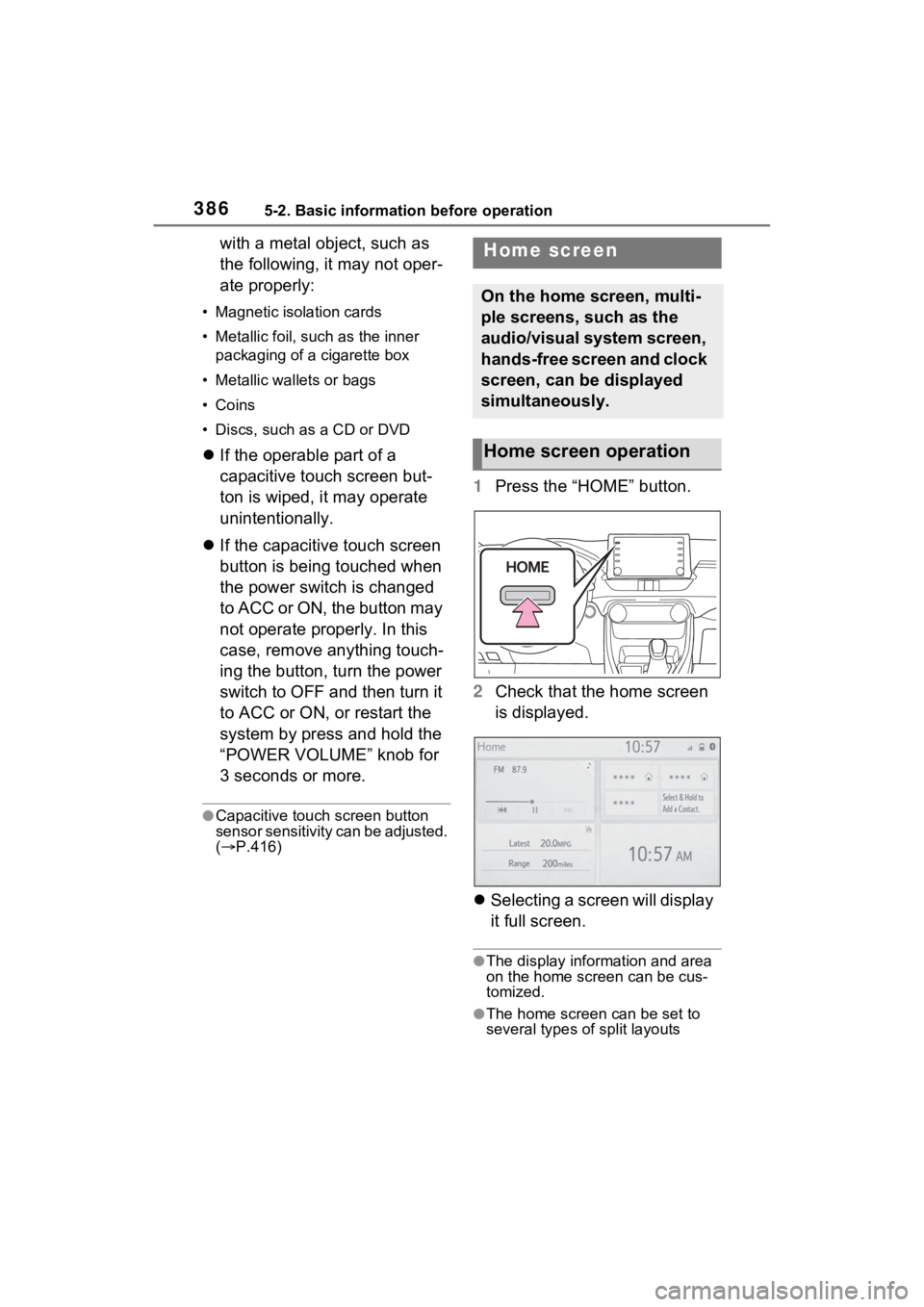
1 Press the “HOME” button.
2 Check that the home screen
is displayed.
Selecting a screen will display
it full screen.
●The display information and area
on the home screen can be cus-
tomized.
●The home screen can be set to
several types of split layouts
Home screen
On the home screen, multi-
ple screens, such as the
audio/visual system screen,
hands-free screen and clock
screen, can be displayed
simultaneously.
Home screen operation
Page 541 of 752
5416-4. Using the other interior features
6
Interior features
device, there are cases where
the operation indicator light will
continue being lit up orange even
after the charging is complete.
■When the operation indica-
tor light flashes
When an error occurs, the oper-
ation indicator light flashes an
orange color.
Handle the error based on the
following tables.
Flashing repeatedly once
every second (Orange)
Repeatedly flashes 3 times
continuously (Orange)
Suspected
causesHandling method
Vehicle to char-
ger communica-
tion failure.
If the hybrid sys-
tem is running,
stop and then
restart the hybrid
system. If the
power switch is
in ACC, start the
hybrid system.
( P.206)
Suspected
causesHandling method
Foreign sub-
stance detection:
A metallic for-
eign substance
is in the charge
area, and so the
abnormal heat-
ing prevention
function of the
charging coil
operated
Remove the for-
eign substance
from the charge
area.
Portable device
misaligned:
The charging coil
in the portable
device moved
outside of the
charge area, and
so the abnormal
heating preven-
tion function of
the charging coil
operated
Remove the por-
table device from
the charging
tray, check that
the operation
indicator light
switches back to
green, and then
once again place
the device near
the center of the
charging tray. If
there is a case or
cover attached
to the portable
device, remove
it.
Page 544 of 752
5446-4. Using the other interior features
NOTICE
●The portable device is placed
with its charging side facing up
●The portable device is placed in
an area misaligned from the
charge area
●The portable device is larger
than the charging tray
●A foldable and portable device
is placed outside the charge
area
●The vehicle is in an area where
strong electrical waves or noise
are emitted, such as near a tele-
vision tower, power plant, gaso-
line station, broadcasting
station, large display, airport,
etc.
●Any of the following objects that
is 0.08 in (2mm) or thicker is
between the charging side of
the portable device and the
charge area
• A card that has metal on it, such as aluminum foil, etc.
• A pack of cigarettes that includes aluminum foil
• A wallet or bag that is made of metal
• Coins
• A heating pad
• CDs, DVDs or other media
• A metal accessory
• A case or cover made of metal
●Electric wave type wireless
remote controls are being used
nearby
●2 or more portable devices are
placed on the charging tray at
the same time
If charging is abnormal or the
operation indicator light contin-
ues to flash for any other reason,
the wireless char ger may be mal-
functioning. Contact your Toyota
dealer.
■To prevent malfunctions and
data corruptions
●When charging, bringing a
credit, or other magnetic card,
or magnetic storage media
close to the charge area may
clear any stored data due to
magnetic influence. Also, do not
bring a wristwatch or other pre-
cision instrument close to the
charge area since doing so may
cause it to malfunction.
●Do not charge with a non-con-
tact IC card such as a transpor-
tation system IC card inserted
between the charging side of a
portable device and the charge
area. The IC chip may become
extremely hot and damage the
portable device or IC card. Be
especially careful not to charge
a portable device inside a case
or cover with a non-contact IC
card attached.
●Do not leave portable devices
inside the vehicle. The inside of
the vehicle can become hot in
extreme heat, which could
cause a malfunction.
■If the smartphone OS has
been updated
If the smartphone OS has been
updated to a newer version, its
charging specifications may have
changed significantly. For details,
check the information on the man-
ufacturer’s website.
Page 560 of 752
5607-2. Maintenance
7-2.Maintenance
■Repair and replacement
It is recommended that genuine
Toyota parts be used for repairs to
ensure performanc e of each sys-
tem. If non-Toyota p arts are used in
replacement or if a repair shop other
than a Toyota dealer performs
repairs, confirm the warranty cover-
age.
■Allow inspection and repairs to
be performed by a Toyota
dealer
●Toyota technicians are well-
trained specialists and are kept up
to date with the latest service
information. They are well
informed about the operations of
all systems on your vehicle.
●Keep a copy of the repair order. It
proves that the maintenance that
has been performed is under war-
ranty coverage. If any problem
should arise while your vehicle is
under warranty, your Toyota
dealer will promptly take care of it.
General maintenance should be
performed on a daily basis. This
can be done by yourself or by a
Toyota dealer.
Scheduled maintenance should
be performed at specified inter-
vals according to the mainte-
nance schedule.
For details about maintenance
items and schedules, refer to the
“Scheduled Maintenance Guide” or
“Owner’s Manual Supplement”.
Maintenance require-
ments
To ensure safe and econom-
ical driving, day-to-day care
and regular maintenance
are essential. It is the
owner’s responsibility to
perform regular checks.
Toyota recommends the fol-
lowing maintenance:
WARNING
■If your vehicle is not properly
maintained
Improper maintenance could
result in serious damage to the
vehicle and possible death or seri-
ous injury.
■Handling of the 12-volt bat-
tery
●Engine exhaust, some of its
constituents, and a wide variety
of automobile components con-
tain or emit chemicals known to
the State of California to cause
cancer and birth defects and
other reproductive harm. Work
in a well ventilated area.
●Oils, fuels and fluids contained
in vehicles as well as waste pro-
duced by component wear con-
tain or emit chemicals known to
the State of California to cause
cancer and birth defects or
other reproductive harm. Avoid
exposure and wash any
affected area immediately.
●12-volt battery posts, terminals
and related accessories con-
tain lead and lead compounds
which are known to cause brain
damage. Wash your hands after
handling. ( P.576)
General maintenance
Scheduled maintenance
Page 561 of 752
5617-2. Maintenance
7
Maintenance and care
■Resetting the message indicat-
ing maintenance is required
After the required maintenance is
performed according to the mainte-
nance schedule, please reset the
reminder light or message.
To reset the reminder light or mes-
sage, follow the procedure
described below:
1 Press or of the meter
control switches and select
on the multi-information display.
2 Press or of the meter
control switches and select
“Vehicle Settings”. Then press
and hold .
3 Press or of the meter
control switches and select
“Scheduled Maintenance”. Then
press .
4 Select “Yes” and press .
You can perform some mainte-
nance procedures by yourself.
Please be aware that do-it-your-
self maintenance may affect
warranty coverage.
The use of Toyota Repair Manuals
is recommended.
For details about warranty cover-
age, refer to the separate “Owner’s
Warranty Information Booklet” or
“Owner’s Manual Supplement”.
Do-it-yourself mainte-
nance
General maintenance
Listed below are the general
maintenance items that
should be performed at the
intervals specified in the
“Owner’s Warranty Informa-
tion Booklet” or “Owner’s
Manual Supplement/Sched-
uled Maintenance Guide”. It
is recommended that any
problem you notice should
be brought to the attention
of your Toyota dealer or
qualified service shop for
advice.
WARNING
■If the hybrid system is run-
ning
Turn the hybrid system off and
ensure that there is adequate
ventilation before performing
maintenance checks.
Engine compartment
ItemsCheck points
Brake fluid
Is the brake fluid at
the correct level?
( P.574)
Engine/power
control unit
coolant
Is the
engine/power con-
trol unit coolant at
the correct level?
( P.572)
Engine oil
Is the engine oil at
the correct level?
( P.570)