rear view mirror TOYOTA SEQUOIA 2012 2.G User Guide
[x] Cancel search | Manufacturer: TOYOTA, Model Year: 2012, Model line: SEQUOIA, Model: TOYOTA SEQUOIA 2012 2.GPages: 708, PDF Size: 15.12 MB
Page 85 of 708
85
1-3. Adjustable components (s
eats, mirrors, steering wheel)
1
Before driving
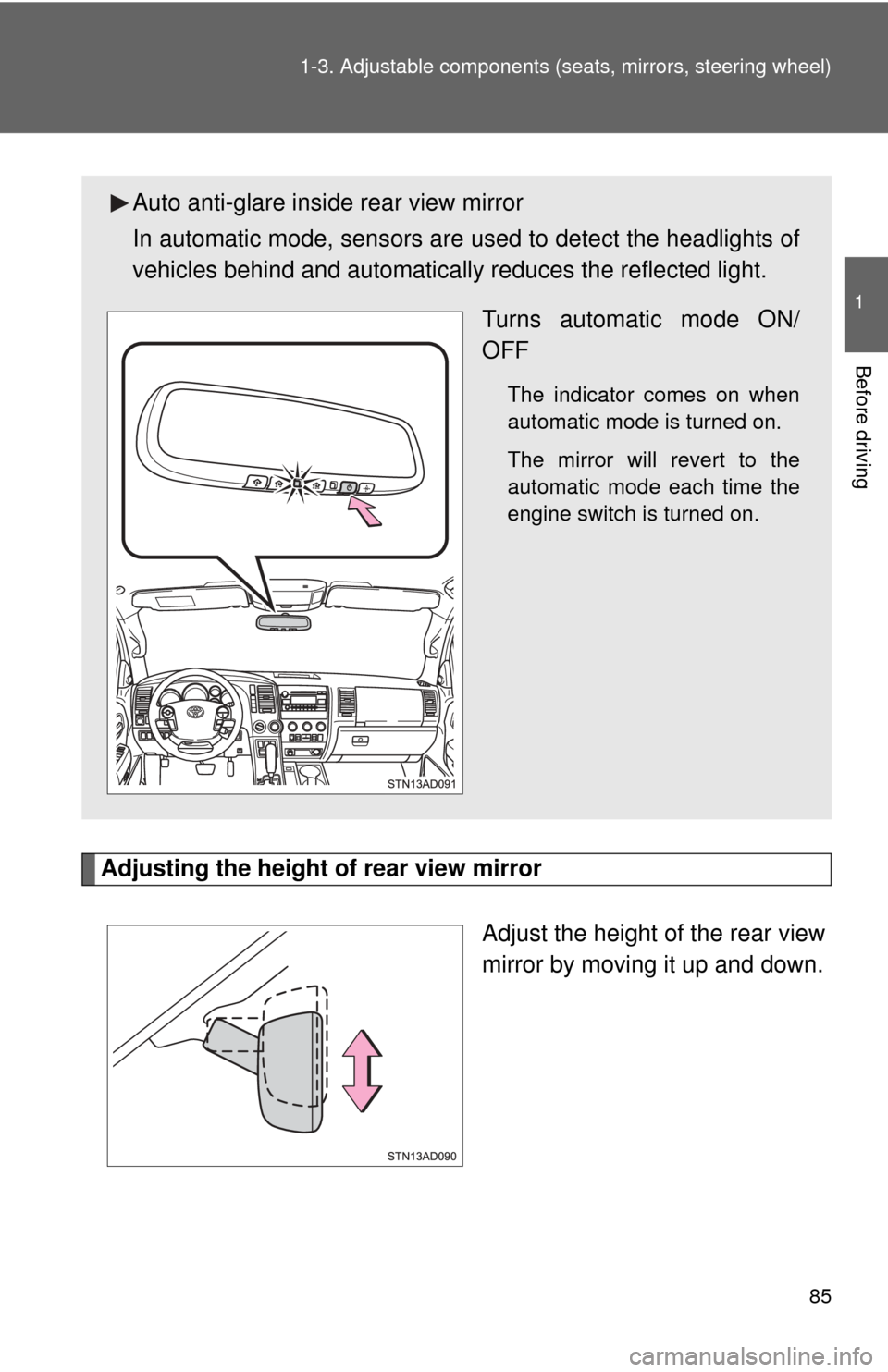
Adjusting the height of rear view mirror
Adjust the height of the rear view
mirror by moving it up and down.
Auto anti-glare inside rear view mirror
In automatic mode, sensors are used to detect the headlights of
vehicles behind and automatical ly reduces the reflected light.
Turns automatic mode ON/
OFF
The indicator comes on when
automatic mode is turned on.
The mirror will revert to the
automatic mode each time the
engine switch is turned on.
Page 86 of 708
86 1-3. Adjustable components (seats, mirrors, steering wheel)
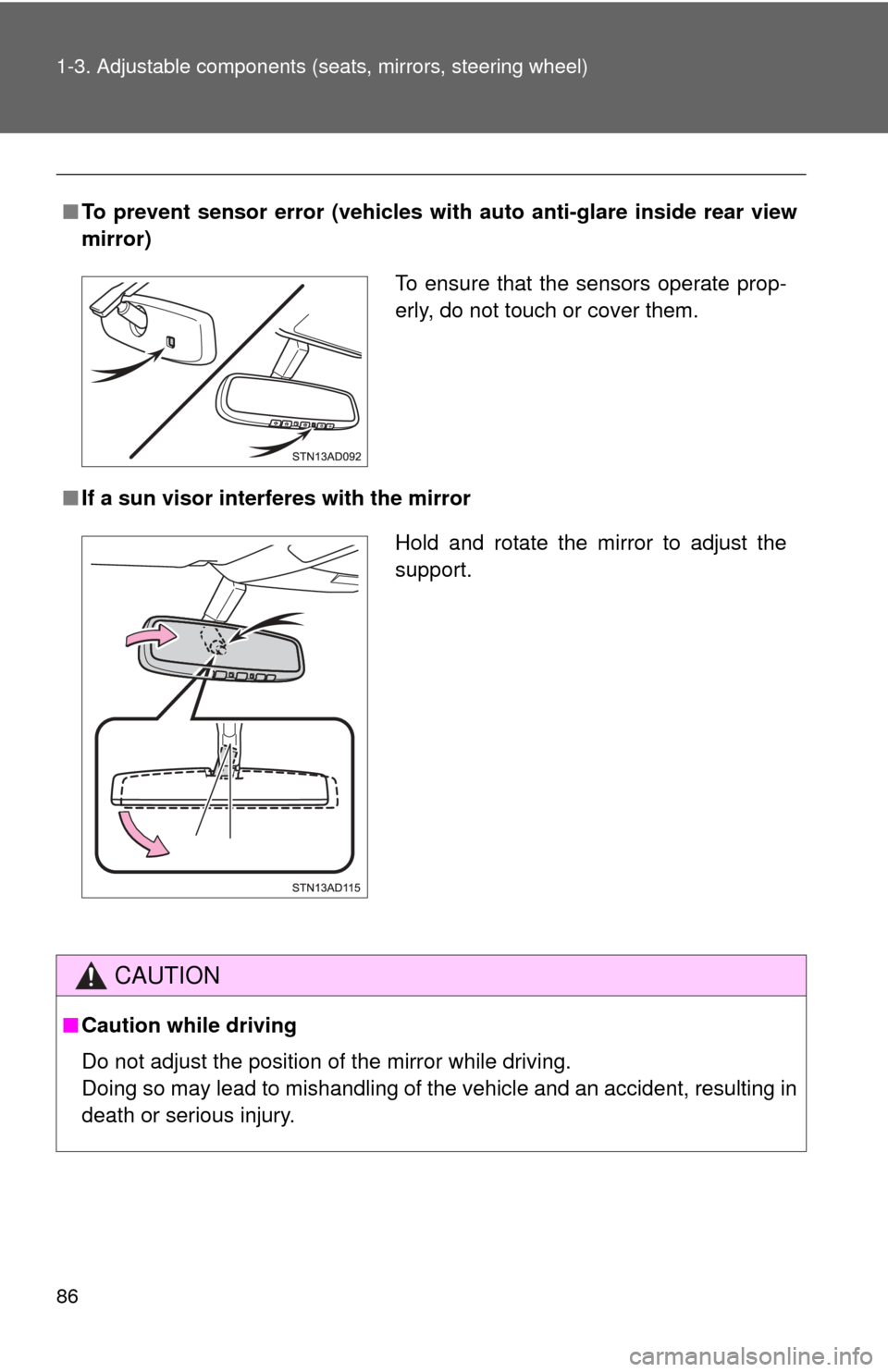
■To prevent sensor error (veh icles with auto anti-glare inside rear view
mirror)
■ If a sun visor inte rferes with the mirror
CAUTION
■Caution while driving
Do not adjust the position of the mirror while driving.
Doing so may lead to mishandling of the vehicle and an accident, resulting in
death or serious injury.
To ensure that the sensors operate prop-
erly, do not touch or cover them.
Hold and rotate the mirror to adjust the
support.
Page 87 of 708
87
1
1-3. Adjustable components (seats, mirrors, steering wheel)
Before driving
Outside rear view mirrors
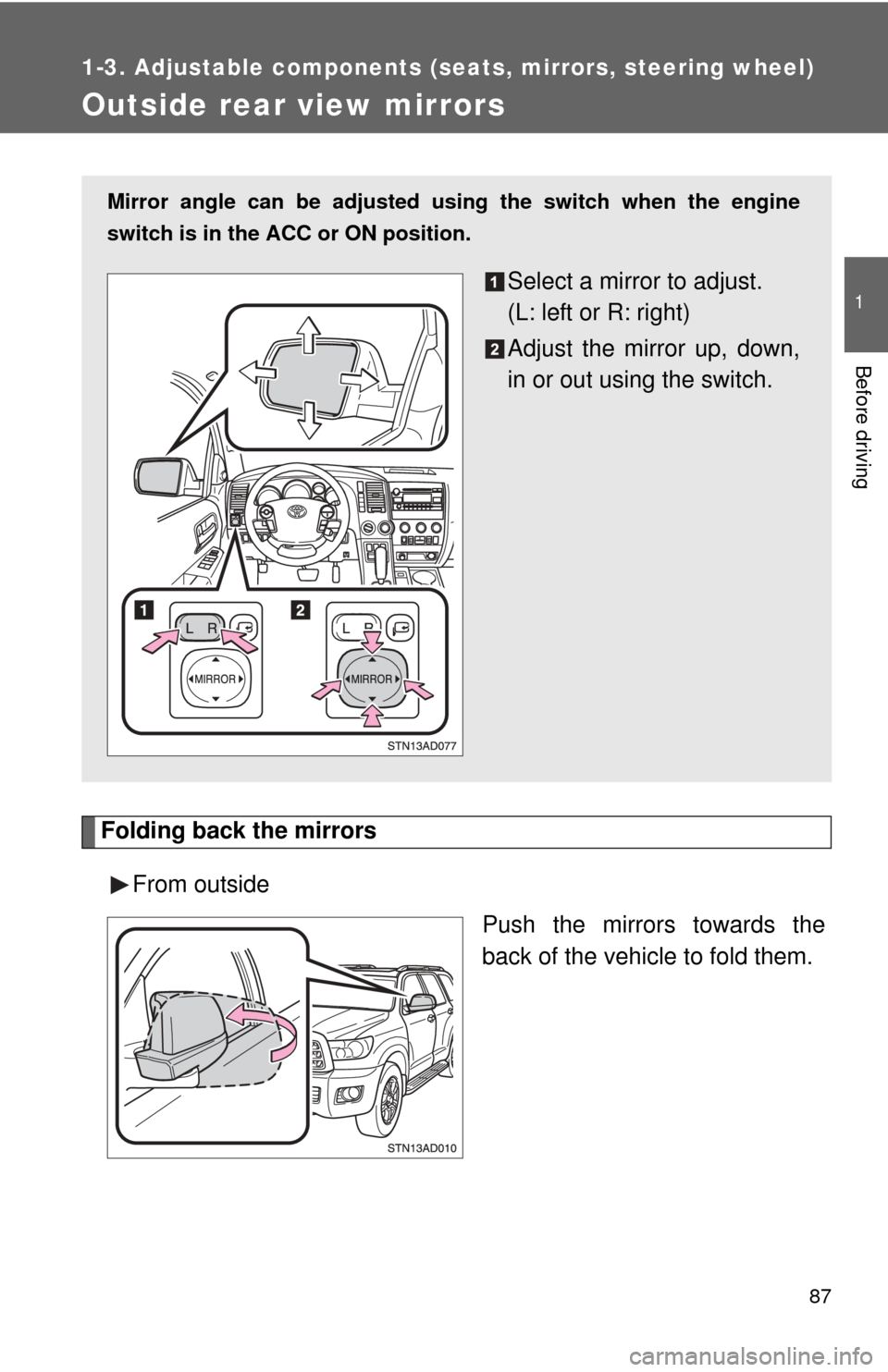
Folding back the mirrorsFrom outside Push the mirrors towards the
back of the vehicle to fold them.
Mirror angle can be adjusted using the switch when the engine
switch is in the ACC or ON position.
Select a mirror to adjust.
(L: left or R: right)
Adjust the mirror up, down,
in or out using the switch.
Page 88 of 708
88 1-3. Adjustable components (seats, mirrors, steering wheel)
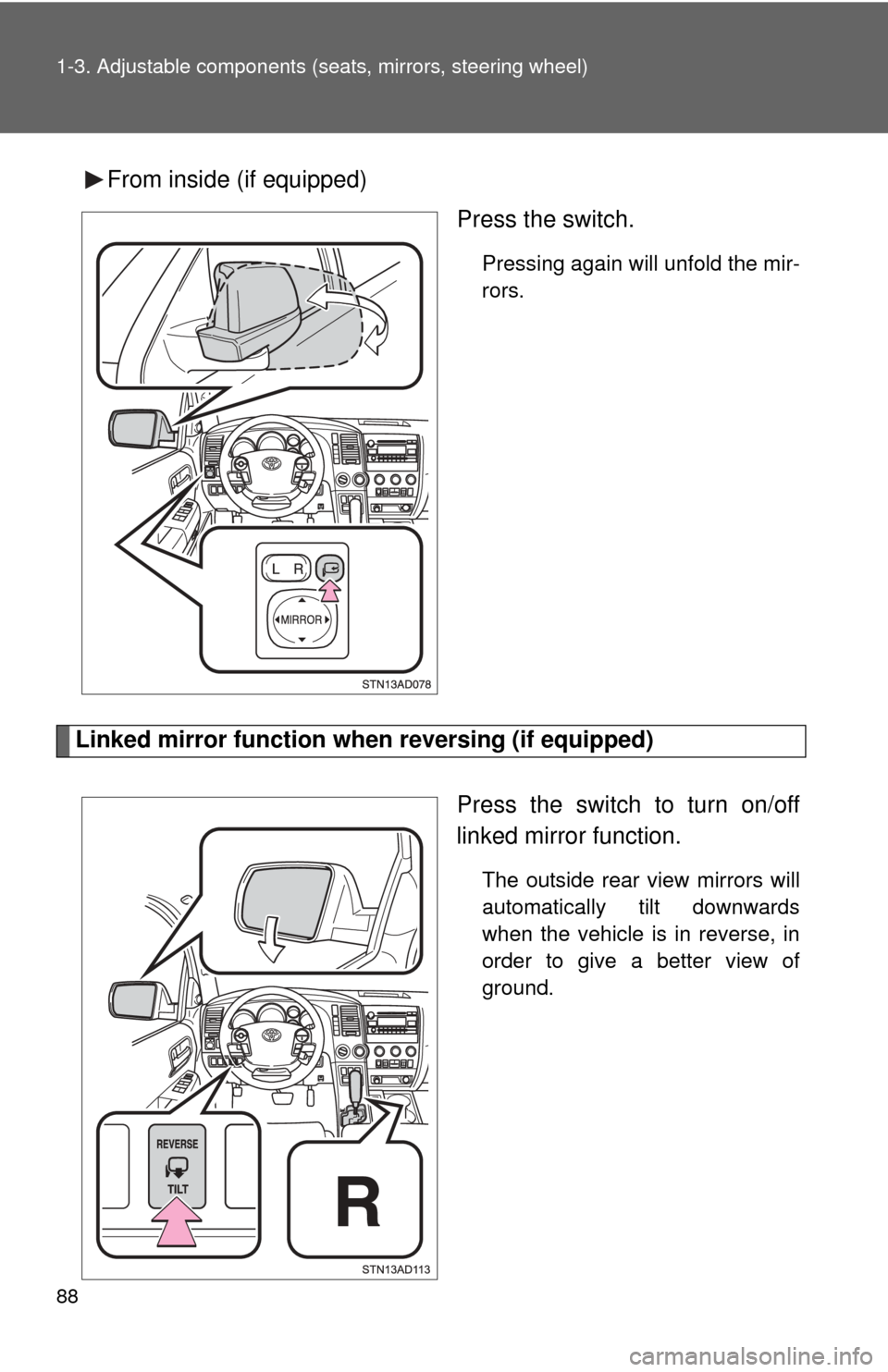
From inside (if equipped)
Press the switch.
Pressing again will unfold the mir-
rors.
Linked mirror function when reversing (if equipped)
Press the switch to turn on/off
linked mirror function.
The outside rear view mirrors will
automatically tilt downwards
when the vehicle is in reverse, in
order to give a better view of
ground.
Page 89 of 708
89
1-3. Adjustable components (s
eats, mirrors, steering wheel)
1
Before driving
■When the mirrors are fogged up (veh icles with outside rear view mirror
defoggers)
Turn on the mirror defoggers to defog the mirrors. ( P. 312)
■ Automatic adjustment of the mirror angle (vehicles with driving posi-
tion memory)
A desired mirror face angle can be entered to memory and recalled automat-
ically by the driving position memory. ( P. 6 5 )
■ Auto anti-glare function (if equipped)
When the anti-glare inside rear view mirror is set to automatic mode, the out-
side rear view mirrors wi ll activate in conjunction with the anti-glare inside
rear view mirror to reduce reflected light. ( P. 84)
CAUTION
■When driving the vehicle
Observe the following precautions while driving.
Failing to do so may result in loss of control of the vehicle and cause an acci-
dent, resulting in death or serious injury.
●Do not adjust the mirrors while driving.
● Do not drive with the mirrors folded back.
● Both the driver and passenger side mirrors must be extended and properly
adjusted before driving.
■ When a mirror is moving
To avoid personal injury and mirror malfunction, be careful not to get your
hand caught by the moving mirror.
■ When the mirror defoggers are operating (vehicles wi th outside rear
view mirror defoggers)
Do not touch the rear view mirror surfaces, as they can become very hot and
burn you.
Page 153 of 708

153
2-1. Driving procedures
2
When driving
CAUTION
■
When driving the vehicle
●Do not shift the shift lever to D while the vehicle is moving backward.
Doing so can damage the transmission and may result in a loss of vehicle\
control.
● Moving the shift lever to N while the vehicle is moving will disengage the
engine from the transmission. Engine braking is not available when N is
selected.
● During normal driving, do not turn off the engine. Turning the engine off
while driving will not cause loss of steering or braking control, but the
power assist to these systems will be lost. This will make it more difficult to
steer and brake, so you should pull over and stop the vehicle as soon as it
is safe to do so.
However, in the event of an emergency, such as if it becomes impossible
to stop the vehicle in the normal way: P. 641
● Use engine braking (downshift) to maintain a safe speed when driving
down a steep hill.
Using the brakes continuously may cause the brakes to overheat and lose
effectiveness. ( P. 162)
● When stopped on an inclined surface, use the brake pedal and parking
brake to prevent the vehicle from rolling backward or forward and causing
an accident.
● Do not adjust the position of the steering wheel, the seat, or the inside or
outside rear view mirrors while driving.
Doing so may result in a loss of vehicle control that can cause accidents
that may result in death or serious injury.
● Always check that all passengers’ arms, heads or other parts of their bod-
ies are not outside the vehicle, as this may result in death or serious injury.
● Do not drive in excess of the speed limit. Even if the legal speed limit per-
mits it, do not drive over 85 mph (140 km/h) unless your vehicle has high-
speed capability tires. Driving over 85 mph (140 km/h) may result in tire
failure, loss of control and possible injury. Be sure to consult a tire dealer
to determine whether the tires on your vehicle are high-speed capability
tires or not before driving at such speeds.
Page 227 of 708
227
2-4. Using other driving systems
2
When driving
Rear view monitor system
: If equipped
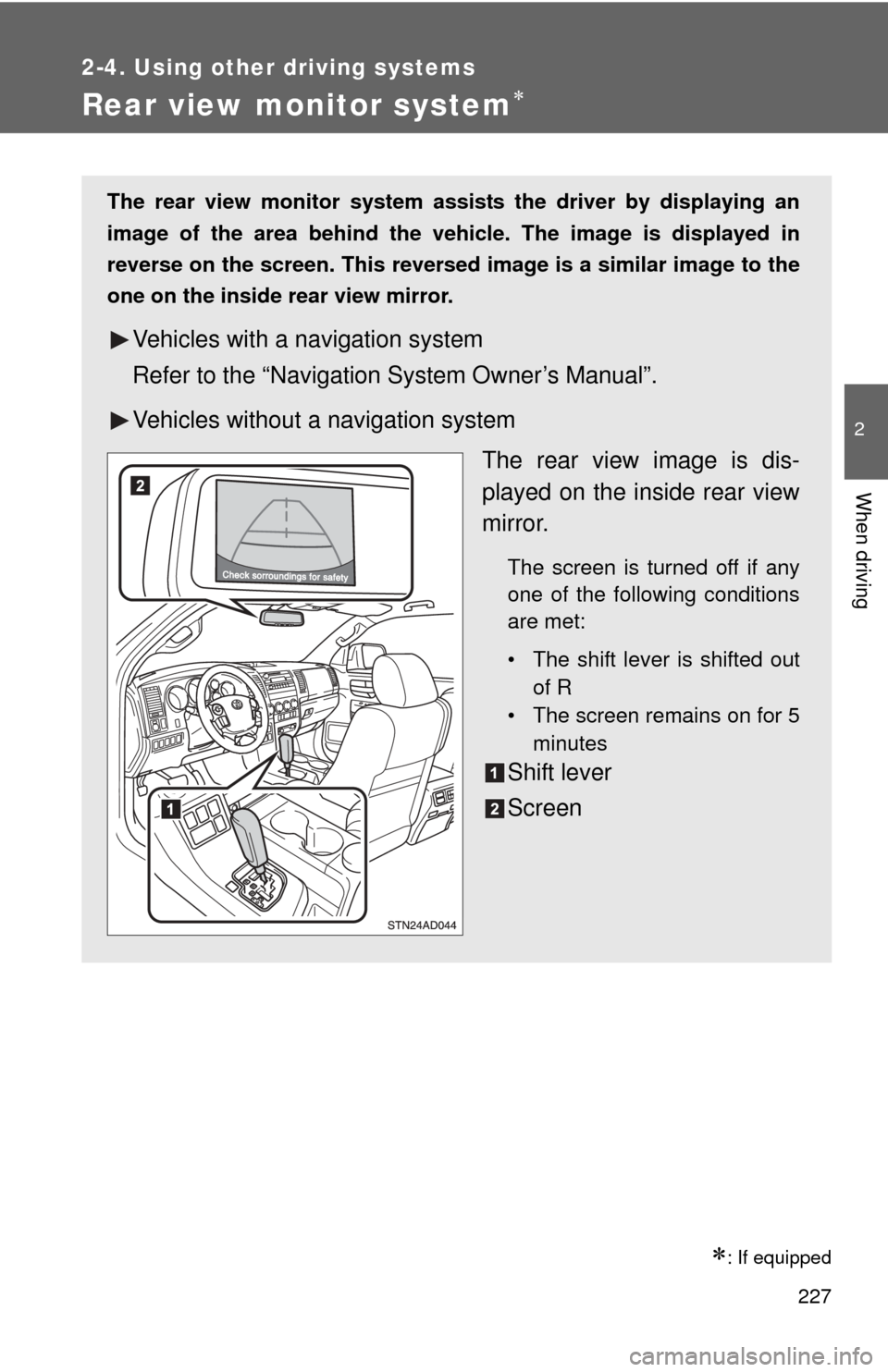
The rear view monitor system assists the driver by displaying an
image of the area behind the vehicle. The image is displayed in
reverse on the screen. This reversed im age is a similar image to the
one on the inside rear view mirror.
Vehicles with a navigation system
Refer to the “Navigation System Owner’s Manual”.
Vehicles without a navigation system
The rear view image is dis-
played on the inside rear view
mirror.
The screen is turned off if any
one of the following conditions
are met:
• The shift lever is shifted outof R
• The screen remains on for 5
minutes
Shift lever
Screen
Page 232 of 708
232 2-4. Using other driving systems
■Rear view monitor system camera
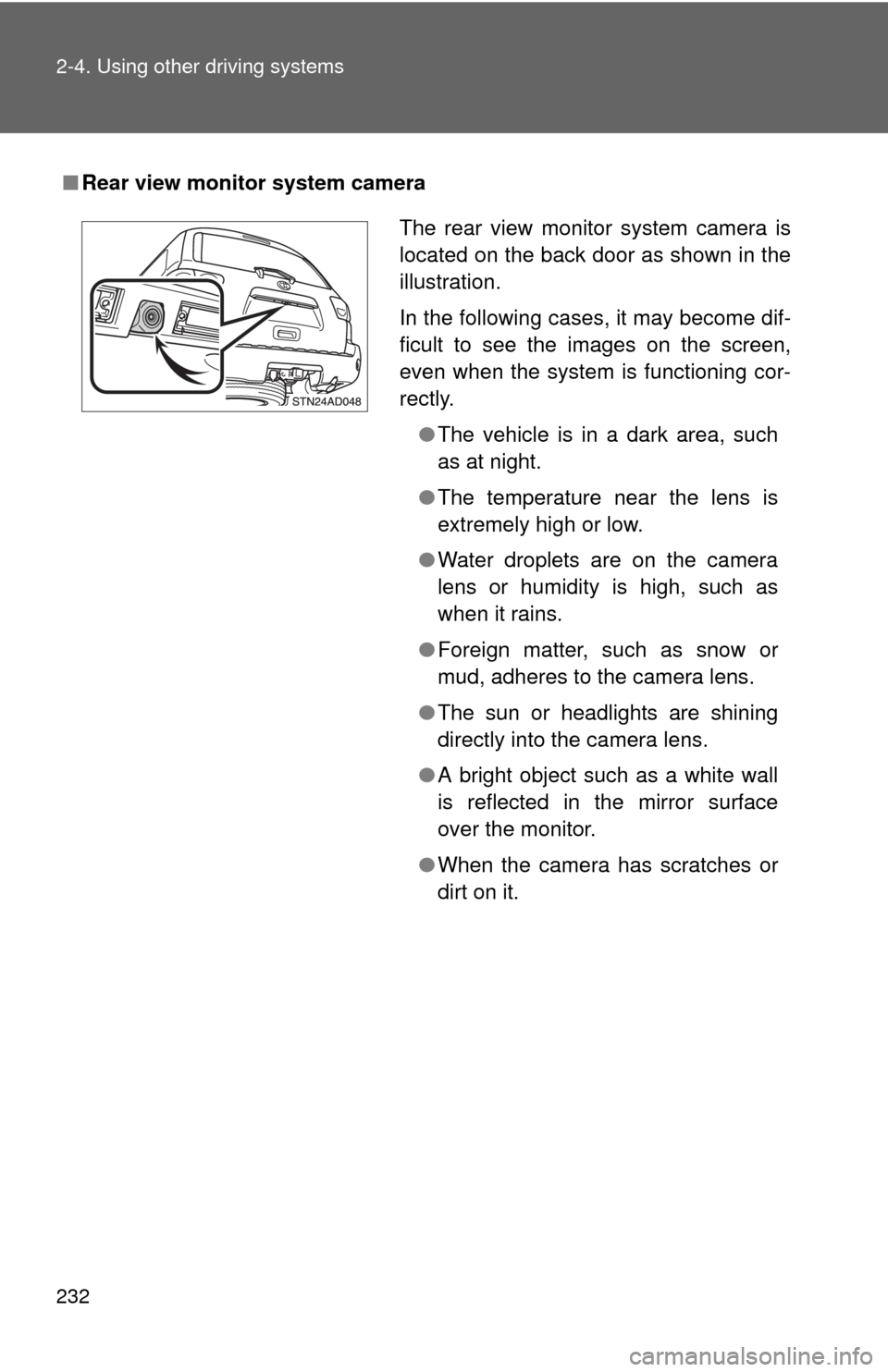
The rear view monitor system camera is
located on the back door as shown in the
illustration.
In the following cases, it may become dif-
ficult to see the images on the screen,
even when the system is functioning cor-
rectly.
●The vehicle is in a dark area, such
as at night.
● The temperature near the lens is
extremely high or low.
● Water droplets are on the camera
lens or humidity is high, such as
when it rains.
● Foreign matter, such as snow or
mud, adheres to the camera lens.
● The sun or headlights are shining
directly into the camera lens.
● A bright object such as a white wall
is reflected in the mirror surface
over the monitor.
● When the camera has scratches or
dirt on it.
Page 234 of 708
234 2-4. Using other driving systems
CAUTION
■When using the rear view monitor system
Observe the following precautions to avoid an accident that could result in
death or serious injuries.
● Never depend solely on the rear view monitor system when reversing.
● Always check visually and with the mirrors to confirm your intended path is
clear.
● Always check the vehicle surroundi ng area, because the guide lines are
estimates of distance and location.
● The guide lines are assistant lines and do not change even if the steering
wheel is turned.
● Depicted distances between objects and flat surfaces differ from actual
distances.
● Do not use the system if back door is open.
■ Conditions which may affect the rear view monitor system
● If the back of the vehicle has been hit, the camera’s position and mounting
angle may have changed. Have the vehicle inspected by your Toyota
dealer.
● Rapid temperature changes, such as when hot water is poured on the
vehicle in cold weather, may cause the system to function abnormally.
● If the camera lens is dirty, it cannot transmit a clear image. Rinse with
water and wipe with a soft cloth. If extremely dirty, wash with a mild
cleanser and rinse.
● The displayed image may be darker and moving images may be slightly
distorted when the system is cold.
■ Caution while driving in reverse
Do not change modes while the vehicle is moving.
Page 236 of 708
236
2-4. Using other driving systems
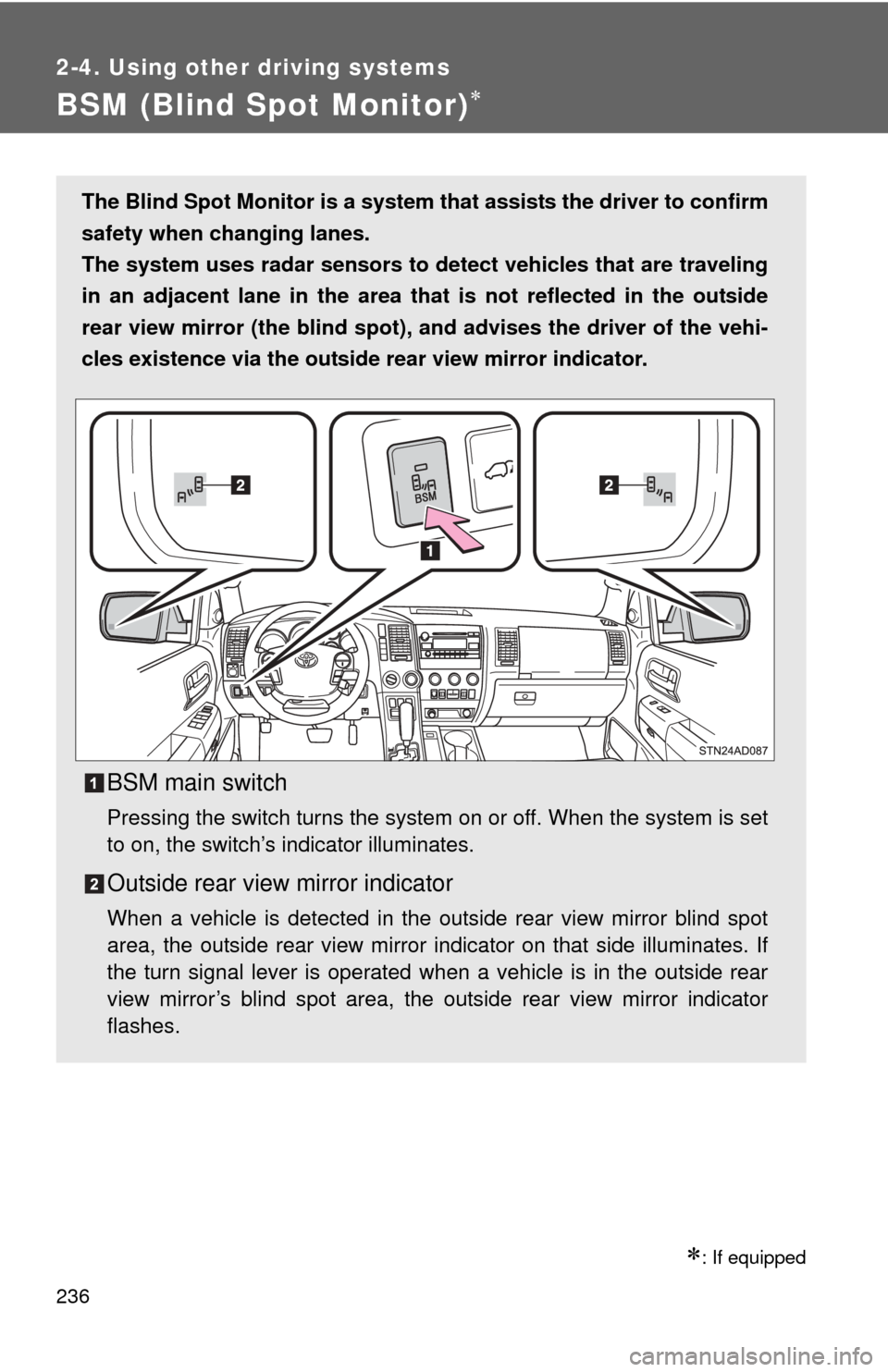
BSM (Blind Spot Monitor)
: If equipped
The Blind Spot Monitor is a system that assists the driver to confirm
safety when changing lanes.
The system uses radar sensors to de tect vehicles that are traveling
in an adjacent lane in the area th at is not reflected in the outside
rear view mirror (the blind spot), and advises the driver of the vehi-
cles existence via the outside rear view mirror indicator.
BSM main switch
Pressing the switch turns the system on or off. When the system is set
to on, the switch’s indicator illuminates.
Outside rear view mirror indicator
When a vehicle is detected in the outside rear view mirror blind spot
area, the outside rear view mirror indicator on that side illuminates. If
the turn signal lever is operated when a vehicle is in the outside rear
view mirror’s blind spot area, the outside rear view mirror indicator
flashes.