door lock TOYOTA SEQUOIA 2022 User Guide
[x] Cancel search | Manufacturer: TOYOTA, Model Year: 2022, Model line: SEQUOIA, Model: TOYOTA SEQUOIA 2022Pages: 592, PDF Size: 10.82 MB
Page 113 of 592
1133-2. Opening, closing and locking the doors
3
Operation of each component
SEQUOIA_OM_USA_OM0C047U
Side doors
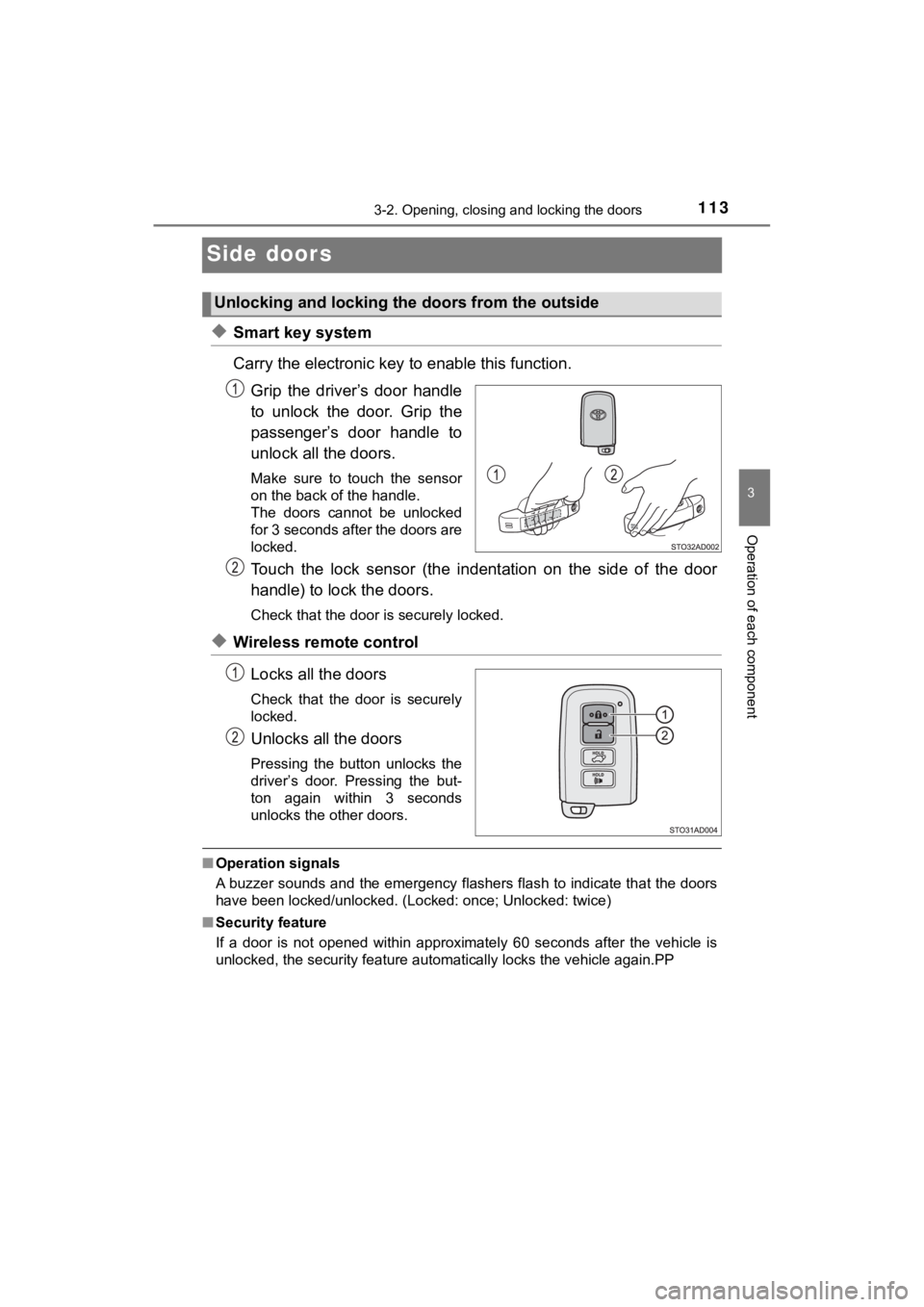
◆Smart key system
Carry the electronic key to enable this function.
Grip the driver’s door handle
to unlock the door. Grip the
passenger’s door handle to
unlock all the doors.
Make sure to touch the sensor
on the back of the handle.
The doors cannot be unlocked
for 3 seconds after the doors are
locked.
Touch the lock sensor (the indent ation on the side of the door
handle) to lock the doors.
Check that the door is securely locked.
◆Wireless remote control
Locks all the doors
Check that the door is securely
locked.
Unlocks all the doors
Pressing the button unlocks the
driver’s door. Pressing the but-
ton again within 3 seconds
unlocks the other doors.
■Operation signals
A buzzer sounds and the emergency flashers flash to indicate th at the doors
have been locked/unlocked. (Locked: once; Unlocked: twice)
■ Security feature
If a door is not opened within approximately 60 seconds after t he vehicle is
unlocked, the security feature automatically locks the vehicle again.PP
Unlocking and locking the doors from the outside
Page 114 of 592
1143-2. Opening, closing and locking the doors
SEQUOIA_OM_USA_OM0C047U■
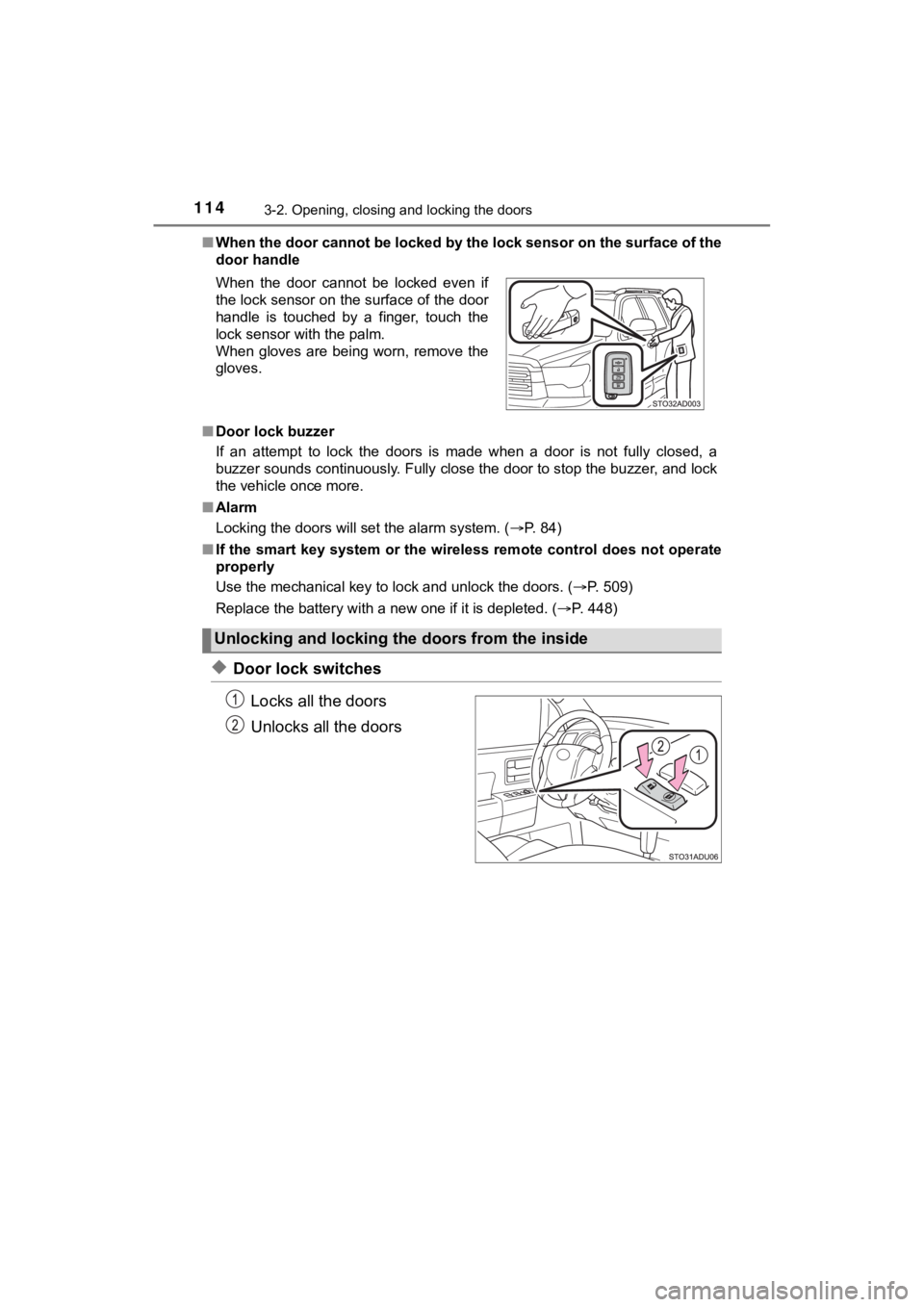
When the door cannot be locked by the lock sensor on the surface of the
door handle
■ Door lock buzzer
If an attempt to lock the doors is made when a door is not full y closed, a
buzzer sounds continuously. Fully close the door to stop the bu zzer, and lock
the vehicle once more.
■ Alarm
Locking the doors will set the alarm system. ( P. 84)
■ If the smart key system or the wireless remote control does not operate
properly
Use the mechanical key to lock and unlock the doors. ( P. 509)
Replace the battery with a new one if it is depleted. ( P. 448)
◆Door lock switches
Locks all the doors
Unlocks all the doors
When the door cannot be locked even if
the lock sensor on the surface of the door
handle is touched by a finger, touch the
lock sensor with the palm.
When gloves are being worn, remove the
gloves.
Unlocking and locking the doors from the inside
Page 115 of 592
1153-2. Opening, closing and locking the doors
3
Operation of each component
SEQUOIA_OM_USA_OM0C047U
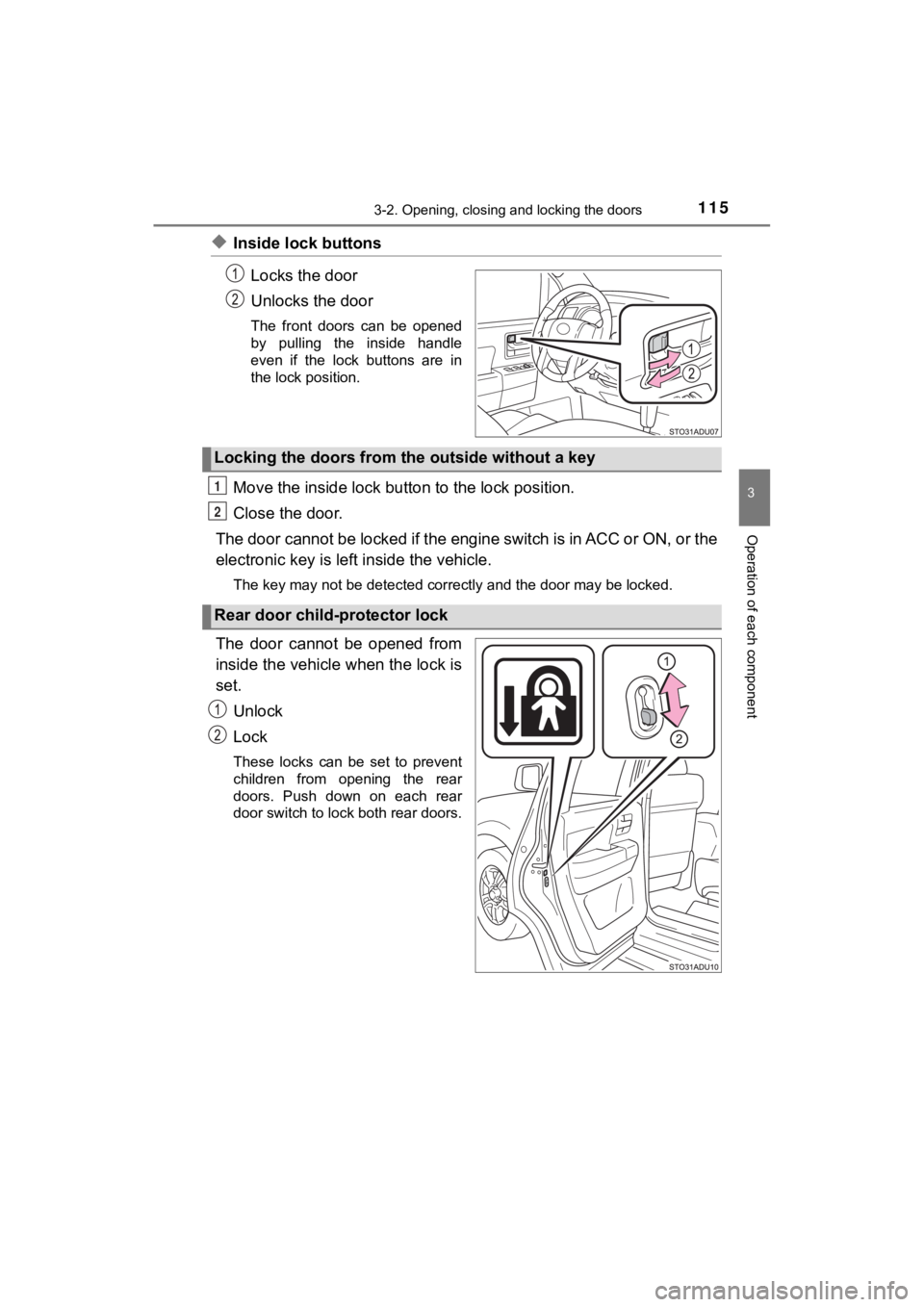
◆Inside lock buttonsLocks the door
Unlocks the door
The front doors can be opened
by pulling the inside handle
even if the lock buttons are in
the lock position.
Move the inside lock bu tton to the lock position.
Close the door.
The door cannot be locked if the engine switch is in ACC or ON, or the
electronic key is left inside the vehicle.
The key may not be detected correctly and the door may be locke d.
The door cannot be opened from
inside the vehicle when the lock is
set.
Unlock
Lock
These locks can be set to prevent
children from opening the rear
doors. Push down on each rear
door switch to lock both rear doors.
Locking the doors from the outside without a key
Rear door child-protector lock
1
2
Page 116 of 592
1163-2. Opening, closing and locking the doors
SEQUOIA_OM_USA_OM0C047U
The following functions can be set or canceled:
For instructions on customizing, refer to P. 548.
■
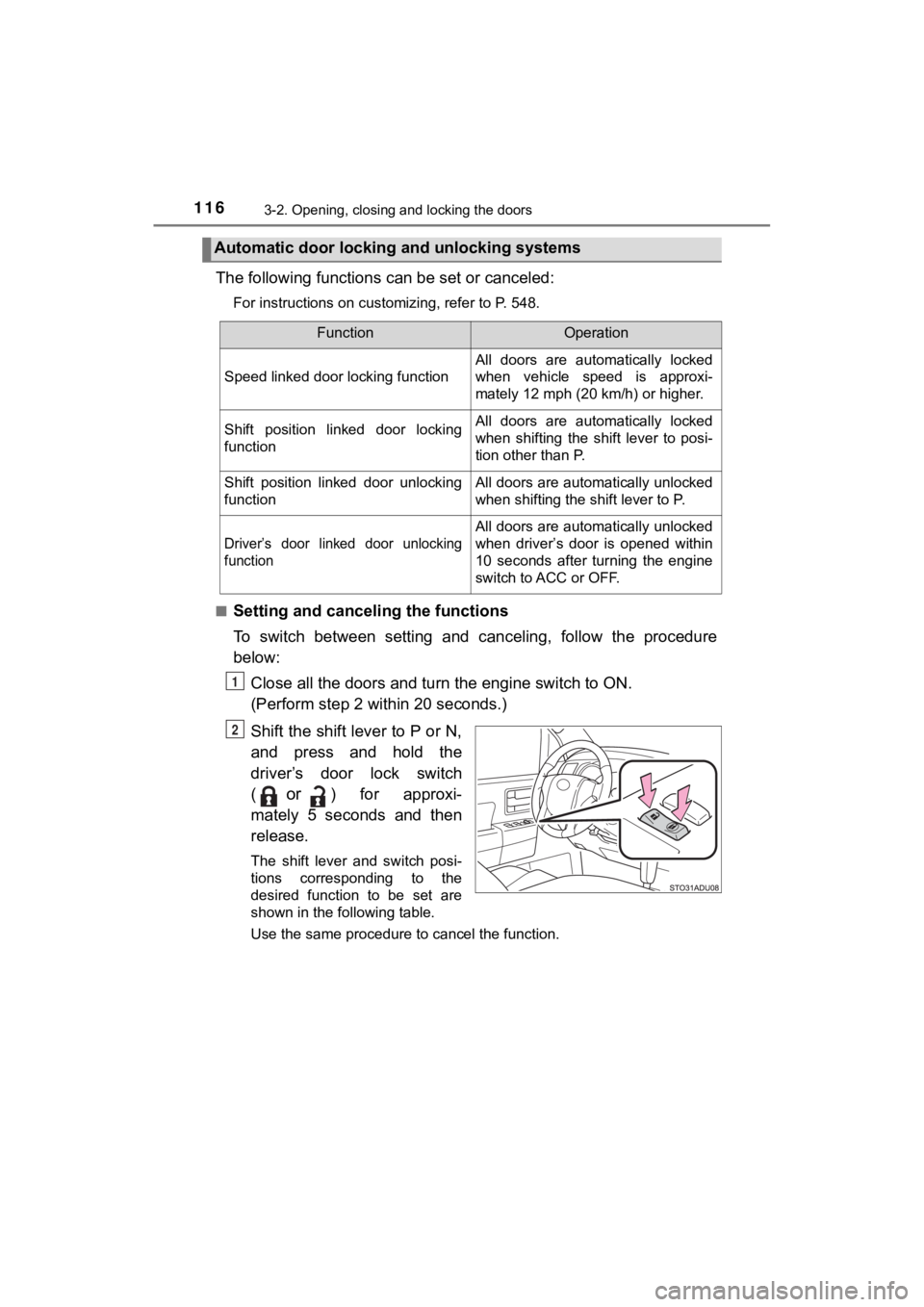
Setting and cance ling the functions
To switch between setting and canceling, follow the procedure
below: Close all the doors and turn the engine switch to ON.
(Perform step 2 wi thin 20 seconds.)
Shift the shift lever to P or N,
and press and hold the
driver’s door lock switch
(
or) for approxi-
mately 5 seconds and then
release.
The shift lever and switch posi-
tions corresponding to the
desired function to be set are
shown in the following table.
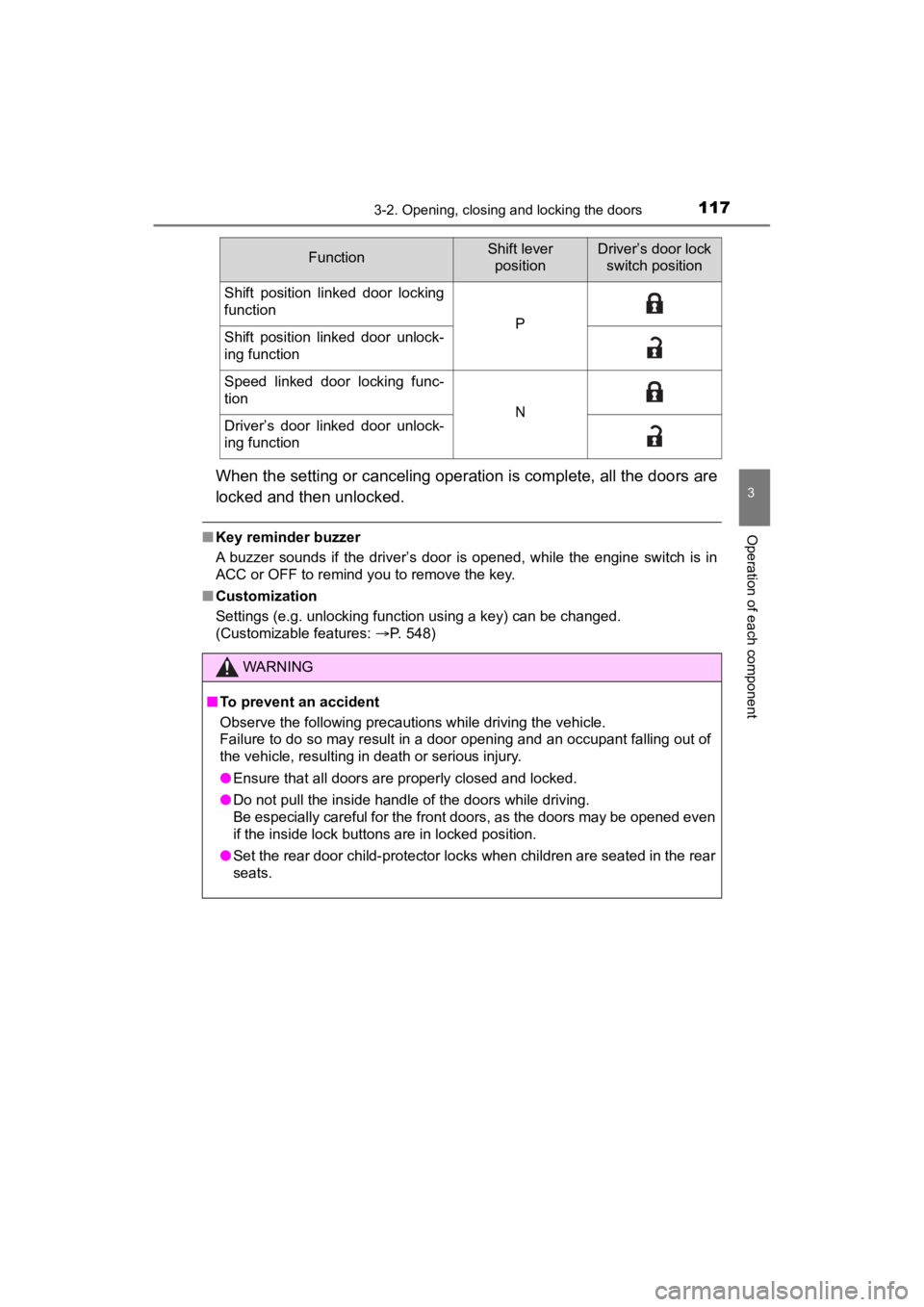
Use the same procedure to cancel the function.
Automatic door locking and unlocking systems
FunctionOperation
Speed linked door locking function
All doors are automatically locked
when vehicle speed is approxi-
mately 12 mph (20 km/h) or higher.
Shift position linked door locking
functionAll doors are automatically locked
when shifting the shift lever to posi-
tion other than P.
Shift position linked door unlocking
functionAll doors are automatically unlocked
when shifting the shift lever to P.
Driver’s door linked door unlocking
function
All doors are automatically unlocked
when driver’s door is opened within
10 seconds after turning the engine
switch to ACC or OFF.
1
2
Page 117 of 592
1173-2. Opening, closing and locking the doors
3
Operation of each component
SEQUOIA_OM_USA_OM0C047U
When the setting or canceling operation is complete, all the doors are
locked and then unlocked.
■ Key reminder buzzer
A buzzer sounds if the driver’s door is opened, while the engine switch is in
ACC or OFF to remind you to remove the key.
■ Customization
Settings (e.g. unlocking function using a key) can be changed.
(Customizable features: P. 548)
FunctionShift lever
positionDriver’s door lock switch position
Shift position linked door locking
function
PShift position linked door unlock-
ing function
Speed linked door locking func-
tion
NDriver’s door linked door unlock-
ing function
WARNING
■ To prevent an accident
Observe the following precautions while driving the vehicle.
Failure to do so may result in a door opening and an occupant falling out of
the vehicle, resulting in death or serious injury.
● Ensure that all doors are properly closed and locked.
● Do not pull the inside handle of the doors while driving.
Be especially careful for the front doors, as the doors may be opened even
if the inside lock buttons are in locked position.
● Set the rear door child-protector locks when children are seated in the rear
seats.
Page 118 of 592
1183-2. Opening, closing and locking the doors
SEQUOIA_OM_USA_OM0C047U
Back door
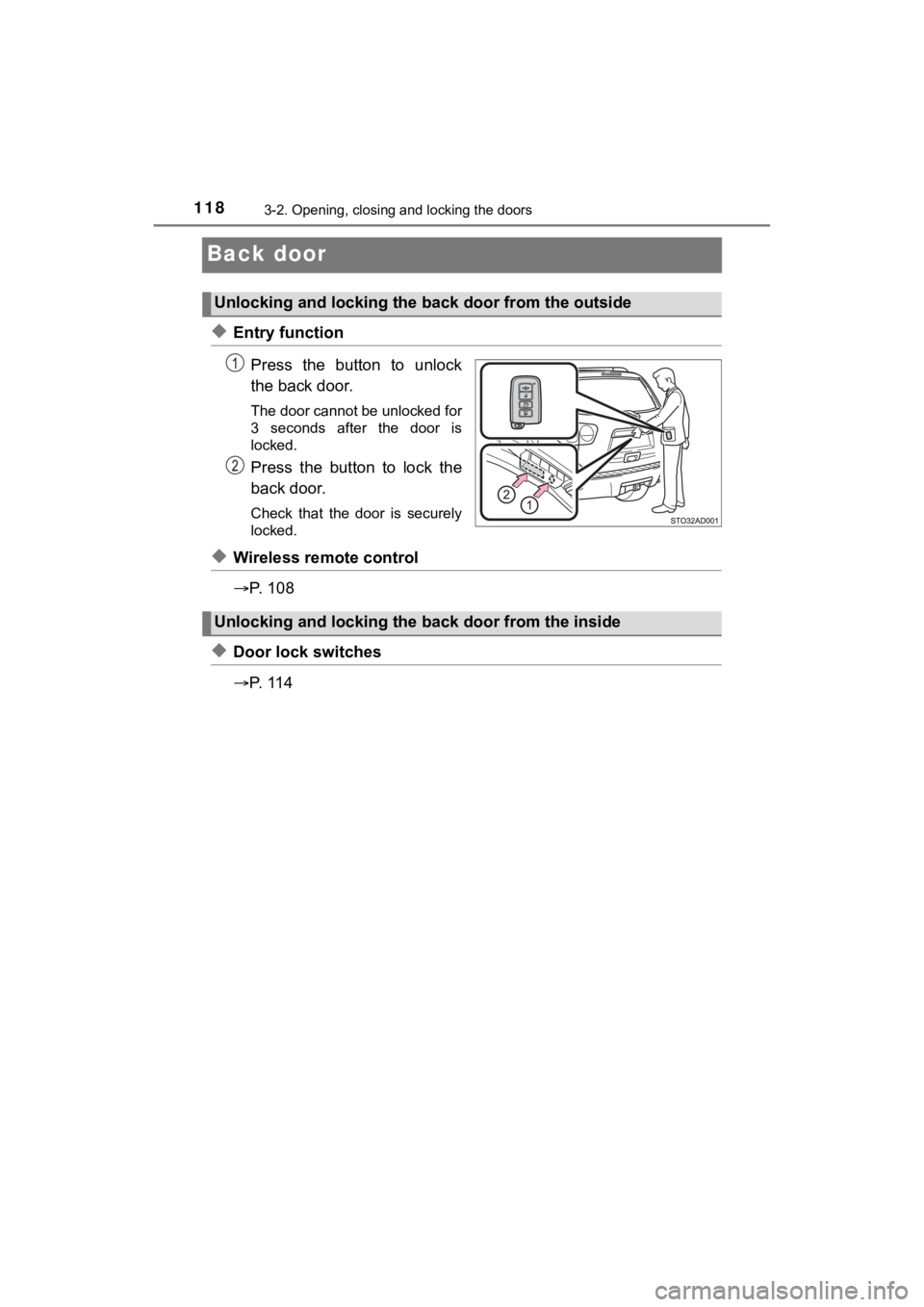
◆Entry functionPress the button to unlock
the back door.
The door cannot be unlocked for
3 seconds after the door is
locked.
Press the button to lock the
back door.
Check that the door is securely
locked.
◆Wireless remote control
P. 1 0 8
◆Door lock switches
P. 1 1 4
Unlocking and locking the back door from the outside
Unlocking and locking the back door from the inside
Page 119 of 592
1193-2. Opening, closing and locking the doors
3
Operation of each component
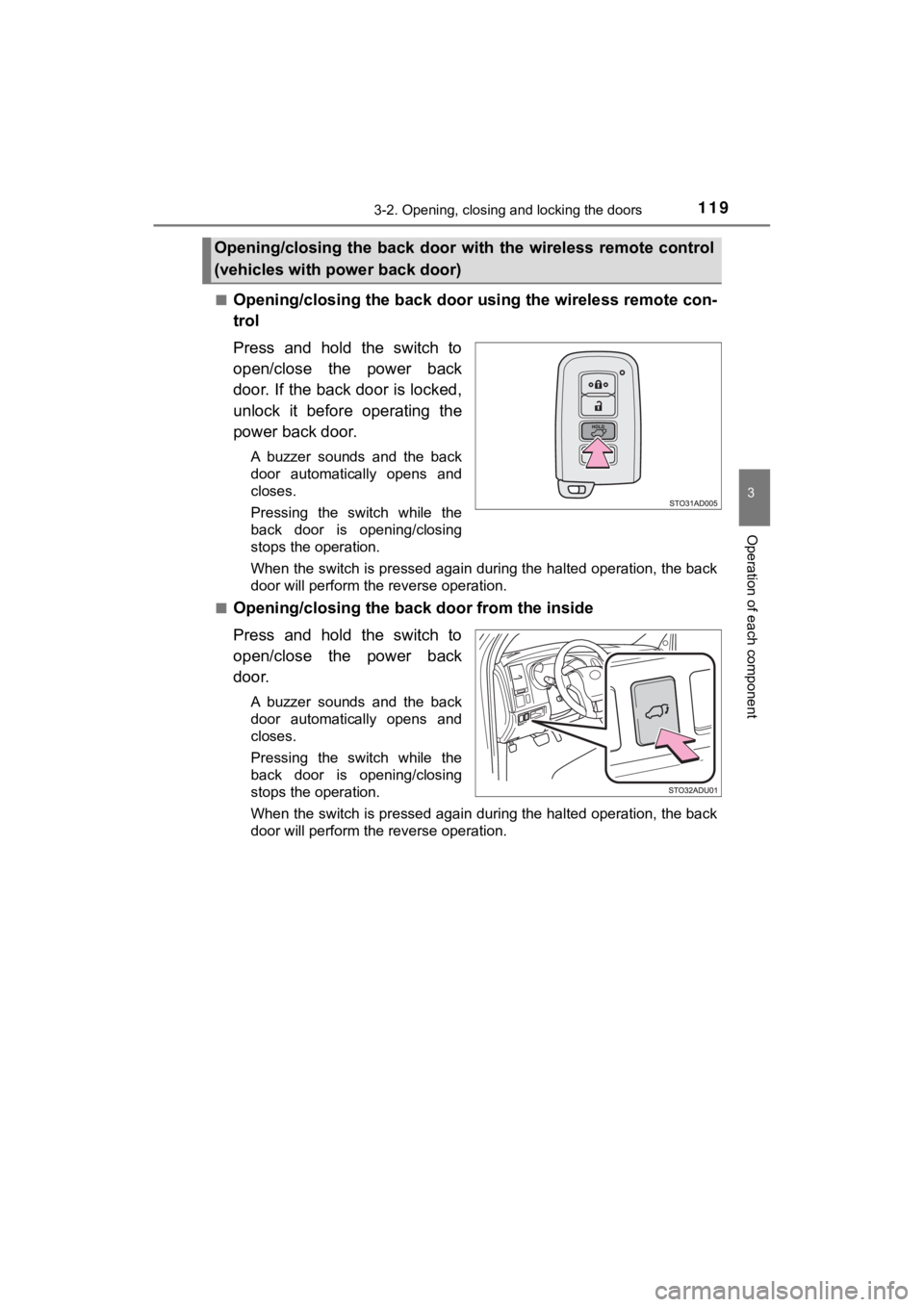
SEQUOIA_OM_USA_OM0C047U■
Opening/closing the back door us
ing the wireless remote con-
trol
Press and hold the switch to
open/close the power back
door. If the back door is locked,
unlock it before operating the
power back door.
A buzzer sounds and the back
door automatically opens and
closes.
Pressing the switch while the
back door is opening/closing
stops the operation.
When the switch is pressed again during the halted operation, the back
door will perform the reverse operation.
■
Opening/closing the b ack door from the inside
Press and hold the switch to
open/close the power back
door.
A buzzer sounds and the back
door automatically opens and
closes.
Pressing the switch while the
back door is opening/closing
stops the operation.
When the switch is pressed again during the halted operation, the back
door will perform the reverse operation.
Opening/closing the back door wit h the wireless remote control
(vehicles with power back door)
Page 120 of 592
1203-2. Opening, closing and locking the doors
SEQUOIA_OM_USA_OM0C047U
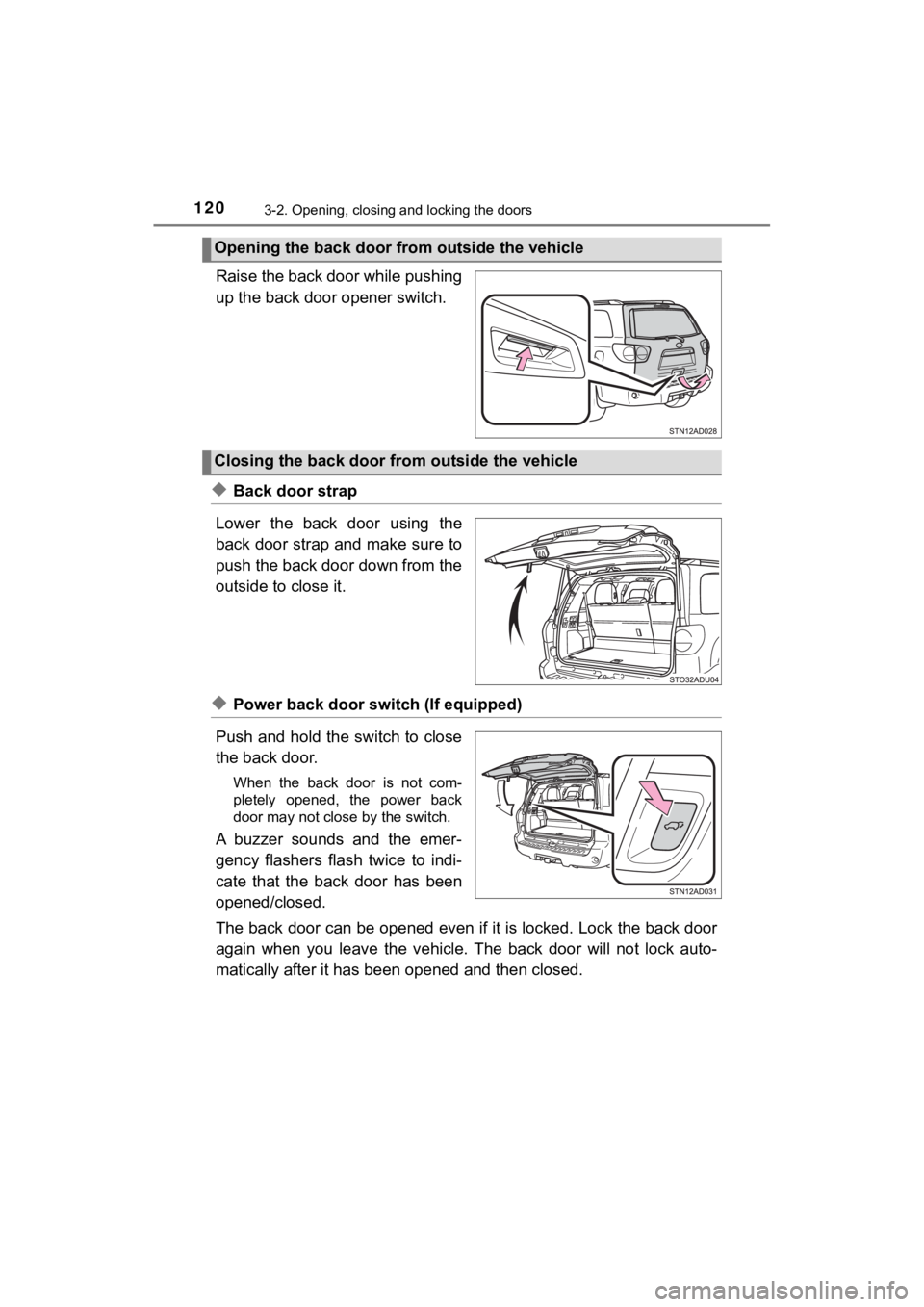
Raise the back door while pushing
up the back door opener switch.
◆Back door strap
Lower the back door using the
back door strap and make sure to
push the back door down from the
outside to close it.
◆Power back door switch (If equipped)
Push and hold the switch to close
the back door.
When the back door is not com-
pletely opened, the power back
door may not close by the switch.
A buzzer sounds and the emer-
gency flashers flash twice to indi-
cate that the back door has been
opened/closed.
The back door can be opened even if it is locked. Lock the back door
again when you leave the vehicle. The back door will not lock a uto-
matically after it has bee n opened and then closed.
Opening the back door from outside the vehicle
Closing the back door from outside the vehicle
Page 121 of 592
1213-2. Opening, closing and locking the doors
3
Operation of each component
SEQUOIA_OM_USA_OM0C047U
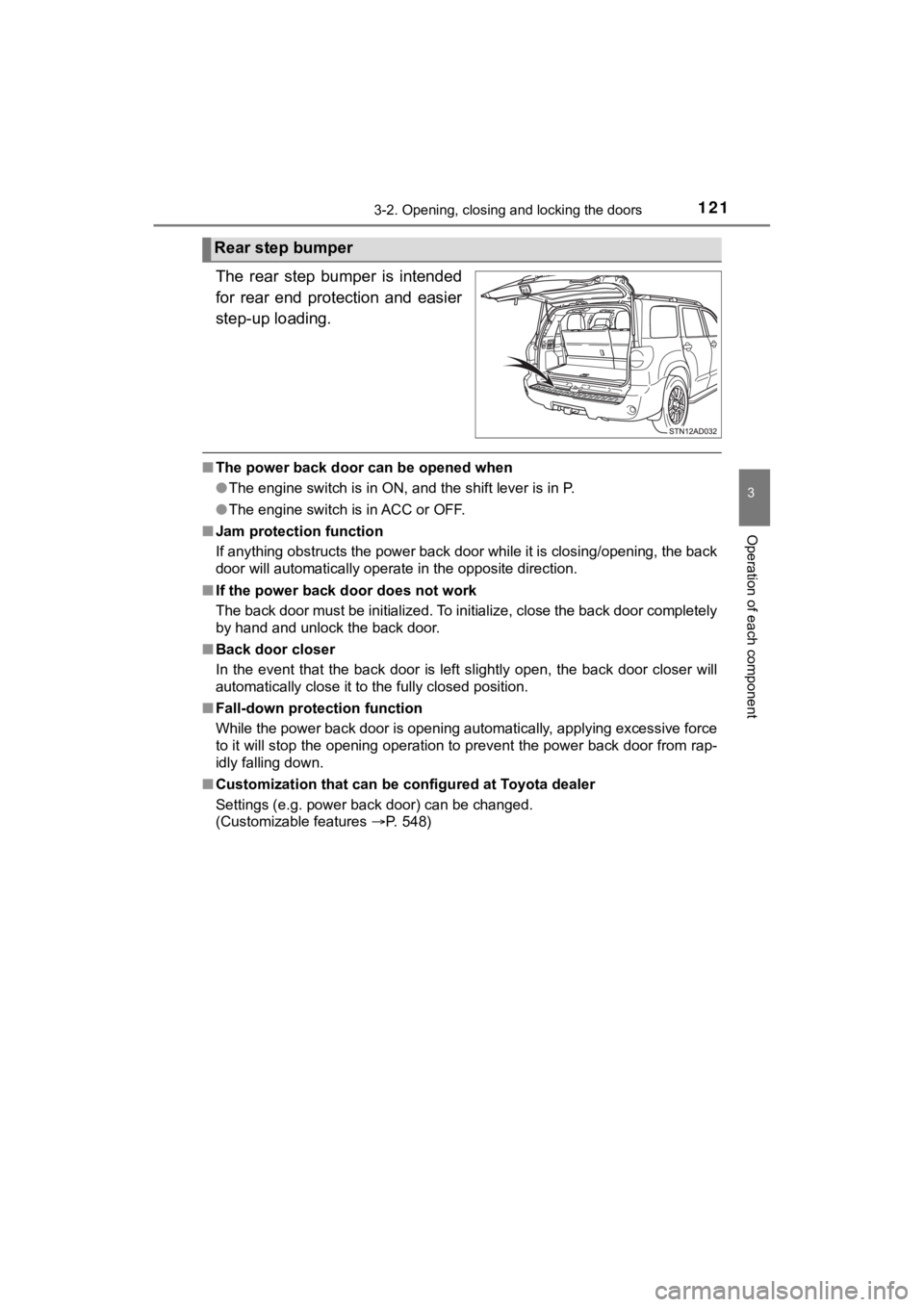
The rear step bumper is intended
for rear end protection and easier
step-up loading.
■The power back door can be opened when
●The engine switch is in ON, and the shift lever is in P.
● The engine switch is in ACC or OFF.
■ Jam protection function
If anything obstructs the power back door while it is closing/o pening, the back
door will automatically operate in the opposite direction.
■ If the power back door does not work
The back door must be initialized. To initialize, close the back door completely
by hand and unlock the back door.
■ Back door closer
In the event that the back door is left slightly open, the back door closer will
automatically close it to the fully closed position.
■ Fall-down protection function
While the power back door is opening automatically, applying ex cessive force
to it will stop the opening operation to prevent the power back door from rap-
idly falling down.
■ Customization that can be configured at Toyota dealer
Settings (e.g. power back door) can be changed.
(Customizable features P. 548)
Rear step bumper
Page 122 of 592
1223-2. Opening, closing and locking the doors
SEQUOIA_OM_USA_OM0C047U
WARNING
■Before driving
Observe the following precautions.
Failure to do so may result in death or serious injury.
● Make sure that the back door is fully closed. If the back door is not fully
closed, it may open unexpectedly while driving and hit near-by objects or
luggage in the luggage compartment may be thrown out, causing an acci-
dent.
● Do not allow children to play in the luggage compartment.
If a child is accidentally locked in the luggage compartment, they could
have heat exhaustion or other injuries.
● Do not allow a child to open or close the back door.
Doing so may cause the back door to move unexpectedly, or cause the
child’s hands, head, or neck to be caught by the closing back door.
● Do not get on the rear step bumper.
■ Important points while driving
● Keep the back door closed while driving.
If the back door is left open, it may hit near-by objects or luggage in the
luggage compartment may be thrown out, causing an accident.
● Never let anyone sit in the luggage compartment. In the event of sudden
braking or a collision, they are susceptible to death or seriou s injury.