garage door opener TOYOTA SEQUOIA 2022 Owners Manual
[x] Cancel search | Manufacturer: TOYOTA, Model Year: 2022, Model line: SEQUOIA, Model: TOYOTA SEQUOIA 2022Pages: 592, PDF Size: 10.82 MB
Page 4 of 592

TABLE OF CONTENTS4
SEQUOIA_OM_USA_OM0C047U5-1. Using the air conditioning
system and defogger
Front air conditioning system............................. 342
Rear air conditioning system............................. 350
Seat heaters/ seat ventilators ................ 354
5-2. Using the interior lights Interior lights list ................ 357
• Personal/interior light main switch ................... 358
• Personal/interior lights ............................. 359
• Interior light ................... 360
5-3. Using the storage features
List of storage features...... 361
• Glove boxes .................. 362
• Front console box ......... 363
• Card holder ................... 364
• Map holder (center console) ............ 365
• Rear console box .......... 365
• Overhead console ......... 367
• Cup holders .................. 368
• Bottle holders ................ 371
• Auxiliary boxes .............. 372
Luggage compartment features ........................... 373 5-4. Other interior features
Other interior features........ 377
• Sun visors ..................... 377
• Vanity mirrors ................ 378
• Power outlets ................ 379
• USB charging ports ....... 382
• Armrest (second seats)............... 384
• Rear side sunshades .... 385
• Assist grips .................... 386
Garage door opener .......... 387
Compass ........................... 395
5Interior features
Page 24 of 592
24Pictorial index
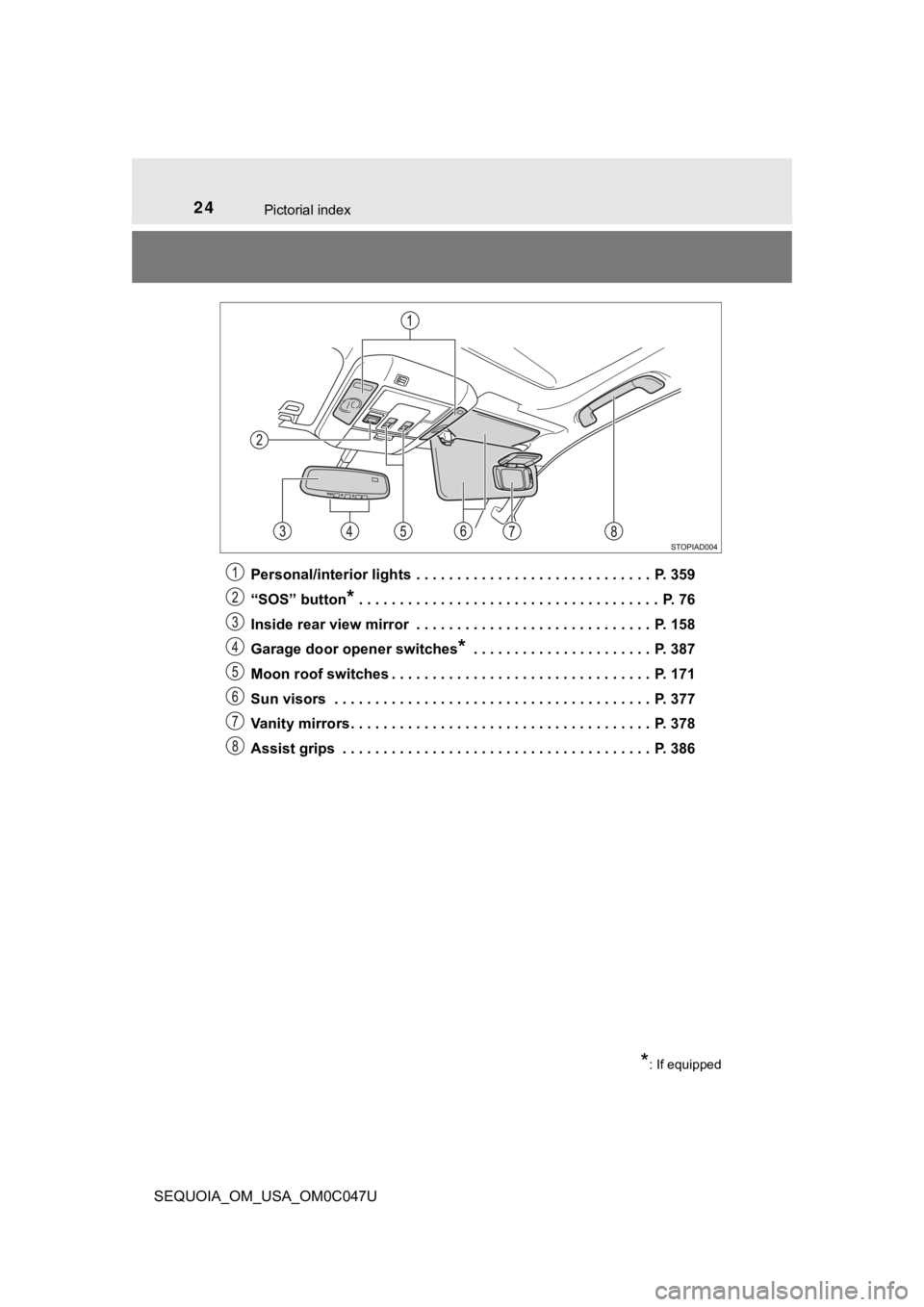
SEQUOIA_OM_USA_OM0C047UPersonal/interior lights . . . . . . . . . . . . . . . . . . . . . . . . . . . . . P. 359
“SOS” button
* . . . . . . . . . . . . . . . . . . . . . . . . . . . . . . . . . . . . . P. 76
Inside rear view mirror . . . . . . . . . . . . . . . . . . . . . . . . . . . . . P. 158
Garage door opener switches
* . . . . . . . . . . . . . . . . . . . . . . P. 387
Moon roof switches . . . . . . . . . . . . . . . . . . . . . . . . . . . . . . . . P. 171
Sun visors . . . . . . . . . . . . . . . . . . . . . . . . . . . . . . . . . . . . . . . P. 377
Vanity mirrors . . . . . . . . . . . . . . . . . . . . . . . . . . . . . . . . . . . . . P. 378
Assist grips . . . . . . . . . . . . . . . . . . . . . . . . . . . . . . . . . . . . . . P. 386
*: If equipped
Page 341 of 592
341
Interior features5
SEQUOIA_OM_USA_OM0C047U5-1. Using the
air conditioning system
and defogger
Front air conditioning system............................. 342
Rear air conditioning system............................. 350
Seat heaters/ seat ventilators ................ 354
5-2. Using the interior lights Interior lights list ................ 357
• Personal/interior light main switch ................... 358
• Personal/interior lights ............................. 359
• Interior light ................... 360
5-3. Using the storage features
List of storage features ..... 361
• Glove boxes .................. 362
• Front console box ......... 363
• Card holder ................... 364
• Map holder (center console) ............ 365
• Rear console box .......... 365
• Overhead console......... 367
• Cup holders .................. 368
• Bottle holders ................ 371
• Auxiliary boxes.............. 372
Luggage compartment features ........................... 373 5-4. Other interior features
Other interior features ....... 377
• Sun visors ..................... 377
• Vanity mirrors................ 378
• Power outlets ................ 379
• USB charging ports....... 382
• Armrest (second seats) .............. 384
• Rear side sunshades .... 385
• Assist grips ................... 386
Garage door opener.......... 387
Compass ........................... 395
Page 387 of 592
3875-4. Other interior features
5
Interior features
SEQUOIA_OM_USA_OM0C047U
Garage door opener
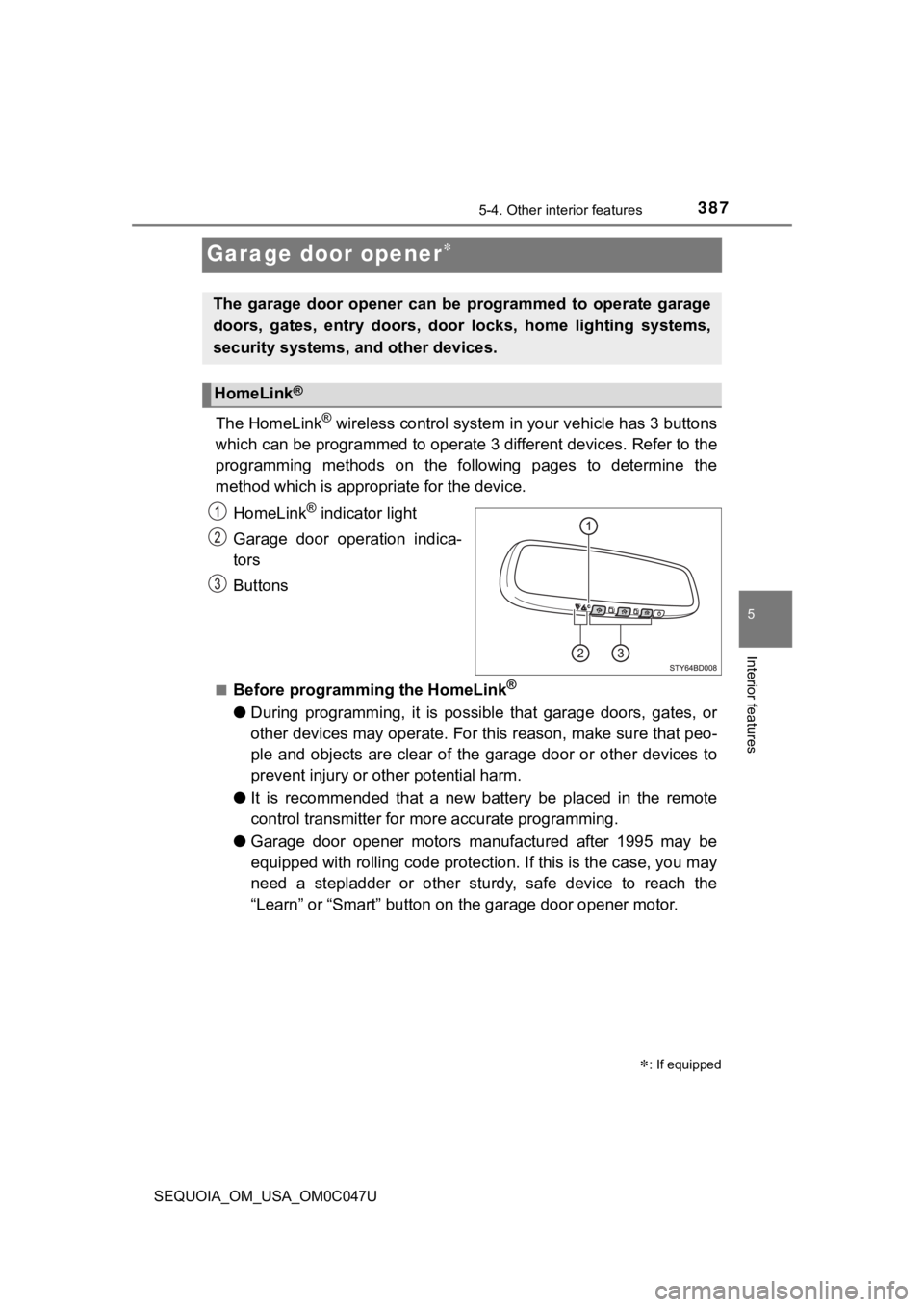
The HomeLink® wireless control system in your vehicle has 3 buttons
which can be programmed to operate 3 different devices. Refer to the
programming methods on the following pages to determine the
method which is approp riate for the device.
HomeLink
® indicator light
Garage door operation indica-
tors
Buttons
■Before programming the HomeLink®
● During programming, it is possible that garage doors, gates, or
other devices may operate. For this reason, make sure that peo-
ple and objects are clear of the garage door or other devices t o
prevent injury or other potential harm.
● It is recommended that a new battery be placed in the remote
control transmitter for mo re accurate programming.
● Garage door opener motors manufactured after 1995 may be
equipped with rolling code pro tection. If this is the case, you may
need a stepladder or other sturdy, safe device to reach the
“Learn” or “Smart” button on the garage door opener motor.
: If equipped
The garage door opener can be programmed to operate garage
doors, gates, entry doors, door locks, home lighting systems,
security systems, and other devices.
HomeLink®
Page 389 of 592
3895-4. Other interior features
5
Interior features
SEQUOIA_OM_USA_OM0C047U
Programming a device other than an entry gate (for U.S.A.
owners)
Press and hold the remote control transmitter button until the
HomeLink
® indicator light changes from slowly flashing orange to
rapidly flashing gre en (rolling code) or continuously lit green
(fixed code), then release the button.
Programming an entry gate (for U.S.A. owners)/Programming
a device in the Canadian market
Press and release the remote con trol transmitter button at 2 sec-
ond intervals, repeatedly, until the HomeLink
® indicator light
changes from slowly flashing orange to rapidly flashing green
(rolling code) or continuous ly lit green (fixed code).
Test the HomeLink
® operation by pressing the newly pro-
grammed button and observi ng the indicator light:
● Indicator light illuminates: Progr amming of a fixed code device
has completed. The garage door or other device should operate
when a HomeLink
® button is pressed and released.
● Indicator light flashes rapidly: The garage door opener motor o r
other device is equipped with a rolling code. To complete pro-
gramming, firmly press and hold the HomeLink
® button for 2 sec-
onds then release it.
● If the garage door or other device does not operate, proceed to
“Programming a rol ling code system”.
Repeat the steps above to program another device for any of
the remaining HomeLink® buttons.
4
5
Page 390 of 592
3905-4. Other interior features
SEQUOIA_OM_USA_OM0C047U■
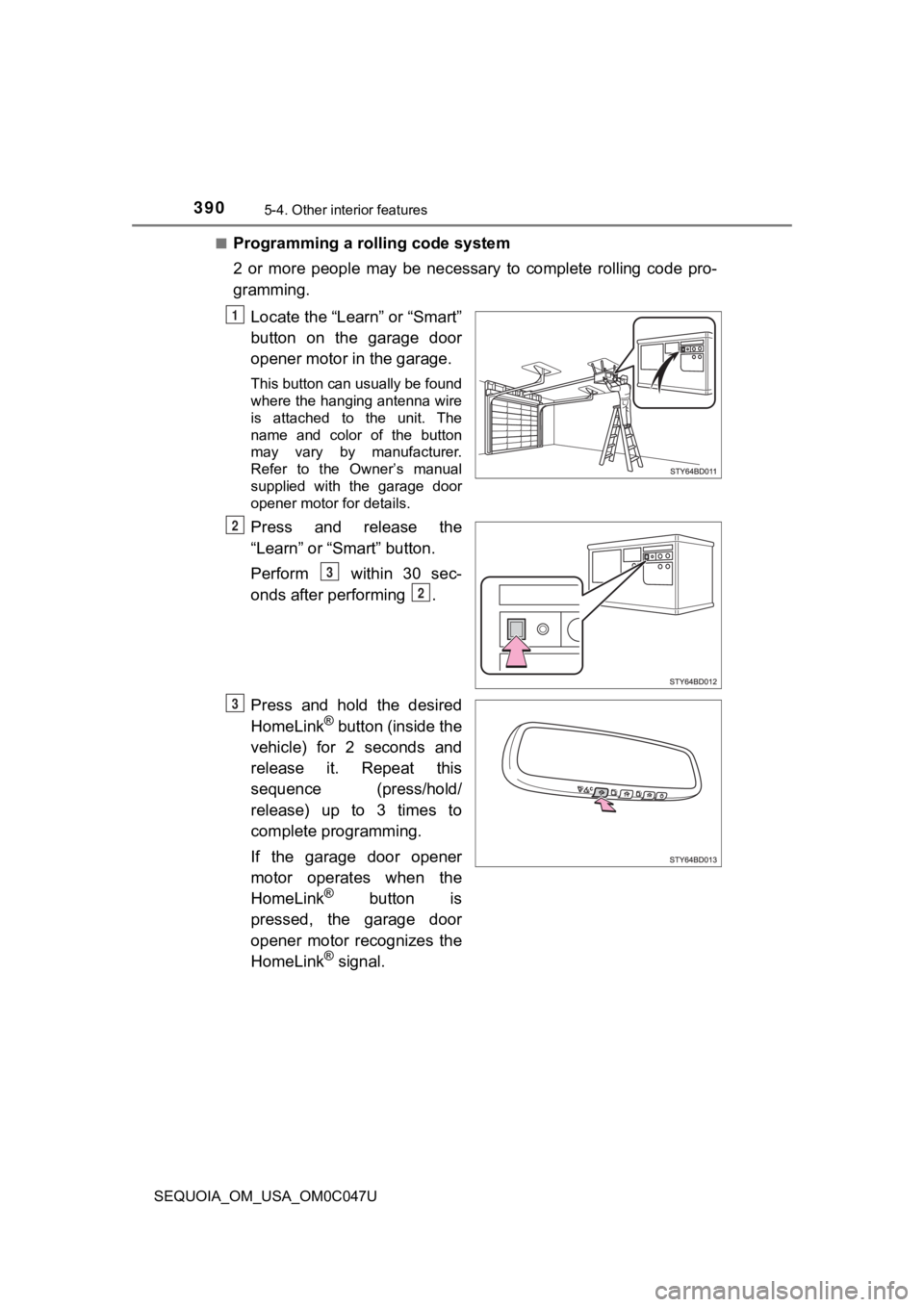
Programming a rolling code system
2 or more people may be necessary to complete rolling code pro-
gramming.
Locate the “Learn” or “Smart”
button on the garage door
opener motor in the garage.
This button can usually be found
where the hanging antenna wire
is attached to the unit. The
name and color of the button
may vary by manufacturer.
Refer to the Owner’s manual
supplied with the garage door
opener motor for details.
Press and release the
“Learn” or “Smart” button.
Perform within 30 sec-
onds after performing .
Press and hold the desired
HomeLink
® button (inside the
vehicle) for 2 seconds and
release it. Repeat this
sequence (press/hold/
release) up to 3 times to
complete programming.
If the garage door opener
motor operates when the
HomeLink
® button is
pressed, the garage door
opener motor recognizes the
HomeLink
® signal.
1
2
3
2
3
Page 391 of 592
3915-4. Other interior features
5
Interior features
SEQUOIA_OM_USA_OM0C047U■
Enabling 2-way communication with a garage door (only avail-
able for compatible devices)
When enabled, 2-way communication allows you to check the sta-
tus of the opening and closing of a garage door through indicat
ors
in your vehicle.
2-way communication is only available if the garage door opener
motor used is a compatible device. (To check device compatibility,
refer to www.HomeLink.com.)
Within 5 seconds after programming the garage door opener has
been completed, if the garage door opener motor is trained to
HomeLink
®, both garage door operation indicators will flash rap-
idly green and the light on the garage door opener motor will
blink twice, indicating that 2 -way communication is enabled.
If the indicators do not flash, perform and within the first 10
presses of the HomeLink
® button after programming has been
completed.
Press a programmed HomeLink
® button to operate a garage
door.
Within 1 minute of pressing the HomeLink
® button, after the
garage door operation has stopped, press the “Learn” or “Smart”
button on the garage door opener motor. Within 5 seconds of the
establishment of 2-way commu nication with the garage door
opener, both garage door operation indicators in the vehicle wi ll
flash rapidly green and the light on the garage door opener mot or
will blink twice, indicating that 2- way communication is enabled.
■Reprogramming a single HomeLink® button
When the following procedure is performed, buttons which alread y
have devices registered to them can be overwritten:
With one hand, press and hold the desired HomeLink
® button.
When the HomeLink
® indicator starts flashing orange, continue
to hold the HomeLink® button and perform “Programming the
HomeLink®” (it takes 20 seconds for the HomeLink® indicator
to start flashing).
1
23
2
3
1
2
1
Page 392 of 592
3925-4. Other interior features
SEQUOIA_OM_USA_OM0C047U
Press the appropriate HomeLink® button. The HomeLink® indicator
light should turn on.
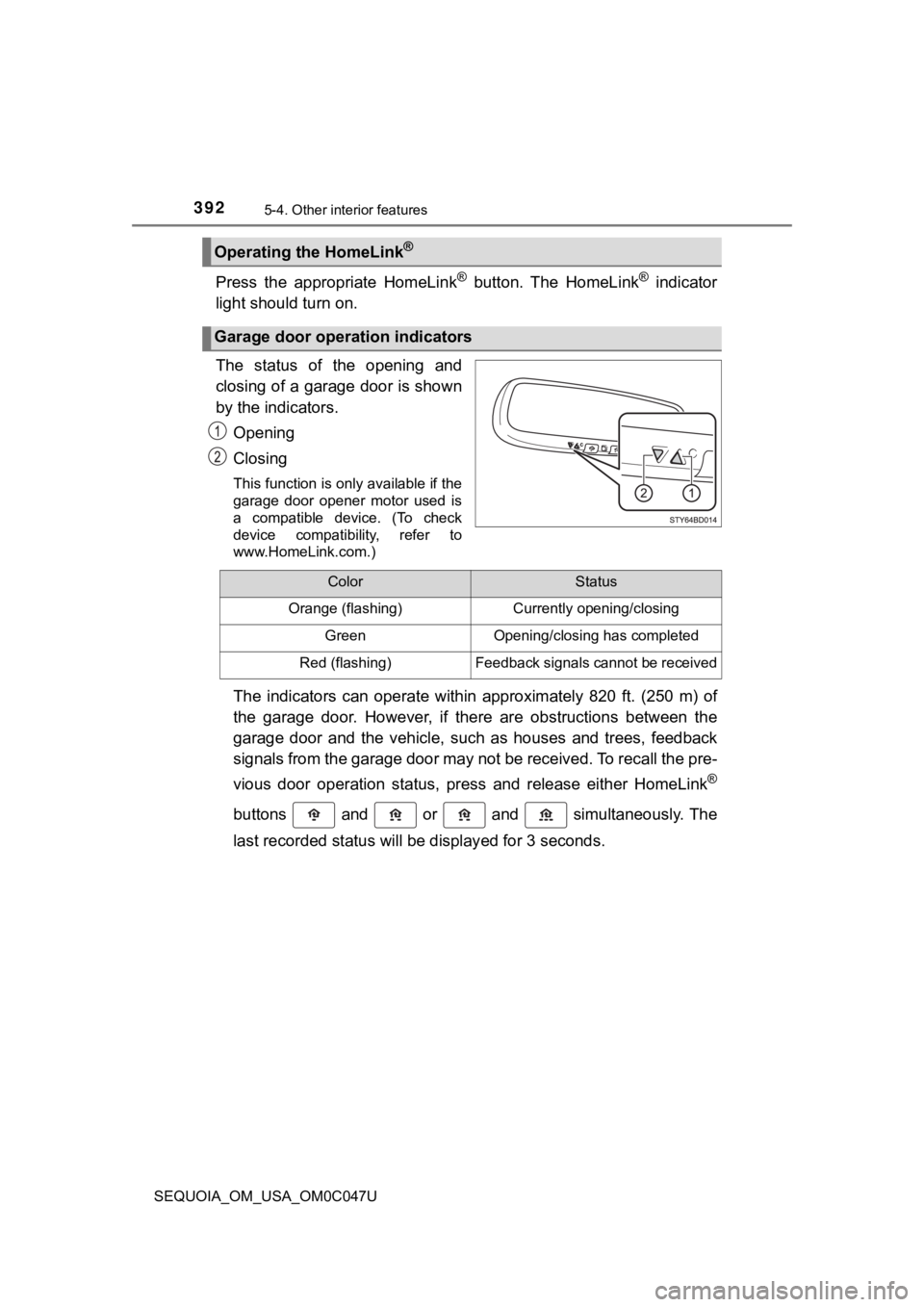
The status of the opening and
closing of a garage door is shown
by the indicators.
Opening
Closing
This function is only available if the
garage door opener motor used is
a compatible device. (To check
device compatibility, refer to
www.HomeLink.com.)
The indicators can operate within approximately 820 ft. (250 m) of
the garage door. However, if there are obstructions between the
garage door and the vehicle, such as houses and trees, feedback
signals from the garage door may not be received. To recall the pre-
vious door operation status, pres s and release either HomeLink
®
buttons and or and simultaneously. The
last recorded status will be displayed for 3 seconds.
Operating the HomeLink®
Garage door operation indicators
ColorStatus
Orange (flashing)Currently opening/closing
GreenOpening/closing has completed
Red (flashing)Feedback signals cannot be received
Page 394 of 592
3945-4. Other interior features
SEQUOIA_OM_USA_OM0C047U■
Certification for the garage door opener
For vehicles sold in the U.S.A.
FCC ID: NZLAECHL5
NOTE:
This device complies with part 15 of the FCC Rules. Operation is subject to
the following two conditions: (1) This device may not cause har mful interfer-
ence, and (2) this device must accept any interference received, including
interference that may cause undesired operation.
FCC WARNING:
Changes or modifications not expressly approved by the party responsible
for compliance could void the user’s authority to operate the equipment.
For vehicles sold in Canada
NOTE:
This device complies with Industry Canada licence-exempt RSS stan-
dard(s). Operation is subject to the following two conditions: (1) this device
may not cause interference, and (2) this device must accept any interfer-
ence, including interference that may cause undesired operation of the
device.
REMARQUE:
Le present appareil est conforme aux CNR d’Industrie Canada applicables
aux appareils radio exempts de licence. L’exploitation est autorisee aux
deux conditions suivantes: (1) l’appareil ne doit pas produire de brouillage,
et (2) l’utilisateur de l’appareil doit accepter tout brouillag e radioelectrique
subi, meme si le brouillage est susceptible d’en compromettre le
fonctionnement.
WARNING
■ When programming a garage door or other remote control device
The garage door or other device may operate, so ensure people a nd
objects are out of danger to prevent potential harm.
■ Conforming to federal safety standards
Do not use the HomeLink
® compatible transceiver with any garage door
opener or device that lacks safety stop and reverse features as required by
federal safety standards. This includes any garage door that cannot detect
an interfering object. A door or device without these features increases the
risk of death or serious injury.
■ When operating or programming HomeLink
®
Never allow a child to operate or play with the HomeLink® buttons.
Page 582 of 592
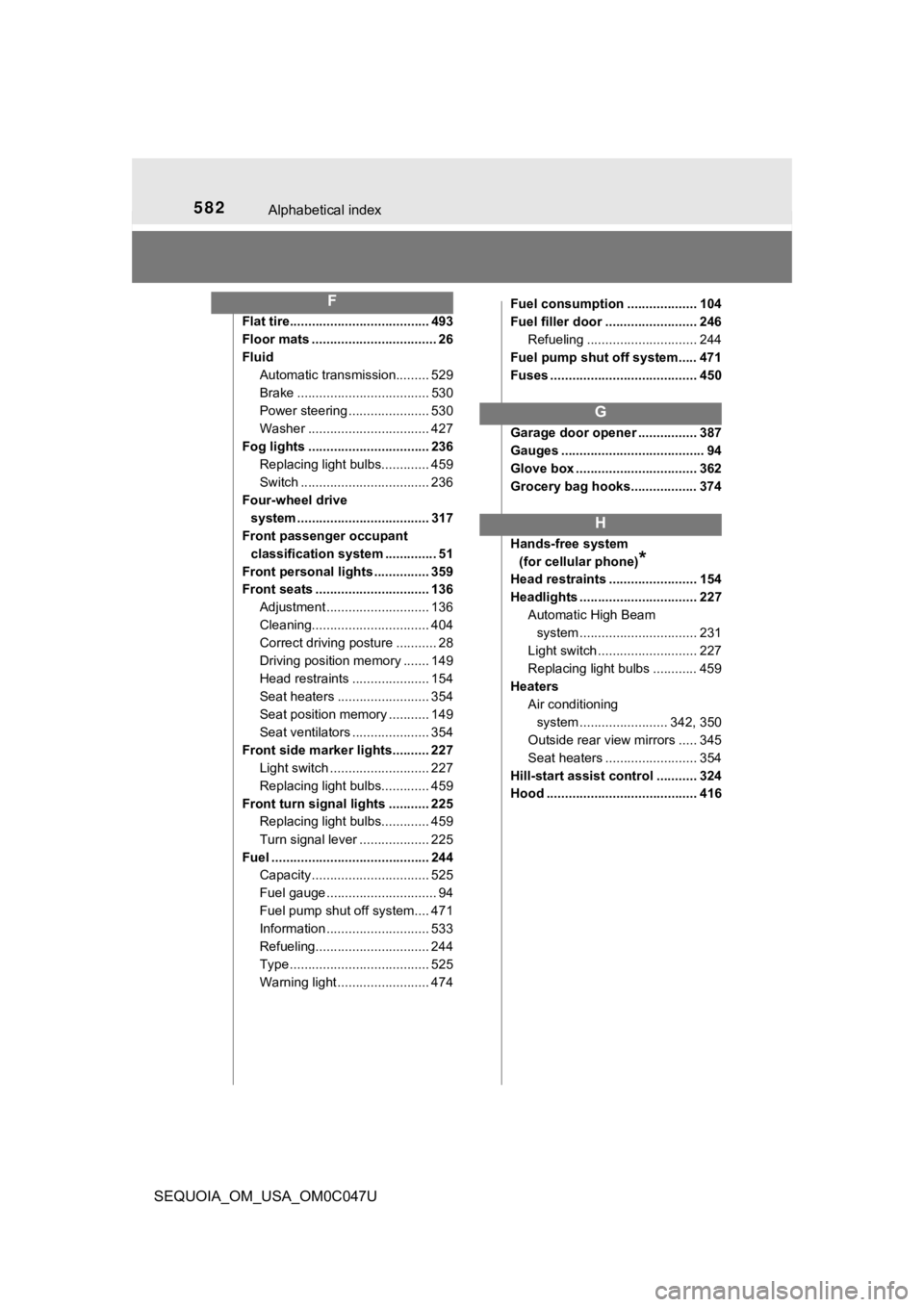
582Alphabetical index
SEQUOIA_OM_USA_OM0C047U
Flat tire...................................... 493
Floor mats .................................. 26
FluidAutomatic transmission......... 529
Brake .................................... 530
Power steering ...................... 530
Washer ................................. 427
Fog lights ................................. 236 Replacing light bulbs............. 459
Switch ................................... 236
Four-wheel drive system .................................... 317
Front passenger occupant
classification system .............. 51
Front personal lights ............... 359
Front seats ............................... 136 Adjustment ............................ 136
Cleaning................................ 404
Correct driving posture ........... 28
Driving position memory ....... 149
Head restraints ..................... 154
Seat heaters ......................... 354
Seat position memory ........... 149
Seat ventilators ..................... 354
Front side marker lights.......... 227 Light switch ........................... 227
Replacing light bulbs............. 459
Front turn signal lights ........... 225 Replacing light bulbs............. 459
Turn signal lever ................... 225
Fuel ........................................... 244 Capacity ................................ 525
Fuel gauge .............................. 94
Fuel pump shut off system.... 471
Information ............................ 533
Refueling............................... 244
Type ...................................... 525
Warning light ......................... 474 Fuel consumption ................... 104
Fuel filler door ......................... 246
Refueling .............................. 244
Fuel pump shut off system..... 471
Fuses ........................................ 450
Garage door opener ................ 387
Gauges ....................................... 94
Glove box ................................. 362
Grocery bag hooks.................. 374
Hands-free system (for cellular phone)
*
Head restraints ........................ 154
Headlights ................................ 227 Automatic High Beam
system .......... ...................... 231
Light switch ........................... 227
Replacing light bulbs ............ 459
Heaters Air conditioning system ....... ................. 342, 350
Outside rear view mirrors ..... 345
Seat heaters ......................... 354
Hill-start assist control ........... 324
Hood ......................................... 416
F
G
H