door lock TOYOTA SEQUOIA HYBRID 2023 Owner's Guide
[x] Cancel search | Manufacturer: TOYOTA, Model Year: 2023, Model line: SEQUOIA HYBRID, Model: TOYOTA SEQUOIA HYBRID 2023Pages: 628, PDF Size: 14.27 MB
Page 135 of 628
1353-2. Opening, closing and locking the doors
Owners Manual_USA_M0C043_en
3
Before driving
The settings of the power back
door system can be changed by
displaying the “Vehicle Set-
tings” screen from the
setting screen of the multi-infor-
mation display. ( P.101)
The changed power back door set-
tings are not reset by turning the
power switch to OFF. In order to
NOTICE
■Hands Free Power Back Door
precautions
The kick sensor is located behind
lower center part of the rear
bumper. Observe the following to
ensure that the Hands Free
Power Back Door function oper-
ates properly:
●Keep the lower center part of
the rear bumper clean at all
times.
If the lower center part of the
rear bumper is dirty or covered
with snow, the kick sensor may
not operate. In this situation,
clean off the dirt or snow, move
the vehicle from the current
position and then check if the
kick sensor operates.
If it does not operate, have the
vehicle inspected by your Toy-
ota dealer.
●Do not apply coatings that have
a rain cleari ng (hydrophilic)
effect, or other coatings, to the
lower center par t of the rear
bumper.
●Do not park the vehicle near
objects that may move and con-
tact the lower center part of the
rear bumper, such as grass or
trees.
If the vehicle has been parked
for a while near objects that
may move and contact the
lower center par t of the rear
bumper, such as grass or trees,
the kick sensor may not oper-
ate. In this situation, move the
vehicle from the current position
and then check if the kick sen-
sor operates. If it does not oper-
ate, have the vehicle inspected
by your Toyota dealer.
●Do not subject the kick sensor
or its surroundi ng area to a
strong impact.
If the kick sensor or its sur-
rounding area has been sub-
jected to a strong impact, the
kick sensor may not operate
properly. If the kick sensor does
not operate in the following situ-
ations, have the vehicle
inspected by your Toyota
dealer.
• The kick sensor or its surround- ing area has been subjected to
a strong impact.
• The lower center part of the rear bumper is scratched or dam-
aged.
●Do not disassemble the rear
bumper.
●Do not attach stickers to the
rear bumper.
●Do not paint the rear bumper.
●If a bicycle carrier or similar
heavy object is attached to the
power back doo r, disable the
Hands Free Power Back Door.
Changing settings of the
power back door system
(vehicles with power back
door)
Page 136 of 628
1363-2. Opening, closing and locking the doors
Owners Manual_USA_M0C043_enrestore the original settings, they
need to be chan
ged back on the
setting screen of the multi-informa-
tion display.
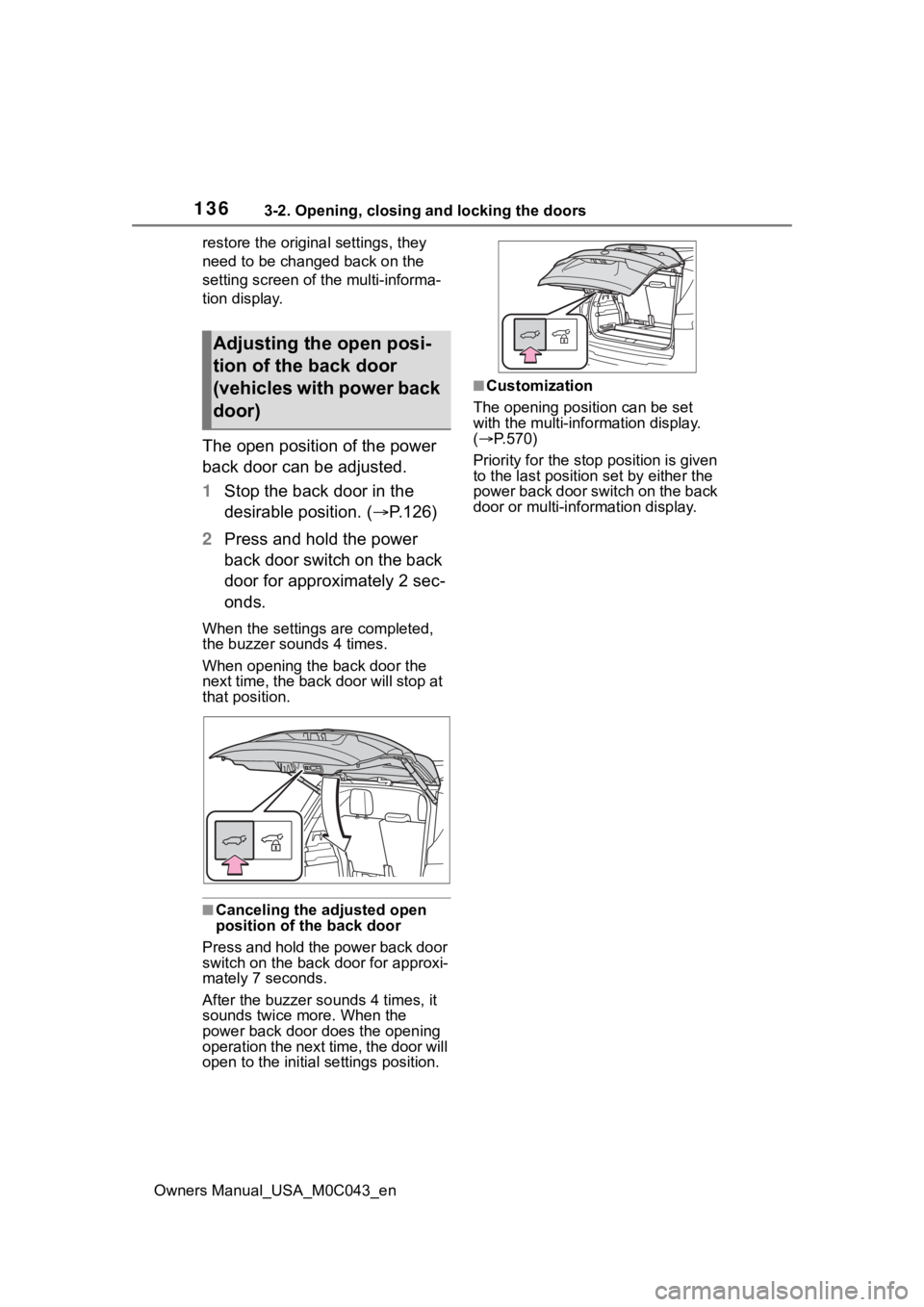
The open position of the power
back door can be adjusted.
1 Stop the back door in the
desirable position. ( P.126)
2 Press and hold the power
back door switch on the back
door for approximately 2 sec-
onds.
When the settings are completed,
the buzzer sounds 4 times.
When opening the back door the
next time, the back door will stop at
that position.
■Canceling the adjusted open
position of the back door
Press and hold the power back door
switch on the back door for approxi-
mately 7 seconds.
After the buzzer sounds 4 times, it
sounds twice more. When the
power back door do es the opening
operation the next time, the door will
open to the initial settings position.
■Customization
The opening position can be set
with the multi-info rmation display.
( P.570)
Priority for the stop position is given
to the last position set by either the
power back door switch on the back
door or multi-information display.
Adjusting the open posi-
tion of the back door
(vehicles with power back
door)
Page 137 of 628
1373-2. Opening, closing and locking the doors
Owners Manual_USA_M0C043_en
3
Before driving
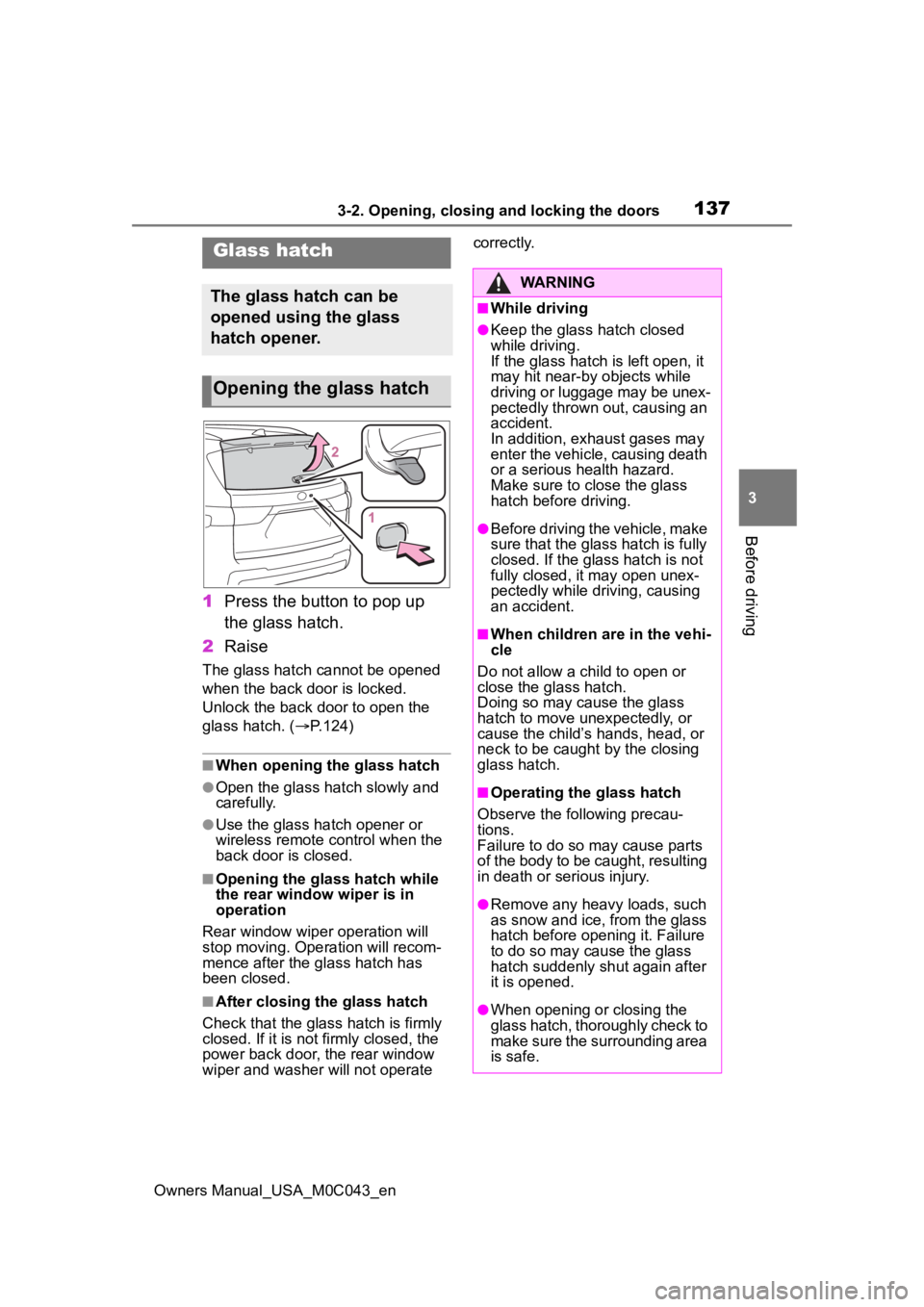
1 Press the button to pop up
the glass hatch.
2 Raise
The glass hatch cannot be opened
when the back door is locked.
Unlock the back door to open the
glass hatch. ( P.124)
■When opening the glass hatch
●Open the glass hatch slowly and
carefully.
●Use the glass hatch opener or
wireless remote control when the
back door is closed.
■Opening the glass hatch while
the rear window wiper is in
operation
Rear window wiper operation will
stop moving. Operation will recom-
mence after the glass hatch has
been closed.
■After closing the glass hatch
Check that the glass hatch is firmly
closed. If it is not firmly closed, the
power back door, the rear window
wiper and washer will not operate correctly.
Glass hatch
The glass hatch can be
opened using the glass
hatch opener.
Opening the glass hatch
WARNING
■While driving
●Keep the glass hatch closed
while driving.
If the glass hatch is left open, it
may hit near-by objects while
driving or luggage may be unex-
pectedly thrown out, causing an
accident.
In addition, exhaust gases may
enter the vehicle, causing death
or a serious health hazard.
Make sure to clo
se the glass
hatch before driving.
●Before driving the vehicle, make
sure that the glass hatch is fully
closed. If the glass hatch is not
fully closed, it may open unex-
pectedly while driving, causing
an accident.
■When children are in the vehi-
cle
Do not allow a child to open or
close the glass hatch.
Doing so may cause the glass
hatch to move unexpectedly, or
cause the child’s hands, head, or
neck to be caught by the closing
glass hatch.
■Operating the glass hatch
Observe the following precau-
tions.
Failure to do so may cause parts
of the body to be caught, resulting
in death or serious injury.
●Remove any heavy loads, such
as snow and ice, from the glass
hatch before opening it. Failure
to do so may cause the glass
hatch suddenly shut again after
it is opened.
●When opening or closing the
glass hatch, thoroughly check to
make sure the surrounding area
is safe.
Page 138 of 628
1383-2. Opening, closing and locking the doors
Owners Manual_USA_M0C043_en
WARNING
●If anyone is in the vicinity, make
sure they are safe and let them
know that the glass hatch is
about to open or close.
●Use caution when opening or
closing the glass hatch in windy
weather as it may move
abruptly in strong wind.
●The glass hatch may close if it is
not opened fully. It is more diffi-
cult to open or close the glass
hatch on an incline than on a
level surface, so beware of the
glass hatch unexpectedly open-
ing or closing by itself. Make
sure that the glass hatch is fully
open and secure before using
the luggage compartment.
●When closing the glass hatch,
take extra care to prevent your
fingers, etc. from being caught.
●When closing the glass hatch,
make sure to press it lightly on
its outer surface.
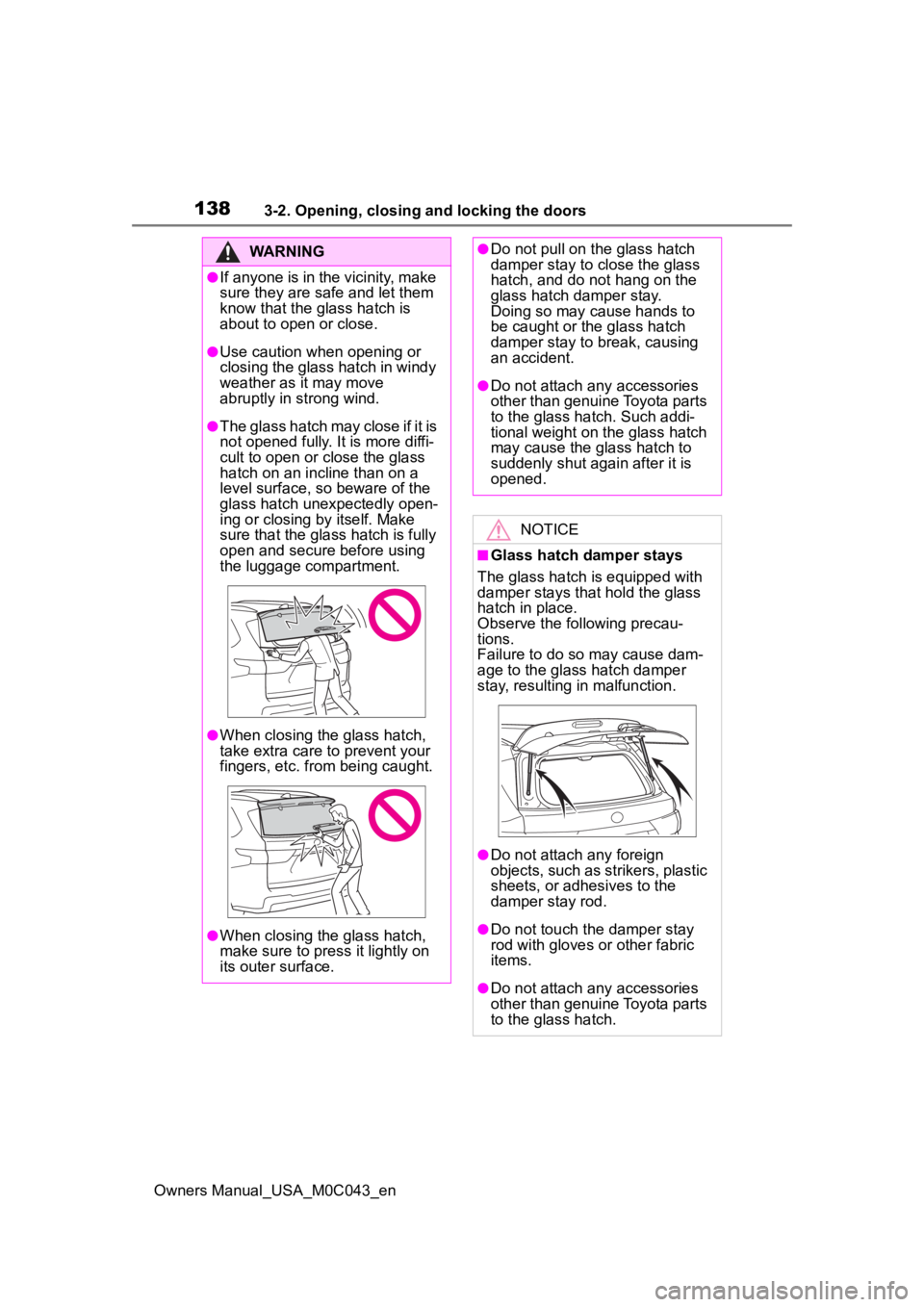
●Do not pull on the glass hatch
damper stay to close the glass
hatch, and do not hang on the
glass hatch damper stay.
Doing so may cause hands to
be caught or the glass hatch
damper stay to break, causing
an accident.
●Do not attach any accessories
other than genuine Toyota parts
to the glass hatch. Such addi-
tional weight on the glass hatch
may cause the glass hatch to
suddenly shut again after it is
opened.
NOTICE
■Glass hatch damper stays
The glass hatch is equipped with
damper stays that hold the glass
hatch in place.
Observe the following precau-
tions.
Failure to do so may cause dam-
age to the glass hatch damper
stay, resulting in malfunction.
●Do not attach any foreign
objects, such as strikers, plastic
sheets, or adhesives to the
damper stay rod.
●Do not touch the damper stay
rod with gloves or other fabric
items.
●Do not attach any accessories
other than genuine Toyota parts
to the glass hatch.
Page 139 of 628
1393-2. Opening, closing and locking the doors
Owners Manual_USA_M0C043_en
3
Before driving
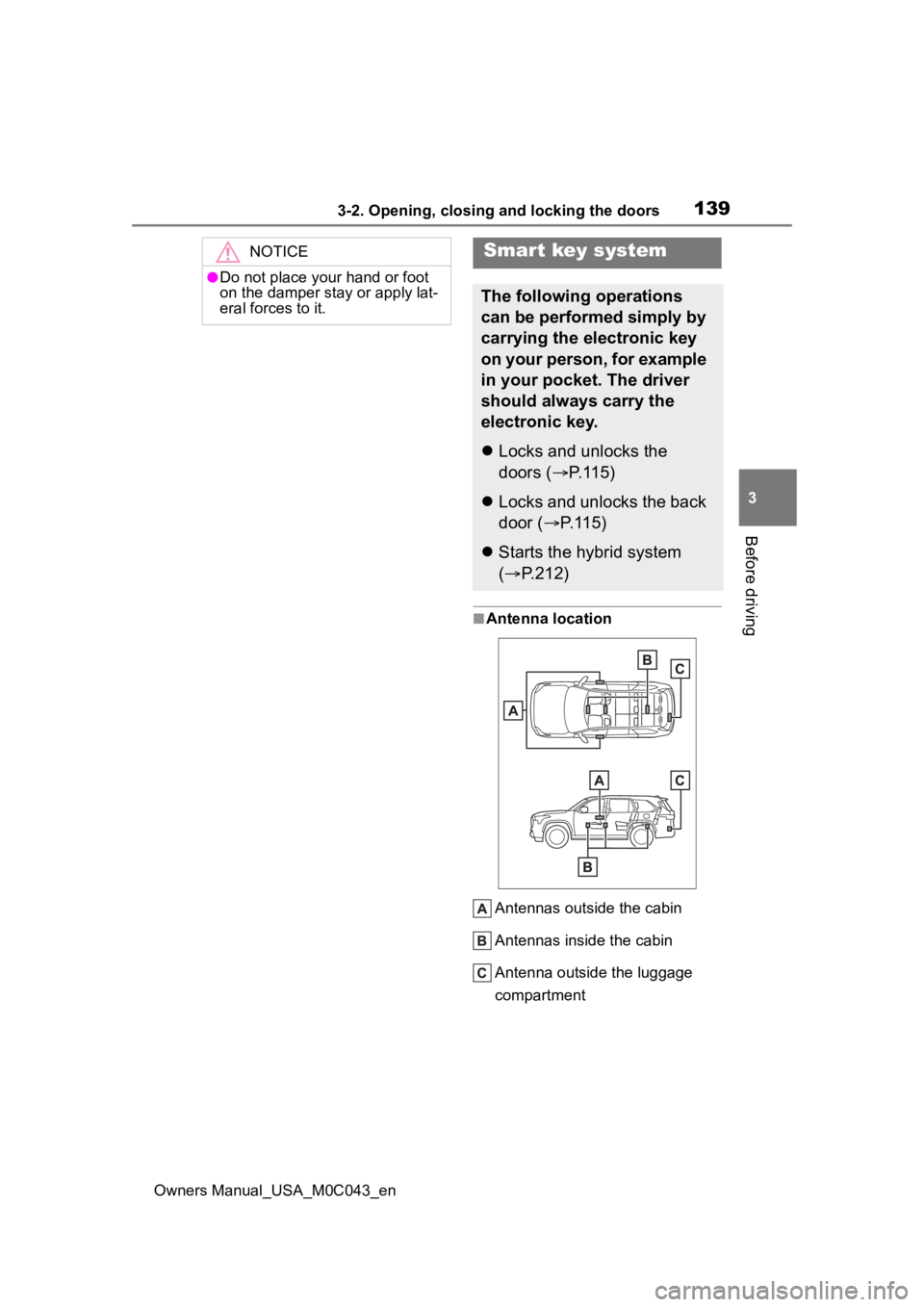
■Antenna location Antennas outside the cabin
Antennas inside the cabin
Antenna outside the luggage
compartment
NOTICE
●Do not place your hand or foot
on the damper sta y or apply lat-
eral forces to it.
Smart key system
The following operations
can be performed simply by
carrying the electronic key
on your person, for example
in your pocket. The driver
should always carry the
electronic key.
Locks and unlocks the
doors ( P.115)
Locks and unlocks the back
door ( P.115)
Starts the hybrid system
( P.212)
Page 140 of 628
1403-2. Opening, closing and locking the doors
Owners Manual_USA_M0C043_en
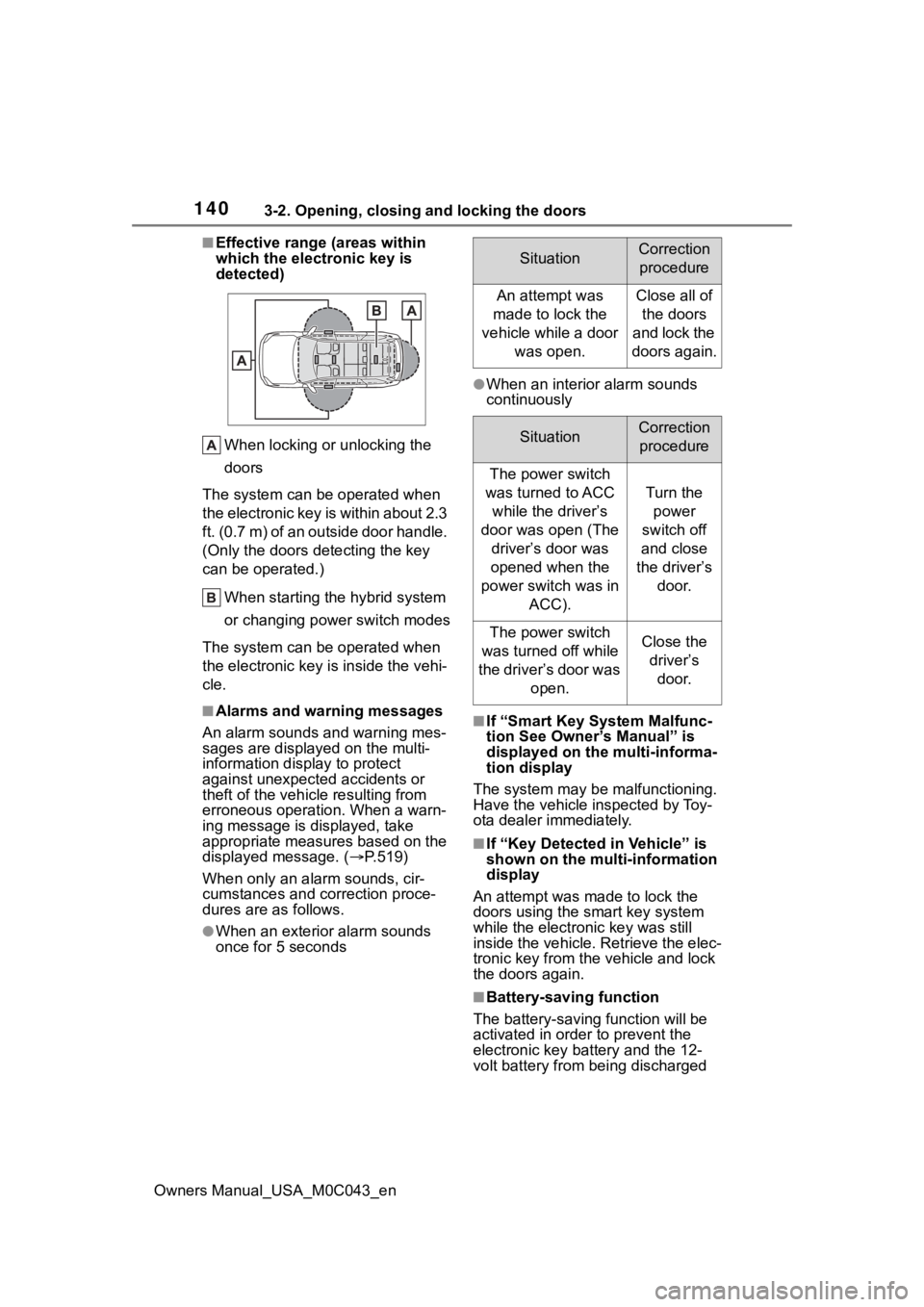
■Effective range (areas within
which the electronic key is
detected)When locking or unlocking the
doors
The system can be operated when
the electronic key is within about 2.3
ft. (0.7 m) of an outside door handle.
(Only the doors detecting the key
can be operated.)
When starting the hybrid system
or changing power switch modes
The system can be operated when
the electronic key is inside the vehi-
cle.
■Alarms and warning messages
An alarm sounds and warning mes-
sages are display ed on the multi-
information display to protect
against unexpected accidents or
theft of the vehicle resulting from
erroneous operation. When a warn-
ing message is displayed, take
appropriate measures based on the
displayed message. ( P.519)
When only an ala rm sounds, cir-
cumstances and c orrection proce-
dures are as follows.
●When an exterior alarm sounds
once for 5 seconds
●When an interior alarm sounds
continuously
■If “Smart Key System Malfunc-
tion See Owner’s Manual” is
displayed on the multi-informa-
tion display
The system may be malfunctioning.
Have the vehicle inspected by Toy-
ota dealer immediately.
■If “Key Detected in Vehicle” is
shown on the multi-information
display
An attempt was made to lock the
doors using the smart key system
while the electronic key was still
inside the vehicle. Retrieve the elec-
tronic key from the vehicle and lock
the doors again.
■Battery-saving function
The battery-saving function will be
activated in ord er to prevent the
electronic key battery and the 12-
volt battery from being discharged
SituationCorrection
procedure
An attempt was
made to lock the
vehicle while a door was open.Close all of the doors
and lock the
doors again.
SituationCorrection procedure
The power switch
was turned to ACC while the driver’s
door was open (The driver’s door was
opened when the
power switch was in ACC).
Turn the power
switch off
and close
the driver’s door.
The power switch
was turned off while
the driver’s door was open.Close the driver’s door.
Page 141 of 628
1413-2. Opening, closing and locking the doors
Owners Manual_USA_M0C043_en
3
Before driving
while the vehicle is not in operation
for a long time.
●In the following situations, the
smart key system may take some
time to unlock the doors.
• The electronic key has been left in an area of approximately 6 ft. (2
m) of the outside of the vehicle for
10 minutes or longer.
• The smart key system has not been used for 5 days or longer.
●If the smart key system has not
been used for 14 days or longer,
the doors canno t be unlocked at
any doors except the driver’s door.
In this case, take hold of the
driver’s door handle, or use the
wireless remote control or the
mechanical key, to unlock the
doors.
■Turning an electronic key to
battery-saving mode
●When battery-saving mode is set,
battery depletion is minimized by
stopping the electronic key from
receiving radio waves.
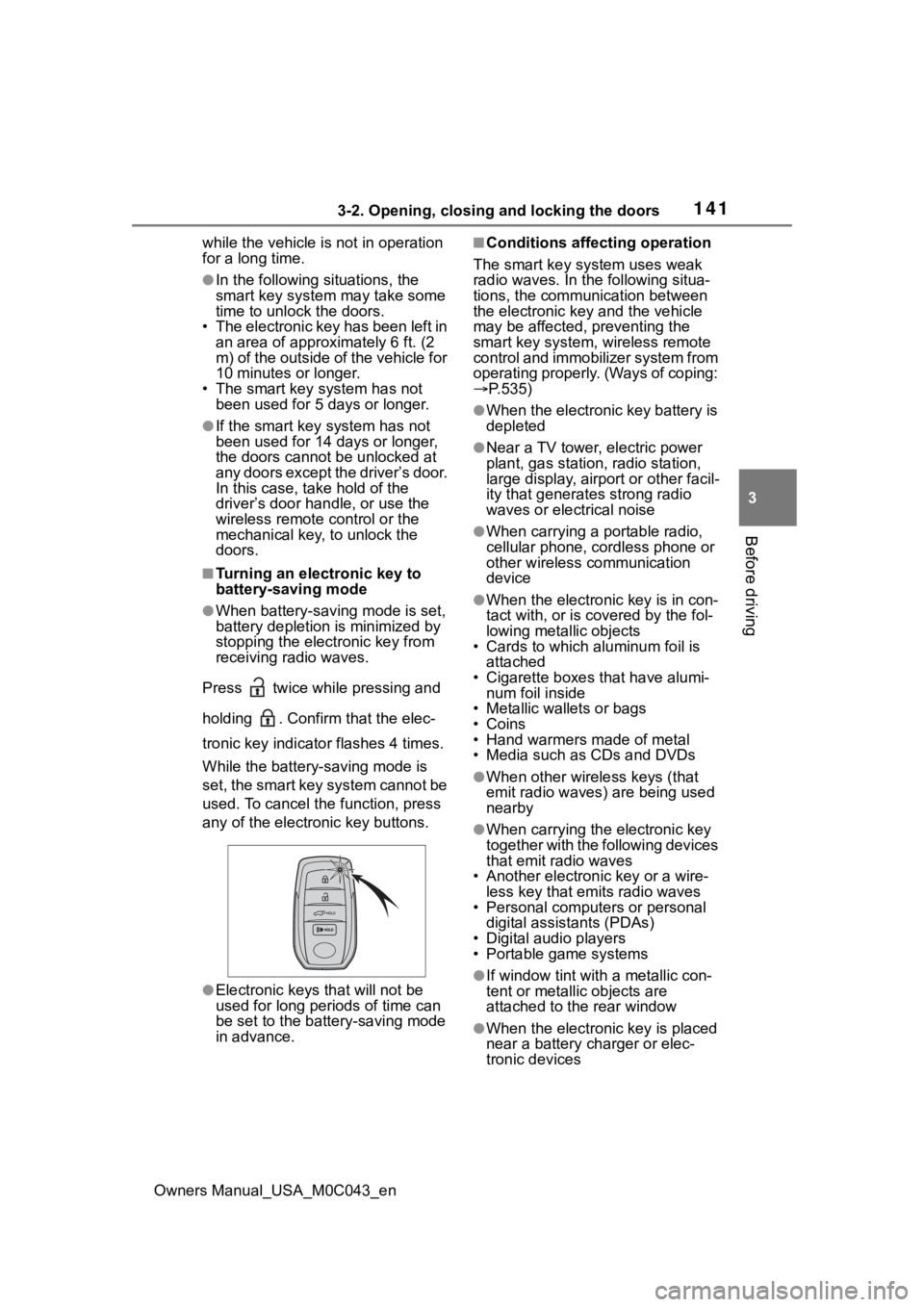
Press twice while pressing and
holding . Confirm that the elec-
tronic key indicator flashes 4 times.
While the battery-saving mode is
set, the smart key system cannot be
used. To cancel the function, press
any of the electronic key buttons.
●Electronic keys that will not be
used for long periods of time can
be set to the battery-saving mode
in advance.
■Conditions affecting operation
The smart key system uses weak
radio waves. In the following situa-
tions, the communication between
the electronic key and the vehicle
may be affected, preventing the
smart key system, wireless remote
control and immobilizer system from
operating properly. (Ways of coping:
P.535)
●When the electronic key battery is
depleted
●Near a TV tower, electric power
plant, gas station, radio station,
large display, airpo rt or other facil-
ity that generates strong radio
waves or electrical noise
●When carrying a portable radio,
cellular phone, cordless phone or
other wireless communication
device
●When the electronic key is in con-
tact with, or is c overed by the fol-
lowing metallic objects
• Cards to which aluminum foil is
attached
• Cigarette boxes that have alumi- num foil inside
• Metallic wallets or bags
•Coins
• Hand warmers made of metal
• Media such as CDs and DVDs
●When other wirel ess keys (that
emit radio waves) are being used
nearby
●When carrying the electronic key
together with the following devices
that emit radio waves
• Another electronic key or a wire- less key that emits radio waves
• Personal computers or personal
digital assistants (PDAs)
• Digital audio players
• Portable game systems
●If window tint wit h a metallic con-
tent or metallic objects are
attached to the rear window
●When the electronic key is placed
near a battery charger or elec-
tronic devices
Page 142 of 628

1423-2. Opening, closing and locking the doors
Owners Manual_USA_M0C043_en
●When the vehicle is parked in a
pay parking spot where radio
waves are emitted.
■Note for the entry function
●Even when the electronic key is
within the effective range (detec-
tion areas), the system may not
operate properly in the following
cases:
• The electronic key is too close to the window or outside door han-
dle, near the ground, or in a high
place when the doors are locked
or unlocked.
• The electronic key is near the
ground or in a high place, or too
close to the center of the rear
bumper.
• The electronic key is on the instru- ment panel, or floor, or in the door
pockets or glove box when the
hybrid system is s tarted or power
switch modes are changed.
●Do not leave the electronic key on
top of the instrument panel or near
the door pockets when exiting the
vehicle. Depending on the radio
wave reception conditions, it may
be detected by the antenna out-
side the cabin and the doors will
become lockable from the outside,
possibly trapping the electronic
key inside the vehicle.
●As long as the electronic key is
within the effective range, the
doors may be locked or unlocked
by anyone. However, only the
doors detecting the electronic key
can be used to unl ock the vehicle.
●Even if the electronic key is not
inside the vehicle, it may be possi-
ble to start the hybrid system if the
electronic key is near the window.
●The doors may unlock or lock if a
large amount of water splashes on
the door handle, such as in the
rain or in a car wash, when the
electronic key is within the effec-
tive range. (The doors will auto-
matically be locked after
approximately 60 seconds if the doors or the glass hatch are not
opened and closed.)
●If the wireless remote control is
used to lock the doors when the
electronic key is near the vehicle,
there is a possib
ility that the door
may not be unlocked by the entry
function. (Use the wireless remote
control to unlock the doors.)
●Touching the door lock sensor
while wearing gloves may delay or
prevent lock operation.
●When the lock operation is per-
formed using the lock sensor, rec-
ognition signals will be shown up
to two consecutive times. After
this, no recognition signals will be
given.
●If the door handle becomes wet
while the electronic key is within
the effective range, the door may
lock and unlock repeatedly. In this
case, follow the following correc-
tion procedures to wash the vehi-
cle:
• Place the electronic key in a loca-
tion 6 ft. (2 m) or more away from
the vehicle. (Take care to ensure
that the key is not stolen.)
• Set the electronic key to battery- saving mode to disable the smart
key system. ( P.141)
●If the electronic key is inside the
vehicle and a door handle
becomes wet during a car wash, a
message may be shown on the
multi-information display and a
buzzer will sound outside the vehi-
cle. To turn off the alarm, lock all
the doors.
●The lock sensor may not work
properly if it comes into contact
with ice, snow, m ud, etc. Clean
the lock sensor and attempt to
operate it again.
●A sudden approach to the effec-
tive range or door handle may pre-
vent the doors from being
unlocked. In this case, return the
door handle to the original position
and check that t he doors unlock
Page 143 of 628
1433-2. Opening, closing and locking the doors
Owners Manual_USA_M0C043_en
3
Before driving
before pulling the door handle
again.
●If there is another electronic key in
the detection area, it may take
slightly longer to unlock the doors
after the door handle is gripped.
■When the vehicle is not driven
for extended periods
●To prevent theft of the vehicle, do
not leave the electronic key within
6 ft. (2 m) of the vehicle.
●The smart key system can be
deactivated in advance.
●Setting the electronic key to bat-
tery-saving mode helps to reduce
key battery depletion. ( P.141)
■To operate the system properly
●Make sure to carry the electronic
key when operating the system.
Do not get the electronic key too
close to the vehicle when operat-
ing the system from the outside of
the vehicle.
Depending on the position and hold-
ing condition of the electronic key,
the key may not be detected cor-
rectly and the system may not oper-
ate properly. (The alarm may go off
accidentally, or the door lock pre-
vention function may not operate.)
■If the smart key system does
not operate properly
●Locking and unlocking the doors:
P. 5 3 6
●Starting the hybrid system:
P. 5 3 6
■Customization
Some functions can be customized.
( P.570)
■If the smart key system has
been deactivated in a custom-
ized setting
●Locking and unlocking the doors:
Use the wireless remote control or
mechanical key. ( P.115, 536)
●Starting the hybrid system and
changing power switch modes:
P. 5 3 6
●Stopping the hybrid system:
P. 2 1 4
■Certification
P.618
WARNING
■Caution regarding interfer-
ence with electronic devices
●People with implantable car-
diac pacemakers, cardiac
resynchronization therapy-
pacemakers or implantable car-
dioverter defibrillators should
keep away from the smart key
system antennas. ( P.139)
The radio waves may affect the
operation of such devices. If
necessary, the entry function
can be disabled. Ask your Toy-
ota dealer for details, such as
the frequency of radio waves
and timing of the emitted radio
waves. Then, consult your doc-
tor to see if you should disable
the entry function.
●Users of any electrical medical
device other than implantable
cardiac pacemakers, cardiac
resynchronization therapy-
pacemakers or implantable car-
dioverter defibrillators should
consult the manufacturer of the
device for information about its
operation under the influence of
radio waves.
Radio waves could have unex-
pected effects on the operation
of such medical devices.
Ask your Toyota dealer for details
on disabling the entry function.
Page 149 of 628
1493-3. Adjusting the seats
Owners Manual_USA_M0C043_en
3
Before driving
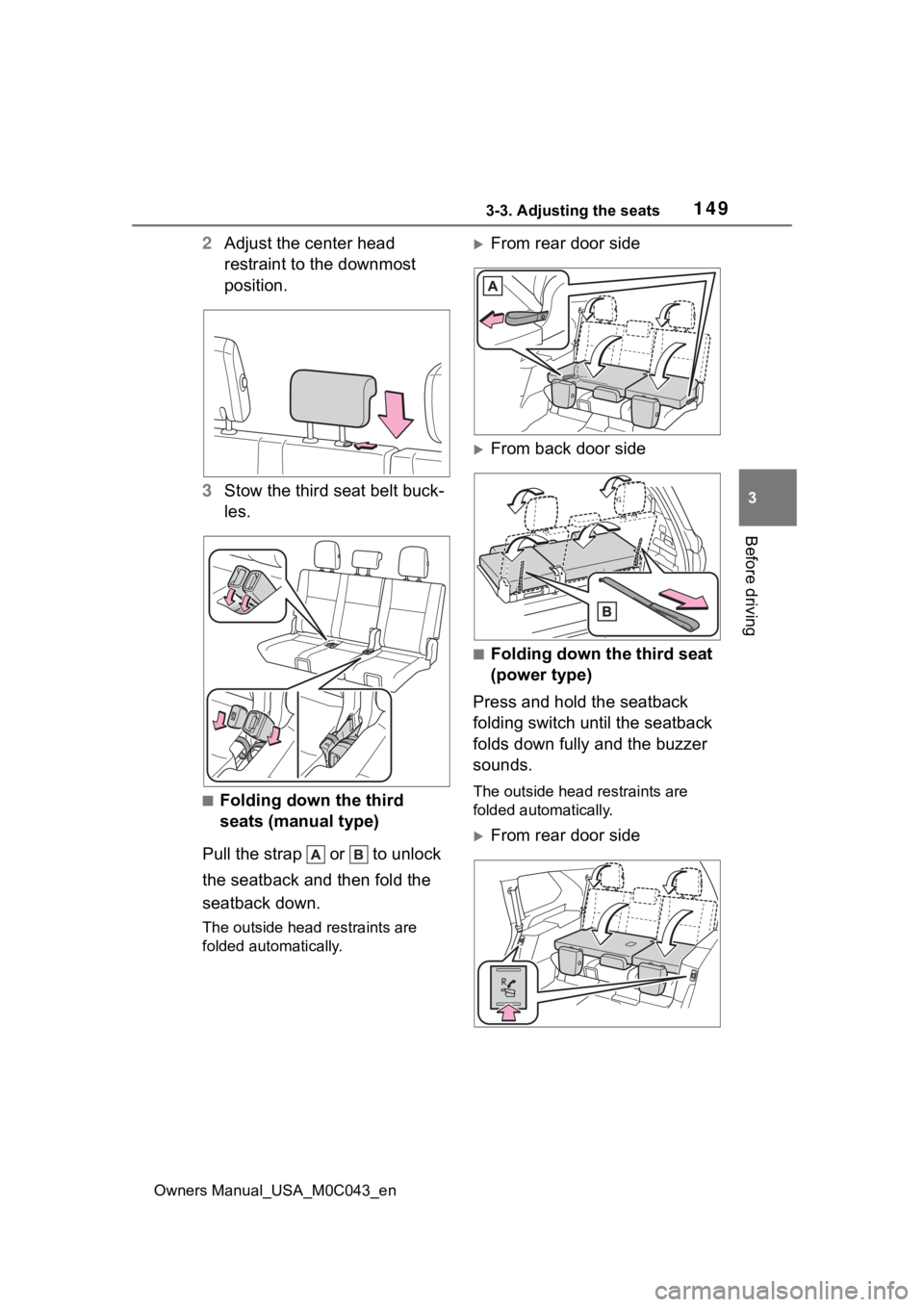
2 Adjust the center head
restraint to the downmost
position.
3 Stow the third seat belt buck-
les.
■Folding down the third
seats (manual type)
Pull the strap or to unlock
the seatback and then fold the
seatback down.
The outside head restraints are
folded automatically.
From rear door side
From back door side
■Folding down the third seat
(power type)
Press and hold the seatback
folding switch until the seatback
folds down fully and the buzzer
sounds.
The outside head r estraints are
folded automatically.
From rear door side