door lock TOYOTA SEQUOIA HYBRID 2023 Repair Manual
[x] Cancel search | Manufacturer: TOYOTA, Model Year: 2023, Model line: SEQUOIA HYBRID, Model: TOYOTA SEQUOIA HYBRID 2023Pages: 628, PDF Size: 14.27 MB
Page 459 of 628
4596-2. Maintenance
Owners Manual_USA_M0C043_en
6
Maintenance and care
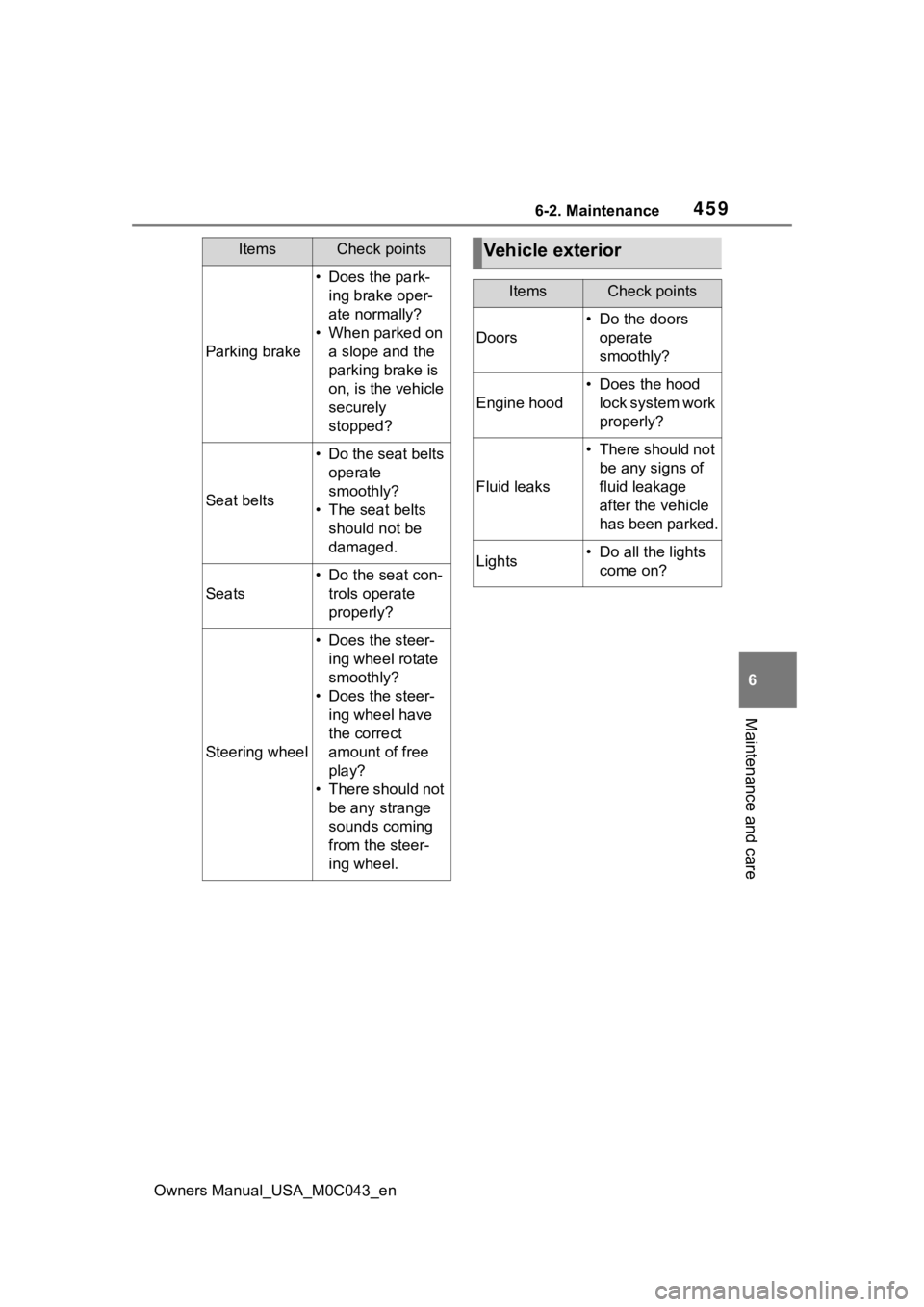
Parking brake
• Does the park- ing brake oper-
ate normally?
• When parked on a slope and the
parking brake is
on, is the vehicle
securely
stopped?
Seat belts
• Do the seat belts operate
smoothly?
• The seat belts should not be
damaged.
Seats
• Do the seat con-trols operate
properly?
Steering wheel
• Does the steer-ing wheel rotate
smoothly?
• Does the steer- ing wheel have
the correct
amount of free
play?
• There should not be any strange
sounds coming
from the steer-
ing wheel.
ItemsCheck pointsVehicle exterior
ItemsCheck points
Doors
• Do the doors operate
smoothly?
Engine hood
• Does the hood lock system work
properly?
Fluid leaks
• There should not be any signs of
fluid leakage
after the vehicle
has been parked.
Lights• Do all the lights come on?
Page 472 of 628
4726-3. Do-it-yourself maintenance
Owners Manual_USA_M0C043_ensure to disconnect the ground
cable.
●Make sure the power switch on
the charger is off when connecting
and disconnecting the charger
cables to the 12-volt battery.
■After recharging/reconnecting
the 12-volt battery
●Unlocking the doors using the
smart key system may not be pos-
sible immediately after reconnect-
ing the 12-volt battery. If this
happens, use the wireless remote
control or the mechanical key to
lock/unlock the doors.
●Start the hybrid system with the
power switch in ACC. The hybrid
system may not start with the
power switch turned off. However,
the hybrid system will operate nor-
mally from the second attempt.
●The power switch mode is
recorded by the vehicle. If the 12-
volt battery is
reconnected, the
vehicle will return the power
switch mode to the status it was in
before the 12-volt battery was dis-
connected. Make sure to turn off
the power switch before discon-
necting the 12-volt battery. Take
extra care when connecting the
12-volt battery if the power switch
mode prior to discharge is
unknown.
●When the 12-volt b attery is recon-
nected, start the hybrid system,
depress the brake pedal, and con-
firm that it is possible to shift into
each shift position.
If the system will not start even after
multiple attempts, contact your Toy-
ota dealer.
WARNING
■Chemicals in the 12-volt bat-
tery
The 12-volt battery contains poi-
sonous and corrosive sulfuric acid
and may produce hydrogen gas
which is flammable and explosive.
To reduce the risk of death or seri-
ous injury, take the following pre-
cautions while working on or near
the 12-volt battery:
●Do not cause sparks by touch-
ing the 12-volt battery terminals
with tools.
●Do not smoke or light a match
near the 12-volt battery.
●Avoid contact with eyes, skin
and clothes.
●Never inhale or swallow electro-
lyte.
●Wear protective safety glasses
when working near the 12-volt
battery.
●Keep children away from the
12-volt battery.
■Where to safely charge the
12-volt battery
Always charge the 12-volt battery
in an open area. Do not charge
the 12-volt battery in a garage or
closed room where there is insuf-
ficient ventilation.
■Emergency measures regard-
ing electrolyte
●If electrolyte gets in your eyes
Flush your eyes with clean
water for at least 15 minutes
and get immediate medical
attention. If possible, continue
to apply water with a sponge or
cloth while traveling to the near-
est medical facility.
Page 520 of 628

5207-2. Steps to take in an emergency
Owners Manual_USA_M0C043_entems such as PCS (Pre-Collision
system) or the dynamic radar cruise
control with full-speed range is oper-
ating. If a warning message is
shown, be sure to decelerate the
vehicle or follow an instruction
shown on the multi
-information dis-
play.
A warning message is shown when
Brake Override System operates.
( P.188)
A warning message is shown when
Drive-Start Control ( P.193) or
Parking Support Brake (if equipped)
( P.307) operates. Follow the
instructions on the multi-information
display.
●If a message about an operation
of the power switch is displayed
An instruction for operation of the
power switch is shown when the
incorrect procedure for starting the
hybrid system is performed or the
power switch is operated incorrectly.
Follow the instructions shown on the
multi-information display to operate
the power switch again.
●If a message abou t a shift lever
operation is displayed
To prevent the shift lever from being
operated incorrectly or the vehicle
from moving unexpectedly, a mes-
sage that requires shifting the shift
lever may be sho wn on the multi-
information display . In that case, fol-
low the instruction of the message
and shift the shift lever.
●If a message or image about an
open/close state of a part or
replenishment of a consumable is
displayed
Confirm the part indicated by the
multi-information display or a warn-
ing light, and then perform the cop- ing method such as closing the
open door or replenishing a con-
sumable.
■If a message that indicates the
need for visiting your Toyota
dealer is displayed
The system or part shown on the
multi-information di splay is malfunc-
tioning. Have the vehicle inspected
by your Toyota dealer immediately.
■If a message that indicates the
need for referring to Owner’s
Manual is displayed
●If “Engine Coolant Temp High
Stop in a Safe Place See Owner’s
Manual” is shown, follow the
instructions ( P.543).
●If the following messages are
shown, there may be a malfunc-
tion.
Immediately stop the vehicle in a
safe place and contact your Toy-
ota dealer. Continuing to drive the
vehicle may be dangerous.
• “Hybrid System Malfunction”
• “Check Engine”
• “Traction battery system malfunc- tion”
• “Accelerator System Malfunction”
• “Hybrid System Stopped”
• “Smart Key System Malfunction See Owner’s Manual”
●If the following messages are
shown, there may be a malfunc-
tion.
Immediately have the vehicle
inspected by your Toyota dealer.
• “Oil Pressure Low Stop in a Safe Place See Owner’s Manual”
• “Braking Power Low Stop in a
Safe Place See Owner’s Manual”
●If “Maintenance Required for Trac-
tion Battery Cooling Parts See
Owner’s Manual” is shown, the fil-
ter may be clogged, the air intake
vent may be blocked, or there may
be a gap in the duct. Therefore,
perform the follo wing correction
procedure.
• If the air intake vent or filter of the
Page 534 of 628
5347-2. Steps to take in an emergency
Owners Manual_USA_M0C043_en
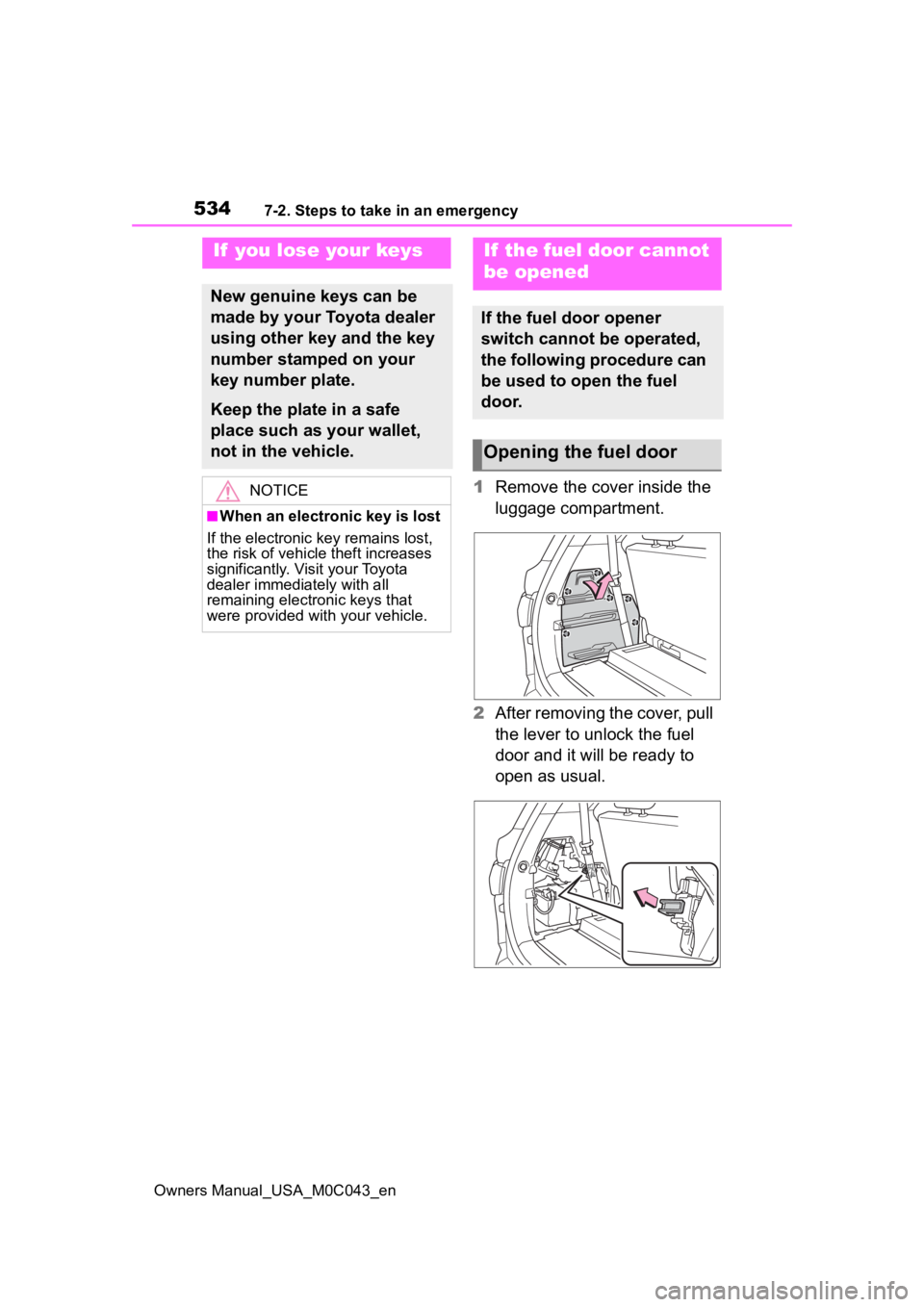
1Remove the cover inside the
luggage compartment.
2 After removing the cover, pull
the lever to unlock the fuel
door and it will be ready to
open as usual.
If you lose your keys
New genuine keys can be
made by your Toyota dealer
using other key and the key
number stamped on your
key number plate.
Keep the plate in a safe
place such as your wallet,
not in the vehicle.
NOTICE
■When an electronic key is lost
If the electronic key remains lost,
the risk of vehicle theft increases
significantly. Visit your Toyota
dealer immediately with all
remaining electronic keys that
were provided wit h your vehicle.
If the fuel door cannot
be opened
If the fuel door opener
switch cannot be operated,
the following procedure can
be used to open the fuel
door.
Opening the fuel door
Page 536 of 628
5367-2. Steps to take in an emergency
Owners Manual_USA_M0C043_en
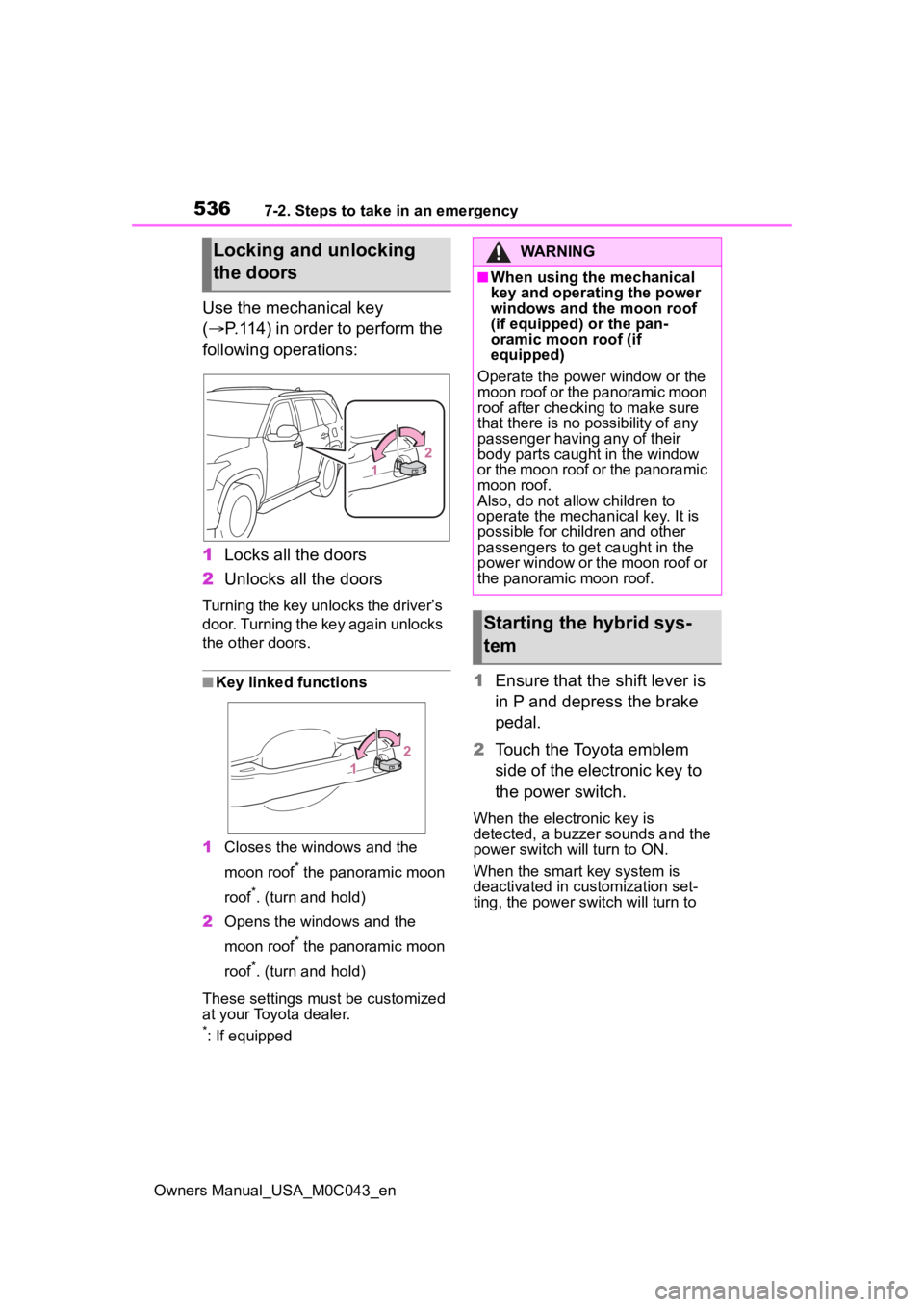
Use the mechanical key
(P.114) in order to perform the
following operations:
1 Locks all the doors
2 Unlocks all the doors
Turning the key unlocks the driver’s
door. Turning the key again unlocks
the other doors.
■Key linked functions
1 Closes the windows and the
moon roof
* the panoramic moon
roof
*. (turn and hold)
2 Opens the windows and the
moon roof
* the panoramic moon
roof
*. (turn and hold)
These settings must be customized
at your Toyota dealer.
*: If equipped
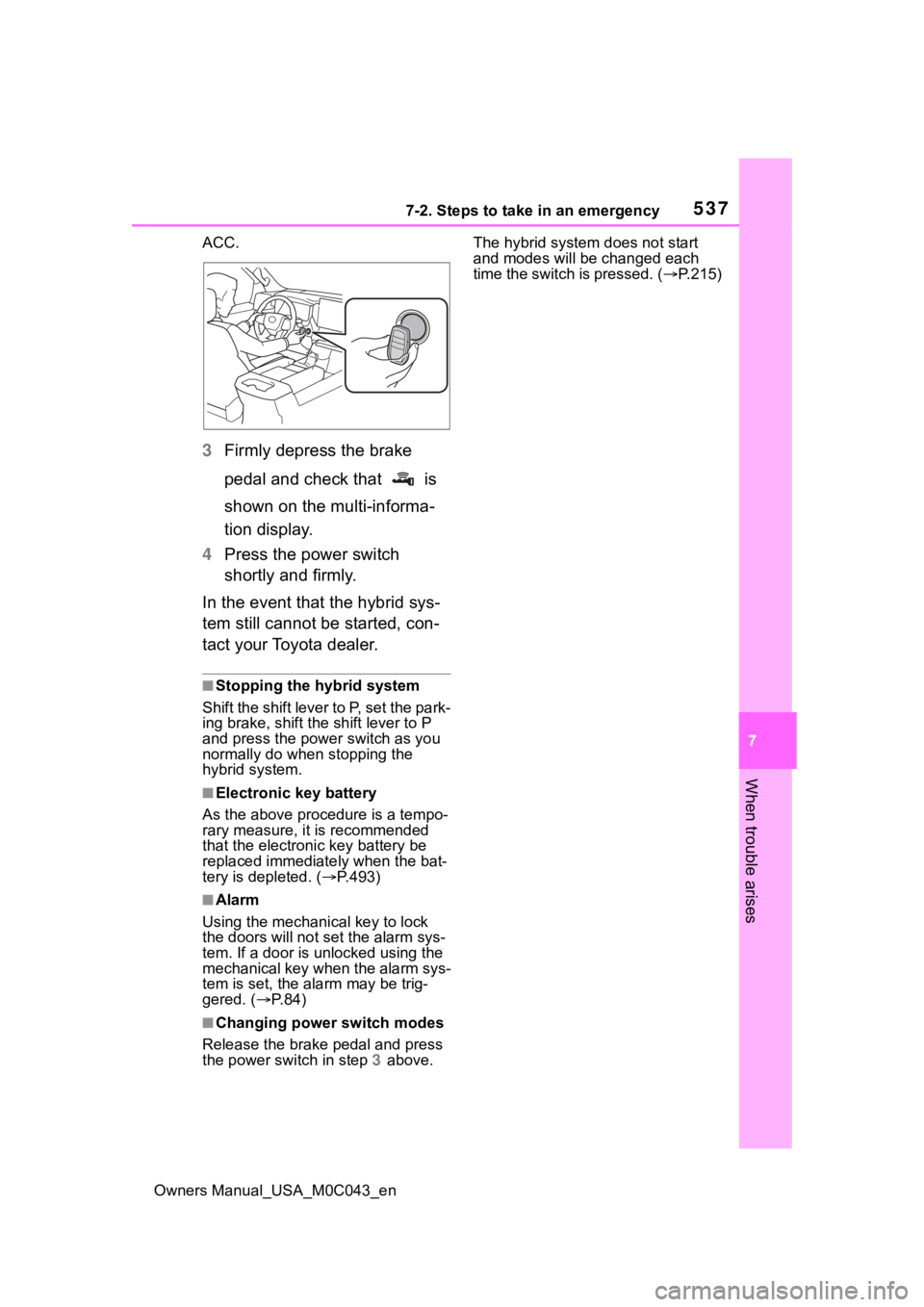
1 Ensure that the shift lever is
in P and depress the brake
pedal.
2 Touch the Toyota emblem
side of the electronic key to
the power switch.
When the electronic key is
detected, a buzzer sounds and the
power switch will turn to ON.
When the smart key system is
deactivated in customization set-
ting, the power switch will turn to
Locking and unlocking
the doorsWARNING
■When using the mechanical
key and operating the power
windows and the moon roof
(if equipped) or the pan-
oramic moon roof (if
equipped)
Operate the power window or the
moon roof or the panoramic moon
roof after checking to make sure
that there is no p ossibility of any
passenger having any of their
body parts caught in the window
or the moon roof or the panoramic
moon roof.
Also, do not allo w children to
operate the mechanical key. It is
possible for children and other
passengers to get caught in the
power window or the moon roof or
the panoramic moon roof.
Starting the hybrid sys-
tem
Page 537 of 628
5377-2. Steps to take in an emergency
Owners Manual_USA_M0C043_en
7
When trouble arises
ACC.
3 Firmly depress the brake
pedal and check that is
shown on the multi-informa-
tion display.
4 Press the power switch
shortly and firmly.
In the event that the hybrid sys-
tem still cannot be started, con-
tact your Toyota dealer.
■Stopping the hybrid system
Shift the shift lever to P, set the park-
ing brake, shift the shift lever to P
and press the power switch as you
normally do when stopping the
hybrid system.
■Electronic key battery
As the above proc edure is a tempo-
rary measure, it is recommended
that the electronic key battery be
replaced immediate ly when the bat-
tery is depleted. ( P.493)
■Alarm
Using the mechanical key to lock
the doors will not set the alarm sys-
tem. If a door is unlocked using the
mechanical key when the alarm sys-
tem is set, the alarm may be trig-
gered. ( P. 8 4 )
■Changing power switch modes
Release the brake pedal and press
the power switch in step 3 above. The hybrid system does not start
and modes will be
changed each
time the switch is pressed. ( P.215)
Page 538 of 628
5387-2. Steps to take in an emergency
Owners Manual_USA_M0C043_en
If you have a set of jumper (or
booster) cables and a second
vehicle with a 12-volt battery,
you can jump start your vehicle
by following the steps below.
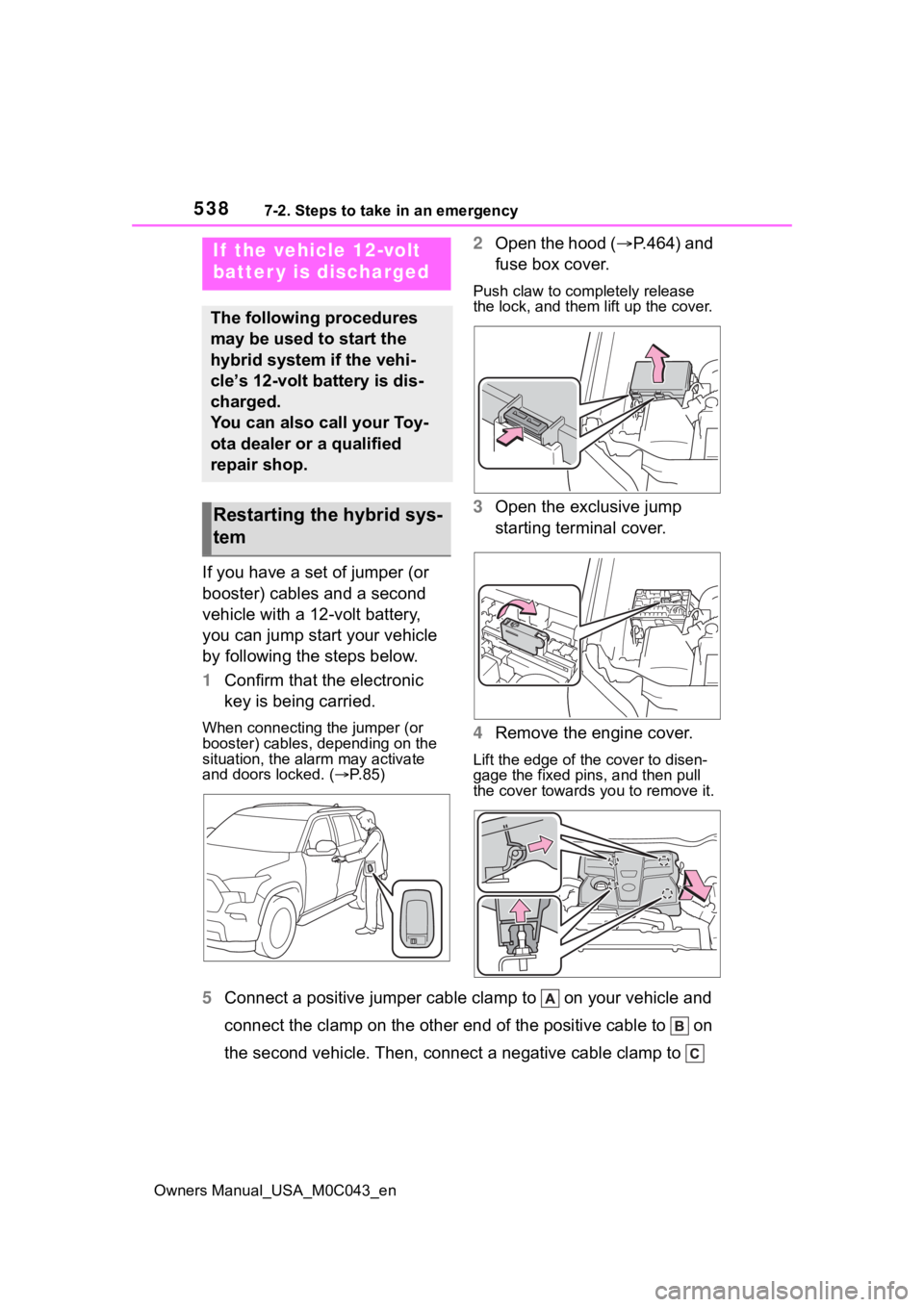
1Confirm that the electronic
key is being carried.
When connecting the jumper (or
booster) cables, depending on the
situation, the ala rm may activate
and doors locked. ( P. 8 5 )
2 Open the hood ( P.464) and
fuse box cover.
Push claw to completely release
the lock, and them lift up the cover.
3 Open the exclusive jump
starting terminal cover.
4 Remove the engine cover.
Lift the edge of the cover to disen-
gage the fixed pins, and then pull
the cover towards you to remove it.
5 Connect a positive jumper cabl e clamp to on your vehicle and
connect the clamp on the other end of the positive cable to on
the second vehicle. Then, connect a negative cable clamp to
If the vehicle 12-volt
batter y is discharged
The following procedures
may be used to start the
hybrid system if the vehi-
cle’s 12-volt battery is dis-
charged.
You can also call your Toy-
ota dealer or a qualified
repair shop.
Restarting the hybrid sys-
tem
Page 540 of 628

5407-2. Steps to take in an emergency
Owners Manual_USA_M0C043_en
■Starting the hybrid system
when the battery is discharged
The hybrid system cannot be started
by push-starting.
■To prevent 12-volt battery dis-
charge
●Turn off the headlights and the
audio system while the hybrid sys-
tem is off.
●Turn off any unnecessary electri-
cal components when the vehicle
is running at a low speed for an
extended period, such as in heavy
traffic.
■When the 12-volt battery is
removed or discharged
●Information stor ed in the ECU is
cleared. When the 12-volt battery
is depleted, have the vehicle
inspected at you r Toyota dealer.
●Some systems may require initial-
ization. ( P.581)
■When removing the 12-volt bat-
tery terminals
When the 12-volt battery terminals
are removed, the information stored
in the ECU is cleared. Before
removing the 12-volt battery termi-
nals, contact your Toyota dealer.
■Charging the 1 2-volt battery
The electricity stor ed in the 12-volt
battery will discharge gradually even
when the vehicle is not in use, due
to natural discharge and the drain-
ing effects of certain electrical appli-
ances. If the vehicle is left for a long
time, the 12-volt battery may dis-
charge, and the hybrid system may
be unable to start. (The 12-volt bat-
tery recharges aut omatically while
the hybrid system is operating.)
■When recharging or replacing
the 12-volt battery
●In some cases, i t may not be pos-
sible to unlock the doors using the
smart key system when the 12-
volt battery is discharged. Use the wireless remote c
ontrol or the
mechanical key to lock or unlock
the doors.
●The hybrid syste m may not start
on the first attemp t after reinstall-
ing the 12-volt battery. In that
case, start the hybrid system in
the same manner as when the
electronic key does not operate
properly ( P.536). This is not a
malfunction, as the hybrid system
will start normally on the second
attempt.
●The power switch mode is memo-
rized by the vehicle. When the 12-
volt battery is reconnected, the
system will return to the mode it
was in before the 12-volt battery
was discharged. Before discon-
necting the 12-volt battery, turn
the power switch off.
If you are unsure what mode the
power switch was in before the
12-volt battery discharged, be
especially careful when recon-
necting the 12-volt battery.
●Some systems may require initial-
ization. ( P.581)
■When replacing t he 12-volt bat-
tery
●Use a 12-volt battery that con-
forms to European regulations.
●Use a battery that the case size is
same as the previous one (LN2),
20 hours rate ca pacity (20HR) is
equivalent (55Ah) or greater, and
performance rating (CCA) is
equivalent (345A) or greater.
• If the sizes differ, the 12-volt bat- tery cannot be properly secured.
• If the 20 hour rate capacity is low,
even if the time p eriod where the
vehicle is not used is a short time,
the 12-volt battery may discharge
and hybrid system may not be
able to start.
●Use a ventilation type calcium bat-
tery
●Use a 12-volt battery with a han-
dle. If a 12-volt battery without a
handle is used, removal is more
Page 572 of 628
5728-2. Customization
Owners Manual_USA_M0C043_en
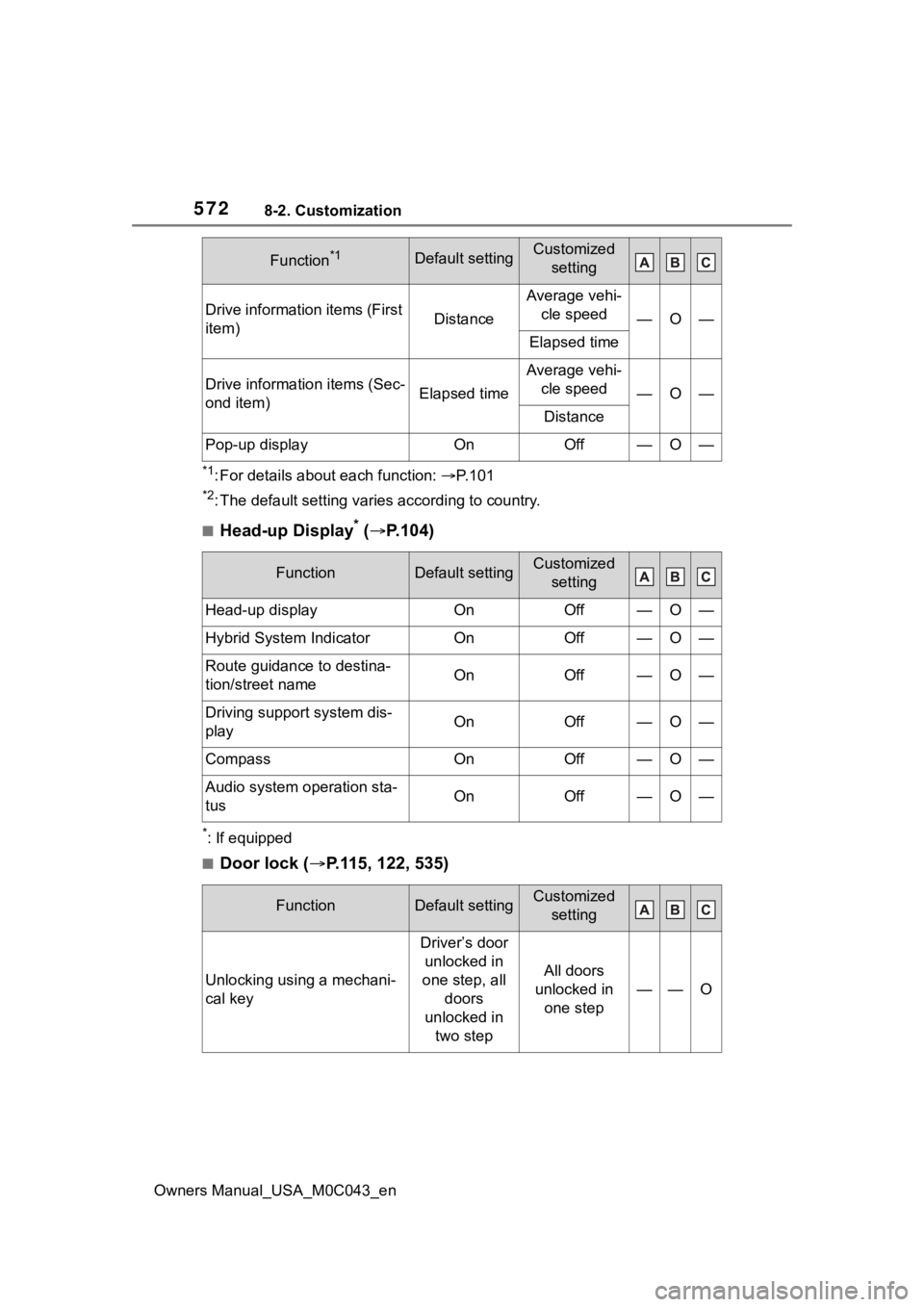
*1: For details about each function: P. 1 0 1
*2: The default setting varies according to country.
■Head-up Display* ( P.104)
*: If equipped
■Door lock ( P.115, 122, 535)
Drive information items (First
item)Distance
Average vehi-
cle speed
—O—
Elapsed time
Drive information items (Sec-
ond item)Elapsed time
Average vehi-cle speed
—O—
Distance
Pop-up displayOnOff—O—
FunctionDefault settingCustomized setting
Head-up displayOnOff—O—
Hybrid System IndicatorOnOff—O—
Route guidance to destina-
tion/street nameOnOff—O—
Driving support system dis-
playOnOff—O—
CompassOnOff—O—
Audio system operation sta-
tusOnOff—O—
FunctionDefault settingCustomized setting
Unlocking using a mechani-
cal key
Driver’s door unlocked in
one step, all doors
unlocked in two step
All doors
unlocked in one step
——O
Function*1Default settingCustomized setting
Page 573 of 628
5738-2. Customization
Owners Manual_USA_M0C043_en
8
Vehicle specifications
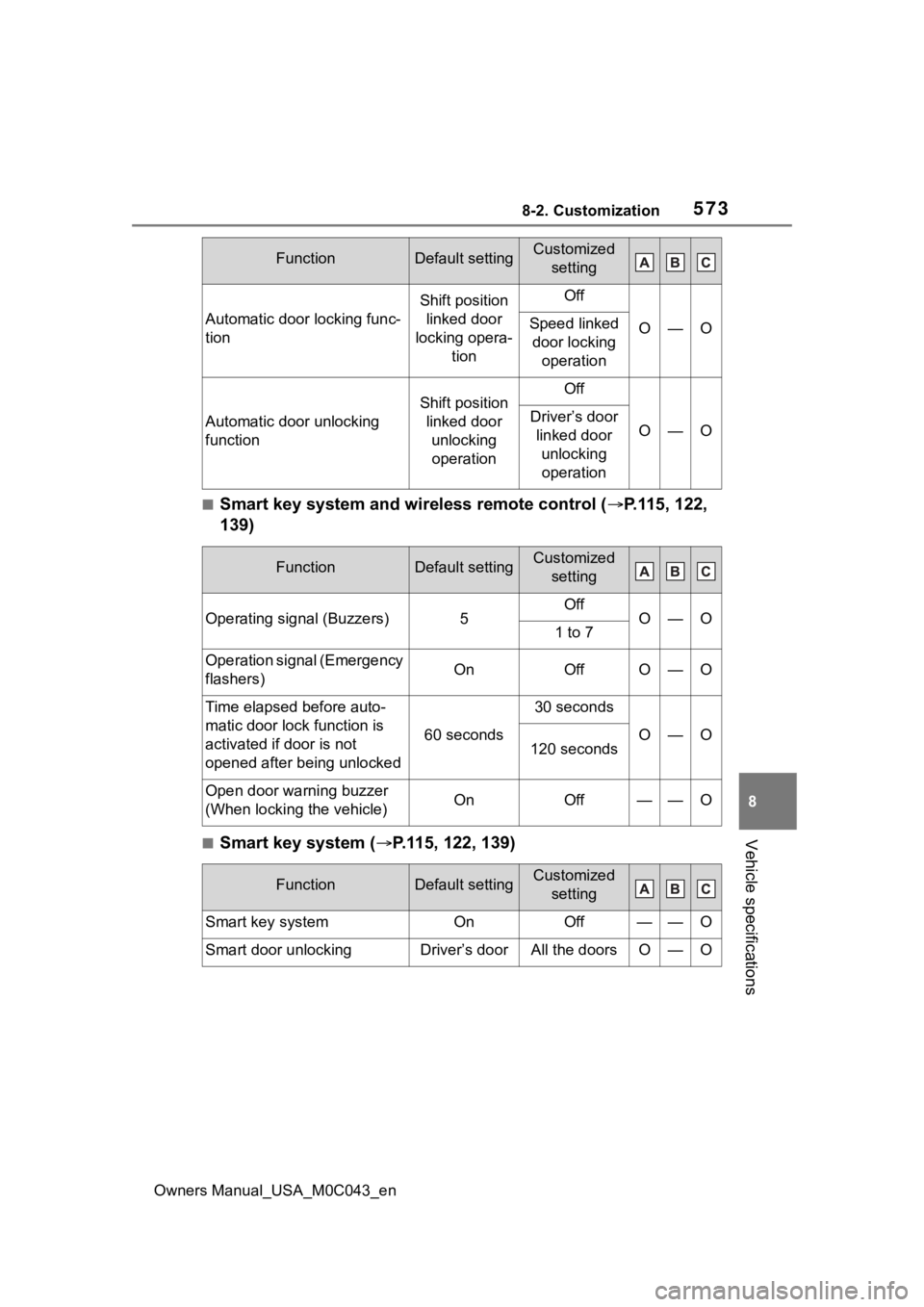
■Smart key system and wireless remote control ( P.115, 122,
139)
■Smart key system ( P.115, 122, 139)
Automatic door locking func-
tion
Shift position
linked door
locking opera- tionOff
O—OSpeed linked door locking operation
Automatic door unlocking
function
Shift position linked door unlocking operationOff
O—ODriver’s door linked door unlocking operation
FunctionDefault settingCustomized setting
Operating signal (Buzzers)5OffO—O1 to 7
Operation signal (Emergency
flashers)OnOffO—O
Time elapsed before auto-
matic door lock function is
activated if door is not
opened after being unlocked
60 seconds
30 seconds
O—O120 seconds
Open door warning buzzer
(When locking the vehicle)OnOff——O
FunctionDefault settingCustomized setting
Smart key systemOnOff——O
Smart door unlockingDriver’s doorAll the doorsO—O
FunctionDefault settingCustomized setting