battery TOYOTA SIENNA 2007 Service User Guide
[x] Cancel search | Manufacturer: TOYOTA, Model Year: 2007, Model line: SIENNA, Model: TOYOTA SIENNA 2007Pages: 3000, PDF Size: 52.26 MB
Page 232 of 3000
RS–474SUPPLEMENTAL RESTRAINT SYSTEM – SIDE AIRBAG SENSOR
RS
REMOVAL
HINT:
• Use the same procedures for the RH side and LH side.
• The procedures listed below are for the LH side.
1. PRECAUTION
CAUTION:
Be sure to read "PRECAUTION" thoroughly before
servicing (See page RS-1).
2. DISCONNECT CABLE FROM NEGATIVE BATTERY
TERMINAL
CAUTION:
Wait for 90 seconds after disconnecting the cable to
prevent the airbag working.
3. REMOVE FRONT DOOR SCUFF PLATE LH
HINT:
(See page IR-7)
4. REMOVE REAR DOOR SCUFF PLATE LH
HINT:
(See page IR-7)
5. REMOVE FRONT DOOR OPENING TRIM
WEATHERSTRIP LH
HINT:
(See page IR-7)
6. REMOVE REAR DOOR WEATHERSTRIP LH (See
page IR-7)
7. REMOVE LAP BELT OUTER ANCHOR COVER LH
8. REMOVE CENTER PILLAR GARNISH LOWER LH
(See page IR-8)
9. REMOVE FRONT SEAT OUTER BELT ASSEMBLY
(See page SB-7)
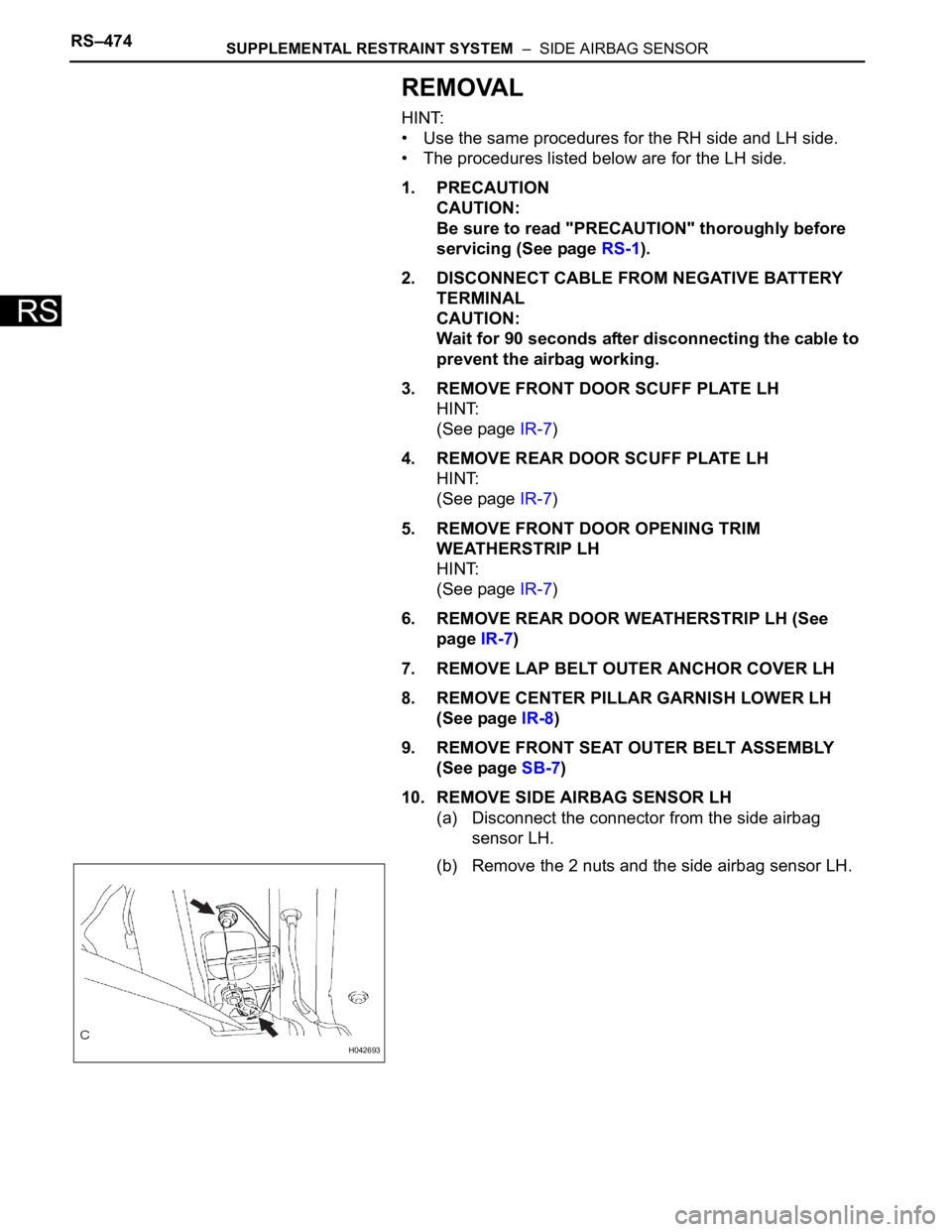
10. REMOVE SIDE AIRBAG SENSOR LH
(a) Disconnect the connector from the side airbag
sensor LH.
(b) Remove the 2 nuts and the side airbag sensor LH.
H042693
Page 233 of 3000
SUPPLEMENTAL RESTRAINT SYSTEM – SIDE AIRBAG SENSORRS–475
RS
INSTALLATION
HINT:
• Use the same procedures for the RH side and LH side.
• The procedures listed below are for the LH side.
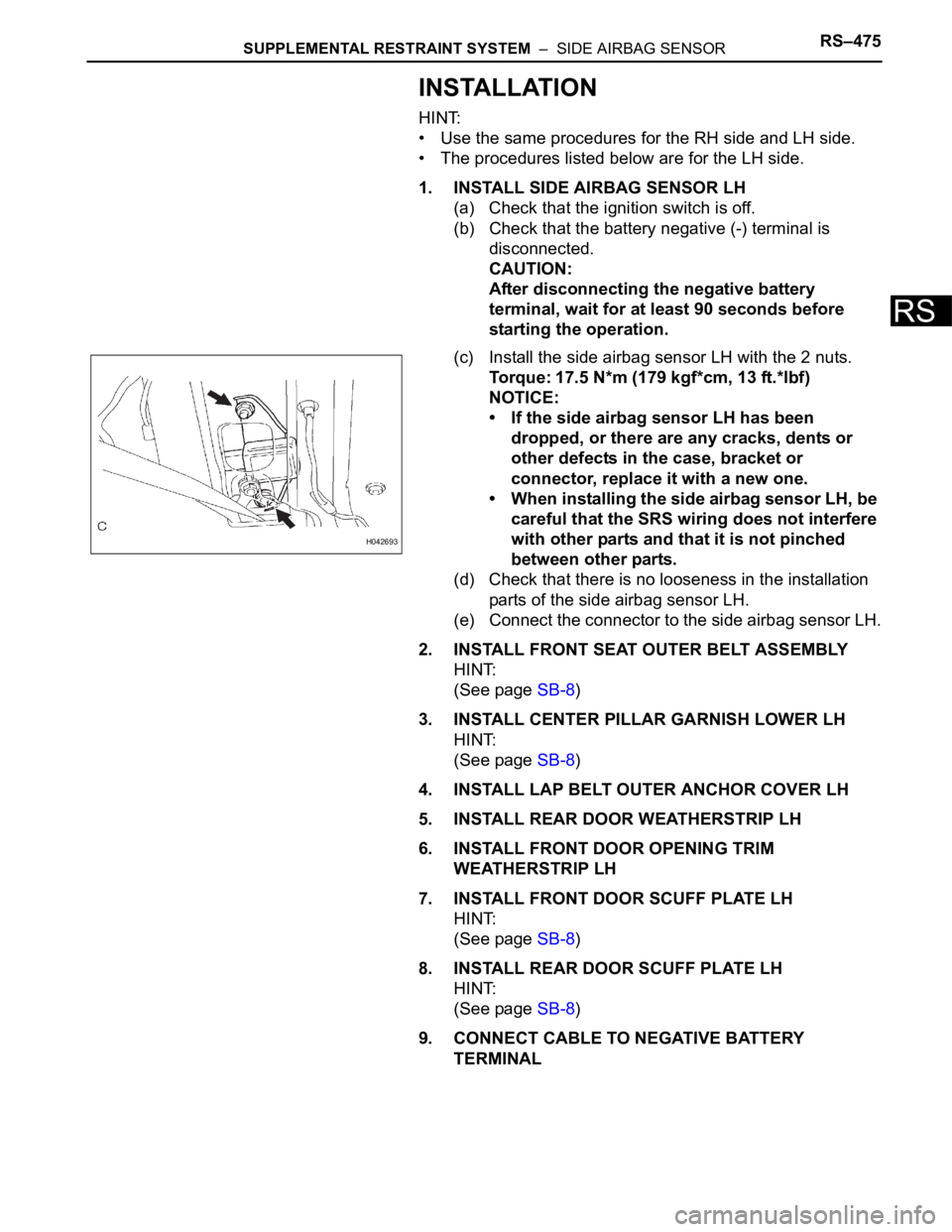
1. INSTALL SIDE AIRBAG SENSOR LH
(a) Check that the ignition switch is off.
(b) Check that the battery negative (-) terminal is
disconnected.
CAUTION:
After disconnecting the negative battery
terminal, wait for at least 90 seconds before
starting the operation.
(c) Install the side airbag sensor LH with the 2 nuts.
Torque: 17.5 N*m (179 kgf*cm, 13 ft.*lbf)
NOTICE:
• If the side airbag sensor LH has been
dropped, or there are any cracks, dents or
other defects in the case, bracket or
connector, replace it with a new one.
• When installing the side airbag sensor LH, be
careful that the SRS wiring does not interfere
with other parts and that it is not pinched
between other parts.
(d) Check that there is no looseness in the installation
parts of the side airbag sensor LH.
(e) Connect the connector to the side airbag sensor LH.
2. INSTALL FRONT SEAT OUTER BELT ASSEMBLY
HINT:
(See page SB-8)
3. INSTALL CENTER PILLAR GARNISH LOWER LH
HINT:
(See page SB-8)
4. INSTALL LAP BELT OUTER ANCHOR COVER LH
5. INSTALL REAR DOOR WEATHERSTRIP LH
6. INSTALL FRONT DOOR OPENING TRIM
WEATHERSTRIP LH
7. INSTALL FRONT DOOR SCUFF PLATE LH
HINT:
(See page SB-8)
8. INSTALL REAR DOOR SCUFF PLATE LH
HINT:
(See page SB-8)
9. CONNECT CABLE TO NEGATIVE BATTERY
TERMINAL
H042693
Page 234 of 3000

RS–476SUPPLEMENTAL RESTRAINT SYSTEM – SIDE AIRBAG SENSOR
RS
10. PERFORM INITIALIZATION
(a) Perform initialization.
HINT:
Some systems need initialization when
disconnecting the cable from the negative battery
terminal.
11. INSPECT SRS WARNING LIGHT
(a) Inspect the SRS warning light (See page RS-27).
Page 237 of 3000
TD–4THEFT DETERRENT – THEFT DETERRENT SYSTEM
TD
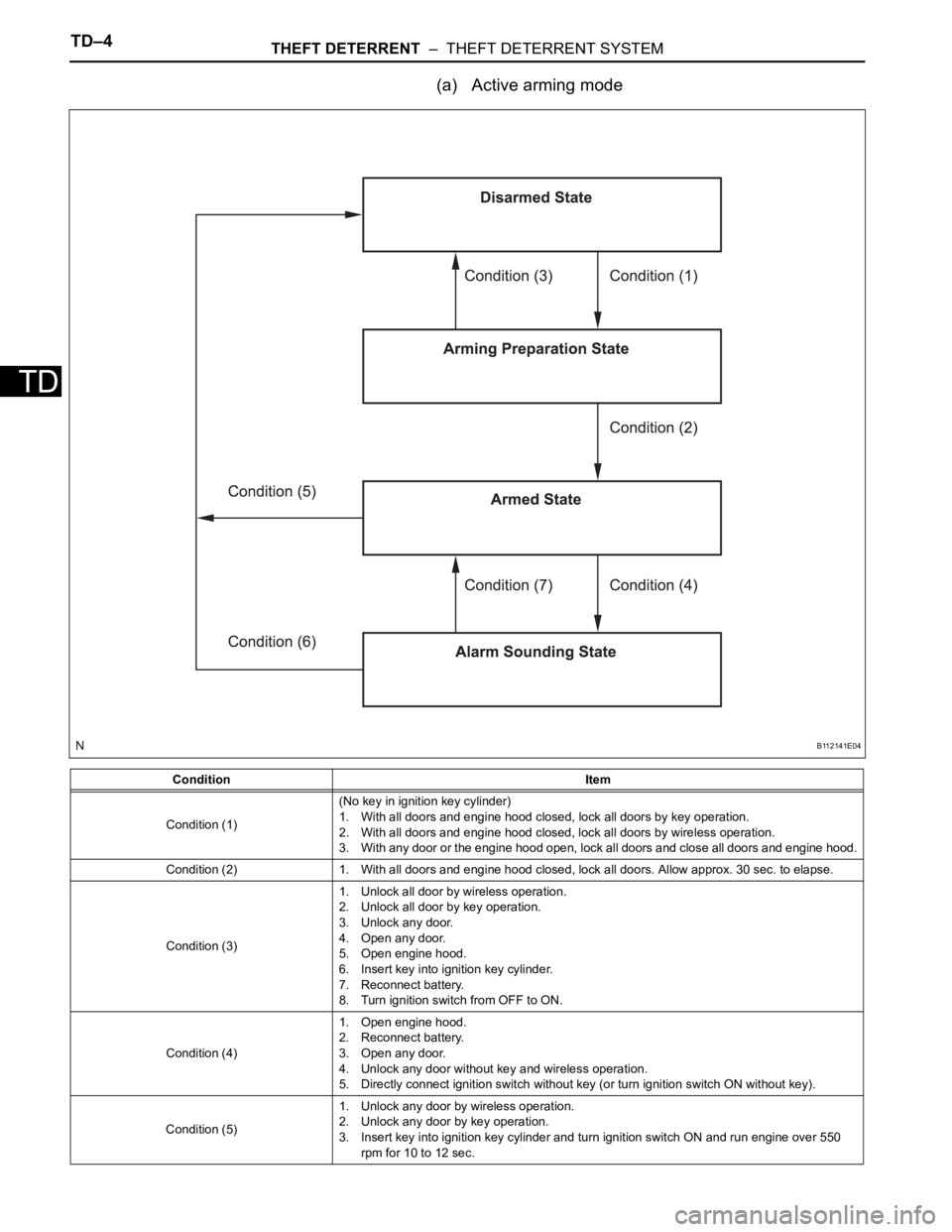
(a) Active arming mode
Condition Item
Condition (1)(No key in ignition key cylinder)
1. With all doors and engine hood closed, lock all doors by key operation.
2. With all doors and engine hood closed, lock all doors by wireless operation.
3. With any door or the engine hood open, lock all doors and close all doors and engine hood.
Condition (2) 1. With all doors and engine hood closed, lock all doors. Allow approx. 30 sec. to elapse.
Condition (3)1. Unlock all door by wireless operation.
2. Unlock all door by key operation.
3. Unlock any door.
4. Open any door.
5. Open engine hood.
6. Insert key into ignition key cylinder.
7. Reconnect battery.
8. Turn ignition switch from OFF to ON.
Condition (4)1. Open engine hood.
2. Reconnect battery.
3. Open any door.
4. Unlock any door without key and wireless operation.
5. Directly connect ignition switch without key (or turn ignition switch ON without key).
Condition (5)1. Unlock any door by wireless operation.
2. Unlock any door by key operation.
3. Insert key into ignition key cylinder and turn ignition switch ON and run engine over 550
rpm for 10 to 12 sec.
B112141E04
Page 240 of 3000

THEFT DETERRENT – THEFT DETERRENT SYSTEMTD–7
TDHINT:
*1: When any door is opened while all the doors are
closed during passive arming mode, the entry delay
time starts. If the switch condition (armed state
disarmed state (1) or (2)) is met during the entry
delay time, the theft deterrent system will return to
disarmed state (1) or (2). However, if the switch
condition for disarmed state (1) or (2) is not met, the
theft deterrent system will recognize it as a theft and
set off the alarm.
Entry delay time of 0, 14 or 30 sec. can be selected
by the customizing function.
4. FORCED DOOR LOCK CONTROL
(a) The forced door lock control prevents the vehicle
from being tampered with. Immediately after a door
is unlocked (alarm starts), the door is forced to lock
by a forced door lock signal.
(1) Conditions that force the doors to lock:
No key is in the ignition key cylinder and both of
the following conditions are met.
• The theft deterrent system is in the alarm
sounding state of active arming mode.
• Any door is unlocked.
Condition (3)1. Unlock all door by wireless operation.
2. Insert key into ignition key cylinder.
3. Reconnect battery.
4. Turn ignition switch from OFF to ON.
5. Unlock any door by key operation.
Condition (4) 1. With all doors and engine hood closed, allow approx. 30 sec. to elapse.
Condition (5) 1. Open any door or the engine hood.
Condition (6)1. Open any door and allow entry delay time
*1 to elapse.
2. Open engine hood.
3. Reconnect battery.
4. Directly connect ignition switch without key (or turn ignition switch ON without key).
Condition (7)1. Unlock all door by wireless operation.
2. Unlock all door by key operation.
3. Insert key into ignition key cylinder and turn ignition switch from OFF to ON.
Condition (8) 1. After approx. 60 sec., alarm stops and system returns to armed state. Condition Item
Page 282 of 3000

WINDSHIELD / WINDOWGLASS – POWER WINDOW CONTROL SYSTEM (w/ Jam Protec-
tion Function)WS–7
WS
INITIALIZATION
NOTICE:
• Resetting the power window motor (initializing the
pulse sensor) is necessary when the battery terminal
is disconnected; when the master switch, wire
harness, power window regulator and power window
motor are replaced or removed/installed; or when the
fuses are replaced. AUTO operation function, jam
protection function and remote operation function via
the power window master switch do not operate
without resetting.
• If the AUTO switch (driver side switch) of the master
switch has been continuously operated for a long
time, the power window motor will stop so that no
additional load can be applied to the motor.
Continuing to operate the switch even after the motor
has stopped will cause the switch to blink while
restricting the AUTO UP/DOWN function and the
remote UP/DOWN function. If this happens, reset the
motor again after several minutes have passed.
• Whenever disconnecting the battery terminal, reset all
the other systems besides the power window control
system.
1. RESET POWER WINDOW REGULATOR MOTOR
(DRIVER SIDE)
(a) Turn the ignition switch ON.
(b) Halfway open the power window by pressing the
power window switch.
(c) Fully pull up the switch until the power window is
fully closed and continue to hold the switch for
approx. 1 second after the power window is fully
closed.
(d) Check that the AUTO UP/DOWN function operates
normally.
If the AUTO UP/DOWN function operates normally,
reset operations have been completed at this time.
If not normal, follow steps below.
(1) Disconnect the negative battery terminal for 10
seconds.
(2) Connect the battery terminal.
(3) Perform the above steps (a) to (d) again.
HINT:
If operation is normal, reset operations have
been completed at this time. If not normal, follow
steps (4) to (7).
(4) Turn the ignition switch ON.
(5) Halfway open the power window by pressing the
power window switch.
(6) Fully pull up the switch until the power window is
fully closed and continue to hold the switch for
approx. 12 seconds after the power window is
fully closed.
(7) Check that the AUTO UP/DOWN function
operates normally.
Page 284 of 3000
WINDSHIELD / WINDOWGLASS – WINDOW DEFOGGER SYSTEMWS–67
WS
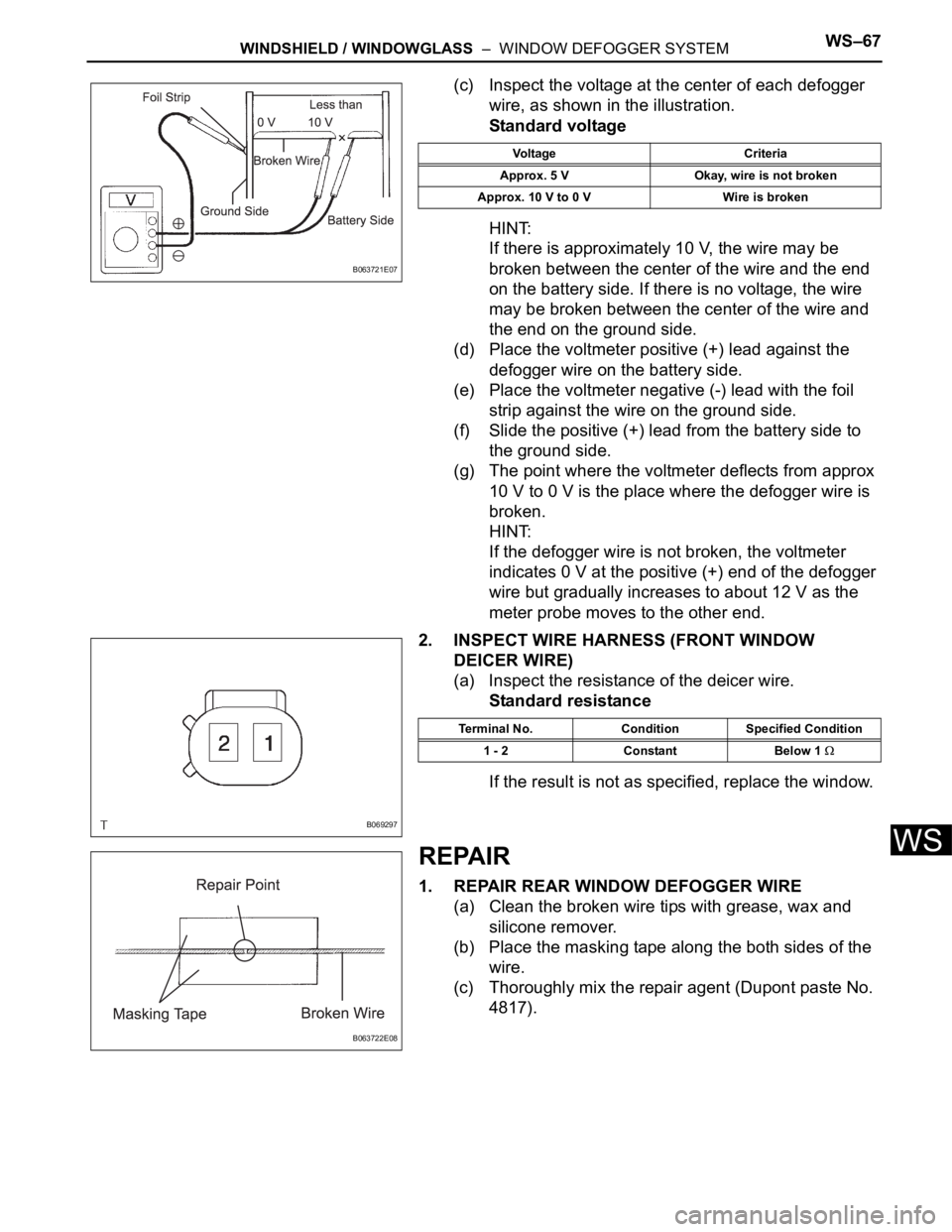
(c) Inspect the voltage at the center of each defogger
wire, as shown in the illustration.
Standard voltage
HINT:
If there is approximately 10 V, the wire may be
broken between the center of the wire and the end
on the battery side. If there is no voltage, the wire
may be broken between the center of the wire and
the end on the ground side.
(d) Place the voltmeter positive (+) lead against the
defogger wire on the battery side.
(e) Place the voltmeter negative (-) lead with the foil
strip against the wire on the ground side.
(f) Slide the positive (+) lead from the battery side to
the ground side.
(g) The point where the voltmeter deflects from approx
10 V to 0 V is the place where the defogger wire is
broken.
HINT:
If the defogger wire is not broken, the voltmeter
indicates 0 V at the positive (+) end of the defogger
wire but gradually increases to about 12 V as the
meter probe moves to the other end.
2. INSPECT WIRE HARNESS (FRONT WINDOW
DEICER WIRE)
(a) Inspect the resistance of the deicer wire.
Standard resistance
If the result is not as specified, replace the window.
REPAIR
1. REPAIR REAR WINDOW DEFOGGER WIRE
(a) Clean the broken wire tips with grease, wax and
silicone remover.
(b) Place the masking tape along the both sides of the
wire.
(c) Thoroughly mix the repair agent (Dupont paste No.
4817).
B063721E07
Voltage Criteria
Approx. 5 V Okay, wire is not broken
Approx. 10 V to 0 V Wire is broken
B069297
Terminal No. Condition Specified Condition
1 - 2 Constant Below 1
B063722E08
Page 289 of 3000
INSTRUMENT PANEL – INSTRUMENT PANEL SAFETY PADIP–5
IP
REMOVAL
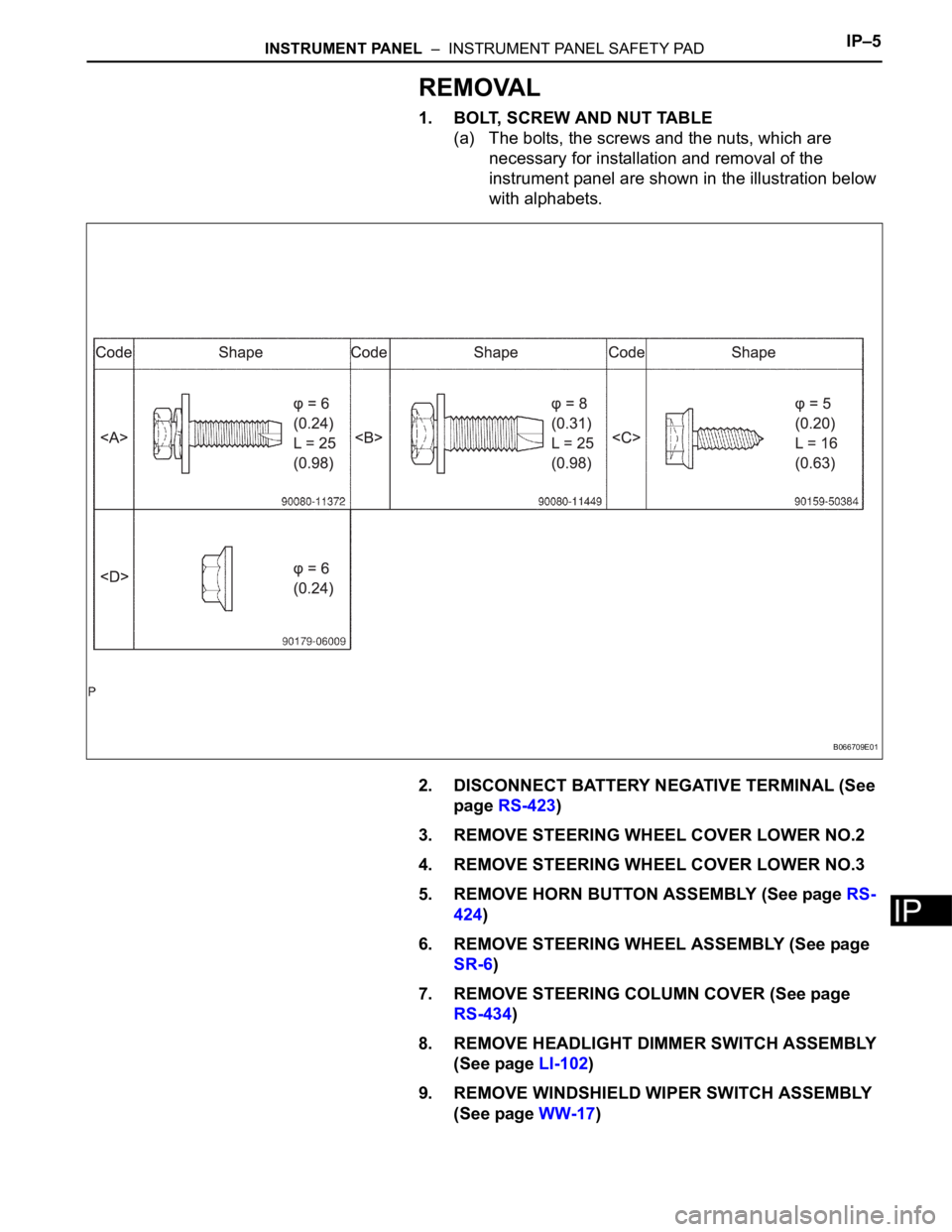
1. BOLT, SCREW AND NUT TABLE
(a) The bolts, the screws and the nuts, which are
necessary for installation and removal of the
instrument panel are shown in the illustration below
with alphabets.
2. DISCONNECT BATTERY NEGATIVE TERMINAL (See
page RS-423)
3. REMOVE STEERING WHEEL COVER LOWER NO.2
4. REMOVE STEERING WHEEL COVER LOWER NO.3
5. REMOVE HORN BUTTON ASSEMBLY (See page RS-
424)
6. REMOVE STEERING WHEEL ASSEMBLY (See page
SR-6)
7. REMOVE STEERING COLUMN COVER (See page
RS-434)
8. REMOVE HEADLIGHT DIMMER SWITCH ASSEMBLY
(See page LI-102)
9. REMOVE WINDSHIELD WIPER SWITCH ASSEMBLY
(See page WW-17)
B066709E01
Page 301 of 3000
SE–98SEAT – REAR NO. 2 SEAT ASSEMBLY (for Power Seat Type LH Side)
SE
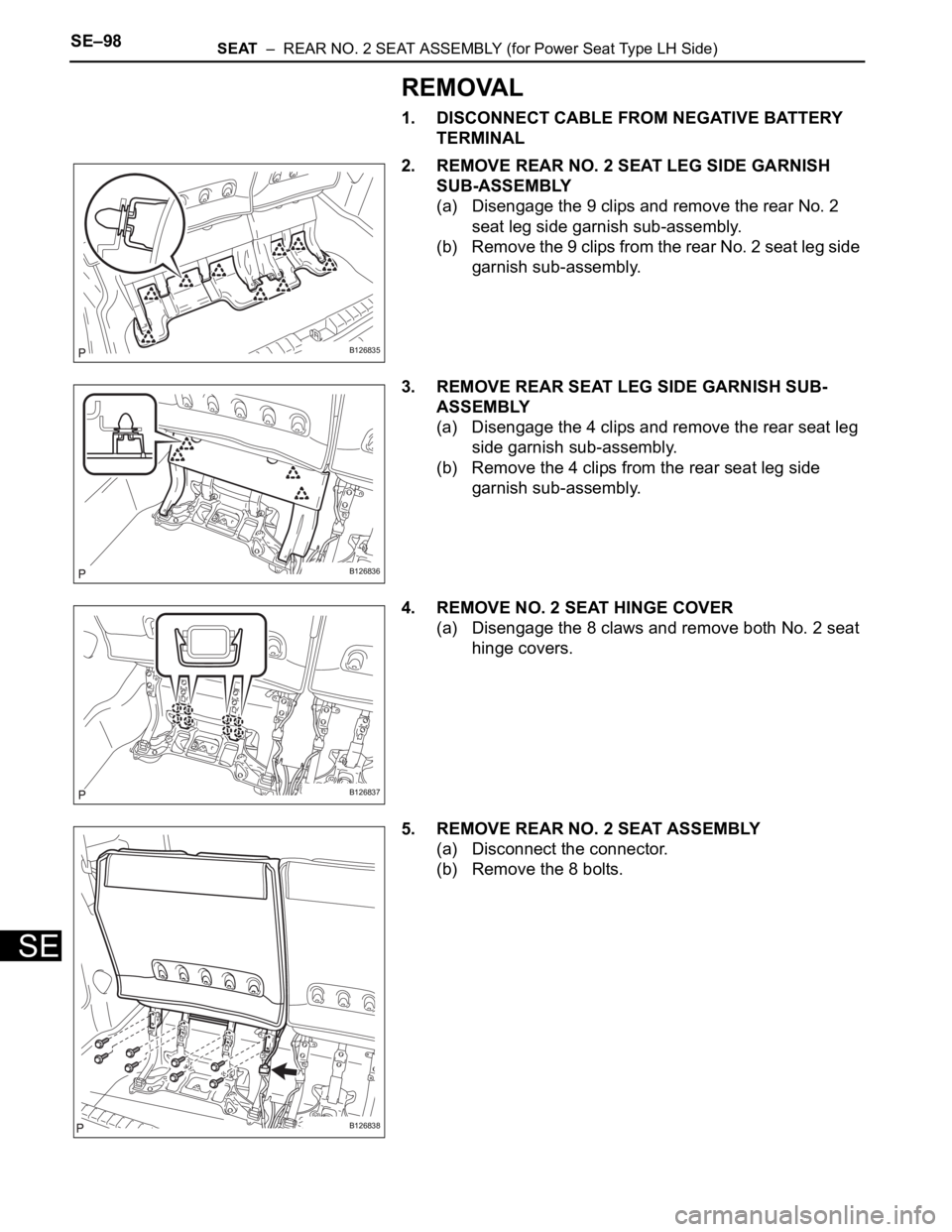
REMOVAL
1. DISCONNECT CABLE FROM NEGATIVE BATTERY
TERMINAL
2. REMOVE REAR NO. 2 SEAT LEG SIDE GARNISH
SUB-ASSEMBLY
(a) Disengage the 9 clips and remove the rear No. 2
seat leg side garnish sub-assembly.
(b) Remove the 9 clips from the rear No. 2 seat leg side
garnish sub-assembly.
3. REMOVE REAR SEAT LEG SIDE GARNISH SUB-
ASSEMBLY
(a) Disengage the 4 clips and remove the rear seat leg
side garnish sub-assembly.
(b) Remove the 4 clips from the rear seat leg side
garnish sub-assembly.
4. REMOVE NO. 2 SEAT HINGE COVER
(a) Disengage the 8 claws and remove both No. 2 seat
hinge covers.
5. REMOVE REAR NO. 2 SEAT ASSEMBLY
(a) Disconnect the connector.
(b) Remove the 8 bolts.
B126835
B126836
B126837
B126838
Page 318 of 3000

2GR-FE ENGINE CONTROL SYSTEM – SFI SYSTEMES–1
ES
SFI SYSTEM
PRECAUTION
1. INITIALIZATION
NOTICE:
• Perform RESET MEMORY (AT initialization) when
replacing the automatic transaxle assembly, engine
assembly or ECM (See page AX-16).
• Perform REGISTRATION (VIN registration) when
replacing the ECM (See page ES-15).
HINT:
Initialization cannot be completed by only removing the
battery.
2. FOR USING INTELLIGENT TESTER
CAUTION:
Observe the following items for safety reasons:
• Before using the tester, read the instruction
manual.
• Prevent the tester cable from being caught on the
pedals, shift lever and steering wheel when
driving with the tester connected to the vehicle.
• When driving the vehicle for testing purposes
using the tester, two persons are required. One is
for driving the vehicle, and the other operates the
tester.
3. FOR USING BATTERY DURING INSPECTION
(a) While using the battery during inspection, do not
bring the positive and negative tester probes too
close to each other as a short circuit may occur.
4. COOLING FAN SYSTEM
NOTICE:
• When the ignition switch is turned off and the engine
temperature is high, the cooling fans may operate for
approximately 3 minutes.
• After turning the ignition switch off, keep hands and
objects away from the fans when they are operating.
HINT:
If all of the following are met for a certain period of time during
a few minute period immediately before the engine is
stopped, the electric fans will continue to operate for 3
minutes after the engine is stopped. This is performed to
ensure restartability and stabilize idle speed.
– The intelligent tester indicates a very high coolant
temperature.
– The intelligent tester indicates a high outside air
temperature.
– The vehicle has been driven under high load (driving on an
uphill or equivalent).
The following sensors are used for this control:
– Coolant temperature sensor
– Outside air temperature sensor
–MAF sensor
– Vehicle speed sensors